Bose App Reviews
Bose App Description & Overview
What is bose app? The Bose app lets you easily control all your Bose products in one place. Bose app (formerly Bose Music app) compatible speakers, soundbars, amplifiers, headphones, earbuds, OpenAudio products, and portable PA systems are designed to work together seamlessly to enhance your listening experience.
GET THE MOST OUT OF YOUR HEADPHONES AND EARBUDS
Personalize your environment with controllable noise cancellation on our QuietComfort products. With Modes on QuietComfort products, you decide how much of the world to let in. Choose Quiet Mode for full noise cancelling, or Aware Mode to hear your surroundings and your music at the same time. Select products offer Aware Mode with ActiveSense technology, which brings the sounds around you down to a more comfortable level. The result is hearing everything you need to, but at a much more pleasant and balanced volume.
All the QuietComfort and OpenAudio features, like Immersive Audio from the Ultra line, are made readily available for you. Fully customize your experience by balancing the EQ settings, picking your on-product shortcuts, and more all within the app.
EASY SETUP AND TOTAL CONTROL
Easily set up your products and get right to listening. Play the same content throughout your home or listen to different content in different areas—it’s up to you. The Bose app lets you control all your Bose products from any room.
ONE-TOUCH ACCESS
One touch and your home is filled with the music you love most. The Bose app makes it easy to set your favorite playlists or stations as presets. Then you can access them effortlessly on your app, the buttons on your speaker, or soundbar remote.
SPEED TO MUSIC
It’s faster than ever to browse and play the music you love from Spotify®, Pandora®, Amazon Music, SiriusXM, iHeartRadio™, TuneIn and more, all within the Bose app. All your favorite music in one place.
ActiveSense, Bose, the B logo, and QuietComfort are trademarks of Bose Corporation.
Spotify is a registered trademark of Spotify AB.
TuneIn is a registered trademark of TuneIn, Inc.
Google is a trademark of Google LLC.
Amazon, Amazon Music, Alexa and all related logos are trademarks of Amazon, Inc. or its affiliates.
Wi-Fi® is a registered trademark of Wi-Fi Alliance®.
Pandora, the Pandora logo and the Pandora trade dress are trademarks or registered trademarks of Pandora Media, Inc. used with permission.
iHeartRadio is a registered trademark of iHeartMedia, Inc.
SiriusXM and all related marks and logos are trademarks of Sirius XM Radio Inc. and its subsidiaries. All rights reserved.
Privacy Policy
https://worldwide.bose.com/privacypolicy
California Privacy Notice of Collection
https://www.bose.com/californiaprivacynoticeofcollection
😍 Do you love Bose app? Please share your friends!



Please wait! Bose app comments loading...
Bose 13.0.6 Tips, Tricks, Cheats and Rules
What do you think of the Bose app? Can you share your complaints, experiences, or thoughts about the application with Bose Corporation and other users?
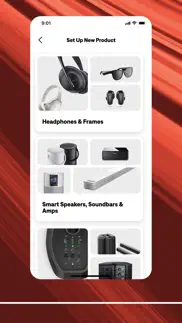
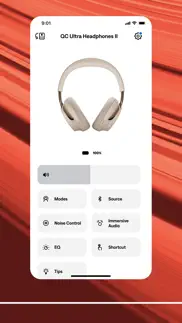

Bose 13.0.6 Apps Screenshots & Images
Bose iphone, ipad, apple watch and apple tv screenshot images, pictures.
| Language | English |
| Price | Free |
| Adult Rating | 4+ years and older |
| Current Version | 13.0.6 |
| Play Store | com.bose.bosemusic |
| Compatibility | iOS 17.0 or later |
Bose (Versiyon 13.0.6) Install & Download
The application Bose was published in the category Music on 22 September 2018, Saturday and was developed by Bose Corporation [Developer ID: 425230041]. This program file size is 867.66 MB. This app has been rated by 171,321 users and has a rating of 4.8 out of 5. Bose - Music app posted on 18 May 2026, Monday current version is 13.0.6 and works well on iOS 17.0 and higher versions. Google Play ID: com.bose.bosemusic. Languages supported by the app:
CS DA NL EN FI FR DE EL HU IT JA KO NB PL PT RO RU ZH SL ES SV TH ZH TR Download & Install Now!| App Name | Score | Comments | Price |
| Bose SoundTouch Reviews | 4.7 | 120,557 | Free |
| Bose Connect Reviews | 4.8 | 291,140 | Free |
| Bose QC Earbuds Reviews | 4.8 | 29,528 | Free |
- Added support for the new Lifestyle Collection Wi-Fi home audio products. Connect and control your new system directly in the app. - Faster, more seamless product setup. Improved onboarding makes it easier to get started.
| App Name | Released |
| Edjing Mix - DJ Music Mixer | 12 January 2012 |
| JBL Portable | 24 June 2015 |
| Offline Music Player | 29 July 2017 |
| Soundcore | 22 April 2018 |
| Airbuds Widget | 21 October 2022 |
Find on this site the customer service details of Bose. Besides contact details, the page also offers a brief overview of the digital toy company.
| App Name | Released |
| Theory Lessons | 17 January 2012 |
| Drumline | 10 June 2010 |
| Pano Tuner - Chromatic Tuner | 05 January 2010 |
| Walkout Song DJ | 16 November 2013 |
| Cleartune | 13 February 2019 |
Discover how specific cryptocurrencies work — and get a bit of each crypto to try out for yourself. Coinbase is the easiest place to buy and sell cryptocurrency. Sign up and get started today.
| App Name | Released |
| Snapchat | 13 July 2011 |
| CapCut - Video Editor | 14 April 2020 |
| Cash App | 16 October 2013 |
| 09 October 2009 | |
| 06 October 2010 |
Install the Giftmio extension for smart shopping. Get notified about cashback opportunities, activate cashback in one click, and save money on purchases.
| App Name | Released |
| Shadowrocket | 13 April 2015 |
| Earn to Die 2 | 20 November 2014 |
| AnkiMobile Flashcards | 26 May 2010 |
| Shotgun King | 24 February 2026 |
| Streaks | 31 May 2015 |
Each capsule is packed with pure, high-potency nootropic nutrients. No pointless additives. Just 100% natural brainpower. Third-party tested and validated by the Clean Label Project.
Adsterra is the most preferred ad network for those looking for an alternative to AdSense. Adsterra is the ideal choice for new sites with low daily traffic. In order to advertise on the site in Adsterra, like other ad networks, a certain traffic limit, domain age, etc. is required. There are no strict rules.
Keep personal info private, avoid scams, and protect yourself online with AI-powered technology.
Bose Comments & Reviews 2026
Extremely Disappointed. I have loved the quality Bose has brought over the last decade. I’ve purchased at least 5 Bluetooth speakers, and 3 pair of noise canceling headphones. My old QC 15s still work wonderfully, but I wanted Bluetooth capability, so I bought the Bose QC wireless Bluetooth Headphones, and it’s been a nightmare. I encountered a problem with this app when switching the “auto shutoff” power option to something other than the default “never”. My earphones would now shut off automatically whether music was still playing or not. So I tried switching the setting back to “never” shut off, and it won’t stay on that option. It immediately reverts back to whichever time setting I chose last. I contacted Bose, and they sent me out a new pair that not only did the same thing, but also had no sound when using the accompanying wire option (other than a clicking sound). So I sent them back and received a third pair, and although these at least work with the wire this time, the auto shutoff option is still buggy. I’m beginning to think it’s the app, not the headphones. But I was walked through with a representative after the first pair failed, and we removed the app, re-paired the headphones, updated the headphones… nothing fixed the issue. I’ll be contacting Bose tomorrow, but at this rate, I’ll never buy another Bose product again.
Bose Connect app constant fails. The Bose Connect app is one of two Bose apps I use. This Connect app is for newer hardware, so I compare the performance of this to the performance of the older app with older hardware. This app is so failure prone that it gets 1 star. First complaint: after how many years of Dark Mode on iOS and this app does not support it. Turn it on at night and you get a full white screen at full brightness. But the biggest failure is the constant disconnects and failures to reconnect. The failure to reconnect happens about 80% of attempts. Then, once it finally connects it will run for a little while, from :10 minutes to 2 hours and spontaneously disconnect. Then you have to go through the long failure-prone reconnect process over and over. Sometimes it will simply not reconnect so you wait a day or two and try again. And then repeat the whole process. I fell back to using the older hardware which works with the older app and that system works correctly 100% of the time, so it seems the company can make successful hardware-software system, just not with this app.
Never worked. I have been endlessly frustrated with these earbuds and with this app. Never has a piece of Bluetooth technology been so difficult and had so many connection issues. I don’t know if I just received a faulty product or what (my mom got the same product and has not had these issues). The product will disconnect randomly. I might’ve used it earlier in the day, but when I put them on again they suddenly won’t recognize my phone. Reconnecting through the app is an hour-long process where I have to reset my product, the app, my phone, or all three several times. Additionally, the earbuds will go in and out in random areas around my house. I’ve lived in old houses before and never had a problem with any other Bluetooth device. I’ve had this product for months, and it’s ridiculous that almost every month I have to reconnect the product to my phone.
Don’t like the newest update. I can’t live without my noise cancelling earbuds. I’ve got autism and adhd, and use these in class to focus. I don’t know how I survived the entirety of high school dealing with people tapping their pencils and chewing gum in my ear. These have been a godsend. However, I don’t like this update that I got without warning. Before the update, when I double tapped on the left earbud, there was just a simple beep and it would cycle to the next noise cancelling preset seamlessly. With this new update, it mutes my music and says “quiet” or “aware” then plays the music again. I really don’t see the point of this change. I mean, there’s only 3 possible settings (now 4, but that’s still small). It’s not hard to keep track of which one you’re on, I don’t need my earbuds to remind me every time I turn down the cancelling for a second because my teacher started talking more quietly. It’s doubly annoying that changing the noise cancelling level now interrupts my music. When the advertising for these earbuds centers around their quality for listening to music, it seems counterintuitive to update them to interrupt your music when they previously didn’t. I’m not normally the one to complain whenever an update changes what I’m used to, but come on. This change is a net negative. The only good thing is the one additional preset, but I don’t even really need it. All I need is min/medium/max for noise cancelling.
Nightmare to connect ,But…. The first time to archive the pairing process was a nightmare,the headphones weren’t connecting to the app,but once paired everything was working perfectly,this was in my phone,the app in my iPad wasn’t working properly and the pairing was not successful after many many attempts,that’s why I was trying in my phone,and after like 3 attempts everything was pairing and working smooth,I would like to make a complaint tho,why I can’t connect my Bose QC35II to this app and control the headphones from here,why this app is different to the Bose Connect app,I think is better if you guys merge both apps into one,my Bose 700 and Bose QC35II are my only 2 noise cancellation headphones and it is kinda ridiculous that I have to have 2 different apps to control devices that have only one generation of different,please make a software update for QC35II to support this app.
Landscape UI on iPad?. Very useful app, easy to use and the features set seems “just right” to offer control without overcomplicating the UI. Could the Bose developers please consider implementing landscape support, especially for iPad? On tablets the most common use case may be watching videos in landscape orientation, and it’s, well, disorienting to see the sideways UI when switching to the Bose Music app to change settings. If the device is docked to a keyboard, it becomes necessary to remove it from the keyboard, rotate it to portrait orientation, and then dock it again, just to change a basic setting. Either that or deal with a sideways UI. This app has a very simple and clean UI, so it should be very easy to adapt it to work in landscape orientation.
Occasional Connection issues. Most of the time, my quiet comfort II earbuds work just fine. But every now and then, the app just refuses to connect. I get the tone in each earbud and the message that the battery is 100%, but they just refuse to connect to my iPhone. The app shows a spinning wheel under “connecting“ and after a while just displays hints for “connection help.” I will put the earbuds back in the case and try again. Same result. This will happen four or five times, and finally, I will go into the Bluetooth settings on my phone and force the connection that way. The next two or three times, it will work just fine. It’s really maddening. Earbuds are not far from the phone and there’s no interference from other sources. Frustrating.
Just a tad bit disappointing. 😕. My family has been been using Bose products since the 80’s, so it was only natural of me to upgrade to the NC 700 at some point... which I did. I was super excited to get these and download the music app to really experience what these thing are all about. It worked well for 12 days until one day out of nowhere my headphones where logged out for no reason at all, and I can’t to connect them back with the app again. Whenever I try to connect it the tells me “product authentication failed”. I’ve gone to the Bose website to see if I can find any way to fix this issue. I’ve tried many of the different things that were suggested to troubleshoot the issue and they have ALL failed. I’m not sure what has happened, but I am slightly disappointed. I see that others are experiencing this too. People spend a decent amount for Bose products to say the least, and for them to experience this...whatever it is... is kind of sad. It is an issue, but it’s nothing that can’t be fixed.
Glitchy app & no way to email Bose. Today, after having enjoyed my Bose QC45 headphones for 3 years, suddenly the sound quality became noticeably garbled and horribly unpleasant. This occurred while listening to music on my iPhone, my iPad, and my digital piano. I figured the speakers were somehow blown, and so I bought a replacement headset. So I was baffled when my brand new Quiet Comfort headset was just as garbled on all the same devices!! I finally found a headset review that said Bose was aware of a problem with their Bose Music app causing distortion, but had no remedy. So I realized I didn’t absolutely need the app to run either headphones, and I deleted it and restarted each device. Lo and behold, NO MORE DISTORTION with either headset on any device!!! I then tried redownloading the app, and I no longer had the same distortion problem. This has cost Bose some money, as I now will return the new unnecessary headset, and I almost abandoned Bose altogether. So not only was the app software responsible for all this hassle, but there is no easy way to report this problem to Bose, hence this app review. Bose, you need better software and better feedback avenues.
Good app but needs a few QOL features. This is in general a good app. Pairing works well and most features are fine. My huge problems are: 1) I don’t like the default of high noise canceling for the Favorites. Noise canceling really throws off my balance and I like to keep it at a nice 3-5 out of 10. However sometimes I like the high canceling. It is really bothersome that the “Favorites” automatically puts your number one favorite as the highest noise canceling. I just cannot figure out how to have the highest noise canceling be on favorites #2 or 3. It auto-sorts and really drives me wild. I really want the ability to set the default noise canceling to a lower 3-4 while still being able to go up with the side buttons. 2) There should be the ability to remove the tap and hold functionality. I like to lay on my side and always accidentally trigger the “you have x hours of battery left message.” I see that this is a customizable button in the app (you can change it to do something with your voice assistant) however there is no third option to just disable the button. Small feature with huge QOL improvements. All in all it’s a good app and good headphones. These are just simple features which would significantly improve my (and hopefully others) experience without having any large changes whatsoever.
Software is Unstable. The sound bar is great when it works. We had issues getting the sound at to turn on, but finally figured it out. Then after 3 days the sound just stopped and we couldn’t get the sound at to turn on. We thought it was a cable problem, but no. Called Customer Support and the got the system working after turning on and off various features in the App. Tha soundboard worked for a day then stopped again. There doesn’t seem to be anything specific that triggers the stop in sound. At first we thought it was a timer in the App, but turning that off only resolved the problem for a couple of days. For now we are just turning the App off and on when the problem occurs and that seems to be working. But after spending $900 on a sound bar having to deal with this issue is beyond ridiculous. Extremely disappointed.
Once I finally got connected. It’s great! Omg I thought I would never get it to complete setup and recognize the Bose Home 300. I think it was a cord issue...the main power cord. I moved it around a bit and all of a sudden the Bose app is telling me to finalize setup! I finally saw a new screen with all kinds of options! My Alexa music is connected and I can just say “Alexa” and the Bose speaker does what I say. Now if you want to set presets while playing music from Alexa (not sure about other services) you can’t just tap “Set preset” in the app. You have to actually start your music from the app, not speaking telling Alexa to play whatever. But FIRST you have to tap the speaker image in the lower right corner, then select your Bose speaker, go to the music you want to play and you’ll see a “Set Preset” button...go from there. Maybe if it’s bluetoothed, like to play through Apple Music...then you could just press and hold to preset? Haven’t tried that yet. I’m afraid I might mess up the setup I finally completed if I switch to Bluetooth. I see in the latest update that you can now log in through your Apple ID...I haven’t seen that yet or how to change it rather and my app is up to date: 3.3.4. Hm.... I’m just so happy to have it set up and be able to play music and adjust the sound through the app while I’m outside!
Good app. Using app with Bose 450 home speaker. App setup was lengthy but fairly worth it because it consolidates multiple streaming services and assistants into one, meaning you have to link your accounts from those services to this app. I struggled to get Google Assistant to register but after many apparent dead ends in the setup, finally got it to work. The end result is my speaker works great and everything is in one app. It also uses WiFi rather than just Bluetooth meaning I don’t have every text and phone call also going from my iPhone to the speaker and the speaker is not dependent on my phone being present to work. I do wish the Bose app would allow you to fast forward in a track. It seems you can only advance fully to the next track.
Great App but you made a few mistakes. I am an electronics engineer and after fixing several issues with the Soundbar 700 offered my experience for free in further design and development to team personal but was ignored. Now you have released a new version of the app but unfortunately you can no longer add any new gaming consoles because all of the drop down menus are cut and paste from the cable subscriber/provider list. You won't find Sony, Playstation, Xbox, etc listed. I did design, research and testing for a living and for a company like Bose to not vet the app software properly for products I paid @ $2,000 +, then I have to fix my own issues with the non functional arc port is completely unacceptable. I have all the details and documentation of my flow chart troubleshooting steps and notes. Your rep is aware of this along with the email chain of communication. Being ignored when someone is clearly more qualified than any of your support technicians is not very responsible to your customer base or respectful to me. How many people are still having issues that I could have helped? I even offered to help with any product evaluation, to find the flaws because that's what I was paid to do.
App works well. I like the app. It’s simple but works and I love that once you connect the headphones (QC Ultra) it is automatically connected when you open the app. Most other headphone apps (except Sony’s and Sennheiser) have a delay like they don’t know they are connected and you have to wait until they figure it out. Layout is simple and easy to navigate. Not a fan of the robotic voice for announcements on the headphones but you can turn it off in the app. Overall works like it should, although I must say I only have the one headphone so I can’t see how it works for multiple devices. Also a fan of the fact you can toggle on/off the multi-point connection as I don’t always want it connected to my iPad. Handy feature that only Bose and Sony utilize.
Accessibility!. I have purchased the Bose 700 surround sound bar and the rest of the components that go with it! I even bought other Bose smart speakers. Oh LOL I spent about $3500. Which I regret 100%! As I am blind there are no accessibility features in the Bose apps for those who are blind or visually impaired! We do not have 100% control all over its features only thing that I can do in the my Bose app. Just press play/pause. Other than that I think those that we can’t comprehend to use all the features that the side of people do!! Both have other apps with no accessibility Milton to want to work with voiceover on the Apple Pay products! A app that is poorly designed is a bad app! Bose should take those who have disabilities in mind as well as the sided! I do not recommend this for anyone who is blind or visually impaired or is hardware as well. As you need the apps do you realize all the features! It was difficult setting it up with the app. And did not get a choice if I want to set up Google or Alexa! And please forgive me if there are any incorrect misspelled words or sentences. The iPhones AutoCorrect thinks it knows best.
Requires App Restart to Connet. The app will not recognize and connect to my NC 700 headphones unless I close the app and relaunch it each time I use the headphones. This failure to connect is with the headphones already connected via Bluetooth to my iPhone 11. It ends up being a minor inconvenience but should have been corrected by now. I have tried forgetting and reconnecting the headphones and factory reset the headphones but the issue remains. Once the app is connected it works as intended. It is very basic when used for headphones but offers no EQ: one size is supposed to fit all music genres, recordings, and personal tastes. I use it primarily to switch the connected devices, and it does that very well once the app connects. It allows me to toggle connection between two phones and a computer, shutting off connection to my personal phone at work, and my work phone once at home.
Unintuitive and painful Bluetooth experience. Bose dropped the ball on this one. They tethered this app to the listening experience of the QC Earbuds and made the native Bluetooth setup require use of this app to change sources and to adjust the noise cancellation. This nets a horrible user experience that prevents adjustments when changing sources from iphone to mac or any other device. When the source is changed to anything other than the iphone, you lose all the necessary features to utilize the product. Not to mention there’s no way outside of the app to change sources let alone utilize the product without the app dependency. The bluetooth listening experience should be untethered to external software. That is how bluetooth is meant to be used. The app dependency is a shameful attempt to enforce arbitrary and proprietary software which negates a positive user experience. For this reason I don’t recommend purchasing the QC Earbuds or any other bose product that enforces this dependency.
Apple Music And Accessibility Support?. I've always been a huge fan of Bose products, their sound is unparalleled, so I was excited to try out the Bose Home Speaker 300. I have yet to receive the product, but am already having some issues with the app itself. First of all, there is absolutely no Apple Music support within the app itself, which is unfortunate as this is a deal breaker for me. I wanted to use this in conjunction with some homepods in other rooms, and the only way to play my Apple Music currently is through Airplay, which I don't understand, as it seems like Apple Music should be an easy enough service to add to the list of available services. More worrisome than this, however is the usability of the app for Voiceover users. I'm blind, and rely ONLY on my screenreader, yet my fiancée, who has partial vision had to scroll through the list of available music services and click on them for me, due to some unlabeled buttons and Voiceover not reading things correctly. I'd like to see these issues properly addressed before fully endorsing this app and product.
Getting Worse. Everything started out fine about a year ago, my Bose 700 headphones were working fine with no issues. But then came the November 2020 update. It promised better battery, my battery is lucky to charge at all and/or go above 1 hour. It promised a resolve for the red/white internal fault light, every morning when I wake up, I go to my headphones and that’s what I see. I’ve attempted a reset multiple times but of course that did nothing. I check the firmware, it’s up to date. I check the app, it’s up to date. I check my phone, it’s up to date. So what’s the problem. I understand if anything else breaks in the headphones but come on, charging is something so simple that you had to over complicate. So I contact Bose support and tell them what’s happening and told them that I attempted a reset multiple times, but for some reason that’s the first thing they told me to do. Bose, I bought these headphones when they were $400. For that much money, I would at least expect good service. Do better because without customers, companies don’t exist and/or die.
Best headphones I’ve ever owned. I have been putting off replacing my AirPods way too long and after using these Bose headphones now for a few days, I deeply regret not replacing them sooner. I know comparing these to wireless earbuds is kinda like comparing apples and oranges but the point is that there is no way to get this kind of audio depth and clarity with noise reduction offered by this amazing product. So comfortable. So easy to operate. If you have some sort of stigma about wearing OTE headphones in public, let it go. The fidelity and comfort of these headphones is unrivaled and you won’t give one rip about what others might think (who cares anyway) about how you look in public. You’ll be too busy enjoying the best audio experience to notice. I researched a lot of options. I initially bought some Sony wireless earbuds but returned them as they were uncomfortable and way too complicated to setup. So immensely glad I switched. Seriously this is one of the best purchases I’ve made in a long time. Don’t second guess it. Do it.
Bose QC Headphones. These headphones are exactly what I was looking for in sound quality, comfort & noise canceling capabilities! They stay in my ear comfortably when I’m in the field grinding my tail off. Almost nothing can interrupt my music with the noise canceling on 👌🏼. The new update allows you to boost the bass or the treble and that just brought the experience to the next level. Charging on the go is easy and fast. The touch Options are excellent for when you're hands free 🙌🏼 Occasionally I do have a little trouble with the left headphone not connecting but I imagine that can be expected from time to time with any wireless headphones. I did purchase the three-year drop/spill warranty so I’m sure they will take care of me if this becomes an issue in time! These headphones live up to my expectations! Will recommend.
If it can do something don’t restrict the user. I just bought some new very expensive QC Ultras. I previously had 700s. The 700s were good but I used them every day and they bit the dust. The app allowed me to change noice cancellation or even turn it off at will. I liked that. I assumed the QC ultras would be similar. They were not similar. First of all, modes? Cute. Good idea. Why can’t I name them whatever I want? I don’t need a mode for my commute. I need one for when fly and one for when I’m coding and one for when I need to be ready to respond to someone. Why can’t I turn off noise cancellation? I don’t want it on all the time or passthrough if not. I bike a lot. Wind reduction is okay, but I bike very fast down hills. Why can’t I turn it off completely? It’s annoying. It can do it. Why can’t I, the user, configure my headphones to do the things I know they can do? The sound quality? 10. The connectivity? Consistent. The wear? Comfortable. The app? The user experience? Disappointing. Please fix.
Huge fatal bug. Got a new phone. Installed this app. Accidentally missed (during the blizzard of pop-ups) the “grant local network access” prompt. App now thinks it can’t see my existing speaker network because it isn’t on wifi. Manually toggled the setting, no change. Deleted the app & reinstalled & made sure I clicked it this time, no change. Deleted it, rebooted my phone, reinstalled, no change. I know the problem is my phone because when we installed the app on my wife’s new phone it works just fine. Everything is fine except my phone will now forever think this app isn’t allowed network access for some reason. Contacted online support, they want me to either (a) remove the products from my old phone (which is impossible because I traded it in) or (b) send them back all the speakers for a software update (which would accomplish nothing) or (c) re-add all the products to the app, but I can’t because the first thing it says is “grant wifi access” or (d) have Apple repair my phone ?!?!?! Hundreds of dollars worth of equipment & dozens of hours of set-up & configuration time are now down the toilet because someone missed a unit test when building the app.
Connectivity problems. Update to my review. Latest app update and firmware update have made connectivity a lot better and the sound issue has been met by adding an equalizer to the app. Those are an improvement, I hope to see in the future a app that can connect to all the soundbars and the Bluetooth speakers and also that setting the noice cancelation to zero will disable the mic so that the wind does not disturb the audio when I’m outside . For some reason the headphones always forget my settings to have NC off I am updating my stars from 1 star to 3 It takes this app forever to find my qc 700 headphones. I have to force close it and try again and again. Bose you have lost my respect and this was my last Bose product in this life time. You used to be cutting edge and Therefore all my devices are Bose but now you are sloppy, releasing crappy software and second class devices. You don’t respond to your customers concerns and wishes. Why do I have to use 1 app for my headphones 1 for my soundbar and another one for my portable speaker.
Worse app ever. Seriously, this app is completely useless! It is absolutely not user friendly at all. Unfortunately, you spend good money on the soundbar and speakers only to get a worthless app that you have no choice but to use. If there was another way to use the soundbar and speakers, I assure you that I would! Their customer service is even worse than this app! I’ve been a Bose consumer for more than 25 years, but after my experience with this pathetic app and their dismal customer service, I’ll spen my money elsewhere and I highly suggest you do as well. If you haven’t opened your new speaker system and you’re reading this review, save yourself a LOT of problems and headaches and just return it back to the store. Bose will NOT help you with any issues you have and you’ll NEVER find anything referenced online in this app to fix ANY issues. Run away from this app and Bose in general. That’s saying a lot coming from a die hard Bose consumer of more than 25 years. I’m returning my soundbar and speakers as soon as I can!
App could have been a bit more efficient.. In the audio settings - bass and treble, the volume control should have been included here as well. Sometimes when trying to get a good balance; bass, treble and volume have to be adjusted accordingly. So we have to go into Audio settings for bass and treble, exit the audio for the volume, and then back in to the audio if necessary. Tedious back and forth at times. Should there not be a mute button in the app? When a turntable is used as an analog source for the amplifier, the stylus needs to be brushed between record changes. A muting feature will prevent the harsh brush-to-stylus noise from outputting through the speakers. When selecting an Audio Source, a contrasting colour could have been used to highlight the selection. It is quite difficult to differentiate the paler shade of grey from the already pale shade of grey for the audio source selected.
I don’t even know where to begin. The frustrations involved with using the 700 headset and this app it is saddled with are so numerous and multifarious that I don’t even know where to begin. The audio problems I realized were caused by having my headset connected to a mobile device and my MacBook at the same time. The insistence on connecting to multiple devices at once every time I turn on the headphones, leading me to alleviate the previously stated problem by manually turning off the bluetooth on my iPad before switching to my Mac. The fact that Bose can’t even be bothered to make a landscape view for this app, which on an iPad with a keyboard case is the orientation I’m using 99% of the time. Seriously, add a landscape view man... I can’t even connect these headphones to my Windows PC... The experience of using these headphones has been so marred by the need of this app that I will probably never purchase another Bose product in my life. Turn it around or you’ve lost a customer.
Great product, Next to worthless app. Love my Bose sport earbuds, great sound quality, love it. The only issue is that they refuse to automatically connect to my phone when I put them on. My AirPods could do it, my bose earbuds can do it 5% of the time. Either I go through the hassle of putting them in my ear, then open the app, earbuds back in the case, then restart the app with my case open. Maybe that works, sometimes. So often it’ll search endlessly asking me to make sure my product is on, near, and Bluetooth lights flashing. Ironically the only way I’ve found to get them to connect is just via the traditional Bluetooth menu in my settings app. Still I have to reconnect my everytime i want to use my earbuds. Awfully inconvenient for such an expensive product. To top it all off, if one looks for help on the app, it sends the user to the product purchase page just to remind me how much money I’ve spent on a product that sometimes works. I love my Bose earbuds, I want to love using them, but this connection process suuuucks
Works but frustrating. I have the Bose NC 700 headphones. This app is ok but there are some bugs that are consistently annoying that make this app frustrating to use. - Recently app has been noticing that my headphones are connected even less frequently. - Settings are not persistent. I want to set wake word for Alexa to default to false, and have the shortcut (long press on tap pad) report battery life to me. On a reboot these settings are lost, wakeword turns on, the shortcut defaults to toggle it. Other suggested improvements (this may be specific to NC700s not the app): - Allow a shortcut to force swap the “streaming device” so I don’t have to interact with the app or try to do weird things with my media players to get my headphones to switch from playing on my phone to my laptop - Allow a shortcut to disconnect the secondary device. This would help so if my headphones are hooked up to my tv and I want them to connect to my laptop I can hit connect on laptop rather than touching app. Complaints before most recent update, mostly fixed after update: - App frequently can’t find headphones when they’re connected over BT. Solution is to close app from multitask pane and re-open. This takes about 10 seconds and I have to do it frequently. - BT connections take a long time to load adding to this wait time. When I want to switch connected BT devices or simply switch which one is streaming I don’t want to have to wait 30 seconds every time.
Problems with expensive units. First off I want to say I love Bose. But for a 200$ earbuds it is failing. How does an electronic not have a factory reset so I can update or retry if something failed like on my noose cancellation earbuds. My buds were working perfectly and then I updated and sync with new updates now my ear detection doesn’t seem to be working. They said would do a replacement but I’m not living outside usa and my friend just brought me this unit. For $200 all the units should automatically be updated and re checked to make sure everything works. Very sad so I give 1 star because ever electronic should have a FACTORY RESET. NOT just a simple reset. Hopefully Brazil will help me replace it but I really doubt it. And the USA headquarters said I have to do it in my own instead of them really helping me. Very sour customer service. My association status is incomplete and service has no idea how to fix it. I uploaded a Different app as suggested and it keeps bribing me right back to the first application I setup. Poor poor service especially for an expensive product.
Loop. I love Bose products, but this app is something else. My home speaker will connect to Wi-Fi, but every single time after that step, I receive the infamous ‘Something happened. Please try again later. Product activation failed’ error. I have done everything humanly possible to fix this to no avail. Yes, I have endured that it and my phone are the only two devices connected to Wi-Fi, but “activation” still fails. What gives?! I wanted a smart speaker, but a Bluetooth one! Why does it even need to “activate?” More importantly, why do we even need to create an account and download an app just to use a speaker (or sound bars)?! When the so called activation fails, it renders our expensive purchase useless! Once successfully connected to Wi-Fi, the products should automatically “activate” OUTSIDE of the app. Whomever thought that was a good idea, please give me some of whatever you’re smoking!
quietcomfort 45 not working. i bought a pair of quietcomfort 45s in 2022 and they are the best headphones ive ever owned. however, im not sure if its the app or what but every so often i get that little voice that says "ready to connect to another device" shortly before disconnecting from my phone completely. not sure why it says that but once it happens, they wont work for weeks, just the same saying over and over again "ready to connect to another device" almost immediately after turning them on, i can barely use them for 5 minutes if that!!! ive never connected these headphones to any other device except my phone so it's incredibly frustrating not being able to fix this. ive tried deleting the app and redownloading it. turning my phone off and on. tried everything, nothing works. just have to let the issue resolve on its own like the first time which is NOT a good look for bose. $100+ on headphones that pick and choose when they wanna work... might switch to apple headphones soon if i keep having these issues
Multiple problems with App & NC 700 Head Phones!. This is only my second day (first full day) trying to use my new NC 700 head phones I bought last night, and already I’m reconsidering this purchase. Here’s why: 1. ditto on mattgraf58’s and other reviews. App doesn’t rotate for iPad’s orientation. Like him I typically use iPad in horizontal view. Very annoying! 2. Instructions for my Bose NC700 Head Phones to pause devices on the app so you can switch between connected devices does not work. Pause button doesn’t respond. I have to completely disconnect and reconnect devices to switch. 3. Connecting to devices takes way too long and must try multiple attempts to connect to the app. When NC700s are connected to my phone the App doesn’t recognize it is. 4. When hitting conversation button on NC700s it only mutes it for a few seconds and then comes back on. Adjusting volume on app doesn’t work either. Had to just take head phones off which defeats the purpose. I’ve always been a big fan and customer of Bose, but this app and the 700HPs needs work. I would have thought Bose would have fixed these issues before releasing these. I have 30 days to return, so I will give these a good test before returning, but if it’s this difficult just to use the head phones I will probably be returning these for the Sony WH-1000XM3s. Will update review later.
Definitely shouldn’t have updated my QC earbuds. I just unboxed my QC earbuds and tried them out for a while before updating them. I definitely liked them better before the update for what some might seem like a minor reason, but I think is important. Using the old favorites options for noise canceling control I think was the better move. I’ve never been a fan really of the announcements appearing for just about everything on the earbuds, but for the most part its been my experience that they stay out of the way. Keep in mind I’m upgrading from the soundsport frees, so the announcer isn’t new to me. It’s nice for calls and battery level, but otherwise I don’t want to hear it. It announcing every single mode when I’m cycling cancelation modes actually bugs me. It was not that way with the old firmware I upgraded from which used the old favorites options instead of modes. They were simply subtle changes you just heard without announcement. I know some would appreciate the announcements so they know what mode they're using, especially in a nosier setting, but I’d prefer being able to suppress the announcements. TL;DR I know what my modes would be, I know what order they would be in. I don’t really want to hear them read off when switching, especially if I’m listening to something quiet in a quiet room, as it actually becomes somewhat disruptive…
Great earphones marred by mediocre app. Purchased top of the line QC noise canceling earbuds after I had a poor experience with Sony’s offering particularly the control app. I thought the highly respected Bose brand would include a app with less bugs. I was wrong. For example, The earphones are supposed to have a mode where the noise canceling function is disabled when only one earphone is in. However on multiple occasions with only one ear phone in the noise canceling remains on (2nd is in the charging case) When you open the app to see the noise canceling status sometimes it lists it as engaged sometime it shows it fully off, however in the later case when you tap the nc level to high setting it stays the same then decreases once you finally pull the level back to zero. It would also be nice to have a simple equalizer somewhere in the app.
The app works fine but. I got the Bose quietcomfort earbuds as a gift and I’ve been using them for a couple weeks now. They work fine and the noise cancellation works really well, but there is no way to disable the touch buttons and voice control in the app, and even though I have Siri turned off on my phone the voice command still activates. This has become very frustrating as I have been accidentally activating the touch buttons so much anytime I go to adjust an earbud or move my hair. If I’m not sitting in one spot totally still I will need to readjust them fairly often, and it’s difficult to do that without hitting the buttons. I just wish that the buttons were toggle-able. Other than that the app works great, probably wouldn’t actually rate the app a one star, since my frustration comes from a mix of the app and the product, the app alone is probably more deserving of like a 3. I’m just really frustrated and want the company to see this and I couldn’t leave the review on the website since I wasn’t the one who purchased it.
Absolutely terrible reliability. I have a multitude of Bose products from the old waves to the latest and greatest 900 sound bars, the portables etc. as stand alone devices these are great. When you try to connect multiple units to the same network (Home Wi-Fi) they fall TERRIBLY short. There’s always some sort of connection error, network error, loss of control, on and on. I literally packed up everything we owned by Bose and brought to our offices where we have fiber for internet and some sort of outrageous speed capability.I had thought that I had a network/Wi-Fi issue at the house. NOPE, exact same issue; failure to connect, failure to communicate, failure to group, failure after failure. When I finally was able to get them to all see the network, the lag is astounding, I will pause a song and five minutes after it’s done playing and onto the next song it will pause. Forget about trying to group things as well-absolute joke. As a final insult, the LP player my wife has will play on EVERY cheap Bluetooth device we have, but the Bose just won’t see it. VERY, VERY disappointed in Bose. Love the sound, hate the app and all it’s uselessness. So much so I have deleted all three of these from all of our devices and just use these as stand alone units. Seems to be the only way it will work.
Bose App Causing Disconnection. Purchased Bose Quietcomfort II Earbuds and they were working fine for months. As of two weeks ago, they were constantly disconnecting from my phone right after saying they were connected. Whenever "forgetting a product" on the app and "forgetting a device" in bluetooth settings, and then attempting to reconnect the earbuds via the app, the device would then have "LE" in front of it and whenever I tried to pair it wouldn't stay connected to my phone for more than three seconds at a time. I finally found a fix, which is doing the same steps as above with the exception of only connecting the earbuds to the phone via the phone's bluetooth settings and not the app. The app does not allow me to maintain connection with the earbuds but normal pairing via settings does, which leads me to this conclusion: the app no longer works with my earbuds making it useless and it needs a software update to address this issue.
App is okay but wish there weren’t two…. I’ll start off with both apps, this and bose connect, are awesome with the features provided between the fine tuned noise cancelling settings, fitting guides, and EQ adjustments (lack of “find my” is worrisome though). That being said, it seems somewhat absurd that the QC 35 II headphones and QC II earbuds require separate apps when the headphones were being sold until not all that long ago. Really just downright an annoying experience for two otherwise great audio products with otherwise functional apps… seems like a huge miss in product management. Even if the experiences can’t be merged, at a minimum seeing the devices I have in the other app and redirecting me there when I try to manage them would be a slight improvement. Hate doing this after great customer service and amazing products, but this is just not what a premium audio product should have software-wise. edit: lowering an additional star as the pairing has been unreliable. Thinking of returning the buds at this point but going to give it a shot now that it’s finally working.
We didn’t know! But we do now!. We didn’t know about all the cool stuff! We bought a new TV and added our Bose sound bar that we have had for several years on the TV. We had never really did more than hook it up and just listened to a great TV sound. Never trying any of the cool things that Bose has to offer with or sound bar. Big mistake, huge! We (well my husband) started exploring what all that the system was capable of doing! We now have both or phones hooks up and can listen to all kinds of music, podcasts and so much more. We want to thank you so much for all we are able to do with this amazing sound bar!
Bose Products are Great but App is glitchy. I’ve always preferred the sound of Bose products over other speakers & home entertainment company’s products however since they’ve become more and more dependent on software to control them the annoyance factor has greatly increased. Most of the time, when I don’t have to use the Bose app to do anything, I still enjoy my Bose C products. But when I have to access settings and interact with the Bose app, my frustration level jumps to a 10 very quickly. I installed an upgraded router in my home so I needed to change my wifi settings. Everything went smoothly until I discovered my Bose products were not staying connected. The Bose products keep dropping connectivity from within the Bose app. This is an example of the main frustration I frequently experience with Bose’s software interface. Additionally Bose no longer connects properly with Alexa. Again I’ll remind you that every other home item is back up & running smoothly but not Bose. 😡
Awful Control (or lack thereof). I’ve tried using this app with my Bose 700 headphones and I feel like I lose complete control every time I open the app. It’s very glitchy and can’t decide if it’s connected to my headphones or not. The worst part though is that it will change the amount of noise cancellation applied to my headphones randomly!! I’ll open the app while listening to music and it’ll interrupt my music and change what level of noise cancellation my headphones go to without warning, it’s awful. I have to turn of noise cancellation completely in order for it to not do that which pretty much defeats the purpose of the headphones in the first place. There are a few other flaws that I find annoying but nothing as bad as changing the settings of my headphones with no warning and without permission. Love the headphones and love Bose, but please develop a better app that will enhance the products rather than making them frustrating and almost impossible to fully enjoy.
What is happening with bose?. I don’t understand what is going on with this company over the past year. This app used to work beautifully with my QC Earbuds I. Now, I’ve been through three (3) pairs of the QC II’s since they keep developing a problem where the audio switches between sides after they download a firmware update from this app. This has taken loads of my time and now the third pair won’t even sync with this app. Actually, as long as I have the app on my phone the earbuds won’t work properly at all. It’s literally the opposite of how $300+ earbuds are supposed to behave and it’s extraordinarily frustrating. I’m not going to go through sending this pair back to get a 4th pair because clearly this is an issue with the entire product line and/or app. Also, when I’ve gotten on Bose customer service to return the first two defective pairs, it took significantly longer and the service was significantly less helpful that it was even a year ago. All of my experiences with bose customer service before had been great. Now it’s crap too. I guess I’ll just keep these as noise cancelling earbuds only, which is not worth the price. It’s a real bummer because I used to love bose and their products. Hope whatever is going on gets fixed but I’m not holding out hope for that
Very dissatisfied with the new QC Ultra Earbuds. I am so upset with my new purchase. I loved the old earbuds, they were amazing but after 2 and a half years the battery was drained. With the QC Ultra people cannot hear me well, it’s so frustrating, I contacted support because they were not working properly and I told them they needed to change them, they tried to fix the issue, it worked at the beginning the but quality of sound for the recipient is terrible. I wish they had just offered to change it because I immediately notified Bose of an issue. Now there is not way to fix this microphone defect and nobody helps me. By the way, the instructions to set up the rubber are useless. I expected outstanding quality and service but I didn’t get it. I have 4 other Bose products that i love but I am seriously disappointed with the earbuds that are essential for me for my business.
Loved before the update. I can’t really figure out why we no longer have the option to control the level of noice cancelling ourselves. That used to really come in handy, for example, when I got on a flight and put my headphones right in, but then they started talking on the speaker and I could quickly adjust the setting. Now it feels like I’m not getting to use the headphones how i want to because they’re limited to the settings on the app. Sometimes I like to walk and have the noise cancelling higher or lower, depending on how much of my surroundings I want to hear. When walking in downtown Chicago I feel safer with lower noise cancelling so I can be aware of my surroundings while crossing the streets, but the new update only gives the option of turning the noise cancelling on or off. I hope they fix this. These headphones aren’t cheap and it’s nice to have the ability to customize them as wanted / needed
Suggestions to developer. A few suggestions to make the app and hardware better. 1. I would like the option to turn off the power-on and power-off chimes. Plus the chimes when it disconnects or connects to Bluetooth devices. If anything, the ability to moderate that decibel level would be helpful. I think the chimes are too loud. 2. In my settings I turned off “background app refresh” for the Bose Music app. I notice when I launch the application it doesn’t connect to the headphones. I need to “swipe up” and completely close the Bose Music app, then re-launch and the headphones will be connected to the app. Sometimes I need to power cycle the headphones too. -I wish the connection between headphones and application were more immediate- 3. Serious bug with changing the noise canceling settings in the app. It won’t let me set the pre-sets appropriately. I would like my noise canceling favorite-presets to be 0,10,0 or 10,0,10. It won’t let me do this pattern. Please fix. 4. I would like to charge the headphones and still use them. Currently the headphones cannot be used while charging. 5. Idea: I have a computer with a usbC port. I would like the option to connect the headphones to the computer via usb-C (male-male cable) so to charge, send audio and even send voice data. This could make them a wonderful business headset. Teams, Skype, Zoom etc. 5. Auto pause music when you take the headphones off.
There’s a few things. All and all the apps pretty basic. You connect your headphones and boom, done. The only thing that’s a little disappointing is the product itself. The sound is amazing, and I love the variety of colors and the quality, but I’ve recently had some trouble getting them to connect to my iPhone. It’ll say it’s connected, and I can hear when it says “battery 50%” or something like that, but when I try to play my music there’s no sound. I wanted to skip to a certain point of a song, but when I did for some reason I couldn’t hear it anymore. I had to connect and reconnect these things at least 15 times, I even had to clear my device list on the headphones and forget the device on my phone. Lucky it eventually worked, but things like that can become very annoying when all you want to do is listen to a song. All and all the app is good, just mind the product and make sure you get a good model and everything.
Bose with Apple products. Do not buy any Bose products if you own an Apple product. It is horribly incompatible with any Apple product. The app is super buggy and does not connect properly, the iPhone won’t recognize the headphones unless you have installed the app (even a $40 pair of headphones is capable of that). Bose will not fix any problems and will only send a replacement pair for more than 2/3 of the price. My current pair of QC 2s warranty has expired and these problem have been happening since day one! Now it is a multiple times per day problem. Their solution was to have me buy a replacement pair for $200! They currently have a refurbished pair for $189. They are always trying to squeeze more money out of you. Do yourself a favor and buy a cheap pair of headphones or stick with Apple instead of buying these overpriced ear plugs that can’t stay connected or connect at all!
FRUSTRATING!. When they work it is BLISS!!!!! I bought the Bose QC ii in April 2023. Installed the Bose app and they worked great. Within 24 hours I was on a 2 hours flight and at the beginning of the flight the blue tooth connection stopped. After uninstalling the app and re-installing, the earbuds worked for 8 months (with minimal usage) then this last month (the 9th) started to use them regularly and everytime I use them the Bluetooth connection drops after 30 seconds of connection. I have uninstalled and reinstalled the app a dozen times (following internet trouble shooting tips) and still the earbuds lose the Bluetooth connection. My belief in these are completely gone. As a consumer, I’ve always held to the belief that if I would buy again given the opportunity, that is the most impactful statement I can make. Bose does not have this endorsement, I will NOT be buying Bose ever again. I will accept the the local convenience store earbuds rather than being a Bose consumer. Not a great, nor good, not even a mediocre experience.
Did you know that you can earn 25 USD from our site just by registering? Get $25 for free by joining Payoneer!
Good, but….. This app is very good for when you are wanting to connect your device and it’s very easy to follow. But sometimes when you lose your product (I have earbuds) I would want to find them, do you think you could add the tracking/finding option like you have on Bose music (I doesn’t work anymore on that app for me) but other than than it’s extremely good!!
Useless App!! How long does it take to get this fixed??. Downloaded the app after purchasing the Bose Home Speaker 500. Worked fine for about 2 weeks then it wouldn’t (and still can’t) connect to the Bose speaker. Just says ‘Not Available’, even though I have a stand-alone Bluetooth connection in use from my iPads and other devices. I’ve deleted the app and re-installed it, switched off the speaker, unplugged it and powered it up again but still ‘Not Available’. No presets working now either after programming them as well. Sorry Bose, but this app is completely useless! ps. The speaker btw is brilliant!! 🤬🤬😂😂
Problems. First I realised that The earbuds having lags when I’m trying to operate them using the touch button on it, and not responsive so I better not to use the touch button but to just wear it and play the music. In case of receiving a call or the need for volume change I just had to use my phone. A week ago while I was wearing the buds the music suddenly stopped. I checked and I realised I can’t find them connected to my phone. A week gone by and I believed it to be working for all the right reasons. But it still not. Maybe it doesn’t connect well to its recharger or what. Or the new earbud update gone wrong. I’m not sure.
Problem with app causing Bose 700 Soundbar to turn up by itself 🔈 🎶. Hi Bose. Hope you’re having a great day. I’m having a problem with my Bose Music app. For no particular reason, the music will automatically go from a reasonable hearing level to extremely loud. I have the Bose 700 Soundbar. This has happened on more than 3 occasions and no one else is home except myself. This has only happened since the last update. If you could please look into this issue it would be greatly appreciated. Cheers 😇👍
I love them but…. These are the most comfortable earbuds of all, hands down. And to get noise canceling in a light comfortable bud is absolutely out of this world. The bug is that I can’t get the volume patch to work. I know they tried to fix the lack of volume control with an update but so far has failed. Annoying but not a deal breaker.
They are the best, but…. Sometimes they automatically connect to a device that you are not using, just because it is in range. This can happen while you are listening to your favourite podcast and the next thing you know is has connected to your closed laptop. You have go into the app to change which device you want to connect to. Other than that they are great.
Updated the app, and now my buds don’t connect. After updating the app and updating my iPhones iOS, I quiet comfort II earbuds no longer connect properly. They don’s olay any audio. When going into the app settings to set the audio source as the phone, it connects and then immediately looses connection. The buds are detected but don’t connect with the phone’s bluetooth audio. They were working just fine before updating. All they do now is act as earplugs, with no ability to play audio or take calls etc
No dark theme?. And it needs it. The ui is basic no frills which is fine. With just empty ‘brilliant white’ canvas for each screen though feels like squinting through a torch. Probably because it’s night, and everything else I’m using is in dark mode or eye fatigue night mode. Could a dark theme option be added down the track? Thanks for listening. 🥸
Bose soundbar 900 connectivity issues, no audio + prime streaming. All of a sudden, soundbar keeps silent, no audio heard. I’ve to keep powering off the device. Today, streaming prime, it cuts off repeatedly. With Netflix, no issues at all. I’m tired of fixing this issue, i am not enjoying my purchase of this brand or/and soundbar. For the price of the soundbar and so much connectivity issues, please check cec programming. I never had an issue until the app was updated with CEC in it.
Bluetooth connection poor. It is a basic app that doesn’t do much and that’s OK if what it does it does well. But it doesn’t. Fails to connect to my Sport Earbuds approximately 90% of the time - even when my phone is actively connected and playing a podcast!! I honestly can’t understand why. Also needs a Find My Earbuds capability. Also the earbuds don’t always charge, even when in the case and closed (but that is not the apps fault). I have a pair of NC700s as well and while they are very good, the Sony WH-1000XM4s are just slightly better in every way. So when I come to replace these earbuds it will be Sony for me.
Volume reset after connection. Earlier version kept the volume at where it left while both the previous and this version reset the volume to middle level. I’d like to keep the volume I selected after reconnection. I don’t like to change it every time. It’s annoying! At least there should be an option in the setting to do so.
Soundbar 700 Universal Remote TV limitations. I have a the Panasonic OLED 4K TH-65FZ90U. However, while the universal remote does recognise this model it does not control the TV beyond power on/off and volume +/-. Must say this has been a disappointment as I was given the impression that the universal remote was a robust genuine tv remote alternative. Granted the universal remote controls other sources I don’t use any. I had to dig into support logs to discover these universal remote limitations were plentiful. OLED TV TH-65FZ950U
Stop connecting since update. Ever since last update the app has not been able to communicate with my Noise Cancelling 700 headphones. Whenever I try to “Add Product” the app tells me something is wrong while trying to initiate the connection with my product (in another langurs so this might not be exact words). Please look into this when you guys have a chance. Thank you!
Great app, minor annoyance. I’ve used Bose products for many years and this app is great. One grievance I have when changing Bluetooth connections is that the voiceover interrupts the listening experience. I appreciate this is necessary however it seems to me there is an opportunity within the app to rename devices to a more friendly and potentially less lengthy name.
Great application with customization, but horrible user design. On the iPad there is no horizontal app support, after being out for so long, it is a bit inexcusable to not have this basic function.
Bose app setup. Was a little finicky to setup at the start. I use a Bose 600 sound bar and Bose 500 sub. The settings in the app were a little confusing with more Bass when sub was unselected in the app. Ended up powering off the sub at the power power point then switched on again. Everything worked after the power reset. Awesome sound for something with such a small footprint.
A good investment. The noise cancelling factor is the best I have ever heard. And the different modes of levels are a cool feature, the app makes everything customisable with a manual 3 band equaliser, and a 3D immersive setting. I work in a noisy work site and this just helps me escape the fuss.
good but could be better. had issues setting the app up. crashed a few times. it would also be great if it was able to rotate for use in landscape mode on iPad as I usually have a keyboard connected to my iPad and therefore the iPad is always in landscape mode. I’d be really grateful if someone could fix this. thanks in advance.
Great hardware; terrible software. Coming from Beats Studio3. Noise cancelation of Bose 700 kills beats Studio 3; Integration with the Apple ecosystem though (e.g Apple TV’s to iPhone and several macs) kills beats. The app Beats Music simply DOES NOT WORK! Bear in mind though I am quite savvy in tech. Over 20 years as software engineer and Apple fan boy. It promises seamless connection and maintenance thought the Bose Music app; Although it successfully detects and finds the headphone it always finalises with an “ops something went wrong, try again” kind of thing. No matter how many permutations and combinations you do on refreshing Bluetooth list, app reset etc you do. Frustrating! Outstanding hardware; terrible software and user experience.
Useless. This app is completely useless. I’ve spent an hour trying to connect the new Bose 700s. I connected earlier, turned off the headphones and went to reconnect later. No connection. Then I spent an hour deleting the app and Bluetooth connection. Rebooted my iPhone. Reinstall etc. no connection. I have the headphones working on direct Bluetooth but no app connection for all the settings. The 700s are going back tomorrow. I should have stuck to the reviews and the store advice, buy the Sony NCs.
Why delete the noise reduction level bar???. So angry and sad. Because the noise reduction level bar is disappeared!!!!!!!! I like change different level in different situation(almost every level I will use), however you guys delete the noise reduction level bar, and the current auto reduction level is not suitable for me. I cannot control it to find the most comfortable listening situation. Which means current app makes me feel really uncomfortable!!!!!!!😡😡😡😡😡😡
Why do I need to sign on to use MY earbuds. When I am forced to sign out because YOU have made an update (where is the customer care here?) and the train goes underground (no connectivity) I can’t use MY earbuds (it’s not yours anymore since I bought them, right?). But it’s a Bluetooth connection to my device, isn’it? Isn’t it stupid? So PLEASE provide an OFFLINE button and leave me alone from your freaky control compulsion. I know an easy fix is to trash that app and use the old way of setting Bluetooth connections with my device. Btw, with the old buds no app was needed, just cycle through the device with the case button is all it needed. Why such a bad move?
Bose is an excellent brand. I have had two bose headphones now and they’ve never disappointed me. I have my car with all Bose sound system speakers, comes standard in the new Mazda 3s but it’s just the quality of their products are amazing. I will always be a hardcore fan of Bose products. :)
Playback dropouts and interruptions. In this app under Source -> Multi Point Connection. TURN THIS OFF - Read on. I had this turned on because I have an iPhone and an iPad. After searching elsewhere for a cure for the cause of the problem while using my quiet comfort SC headphones I found the cause to be the above setting. Since I turned it off on my iPad there have not been any further problems with my iPad at least.
Best ever. I was shocked with the noise cancellation that I thought for a second i lost hearing while no music was playing. It turned out that as soon as you put the earbuds on and they calibrate, they start the noise cancellation and there you go. I have been using Bose products for more than 5 years and they have never failed me. Either from a product perspective or customer service handling. #respect
Buggy and hopeless. Bose needs to get on top of their devices and apps. Just got locked out of the App due to updated terms and conditions. Logging back into my account all my devices are missing. After re-adding all devices, most functions don't work. Can't create a group. Audio settings unavailable etc. deleting and reinstalling the app didn't work. This is the final straw, my (2mth) old sound bar always crashes, my home speaker hangs requiring reboot. Bose may have good sound quality. But very, very poor stability. And, yes all running latest firmware. Using iOS device.
Bose Soundbar Ultra. This is a terrible product. When the soundbar is synced to the app, the app drops out and you have to do a soft reset (unplug cables, disconnect power, then reconnect and resync). That’s just one issue. Issue 2, with the magic remote synced to the tv, the tv turns off without notice, prompting. Issue 3; constantly having to do a hard reset every 4-6 weeks. After the hard reset, the soundbar is trouble free for a week before the issues start again. The only joy I’ve had is not downloading the app. But with that, any technical advantage of an expensive soundbar (accessing equaliser, speaker projection) is lost. It’s just a rubbish and flawed product. I wish I had read all the reviews o this previously.
Takes away your control. I “upgraded” from my trusty QuietComfort 35ii to QuietComfort Ultra and was forced to use this app instead of the old one. The new headphones don’t provide buttons to directly adjust the ANC level or turn it off. That would be almost acceptable if the app allowed it to be directly adjusted. It doesn’t. ANC is the only setting that you can’t directly adjust. You instead have to create “modes” that act as presets with different ANC levels and “immersion” settings. You can’t even give your modes their own name, e.g. “Medium” for medium ANC level. Instead, you’re forced to choose from things like “Workout”, “Commute”, etc. I suspect the ANC setting was removed from the main screen because no one would want to use modes and the product manager who cooked up that half-baked feature (which doesn’t include EQ settings) decided to force people to use it as the only means to control ANC. Also, it’s unforgivable in this day and age to not provide dark mode. Perhaps Bose has decided once again, just like modes, that they know what their customers want more than their customers do. It couldn’t be a time/cost thing because it’s such a basic app with a small number of simple screens.
Bose: fix this App urgently!1st time Bose user. App keeps disconnecting after less than 30min of use. Bought my first Bose headphones (Ultra). Device is good, HOWEVER, this app totally lets it down massively. The headphone keeps on disconnecting frequently after less than 30mins of use. The phone and the headphones are near to each other, ie within 1-2 meters apart - yet it disconnects. No Interference signals. Same case whether using the headphone and the app on the move or stationary. BOSE FAQ did little to help fix the issue. After some research - a reddit post suggest connecting the device the headphone is connected to (like then iPhone, game device or pc or music device) and then IMMEDIATELY DELETE THE BOSE APP. This worked for some odd reason, BUT it should not be the resort we fall to especially for a a headphone that costs more that $450. BOSE: fix this app issue asap. If nothing improves soon on the app - you can count me out from future BOSE equipment.
Bose 700 AU / forget it. Waited months for these headphones to be released in Australia. Picked up on launch day in AUS which was 6 weeks post US so bugs should have been resolved, else don’t sell them!!! Can not get these to connect to the Bose music app which is key to controlling core functionality. Updated IOS, uninstalled and reinstalled app, disconnected and reconnected Bluetooth in multiple scenarios tried multiple IOS devices on different versions of iOS. updated firmware on the cans via a win10 device, Spoke to support who said sorry you have to wait for an update to the app. $600 pair of cans with limited functionality. Bose, seriously... two weeks later no updates, customer Support who have zero understanding. Great opportunity for Sony.
Badly designed app controlling non-Apple compatible devices. This app is very poorly designed, very non-intuitive and unlike the older connect app almost forces you to sign up to a Bose account. That said it does allow you to fully control your Bose product and Bose’s noise cancelling is much more flexible than Apple’s on or off approach. The biggest problem however is that Bose has decided to make some of its products incompatible with Apple apps. Their Quietcomfort earbuds for example require a double tap to control play/pause as opposed to Apple’s single tap/press. This means that you cannot skip tracks forward/backwards using the standard double/triple tap/press as with older Bose products.
I was not looking forward to connecting but... IT WORKED FINE! I went into this expecting to go through the same frustrations that so many others had clearly gone through to get the 700s connected and working. The app isn’t essential to using the headphones but i wanted to give it a red hot go. As it turned out, the process was seamless for me. The app downloaded what appeared to be a big update that when i opened up now includes a basic EQ. I can’t fault the headphones themselves. have tested them in most situations and the mic quality for calls (my main usage) was the best in my experience. fingers crossed you have no issues when you set up.
Won’t connect on ios16. Used to work really well but since upgrading to iPhone 14 and iOS 16 app won’t connect to speakers. Even though phone and speakers are all on same home wifi network and phones wifi is on the app isn’t recognising that and I can no longer connect to my speakers. Very expensive paper weights now. I hear Sonos is a flawless system, anyone want to buy a couple of Bose soundbars? Haven’t been used in weeks.
raqnz. Absolutely LOVE our recently purchased Soundbar 700, but sadly the App is a little redundant; it will not connect to the device. Have checked the website and tried everything it suggested but still no luck! - BOSE, perhaps an update of the App is required because it seems there are many of us a little disgruntled with it? I was hoping it would contain a little more information about the soundbar as there is no manual to help me set up the voice controls, and all the leaflet suggests, is connect to the BOSE Music App! Looking forward to seeing an update to fix the problem. Thanks in advance.
Not much good on an aeroplane. The app keeps de-registering the earbuds every few days. To re-register you need to sign into your account. Which requires an internet connection. If you find this out at the start of a 12 hour international flight without internet, bad luck. You get to listen to Screamy McToddler for 12 hours while your noise cancelling earbuds are sitting uselessly in your pocket. Come on Bose, remove this dumb login required ‘feature’ and keep your products simple. You know, like they used to be.
Limited settings. The Bose music app, all in all, is prettty standard, reliable and easy to use. That’s be 3-4 Stars in my books, but… The settings that you can modify are very very limited, and the few settings you do have don’t have much to work with. The equaliser for example, the four presets are very uninspiring. The ‘in-ear detection’ for Quiet comfort, you can’t turn off or change the annoying start up tone. You expect inspiring stuff from Bose. Here you only have the basic.
Add shortcut. Can you add a third shortcut where the user holds both earbuds together? Also why does connecting in Bluetooth settings work, but connecting in the app not work? Lol It tells me i have to put the buds back in the case and hold bluetooth button. Yet I can just go into Bluetooth settings and connect immediately, then back in the app it is connected. Buggs!!
Mostly good but has doesn’t manage multiple input devices well. The app is very useful and generally well designed. The major exception to that, though, is it doesn’t remember which device it was most recently connected to. So, every time you turn it on it just connects to everything it can find in the area (turning on laptops, etc.), which is a terrible feature when you want to split your usage across many different audio devices.
Terrible. Hi unfortunately the Bose app which allows you to control your Bose hardware is a poor and a very frustrating experience. App is very buggy, voice assistant no longer works on Bose hardware, asked my friends if they have trouble with their Bose equipment, same issues for them. Such a pity as have been a long time fan of Bose and have 4 Bose products, but if you can’t control your speakers what’s the point? I no longer recommend Bose to friends. Thanks
Bluetooth suggestion. Just an idea: would it be possible to designate one Bluetooth device as a “always connect to this”? For example, it would be great if my QC45s always connected to my iPhone by default, and then would connect to a second device depending on what is around (eg Apple TV or Mac, etc). I’m finding that I frequently have to open the app to get the headphones to connect to my iPhone. Given that the app is also on the iPhone, this feels like a process that could be simpler.
Stopped connecting on iOS 16.4. I have the Bose QC earbuds ii. Bought them a month ago. I am updated to the latest firmware and app version. They just stopped connecting to my phone all of a sudden. No product maintenance, no support, no fixes. The last time they released an update was over a month ago. How can you expect customers to even enjoy your product after paying $400 for something when people can’t even connect the earphones to a phone. Horrible experience. Please update your app, your firmware, your support to the latest iOS. Also, test your product for every iteration of iPhone and every latest iOS update. Your product and tech team has one job and they can’t even do that properly.
Finding lost earbuds. I have Bose QuietComfort II earbuds an I’ve lost them a few times when I look up if there is any ways to locate them it says there is on the Bose connect app which sends me back to this app when I try connect them to it, this app doesn’t have the find my buds feature. If the earbuds don’t have that feature why do previous models have it but not these
Frustrating and buggy. This app is full of bugs and very frustrating to use. The main issues are that the volume control setting doesn’t stick and the app is very laggy on speaker groups. Also the app somehow lost connectivity to the Soundbar 500 and the only way to fix it was to do several hard resets of the device. Considering that Bose is a prestige brand, this is very poor that they put their name to this faulty technology. The Bose soundbar and portable speaker were very expensive products and the sound is great but it all gets let down by this useless app.
Poor App ruining a great product. Purchased Earbuds II mid-April and all has been well until this week when the App connects for less than a minute and won’t reconnect. Followed troubleshooting guide multiple times thinking it’s the Earbuds then tried connecting to the iPhone without the App and they work fine. Downside is there’s now no option to use the features such as noise cancelling when I want. Extremely disappointed at paying for a premium product which is supported by a cheap App. As such, will be seeking a refund as both product and App go hand-in-hand.
Great Product. I really love the Bose Soundbar 700 and although the music could be more customisable it works for me. One thing I would like is for the app to add landscape mode. Using a wall mounted iPad mini for home automation this is the only app I use that does not orientate in landscape mode.
App keeps signing me out!. I’ve been using the Bose app for a while now to control my L1pro PA system. The previous version of the app was fine, this new release keeps signing me out forcing a re log-in. Very frustrating when getting to a gig to have to do this every time. Also, would like to be able to view in landscape.
Works great for sportsbuds!. I recently got Bose Sportsbuds and the app is so easy to use with them! You connect once, then it automatically connects to the most recently used! Plus, they’re always updating the buds themselves through the app. Recently they added an update to change volume with the touch controls. Not quite sure how to answer calls and how to reject them or how to hang up/put on hold/hang up and pick up incoming calls. If there was one thing I would suggest it would be adding a feature using the same prompt as the volume controls on the left ear for skipping through certain points in the song. This could also be used as a speedy song skip instead of having to constantly double tap. Not necessarily both, just to have the option.
Bose 500 surround sound. The sound coming out of a very neat and compact system is simply amazing. The Bose 500 is almost invisible under the Sony 65” TV especially with the woofer hidden under a corner table and the rear speakers being wireless. Highly recommended, just spend the little extra cash.
Bose Music hangs the iPhone. Bought some QC Earbuds and need the Bose Music app to configure the preferences. I have the latest software updates but when the app is in use or open in the background the iPhone is continually freezing. Rebooting the phone helps temporarily and deleting then reloading the app makes no difference. Once Bose Music is deleted everything returns to normal but I can’t change settings on the earbuds. The app is good to use when it is working, but this is rarely. This problem is reported prolifically on the Bose community forum but all Bose says is ‘Sorry, try rebooting your phone’. Not good enough.
Ability to turn mic off. I have some Bose quiet comfort in ear which I love. My one criticism that I’m hoping the developers could resolve is the ability to turn the mic off completely for the noise cancelling. The software tries to be a little too smart with the hear through function. But if there too much wind around, no matter the hear through setting, the mic just amplifies wind noise into the headphones. Just need a simple off setting, not only hear through.
Imagine you at your best. All the time. Picture yourself at your sharpest and most productive. Your most alert and focused. Your most lucid, creative and confident. At work. At play. In every area of your life. Add Mind Lab Pro® v4.0 to your daily routine and uncap your true potential. Buy Now!
Ipad user. Make a landscape version can't be that difficult
Thanks Bose. Not.. App update went south. Timer kicks in after 20 minutes and turns TV off. I can fix that. What I can’t fix is the Soundbar 300 becomes unresponsive after that occurs the first time and I have to do a factory reset (soft reset does not work). Just another garbage app!
Impossible de connecter mon casque. J’ai tout essayé dans les derniers semaines, je suis les instructions à la lettre, mais impossible de connecter mon casque Bose QuietComfort 35 II. Je ne peux pas recommander les produits Bose à mon entourage si je ne peux même pas accéder à l’application.
Broken in multiple areas, and doesn’t like Apple Music anymore??. I have my Apple Music account connected to both this app and my assistant, when I ask Google to play music it says it’s going to play music from Apple Music but then nothing happens.. plays YouTube and Amazon music find though 😩
not connected. It wouldnt find my bose qc35
Rarely Works Anymore. Used to work, now logging in is a crapshoot at best. Bose needs to do away with needing an app to control a device. The amp is useless now.
Samsung TV. Since the update I can no longer connect to my Samsung TV. What's up with that?
New updates keeps erasing Login info. New updates keeps erasing Login info and will not show devices until I log back in. Just need the headphones to work without an app to keep messing it up. Also not available on Apple Watch making it useless on an entire platform.
Doesn’t pair. Useless app. Even help page link is broken.
Rename it as Bose Faulty App. So many issues with this app, makes you think where to start from: 1. Keeps saying installing updates does nothing 2. Says cloud sync error everytime you open the app after force closure 3. No support whatsoever is available until you wait for 1 hour on the phone technical support 4. Bose Music renamed as Bose but all soundbar and home theater docs still show Bose Music as the app and makes everyone wonder where the fish to find this on AppStore! All in all, Bose faulty app!!!
So much connection issues with earbuds 2. Like title says, so much issues with earbuds 2. Had to go to Reddit to figure out to uninstall this app and use Boson test flight app. Such a shame as the earbuds 2 are perfect… finally now that I use boson.
Horrible app. Need the app to control the sound bass treble etc always crashes get to adjust stuff once in a while. Tried the delete the app and reset sound bar and now it won’t even find the sound bar wish I bought a Sonos
Frustrated!. Clunky app, which consistently hangs and randomly stops playing. Speakers regularly go offline and need rebooting. Have to group speakers upon each use. Can’t set that as a permanent option. No logic to settings and features flow in the app. Help documentation useless for where I live: Canada, some are not available here. Just reinstalled the app because it wasn’t working, and now it hangs on the intro screen. Quick to tell me where I can get info on new products and deals though!
Renders Quietcomfort II Earbuds Unuseable. This is a terrible app. Bose should be embarrassed. I own the $300 Quietcomfort II earbuds which work great UNLESS you install Bose’s app. If you do, they will disconnect repeatedly, fail to connect at all and just not work right. I had it installed and I thought something was wrong with my earbuds. I did some research and discovered it was the app not the earbuds. They work great now. I will never again use this Bose app. Bose: do better.
Can’t control my devices anymore. Sorry I don’t want an account. I paid for devices that I can’t use anymore. Unacceptable.
Google assistant integration. Not the best at integrating with Google assistant. Also Bose smart speaker totally freezes at times.
Bose QC 45 stopped working out of nowhere. Battery seems to work as the white like blinks on and off but no voice telling me power is on or connecting. Rebooting it does not help. I expect the last update has caused a glitch. Please fix
Probably the most unreactive app. Step it up bose.. cant connect whenever theres wifi changes or it stutters between different channels.. youtube-netflix-laptop
Horrible app. Had major problems connecting to my iPhone Xr. Jumps in and out of connecting. Then I lost access to Amazon music when I switched wifis. Reinstalled app same problem. This is not intuitive at all. Reinstalled app on my iPhone 14 and now it has been updating for 2 hours (and says few minutes left for last 1.5 hours). I guess reinstall app one last time and see if it works. Not sure why so buggy.
Connection problems. Every time I want to connect to my sound bar, it shows not available and I have to restart it several times until it connects.
Décevant. Pous le prix que le produit coûte,il ne sont pas capable de faire une application qui fonctionne Toujours en train de reprogrammer Incapable de les grouper il ne sont jamais syncro et la j'en passe. J’aurais du opté pour sonos plus de choix d’appareils et mieux
Can’t Do The One Thing I Need It To Do!. I can never tell what level of noise cancelling is on… they’ve over complicate the app with ‘levels. - I just want to know if it’s at max!!!! Time to go back to AirPods?!
It was great until 2 months later, keeps dropping Bluetooth connection. It was great and easy to use with my Bose QC Ultra earbud. However, after 2 months using it on my iPhone, it keeps dropping Bluetooth connection every 5-10 mins. This Bluetooth connection dropping issue was resolved after removing this app and connect the earbud as raw Bluetooth connection and not via this app
Feature needed. Add ability for equalizer to change based on ANC level ex: 5,-1,4 with 0 ANC 6,0,0 with 10 ANC
Expensive Ear Buds Poorly made app. App keeps forgetting the device. Guys, 430 Canadian but the app looks like a ripoff of Bose. Getting the basics right is essential before creating extra ordinary ones
Bose 700 Auto Off Setting Not Working. I can’t change the Auto Off and there’s no way to reset these things and no firmware update in site. Headphones shut off after 1 hour of no activity, so instead of noise cancelling for work I get 1 hour of noise cancelling than the obnoxious CELLO SOUND or whatever it is blaring in my ears. I mean, life’s good, but when you pay for expensive headphones to cancel the noise so you can work or sleep and they stop working after an hour and power down in a totally counterproductive way, it’s bad within its scope of the world. Bose spends more on branding than software. In 2024. When companies are spending like crazy on AI and Bose is like “but is there a more expensive agency that can do minimalist marketing design? Let’s make sure the new version has a Mad Hatter inspired Purple and Green option that everyone knows will be steeply discounted in 8 months for people with high self-esteem/who use them exclusively in private” At least go the Apple route and sacrifice all app UI for reliable functionality, it’s a better tradeoff. Beautiful icons though, great rebrand guys!
Love my new UOEs!. Just got my Bose Ultra Open Earbuds and I couldn’t be happier with them. Setting them up with the app was the EASIEST setup ever. And they perform seamlessly going from watching videos & reels to phone calls and audiobooks. Also so comfortable.
Useless. Doesn't launch or pair with headphones.
Soundbar works. App is garbage. Won’t recognize the soundbar or set up. For $1200 cdn go buy another brand like Sonos
Terrible Connection. Headphones are theoretically great but they are constantly disconnecting from the phone so basically useless.
Need auto power off option for QC earbuds. The app is good in general. The missing thing is auto power off option for quite comfort earbuds. There is no way to power off the earbuds. I use for 30 minutes in the morning before going to work , and battery capacity decreases from 100 to 90 percent in that time frame . So I don’t insert back into charging case to avoid frequent charge of battery from 90 capacity to full. Do I leave the earbuds on the counter and when come home from work 8 hrs later, the earbuds capacity decrease to 10% or even zero even though the earbuds where on the counter and not used at all. Problem is that there is no workaround to shut off the earbuds. I think Bose should add auto power off functionality like the one for QC 35 headphones. Otherwise the earbuds will be a toss in the garbage due to battery deteriorating. Bose please add auto power off for the QC earbuds. Other competitors has this important feature.
Listen to +++ customers, major bug with last app update. Recurring loss of Bluetooth pairing with iPhone. QC buds are now functionally useless. Only since last app update, buds work fine with my laptop and my phone still pairs fine with other devices... Tech support had the gall to tell me it’s the buds that are faulty and to buy new ones, of course just a few weeks post warranty lol… I gave up, what useless customer service. Please debug your app before you bleed customers, better yet get rid of the app-based pairing altogether
Terms and conditions make you agree to absurd levels of privacy invasion. The terms and conditions for this app allow Bose to collect data on everything you listen to while using them, as well as all noise it hears around you thats used for the noise cancellation. Considering that I find this unacceptable and won’t agree to it, it means that it’s impossible to control my 500$ headphones, since this app is the only one compatible with them. I find this unacceptable and an questioning my headphone purchase at this point. They don’t work properly without the app and often cut out or disconnect unexpectedly. Very disappointed in Bose for this one.
Will not connect to sound bar mo matter what i do, I’m returning the soundbar. I have messed around with this app and the sound bar for two freaking days and I am sick of this. Why the hell do we have to always connect everything to a stupid application just to get the sound to work properly. I’m going to another sound bar.
Constant Pairing Issues. I often have difficulties pairing my bluetooth headphones to my iphone. There’s no rhyme or reason as to when it happens, but it happens regularly. Sometimes the connection is randomly lost. It may take 5-10 minutes to fix, after several reboots. The constant waste of time has left me with no desire to continue using my headphones (which sadly I quite enjoy when they do work).
Awful no support bricked headphones. Bose updated software no longer connects to my sports earbuds I’ve been using for the past two years without any issues. Since previous update - Bose app is unable to connect to headphones without error. And when the app does eventually connect to headphones after 20 minutes of continued connection attempts so that finally I can use the things… the following session everything fails and I have to reset the whole process of spending 20 minutes to connect. Contacting support results in no help as support only extends for one year after purchases Bose - mediocre quality… limited time support. Stay away.
Useless. Doesn’t work at all.
A joke. This requires an account to be able to change input devices on your headphones or update the firmware. Absolutely unnecessary. Additionally, it dosent even work. The Bose connect app worked perfectly with my QC35s, but this app has to constantly be reinstalled to work with my NC 700s. What a joke for a pair of $600 headphones.
Worst app for the most expensive earphones. Whenever the app is running i either lose connections to the earphones or get dropped music. Everytime i need to setup the system, i need to download the app, set it up and remove the app. Running on an iphone 15 max and latest ios.
Can’t connect to soundbar 700 anymore. Can’t connect to my soundbar 700 anymore. Too much Bass, annoying my neighbours !!! And after downloading It disconnected all my Bose to my PC and unable to reconnect !!!
Bose the Boss. Simple et efficace
Fix your app please. The only way I can use my quiet comfort headphones is by deleting your app…. Suppose to be one of the best audio companies in the world read your reviews and fix this #<>%*!< app please
Manque de réglage. J’ai acheté les Bose QuietComfort Ultra et il manque de réglages très simple dans l’application, comme pouvoir enlever l’ANC (on ne peut pas l’enlever, soit ça supprime le bruit, soit on entend le monde extérieur, on ne peut pas juste avoir un mode « off » avec juste rien, cela serait très pratique pour économiser de la batterie et ne pas entendre de bruit blanc), on voit seulement le pourcentage de la batterie par dizaines (10, 20, 30, 40%…)
Latest version can’t connect to speaker anymore. App has become useless as it can’t find my sound bar 300 anymore. I even tried to download it on a separate device and it failed again. Strangely it didn’t even ask the local network permission.
Great optimization. Can customize a decent amount, great job Bose!
Bose smart speaker 500. Bluetooth connection not always able to connect must restart several times
Forced update?. It seems the app went through a forced update after which I could not get Bluetooth working. I’m sure if I work with it I’ll get things up and running but adding a ton of friction which is frustrating (Bluetooth is already an imperfect and frustrating piece of tech at times).
Spend 15 minutes at the gym every day trying to connect earbuds before your workout. Sometimes it just never works and I work out with no music or podcasts.
Bad update. So you updated your app. Which signed me out and now the sign in screen just freezes and the app won’t work. Well done.
Screen rotation. Screen rotation is a must have for the iPad when you are using this app to control the L1Pro. Please update asap…
Adsterra is the most preferred ad network for those looking for an alternative to AdSense. Adsterra is the ideal choice for new sites with low daily traffic. In order to advertise on the site in Adsterra, like other ad networks, a certain traffic limit, domain age, etc. is required. There are no strict rules. Sign up!
When it works and Pairs it’s great. Bose help. What’s going on. When the app works it’s great. I prefer not to connect my two portable smart speakers by Wi-Fi but rather Bluetooth. When I use the app often it’s fine they both pair great after I get the Bluetooth connected. Sounds great on EDM. But when I don’t use it for a awhile. I cannot pair both my speakers and only 1 speaker plays music. Even though my Bluetooth list Susa they’re both connected? What happened? It’s frustrating. Love my speakers but I shouldn’t have this problem connecting both and pairing and listening to both speakers after spending close to nine hundred bucks on two speakers. Cmon Bose you can do it, let me love my speakers again together not just one
Fantastic for road warriors. Honestly have nothing bad to say about these other than the price tag. I travel for work weekly at take a dozen plus flights a month. These save my sanity. Comfortable, long battery life, easily switch between 2 devices by staying connected to both(what!?) and the sound is incredible. Coming from Beats Studio3, which are quality sound for the price have no doubt, to these the upgrade is noticeable. And the noise cancel, mmmmm magnific! If you have the means, I recommend you try it. I’m not trying to be snotty. Or snooty. These things are dope.
Simply doesn’t work. I recently purchased the Bose NC 700 headphones and downloaded this app. You need this app to control everything with the headphones. The app initially connected to the headphones, and I was able to play music from my iPhone 11. Then I paired my Yamaha receiver with the headphones. The headphones themselves seem to work fine. My phone and receiver show Bluetooth connections to the headphones and I get audio in the headphones. However, after that very first connection with the app, it now says it lost the connection, and it’s impossible to get the app to see the headphones that the phone sees just fine. Without the app connection, you can’t do anything, and the headphones are useless. I’ll be looking to return the unusable headphones since this software just doesn’t work, and it’s a shame.
Easy setup and programming. The Bose application made the setup of my Bose 700 sound bar super simple. The app allows you to connect to, and program various Bose devises. Additionally this app walls you through programming universal Bose remotes. This app took seconds to install and ultimately assisted me with updating and programming my New equipment so it was completely ready for use in under 10 minutes. I would have given 5 stars but the programming fiction was not intuitive enough for me to describe an issue I’d come across. I’m not sure if this was related to my Bose product, or the Bose application. Otherwise I’m extremely pleased with the simplicity of the Bose Application.
A whole new world!. The earbuds shutout the world around you 99.9%, while providing you 10 different levels of sensitivity adjustment for noise cancellation through the Bose App. Sound quality is excellent as is fit and comfort in ear. It works flawlessly as a headset companion for your phone as the touch options are on point. They are quick to charge in the case they come in. Would highly recommend spending the extra $100 to get the noise cancellation option as it is more effective then anything else I have ever experienced. As always, nice work Bose, I have nothing negative to report.
Hate app dependency. If you pair with more than one device, BEWARE. I spend 8-10 hours a day with headphones on and have been using Apple AirPods and/or Beats Pro for several years. I needed a new set of headphones recently and decided to give Bose a chance. The quality of the headphones and the sound is amazing, better than I expected. But the connectivity experience and dealing with 2 different Bose apps (for headphones and outdoor speaker) is astonishingly difficult. For years I’ve seemlessly used AirPods or Beats Bluetooth devices paired with my phone, laptop, iPad, Nintendo Switch, etc. without trouble. My experience over the last week just switching between iPad and iPhone has been so frustrating that I’m considering returning these headphones, and in fact frustrating enough for me to bother writing this review to warn others.
Absolute trash.. It’s impossible for me to consistently use this app to control my new NC 700’s. Also, it’s unfortunate, because it’s the ONLY way I can tell my headphones which device to connect to (I often have 3+ in my area). This was way easier when I simply could use the switch on my old QC35II’s to tell it which device to connect to. But that’s not all; it’s buggy. It just doesn’t connect. I setup a device, launch the app another day and the app fails to show all the devices, then it shows some of the devices, then all. Trying to connect to a device results in errors like “Failed to connect to headphones” even though they’re clearly connected. WORST OF ALL: You have to LOG IN to an app (which routinely fails to remember your session) in order to control your $400 headphones. Seriously, Bose???
Good but not perfect !. I’m using the app on my iPhone and IPad. I used basically the app to switch devices sources between my computers, my iPhone and iPad. I’ve 2 issues with this app. 1)When you’ve 2 devices connected, you can only configure Bose header QC35 from 1. If you’ve opened it on your iPad, you need first to close it on your iPad to be able able to configure your headphones from your IPhone. Until then, the app on your IPhone, your headphones shows the status "not available”. Really annoying, because Bluetooth is quite powerful on Apple devices. Sometimes, I forget my iPad in the 2nd floor and using my IPhone in the 1st floor. To be able to configure it, I need to find my IPad first ne close the app. 2) on IPad, the app does not support landscape mode. To be able to use the app, you need first to turn your IPad in Portrait mode. Once again, really annoying. It’s quite a shame for Bose to not be able to have a perfect app for their headphones…
qc2 earbuds user. this app causes bluetooth connectivity issues on ios. spent months digging online to find the solution to solve your this issue which wasted massive amounts of time trying to troubleshoot. let me save you time. if this is happening to you, remove app bluetooth permissions (in privacy settings) or delete app altogether and buds connect no issue. there is also a non brand app recommended but i haven’t tried it. on a different note, qc2 buds BIG downgrade from original qc buds not just bc of app. top 3 complaints: 1) anc is not as good and has white noise 2) no wireless charging 3) tap controls have less options and don’t work consistently and effortlessly. Bose, please bring back your old quality—these are real let down.
Pretty but not practical. I’ll start out by saying the app looks nice It’s clean and aesthetically pleasing. But when it comes down to it, the important thing is ease of access. That means minimizing how many things you need to press to do what you want. It is a bit ridiculous how many steps there are to connect my speaker to my computer or phone every single time. I turn on my speaker and I need to enter the app and go through a process of several slow responding buttons to connect my speaker. And on my computer I still need to activate it on there. It shouldn’t be so complicated to connect Bluetooth. Other less expensive speakers can connect automatically when I turn it on. Why is this not an option? Again. Very pretty app but not practical
NC 700 Headphones ($400). I bought these because I didn’t enjoy the fit/style of the QuietComfort 35 NCII. The previous app I used for those worked great, for those who travel. Hoping these would be more comfortable to sleep on a plane, the new app requires that I have WiFi to control any settings or switch devices. This is indeed a huge problem because I don’t use WiFi, unless I’m at home, so not sure why on earth it can’t just use Bluetooth and my unlimited data to achieve this. Also I find it rather annoying that you make me log in EVERY TIME to use the app. Can you not remember me? Can you not use my face to unlock? Please Bose, fix these issues. I love the new headphones and the noise cancelling is superior to any brand, but your app has some serious limitations!
App exceeds expectations. Recently purchased Bose Portable Speaker. Unlike the former Bose wireless speaker I owned, this speaker connects through the Bose Music app. Doing so is absolutely necessary. Without it you cannot update the speaker’s firmware nor can you connect to the speaker over Wi-Fi if that is your preference. I prefer the AirPlay 2 connection made available in the App’s settings. This option may not be available for all Bose products that use this app vs their other apps such as Bose Connect. Idk. Anyways, the app itself is intuitive and provides the additional functionality I hope for when owning a higher end speaker. Thank you, Bose!
Simple to use, but too basic. Very easy to use overall. Not a lot to write home about as it doesn’t much besides just managing the simple settings that Bose products have. Please add the ability to customize the order of the devices on the main page. Sorting it alphabetically is not intuitive. It would also be nice if devices that are detected to be playing something appeared with a duplicate, but smaller tile in a shelf above the device list. Basically a shortcut to devices that are playing something. Docking it some stars because the app randomly logs me out every few months. I’ll launch it one day and I’ll be magically logged out for no reason at all. When it does this, sometimes the products you had in the app get kicked into like a “default” state and they’re all named “Bose Product” until you connect them to your phone or your phone finds the device on the home network. Just recently it did it and now the devices are all in a different order that I really hate. It’s put all my headphones above my home speakers which is inconvenient.
My only problem. I am an avid traveler who decided after purchasing these outstanding super quite headset to use during my newly started scared to death with nothing to lose, never going back to corporate America my new career….. travel blogging. The one thing I would want is a better understanding of “Why does the headset NOT fit properly and comfortably on my head without constantly falling off”..,I mean really $400 headset does not fit perfectly? Well hopefully I figure them out, before I do something rash with them😎
Good app. The app itself is good. However, it's the customization for the headphones that seem to be lacking. Pretty easy to navigate, but it would be nice if I could adjust the system volumes. For example, I have the QC45 and NC 700, it'd be nice if I could turn down the system volume on my significantly more expensive NC 700s to the system volume of my QC45s. Also, on the NC700, it'd be great if we were offered the option of using the three ANC settings or turning off one, allowing for example ANC settings for 10 and 0. Right now, you need to have 10, 5 and 0.
Great Product, Poor App Support. I recently purchased a new pair of GC45’s. I love the performance of the headphones, but the app is a poor representation of Bose and their quality headphones. You can only link two different Bluetooth devices at one time so that is not great since I have an iPhone, an iPad and two tv’s that I use them with. Each time I go to watch tv, I have to “forget” a connection with my phone, otherwise the app will automatically reconnect. The other glitch is that if you are connected to your iPhone and your television, the headphones will continuously drop in and out randomly while you try to watch your film. The only way to remedy this situation is to disconnect the Bluetooth connection to your iPhone.
Problems connecting (but much improved), flickering UI annoys. The connection is more reliable than in earlier versions of the app, but still refuses to connect enough to be worthy of mention. Occasionally, force-quitting the app helps, at other times power cycling the headphones helps. The audio works fine when the app doesn't connect, luckily. There is a new behavior which is odd: the play/pause bar flickers rapidly/constantly. Since I only use the app to check the battery level and to adjust the NC, it's not too annoying. Net-net: while improved in recent releases, the app still reflects poorly on the overall product, especially at this price point.
Connected….then act like it. It’s so annoying the EarPods disconnect frequently and it says that it’s not fully charged when in fact it is. Also you can’t lower the voice of the lady on it. I can have it on a low volume but when I get a call or something interrupts the voice is full volume. Gives me a heart attack when I’m laying in bed drifting off to sleep. And Bose voice lady says 30%. Also why doesn’t it have fine my EarPods like Apple. Once of the best things when I have misplaced them and was able to locate my missing Apple EarPods. I bought these because I thought they were better and was tired of apple products. But these go on that list as well and will be looking for different earpod brands in the future.
Great Speak but Horrible App. I’m impressed by the wonderful sound this little speak reproduces, especially compared to the two (2) Sound Touch systems I’ve own for a couple of years. The iOS App for the Bose Home Speaker 500 is horrible, especially compared to the Sound Touch App! I cannot find the Internet international stations I have as preset stations on my Sound Touch 30. I cannot turn off the system either from the App or the device (no on and off physical button)! I was using the Bluetooth fiction to play music from my iPhone X. The songs kept breaking up, the volume varying on its own, and I got annoyed so I stopped using the 500. I found the “equalizer” (for the bass and treble) during the initial set up (I fumbled through it), but could no longer find it. Alexa was easy to set up — but Echo Show is far superior for Alexa usage. Clearly, the sound of Bose 500 beats even the new Echo Show 2.0 by miles. However, I’m returning this Bose 500; the App is not ready for prime time. And maybe the Bluetooth receiver and chip are defective on the unit I bought. Bose should try to incorporate the best features of the Sound Touch App into the app for the Bose Home Speaker 500, which looks gorgeous and produces wonderful sounds, but . . . .
App is great, but QC45 needs one tweak. I do like the Bose app, it gives me so much control over sound preferences. But I do have one gripe, specifically about the QC 45 headphones. I wish there was an option to turn OFF ANC. My wife has the QC 35ii, and you can actually turn off ANC. The problem I have with ANC is sometimes on a plane it pumps in artificial sounds that actually hurt my ears. Also, when I’m home, and it’s quiet, I don’t like the transparency mode. I don’t want/need the microphone making small sounds much louder than they actually are. PLEASE allow users to turn OFF ANC on the new QC 45. We don’t need it on all the time and unnecessarily draining the battery.
New NC 700 Headphones need firmware update to use app. Trying to connect a just purchased NC 700 pair with this app would not work until I found advice on the Bose support community page recommending updating the headphones’ firmware. I followed those instructions and that got them to finally connect to the app successfully on both my iPhone and iPad. You’ll need to do this using the supplied USB-A to USB-C cable connected to your computer. And important to note, for some reason this process won’t work using Safari (per Bose’s instructions). You must use Chrome or some other browser to do this. The app is fine, and allows for equalizer adjustments, but minus two stars for Bose for making this process so clunky.
Switching sources is horrible. On the brand new QuietComfort Earbuds you have to manually open the app on the device you want to switch off of to disconnect before you can connect them to any other device. Attempting to force a connection on the new device without disconnecting on the previous device does not work nor does the app support switching to a different device through the app on the device it is currently connected to. Not only is this massively inconvenient, but if you do not have your device that they’re connected to nearby, you have to run and get it to swap connections (This happens regularly as I am working from home and need them connected to my computer for video calls but also use them with my phone).
Terrible app, shouldn’t have to sign in to control hardware. The fact that one has to create an account on the poorly designed (probably poorly secured) Bose website is enough to merit this one star review. However, Bose insists on doubling down and design it so the app frequently drops the authentication, requiring you to often re enter your account details, which on its own deserves a 1 star rating. The thing that really seals the deal (and again, is a 1 star rating on its own) is how you need to enter this account information (and by extension be connected to the Internet) to access the software controls for your Bose hardware. Even the chintziest of off brand Bluetooth devices don’t sink to that level of stupidity. Can’t wait for Apple’s over ear noise cancelling headphone to hit the market so I can ditch Bose’s pathetic dumpster fire of poor hardware and software design.
It’s does what you need it to do…sometimes. This App and I have not had a very great relationship since the beginning. The setup process was finicky but eventually worked. The App has crashed more times then I have been able to keep track. Nonetheless, its an absolute necessity to work with some Bose products and so you have to deal with it wether you like it or not in a sense. The apple itself, has the basics and does what you need it do to. It is by no means anything other that a very straight forward app. Enjoy it when it works and praise the heavens and the universe after restarting everything you own to just get it to be the simple app that it is sometimes. That’s all I really have to sat about it.
Poor QC 45 multi device connectivity. I've been a Bose fan for years and just bought the QC 45s to my regret. Using the headphone Bluetooth toggle button to switch between devices was my fav feature on the 35 IIs but the 45s have a hard time device switching. I expect better! If this is some weird product or business decision to get get people to use the app to switch devices instead of the headset toggle button, then you've failed usability 101. Also these are terrible to go jogging with. The mic placement on the 45s go head on against the wind resulting in crazy scratchy wind noise whole running. The 35 II design is far superior. Stick with what works instead of changing for the sake of change! At the very least, figure out your firmware update so I can easily toggle between my phone and laptop!
Love the QC ultra but….. So disappointed in how this product interacts with Apple products. Does not connect to the Apple Watch, which is extremely disappointing, and there are no other options except answering and incoming call (cannot initiate the call) which has been anything but seamless. since I have 30 days I am still trying to decide whether or not to keep this product, but I have to say the app really has nothing to offer. Given the flexibility of the AirPods Pro, I am more than likely going to stick with them, but I do want to stress that the QC ultras sound amazing. for a company that’s been in business for so long and been an industry leader, I expected more. I see responses from Bose developers to some of the comments saying how sorry they are, but it would behoove them to try to improve their product instead of saying they’re sorry.
Auto off does not work. Why does the app keep defaulting to 3 hours auto off? It will NOT stay on never. I have had the headphones turn off connected via the aux input and they turned off. Connected via Bluetooth and they turn off. Called customer support without any solution other than confirming not working. Text chat with agent they are super slow and don’t seem to understand what the issue is. Removed headphones from devices, from my account on app. Uninstalled, reinstalled, powered off and on. All the tricks. Tried the reset of headphones. Always defaults to 3 hours auto off and despite being connected still shuts off while being used. Perhaps time for a different brand?
Bose QC45 just rocks!. Received the Bose QC45 headset as a gift and am pleased with the overall experience! Features like long battery life with quick recharging, simplicity of operation, embedded microphone array, ability to fold into its own small footprint case, smart connectivity, ability to toggle between quiet mode and hearing the surroundings, and the audio assistant all add up to a happy user. The QC45 has great sound and is comfortable to wear, so I can enjoy the experience without being distracted by the technology. Thanks Bose Engineers for a fine product!
Bose trips over itself?!!. Which app do i need to make my bluetooth headphones work with my ipad? Zero for other brands. Two or more for Bose. First I downloaded the bose connect app because my Bose headphones would NOT connect via Bluetooth. Okay, i gave in and downloaded the connect app. Then it wanted me to accept policies. Then it demanded that i create an account. Get everything you can from you customer, right? Then it said there was a better app, Bose music, and demanded that I download that app. Only then would the Bose product function. But here is the catch…. It stops working the first time the headphones are turned off. Clearly Bose wants users to use another brand to get a functional link. After reading this, you my decide that any brand will be less hassle than Bose, that is now my opinion.
Bose Music App Review. Terrific management platform. Promotes consumer confidence relating to Bluetooth technology and the associated security risks. Bose products registration via serial numbers uniquely identifies and links the purchase with the owner, and would greatly enhance recovery efforts from either loss or theft. I’ve been a big fan of Bose Audio technology for over forty years, and find myself equally impressed with their online marketing and sales presence, as well as this product management app. So I simply recommend to listeners everywhere, that when it comes to your music—— Build a Better Experience with BOSE Audio products… your ears deserve it.
New Modes Feature Doesn’t Reflect Usage. Need to be able to delete the default modes or set them to custom levels. Need to be able to rename manually, and not from a list of activities. I don’t set it to “commute” mode or whatever in actual usage - I only turn the noise cancellation down a bit temporarily to hear a friend, hear a bus or train announcement, or cross the street (hear cars). Furthermore, because you can’t delete the default modes (or even change what order they’re in), you can set only two yourself. It really makes this feature less usable than what it’s replacing.
Really?. Getting the app to recognize the Earbuds QC was a lesson in patience. It took the app a long time to recognize the buds. All I wanted to do was enable volume control. Now that I enabled the volume control it works sporadically. Most of the time it enables Siri, Apples mobile assistant. If I could disable this feature I would but it does not allow that. My other issue is skipping forward and back. You can set one shortcut to skip forward or back but not both. I have earbuds that allow you to do that. Bose needs to look at Between Pro earbuds to see what they do. And with the Between Pro Earbuds you do not have to download an app to use the features.
Headphones leave a lot to be desired. I love Bose, but this software/newest version of quiet comfort is everything wrong with headphones. 1) physical switches (not buttons) let me know when something is actually off versus waiting or possibly playing a game of confirming the power off sound is being played 2) the newest quiet comfort headphones have 2 different connections on an iPhone, the one it connects to when it’s the secondary option does nothing 3) the app does nothing to help when there’s a hiccup with softwware. I have to restart everything to TRY to have audio through my headphones?? I spent hundreds for an upgrade and only got headaches,I expected more from BOSE
No more NC control. *Update* its back. I don’t know if it was a bug or what but the noise control under the work setting had disappeared for about 20 minutes. Gone and back that fast. Used to be able to Control the noise Canceling sensitivity on the work mode. That ability is now automatically controlled. I bought the headphones because I could control the level myself. I can no longer use these at work (factory job) because I have to have a balanced to what I can and cannot hear for safety reasons. They function was a bar that you could select the amount of Noise canceling or sound that was blocked out.
I Expect Better from a Premium Brand. The simple fact that this app does not properly support landscape mode on my iPad is just plain dumb in my view. I love my headphones. When my iPad with a keyboard cover attached uses landscape mode, using the Bose app requires that I look sideways at the screen, or flip my device to portrait view. Either way, it is awkward, and not at all a pleasant user experience. Especially when you want to swipe to switch to another app. You have to swipe from the side of the screen, not the bottom. I expect better from Bose. Been this way for a while, and I guess it was stupid of me to hope things would change. Oh well.
Update: Bose app recognizes Wi-Fi again. Update: The app appears to be fixed after months of not working. It’s a good app as long as it works. Original Review - 1 Star I spent one hour with Bose tech-support two months ago and over 90 minutes this evening. They cannot explain why the app will not connect to my Wi-Fi using an iPhone. It connects just fine using the iPad app. I’ve reset the devices, I’ve updated the firmware, I’ve downloaded the app three times. The Bose app is broken. It’s been broken for months and they don’t fix it. I have two soundbars with surround sound that I cannot control. Bose stinks.
World’s best Speakers meets World’s Worst App. If only Bose Apps were as good, or even close for that matter, as their speakers. How is it possible to make such poor performing apps these days!? Let’s forget for the moment how ridiculous it is for there to be numerous Bose apps, each one doing something different. The reality is, they all share one thing in common; they’re all crap. Having connected my brand new Home Speaker 500 to a WiFi in one part of the house, I then made the inexcusable mistake to move it to another part of the house, working off a different WiFi. Well, forget reconnecting. The app can’t find the speaker, not when I turn it off and on, not when I hold AuX and Play to enter WiFi paring mode. I honestly haven’t seen such poor user interface since AOL dialup.
QC II earbuds kept getting disconnected till I removed this app. I had this app for a couple of months since I first got my Quiet Comfort II earbuds and things were working fine till suddenly my earbuds kept getting disconnected and at times needed to be paired again I kept trying different things like resetting the earbuds after removing from the app and the Bluetooth setting to no avail Then I removed the app and tried connecting the earbuds like regular Bluetooth device and my earbuds stay connected without the app. I again reinstalled the app to see if the problem had cleared up but it again kept disconnecting my earbuds. For some reason it just does not like them anymore. I have now completely removed this app from my phone and my earbuds have worked without any quirks whatsoever Overall this is a terrible app with little to no advantage The only thing I miss is being able to see the battery levels which the earbuds announce anyways and being able to control the modes. I am so frustrated that I’m considering replacing these earbuds which otherwise work really great.
Sleepless in Seattle. I’d have given a 2 for this app, but I love my Bose products and customer service has always been terrific/top notch. So hopefully a 3 might get their attention. As for app, if is clunky to use, has a terrible UI and is not easy to use even for those of us that are technological ally adept. It takes too long to connect to a device (well more than 50% of the time), when adding a new device or switching import source. Last but not least. The MaxOs upgrading app for the firmware, doesn't t work a majority of the time. By this, I mean itwont connect to my headphones when they are plugged via USB-c into my M1 chip, MBP. Perhaps the M1 chip is the issue? Bose must have a large in-house Engineering Department, but as for IT/App Development, perhaps it is outsourced. Even that is the case, it shouldn’t make a difference as there are a bunch of strong IT freelancers out there. As I stated at the beginning, I am a loyal Bose fan, and am not leaving as a customer. I’d just like a better app experience. (Before anyone asks, Im using the latest iOS app, and the latest Bose link on my MBP for firmware updates. Also, Im using QC45 headphones).
Requires an account + invasive data collection. The app won’t work (initially) in offline mode, and requires you to create an account and agree to a horribly invasive “privacy” policy to use the hardware you’ve already paid for. I have a severe sensitivity to low frequencies and I bought the NC 700 headphones because they offer great noise canceling to block out environmental low frequencies, but I can’t use them to listen to music or watch movies because the default sound profile is far too bass heavy. I was excited to see that they recently added an equalizer feature, meaning I might be able to EQ down the bass and use my expensive headphones to actually listen to music. Unfortunately it turns out there’s no way to do this without consenting to their horrible data collection policies.
App works fine but time zone is stuck.. The app and the Bose 500 speaker work great. However, we can’t change the time zone. We bought it on the west coast and used then brought it home with us to the east coast and there appears to be no way to change the time zone on it. We were able to change the networks no problem using the online help, but time zone seems to be an issue. The forums seem to have a lot of people with the same issue. Alexa works great too but it seems like a pretty simple bug to fix since I can change 12 or 25 hour time display. Little bugs like this make for an aggravating experience on an otherwise great product.
Awful new UI. I am a huge Bose noise cancelling headphone fan and have owned one to two different pairs for 5+ years. This new app update has completely disappointed me and cut functionality with my QuietComfort Earbuds. And, it’s turned me into that person who yells in App Store reviews. There used to be an awesome slider you could use to quickly adjust your noise cancellation levels. Now I’m only stuck 4 with “modes” and EVERY time I toggle between them, the voice assistant *stops* my music to say their names. I don’t want to hear “AWARE” “QUIET” “WORK” etc while I’m adjusting my noise cancellation. Why can’t you turn her voice off?! Why am I stuck with modes? What is the point of having adjustable noise cancellation if you can’t easily adjust it?? I wish I’d never updated my app! PLEASE bring back the slider and give us the ability to turn off her voice!!!
Good, could be better. I wish I didn’t have to have both headphones in my ears or the case. I often listen with only one and often want to check on things but the app won’t connect and therefore I can’t see anything at that moment. Also, I’ve had trouble accessing the user manual. It seems like too many steps and leads to a browser. It would be nice to have access to more info on the app or at least a quicker transition to a browser as it’s a lot of info. The initial setup to just get listening was fairly straightforward and I’m enjoying the headphones immensely.
Impressive Sound Bar + Bass Module!. I got the Bose 900 sound bar with the 500 bass module for a NYC apartment. What an impressive combination! The voice is super crisp and clear at any volume and all midranges sound accurate and present. The low end from the sound bar plus bass module is powerful and impactful, but never overpowering. I’ve streamed music, movies and video games with and without Dolby Atmos and it sounds simply incredible. Calibration with the AdaptiQ does make a difference- everything sounds more spacious. The only thing missing is an HDMI out. Otherwise this system is perfect and worth the price!
Amazing app. I love the updates and ways to style your audio quality with the app. It helps keep track of everything. I hope it continues to evolve! It would be nice to see the damage quality of the headphones or at least a condition status incase any water occurs on the headphones from rain or if anything else comes up for concern to keep the earbuds in the best condition possible. Maybe add more tips of taking good care of them? My QC earbuds got soaked in the washer and I wasn’t aware to put them in rice after. That’s on me. Anyway. Keep up the good work! And thanks again for being innovative!
I’d invest in the Sony Headphones instead.. Spent nearly a year trying to get these to play nice with an iPad and a Windows laptop. It’s been spotty at best and often the only way to get semi-predictable performance has been to power-cycle the headphones or delete the headphones from the laptop and then re-pair them again.. and again.. and again. Now, when I’ve finally hit a point where while I can sometimes count on the headphones to regularly pair and be available for Zoom and Teams calls, I’ve discovered that they refuse to connect as normal headphones to present audio from system video. Quite frustrating how the “enhanced” software is interfering with otherwise stellar hardware. Regretting my purchase. Wish I had gone with the Sony headphones instead.
Great app. I have the Bose 900 sound bar and this app is great for customizing the sound. I wish you could turn the up firing speakers higher for a better depth affect but think its the room I have it setup in. My only complaint is firmware updates. They work, but they take forever, So long that I thought it failed and did a factory reset which did not work, spent a few hours on the phone with Bose support who were amazing and patient and helpful and would not give up until they got the firmware updated for me. If you get one of those speakers. Give a GOOD THIRTY minutes for the update to complete.
One of the worst Bluetooth earbuds I’ve ever used. I’m always running into problems with these earbuds. Whether it’s them slipping out of my ears or not connecting/randomly disconnecting, something is always going wrong with this product. I’ve tried every single combination of custom fits, dozens of times, but they simply do not match the shape of my ear. But the reason I feel anything more than a single star would be a dishonest review, is because of the connectivity issues. At least once a week, they won’t connect, and I’m forced to spend at least twenty minutes troubleshooting. I don’t always have time to be messing around on my phone trying to figure out why my $300 headphones won’t work. I will likely never purchase a Bose product ever again.
Really missing key audio source options. I love the 700 headset, try to use for everything -- 5 or so different devices/"sources" set up in app. However, I constantly have issues with the app trying to choose which 2 sources to connect when more are available. Also, even if the 2 correct sources are connected, it sometimes struggles to prioritize the 1 that I want to mainly hear from. It requires me to manually open the app and constant on/off several sources to get the right mix. Really would be helpful to have a simple "priority setting" (e.g. options 1 through 5) to control preferred 2 connections. Also to prioritize which of 2 is the "active stream".
Won’t update my qc45. I was really excited to try out my new headphones, I was holding out on buying them cause of no eq set up, but when I heard an update came out, I just couldn’t get my hands on them quickly enough. I got them and hooked them to the app, but no matter what I do it keeps saying “there was a problem updating your headphones, well try again”. And no matter what I do it didn’t work, I turned the headphones off and on, charged them, deleted the app, removed the headphones from my account, forgot them on my device, reset the headphones, factory reset the headphones. I mean I went through the whole list on the support page and all through Reddit as well for a help blog or something. But no matter what I do, nothing they won’t update. I’m hoping it’s an app problem so a app update should fix it, if not I’ll warranty claim my qc45s. 🤷