XScope Mirror App Reviews
XScope Mirror App Description & Overview
What is xscope mirror app? ••• Requires xScope 4 available from the Mac App Store •••
xScope Mirror lets designers and developers effortlessly preview any Mac desktop image directly on your iOS device or Apple Watch.
Unlike other preview apps, xScope Mirror doesn’t have any desktop chrome to get in your way while you work or require you to save files again and again. Simply launch xScope Mirror on iOS and then xScope on a Mac to begin. Confirm the connection on iOS and then drop an image file onto the Dock icon for xScope.
A remote connection to Photoshop is also supported: this lets you preview changes in your PSD while you edit. The Mirror can also display any window on your Mac or images copied to the clipboard.
Finally, any image that's displayed on the iOS device can be transferred to the Apple Watch by tapping on its screen. Layouts that are taller than the watch's screen are scrollable. Any file that matches the icon sizes for the Apple Watch will be presented with circular mask against a black background, allowing quick asset previews.
Features include:
• Remote Viewing – Easily view the contents of any Mac desktop window on your iOS device or Apple Watch
• Apple Watch – Includes a watch extension that makes previewing on your wrist a snap!
• Pin & Lock – Move the Mac window anywhere (even under other windows) & it always stays in focus on iOS
• Chromeless UI – No overlaid chrome to get in the way while you work
• Retina Scaling - Preview mirrored content 3:1, 2:1, 1:1, 1:2 or 1:3, great for testing on Retina devices
• Compatibility – Runs on all devices using iOS 5 or later
• Security – Toggle user authentication requests on/off via Preferences in the xScope desktop app
• Multi-client – Multiple iOS devices can connect and view the same Mac window – Great for demos or meetings
• Sharing – Copy the current image to the iOS clipboard or save it in your Photos
• Nudge – Nudge the selected window one pixel at a time (useful on Retina displays)
😍 Do you love XScope Mirror app? Please share your friends!



Please wait! XScope Mirror app comments loading...
XScope Mirror 1.3.8 Tips, Tricks, Cheats and Rules
What do you think of the XScope Mirror app? Can you share your complaints, experiences, or thoughts about the application with The Iconfactory and other users?
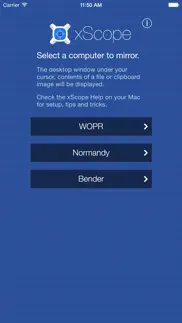

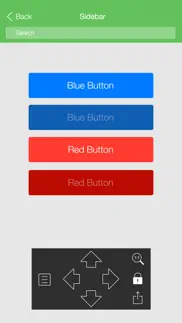


XScope Mirror 1.3.8 Apps Screenshots & Images
XScope Mirror iphone, ipad, apple watch and apple tv screenshot images, pictures.
| Language | English |
| Price | $1.99 |
| Adult Rating | 4+ years and older |
| Current Version | 1.3.8 |
| Play Store | com.iconfactory.xScope-Mirror |
| Compatibility | iOS 8.0 or later |
XScope Mirror (Versiyon 1.3.8) Install & Download
The application XScope Mirror was published in the category Productivity on 19 January 2012, Thursday and was developed by The Iconfactory [Developer ID: 281795483]. This program file size is 5.01 MB. This app has been rated by 2 users and has a rating of 3 out of 5. XScope Mirror - Productivity app posted on 12 November 2020, Thursday current version is 1.3.8 and works well on iOS 8.0 and higher versions. Google Play ID: com.iconfactory.xScope-Mirror. Languages supported by the app:
EN Download & Install Now!| App Name | Score | Comments | Price |
| Linea Sketch Reviews | 3.7 | 776 | Free |
| Blank TV Reviews | 1 | No comment | Free |
| Exify - Tools for Photos Reviews | 3.8 | 21 | $1.99 |
| Iconfactory Sunshine Smilies Reviews | 4.3 | 13 | Free |
| Triode - Internet Radio Reviews | 4.2 | 137 | Free |
• Compatibility with latest operating systems and hardware
| App Name | Released |
| Google Voice | 16 November 2010 |
| Padlet | 10 August 2015 |
| Smart Home Manager | 23 August 2017 |
| Microsoft Authenticator | 30 May 2015 |
| Microsoft Outlook | 28 January 2015 |
Find on this site the customer service details of XScope Mirror. Besides contact details, the page also offers a brief overview of the digital toy company.
| App Name | Released |
| Easy Calendar | 08 March 2011 |
| Pythonista 3 | 13 June 2016 |
| Bullet Journal Companion | 23 February 2017 |
| Pipe Fitter Calculator | 13 January 2012 |
| MobileFamilyTree 11 | 27 January 2025 |
Discover how specific cryptocurrencies work — and get a bit of each crypto to try out for yourself. Coinbase is the easiest place to buy and sell cryptocurrency. Sign up and get started today.
| App Name | Released |
| Spotify - Music and Podcasts | 14 July 2011 |
| Amazon Shopping | 03 December 2008 |
| SHEIN - Online Fashion | 19 May 2014 |
| WhatsApp Messenger | 03 May 2009 |
| YouTube TV | 05 April 2017 |
Install the Giftmio extension for smart shopping. Get notified about cashback opportunities, activate cashback in one click, and save money on purchases.
| App Name | Released |
| Stardew Valley | 24 October 2018 |
| Incredibox | 27 March 2016 |
| Procreate Pocket | 17 December 2014 |
| Subnautica | 08 July 2025 |
| Slay the Spire | 13 June 2020 |
Each capsule is packed with pure, high-potency nootropic nutrients. No pointless additives. Just 100% natural brainpower. Third-party tested and validated by the Clean Label Project.
Adsterra is the most preferred ad network for those looking for an alternative to AdSense. Adsterra is the ideal choice for new sites with low daily traffic. In order to advertise on the site in Adsterra, like other ad networks, a certain traffic limit, domain age, etc. is required. There are no strict rules.
Keep personal info private, avoid scams, and protect yourself online with AI-powered technology.
XScope Mirror Comments & Reviews 2026
File Mirroring still an issue. I am an app designer starring down the barrel of developing for iPad retina. I was excited to see the update that seemed to claim to fix the problem with mirroring via file. But when I tried it out, it still snaps back to mirroring under curser when you save. This only seems to happen on PSD files. With monitor size limitations this really could be a KILLER app and feature if the file mirroring worked better. Please debug/update soon!
Indespensible. I use this tool every day for both Mac and iOS work. It's absolutely indispensable. A must buy for any serious Cocoa developer.
Indispensable. The ability to mirror to an iOS device is a lifesaver. Oh and the other features are awesome, too. Love it, love it, love it.
Flaky mirroring. The mirroring feature (the main reason I purchased xScope) is really flaky. It seems hit or miss if my laptop will show up in the app (more often than not, it doesn't). I usually have to reboot either my phone or MacBook and even then it doesn't always work. I followed all the troubleshooting on their website and that still hasn't fixed it. It's nice when it does work, however.
Hit with ugly stick = 1 star review. Just got an update for this app and all it did was make it uglier with no new interesting features, just like iOS 7. Very disappointed.
Excellent app for iOS designers. Best app I've seen out there for iOS testing for designers. I use it literally everyday. Highly recommend.
Most useful tool I own.. I can't get over how useful this tool is for designing for iPad applications. I was using an alternative free application for iPad mirroring but it was underwhelming and lacking basic features. xScope is truly magical and makes designing for iDevices amazing. It only gets a 4 star review due to its speed. Thankfully I don't have to interact with the iPad after I get everything set up, but the controls are really unresponsive and I find myself tapping the same thing multiple times for it to recognize my input.
Impossible to connect:-(. I love Xscope. But this app is totally user-unfriendly. I followed all the steps of trouble shooting I found online--preferences, Bluetooth, firewall, bonjour, etc. I finally gave up. It is just impossible to connect! Frustrated!!!
Incredible tool 💯. This tool is very valuable for helping designers and developers iterate on their designs. Speedy, efficient, saves you time
Amazing. Connecting xScope Mirror to xScope on my Mac was easy and worked flawlessly. The refresh rate of a displayed window on xScope Mirror is amazing considering what it’s doing. Even being a software developer and understanding what’s going on, it still truly seems magical!
fantastic - a game changer. Works perfectly. Makes previewing artwork on the iPhone/iPad *as you work* seamless. Thank you Iconfactory!
Changes the way I work. My old mobile UXD workflow was complex. It involved layer comps, Dropbox and cups of tea. xScope Mirror is awesome. It totally streamlines the design process, and let's you see a live view of your work right on your iPhone or iPad. It took me a few minutes to set things up, but it works great for me.
Did you know that you can earn 25 USD from our site just by registering? Get $25 for free by joining Payoneer!
Love and hate. I love that I can mirror my UI designs onto my iDevices with relative ease, but I hate how the "lock" feature doesn't stay locked, and you can't pan the screen around using gestures, you have to use the arrow buttons. Not only that, you can't hold the arrow buttons down; you have to tap them once for EVERY-SINGLE-PIXEL. Annoying.
Imagine you at your best. All the time. Picture yourself at your sharpest and most productive. Your most alert and focused. Your most lucid, creative and confident. At work. At play. In every area of your life. Add Mind Lab Pro® v4.0 to your daily routine and uncap your true potential. Buy Now!
Outstanding. The best of the bunch (compared to similar products) and I could simply not live without it anymore!
Family Sharing?. Awww No Family Sharing…
Adsterra is the most preferred ad network for those looking for an alternative to AdSense. Adsterra is the ideal choice for new sites with low daily traffic. In order to advertise on the site in Adsterra, like other ad networks, a certain traffic limit, domain age, etc. is required. There are no strict rules. Sign up!