DaVinci Resolve App Reviews
DaVinci Resolve App Description & Overview
What is davinci resolve app? DaVinci Resolve Studio 20
Hollywood’s most powerful tools for professional editing, color correction, audio post and visual effects!
DaVinci Resolve Studio is the world’s only solution that combines professional editing, color correction, visual effects and audio post production all in one software tool! You can instantly move between editing, color, effects, and audio with a single click. Whether you’re an individual artist, or part of a large team, it’s easy to see why DaVinci Resolve is the standard for high end post production and finishing on more Hollywood feature films, television shows and commercials than any other software.
Blackmagic Cloud
DaVinci Resolve supports Blackmagic Cloud for remote collaboration using cloud based workflows! You can host project libraries using Blackmagic Cloud and collaborate on the same timeline, in real time with multiple users all over the world.
Cut Page Editing
Designed for projects with tight deadlines that need to be turned around quickly, the cut page is designed for editing speed. The sync bin and source overwrite tools are the fastest way to edit multi cam programs. You can work faster than ever with dual timelines, source tape and smart editing tools. The cut page has a new layout for vertical timelines, voice over palette, dedicated keyframe editor, MultiText tool, new live overwrite controls and more!
Professional Editing
Perfect for both offline editorial and online finishing. You get every editing and trimming tool imaginable, stacked and tabbed timelines, multi cam, closed caption and subtitling tools, on screen annotations, faster project loading, 2D and 3D title templates, and dozens of other new features!
Advanced Color Correction
Hollywood’s favorite color corrector keeps getting better! You get advanced HDR primary color grading tools with unlimited secondary corrections, power windows and tracking. The new AI Magic Mask gives you even more refined tracking and AI depth map 2 enables faster scene analysis and mattes, plus there’s new chroma warp grading and more.
Fusion Visual Effects
Fusion gives you a true 3D workspace with over 250 tools for creating feature film quality visual effects and stunning motion graphics! DaVinci Resolve 21 has a new deep image compositing toolset as well as a multi-layer pipeline for OpenXR, and psd files. There’s a new vector warp toolset, support for 180 VR, 3D scene dome light and support for native Cryptomatte workflows.
Fairlight Audio Post
Fairlight is a full blown digital audio workstation with high performance multi track sample level editing and mixing! You get ADR tools, support for sound libraries, audio and video scrollers for quickly syncing sound, a scrolling timeline, normalization and Fairlight FX plugins including a hum remover, de-esser, reverb and more. DaVinci Resolve 21 features AI Audio Assistant which automatically creates a final mix.
Upgrade to the paid version of DaVinci Resolve Studio 20 and you also get IntelliScript to create a timeline from script text, dialogue matcher, music editor to adjust track length automatically, animated subtitles, beat detector and MultiCam SmartSwitch for automatic camera angle switching. New Fusion toolsets include deep image compositing, multi layer pipelining and vector warping plus there’s support for VR 180. Studio v20 also includes major updates to Magic Mask and depth map. IntelliCut to remove silence and checkerboard speakers and audio assistant for a mastered final mix.
DaVinci Resolve 21 App Store Limitations
The Mac App store version of DaVinci Resolve Studio 20 does not support some external control panels, and may not be compatible with all 3rd party OpenFX or VST plugins. If you need these features, please download DaVinci Resolve Studio 20 from the Blackmagic Design support website.
System Requirements
Current model Mac with Apple silicon. 8GB of system memory, 16GB when using Fusion, Mac OS X 14 or higher, at least a 1440 x 900 resolution display.
😍 Do you love DaVinci Resolve app? Please share your friends!



Please wait! DaVinci Resolve app comments loading...
DaVinci Resolve 21.0 Tips, Tricks, Cheats and Rules
What do you think of the DaVinci Resolve app? Can you share your complaints, experiences, or thoughts about the application with Blackmagic Design Inc and other users?
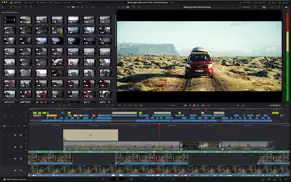
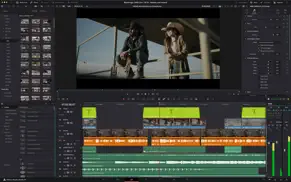
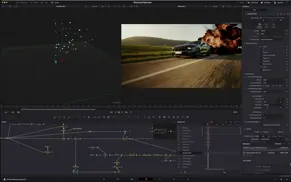

DaVinci Resolve 21.0 Apps Screenshots & Images
DaVinci Resolve iphone, ipad, apple watch and apple tv screenshot images, pictures.
| Language | English |
| Price | Free |
| Adult Rating | 4+ years and older |
| Current Version | 21.0 |
| Play Store | com.blackmagic-design.DaVinciResolveLite |
| Compatibility | iOS 15.0 or later |
DaVinci Resolve (Versiyon 21.0) Install & Download
The application DaVinci Resolve was published in the category Photo & Video on 07 December 2012, Friday and was developed by Blackmagic Design Inc [Developer ID: 419527253]. This program file size is 1.82 GB. This app has been rated by 17 users and has a rating of 1 out of 5. DaVinci Resolve - Photo & Video app posted on 10 June 2026, Wednesday current version is 21.0 and works well on iOS 15.0 and higher versions. Google Play ID: com.blackmagic-design.DaVinciResolveLite. Languages supported by the app:
Download & Install Now!| App Name | Score | Comments | Price |
| Blackmagic Videohub Reviews | 2.6 | 39 | Free |
| DaVinci Resolve for iPad Reviews | 4.5 | 2,813 | Free |
| DaVinci Resolve Studio Reviews | 1 | No comment | $299.99 |
| Blackmagic Camera Reviews | 4.8 | 20,452 | Free |
| Blackmagic Remote Monitor Reviews | 4 | 29 | Free |
Photo Page • New photo image editing now fully integrated within DaVinci Resolve. • Native Canon, Fujifilm, Nikon, Panasonic and Sony RAW format support. • Use all of Resolve's native color controls, looks, LUTs and effects for your images. Cut and Edit Page • Keyframes and curves support 4-point bezier retimes, editing multiple selected clips and Fusion effects. • Keyframing ease options, loop, ping pong, reverse and stretch. • Subframe support for keyframing and markers. • Resolve FX Picture in Picture effect. • Font browser and font preview preference for text and subtitle elements. • Spell checking for all text elements. • Emoji and color fonts for Text+ and MultiText. • Multicam improvements include clean feed angle previews, source tape, all audio tracks and full clip extents. • Replay improvements to view last 5 minutes, add favorite titles and independent start and end stingers. • Mono audio now plays on left and right channels of stereo tracks. • Improved waveforms, markers and fades for short edit tracks. • Source timelines support auto track selectors. • DRT timeline import supports link and conform options. • Compare timelines with timeline backup snapshots. • Subtitle inspector now supports search and replace. • Hide video tracks from edit index. • Affinity .af file support with group and individual layer control. • Edit page timecode options for frames, subframes or audio samples. • Menu action to select transitions in the cut and edit page. • Paste and remove attributes for clip color, markers and flags. • Match frame finds source media for nested clips and multicams. • Resolve FX Video Collage with separate tile fill and border controls. • Subtitle support for fade in and out. Media Pool • Support for tabbed layouts. • Thumbnail, list and metadata views can be set for each bin. • Star rating support for clips. • Cut page supports smart bin views. • Export media bin thumbnails as a PDF. • Automatic smart bin and clip filter for offline clips. • Custom metadata for smart bins, filters, data burn and naming tags. • Reset audio clip attributes to source. Color Page • Clip groups now support grade versions. • View node graphs as a layer list. • Node stacks now support up to 8 layers. • Customizable HDR and nit scopes ranges. • Adobe RGB colorspace and gamma support. Fairlight Page • Folder tracks to group and expand audio tracks. • Go to mouse pointer using the C key. Fusion Page • Over 100 new motion graphics effects and tools including Krokodove effects. • New Macro Editor. • New Fairlight animator modifier. • Text+ and MultiText support spell checking, emoji and color fonts. • Support for USD SDK 25.11. • USD support for 3D matte objects and textures. • Support for USD Texture Projector and Catcher. • Native Relief Map support. • Change inspector properties for multiple tool or layer selections. • User defined metadata variables in paths, expressions and scripts. • Lens Distort offers checkerboard calibration. • Open keyframes and spline as a new window. Codecs and I/O • Decode Apple ProRAW images. • HDR support for HEIC, JPEG, PNG and TIFF images. • HEIC encode support. • Support for Insta360 I-Log in color management. • Improved EXIF metadata support for stills. • Support for Sony Burano V3 clips. • Per render job option to override RCM or ACES outputs. General Improvements • Powerful, expanded and flexible data burn-in window. • Preferences and project settings can now be searched. • Multi-user projects support dynamic project switching. • Support for importing and exporting Final Cut Pro 12 FCPXML. • Up to 3x faster file sync performance to Blackmagic Cloud. • General performance and stability improvements.
| App Name | Released |
| Edits, an Instagram app | 22 April 2025 |
| Kick - Live Streaming | 26 March 2023 |
| Snapchat | 13 July 2011 |
| Canon PRINT | 22 July 2013 |
| Frameo | 08 December 2016 |
Find on this site the customer service details of DaVinci Resolve. Besides contact details, the page also offers a brief overview of the digital toy company.
| App Name | Released |
| Superimpose X | 15 December 2017 |
| Massive Dev Chart Timer | 11 November 2010 |
| TV Cast Pro for Roku | 30 June 2016 |
| Spatialify | 08 December 2023 |
| MyLightMeter PRO | 13 December 2012 |
Discover how specific cryptocurrencies work — and get a bit of each crypto to try out for yourself. Coinbase is the easiest place to buy and sell cryptocurrency. Sign up and get started today.
| App Name | Released |
| Hive Social | 18 October 2019 |
| Gmail - Email by Google | 02 November 2011 |
| Google Maps | 12 December 2012 |
| 28 April 2011 | |
| 07 April 2016 |
Install the Giftmio extension for smart shopping. Get notified about cashback opportunities, activate cashback in one click, and save money on purchases.
| App Name | Released |
| Stardew Valley | 24 October 2018 |
| Subnautica | 08 July 2025 |
| AnkiMobile Flashcards | 26 May 2010 |
| HotSchedules | 30 October 2008 |
| Procreate Pocket | 17 December 2014 |
Each capsule is packed with pure, high-potency nootropic nutrients. No pointless additives. Just 100% natural brainpower. Third-party tested and validated by the Clean Label Project.
Adsterra is the most preferred ad network for those looking for an alternative to AdSense. Adsterra is the ideal choice for new sites with low daily traffic. In order to advertise on the site in Adsterra, like other ad networks, a certain traffic limit, domain age, etc. is required. There are no strict rules.
Keep personal info private, avoid scams, and protect yourself online with AI-powered technology.
DaVinci Resolve Comments & Reviews 2026
Did you know that you can earn 25 USD from our site just by registering? Get $25 for free by joining Payoneer!