Massive Dev Chart Timer App Reviews
Massive Dev Chart Timer App Description & Overview
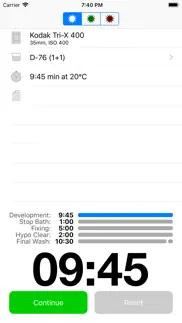
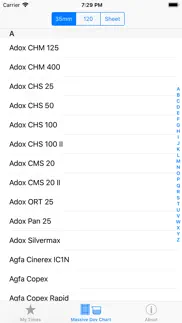
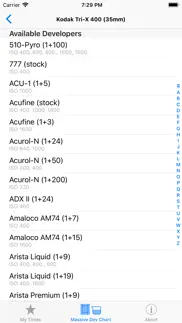
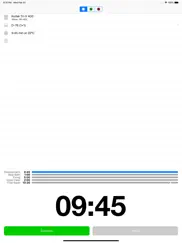
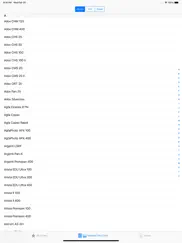
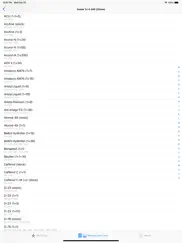
What is massive dev chart timer app? The Massive Dev Chart is the world's largest film development chart with easy to use multi step timer and darkroom support for iPhone and iPad. Watch the instructional video at: https://www.youtube.com/watch?v=P915z6THiY8.
*** Features ***
• Offline copy of The Massive Dev Chart in your pocket
• Multi Step Timer with sound notifications
• Customizable agitation scheme
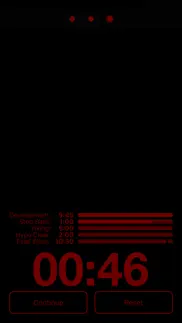
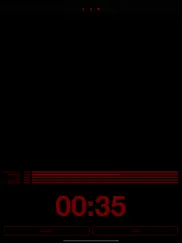
• Darkroom themes
• Dilution Mixer
• Support for two-step development and two-step fixing
• Support for optional hypoclear and photo flo steps
• Automated development time/temperature compensation
😍 Do you love Massive Dev Chart Timer app? Please share your friends!



Please wait! Massive Dev Chart Timer app comments loading...
Massive Dev Chart Timer 4.8.0 Tips, Tricks, Cheats and Rules
What do you think of the Massive Dev Chart Timer app? Can you share your complaints, experiences, or thoughts about the application with Freestyle Photo & Imaging and other users?
Massive Dev Chart Timer 4.8.0 Apps Screenshots & Images
Massive Dev Chart Timer iphone, ipad, apple watch and apple tv screenshot images, pictures.
| Language | English |
| Price | $9.99 |
| Adult Rating | 4+ years and older |
| Current Version | 4.8.0 |
| Play Store | com.digitaltruth.mdc |
| Compatibility | iOS 12.0 or later |
Massive Dev Chart Timer (Versiyon 4.8.0) Install & Download
The application Massive Dev Chart Timer was published in the category Photo & Video on 12 November 2010, Friday and was developed by Freestyle Photo & Imaging [Developer ID: 1786429988]. This program file size is 13.3 MB. This app has been rated by 50 users and has a rating of 3.8 out of 5. Massive Dev Chart Timer - Photo & Video app posted on 17 April 2026, Friday current version is 4.8.0 and works well on iOS 12.0 and higher versions. Google Play ID: com.digitaltruth.mdc. Languages supported by the app:
CS EN FR DE JA PL PT RU ZH ES Download & Install Now!| App Name | Score | Comments | Price |
| Darkroom Lab Timer Reviews | 3 | 4 | $8.99 |
| Darkroom Formulas Reviews | 2.5 | 4 | $5.99 |
| Phase Timer Pro Reviews | 1 | No comment | $4.99 |
| F-Stop Printing Calculator Reviews | 3.7 | 4 | Free |
Database update - New film/developer combinations
| App Name | Released |
| YouTube | 11 September 2012 |
| 06 October 2010 | |
| InShot - Video Editor | 11 June 2015 |
| VLC media player | 19 July 2013 |
| BeautyPlus-Selfie Film Camera | 24 April 2013 |
Find on this site the customer service details of Massive Dev Chart Timer. Besides contact details, the page also offers a brief overview of the digital toy company.
| App Name | Released |
| Stop Motion Studio Pro | 05 July 2013 |
| Death Lens | 27 May 2015 |
| Photo Scanner Plus | 10 March 2015 |
| Superimpose X | 15 December 2017 |
| PromptSmart Pro - Teleprompter | 13 August 2014 |
Discover how specific cryptocurrencies work — and get a bit of each crypto to try out for yourself. Coinbase is the easiest place to buy and sell cryptocurrency. Sign up and get started today.
| App Name | Released |
| Snapchat | 13 July 2011 |
| Gmail - Email by Google | 02 November 2011 |
| Google Maps | 12 December 2012 |
| 06 October 2010 | |
| Google Chrome | 28 June 2012 |
Install the Giftmio extension for smart shopping. Get notified about cashback opportunities, activate cashback in one click, and save money on purchases.
| App Name | Released |
| Stardew Valley | 24 October 2018 |
| Geometry Dash | 13 August 2013 |
| Paprika Recipe Manager 3 | 15 November 2017 |
| CloverPit | 17 December 2025 |
| Monash FODMAP Diet | 17 December 2012 |
Each capsule is packed with pure, high-potency nootropic nutrients. No pointless additives. Just 100% natural brainpower. Third-party tested and validated by the Clean Label Project.
Adsterra is the most preferred ad network for those looking for an alternative to AdSense. Adsterra is the ideal choice for new sites with low daily traffic. In order to advertise on the site in Adsterra, like other ad networks, a certain traffic limit, domain age, etc. is required. There are no strict rules.
Keep personal info private, avoid scams, and protect yourself online with AI-powered technology.
Massive Dev Chart Timer Comments & Reviews 2026
Pretty good. I like the database it contains. Once I figured out how to customize it for my darkroom conditions, it all went more smoothly.
Super useful. This app helped me develop my first roll of 120 very easily. No more trips to the lab. I agree with some of the suggestions from the earlier posters. Nonetheless it looks like for most current stocks and formulations it's all set to go.
Overall great but... This app is a life saver. The agitation timer in itself is the best thing I've ever purchased. HOWEVER, and I hope this gets fixed; ironically the online (you know free?) version of the chart seems to be more updated with film variety. It also seems like many reputable film names (I.e: vivitar, etc. ) got left out of the mix while a lot of unknowns are actually there. Hopefully updates will fix this in time. Overall though, this app is amazing and totally worth the download to anyone stepping foot in the darkroom EVER! :)
Good stuff. Works great, conversion of time/temp is great. Good list of films and developers. Able to edit to suit your taste
Best film photographer app ever. For the price of a roll of film you can have a chart that will not only give you the time for any film and developer combination possible, but it will also walk you through development, like when to agitate, how long to stop and fix, all with sound effects so you really know what to do. Theres even a darkroom mode where it turns the screen red and black. They really thought of everything. If you're starting out black and white photography, or even if youve been at it for a while, this app is just about indispensable.
Just use the online chart and your clock app, save your money!. Lacking several film stocks, doesn’t seem to be a way to add them. Rigid interface, no ability to change or alter development steps or they’re times. Just a bundle of preset timers for $8 was a mistake. Just use the online chart and your clock app, save your money!
Totally worth the money!. Sure you can use any kitchen timer for developing, but this app makes developing so much simpler! I don't even have to pay much attention to what I'm doing, to be honest. I input my film/chemicals to be used and I have a perfect timer for each stage that also reminds me when to agitate.
Really love this app...Attending photography school all the local college, and use this app a lot.. If you do any developing at all I highly recommend the app. It has a lot of common developers and films built in, and is fairly customizable.
Timer no longer works properly. This has been my go to developing app for many years. Never had a problem with it until today when I noticed that the timers font has changed to a bold and larger font. The minutes show and the actual counter still works, but the seconds are gone. All that show are three dots. Not unusable if you are used to developing. But rather inconvenient. And probably unusable if your new to it. Hopefully you guys will read this and fix it. My one star turn back to 5 upon their return :)
Great app - when it doesn’t crash. I’ve been using it for years on an old iPad, but when I upgraded to a brand new iPad and loaded the app it crashes EVERY. SINGLE. TIME. It’s unusable. I’ve tried reloading the app 6 times. Still crashes. There is nothing online about this problem other than: “reload the app”. Now I need to keep the old iPad to run just one app - Massive Dev. That’s F’d up.
Film helper. Huge help when developing film! Pick your film and developer and the app will time everything out for you so you can zone out a bit or multitask.
Perfect!. Does everything I need!
Great app. Made developing so much easier - rather than ticking off the minutes with my timer and my fingers, I actually could chill out and wait for my alerts. Well worth the money if you develop film.
Absolutely Amazing. I would not have gotten this unless I got an iTunes gift card. Luckily I did. This app is imperative to anyone that develops at home. They give you every development time for every film and developer. Also, if you have experimented in the past and changed Dev times a little, you can edit each time as well. Absolutely amazing app
Latest upgrade broke on iPhone 4S. I’ve been using this app for quite some time, and must say it is very useful when I develop black and white film, and I rather like it. However the latest upgrade broke on my iPhone 4S despite the fact that the phone is running iOS 9.3.5, which the app is supposed to run on. The problem is that UI elements tend to overlap on the screen, making some parameters impossible to change. (Example: trying to turn on time-temperature conversions changes the temperature setting! I tried using a stylus instead of my finger but it didn’t do any good.) The app works fine on my iPhone 6S+, but as that is my primary phone I’d rather not expose it to chemicals - that’s what I use the old 4S for. Guess I won’t have a choice until the problem is fixed in a future update. Could I make another suggestion? Please allow different agitation regimens for developing and fixing.
No color. This is great for b/w development, but there is no recipe geared for color dev, which is a shame. It's very kludgy if you want to modify it for color. They refer you to their "darkroom lab timer" which is another $9. I should've just gotten that one since it does b/w and color apparently.
Way different on iPad. No film or developer combos like on the iPhone app. Safelight mode doesn't work on the iPad, big WHITE banner that displays template name over the "safelight" mode display, which makes "safelight" mode is worthless. Great app on Android/iPhone but extremely disappointing on iPad.
Needs improvement. This would be great but it says 8000 films and I don't see nearly that many. You can't search by brand name as names often change, and there is no old stock film times, I bought this looking for the times for GAF aerial film times, I can't search by GAF, Ansco, or AGFA but by the film specific names, like APX or Pan F but all my roll says is "Type 2913" and "Speed 200" I don't know the name for "type 2913" nor what it was called under the Ansco or AGFA label. Any newer film times are easy to search for its the older films that need more info, and giving multiple search options like by film, if you only shoot Kodak it's. Pain to look through all the ilford names etc. Thanks but I think the 8,000 films was misleading, I assumed in 8,000 there would be at least ONE GAF product... But I can't search for that ... You also can't add your own film to the "my times" if it isn't on the list so even if I could find the times for the GAF film I couldn't input it into the app. It doesn't allow for calculations based on different time/temperatures in adverse conditions etc, all the stuff you wouldn't inherently know as a developer is missing. Great idea, keep updating!
Black and white only. No where does it state its black and white only. Completely useless to me.
EXACTLY what I was looking for. Amazing app. Not only does it have all of the dev chart info... you can edit your own times as well. Amazing.
Don't know what I was doing without it. Great app. Very useful. I use it all the time in the darkroom. Fairly exhaustive list of BW films and developers. I've also added custom settings for C-41, E6, and even printing. It's nice to just start the app and just sit there and have it work for you. Much preferred to having to set a new timer every step. I know its not really meant for color films - But it'd be nice to be able to edit the names on the processes. So that I could rename them Blix or dev2 or whatever. Hopefully that comes in a future update
Love the web site - the app not so much.. Can't give "My times" steps meaningful titles - if your work flow deviates at all, it can't be saved in a useful way. Notes don't word wrap so you can see them. An app this mature should at least be aware of new sentences - auto capitalization is built in to the OS. I do enough traditional processing to probably keep it but pretty sad for 9 bucks.
Excellent App. I’ve been using the Massive Dev Chart for over a year. It has worked brilliantly for me. I’m developing mostly Kodak Tmax and Tri-X, but I have also used it to develop Fujifilm Acros I. Just a well thought out easy to use app.
Where was this when I was in high school?. This app is excellent. I wouldn't enter my darkroom without it.
Crude & Uninspired. Great idea, actually wished it would be available for years. I am a long time shopper on digitaltruth and have used their mass charts all the time. This application is crude, uninspired and more of a hassle to use than a simple timer already on the iPhone. Example: let us say that at this very moment I want to develop HP5+ in HC-110 B. We know it should be 1 to 7 on stock solution. Try to get the application to show you out of bottle ml of water to developer while working so you can work on multiple rolls.. You end up having to note the solution elsewhere. If you have done that already, what's the app for? I know how long in the stop bath, you know how long in the fixer.. I was hoping for something in the update. : (
EXCELLENT!!!!!. Very easy to use, it contains just about every formula & combination I will ever need... If you shoot real B&W film and love to hand-process, this is the app!
Crashes fixed, now a great app again.. I love this app, use it several times a week.
I love this app!. I’m a commercial photographer who is returning to film for the fun of it. This app takes all the pain and guesswork out of black and white negative development. Hats off and wallets open for the brilliant minds and hard work that made this app a reality!
Works great!. This app is definitely worth the 9$, it has all the film you will ever develop. And it even has cross developing choices. This is a great app!!!!
How do you convert temperature to F.?. And they say temperature extrapolation data is available, but how do you get to it? Great to have the massive chart in digital form, but for $8.99, the app is underbaked.
The best!!. I’ve been using this app for years. This is THE BEST app out there if you’re going to be working in the darkroom. Couldn’t recommend this app more.
Fantastic. Such a good app and the database is a lifesaver - no more looking up data sheets for base dev times. Only thing I would request is an analog view option and a 5-second countdown timer option. Both of those would complete this for me!
Feedback. This app is for the most part very useful. I do have a couple things to point out, that if implemented would make this app even more useful. 1. Allow user control via user-defined steps, rather than only the pre-defined steps. For example, I almost always use a Presoak, but there's no option to add this ahead of the development step. One might also have an additional toning step. And it's nice to break washes up into separate steps as well to help keep track of the number of times the wash water has been changed (useful when using drums) 2. It would be a great help if there was a volume calculator for stop bath, fixer, hypo-wash, or any other step requiring specific ratios of chemicals, not just in the developer section.
Great database! Especially for beginners. This app has been great! It takes all the documentation that used to be printed and bundles it all up into a nice app. I've only been developing for a couple years but this app has been a great tool for me. I still have my binder of documentation from the vendors I use, but for quick references and timer, it's great!!! The only thing I wish was on the app, was pull times. I know everyone pushes but it be nice to have pull times as well.
A must have app!. This was the best photography value in my 30+ years in this hobby. The best $8.99 I ever spent! If you develop your own film this makes it even easier.
Truly amazing. This has pretty much every type of film/developer I use. It’s an amazing app that makes developing super easy and it allows you to customize and make adjustments as needed. It would be amazing for them to include color film options, especially since c-41 kits are becoming more popular and obtainable for at home developing.
Cool but wish it was customizable. So I bought this to develop my first roll of Ilford HP5+ and while it was super helpful I had to write a couple notes to myself where I altered your events such as the hypo clear step. Could you please let us edit the titles or even let us add our own operations?
Must own for traditional darkroom. A great app for film developers and darkroom printing. Replaces my notebook for formulas and dev times. The timer is also useful, just be careful with light leakage into your film/paper if you are using trays. I cover the top part of the iPhone with paper to limit light usage. Amazing application!
Could use some work for processing in complete darkness. While the interface is easy to work with and the link to Massive Development Chart data is great, the program requires that you stop your developing and touch the screen between every step in the development process. This really isn't feasible when developing sheet film in a tray or deep tank. The option to add a draining period between each step would solve this problem. An announcement regarding the time remaining and the step coming up would also be great, particularly for those of us who use lots of different development processes.
Surprisingly good. Despite the negative reviews and the somewhat steep $9 price tag, I went ahead and bought this app. So far, I'm loving it. Will it ever replace all the other real timers on your darkroom? Of course not. But it's awesome for anyone like me who forgets if it's been three and a half minutes since I started or four and half minutes. Also, you can customize every development scheme to a pretty good extent, which means I can even use it for developing color film too! I gave it four stars because it's not the prettiest app in the store and because of the price tag (though, it's still one of the cheapest things you can buy for the darkroom these days).
Works great. I use this app for home development and it works well enough for what it is
Excellent app.. A great resource for developing, easy-to-understand user interface, and readily customizable. Makes using most any combination of film and developer a breeze!
GREAT APP!!!. I have been using this app for over a year now and I must say I can not understand why there is all bad and neg reviews. I have not had any problems with any aspect of this app,it works like a champ !!! Maybe if the bad reviewers would learn to use there complicated phones and turn off some of the useless settings they would find that this is a GREAT tool.... I have been developing film for over 30 years now with Manual and automatic equipment depending on the process required, this program fits the Bill for all my Zone work and custom developing needs, Thank You to the Developers of this Program..with the database all in one place is awesome......... And to the negative dopes. use it in a iPod touch or a Samsung Galaxy 5.0 and check your settings!!! you will not have a problem!!!!
Crashed during dev twice. The app "crashes" (actually just went to a white screen and then back to the main menu, I never got the iOS crash message) occasionally. The first time this happened during fixing which isn't a big deal, but the second time was during dev and I lost the time, so my final development was off.
Amazing. I use this app with my jobo rotary processor CPP-2 and it's amazing. My life has become so much easier. I'm able to keep track of everything, even when I'm not paying attention. I wish it had a color processing mode. It's a must buy for film enthusiast.
Easy with tons of info. It's very easy to use with all the information you could need.
Fantastic!. I recently started developing my B&W film at home and I consider this app a must-have. Having the dev info, temperature conversions and (best of all) the timer all together in one easy to use app makes life so much easier. Well worth the price!
Terrific resource.. I wish it synced between my iPhone and iPad - so my custom timings would transfer automatically - but that's a minor, minor nitpick.
PLEASE FIX!. Love the app! BUT. Please fix the home screen line (located at the bottom of the screen on iPhone XS) while in darkroom mode. It is emitting a bright light during development. I’m having to duct tape over it at the moment. Thank you!!!!
May have wasted my money on this. The online version of the Massive Dev Chart is very helpful, and I refer to it regularly, so I thought this app would be just as good. Maybe I’ve missed it somewhere in the settings, but I don’t see the option of setting the agitation to “continuous” like you can on the website. The instructions say you can modify your agitation preferences, but none of the options they provide are for “continuous”. Of course I can just deduct 15% from the normal times to achieve this using my free calculator app. But I paid $9 for this app to do that.
Did you know that you can earn 25 USD from our site just by registering? Get $25 for free by joining Payoneer!
Fabulous!. Huge built in database plus ability to add more combinations or edit the library. Built in timer is great too. Films are under their name not brand eg Tmax not Kodak Tmax - once you know that it's easy to find what you need
A great App.. I've used the Massive Dev Chart for years, ever since it was just an Excel spreadsheet on my computer. The App only makes it more useful, with it's controls & chemical combinations & darkroom-dimable modes. Simply put, it's a great App.
Previous review about lucky film. My bad, found it under shd.
Awesomeness. Used this app last night to develop three different kinds of rolls of film and was impressed how easy it was to use! Love it!
Great App. It is simply awesome! I just would like to have the option to change developing time in hours not just min and seconds so that I can customize my favorite list for stand developing which is usually at least 1.5 hour when I am rating Tri-x 400 at 1600 ASA.
Fantastic. This has to be the best $10 I've ever spent. I used to have the Digital Truth web site open on my computer while I was processing. This app is convenience plus!!
Great app but cannot search. Pity I cannot do a search for the films listed. For example checked Portra and Kodak and neither is listed or I cannot easily locate. For the price of the app, I would say search capability is a must. Web site is also a bit useless on search, as although supported, it asks you to select the film from a huge list without capability to trim it based on keywords.
A monkey could develop film with this app.. Been using this for 6 years. Well worth it.
Imagine you at your best. All the time. Picture yourself at your sharpest and most productive. Your most alert and focused. Your most lucid, creative and confident. At work. At play. In every area of your life. Add Mind Lab Pro® v4.0 to your daily routine and uncap your true potential. Buy Now!
11.99 for an app. It’s a great app, until it jumped from 8.99 to 11.99. Now it’s like yea, it’d better be good.
Good App. Very useful app, but would be nice if we could re-label some of the processes such as an additional wash instead of Fixer B.
Worth the money.. A box of 4x5 film costs $30-$70. The chemicals cost even more. You’re investing time and money and care into getting this right. If this app cost me $40 it’d be worth it stamp out the expensive risk of getting mixtures wrong.
awesome. I've used this app for processing 35mm and super-8 film. The timer is easy to use and customizable. The temperature/time conversion calculator is really handy. I've customized profiles for hand processing super-8 films. Saving those profiles and add notes makes it much easier to track your process and results.
Wonderful resource. Digitaltruth is a great place for those who like to keep the spirit of analog photography alive. This app is well worth the money and updates keep improving!
Exactly what I was looking for .... Unbelievable, that this app exist ! This is amazingly well written by someone who know what processing film is all about. Well done.
Best thing since sliced bread!. A very comprehensive database of film/dev combos and has a great processing timer. If on iOS you can further tweak agitation schemes and other defaults in the settings area. All in all, it has been well worth whatever I paid several years ago. Yes, info can be had for free online but this still costs less than a roll of Double-X. A must-have if you like to try different film stocks and developers. I recently souped film for the first time in a few years and used three film/dev combos and was able to just go into MDV and use it again with zero futzing about - very intuitive. A must have!
Great, but not perfect.. This is an incredibly useful tool for any dark room enthusiast. That said, it needs the ability to compensate for constant agitation and temperature differences.
Great app!. I was hesitant to spend the money on this app initially since I could get the development info for free online. But this was one of the most useful and best designed apps I've ever bought. Being able to customize all of the steps and times for my development style is great. It is so easy to use and well laid out to make film development easy.
New upgrade is awesome. With new upgrade looks much better on my ipad. Thank you! Very easy to use. Being able to easily add films and developer combos and to he able to edit items just adds to the already very functional app. this app helps developing my films easier and hence adds to my enjoyment of photography
Adsterra is the most preferred ad network for those looking for an alternative to AdSense. Adsterra is the ideal choice for new sites with low daily traffic. In order to advertise on the site in Adsterra, like other ad networks, a certain traffic limit, domain age, etc. is required. There are no strict rules. Sign up!
What happened?. Everything was ok until this last update. It crashes and I cannot use the app at all. Guys, please fix this!!
Most helpful app available!. Ive been shooting film for two years now and for the longest time I've been forgetting my development times, what my developer is diluted to, how long I should be fixing things for. My time compensation chart is so hard to read. AND THEN MASSIVE DEV CHART CAME INTO MY LIFE. This app has been everything I've wanted and more. Not more using the stopwatch on your iPhone to time things! It is really my favorite app. A must have for anyone into photography.
Wait for next update. Prior to the update, app worked well. Now, it crashes after selecting a film speed. Thankfully, I have "my development times" saved. Otherwise, app would be useless.
Very good!!. I use this app all the time. It never failed me. All love to the developers...
EXCELLENT!!!!!. Very easy to use, it contains just about every formula & combination I will ever need... If you shoot real B&W film and love to hand-process, this is the app!
Needs More Flexibility. Temperatures are only in Celsius.
Dark mode is broken. In a recent update, when using the app in my dark room to develop sheet film, when I select, dark mode, there is still a bright white dynamic island where the mode selector is, contributing significant light pollution into my space. I’ve had to tape it off with black tape to make it usable. Why did you implement this? Is it a bug?!
Great app. Awesome and invaluable. I wished the alarms rang when I'm on another app like YouTube though...
iPad. Why is this not for the iPad...
Poor app development.. I cannot believe they still have not added full support for iPads.
Massive Dev Chart. The developer erroneoulsy claims this app. is iPad compatible; however, in my opinion this is a joke. Perhaps, "Massive Dev Chart" app works and looks fine on an iPhone or iPod, but it clearly looks so bad on my iPad (the device where I had wanted to use it), that I most certainly will not use this app and would even like to have a refund of the money I wasted on it. Folks, unless you intend to use this app on an iPhone or iPod, I would simply Not purchase it, as the app is clearly not an iPad app. Shame on the developer for selling it for sale, as an app compatible with iPad; and, shame on Apple for letting them do so, as I have been cheated out of the money I paid for it.
Awesome. Running an iPhone 5, this app runs great. This app has NEVER crashed on me. I love it ! Thank you :)
Could be so much better. Timer works fine, that’s the important part. But the UX around the whole app is just bad. It hard to scan the list in My Times (why no search?), can’t bulk delete, can’t sort or group. No separate utilities like the volume mixer. Please take some time to improve the app, there’s so much potential here.
Set up oddly. Doesn't have any of the films I use, glad I spent $9 on this...
Where was this when I was in high school?. This app is excellent. I wouldn't enter my darkroom without it.
Unusable. It crashes every single time. Is it being worked on? What's the wait???
Crashes fixed, now a great app again.. I love this app, use it several times a week.
Perfect!. Does everything I need!
Dark mode no longer dark!. In the darkroom, I rely on the ability to turn the screen of my iPhone to dark mode when using this app to time film development (sheet film, in trays). But in a recent update, there is now a large white “Dynamic Island” where the mode buttons are that cannot be turned dark, so there’s significant light pollution in my workspace when developing film, and I have to put black tape over that part of the screen!! WHY did you implement this?? Is it a bug or a “feature”??!
Worth it!. A real resource!
Pretty good. I like the database it contains. Once I figured out how to customize it for my darkroom conditions, it all went more smoothly.
Works great. I use this app for home development and it works well enough for what it is
Good stuff. Works great, conversion of time/temp is great. Good list of films and developers. Able to edit to suit your taste
An Almost Perfect Replacement For My Dead GraLab. Seems almost impossible but my GraLab died about a month ago, and I needed a new timer. The timer function alone is worth the cost of the app, while the development data is hit or miss depending on what you develop. Bottom line: for the photographer who still process film the old fashioned way, manually in a "wet" darkroom, this app does the job - serving as both a database for processing times and good timer with agitation cues. A couple of recommendations to the developer(s) at DigitalTruth: an analog timer would be more useful than a digital countdown (easier to read), and the ability to have separate agitation cycles for developer and fixer would be very useful.