MacOS High Sierra App Reviews
MacOS High Sierra App Description & Overview
What is macos high sierra app? New technologies at the heart of the system make your Mac more reliable, capable, and responsive — and lay the foundation for future innovations. macOS High Sierra also refines the features and apps you use every day. It’s macOS at its highest level yet.
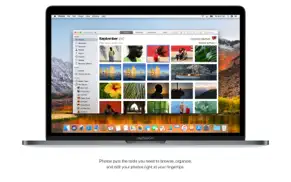
Easily organize, edit and view your photos in Photos.
• Make short videos from your Live Photos using new Loop and Bounce effects.
• Easily locate and organize your content with the new sidebar.
• Conveniently access all of your editing tools in the redesigned Edit View.
• Fine-tune color and contrast in your photos with new Curves and Selective Color tools.
• Access third-party apps directly from Photos and save the edited images back to your Photos library.
• Rediscover images from your library with new Memories themes including pets, weddings, outdoor activities, and more.
• Create printed photo products and more using new third-party project extensions.
Improve your browsing experience with Safari.
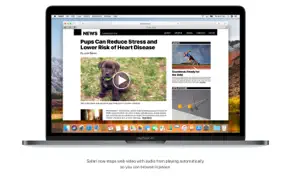
• Stop web video with audio from playing automatically.
• Prevent websites and ad networks from tracking your browsing with Intelligent Tracking Prevention.
• Customize your browsing experience with new per-site settings for Reader, page zoom, content blockers, and more.
Enjoy refinements in Mail.
• Instantly find the messages most relevant to your search using Top Hits.
• Use Split View when composing new email in full screen.
• Save space on your Mac with compressed messages.
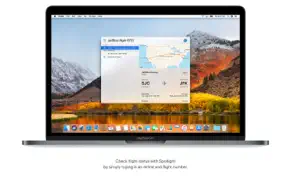
Look up flight information in Spotlight.
• Check the status of a flight by typing the airline and flight number in the Spotlight search field.
Collect your thoughts with Notes.
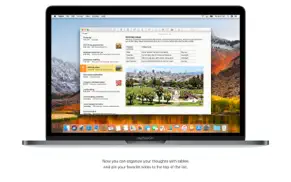
• Organize your information using configurable tables.
• Pin your favorite notes so they’re always at the top of the list.
Capture a moment in FaceTime.
• Take a Live Photo during a video call to any supported Mac, iPhone, or iPad.
Get music suggestions from a more natural-sounding Siri.
• Hear more variations in intonation, emphasis, and tempo when Siri responds to you.
• Enjoy personalized music recommendations from Siri when you listen to Apple Music.
Copy and paste files from one Mac to another with Universal Clipboard.
• Copy and paste files between your Macs using standard copy and paste commands.
Safely store your family data in iCloud.
• Share a single iCloud storage plan with your family and keep everyone’s data backed up and safely stored.
• Set up your family with a few clicks and add capabilities when needed.
Work together with iCloud Drive.
• Share and work on any file in iCloud Drive with other people so it is always up to date with the latest edits.
Upgrade the performance, reliability, and security of your Mac with the new Apple File System.
• Update to a new file system architecture designed for all-flash Macs.
• Experience greater responsiveness when performing common tasks like duplicating a file and finding the size of a folder.
• Enjoy faster and more reliable backups.
• Protect your entire drive with built-in native encryption for greater security.
Step up to the new standard for 4K video: HEVC.
• Create and watch high-resolution video with High Efficiency Video Coding (HEVC), which uses up to 40 percent less space without sacrificing quality.
Enjoy next-generation graphics and computation with Metal 2.
• Get the most out of the graphics capabilities of your Mac with the new and improved version of Metal.
• Discover immersive tools for content creation with support for virtual reality.
• Build state-of-the-art apps with features that accelerate common machine learning functions.
Some features may not be available in all regions or all languages. Some features require an iCloud storage plan. Some features have hardware requirements. Apple File System requires all-flash internal storage.
😍 Do you love MacOS High Sierra app? Please share your friends!



Please wait! MacOS High Sierra app comments loading...
MacOS High Sierra 10.13.6 Tips, Tricks, Cheats and Rules
What do you think of the MacOS High Sierra app? Can you share your complaints, experiences, or thoughts about the application with Apple and other users?
MacOS High Sierra 10.13.6 Apps Screenshots & Images
MacOS High Sierra iphone, ipad, apple watch and apple tv screenshot images, pictures.
| Language | English |
| Price | Free |
| Adult Rating | 4+ years and older |
| Current Version | 10.13.6 |
| Play Store | com.apple.InstallAssistant.HighSierra |
| Compatibility | iOS 10.8 or later |
MacOS High Sierra (Versiyon 10.13.6) Install & Download
The application MacOS High Sierra was published in the category Utilities on 22 September 2017, Friday and was developed by Apple [Developer ID: 284417353]. This program file size is 4.47 GB. This app has been rated by 17 users and has a rating of 1 out of 5. MacOS High Sierra - Utilities app posted on 12 July 2018, Thursday current version is 10.13.6 and works well on iOS 10.8 and higher versions. Google Play ID: com.apple.InstallAssistant.HighSierra. Languages supported by the app:
AR CA HR CS DA NL EN FI FR DE EL HE HI HU ID IT JA KO MS NB PL PT RO RU ZH SK ES SV TH ZH TR UK VI Download & Install Now!| App Name | Score | Comments | Price |
| Apple Music Classical Reviews | 3.9 | 3,807 | Free |
| OS X El Capitan Reviews | 1 | No comment | Free |
| Apple Configurator Reviews | 1 | No comment | Free |
| AirPort Utility Reviews | 3.0 | 2,009 | Free |
| Swift Playground Reviews | 1 | No comment | Free |
The macOS High Sierra 10.13.6 update adds AirPlay 2 multi-room audio support for iTunes and improves the stability and security of your Mac. AirPlay 2 for iTunes •Control your home audio system and AirPlay 2-enabled speakers throughout your house •Play music at the same time on multiple AirPlay 2-enabled speakers in your house, all in sync Other improvements and fixes •Fixes an issue that may prevent Photos from recognizing AVCHD media from some cameras •Fixes an issue that may prevent Mail users from moving a message from Gmail to another account
| App Name | Released |
| Amazon Fire TV | 22 December 2014 |
| Clean Up Storage - Cleaner Kit | 26 January 2017 |
| 12 February 2019 | |
| DuckDuckGo Private Browser | 27 June 2013 |
| EarVision | 07 September 2023 |
Find on this site the customer service details of MacOS High Sierra. Besides contact details, the page also offers a brief overview of the digital toy company.
| App Name | Released |
| FindPaintColor | 14 May 2021 |
| Trump Trump - Block Trump content | 16 November 2015 |
| Watchla for Tesla | 16 February 2021 |
| Number Shield | 01 December 2017 |
| Direct Remote for DIRECTV | 10 August 2012 |
Discover how specific cryptocurrencies work — and get a bit of each crypto to try out for yourself. Coinbase is the easiest place to buy and sell cryptocurrency. Sign up and get started today.
| App Name | Released |
| Wizz - Make new friends | 24 February 2019 |
| Spotify - Music and Podcasts | 14 July 2011 |
| TikTok | 02 April 2014 |
| Gas | 27 August 2022 |
| 07 April 2016 |
Install the Giftmio extension for smart shopping. Get notified about cashback opportunities, activate cashback in one click, and save money on purchases.
| App Name | Released |
| MilGPS | 01 December 2010 |
| Stardew Valley | 24 October 2018 |
| Slay the Spire | 13 June 2020 |
| Procreate Pocket | 17 December 2014 |
| Slime Rancher | 26 May 2026 |
Each capsule is packed with pure, high-potency nootropic nutrients. No pointless additives. Just 100% natural brainpower. Third-party tested and validated by the Clean Label Project.
Adsterra is the most preferred ad network for those looking for an alternative to AdSense. Adsterra is the ideal choice for new sites with low daily traffic. In order to advertise on the site in Adsterra, like other ad networks, a certain traffic limit, domain age, etc. is required. There are no strict rules.
Keep personal info private, avoid scams, and protect yourself online with AI-powered technology.
MacOS High Sierra Comments & Reviews 2026
Did you know that you can earn 25 USD from our site just by registering? Get $25 for free by joining Payoneer!