Things 3 App Reviews
Things 3 App Description & Overview
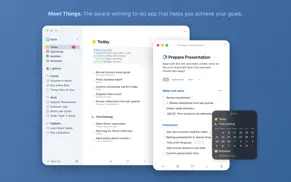
What is things 3 app? Get things done! The award-winning Things app helps you plan your day, manage your projects, and make real progress toward your goals.
Best of all, it’s easy to use. Within the hour, you’ll have everything off your mind and neatly organized—from routine tasks to your biggest life goals—and you can start focusing on what matters today.
“Things offers the best combination of design and functionality of any app we tested, with nearly all the features of other power user applications and a delightful interface that never gets in the way of your work.”
—Wirecutter, The New York Times
KEY FEATURES
• Your To-Dos
Your basic building block is the almighty To-Do—each a small step toward a great accomplishment. You can add notes, tag it, schedule it, and break it down into smaller steps.
• Your Projects
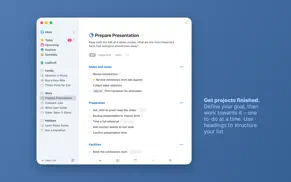
Create a Project for any big goal, then add the to-dos to reach it. Use headings to structure your list as you outline your plan. There’s also a place to jot down your notes, and a deadline to keep you on schedule.
• Your Areas
Create an Area for each sphere of your life, such as Work, Family, Finance, and so on. This keeps everything neatly organized, and helps you see the big picture as you set your plans in motion.
• Your Plan
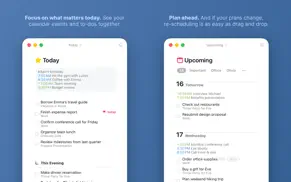
Everything on your schedule is neatly laid out in the Today and Upcoming lists, which show your to-dos and calendar events. Each morning, see what you planned for Today and decide what you want to do. The rest is down to you :)
MORE THINGS TO LOVE
As you dive deeper, you’ll find Things packed with helpful features. Here are just a few:
• Reminders — set a time and Things will remind you.
• Repeaters — automatically repeat to-dos on a schedule you set.
• This Evening — a special place for your evening plans.
• Calendar integration — see your events and to-dos together.
• Tags — categorize your to-dos and quickly filter lists.
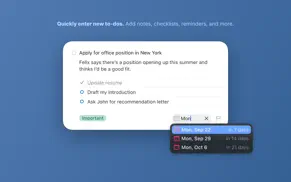
• Quick Entry — create to-dos from anywhere, as soon as the thought hits you.
• Quick Find — instantly locate to-dos, headings, or tags.
• Type Travel — jump from list to list with your keyboard; just start typing!
• Widgets — see your lists on the desktop or in Notification Center.
• Mail to Things — forward an email to Things; now it’s a to-do.
• Markdown — structure & style your notes.
• And much more!
MADE FOR MAC
Things is tailored to the Mac with deep system integrations as well. A great example is Quick Entry with Autofill: a shortcut that grabs content from other apps and adds it to Things for you, such as a link to a website or an email you want to get back to.
You can also enjoy a beautiful dark mode at sunset, connect your calendars, open multiple windows, add a variety of widgets, import from Reminders—Things can do it all! There’s even Shortcuts integration if you want to automate your workflows.
STAY PRODUCTIVE ON THE GO
Things also has full-featured apps for iPhone, iPad, Apple Watch, and Apple Vision Pro (sold separately). All your devices sync seamlessly via our free Things Cloud service. It’s great to have everything at your fingertips when you need it!
AWARD-WINNING DESIGN
Made in Stuttgart, with two Apple Design Awards to its name, Things is a fine example of German engineering: designed not only to look fantastic, but to be perfectly functional as well. Every detail is thoughtfully considered, then polished to perfection.
“It’s like the unicorn of productivity tools: deep enough for serious work, surprisingly easy to use, and gorgeous enough to enjoy staring at.”
—Apple
GET THINGS TODAY
Whatever it is you want to accomplish in life, Things can help you get there. Install the app today and see what you can do!
Visit our website now and get a free 15-day trial for your Mac: www.things.app
If you have any questions, please get in touch. We provide professional support and will be glad to help you!
😍 Do you love Things 3 app? Please share your friends!



Please wait! Things 3 app comments loading...
Things 3 3.22.11 Tips, Tricks, Cheats and Rules
What do you think of the Things 3 app? Can you share your complaints, experiences, or thoughts about the application with Cultured Code GmbH & Co. KG and other users?
Things 3 3.22.11 Apps Screenshots & Images
Things 3 iphone, ipad, apple watch and apple tv screenshot images, pictures.
| Language | English |
| Price | $49.99 |
| Adult Rating | 4+ years and older |
| Current Version | 3.22.11 |
| Play Store | com.culturedcode.ThingsMac |
| Compatibility | iOS 10.15.0 or later |
Things 3 (Versiyon 3.22.11) Install & Download
The application Things 3 was published in the category Productivity on 18 May 2017, Thursday and was developed by Cultured Code GmbH & Co. KG [Developer ID: 284971784]. This program file size is 21.33 MB. This app has been rated by 17 users and has a rating of 1 out of 5. Things 3 - Productivity app posted on 25 March 2026, Wednesday current version is 3.22.11 and works well on iOS 10.15.0 and higher versions. Google Play ID: com.culturedcode.ThingsMac. Languages supported by the app:
EN FR DE IT JA RU ZH ES ZH Download & Install Now!| App Name | Score | Comments | Price |
| Things 3 for iPad Reviews | 4.8 | 11,711 | $19.99 |
| Things 3 for Vision Reviews | 1 | No comment | $29.99 |
• Fixed a layout glitch for link buttons in Settings. • Fixed a bug where generated URL scheme tokens had insufficient entropy. • Fixed a rare crash. THINGS 3.22 Things is ready for macOS 26 Tahoe, with a new app icon, an entirely refreshed interface, control buttons, support for new widget styles, and more. FRESH LOOK & FEEL • Things’ interface has been completely refreshed in every corner. You’ll notice a touch of glass in the sidebar that lets a hint of color shine through; increased rounding of corners for windows, dialogs, and to-dos. • Things’ icon has been refined and realigned to sit beautifully within macOS 26. It’s familiar at a glance – and unmistakably Things. • Icon & widget styles: Things’ app icon and widgets now support styles on Mac. To change your style, go to System Settings > Appearance and choose from Dark, Tinted, or Clear. QUICK CONTROLS Things’ handy control buttons are now available on Mac. Open Control Center from the menu bar and click Edit Controls. Things offers controls for New To-Do and List (you choose a list). You can place them in Control Center, or directly in your menu bar for one-click access. AND MORE • Spotlight can now create to-dos. After you’ve invoked Spotlight (⌘ Space), type “Create To-Do”, press Return, then enter your title. Your new to-do is created in the Inbox – even if Things isn’t running. • Things’ Quick Entry feature now supports adding links from the new Comet browser. We hope you enjoy using Things on macOS 26 Tahoe!
| App Name | Released |
| ChatGPT | 18 May 2023 |
| HP Smart | 18 October 2011 |
| Smart Home Manager | 23 August 2017 |
| Microsoft Word | 27 March 2014 |
| Google Voice | 16 November 2010 |
Find on this site the customer service details of Things 3. Besides contact details, the page also offers a brief overview of the digital toy company.
| App Name | Released |
| ChoreoRoom | 08 January 2018 |
| UnTrap for YouTube | 08 August 2022 |
| Wildland Toolkit | 07 June 2009 |
| Oilfield Calendar | 18 April 2014 |
| Site Audit Pro | 26 April 2011 |
Discover how specific cryptocurrencies work — and get a bit of each crypto to try out for yourself. Coinbase is the easiest place to buy and sell cryptocurrency. Sign up and get started today.
| App Name | Released |
| Snapchat | 13 July 2011 |
| Gas | 27 August 2022 |
| PayPal - Send, Shop, Manage | 03 February 2019 |
| 12 February 2019 | |
| 09 October 2009 |
Install the Giftmio extension for smart shopping. Get notified about cashback opportunities, activate cashback in one click, and save money on purchases.
| App Name | Released |
| After Inc. | 26 November 2024 |
| Scritchy Scratchy | 18 March 2026 |
| Bloons TD 5 | 15 November 2012 |
| Balatro | 26 September 2024 |
| AnkiMobile Flashcards | 26 May 2010 |
Each capsule is packed with pure, high-potency nootropic nutrients. No pointless additives. Just 100% natural brainpower. Third-party tested and validated by the Clean Label Project.
Adsterra is the most preferred ad network for those looking for an alternative to AdSense. Adsterra is the ideal choice for new sites with low daily traffic. In order to advertise on the site in Adsterra, like other ad networks, a certain traffic limit, domain age, etc. is required. There are no strict rules.
Keep personal info private, avoid scams, and protect yourself online with AI-powered technology.
Things 3 Comments & Reviews 2026
Did you know that you can earn 25 USD from our site just by registering? Get $25 for free by joining Payoneer!