TeX Writer - LaTeX On The Go App Reviews
TeX Writer - LaTeX On The Go App Description & Overview
What is tex writer - latex on the go app? Writing and compiling TeX files on the go. No internet connection needed.
FULL TeX/LaTeX SUPPORT
- Supports both plain TeX and LaTeX, output PDF;
- Supports XeLaTeX/LuaLaTeX (online compiling, requires PRO subscription);
- Fast compiler optimized for iOS devices;
- On-demand package auto downloader, including big packages like beamer;
- Integrated BibTeX/MakeIndex;
- Support multi-file project with comment "%!TEX root=main.tex"
- Support compiler specification: "%!TEX program=xelatex"
DESIGNED FOR PROFESSIONAL WRITERS
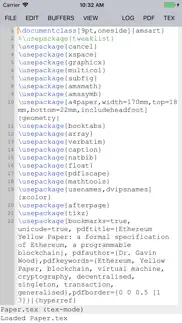
- A text editor designed for LaTeX editing. With syntax highlighting, customizable assistant keyboard, powerful commands.
- Outline view. Works for multi-file project.
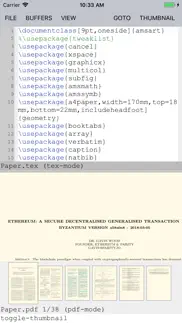
- Side by side PDF preview with auto reload after compilation.
- View source: from PDF to TeX
- TeX-aware spell checking (cmd -> spell)
- Handy customizable assistant keyboard for inserting special characters.
- Open .tex file from other applications
- export & print pdf
- Customizable UI appearance (via twilit.l)
SHARING
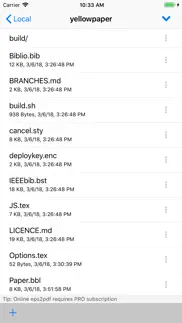
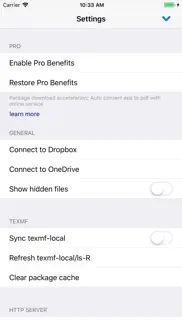
- Dropbox and OneDrive syncing, with file comparison and manual conflict resolution
- WebDAV
- PDF export/email
PRO SUBSCRIPTION
- Package download acceleration;
- Automatic eps-to-pdf conversion with online service;
- Payment will be charged to iTunes Account at confirmation of purchase
• Length of subscription is 1 year
- Subscription automatically renews unless auto-renew is turned off at least 24-hours before the end of the current period
- Account will be charged for renewal within 24-hours prior to the end of the current period, and identify the cost of the renewal
- Subscriptions may be managed by the user and auto-renewal may be turned off by going to the user's Account Settings after purchase
- No cancellation of the current subscription is allowed during active subscription period
- Any unused portion of a free trial period, if offered, will be forfeited when the user purchases a subscription to that publication"
- Privacy and Term of Use: https://apps.texwriter.net/about.html
HOW TO GET HELP
- Visit https://apps.texwriter.net for user guide, and templates for russian, chinese, japanese.
- Email [email protected] to send bug report and feature requests.
- Or directly talk to @litchiedev on Twitter.
😍 Do you love TeX Writer - LaTeX On The Go app? Please share your friends!



Please wait! TeX Writer - LaTeX On The Go app comments loading...
TeX Writer - LaTeX On The Go 6.3.2 Tips, Tricks, Cheats and Rules
What do you think of the TeX Writer - LaTeX On The Go app? Can you share your complaints, experiences, or thoughts about the application with 潮激 李 and other users?


TeX Writer - LaTeX On The Go 6.3.2 Apps Screenshots & Images
TeX Writer - LaTeX On The Go iphone, ipad, apple watch and apple tv screenshot images, pictures.
| Language | English |
| Price | $14.99 |
| Adult Rating | 4+ years and older |
| Current Version | 6.3.2 |
| Play Store | com.litchie.tex-notebook |
| Compatibility | iOS 12.0 or later |
TeX Writer - LaTeX On The Go (Versiyon 6.3.2) Install & Download
The application TeX Writer - LaTeX On The Go was published in the category Productivity on 22 August 2012, Wednesday and was developed by 潮激 李 [Developer ID: 342075158]. This program file size is 89.35 MB. This app has been rated by 113 users and has a rating of 4.0 out of 5. TeX Writer - LaTeX On The Go - Productivity app posted on 26 October 2020, Monday current version is 6.3.2 and works well on iOS 12.0 and higher versions. Google Play ID: com.litchie.tex-notebook. Languages supported by the app:
EN Download & Install Now!| App Name | Score | Comments | Price |
| EPS to PDF Converter Reviews | 1.3 | 12 | Free |
| Write Only Reviews | 3.6 | 14 | Free |
| Write Only 2 Reviews | 2.5 | 4 | $0.99 |
| IDOS 3 Reviews | 4.3 | 51 | $4.99 |
| Golden Ear Reviews | 3.7 | 22 | $4.99 |
- fix bugs
| App Name | Released |
| ChatOn AI - Chat Bot Assistant | 13 January 2023 |
| ChatGPT | 18 May 2023 |
| Link to Windows | 28 February 2023 |
| Ostrich VPN - Proxy Master | 15 March 2021 |
| Smart Home Manager | 23 August 2017 |
Find on this site the customer service details of TeX Writer - LaTeX On The Go. Besides contact details, the page also offers a brief overview of the digital toy company.
| App Name | Released |
| ICalendar | 05 January 2012 |
| Tampermonkey | 18 November 2024 |
| My Contacts Backup Pro | 03 October 2011 |
| Pythonista 3 | 13 June 2016 |
| Pipedata-Plus | 18 October 2015 |
Discover how specific cryptocurrencies work — and get a bit of each crypto to try out for yourself. Coinbase is the easiest place to buy and sell cryptocurrency. Sign up and get started today.
| App Name | Released |
| 06 October 2010 | |
| Snapchat | 13 July 2011 |
| 12 February 2019 | |
| Gmail - Email by Google | 02 November 2011 |
| Target | 24 November 2008 |
Install the Giftmio extension for smart shopping. Get notified about cashback opportunities, activate cashback in one click, and save money on purchases.
| App Name | Released |
| Procreate Pocket | 17 December 2014 |
| Monash FODMAP Diet | 17 December 2012 |
| Shotgun King | 24 February 2026 |
| CloverPit | 17 December 2025 |
| MilGPS | 01 December 2010 |
Each capsule is packed with pure, high-potency nootropic nutrients. No pointless additives. Just 100% natural brainpower. Third-party tested and validated by the Clean Label Project.
Adsterra is the most preferred ad network for those looking for an alternative to AdSense. Adsterra is the ideal choice for new sites with low daily traffic. In order to advertise on the site in Adsterra, like other ad networks, a certain traffic limit, domain age, etc. is required. There are no strict rules.
Keep personal info private, avoid scams, and protect yourself online with AI-powered technology.
TeX Writer - LaTeX On The Go Comments & Reviews 2026
Amazing app. I am not an expert at TeX or LaTeX. I have been aware of and have used is a little for at least thirty years. I have installed several versions on many different machines running many different operating systems. But most of the time I was able to limp along with limite TeX skills. A however when the iPad came into my life and it became apparent that Pages couldn't even display superscripts I started looking around for an alternative. I've found a couple but TeX Writer and TeX Equation are the best by far. I am very impressed by the completeness of the implementation and the number of features available in the editor. I think this is going to become my primary document production system. Also, it seems that the developer is highly responsive to user concerns. I hope this app succeeds, it is badly needed by the mobile technical community. One feature that would be nice would be an option to translate TeX to MathML as well as PDF.
Garbage app. Update: the most recent version put new features to a Pro version, asking for annual subscription fee. A greedy, poor app. The TeXShop on Mac is 1000 times better, and it's completely free! This app is a useless garbage. It used to work at least. Now, the new version doesn't compile any file. It only asks you to pay for a pro version. The developer’s response is not informative at all. The developer strisp off functions of the original version, which I paid for, and then push the user to buy the Pro version. I refuse to pay any Pro version of app. I will just use TeXShop on my Mac, which is completely powerful and completely free. I advise everyone to do the same.
No support. The package developer has completely ceased their internet presence in all ways. This package will probably never be updated. Buy something else.
Lost all my data. So I go to emailthe pdf of my file, and it not only crashes, but any subsequent opening of the app crashes, even after closing the program and restarting my phone. I’ve lost all my work. Deleting the app and reinstalling could delete the local files. My only option is to wait and hope for an update that fixes the issue, and in the meanwhile recreate my paper in a different app. This is the worst possible result. :(
Needs iCloud. It works well enough, including the new version. However, I’m trying to consolidate with just one cloud provider, and iCloud is the one I’ve chosen. It’s odd that iCloud isn’t included in this new version; Dropbox is common enough, but they put in OneDrive before iCloud? Really? I’d also very much like a dark mode. I can use the invert colors feature, but that’s a kludge.
Latest Version is not an Improvement. I have been using this app since its inception. I used to love it, but I agree with another reviewer: its usability has gone down. The new interface is counterintuitive, and my special characters settings are now ignored. I am even having problems pasting figures into the app. It is sad to see an excellent app being destroyed by trying to incorporate new "bells and whistles!" BRING BACK THE EARLIER VERSION. Until that happens, I will be using TeXpad.
Delightful. There weren't many reviews for this app so I was pretty apprehensive to buy it. If it sucked I wouldn't even try to salvage the 10 dollars and just say oh well. There's not much else out there as far as latex apps go, so I decided to just try it. I've been using it for about a week and I'm really happy with it. I really like the custom keyboard. I was literally just complaining about how I have to hit the shift key all the time. Underscores, brackets, carrots, capitals you get the idea. This keyboard has common use keys on The main page and a nifty environment feature so you don't have to type \begin \ end all the time. I love the syncing with Dropbox as my papers were already there. I'll update my review if I come across significant things but so far I'm extremely happy. I will recommend to my fellow grad students at UCSD.
Not much to complain about. The "innovative" selecting feature is a bit strange, but maybe it will become easier and more useful when I get used to it. Other than that, the app is pretty darn good once you figure out where everything is. Definitely a nice app for the monetary equivalent of a Burrito.
Terrible support. The last update broke the Dropbox syncing. So, the app is completely useless to me. Wrote an email to the developer more than a month ago, and a few follow up ones, and haven’t got any replies yet. Essentially, the developer takes your money and provides zero support.
Works OK. The app works OK and with Dropbox you CAN actually get work done on it. I hope there is split screen support for iPad Pro. After all, I imagine a good portion of users of this app have a 12.9'' large screen.
Revised review: very poor interface after update. The new user interface remains clunky and counterintuitive. See original review— I've used several editor-compiler systems for LaTeX and without question TeX Writer is my favorite mobile mathematical document markup application. The interface (editor) is clean and free of the clutter that sometimes plagues full desktop systems. Compiling is done on-board, so there is no need for continuous Internet access. As expected from LaTeX in general, mathematical articles written using TeX Writer are beautifully and professionally typeset. I've not had any issues with journal-specific document classes. All in all, a very solid LaTeX editor-compiler platform.
Though We All Go To Dust, Let Us Chisel a Bit in This Stone. Effective implementation of LaTex.
Works well!. I use LaTeX on my computer, and it's so convenient to have it on my iPad and iPhone 6 Plus as well. It makes me so productive since I can work and make documents anywhere and any time. I love how it integrates with other apps. I use a combined file browser, file server, FTP client app, Documents, and I can move my Tex and PDF files back and forth between the apps. The new text editor is much better than the original and a lot easier to use. The one thing I think would be helpful is have a video tutorial to show us how the app works and explain how to use the features. The app developer is responsive and fixes issues with the app quickly, so if you have problems, don't hesitate to email. I've had some problems before, and they have all been fixed around a week after I reported them.
Best out there. I am amazed at how easy it is to get LaTeX running on a phone. And packages download effortlessly. This program is well done.
Very disappointed. This is a very primitive app. You can’t even navigate to folders elsewhere on the iPad. Go with a free program first and see if it works for you.
Excellent app. Does what it needs to do without fuss and bugs. It is the only app I could find that makes me write latex docs on the phone. Dropbox integration is a lifesaver.
Excellent. I have been using this app for several days now, and so far it seems excellent. I have been able to easily send papers to and from my dropbox account so that I can work on them both on the ipad and from my work and home computers. The interface is spare, but nicely so. I have had no difficulty with any of my packages, and my files have compiled very quickly. The app also works perfectly with my bluetooth keyboard (I have had some sluggishness from other apps in the past). The pdf viewer seems to work well, also. It would be nice to have a dropdown menu with commonly used commands and symbols (like I have in Texstudio and Latexian on my other computers). However, this is a very small thing, as commands are easy to search online. All told, I would highly recommend this app.
Director. The app keeps crashing on my iPad. I lose massive amounts of text even though the safe feature is allegedly automatic. The spell checker goes off on its own. Compiling in the app crashes it and you have to re-install to get it to function again. The synchronization with Dropbox is at best spotty, at worst unpredictable in its selection.
Awesome update 5. This is really good update and I love the split view!
Complete and very usable Latex on the go!. This app rocks - I use it on an iPad Pro and it does all I expected and more. 100+ hours using it. I'm rediscovering cool things I can do with latex. Note to developer: the TeX Writer text selection method is much better than the standard iOS method, for serious editing anyway. Please do not change the app!
Overall works well. UI minimalistic but great to focus on writing. Compilation is fast and split view works well. Works well together with working copy to manage the git.
Full LaTex system in your pocket. I use this app for everything — envelopes, letters, presentations, even my resume.
Works great. Been using it on and off for a few years. Love being able to do my LaTeX work on the iPad
Great app. No need for my laptop any more!
My go-to TeX app. It's skinny, but it's reliable. Perfect for iPad TeX work.
Does what it says. My LaTeX and TeX needs are rather rudimentary. I use it to write long documents, and for that it behaves quite traditionally for me. I like the added integration for other on-line locations such as iCloud and OneDrive. I have occasional pictures in my documents, but not an abundance, so I can't say I've "stress-tested" the app. I do, however, often use TexTastic as an editor when I want dynamic font sizing for the editor. Does what it says. I've not seen it crash and burn on anything.
Good editor, should be clearer that it cannot locally connect to Google Drive. The app works fine for editing and creating documents. I was disappointed it cannot locally connect to the Google Drive app on the iPad. It is a hassle to open a Dropbox account just to be able to work on TeX documents between my iPad and computer.
TeX on the bus. I am a theoretical particle physicist. This app finally allows me to work on my research papers on the long bus ride to/from work. I keep my files in Dropbox with which this app syncs when in the presence of a wireless network. This allows me to seamlessly pick up where I left off on my computer at work and vice versa. A few requests: I would prefer to have Apple's standard selection tools as I am already familiar with them. Perhaps an option in settings where the user chooses which selection tools to use. It would be a huge help if after selecting text, one of the options could be to take me to that position in the PDF. The same feature would be a huge help from the PDF. Pressing and holding on the PDF should give me the option to go to that position in the TeX file. It would be nice to be able to sync with Google Drive as well as Dropbox. Finally, I can't find back tick to create left quotation marks. Keep up the great work!
Most stable Latex app at the moment. This app has allowed me to use my iPad as my primary work gadget. I like the stability of the app, and the fact that it even allows me to customize the editor to my needs. The text selection method may take a little getting used to, and I sometimes have trouble selecting text properly using the Apple Pencil. Also, scrolling on the editor seems to be a little choppy. With the new iPad's Pro Motion technology, I hope the app releases an update to fix this. Two improvements would be great: 1) The ability to see the pdf output side by side with the editor (another TeX app does this, but the other app has stability issues). 2) Being able to access any folder in my dropbox, and not just those in the TeX Writer folder. This makes it easier for me to switch between using my iPad when I am on the move, and my desktop when I am at home. I think with these two updates Tex Writer will be very close to Tex experience on a laptop or a desktop. All in all I highly recommend giving this app a shot!
ugghhhhh!. The lack of user documentation, even of the most basic kind, makes this app useless for me.I should have been able to determine this failing by reading the description of the app. Had I accessed the website mentioned I would have found that the creator of the app is not that interested in providing user info. There are free latex apps that are more user friendly.
Functions well but would like some usability improvements. 1-being able to double tap to select words and triple tap to select lines would be a convenient parallel to computer programs. 2-being able to reduce text size in editor to zoom out and see larger document structure would be great. Thanks!!
Good TeX editor. Works well and has a lot of great features. I just wish it were easier to select text
Everything you need. Awesome app, when you don’t have LaTex on your Mac or Pc.
Good quality Latex compiler for iOS. It was able to compile my research papers effectively, thus making it possible to write on the go using the ipad pro. Other editors had significant difficulty doing this, especially because they were unable to share documents with other applications on the iOS. This editor is able to share documents with other apps, making it easy to synchronize with a git client, for instance. Kudos to the developer for making a great app ! Wishlist : One feature I would like to see is vim bindings in the editor, to make it a complete solution for vim users. Currently, I use Buffer editor to edit the files, and use TEX Writer exclusively to compile. Second, the compile process could be made easier by designating a 'main' file for the project. Currently, the main file needs to be selected a the 'active' buffer in order to compile it. If a different buffer is selected, then there is a compile error.
Very good product, excellent support. This product is an extremely nice implementation of LaTeX for the iPad, and is the only one I’ve found that actually works well for `cloud free’ LaTeX document compiling. Writing documents is easy in the app, and the Dropbox integration works very well. I had a question when first using the App, and the developer responded nearly in real time, making the support another attractive feature. Five Stars!
Magnificent app!. First of full kudos to the developers! Being a theoretical particle physicist who uses his iPad constantly scribbling lecture notes and seminar notes, and calculations into handwriting apps, reading publications on the iPad almost exclusively these days, and performance symbolic computations off-line using some available apps as well as with Wolfram Alpha or a remote login into main machine online, this is an app I have been waiting for for a long stretch of time. finally off-line LaTeX typesetting with figures and PDF output locally on the iPad! The basic functionality is great, I can now basically draft-write whole papers on the iPad alone! Then new find/replace function has its advantages I admit, though that it works differently Apple's standard cross-app implementation, I find sometimes still a bit confusing - but that probably says something more about me than the implementation it self. ;-) Having said this - there is one basic functionality which should be added to the app directly in the next update - because it is ubiquitous in use: - please, support for hyphenation ! This would render the almost perfect then virtually perfect! ;-)
Going downhill. I’ve been using TeX Writer for years now and it seems to be going downhill. Even after writing dozens of documents with it, I still don’t like the current interface. The previous one was much cleaner and more intuitive. Dropbox sync also seems to be getting less reliable (syncing doesn’t alway sync everything and occasionally it just fails). The last few times I’ve tried to work on a document in TeX Writer, I’ve just given up and gone to my laptop.
This app would be perfect if it had auto sync. I have lost lots of work because of the manual sync... this is the worst flaw of the app, you have to remember to sync manuallyall the time otherwise your can lose hours of work.
Excellent app. This is a pleasantly surprising app for me, since I used Tex Touch before and got used to the notion that compilation of TeX/Latex locally is too much for iOS device. This app is fast even compare with desktop setup, and flexible since it downloads missing packages automatically, its ability to use Dropbox directory (although synchronization to directory outside its sandbag is a notorious problem for Dropbox). The current version already support split view of IPad Pro, and work with Apple Smart Keyboard, its support for Pencil is minimal. Overall, with continuing improvement, this app is surely an index-sensible tool for many professional who rely on using TeX/Latex for their writing. The author of the app is very responsive and open to suggestions which is a big plus!
OK, but lacking. I can open and compile TeX files, so the app passes the most basic performance test. However, it falls short in a few areas. 1) The sync to Dropbox is clunky. For one, you have to do it manually. That would be fine, except the sync button is hidden under “open” for some reason. Why not have it on the main interface screen? After finding the sync button, I then spent 15 minutes trying to figure out why only the PDF and not the TeX file synced. Clearly the TeX file is the more important of the two. I had to close the PDF and sync again to get the TeX file to sync. 2) The lack of autocomplete is a hassle - and was a surprise. How could this have been overlooked? I am a professional mathematician and use LaTeX daily. At this point in my life, I know (or can look up) most commands. But autocomplete should be standard and for beginners it is essential. Some positives: 1) There were no issues downloading the needed packages on the fly! (I haven’t tried Tikz yet, though.) 2) I love the split screen; using an iPad Pro 12.9 here and neither page is too small for my taste. Even with the flaws, I’m going to keep using the app when I travel as it is good enough. If/when the sync is fixed to be more user friendly, I’ll update my rating to 3 or 4 stars. If autocomplete is added, I’ll give it 5+.
New version is difficult to use. The previous version, despite the usability nuances, consistently worked to compile LaTeX into a PDF. With the new major release, it’s very difficult to navigate the app and compile on demand. There’s also no user documentation or manual on the website. The user interface changed drastically from the previous version, and now it has lost effectiveness. Right now, the major release is unintuitive and has broken what used to be a functional app. (It’s like having scissors that don’t cut.)
Can not be used.. It is can not be used and there was no instructions. I just want to get refund.
lack of support. There have been no updates for a couple of years and it seems impossible to access documentation on website. What used to be an excellent app no longer is. You used to be able click PDF file to go to relevant place in tex file but this no longer works after a recent IOS update. So sorry that what used to be an excellent app is now so outdated.
Version 4 really improves DropBox support. I use this app a lot to write notes and tutorials for my courses and it has been an invaluable tool for me. For anybody with memories of old implementations of LaTeX on Mac OS (for example OzTeX), the way this app. automatically fetches packages online when needed simply seems magical. The one main weakness for me was the shaky DropBox support. Yes, it worked, but only as long as the DropBox folder was only used to push edits done on the iOS side. Any work done on the macOS side would invariably lead to conflicts that this App was doing a terrible job of solving (pretty much, the only solution was to flush the entire folder). Fortunately, v. 4 seems to have solved virtually all DropBox problems for me. It really works the way it should. Many thanks to the developer. The only remaining minor irritants are that the editor is limited. Yes I know that I can modify the config file to change the presets, but it is somewhat cumbersome. I used to hate the copying mechanism that the developer seems to be very proud of... I just got used to it and it doesn't bother me as much as it used to. Anyway, this is one of a handful of apps that are absolutely essential on my iPad and that I use every day. I Love it!
Clunky interface; no help on ussage; works OK. Don’t do a lot of Latex and anything serious I would do with TexShop on my computer. Tex writer seems to work although I can’t get the minted package to work. My main complaint is if there is any way to start up a fresh tex file from scratch (as in new file) I can’t figure it out. I generally open ivim and do the basics there; write it to my file system on the ipad; and then open it in tex writer. That works but seems like there should be some way to do it all native.
Excellent tex editor. I use this app daily for writing journal articles and a textbook. The automatic package download, dropbox syncing, and ability to use multiple tex sources files works flawlessly. This app actually compiles faster on my iPad Pro than TexShop on my macbook pro from 2015. I don’t love the text selection method since I use the iPad Pro keyboard but assume they will modify that soon in an update.
Save as ... broken?. Version 5.2 seems to have broken “Save as”. When I select “Save as”, enter a new file name, and select “Return”, the app crashes. (iPad Air 2 running iOS 11.3.)
New Version is much better (Updated for Version 5). [Written a few months before Version 5: Although some automatic sync isn’t great, it has much better version control. Incredibly stable and easy to use a wide-variety of packages (I was particularly impressed with how easy it was to make advanced geometric figures with tikz). Very happy I purchased it.] I just recently updated to the Version 5. This was a massive improvement. The automatic sync is still wanting (as in, I need to hit “sync” whenever I think about it in order to sync my documents), but the editor is fantastic. Split view has made this a supremely useable and productive editor for myself. I still prefer TeXStudio on my computer, but on the go this is the best option.
Does what it should.. As a student, my needs are fairly basic as compared to those who might be publishing. Even so, as someone who does a ton of math, this app is perfect.
Re-Link to Dropbox Issues. Very disappointing! Update requires relinking to Dropbox, but this did not go well. Seems to have created another Tex Writer folder inside existing TeX Writer folder. Original was nested witching Apps. Sinking local seems to have issues, too. Really messed my workflow up ... I’m a longtime user. Not good!
Did you know that you can earn 25 USD from our site just by registering? Get $25 for free by joining Payoneer!
Really bad. The beamer doesn't work as expected. So disappointed .... The software needs more works to improve. I felt I dont get what i need for the payment ...
Great app. Now I can edit and view my tex files on the go!
Works fine. Could do with a bit more polish such as better integration with other apps (make it easier to open tex or pdf in other apps and vice versa), text editing is OK, particularly with a keyboard but missing some basics such as search and replace (or maybe this functionality is just too well hidden to find it easily) However the basics of dropbox integration, editing and processing to pdf work well.
Good purchase. A very good LaTex app for iPad. Works well.
Good. Very nice app that adds value to my iPad. Works really well and easy to use.
Very useful. While it's not quite the same as typing on a desktop TeX, it's great to work with. I've written entire maths assignments with it, and there's not really anything on a phone that can produce this quality of output. Excellent product.
Works perfectly, small details still to be sorted out. I love this app - a fully featured LaTeX client. My only complaint is the rather idiosyncratic text selection method - why couldn't have they used the standard selection tool? Also, it wasn't clear how one can export PDFs to apps other than Dropbox e.g. Adobe Reader or iBooks.
Great App!. This is a fantastic app! It compiles on the device meaning that an Internet connection is not required. I've been waiting for something like this for ages! The editor is intuitive and easy to use. Makes typesetting LaTeX on the go a breeze. Overall the best LaTeX app I have used on the iPad. I would say it is the most useful app I have on my iPad. I have written full 50 page reports using this app and it works flawlessly. Very clean. Keep up the good work!
Great App. Works great with Dropbox and Overleaf! Tried many others but this is the best so far. Please introduce a dark mode for this application or different colour schemes for ease viewing. Please auto recompile when saved so that PDF can be viewed as changes are made. Otherwise great work!
Excellent App. Excellent full featured App; all LaTeX writers should experience. Security of knowing all compiling is happening onboard your iOS device. There is no off board server compiling involved at all. This makes the App extremely fast even with large documents and keeps intellectual property secure. Keyboard very intuitive and easy to use. Excellent cut and paste implementation. Excellent file management. I personally haven't come across any LaTeX feature that is missing or not supported.
If you want Tex on your iPad this is definitely the app to get.. The best thing about this app is that it compiles on the device directly. This app is perfect for my studies at university and by syncing my files with Dropbox makes this app invaluable to me. It has a beautifully set out keyboard which allows ease of use with using environments and writing equations.
Nice app that fills a niche. As above
Fills a gap superbly. This is an amazing app. I've been checking in to the App store every now and again, looking for a Tex app that would allow me to work on LaTex documents on my iPad. I was delighted to find this one, and with the prospect of a long flight, a report to write, and a dodgy laptop battery, took the plunge and bought the app. I found the app simple and intuitive to use. I often use the Memoir document class, and asked the developers about support for that. There was a response within the hour, with a solution for me and promise to accommodate Memoir in the next update.
Great app. Great app, does exactly what it is meant to do. Google drive sync would be brilliant though!
What am I missing?. I’m surprised that this app has such a high average rating. I find the user interface so unfriendly as to render the app useless to me. I realise that implementing a LaTeX distribution in iOS is no mean feat, and kudos for trying, but I’m deleting this from my iPad.
Latex on the Ipad. Creation on the Ipad is somewhat of a challeng. However Texmaker does a great job of allowing anyone to create, edit and publish simple Latex files. The limitations in this app are primarily due to the limitations in tablet hardware. Texmaker adds a useful keyboard extension for the most commonly needed Latex characters. Works well with Dropbox too. This app lets me keep writing while I'm in the same room as my other half. Using a tablet in my lap is much simpler than trying to grapple with a laptop. Nice job guys.
Issues with IOS 12.2 beta 2. I’m currently running IOS 12.2 Beta 2, on the iPad Pro 12.9 gen 3 and am having issues, where the application won’t launch. I have tried turning the device off and back on, but the same issue persists. Have not deleted the app and re downloaded to see if that would fix things. This is mainly due to the file structure being stored locally, would then have to copy the files and move elsewhere, then move back. Since this is still in beta, maybe it is something to look into, to see what is making the application incomparable, ensuring all is working in time for the final public release. Have no problems with the app, have been using it on and off over the last year. It has performed as expected and has made producing Latex based pdf’s a breeze when offline. Keep up the great work, look forward to continuing to use this application in the future.
Fits my needs perfectly. The app works quite well and as mentioned in other reviews fills a niche quite well. I would really love it if the developers would work toward auto-completing commands as in PC LaTeX apps.
Excellent!. This app is brilliant: you've saved me the cost of a laptop. Been using it for a few days now and absolutely no problems or instability. The only request I have is command highlighting, but that's minor. Good job.
Imagine you at your best. All the time. Picture yourself at your sharpest and most productive. Your most alert and focused. Your most lucid, creative and confident. At work. At play. In every area of your life. Add Mind Lab Pro® v4.0 to your daily routine and uncap your true potential. Buy Now!
Great tex app for ipad. Works as advertised. Compiles the text files directly on the ipad and I have had no problems when loading modules yet. Recommend it strongly
Great app. This app works great for me. I now spend all my time writing tex on the ipad, and even when I'm without the keyboard it goes fairly fast. I draw in idraw, and upload the figures straight to this app, and that's also great. I can make a few small suggestions: to add the option to flag a row in the source, to add the option to jump from a word in the pdf to the source, and to change the extra keyboard rows when one switches to the number keyboard (so, for example, the plus sign could appear and other useful signs from the third keyboard). But these are really small issues and I am extremely pleased with this app.
Over priced and limited but it works. Pros: it works. Cons: this app has extremely limited features and I found it way over priced.
TeX Writer - LaTeX on the fly. I'm extremely new to using LaTeX as a document editor. I had heard many good things about LaTeX for a long time but never was able to get around to getting it running on my home computers. As a university student I was always on the go and so I began looking for an iOS variation that would suit my needs. TeX Writer was the only app that offered in app compiling. I'm still learning the ropes with LaTeX, but with TeX Writer it won't be hard or take long! Great App! It's not perfect, there seems to still be some functionality issues when using a keyboard, but the developer *seems* to be involved. Time will tell. I'd really like to see this get updated more frequently!
Very nice!. Love it! Works great. With my Bluetooth keyboard, I can really tex on my ipad.
Pretty good for latex but some keyboard issues. The usual keyboard shortcuts that help you navigate a page do not work and the liner wrapping makes arrow keys tricky. If you user a keyboard you are probably used to option+arrow or command+arrow but neither work as expected. Up/down arrows jump lines but lines are wrapped so that entire paragraphs are lines. I often get a little frustrated editing a document. But... it's LaTeX and it works.
Marginally better than TeXpad. Compiling works perfectly, and I've never had a problem with packages or encoding, which is great because I often write in French. The shortcuts for keyboard arrows don't work, probably because of the extended virtual keyboard. Very nice to use with the virtual keyboard, ok with a physical one. The file manager is not very nice to use, but the Dropbox sync feature is very useful. Please let this app never stop being maintained.
Limited sync support and function errors. I was suggested by a youtuber to use this app on my ipad pro. However, the experience is not as good as introduced. In summary, I don’t think this is a so-called productive app. 1. cmd + F: you cannot continuously start a new word searching after the previous one in the same input line. 2. bad sync support: onedrive is not enough for most of the people. 3. bad local project support: you cannot import a folder or a project into this app. Sharing the latex file seems also impossible. 4. this app has not been updated for more that one year and the mail sent to the developer has no response. 5. unknown errors happened: lipsum.ltd not found. But the same latex file could be compiled by another ipados app. I WOULD LIKE TO HAVE A REFUND!
Very Good Product. I tried this software by composing one of my technical report, which contains equations and figures. I am very satisfied with the software, especially the DropBox sync. and PDF preview functions. I wish the software can be further improved in figure including function: for now, the figures that users want to insert their documents are saved in photo app. I hope Tex Writer can allow users to save their figures independently in a sub-folder of the folder where the .tex files are saved. Anyway, this is a very good product to me.
local compiling. The remarkable thing about this app is that it does compile tex locally. For now, adding additional packages is clumsy and does not always work.... but for standard amslatex + pdf graphics it works and is very fast. I use it to write short documents on the go, without the use of my laptop. Highly recommended ! With a few improvements (better package+ file management, better editor etc) it will be a must have app for any scientist with an iPad.
Very nice app, but lacks that final touch. The one feature that’s missing is being able to navigate between the tex and the pdf (e.g. click on the tex to get to the same part in the PDF and vice-versa). Other than that, I do a lot of writing on my phone and on my iPad using this app, and it’s been wonderful so far.
Clean interface, solid performance. Never had an issue with this app. Very easy to use.
Awesome!. A tiny self-contained TeX/LaTeX distribution, bundled with very good text editor and PDF viewer. And a Beamer class! And Dropbox sync! Awesome, what else is there to say... Rays of happiness and sunshine to developers!
Great app. First of all, I'd like to note that this app does actually compile locally on your device without any internet connection or any connection to some compiling server. It comes with basic packages, but the app dev provides a detailed description of how to install custom packages, and it works just fine (for most parts). As for font, it actually is a challenge for non-expert users such as myself, exactly as described by the app dev. To note is how well the app actually works on a mobile device!!! Also, the communication with app dev is excellent. They provide you with all the help required and are pretty quick in responding. I would definitely recommend this app for those who'd like to write or edit tex on the go, and would like to compile locally to visualize their document. Definitely worth investing 10$ for those who are willing.
Awesome. The debug log could be a bit more clear, but other than that I would give it 5stars!
Good, but still need improvements. Other than the lack of support of using an external keyboard and TextExpander. The app is great for making edits on the fly or writing the first draft to a latex document.
This is a piece of junk.. I bought this app as it said it can link to Dropbox, however every time I do it it simply crashed. I tried to get a refund right away, NO they didn't allow you to get anything back, it's simply a set-up. Don't make the mistake I made, don't give a chance to cheaters.
Wonderful app. This is a wonderful app for writing tex documents. I was particularly impressed by its small size and integration of styles for writing papers for mathematical journals. I would highly recommend this. Great job... Keep going
Beautiful App. This is a very useful and powerful app. It brings me one step closer to my dream of turning my i device into a linux machine. PS - Please add Emacs short cuts.
Very Useful App. I have found this to be a very useful application. My LaTeX needs are modest but are completely met by this app. Dropbox synchronization works well for me.
A Wonderful App. This is a great app for those people who would like to have a LaTeX editor installed on their Ipad. I strongly recommend having a keyboard as well. I use LogiTech slim Ipad keyboard.
Good and getting better. I bought this app early on after exchanging emails with the developer. First, this app works. I have managed to tex documents even using revtex. While this app is still too cumbersome to probably do any major writing, the developer has been making some great updates that have significantly improved the app. I recommend this app for anyone that foresees themselves wanting to make changes to an already typed paper when they are at a conference or the such.
Quite good, but could use a few extra simple features.... I really like this LaTeX app. It has a nice clean interface and it is very simple to organize and compile files. It would be nice to be able to rename folders. What it would be REALLY NICE is to have Google Drive support for file syncing. Keep up the good work, and keep the updates coming!
Works beautifully. Compiling offline, seamless synching with Dropbox allowing me to continue to work on documents I started on my desktop, possibility to add new packages, transparent display of the compile logs makes it easy to debug. Great job! The price? Well, some people think that any app over $0.99 on iOS is expensive. On the other hand, few people care about paying $5-7 for a lunch, a one off. Question: How much is the convenience of this app worth to you? How much is your time worth? If you are a TeX user, this app is a must have.
not bad. Needs more background colors to distinguish the math functions. However, not bad at all.
good start, needs a few things. -was immediately productive, with limited previous Latex experience. -editor is missing find & replace; author responded & promises it's coming
Adsterra is the most preferred ad network for those looking for an alternative to AdSense. Adsterra is the ideal choice for new sites with low daily traffic. In order to advertise on the site in Adsterra, like other ad networks, a certain traffic limit, domain age, etc. is required. There are no strict rules. Sign up!
One of the best apps. This is the last missing piece I needed to use my iPad Pro as my daily driver to replace my laptop. Now I can pretty much do everything I need to do on my iPad Pro. This app is very well designed and functioning rather smoothly. I haven't had any issues with it. One great feature that could be added is iCloud syncing, or at least file sharing between iCloud Drive. Hope to see that in later updates.
Best LaTeX so far. The ability to render the LaTeX on the iPad without using a separate computer sets this app apart. TeX Writer also has some built-in TeX formatting commands that it recognizes. Package recognition and Dropbox integration are good even though they could be improved. What would make this a five-star app would be in-line recognition and auto-completion of TeX and/or LaTeX commands. The Windows/OSX app TeX Maker shows the way and greatly speeds up TeX writing. Another great feature would be the ability for side-by-side TeX source and PDF render in landscape mode. Both would be small, but for those with young eyes it would make writing much easier.
Convenient, Limited. Have been able to work on most classes of documents, very convenient. Dropbox integration - even better. For me, well worth the money, allows me to work on projects on idle time. Cannot select text as you would in all other iOS applications. Hold ctrl + shift and an arrow to select a line. Being indiscriminate, this is an imperfect substitute. Also, does not actively keep track of each pair of delimiters as does an editor like TeXworks, which is a very convenient feature when writing very long/complex mathematical expressions.
Super useful. This app is easy to use and surprisingly functional for an iOS app. An especially nice surprise is the ability to copy and paste certain images from elsewhere, which are automatically added to the .tex file's folder with the appropriate \includegraphics command inserted into the text. Linking to Dropbox makes it easy to pick up from where I left off at the desktop. A couple of requests for updates: (1) The \graphicspath command does not seem to work; instead I had to specify the subfolder at each \includegraphics command. (2) When searching the document using "find", search strings starting with backslash \ didn't work.
Very useful, but some quirks. This is a great app... I've gotten a lot of use out of it. There are a couple of issues though. First, eps images are not supported. Also, when used with an external keyboard, the up and down arrow keys behave in a rather annoying way. Instead of moving between displayed (wrapped) lines of text, they move between input lines. So if a paragraph is a single line in the .tex file, up arrow moves to the top of the paragraph, not the next line up as usual. This gets frustrating rather quickly...
Works well for working while mobile. Despite the occasional crash when generating a PDF, the app does what it advertises. It works well as an app where changes and additions to a document can be made while away from a desktop install of TeX. The only real negative I see is navigating through a file and trying to insert text within a particular line. That could take several tries and becomes annoying when in a hurry.
Works. Syncing with Dropbox was easy. I appreciate that I don't need an internet connection to compile. The interface is simple and intuitive. So far, everything has worked normally except for the centernot package. Selecting text to copy and paste is difficult and frustrating. I wish that text in math mode appeared in a different color in the editor.
Tex on my ipad mini, no problem. It took some time to fine tune it, but it works. Since I installed it 1.5 months ago, I've written a scientific article and a 50,000 word novel. I also edit my students' tex files on it. Naturally, much of the fine tuning happens on the desktop, but all the writing took place on the mini. It's not bullet proof, but it has turned me into a fairly full time tex user.
Made my office portable again.. A great app. I am not a Latex power user, but I do rely on it daily for writing and formalizations. I work on a MacBook Pro at home and an iPad Pro on the go. I occasionally fix typos from my iPhone 6. The drop box integration and reliability of the compiler and text editor have made keeping my devices in sync an effortless task. I now worry less about how a I work and more about just working.
All You Need for Mobile Writing. I usually use MikTex on Windows PC. This app is compatible with MikTex documents and packages so far as I experienced. I can edit and compile tex files into pdf documents everywhere. It automatically syncs all documents with Dropbox under the specific directory. Keep seamless working on iPad, iPhone and PC. You can edit your documents on toilet time, waiting time, illness time, bus time, and so on. You can finish your homework/thesis/dissertation on bed.
Fully reliable and capable LaTex on IOS. It works every time, even downloads esoteric packages. Even after using it for several months I still do not like the goofy text selection function. It might be better than the IOS standard...but any potential benefit is outweighed by the fact that no other program uses this goofy technique. Please remove it or at least make it user selectable! Can't wait for a standard, inline autocomplete function. If Tex Pad allowed spaces in file names then TexWriter would lose its status as #1 in my opinion...unless you address the select function and implement auto-complete.
Great potential, but serious syncing problem. I really liked this app because it enabled me to edit papers on my iPad when offline, primarily on planes. During a recent trans-Atlantic plane flight, I did just this. However, when I returned home and connected to the internet, my edited version was not synced via the allegedly supported Dropbox functionality. Instead, the pre-flight version was synced to my iPad, and I lost hours of work. This is unacceptable, especially given the rather high price of is app. I would have given the app 4 stars prior to this experience, but this very significant failure made me lose all confidence in the app.
Great for writing on the go!!. I am a graduate student and IT consultant. I often travel and have to take my research with me. TeX Writer makes it possible to write or edit papers pretty much anywhere. This software was the last piece of the puzzle for me. I have an iPad with a BT keyboard. TeX Writer gives me the ability to get far more substantive work accomplished than the multi-step solution I used previously. It just does what it says it will do. Well done!
Very good. I like this app a lot. there are some things that I wish were different. I have most of my .tex files on dropbox, I would have liked to be able to access those files there and edit them. what happens now is that the app makes a copy of it and then when I'm done editing it I have replace the old file with the new file.
Excellent LaTeX App. Short and to the point: this app has been more than sufficient to allow me to write a technical book on my iPad from my DropBox account. It is self contained and quite user friendly. I would have given it five stars if it had cross probing to allow one to easily find locations in the tex file from the output pdf file and vice versa...perhaps this might get included in a version of the app for the new iPad professional.
The best latex app. If you're a frequent latex writer you'll know that right use of the arrow keys simplify you tons of work. This app attacks this situation with a custom made keyboard for easy latex text input and navigation around the interface. Also it has it's own select,copy and paste system which makes it easier to work with large documents. I think apple washouts implement some of the functionalities that this app offers. Great application.
pretty good. I purchased this app with the hopes that I could forgo a new computer entirely and work directly from my iPad. I suppose I don't know exactly what I was expecting (in my heart of hearts I suppose I was hoping for something as completely functional as a desktop) and while it's not as functional as a desktop given the restrictions they did a really good job. I've found the lack of mouse to be a complete non-issue in fact when I switch to a desktop now I almost always try to touch the screen rather than go for the mouse. And as a very remarkable aspect the program will go and install packages for you! The rest of the program is remarkably functional, it may take a few head scratches to make the switch over, but nothing too crazy. If I have complaints, and I have two it's that the file storage system is a bit clunky and difficult to navigate (plus no way to save templates that I can see) and while there is a spell checker it only has the ability to tell you you're wrong, not give possible suggestions. Overall quite pleased.
I'm in Love with this App!. I really love TexWriter on the iPad, especially with my LogiTech Bluetooth keyboard. My book has 21 files (chapters), over 125 pages, and a bunch of .png images, stored in a separate folder from the .tex files. I'm also using a bunch of style files and am blown away by how easily TexWriter just gobbles them all up and produces the beautiful text that I've grown to love with LaTeX. And, btw, TexWriter typesets my book very fast on my iPhone Plus! I love the app.
Great app so far. I've used it only for light editing and capturing ideas while on the road. That said, it compiles quickly and natively (i.e., offline). Totally worth it. Haven't tried the dropbox integration, mostly because I don't want to get my hopes up that it would handle "normal workload" types of LaTeX documents with multiple esoteric style files. But, to be honest, I think this might be a good thing: I don't want my iPad/iPhone (yes, it compiles LaTeX natively on my iPhone 4) to be my main editing workstation. Sometimes it's good to be constrained.
Works Perfect Off Line. This is an excellent piece of work. See how I appreciate it. I have been looking for a portable LaTex editor that can be workable even when our cloud service is not available overseas like in China. I am an old dead wood professor in EECS that gives infrequent lectures overseas. I set up lecture notes before the travel and want to modifications and additions on the go. On the spot I upload them on their WEB site. Now I can do all with iPAD Pro with the keyboard and the pencil. Multitask works fine. I also use flash memory with USB and lightening connection. My materials can be transferred to TA's PC there and they take care of uploading part. On thing I noticed is that we have to use the right PDF reader including Tex Writer. The file is sometimes not viewable by other apps although the data is not corrupted.
Perfect addition to Dropbox latex. I store all of my latex files in drop box, so the fact that this syncs with my Dropbox giving me the ability to use latex On the bus, train and anywhere else I happen to be is a dream! I love this program and highly recommend it to anyone that uses latex regularly. :-) thank you for this program!
Great Program. I have used a few other Tex programs, on my iPad, and this one is, so far, the best one that I have used. It is very easy to use and the outputs are clean. However, the only drawback is that it is not very intuitive when it comes to importing images and exporting files. After a Google search, I was able to find the answers to these questions. Great app, can't wait to see what else is in store!
Amazing!. I never thought that I would find a stand-alone LaTeX app for iOS, but here it is. I have had no problems compiling my documents. I have successfully compiled documents with PicTeX in article, report, book, and memoir document classes! It downloads any missing packages on the fly. I love it. In terms of how much I use it, this app is in the top 5% of all apps on my iPad.
Very useful. I came in with low expectations for how usable this would be and whether it would have latex packages that I need. It has turned out to be very helpful. I give talk presentations from PDF slides generated in latex (I know, I know, but I need the equations). This app has really saved me when I needed to work on my talk on an airplane on the way to a meeting, and there was no way I could use my laptop in my coach seat.
Mostly excellent!. Does what it's supposed to! Only small gripe: I've had compatibility issues with .tex files that I created using the app, modified using another editor on my laptop, and imported back into this app. For some reason the entire body of my text started showing up as a single line of tex writing within the app, which causes many problems. (The body of text showed up as a single latex line (line number 84) even though the app clearly registered the fact that what it counted as a single tex line in fact contained very many lines of writing - showing up as over 300 latex lines on other editors.))
Handy. As a math grad student, this thing is really handy. I can leave my computer at home and wrtie stuff up at a cafe or library or whereever. It's also great for taking notes in a seminar or class. This won't replace your favorite way write LaTex, but it is compatible with your other LaTeX program using DropBox (maybe other methods too, I haven't tried) and will definitely give you greater flexibility. Get this for sure.
excellent!. I am delighted with this product. Thanks in part to TeX Writer, I can just take my iPad to conferences and leave my (comparatively) bulky laptop at home! My only complaint is: it would be nice to have the capability to rename files. As it is, I have to copy-paste all the text into a new file. Otherwise, I highly recommend it.
My favorite app ever!. I am a math student, and it's so exciting that I can finally type/compile/sync my TeX files all on the iPad! Works super well with Dropbox, compiles well, never had any problems with symbols that I've needed (i.e. packages are either all installed or auto-downloaded). The interface is simple and feels exactly like what I would have expected a TeX program on the iPad to be like. So useful!
So far, so good. I haven't used tex or latex in over 2 decades in favor of equation editor with MS word. I hadn't found an app that let me work on my iPad with any form of sophisticated document preparation. What I'm getting out of TeXWriter so far is very promising. As a platform for re-learning TeX, I've been quite pleased. Some integrated spell checking would be nice. I haven't tried to embed any images yet so we'll see how that goes.
Amazing TeX support. On the one hand I'm amazed that I can use all kinds of TeX packages including TikZ for diagrams and everything works just fine. It runs reasonably fast too. On the other hand the editor is a bit quirky. Selection for copy and paste is plain weird and things don't seem to be well integrated with the Smart keyboard so I keep having to touch the screen. It'd be nice if the error log could take me straight to my errors but I'm not sure the design of TeX makes that easy.
Exactly what I need to write papers on the road. Combining this app with the Logitech thinline keyboard cover for my iPad and I really don't have any reason to take my bulky laptop with me any longer. This app works perfectly for writing papers using the IEEEtran style (built in). The integration with Drop Box also allows me to seamlessly work between my home computer and my iPad. This is turning into my most-used productivity app.
Flawless. Several years ago I got Tex Touch for my iPad. I was happy with it, but then a while ago it just quit working. (I guess it was never updated to more recent IOS updates?) Anyway, I finally got around to getting a new latex compiler for my iPad. I cannot believe how smoothly and intuitively Tex Write works. It compiles smoothly. It works well with drop box. It even allows me to make folders to organize my documents and it was all easy to figure out. I haven't been happier with an app yet. Great product! Update some time later: Still incredibly happy with Tex Write.
Easiest TeX I have used. This standalone LaTeX editor and viewer is the best I have used, at least in part because it is completely self-sufficient. Support for a Bluetooth keyboard is ok, but lacks some Mac-standard shortcuts. With Dropbox support, I can bypass that and edit on my Mac while compiling on the iPad. The auto-fetch packages feature is pretty cool, too.
Not perfect but excellent. From my Mac, I use the TexShop application for writing technical documents placing the documents in Dropbox. This app could not be more convenient when on the go. There does seem to be a difference between the documents this app can handle and what TexShop can handle. This app is less forgiving for some reason. For readability, I like to separate command parameters with spaces. This seems okay with most of this, but there seems to be some commands that result in errors. These are hard to track down because the error output is not specific. One change to this app I consider a must. Unless there is a configuration setting which I have not set, the editor does not make it easy to locate where the "cursor" focus is. Instead of using the Apple standard of a magnifier, it places a blue horizontal line in the area of focus and it is impossible to be sure the insertion focus is located where it is wanted. Where the app should be updated is in setting the app's configurations. It should be done through screens in the app, rather than in configuration files.
Three Cheers. This app merits its stellar reviews due to its amazing ease of use and full functionality for TeX on iPad. I agree with the pleas for improvement of cut and paste and autocorrect, but in perspective such pleas indirectly indicate how good the app is for use in traveling light. Dropbox syncing worked perfectly for me, but the negative experience of one reviewer is a bit worrisome.
Best TeX app on the market. This supports editing and PDF preview, and can integrate with Dropbox, which is a useful idea (I've yet to explore that so read others' reviews for that). There are a couple idiosyncrasies to the user interface but you'll get used to it quickly. Worth the ten bucks for when you want to mess with math on the go.
Does exactly what it claims it does. The app does exactly what it claims it does in the description. The two main feature that warrants the price on the apps are (1) downloads all necessary packages and (2) syncs with Dropbox. An Apps>TexWriter folder appears in the Dropbox when you sync the app with Dropbox and any files in this folder is accessible and auto syncs flawlessly.
Very nice interface, might improve Cloud usage. This is a very well-thought program. The one issue I 'm facing is that it doesn't sync well with Dropbox except one way (if I modify files in TexWriter all is well, but if I modify files in my Dropbox folder on my desktop then TexWriter doesn't see the changes). Also, integration with other cloud services like OneDrive,iCloud, Google Drive etc. would be nice.
No computer, no problem. A month ago, my new PC broke and I was left without a TeX application. TeX Writer allowed me to easily write, format and refine my senior thesis and two talks I've given recently, and I was able to do so from the comfort of, well, anywhere. Fantastic app, would recommend, 12/10 would download again, etc etc get this.
A good start. This app fills a tremendous need, and for that I thank you. If this app were 2 bucks then I'd have less complaints but for the 8 dollar price tag I expect some improvements. The general look and feel is fine but the text editor needs significant work. It does not conform to IOS U/I text editor standards and exhibits confusing and unexpected behavior. Navigation is slow and clunky, and the swapping of commands to search or undo etc. reminds me of VI or Emacs, not IOS. In spite of that the rest of the app-so far seems great, the preview function works very well, and the document organization is sufficient. Keep the updates coming and you'll have yourself a great product.
Similar problems to Texpad, not suitable for iPad Pro. There's no side-by-side of the PDF and latex. Switching to the PDF viewer (and finding where you were, and finding the right zoom) is very clumsy. One place Texpad is better is supporting multi-file documents well. In TeX Writer, I must navigate (manually) to the "root" document to be able to build successfully. The outline on the left sidebar doesn't see inside "\input"s of other sections. If I (again, manually) open one of the sub-documents, then I can't build. I can't even open the previously built PDF directly from that sub-document, because it isn't associated. Also, I really like the shortcut buttons along the bottom of the screen. It's useful, but the command-autocomplete that Texpad supports may be useful in combination with these point-and-press buttons. On the plus side, the dictionary and package auto installation worked smoothly, and the first document I tested did build successfully.
Perfect for a mathematician. This app is exactly what a mathematician needs. True, both the editor and the available packages are somewhat limited, but one cannot expect a full LaTeX installation with Emacs.... What you get is easy to use, quite clear and reasonably complete. I Got a wireless keyboard for my iPad and do not need a laptop anymore....
The best LaTeX app on the iPad. This is a fabulous piece of software. It is an easy to use app to compile LaTeX files to produce beautiful output. As an academic, I've been using LaTeX for over 25 years. It is the dominant word processing system in science and engineerng. This app makes it easy to edit and create LaTeX files on your iPad. Just load the entire project into the Apps folder on your Dropbox and import into TeXWriter. It works silently, and flawlessly! The editor could use some more polish. I found it a bit awkward at times, as it moves the screen at times unpredictably. But, this is a small critique.
Enormously useful. Although I use TexMaker on my desktop as my primary TeX editior/compiler, TeX Writer had proven enormously useful. The Dropbox sync feature allows me to organize all my documents between TexMaker and TeX Writer. This product has the limitations of any mobile text editor (too few keys per screen, etc.) however, it compensates in some unique ways, text selection in particular. highly recommend as a secondary editor you can access anywhere.
Excellent app, easy to use.. I installed this app because I was asked to write a scientific article for an at-home experiment that I performed regarding Europa's salt content and structure of its ice. This was my first time ever writing something in TeX format, and I was impressed with this app as far as the versatility and ease of use. I was able to write my article within a couple of days and wrote a subsequent article within the week. Great app, well laid out, the DropBox feature is great, and I'm very glad I purchased it.
A lifesaver. This app is the best and only thing you need to capture a research idea when traveling, or otherwise for working on latex when taking out a laptop doesn't seem like a good idea. It has helped me be productive at times when I would just be frustrated before. Thank you to the developer, and I hope that this remains supported and developed over the years.
Just one thing.... This app is a big step forward and a possible dream come true: finnaly I am able to write math papers on my device. It is a feature all mathematicians with Ipads have been looking for. What is needed to be added to this great app is bassicly one thing: please make adding created tex files as email attachments possible! I dont want use dropbox. After writing a paper the thing you always do is sending your paper via email somewhere. So please add this feature.
Fantastic product. Excellent. No complaints whatsoever. As a math professor and researcher, I use Tex a lot to write papers and homework. It's great to be able to do so on the go, from the lightweight ipad mini. Compiling time is fast and you don't need to be connected in any way to your main computer, which makes this app better than the other available tex writers.
Quite an achievement already!. I really feel I invested $9! TeXWriter is nearly there... I could generate great pdf but the graphic package is not complete and you cannot crop pdf easily on the ipad. The \figure doesn't seem to be there. But i see the graph when I compile it and in latex this is remarkable! The graph is just not croppable on the ipad using keynote, iphoto or latex (trim command in \includegraphics is not working). But great work so far by the programmers!
Best Document Rendering System EVER!. If you haven't used LaTeX before this will take some getting used to. And, if you've been using Word for the last 40 years, maybe this isn't for you. If you're willing to get used to the interface it's great. This is especially useful for allowing contributions from multiple writers and editing mathematical equations. I've been using LaTeX for many years now and I was able to port all of my old LaTeX files over with a minimal amount of fuss.