My Contacts Backup Pro App Reviews
My Contacts Backup Pro App Description & Overview
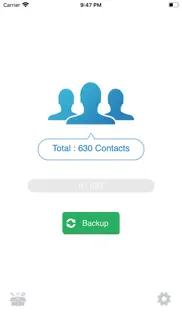
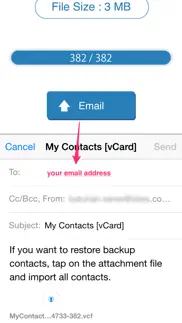
What is my contacts backup pro app? My Contacts Backup Pro is the easiest way to backup and restore your contacts all from your phone without needing a computer or synchronization. You can backup all your contacts with a single touch and send it to yourself as a .vcf attachment via email.
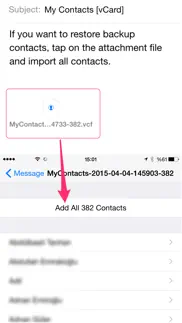
All contacts can then easily be restored any time by simply opening the .vcf file in your mailbox.
Key Features:
* Offline Backup. No need to sync to any server. Just email the backup file to yourself.
* Easy restore. No need to use any app to restore backup file. Just tap on the *.vcf backup file in the iPhone, iPod Touch or iPad mail client.
* Easily transfer contacts between iOS Devices using just an email client.
* Edit contacts (update, delete, add) using Wi-Fi Manager option via browser on your computer.
* Save vCard (VCF) backup file to your computer or upload from your computer via Wi-Fi Manager feature.
* In App vCard Restore
* Dropbox Support
* Remove identical or duplicate contacts.
* Export your contacts in the form of multiple vCard files.
* Save backup file to your computer via iTunes File Sharing feature.
* Set REMINDER to backup regularly (weekly or monthly)
* Backup Contacts as VCF (VCard) or Export Contacts as CSV (Excel) file
* Delete All Contacts in Address Book
* No ads.
----------
IMPORTANT NOTE: After sending backup file (*.vcf) to yourself, please check your inbox to sees if message arrived and contains attachment (backup file). Sometimes email providers block attachments if attachment size is too large. Try with another mail account if possible, to send your backup file. Or save backup file to your computer via Wi-Fi Download option..
😍 Do you love My Contacts Backup Pro app? Please share your friends!



Please wait! My Contacts Backup Pro app comments loading...
My Contacts Backup Pro 2.2.3 Tips, Tricks, Cheats and Rules
What do you think of the My Contacts Backup Pro app? Can you share your complaints, experiences, or thoughts about the application with GLOBILE BILISIM BILGISAYAR HIZMETLERI ILETISIM DANISMANLIK SANAYI TICARET LIMITED SIRKETI and other users?
My Contacts Backup Pro 2.2.3 Apps Screenshots & Images
My Contacts Backup Pro iphone, ipad, apple watch and apple tv screenshot images, pictures.
| Language | English |
| Price | $2.99 |
| Adult Rating | 4+ years and older |
| Current Version | 2.2.3 |
| Play Store | com.globile.ios.MyContactsBackupPro |
| Compatibility | iOS 9.0 or later |
My Contacts Backup Pro (Versiyon 2.2.3) Install & Download
The application My Contacts Backup Pro was published in the category Productivity on 03 October 2011, Monday and was developed by GLOBILE BILISIM BILGISAYAR HIZMETLERI ILETISIM DANISMANLIK SANAYI TICARET LIMITED SIRKETI [Developer ID: 446784596]. This program file size is 36.92 MB. This app has been rated by 8,813 users and has a rating of 4.7 out of 5. My Contacts Backup Pro - Productivity app posted on 23 August 2020, Sunday current version is 2.2.3 and works well on iOS 9.0 and higher versions. Google Play ID: com.globile.ios.MyContactsBackupPro. Languages supported by the app:
AF CA HR CS DA NL EN FI FR DE EL HU ID IT JA KO LT MS NB PL PT RO RU ZH SK ES SV TH ZH TR UK VI Download & Install Now!| App Name | Score | Comments | Price |
| Dama - Turkish Checkers Reviews | 4.4 | 621 | Free |
| My Contacts Backup Reviews | 4.5 | 10,033 | Free |
| 66 - Sixty Six Reviews | 4.3 | 81 | Free |
| My Voice Recorder Reviews | 4.2 | 5 | Free |
| Okey Rummy Reviews | 4.3 | 36 | Free |
* Minor bugfixes
| App Name | Released |
| Microsoft Outlook | 28 January 2015 |
| Microsoft Word | 27 March 2014 |
| Google Gemini | 13 November 2024 |
| Google Drive | 28 June 2012 |
| Google Sheets | 30 April 2014 |
Find on this site the customer service details of My Contacts Backup Pro. Besides contact details, the page also offers a brief overview of the digital toy company.
| App Name | Released |
| MobileFamilyTree 11 | 27 January 2025 |
| IFacialMocap | 13 January 2020 |
| ICalendar | 05 January 2012 |
| Oilfield Calendar | 18 April 2014 |
| Sign Up by SignUp.com | 19 July 2013 |
Discover how specific cryptocurrencies work — and get a bit of each crypto to try out for yourself. Coinbase is the easiest place to buy and sell cryptocurrency. Sign up and get started today.
| App Name | Released |
| Google Maps | 12 December 2012 |
| 07 April 2016 | |
| Gas | 27 August 2022 |
| Gmail - Email by Google | 02 November 2011 |
| Hive Social | 18 October 2019 |
Install the Giftmio extension for smart shopping. Get notified about cashback opportunities, activate cashback in one click, and save money on purchases.
| App Name | Released |
| CloverPit | 17 December 2025 |
| Gambonanza | 01 May 2026 |
| RadarScope | 12 February 2019 |
| Monash FODMAP Diet | 17 December 2012 |
| Subnautica | 08 July 2025 |
Each capsule is packed with pure, high-potency nootropic nutrients. No pointless additives. Just 100% natural brainpower. Third-party tested and validated by the Clean Label Project.
Adsterra is the most preferred ad network for those looking for an alternative to AdSense. Adsterra is the ideal choice for new sites with low daily traffic. In order to advertise on the site in Adsterra, like other ad networks, a certain traffic limit, domain age, etc. is required. There are no strict rules.
Keep personal info private, avoid scams, and protect yourself online with AI-powered technology.
My Contacts Backup Pro Comments & Reviews 2026
Quick & Easy. This has been one of the best ways I have found to export my contacts. Quick, easy, and exactly what I was looking for.
Not large enough. I do have a lot of contacts on my phone...or do I? A little over 1200? I have clients as well as personal contacts.... but I’m forced to use Pro because of that and THEN it can’t keep the pictures attached to each contact because it’s still too large. Love the idea and I love the ability to have the additional security of knowing my contacts are saved just in case.... but I wish I could save all the contact info including the pic. I have the pic of my clients to remember who they are at a glance so it’s not just for fun. Hopefully I won’t ever have to use this backup but I’m glad it’s here just in case.
Disappointed. I know I only paid $1.99 for this app but it doesn't work. When I export as either a CSV or VCF file it is always received as a VCF file. I managed to get the CSV version from the server setting but the file is garbage. Instead of 1741 rows and the necessary columns I get 4 rows and a 1741 columns. Obviously not useful. In fact it wasted not only my money but more importantly my time.
Thank you for providing peace of mind!. EVERY MONTH you remind me to backup and it takes just a minute or two to do so and email myself the flat file. While I still backup in iTunes, this is a great way to make things belt and suspenders. Thanks again!
Absolutely Great. I wanted to copy all of my iphone contacts to my Macbook. It worked in exactly one minute. It couldn’t be better!
Great app, simple to use.. This is a really intuitive application that works well. I have used it for job transitions and moving contacts from one phone to another. Highly recommend.
Definitely worth it. This app works as promised. I periodically use it to back up and save all my phone contacts - A necessity since I no longer use paper and just enter all contacts into my phone.
Just plain works. Allows you to to send back up vCard and CSV of your phone contacts to another device for peace of mind backups. It does this one simple job with no complications. Since it is so simple you are more likely to do routine backups.. which you might not do with a more complicated backup. This feature is pure gold. Highly recommended!
Essential App. Having lost a huge number of contacts once, I vowed never again to let this happen. Using this app has since saved my neck as the next time a calamity occurred I was able to reinstall my contacts quickly. Very highly recommended!
Created duplicatea. Be careful. This app created duplicates of existing contact as it seems to merge the new file contacts with existing file contact. I now have 3-6 of the same number listed for each contact🙄 Purchased the pro version to remove “duplicate contacts” and it just looks for duplicate contacts that haven’t been merged yet, while overlooking the duplicates it creates within each contact. Hope this helps someone.
Better all the time. This app has been significantly improved and provides an easy interface to keep contacts backed up. I email the backup directly to my Dropbox account so it is safe.
The best back up on IOS. I have been using this since 2016 and it had never failed me before, it lets you back up on any device and contacts and names appear same, the only downside is the file may be too big for pictures, but all the same this is a 5 star app.. I highly recommend it for everyone, Tried and trusted
Simply the easiest iPhone contacts solution. Backing-up my iPhone contacts has never been easier. I’m no longer worried about losing my contacts . I can retrieve my contacts in seconds from my email .
Contact Notes are not getting backed up.. In the Pro Version 2.2.2, the Notes field is not getting backed up. I checked the settings and the Notes field is turned on. In version 2.2.1 everything was working fine, the Notes field was getting backed up. Five stars for version 2.2.1. Please help.
Backup. When I try to backup file for windows, it neither email the zipped file nor it uploads to drop. Also the file does not show up in the backup on the device. Someone needs to fix the issues soon
To tech support. I have tried this apps and email my contact to myself but then it prevent me from receiving Emails from anybody else that don’t recognize the sender pls help
Alphabetical order does not exist anymore. I used to love this app , now I hate it I used to have the backup in alphabetical order ... now it’s hard to find a name , plz update and bring it back with the alphabetical order like it was before ... or is it an iPhone iOS 11 problem ????
Best app. I been using this over a year and I have never have any issue with unlike other apps, very easy to use
It Works !!. After each backup, the full Contact list can be emailed to you. It was very easy to Restore my Contacts after accidentally deleting them. (Didn’t think ‘hiding’ them meant they’d disappear!) Lifesaver!
Lifesaving app!. I first bought this app to transfer contacts to a new phone, and it works great for that. But it also reminds me to backup contacts regularly in case my phone is lost or destroyed. After hearing sad tales from friends about how they lost all their contacts, I tell them about this essential app! Great stuff....
Amazing!!!. When I deleted my former employers mail off my iPhone, 6 years of contacts disappeared. Poof! I still had them on my iPad. I was able to import This app saved years of work all for $1.99 Bless you!
Almost Worthless!. This will place a copy of one’s contacts on the web. I can find no way to make it move said contacts to Outlook. It will email to me “Contacts” (sometimes) but in each and every instance when the thing has generated an e-mail, said email has included only one contact of my 200+. I’ve spent most of the day fighting with this, and to no avail.
My contacts hijacked?. Used this app to export contacts from my iPhone, had a hard time emailing and suddenly received ransomware asking for bitcoins … first time ever! Too much of a coincidence I think. What to do?
insane how no other app does this. Epic app: buy premium if you use it alot BUT complete usable free (chad dev😎😎) HOW does no other app give you a VCF file???? This guy gets it! Tips: - hold the file from email composer with one finger and navigate to the files app with another finger to save the file without emailing - use the WiFi server feature to download it from the computer's browser
Not updated. This app has never worked for me the way the reviews say. Does it back up? Yes and then it pops up for you to email the file to yourself, but you are never able to because it doesn’t work. It’s 2019 and there are so many more better choices.
Love This App. It’s almost automatic to backup and send the resulting file to one or more email addresses. I don’t see any way contacts backup could be any easier or faster.
Hussain Belselah. One of the best App in Apple’s App Store, user friendly and always reliable, I love it , it makes life a lot easier specially when you buy a new phone and you want to transfer all of your contacts, one click that’s ALL it takes . Definitely one of my TOP picks .
Life Saving App!!!. This by far is the easiest and most dependable app for backing up your contacts. Email yourself a V card once a month and you will never have to worry! Thanks to the developers!!
Best app ever!. My company that I just left wipes contacts from your phone when you leave. I thought I’d give this app a try hoping it would work and it did! I was able to recover a little over 400 contacts. Absolutely love this app!
Easy to use and reliable!. Have been using this app for several years now. Love the flexibility, ease of use and reliability! Kudos to the dev team!
Fabulous. When my iPhone was wiped out and nothing was left in the cloud, I had no idea what to do. I found this app on my phone I didn’t remember ever using it it turned out I had used it two years ago. I was able to get every contact minis the past two years. I was so happy. I have all contacts back now and use this app to back up my contacts often now.
Love it. Quick and easy to do a quick backup. I run it every couple weeks. My phone is used for business and if I lose contacts we lose money. 5 seconds backs up and emails 1500 contacts back to me in case my phone breaks or gets lost.
Not work with G-mail app. If send the back up copy google Gmail to iPhone (G mail app ) will be able to see only one contact , but work fine with iPhone email app. It’s not perfect, need to fix please.
Useless App!. Using the vcf option, the backup function stated 1100 contacts (all my contacts) were in the file. Upon opening it, only the first one was in the file. I made various attempts, opening on a PC in gmail and in MS Outlook - same result. I then tried the csv option. Then, the contacts were in the file. But less than 5% had phone numbers. many had weird characters, no names, other missing fields. The only way this seems to function - is IF you'll be copying to another apple device (the contacts are present in the file when opening on a MacBook). This big limitation was not mentioned, therefore this app was totally useless to my need. I emailed the shady operation (from Turkey), no reply.
Top notch. Easy to use. Backs up 2000+ contacts in vCard and excel. Restores contacts to my phone easily and quickly. Use the excel backup to import to my Access database. Love it.
A must have. If you have lots of contacts and care if you loose them this app saves your day, maybe more ! It’s worth it
Missing one killer feature. If you want to back up your contacts, use iCloud. But this app doesn’t have any way to let you back up just your non-iCloud contacts. It’s all or nothing, every time, and that’s not much different from what your phone can already do. Disappointing!
Fraud. The app makes motions like it is saving all your contacts to a PCF file. It next show shows you an email button to press. But pressing that button does absolutely nothing. It does not ask you for an email address nor do anything else. Thankfully, I only wasted two dollars.
It works half way. I can download all the NAMES of my contacts, but less than half of them also downloaded their information. I’m trying to avoid plugging in every single one manually, but apparently I’m still going to have to do it.
Awesome. The best and most reliable and also very easy to use app for backing up contacts.
Waste of time and money scam. Does not send you email of your contacts I have used the free version with no trouble till I reached the max contacts in that app forcing me to download and pay for this peace of garbage app it had same layout and seems to send the back up file but it never shows up to any email waste of time
Amazing and easy. I left my old company and needed to bring all my contacts forward to my non company phone (or same phone once disconnected). Backing up to iCloud doesn't back up contacts synced to corporate Outlook. This app is super simple and worked like a charm.
New phone all contacts saved. Been backing up Contacts every month for Peace of Mind. Had to buy a new phone and Contacts retrieval was so easy.... One button...so happy it works. I always save in both versions.
Easy Peasy. Love this App after losing half of my contacts after an IOS upgrade I needed a solution. I’m so happy to have found this app!
I was confused. . .. Download, did a pack and clicked the Email option. Nothing would happen. I use Outlook as my mail app. After attempting multiple times and not finding an issue. I reloaded the default Mail app on the iPhone, added my email and nownit works There was nothing in the help wectionnor description that default Mail app is required to work the app
Great utility. I’ve used the free version for years and didn’t really realize there was a pro version until recently. Happy to pay the $1.99 for pro as thanks for the great use I’ve had of it. Also like the duplicate contact check in pro. Haven’t had any issues with either version. Both work as described.
Phenomenal app!. This app is saved my life many times. Every time I change a job or a device I use it to export my contacts. It works flawlessly, quickly and it’s very easy to use.
App is Never updated!. Easy to use But PLEASE STOP telling me the file may be too big at 4mb. IT'S NOT! You need to UPDATE this. I've sent email to support TWICE years ago... only reply was "we'll get back to you soon" but "soon" ended a long, long time ago. Now when you click on contact support it does nothing. NO SUPPORT!! iOS 26.4 brought a new problem where the keyboard doesn't load properly when trying to send the email using my iPad. An update is needed.
Contact. Awesome, I’ve used it twice in a month to reload my lost contacts 😁
Had my contacts in my new phone within 2 minutes. Super easy to export, email to myself, and reimport into iCloud and gmail. Thank you!! Names, phone numbers, notes, company name, address, and even phonetic spellings were all included. Just what I needed!
Did you know that you can earn 25 USD from our site just by registering? Get $25 for free by joining Payoneer!
App no longer works. This app no longer works as I have tried to use it with two separate phones and not one contact is transferred to either phone. Support for this app seems to be non-existent as well.
Love this app.. This is a great app. Thank you.
Simple and elegant.. Great product, works really well and gives peace of mind in the event that my iPhone is lost, stolen or blows up!
Very nice app. Excellent app, service is very good
Great Utility. This is a great little app. I used it while migrating contacts to a new phone and it was great. Now the reminders to take a regular backup just give you more options.
Proven to work.. Simple, yet brilliant. When my iPhone died last month, I lost everything. Thanks to this app, I recovered all of my contacts. Thank you so much.
As stated by others, awesome, saved me a number of times..a must have!. As stated by others, awesome, saved me a number of times..a must have!
Great. This has been a very simple and easy to use app and has been used regularly.
Email send button doesn’t work. Excellent Application but the send button doesn’t work when you come to send your emailed backup. Otherwise it would be 5 stars.
Every time I use this app to back up my contacts, it duplicates them.. I’ve just backed up my contacts using MCBackup Pro and it duplicates my contacts in my iPhone. I did it again and now I have triple the amount of contacts. I had to download another app the de-duplicate. Not sure if it’s the app or me, however it shouldn’t be this hard.
MC Backup is better than 5 Star. An unbelievably good and very simple App that, if you find your contacts MIA, will give you back your 100's of contacts in under 60 seconds, providing of course that you have saved them to MC Backup BEFORE the glitch. We had a glitch in iTunes that meant we were only getting 25 of our 500 plus contacts back on doing an iTunes restore from back up, inspite of multiple attempts and professional advice AND LOTS OF STRESS. Then I remembered I had downloaded the free version of MC Backup. We had our 500 contacts back in under 60 seconds with MC Backup. We purchased MC Backup Pro. We have over 80 Apps, I have never written a review before. This App is better than 5 star if the proverbial hits the fan. IT'S ROLLED GOLD
Best app. Easy to use. You’ll never lose your contacts
So worth having. Heart in mouth moment, most important contacts details all gone then I remembered that I have this app. All restored and can breathe easily again! Thank you
Easy as. This worked a treat and couldn't have been easier. I used it to back up an old iPhone 4 and restore on a new iPhone 4S. Great app!
Update Icon!. Loving the app guys but have to say the the free version had a better icon then this pro one does. The green "pro" label above the title looks unprofessional In opinion, please consider removing it as it can be off-putting for future customers.
Super app easy to use. I've had this app for more than two years. It's very useful and intuitive. Recommend to get full version 👍 Definitely one of my best buys :-)
Excellent. Excellent App that makes backing up your Contact List easy to save or share with another device
Excellent App. The App is a quick way to perform an essential backup which is often overlooked.
What a brilliant app. I moved from a Samsung to an iphone and this app worked on both players forms so I just backed up my Samsung contacts and imported them onto my iphone using this app. Took me less than 60 seconds.
Backing up to Dropbox. App seemed to work well until I thought I would take advantage of the saving to Dropbox. I had already downloaded the Pro version, but it kept cycling wanting me to download Pro version again - annoying! I'll just copy the file manually to Dropbox.
Only Backed Up 350 of 2600 Contacts. Easy to use, but doesn't back up email addresses, so doesn't do what it claims.
Best contact backup. Best contact backup
A handy app to keep your contacts safe. This application works, however it is not in surety of how to upload contacts to drop box until you get used to using the program.
Great app.. I've used this app for years and wouldn't be without it. Works perfectly.
Seems to work.. Installs easily and back process straight forward. I bought this because I previously lost all contacts. I have not yet tried to restore them, but now I'm ready.
Peace of mind. You can never have too many backups. This great program backs up my contacts every month to my email address plus as an added bonus I also get it backing up to my Dropbox account.
MacBackup Pro. This is an excellent App. It does what it says, is simple to use, is reliable and works well. Coupled with Dropbox or printer pro I print a hard copy every now now and then for added peace of mind. Many thanks.
Amazing. You can’t believe
Backup Doesn’t Work!!. It’s not working! It’s just saving one contact! I want a refund!!! Not happy:-(
No problems. Had it for a while, easy, quick, always works. Recommended.
Rip off. Waste of time and money. Tried with the free app, then paid for it, still wont work, wont email my contacts to any email account. Fake app that is just there to steal your data
Peace of mind. Simple process to completely back up all contacts to your selected email address. Really a "must have" app. Complete peace of mind product.
Good. Good
Great. Does everything I want it to do, wish they had one for calendar too!
Phone backup addresses. Great program I never lost phones again
Simples!!!. Back them all up using this simple App. Just remember iCloud contacts are safe but beware of turning off Yahoo, GMail etc contacts or you'll lose them. Follow these steps: "Re: Notes and Contacts not updating - You can tell what account they are in by opening Contacts, tapping Groups, then selecting your non-iCloud groups (Yahoo GMail etc) one at a time to see the contacts that belong to each non-iCloud account. Let's assume that they are scattered across multiple accounts. To get them all in iCloud, do the following: Go to Settings>iCloud, turn Contacts to Off, choose Delete from My iPhone when prompted (they will still be in iCloud still very safe). Download the app My Contacts Backup to your iPhone/iPad. (You'll need to get the "Pro" version if you have more than 500 contacts that you need to copy to iCloud.) Use this to backup the remaining contacts on your phone (from the other accounts) as a vCard attachment to an email that you send to yourself. Confirm that you have received the email. Go to Settings>iCloud and turn Contacts back to On. Go to Settings> Mail, Contacts, Calendars> Default Account (in the Contacts section), set this to iCloud. Go to Settings> Mail, Contacts, Calendars...tap each of the other accounts that you are syncing contacts with (such as Yahoo/Gmail) and turn off contacts syncing. This will prevent having duplicates when you re-import them from the backup your made earlier. Open the My Contacts Backup email and tap the attachment to import the contacts from the other accounts back to your phone. They should now be in iCloud!
This is a great App!. This is a great App, especially if you do not have iCloud or a computer to back up to iTunes too 👍
Not quite successful. Whilst it exported all 980 contacts I had in my iPhone, unfortunately I could not open the vcf file so I tried csv with more success but it didn't export email addresses which is obviously very frustrating
Saved me. I updated my phone but for whatever reason 1/2 my contacts wouldn’t sync. I really didn’t want to re-add manually a heap, so to the App Store! So easy to use, reviews are honest, the free version worked perfectly and was super easy to use. I decided right then to upgrade to pro so I can get into the habit of good backup and not have stress if iCloud won’t sync. Thank you heaps! 💜
Don’t use duplicate detection feature. The basic operation of this app is fine. However, as I found to my cost, the duplicate detection is rather too simplistic. When it finds two contacts with the same name, it just keeps one and discards the other: no attempt to merge them. And the result is then synced to iCloud, so you lose information. What worked for me: export all contacts as a VCF, import that into Contacts on the Mac, then use duplicate detection on the Mac. Oh, but before you do anything, backup your Contacts on the Mac; that’s what saved my bacon.
Great App. I use the Pro Version because of the large amount of contacts I have for work but even the basic version gives you heaps of contacts. Highly recommended. Ian
Ridiculously simple. Really impressed with app. Compared to Apple's confusing system, it's incredibly simple. Could be improved by adding options to schedule monthly, weekly etc backups, but otherwise a really outstanding product. V happy :)
Not good. It not useful I want to refund my money back
It worked. I needed to download my contacts in excel. This app worked a treat.
Lifesaver. Bye bye "moments like these..." you can pick up your contacts anywhere anytime if you remember to update, auto upload is only thing missing
Contact updates. Good app for contact updates. Very easy to use
So simple, so effective, yeah!. Well like the others I found this program to be simple, straight forward and it works. I emailed the backup to another computer and imported the contacts into another email program. Perfect, all details intact. Thank you!! Mark
Why can’t we sort the contacts now? I used to get sorted. Why can’t we sort the contacts now? I used to get sorted
Works Useful and Recommended. Simple and useful personally have no issues with this app. Thanks to the developers.
Backup Pro. Great way to back my contacts in mobile phone with over 600 contacts keeps all data secure and up to date!
Imagine you at your best. All the time. Picture yourself at your sharpest and most productive. Your most alert and focused. Your most lucid, creative and confident. At work. At play. In every area of your life. Add Mind Lab Pro® v4.0 to your daily routine and uncap your true potential. Buy Now!
Most convenient way to restore your contacts... 5 big stars!. Amazing!
Only worked once.. I paid for the Pro version. It worked once then after that it wouldn’t send the file to any email addresses, so is basically worthless.
Incredible!. Love it...love it...love it!
Email function doesn’t work. I tried multiple times to email my contacts to myself and all failed even though the app said it worked. And then upgraded to the pro version and I’m having the same issue. Don’t waste your money
Sux. Lost all my contacts
Get this app. I have had this app for years. Nothing better out there. Simple. Works perfect. Must have.
Amazing. Does what it's supposed to do and fast!
Reviewed 3. This one was the easiest.. I reviewed three other apps that all exported contacts from iPhone. This one was the easiest by far.
Brilliant App. This is a brilliant app, I would be lost without it!!
Does what it says. This is a great no frills app that very quickly backs up contacts to email.
Contacts backup when you need it. iCloud is great but you never know when you might need a back up of your contacts and when you do you’ll be glad you have. Does what it needs to do easily and simply.
Great App. I love this!
Amazing!. Great app, really easy to backup and restore. Does exactly what's it suppose to do.
So simple and it works!. Contacts are very very important. I've checked out many apps. for backing up contacts and this one wins by a mile. It's so easy to use. I print them so I have a hard copy as well. I love this app.!!!
Fantabulous!!!. Fast, easy and efficient. Don't buy other apps to organize and backup your contacts...this is THE one.
Rubish. Downloaded the free app, didnt work. Bought the pro app, didn’t work.
Great App. Very easy to use. Keeps everything up to date with 2 clicks.
Easy as pie. Great product, easy to use and gives “peace of mind” that the backup is done and under the user’s control. Worth every penny!!!! 😀👍
Excellent App !. A very useful app and a must for all iPhone users.
Still 5 stars. I have had this app for a few years, still fast and efficient
The best. If I could only have one app on my phone this would be it, this app actually has a use. Never loose your contacts again and if you buy a new phone this will simply transfer your contacts for you. This is by far the best app I have.
Doesn’t backup ring tone configuration and what you wrote in the note section. Everything seems to work well if you don’t have any special ring tone set up for any of your contacts, or don’t add any note to your contacts. Instructions is not the best, but if you have the patience to read carefully, you’ll do fine.
Your contacts will not get lost!!!. What a useful app! The only way to make it better is to automatically back up on a prearranged day ;)
Easy And rapid. Very Easy and rapid
Great App. Nice app to save aand restore all the contacts.
Great app. Very glad to have this
Contacts BkUp. Quick & user-friendly! I wouldn't want to do without this wonderful APP! Fantastic app...I recommend dearly.
BEST/EASIEST CONTACT BACK UP APP EVER!!!. Easy! Simple! Super quick! Work perfectly. Love how you can set a remind to back up every so often.
C'est un indispensable. J'ai plus de 600 contacts et la sauvegarde se fait à la vitesse de l'éclair. Facile à utiliser.
Backup App. Super duper amazing!!!
Practica y eficiente. He probado varias aplicaciones de backup de contactos, algunas muy complicadas que incluso borran contactos según distintos criterios, esta aplicación me ha resultado eficiente y segura incluso en la privacidad, la recomiendo.
Useful app. Great app to export contacts off of phone and into another application like iCloud contacts or a desktop computer. I did also find the “find duplicates” feature useful to clean up my contacts.
Super👍. Super👍No 1
Great app wouldn't be without it!. Easy to use app. Does exactly what it claims to do. Backs up contacts to a file that you can email and save for use if needed. Makes moving to a new phone a breeze.
Quick and Easy. Prefect app!
No more working !. I can’t save my contact and send email anymore.
Brilliant.. Works like a charm. Worked on my iPhone 4S and 5S. Very quick.
Worth using. It is a good app, worth it for sure.
Excellent. Excellent work done
Can't email myself. The pro version won't let me set up an email to myself. Waste of money. Only let me sync to Dropbox and even that doesn't work
Only 1 contact. Says it downloads all contact in to a vCard file but it only captures one contact.
Partial loss of contacts. Used the app for copying contacts to a new secondary phone. Went well for 300 contacts, however, the bad surprise was non synced contacts disappeared from the source phone.
Be Careful. This app removes all your notes that you have added to individual contacts !!!!😱
Awesome. Awesome application
MC Backup Pro. I have an iPhone and I back up on a regular basis but this app is a great back up for your contacts you can go back years and get an old contact. Brilliant!
Excellent apps. Really useful, this is a marveloys security contact backup in case the cloud fails!
Major defect. I can’t backup from my note, After last updated، It has been very slow since the last update. I would like to know when will be to update?
Order. It would be nice if contacts were in alphabetical order
Love it!!!!. Excellent app.
Simple yet effective. Did exactly what it was suppose to. Quick and easy.
Adsterra is the most preferred ad network for those looking for an alternative to AdSense. Adsterra is the ideal choice for new sites with low daily traffic. In order to advertise on the site in Adsterra, like other ad networks, a certain traffic limit, domain age, etc. is required. There are no strict rules. Sign up!
Great product. Great product
Compliment. Best app ever than Apple’s option. Easy, fast, and helpful.
Stopped Working. Don’t buy this app. While it worked a couple of years but it’s now stopped working. Like others have reported, I’m unable to Email a backup(s) to myself. I tried the uninstall/reinstall but no change. Based on the app history the developer probably hasn’t updated it to work with new versions of IOS with and something stopped working. Removed the app for good and I’m looking for something else.
Simple & easy to understand A+++. Love it
Doesn’t work and not user friendly. App keep asking me to e-mail back up to my e-mails. E-mailed it to 3 different e-mails and never received any e-mails. Doesn’t provide clear directions or process as of what. Red to be done next.
The e-mail never arrived in my inbox. I downloaded the free app but since I have more than 500 contacts, I was told to download the premium app, which I did. However, the premium app does not seem to work - three times I tried to e-mail to myself the contacts but it didn’t work.
Extremely useful and simple app!!!. Easy as a breeze and sooooo useful for preventing contact losses!
Great product, but….. Seems like it does what it’s supposed to do, but figure it out on your own because you’ll get zero support. Developers ignored multiple attempts at my asking a question.
Great app. I use to be worried about loosing my contacts, Not anymore
Haven’t received any of the backups yet. I’m so frustrated. I paid for the pro version and have backed up multiple times and had the backups sent to different email addresses but haven’t received any of them! How long does it take? I want my money back!
Excellent! Very nice.. Super easy to use. If you lose your iphone, this could be a lifesaver. Your contacts are your life.
Good. Does exactly what youre hoping for ... i have used many times iphone to iphone and driod platform
Mcbu. Works quick Works well Great for transferring your contacts to a new phone
Excellent. The best app ever to backup your contacts. Very easy to use, very easy to backup, and it’s respect your privacy, thank you guys.
Not working with iOS 11. Great program, but they have been slow to update for iOS 11. Doesn’t work at the moment.
Does not backup all of the data. I sent the contacts to a cvs fole because I needed the data in excel. For an unknown reason some of the phone numbers did not get copied. Wasted my money
Very good app but no privacy info?. Recommended app but the developer needs to post privacy policies/protections.
Great Back Up App. This app reminds me when its time to back up my contacts. I am glad I have it & thankful I have used it!
Lost over 100 contacts. App worked great until the last backup where I lost over 100 contacts
I like it. Appreciation more than fantastic
No export. I do not use Apple Mail, but gMail. Apple's app has never been opened and is not configured. Therefore the file created cannot be backed up.
Simple. Reminds me to back up. Simple to use. Perfect tool.
Is this real?. I bought the write up. BIG mistake. Won’t connect via wifi and the app says ti sent the email; but no email shows up. A through search shows not one vdc file on my iPhone. Additionally, support is by email; but still no answer.
strongly recommended. Keep your contact safe with MCBackupPro it’s really great I am using this for many years and I never lost one contact. Very easy to use.
Crap app ! does not work. Terrible app. I purchased the pro version because it said I need a pro for more than 500 contacts. Then I emailed myself the back up file. Nothing came in my email. I did it 3 times and still nothing in my email. Total failure!! Crap
Perfect!. This app saved me a lot of hours and headaches. Thanks a million for this great app that works exactly as advertised.
Five Stars. I’ve tried several apps that back up Contacts. This was the easiest and best, for me - 5 Stars. Thanks.
Does what is says it does:). So nice when apps do what they are supposed to do. Thank you!
Very easy. The app is very effective and user friendly. Thanks to developer
Would like more frequent nsckups. Thank you for reminding me🌺ALOHA FOR NOW🌺
This app deleted everything!!. I tried using this app and it didn’t email me anything. I tried deleting the contacts off the app and it deleted everything in my entire phone contact list. BEWARE DONT DO IT
So easy, a lifesaver. Exactly as it is supposed to work!
Not great. The contacts show up in an email file in random order (not alphabetical) which is a real hassle. I’m also getting duplicate contacts. Disappointing.
Amazing. I kept all of my contacts with no problems
For I phone this not much useful. I liki this app but it doesn't have the automatic backup option for this
1350 contacts moved in 30 seconds. Flawlessly. Repeat.
Great app. Can backup and preserve contacts especially if have to change phone.
Simple. Powerful. Works!. Wow. Better than I expected! 7000+ contacts handled both as vcf and csv files.
Helpful. Saved my contacts
Didnot work as it should. no email where received even after more than 2 email accounts with no luck .... I bought the Pro edition and didn't get any use for it
Awesome and Superb. This Backup App is an amazing tool. And great way to keep all your contacts without losing any information on them👍🏼👍🏼👍🏼
Not backing up anything. It says to send a file attachment to my email for the backed up information but nothing is coming through my email. Tried it several times with no success. Just wasted my money buying this up. It’s useless.
Excellent. So easy and fast to use. Very reliable you can count on it.
Back up contacts. Easy to use great thank you.
Very easy. Great way to back up contacts.
Do NOt BUY!!!. Worst app ever will not work at all! The email button will take you absolutely no where have tried every possible thing and way!!! Wasted my money so you don’t have to! Try something else!
Great Tool. This is so handy! How much did I pay for “Pro@ version?
MC Backup Pro. This does not work. There is nothing in the Backup, only one empty card file with only the name of the Contact. I need a backup that I can email to Windows 10 and view to verify that everything is there and print it out to review and mark for change/delete.
Best apps. Every time I back up my contacts and I never loose any my favorite phone numbers
why Contacts backup pro cannot output to excel format.. I like the Contacts kit better because it outputs excel format files. I do not know why Contacts backup pro cannot.