Content - Workspace ONE App Reviews
Content - Workspace ONE App Description & Overview
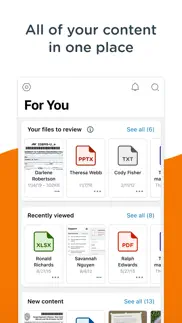
What is content - workspace one app? Workspace ONE Content brings you secure access to all of your files anytime, anywhere, across your devices. Easily share files, mark files as favorites, access documents offline, edit Office documents, and annotate PDF files with built-in editing tools.
**Quickly Search for Files**
Use Content as your single access point to search across the places your content is stored, regardless of whether the content is downloaded to your device or not. Once you’ve hit search, add filters to find exactly what you’re looking for.
**Easily Favorite Content**
Use a document often? Simply tap the star by the file you wish to favorite and find it even faster next time.
**Create New Documents and Folders**
Need something new? Easily add new documents, media, and folders or connect to a new repository by tapping the plus in the bottom right of the app.
😍 Do you love Content - Workspace ONE app? Please share your friends!



Please wait! Content - Workspace ONE app comments loading...
Content - Workspace ONE 26.05 Tips, Tricks, Cheats and Rules
What do you think of the Content - Workspace ONE app? Can you share your complaints, experiences, or thoughts about the application with AirWatch, LLC and other users?





Content - Workspace ONE 26.05 Apps Screenshots & Images
Content - Workspace ONE iphone, ipad, apple watch and apple tv screenshot images, pictures.
| Language | English |
| Price | Free |
| Adult Rating | 4+ years and older |
| Current Version | 26.05 |
| Play Store | com.air-watch.content.locker |
| Compatibility | iOS 17.0 or later |
Content - Workspace ONE (Versiyon 26.05) Install & Download
The application Content - Workspace ONE was published in the category Business on 29 June 2012, Friday and was developed by AirWatch, LLC [Developer ID: 338761999]. This program file size is 400.95 MB. This app has been rated by 1,471 users and has a rating of 4.1 out of 5. Content - Workspace ONE - Business app posted on 18 June 2026, Thursday current version is 26.05 and works well on iOS 17.0 and higher versions. Google Play ID: com.air-watch.content.locker. Languages supported by the app:
AR CS DA NL EN FR DE HE IT JA KO PL PT ZH ES SV ZH TR Download & Install Now!| App Name | Score | Comments | Price |
| Tunnel - Workspace ONE Reviews | 3.1 | 77 | Free |
| Web - Workspace ONE Reviews | 4.4 | 22,447 | Free |
| Send - Workspace ONE Reviews | 5 | 11 | Free |
| Intelligent Hub Reviews | 4.4 | 82,210 | Free |
| PIV-D Manager - Workspace ONE Reviews | 4.2 | 23 | Free |
• Enhanced Analytics reporting Admin and User repositories access • Ability to summarize the Microsoft Office and PDF documents using Apple Intelligence • Support to display Sections in For You Tab as configured in UEM Console
| App Name | Released |
| WhatsApp Business | 04 April 2019 |
| UKG Pro | 02 October 2023 |
| DoorDash - Dasher | 13 March 2019 |
| Shopify - Your Ecommerce Store | 12 May 2010 |
| Google Chat | 28 February 2018 |
Find on this site the customer service details of Content - Workspace ONE. Besides contact details, the page also offers a brief overview of the digital toy company.
| App Name | Released |
| FTPManager Pro | 03 May 2012 |
| VesselFinder Pro | 05 March 2013 |
| PDF Studio Editor | 26 July 2014 |
| KoolerIce | 02 September 2010 |
| Invoice Maker Simple | 24 September 2013 |
Discover how specific cryptocurrencies work — and get a bit of each crypto to try out for yourself. Coinbase is the easiest place to buy and sell cryptocurrency. Sign up and get started today.
| App Name | Released |
| Amazon Shopping | 03 December 2008 |
| DoorDash - Food Delivery | 10 October 2013 |
| Hive Social | 18 October 2019 |
| Snapchat | 13 July 2011 |
| Gas | 27 August 2022 |
Install the Giftmio extension for smart shopping. Get notified about cashback opportunities, activate cashback in one click, and save money on purchases.
| App Name | Released |
| Balatro | 26 September 2024 |
| Shadowrocket | 13 April 2015 |
| Farming Simulator 26 Mobile | 19 May 2026 |
| Bloons TD 5 | 15 November 2012 |
| Slime Rancher | 26 May 2026 |
Each capsule is packed with pure, high-potency nootropic nutrients. No pointless additives. Just 100% natural brainpower. Third-party tested and validated by the Clean Label Project.
Adsterra is the most preferred ad network for those looking for an alternative to AdSense. Adsterra is the ideal choice for new sites with low daily traffic. In order to advertise on the site in Adsterra, like other ad networks, a certain traffic limit, domain age, etc. is required. There are no strict rules.
Keep personal info private, avoid scams, and protect yourself online with AI-powered technology.
Content - Workspace ONE Comments & Reviews 2026
Simplify layout. Current content locker is too cumbersome. Need to customize, or have the ability to personalize for individual pilot/fleet type. This would do two (2) key things. First, it would make the ease of viewing, updating, and searching for information easier and faster for each pilot. Second, this action would increase storage volume on each iPad thus allowing for better speed and efficiency. Please consider improving the iPad product for the customer (the pilot). Thank you
The crasher. Never saw an app that crashes as often
The Worst. No way to reset a password without maxing the attempts, then deleting and reloading the software. Useless and frustrating! Even reloading this crap doesn’t work!
Unreliable. The worst app I have ever dealt with.. I am forced to use this app for work. It is unreliable because it constantly freezes, crashes, and sends the iPad into a reset. Hands-down the worst app I have ever had to work with. They even changed the name of the app to erase the previous dismal ratings and reviews. After all the updates, it is still junk.
Not impressed. This software promises much more than it can deliver. Installation was awful and didn't work immediately. Only partially works after a wipe clean reinstall. Email creates run on sentences, there is not a way to edit calendar requests sent by others, the web browser doesn't sync with internal secure websites. Very frustrating since this was supposed to be an improvement of these type of applications.
Does not work with iOS 13. This app does not work with the new iOS. Files do not open
Abysmal failure. My company has used this horrendous app for the last couple of years to provide access to company documents. These documents are critical to accomplishing my job. The app crashes constantly. It is supposed to automatically connect to the company server to download the latest version of updated documents. It does connect but crashes about half a dozen times before the documents complete the update process. There is supposed to be a facility to annotate PDFs , but according to out IT people, they "forgot" to include it in the two most recent releases. So now we can't even highlight sections of the books. Do not use this product if you can avoid it. Our company is soon replacing it with another application.
Not a great app. I only use this app to upload files from and iPhone to a company OneDrive folder. When the app works, it does this job fine, but too often the upload fails for no apparent reason (eg I have good connectivity both via Wi-Fi and cell data, so upload shouldn’t fail). I know the OneDrive server is up in these cases since I can access previously uploaded files in the OneDrive folder using a PC.
Poor system. This is a very poor document storage/retrieval system. Hard to navigate, bad search function. Difficult to find needed item during critical time frame. Scrap this junk and start over
The Worst App on my iPad. This app is basically not much more than a document reader. I therefore expect it to offer at least the minimum features of a good reader app. But this falls way short. These shortcoming have long gone unaddressed by the developer. Specific gripes: 1. The open document tabs cannot be dragged to re-order. 2. The app doesn’t follow iPadOS developer guidelines and save its state. When launched after a period of non-use, I frequently have to reopen the documents I was using. 3. The scrub bar at the bottom of the app is too close to the iPad dock. Often, I will swipe up for the dock but Content will see that touch and jump to a new page.
Crashes A LOT!. This app was installed in my phone through work for business but it crashes a lot which does not allow me to open files when I need to, specially the ones which come from emails, that defeats the whole purpose of having it. What is it good for if you can’t not open the files? Until these bugs are fixed and they come up with an update that works I do not recommend it.
Update has slowed down Apple Pencil use to a crawl. The update yesterday has caused using the app with an Apple Pencil to move very slow and lag, the app was super fast with the Apple Pencil until yesterday’s update. Now it is hard to use.
Crashes. Crashes too much
Horrible App. Unable to mark up anything.
Basically trash. Constantly crashes, settings are completely unintuitive, all around a terrible app.
Great App. Good app but would be a lot better if you could copy and paste off the documents. Please work on this AirWatch!! Other than that good app to have handy!
Terrible. Forces closed every time I attempt to open. I have to delete this app and reinstall in order to open a content attachment. So annoying.
Not Intuitive. Shows offline. No way to reset app. Device is definitely online
login issues. I really don’t know if this is a setting issue on our side or general app issue. When I have to login, which is pretty much every time I view the app and every time I view a different folder, I cannot click ”DONE” on the keyboard; I have to remember to click “Login” on the top right corner of the screen. Is there really no way to make use the “DONE” button for logging in? Or, can the “DONE” button be hidden so as not to look like it should have a helpful funtion?
Horrible. More impossible to navigate with every update, plz trash it all and start over #disaster
Meh. Not very useful.. While this gives access to shared folders, it doesn't have great integration with other iOS apps. I use Microsoft OneNote regularly but this app doesn't even recognize it and allow me to open a OneNote notebook. Really, this app is only for read-only use and even then, it's barely average.
Broken. This latest version is broken!!! Now when I try to edit a file, within moments of starting to write with my pencil it will toggle it back off on me. It’s also corrupted several PDF files on me. This is completely unusable as is right now. Yesterday it was fine.
Update 4.13 Broke PDF Annotations. Airwatch is used by my work. In general it has been a workable tool until this latest update. It ostensibly introduces auto saving of PDF annotations. This would be great except it is so aggressive with this action you can’t write anything before it has “saved” the annotation resulting in significant distraction. Ticket has been submitted...
Needs to be updated to iPadOS 13.4. When using the new mouse features, menus disappear before you can select anything on them.
Install size. I think Airwatch varies from company to company on install parameters and usage patterns. Where I work it is a fairly slow product and clunky at best. VMWare needs to seriously reduce the install footprint of this application. 100mb per adjustments to the app are unacceptable in this day and age.
Unreliable - A poor excuse for an app. Unreliable, Crashes and locks up often. Of course when it crashes you have to put the password in to get back in and hope you will have some time before another crash. No ability to note or highlight documents; Little flexibility; Poor sorting capability; Poor search function. Make sure you put a short password on it or you will be typing constantly. It does allow a company to limit what workers use the reader for. If you are interested in that, it works. However, the price for that security and selectivity is an unreliable app and miffed employees.
Stopped working after IOS 7.1.1. We have 30+ iPads enrolled and after update to IOS 7.1.1 And SCL 2.2.0, our docs (over 1,200 of them) no longer sync automatically. You have to go into each folder for them to sync and then only the doc names download. It won't open our PDFs or even some simple Excel sheets. These are docs used in the field by our sales force to show to our clients. Problem reported to AW support 6 weeks ago, today they're saying it may be fixed by "Q3"! We are now evaluating MDM solutions to replace AW.
Content BLocker. My company tortures us by forcing us to use this crap so I guess it’s cheap.
SHIFT KEY DOES NOT WORK WITH EXTERNAL KEYBOARD. PLEASE READ!!!!!! This has been going on for multiple updates now and still is not fixed. Multiple users have reported this issue. Any user that uses a apple keyboard or Bluetooth keyboard when they try to login to the app, if their password contains a special charter when pressing SHIFT + the Special character key,. Only the regular key is pressed example if you want an @ you would press SHIFT +2=@. However you get a 2 instead of the special charter @. Please fix as it has generated a lot of help desk calls for us. I’m sure we are not the only ones that have this issue as it can be easily reproduced.
Garbage. I hate this program and the fact my employer forces it to be used for work emails.
Contact crashing. Constant crashing
Does not work well with iOS or iPad. This app works to read one document at a time. Editing is sometimes a challenge and you cannot copy-paste from one document to another or look at two documents at the same time. You have to completely exit one document to open another. Now that we have tools like the iPad Pro, this app is very out of date. It also is not working for me in Mail to add attachments, so I cannot reply to a previous e-mail and add attachments. I can only send one attachment at a time directly from the app, which is not how I need to work most of the time. Please update the app to work with iOS and the features of the iPad.
Does not work. What else to say. Asking for email then a server address and group? Cannot get past that.
Seth. Descent app when it works. Problem is, it rarely works. My current version crashes every time I open it, as opposed to half the time on previous versions. If you're fortunate enough to get it to run, don't bother trying to update files as this rarely works. Aside from essentially not being able to use it or update your files, the developers should give themselves a pat on the back for conjuring up a wonderfully useless app!
Broken JavaScript support. Broke JavaScript support and claimed it was done for security. No mention of this anywhere. Update. This was not fixed. Like I said. It was done intentionally and never changed. No other apps I know block JavaScript and don’t give you a choice.
PDFs not displaying properly. Some PDFs do not display properly (pages blank or with illegible appearance) on the newest version of Content Locker. The same PDFs can be viewed on iPads with an older version just fine.
A lifesaver in my position. As a training manager for Walmart, I utilize computer based modules to facilitate the training of my participants. This app has all of the functionality of BINDER (a similar app) with some additional features and functionality. For example, I can highlight (in any color), underline, strikethrough, free-write, type text, or insert text boxes, insert audio notes, insert pictures, shapes, lines and arrows. I have never had this app crash, and I have used it for 6 months almost daily. I am using this on an iPad Pro 9.7, so maybe the other reviewer had an older machine (I cant speak to what I do not have). I love how easily I can organize my training modules in multiple folders, and that I can have 5 different modules open on the screen at the same time (with individual tabs). I have not run into any issues with utilizing my Apple Pencil with this app either, which was a constant problem with both Binder and PDF MAXpro (they often froze during the use of my pencil). If you are a business professional, educator or trainer, and need a simple to use app that will allow detailed note taking and editing of PDF files, this is the app for you. THANK YOU CONTENT LOCKER TEAM!!
Issues with Apple Pencil. I’ve been using this app for several months and I like that it allows me to access work on my iPad. Over the last several weeks, the functionality with Apple Pencil has deteriorated substantially. When writing with the pencil in pdf files, it is extremely laggy, to the point where I’m several words ahead of what is showing up on the screen. The pencil used to work pretty well but now it is tough to take notes when on a call. Please fix this functionality!!
Imposed applications are mostly rubbish. This app especially is just that. This is besides the constant crashing and the vkeyboard you can’t get rid of.
Great reader. I got this app through my company and it is fantastic. New version has ability to import external content. Two thumbs way up
Not user friendly. Doesn’t support Apple Pencil. It’s difficult to edit documents or make notes.
Astonishingly poor bookmark management. My company updates its policies and manuals regularly. Every time a manual is updated, all bookmarks are deleted. I realize a manual update could shift a bookmark to the wrong page, but I would much rather have bookmarks that lead me a page or two from the correct page than have a long list of bookmarks deleted with no trace they ever existed on a regular basis. This has led me to stop using bookmarks altogether, which dramatically reduces the functionality I get from the app.
Does Not Work with IOS11. Doesn’t work with IOS11. Users are unable to open secure documents into Content Locker from Apple’s native Mail app. Fix for more stars.
Worst. Hands down one of the worst apps I’m forced to use by my company. Continually crashes and asks for repeated sign-ins. Unusable more often than not. Fortunately I have goodreader as a backup as content locker mostly never works.
AirWatch Content Locker Fails. Airwatch Content locker is one of the most challenging and frustrating apps on the iPhone today. When it does work, users spend 15-60 seconds per attachment entering redundant pass codes and waiting for document decryption. (Even on a powerful iPhone 6). The app often crashes or dead ends and requires an app restart. It frequently corrupts iPhone mail headers and menus requiring a full mail app restart as well. On the plus side, it rarely crashes iOS entirely. Corporate users will see decreased productivity as they attempt to attach and forward documents, images, non air watch markups, or other important business information. This app is truly one of the few apps on the iPhone today that significantly decreases productivity and complicates simple smartphone processes. If you're trying to work on the road with Airwatch Content Locker, be sure to bring along a laptop, you will need it if you expect to accomplish anything much more than simple email replies. If you're a corporate security geek, understand what your objectives are before you push this app to your mobile devices. This app will cost your business a lot in productivity.
Pushed by employer. Works well until it crashes. No way to reset app other than deleting and re-downloading. Total PITA
Airdrop. Anyone else unable to airdrop manuals. Everything is configured to be able to do this.
Absolutely awful. Avoid this app.. This app crashes all the time. Much of the functionality (highlighting and annotating text) has never worked for me. If I did not have to use it for work, I would use a different app.
Embarrassingly bad POS app. Is one star as low as I can go.....? This is the app my employer has chosen for its first venture into electronic document distribution. It is a great app if you like the following: Crashes - it does this a lot. Unreliable file updates - notifications are not to be trusted for accuracy and often new files will not update old files properly which kills both the old and the new version of a file. Slow rendering and shockingly bad viewing performance. Screen redraws and slow performance with anything that has graphics. You get a lot of practice zooming! Want good performance and stability? Get GoodReader. Scary MDM policy. My employer makes use of this optional, yet if I want electronic documents (I do) this app is the only approved reader I can use. This is NOT company issued hardware - it is mine. In order to use this app for work related documents the MDM policy requires me to approve total control of content by AirWatch. Apple should be embarrassed that this app was approved. It takes no advantage of any of the many iPad features engineered by Apple. It is a totally unreliable POS.
Apple Pencil Doesn’t Work with Last Two Updates. After the previous update, the edit mode using my Apple Pencil will routinely shut off after a few seconds, even while writing. I was optimistic that this would be corrected in next app update but after downloading the update the problem is still there. This makes using the app incredibly frustrating and almost unusuable.
Did you know that you can earn 25 USD from our site just by registering? Get $25 for free by joining Payoneer!
Trash. Needs a quick trash option at present it requires you to view the email before you trash it.
Please fix this ASAP. Apps constantly locks out when iPad is in airplane mode even when offline mode is selected.
So many bugs since last update. App opens multiple tabs for no reasons. Crashes frequently. Unusable since last update.
Rubbish. Glitchy does not work as advertised, now does not work needs multiple sign ins.
PDF = Unsupported format?. For some reason, all PDF I put in the content locker are files of “unsupported format”
Incompatible with Apple Design Approach. Steve Jobs would have hated this application and never allowed it to go to market. Not that this is an Apple Product, but to the designers that are behind it, something to note. Clunky. Not intuitive. Loses files. Not good. Certainly not Enterprise standard.
Imagine you at your best. All the time. Picture yourself at your sharpest and most productive. Your most alert and focused. Your most lucid, creative and confident. At work. At play. In every area of your life. Add Mind Lab Pro® v4.0 to your daily routine and uncap your true potential. Buy Now!
Crash crash. Crashes frequently. Makes viewing files about a 20% success rate if it is stable long enough. It struggles to update. Wish my company didn’t use this app.
Constant Logging in. Constantly have to log into each folder, even after selecting stay logged in.
Crashes when opening PDFs. Can’t open files because the program constantly crashes. Have to delete and re-install. Will work for a day and then starts crashing again. Fix your app and quit being lazy.
Not great. Crashes regularly, continually asks for my log in credentials…. Really not that useful a as a productivity tool in my opinion… wish our IT department would find something better, really can not rely on this product for anything important
Not even close to the mark. Completely unusable. So many better options out there.
Nothing good to say about this app ... it's unusable. It's would be difficult to outline all the problems with this app so I will just highlight a few: - no high level sync, every file has to be manually downloaded and manually synced every time anything changes - filenames are not visible if they are longer than a certain number of chars so they are indistinguishable - the interface is clunky and slow, the icons make no sense ... copy is available on a folder but doesn't copy the folder contents ... pretty useless Devs ... take a look at GoodReader and just copy that, it's not like you have to invent any concepts.
Adsterra is the most preferred ad network for those looking for an alternative to AdSense. Adsterra is the ideal choice for new sites with low daily traffic. In order to advertise on the site in Adsterra, like other ad networks, a certain traffic limit, domain age, etc. is required. There are no strict rules. Sign up!
Integral. O colégio Integral o utiliza para manter as apostilas digitais... Escolas não sigam isso! Por favor! 😀
This is a story. This is my review: I've had Airwatch for a while now and it's been a WONDERFUL EXPERIENCE! I have no complaints at all. The customer service reps are delightful to talk to (I was only put on hold for 5 hours, great lesson on patience), I no longer have to have a pesky 8-hour battery on my iPad, as it is now only 2 hours before I need to charge it back up (fun!), and now my school can watch whatever I do on my device (Hi Jim 😄). Unfortunately, there was one incident where I was not completely satisfied. This story, however, is not to make Airwatch look bad. Don't get me wrong, I love Airwatch but this is no ordinary story. This is a story all about how my life got flipped-turned upside down and I'd like to take a minute, just sit right there, I'll tell you how I became the prince of a town called Bel Air. In west Philadelphia born and raised, on the playground was where I spent most of my days, chillin' out maxin' relaxin' all cool, and all shootin some b-ball outside of the school. When a couple of guys who were up to no good started making trouble in my neighborhood. I got in one little fight and my mom got scared She said "You're movin' with your auntie and uncle in Bel Air". I begged and pleaded with her day after day, but she packed my suit case and sent me on my way. She gave me a kiss and then she gave me my ticket. I put my Walkman on and said, "I might as well kick it". First class, yo this is bad. Drinking orange juice out of a champagne glass. Is this what the people of Bel-Air living like? Hmmmmm this might be alright. But wait I hear they're prissy, bourgeois, all that. Is this the type of place that they just send this cool cat? I don't think so, I'll see when I get there, I hope they're prepared for the prince of Bel-Air. Well, the plane landed and when I came out. There was a dude who looked like a cop standing there with my name out. I ain't trying to get arrested yet, I just got here. I sprang with the quickness like lightning, disappeared. I whistled for a cab and when it came near, the license plate said fresh and it had dice in the mirror. If anything I could say that this cab was rare. But I thought "Nah, forget it" - "Yo, home to Bel Air". I pulled up to the house about 7 or 8, And I yelled to the cabbie "Yo home smell ya later". I looked at my kingdom, I was finally there, to sit on my throne as the Prince of Bel Air.
Love it!. Love the app and easy to use. Keeps everything organized and synced with corporate documents.
Horrible. Horrible. Crashes all the time. Needs more/better functionality. File management is not at all intuitive. Unfortunately I'm stuck with it (work). To the developers - please fix it. To work (you know who you are) - please switch to Goodreader.
Great for Content Management. I prefer it to some of the major content management players like box.
iOS 8. DOESNT WORK WITH iOS 8!!!! FIX IT ALREADY!!!! I NEED THIS FOR SCHOOL!!!!
What?. How did this unstable, balky and generally bad app make it to the app store? It is unfortunate that many will be forced to use such an unpleasant app on such a wonderful device.
Works Great!. Can edit documents and send them back to multer file servers!
Very glitchy. This app is very unreliable, causes iPad to lock up, forcing a hard reboot. The app is a memory hog and has countless compatibility issues with other apps when open. STAY AWAY FROM THIS APP!!! I and our companies IT support, have waisted countless hours fixing, reinstalling and troubleshooting numerous problems.
Unreliable. Pure garbage.
Doesn't work online. The app worked online for a week or two now the app crashes like no tomorrow when I try to go online to download books I need for classes.
Crashes. With iOS 8 the app crashes almost immediately after opening A book
Worst app ever. This is the most horrible app I ever used in the last 8 years.
Really a pain.... If it doesn't crash, it is a poor app. If it doesn't crash... When it's functioning is is not a very friendly tool... When it's functioning.
Great for the IT department. This is great for the IT department in that Air Watch's MDM is rated highly. However from an end user's perspective, Content Locker is one of the worst readers on the market. You'll have to have your IT department set this up for you. You can't buy a reader from the App Store that is this bad on your own.
Crashes. Keeps crashing when I access new content. I've written the company 2 months ago. I got an initial response and then zero follow up. Obviously nothing has been done.
Too bloated!. This app does not have enough functionality to justify it's size. 193MB?!? Time to rein it in guys!
Ugh.. Hate it.
Doesn't open encrypted email attachments.. So far the app seems fairly useless - the native iOS email client doesn't recognize the SCL format of the files. I cannot open encrypted attachments.
No way. This app mines all your data and activities all the time!
CRASH! Worst app ever.. App crashes a dozen times for every one time it stays open. I've used hundreds of apps over 6+ years and I've never had one even close to this bad.
Worst App Ever. My employer, a large bank, switched to Airwatch and it is the worst business app I've ever seen. Breaks constantly, if IOS updates it makes the app unusable. Totally unreliable. I pray we switch to something else SOON!
Doesn't log in, period. Need I say more?
Recenzja. Beznadziejna
Awful. Crashes constantly. Can't access other apps and return to it for reference. Awful.
Not good. No notifications that you have actually received a new email. Doesn't actually check for new messages until opened. Cannot sync with outlook contacts so you have to keep every contacts email address in your phone contacts list. Sorriest excuse for a product I have ever seen.
Not good. Always signs out when switching switching apps. Very frustrating to have to keep logging in every time. It should have an option to keep you signed in. Every time I switch apps it logs me out.👎
Crap. Terrible reader. Places handcuffs on all my data.
Crashes when using Latest iOS update. app crashes when using the latest iOS update
Meh. Not very useful.. While this gives access to shared folders, it doesn't have great integration with other iOS apps. I use Microsoft OneNote regularly but this app doesn't even recognize it and allow me to open a OneNote notebook. Really, this app is only for read-only use and even then, it's barely average.
Not a great update-again. Clearly no one is listening as there has been no response to my post and further features are being removed. Most recently I've lost the ability to edit pdf pages and add colored boxes to block unimportant text and allow the important text to remain unaltered. I'm not sure what the feature is called but it simply disappeared. It was located just below the add photo feature in the selectable menu that allows highlighting, adding arrows, and writing on the page. I hope this was an oversight and the feature will be restored. Original review......I'm not pleased with the new structure of the update I received today. It feels very imposing and "in your face." There is significant on screen real estate wasted on folder contents. Large blocks or the entire width of the screen if you select list view? I'd like to see an ability to switch back to the previous view with folder son the left and tabbed docs on the right (landscape view). Also, I'm having difficulties finding pending transfers and optional downloads. My employer does not force all content and now it seems more difficult to find. I'm sure you added background features stabilizing the program and increasing security but don't change the face of an app for the end user. We rely on this for important time sensitive document retrieval and this update, while may be "better" for some, has decreased the user interface. Yeah, I've been playing with this for a bit. I want my folders back. Split screen. Folders on the left and docs on the right. Please! Sorry to be harsh...this update was a downgrade.
My honest opinion. Guarantees security
.... ...
An impediment to productivity. Crashes repeatedly. I've been forced to use this app for several years by my employer. I'm reasonably tech savvy and have never encountered a more cumbersome and slow app. Wastes my time every time I use it. I'd give it negative stars if possible.
Keeps wiping my device. This app keeps wiping my device even though I have only approved apps installed. Please help! It has wiped critical data at some of the worst time. Huge time waster to set my device back up. 2 hours each time. Ugh...
hate it. IT team please bring back good technology. I was unhappy a bit with Good, but not as unhappy as I am with Airwatch. All these apps get marketed like they work together, but they're all these junky apps that are there just to compete with the cometition. I'm now less productive just because my IT team wanted to switch.