Wi-Fi Toolkit App Reviews
Wi-Fi Toolkit App Description & Overview
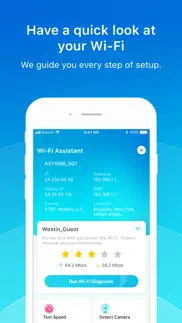
What is wi-fi toolkit app? The Wi-Fi Toolkit helps you diagnose your network for free. It aims to protect your privacy from being stolen when you use public Wi-Fi.
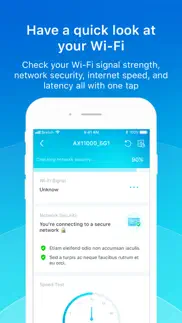
• Check your Wi-Fi signal strength, network security, internet speed, and latency with one tap
• Test your internet speed while playing a racing game
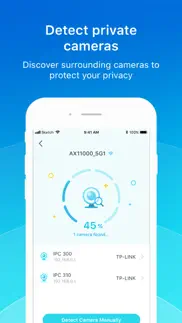
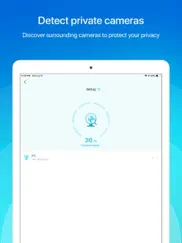
• Discover surrounding cameras to protect your privacy
• Find all devices in the same network
• Test your ping to measure your connectivity to target services for a better network experience
😍 Do you love Wi-Fi Toolkit app? Please share your friends!



Please wait! Wi-Fi Toolkit app comments loading...
Wi-Fi Toolkit 1.4.10 Tips, Tricks, Cheats and Rules
What do you think of the Wi-Fi Toolkit app? Can you share your complaints, experiences, or thoughts about the application with TP-Link Systems Inc. and other users?



Wi-Fi Toolkit 1.4.10 Apps Screenshots & Images
Wi-Fi Toolkit iphone, ipad, apple watch and apple tv screenshot images, pictures.
| Language | English |
| Price | Free |
| Adult Rating | 4+ years and older |
| Current Version | 1.4.10 |
| Play Store | com.tplink.networktoolsbox |
| Compatibility | iOS 11.0 or later |
Wi-Fi Toolkit (Versiyon 1.4.10) Install & Download
The application Wi-Fi Toolkit was published in the category Utilities on 06 July 2021, Tuesday and was developed by TP-Link Systems Inc. [Developer ID: 1713842892]. This program file size is 71.81 MB. This app has been rated by 88 users and has a rating of 3.4 out of 5. Wi-Fi Toolkit - Utilities app posted on 29 October 2025, Wednesday current version is 1.4.10 and works well on iOS 11.0 and higher versions. Google Play ID: com.tplink.networktoolsbox. Languages supported by the app:
AR BG CS DA NL EN FI FR DE EL HE HU IT JA KO MS NB PL PT RO RU ZH SK ES SV TH ZH TR UK VI Download & Install Now!| App Name | Score | Comments | Price |
| TP-Link Festa Reviews | 5 | 4 | Free |
| TP-Link Omada Reviews | 4.4 | 459 | Free |
| TpPLC Reviews | 1.7 | 162 | Free |
| TP-Link Tether Reviews | 4.7 | 137,528 | Free |
| TP-Link FileBank Reviews | 1 | 3 | Free |
Fixed some bugs and improved the stability.
| App Name | Released |
| Mint Mobile | 15 November 2017 |
| Google Chrome | 28 June 2012 |
| PrivadoVPN Fast VPN and Proxy | 05 January 2021 |
| Genasys Protect | 20 February 2023 |
| Second Phone Number - 2Number | 15 June 2017 |
Find on this site the customer service details of Wi-Fi Toolkit. Besides contact details, the page also offers a brief overview of the digital toy company.
| App Name | Released |
| Just Press Record | 21 September 2015 |
| My Classic-Retro Console | 14 October 2022 |
| AnyFont | 20 February 2014 |
| Watchla for Tesla | 16 February 2021 |
| Transcend Theory | 16 April 2024 |
Discover how specific cryptocurrencies work — and get a bit of each crypto to try out for yourself. Coinbase is the easiest place to buy and sell cryptocurrency. Sign up and get started today.
| App Name | Released |
| Gmail - Email by Google | 02 November 2011 |
| Ralph Lauren | 08 November 2021 |
| Target | 24 November 2008 |
| TikTok | 02 April 2014 |
| 28 April 2011 |
Install the Giftmio extension for smart shopping. Get notified about cashback opportunities, activate cashback in one click, and save money on purchases.
| App Name | Released |
| Plague Inc. | 25 May 2012 |
| After Inc. | 26 November 2024 |
| Gambonanza | 01 May 2026 |
| Farming Simulator 26 Mobile | 19 May 2026 |
| Incredibox | 27 March 2016 |
Each capsule is packed with pure, high-potency nootropic nutrients. No pointless additives. Just 100% natural brainpower. Third-party tested and validated by the Clean Label Project.
Adsterra is the most preferred ad network for those looking for an alternative to AdSense. Adsterra is the ideal choice for new sites with low daily traffic. In order to advertise on the site in Adsterra, like other ad networks, a certain traffic limit, domain age, etc. is required. There are no strict rules.
Keep personal info private, avoid scams, and protect yourself online with AI-powered technology.
Wi-Fi Toolkit Comments & Reviews 2026
Recommended!!. This app is so cool. It has so many functions and it’s very accurate. Download it!
Shows Me I’m Offline. This app gives me a single star for network quality, but the Deco app shows five… the Deco app also shows me online whereas this app has yet to do so. I’m struggling to understand what it does.
Offline? How?. Same as other users, It says I’m offline and gives me a single star for my Wi-Fi but the deco app says I’m all good.
Annoying sounds. There is no way to turn off the annoying sounds during a speed test
Thank you!!. All of you giving negative feedback, remember that this is a *free* app from TPL. Do you want this to not exist? This app is incredible! There's no other app that lets me quickly run speed tests (with no ads) AND run IPV4/6 Ping to discrete servers AND do a port/IP scan from my phone. I use it all the time for systems management. Thanks so much TP link people who put this together.
More accessible then other apps offered on ios. Love the app,cant find nothing like it in my years of cybersec im talking about iPhone just a problem my router shows up as a camera but everything else works better then fine
Pretty much useless. It feels more like an advertisement for their VPN than a useful app. Checking for, and identifying devices, on your network doesn’t work AT ALL. It identifies everything as generic and doesn’t find all devices either. So how am I to know if there’s a device placed there by a threat actor? Like I said, useless.
It needs to work better with home shield. Home shield always thinks it’s being compromised every time Open Port Check runs. It list everything as unknown. It doesn’t detect phones, tablets, or TV. It doesn’t help anything, except Port Scan and that freaks out the deco security. I’ve never seen anything like it.
Why are devs still making iPad apps that only have Portrait mode?. Do I need to say more? iPad sitting on a stand/keyboard/folding case in perpetual landscape mode? Do developers not know this?
Ridiculous annoying sounds. Ridiculous annoying sounds that serve no purpose other than annoy the user
Doesn’t work. Just to test this app I scanned my own home wifi with 3 cameras, and it said no camera detected.
This app is so stupid don’t buy from this brand. The devices that I had along with this app proved that the brand is false advertising for a product that doesn’t even work. I went through HOURS of trying to get that thing to work (Wi-Fi extender). Multiple resets and to no avail. The product doesn’t work at all. Terrible latency issues and drops down all the time. Terrible service and very disappointing customer service. Will never get anything from this brand ever again.
Did you know that you can earn 25 USD from our site just by registering? Get $25 for free by joining Payoneer!
Imagine you at your best. All the time. Picture yourself at your sharpest and most productive. Your most alert and focused. Your most lucid, creative and confident. At work. At play. In every area of your life. Add Mind Lab Pro® v4.0 to your daily routine and uncap your true potential. Buy Now!
Does very little, some ok some poor. The general check feature of this app is ok, it gives a very simplified summary of the network you’re currently on, essentially that it is secure and gives the speed. But it also reports the bandwidth incorrectly, and the speed measurements do not match other Speedtest apps. The specific Speedtest feature is unusable, displaying a background screen of a game with screaming loud noises and sound effects totally unsuitable for use with anybody else around, especially in public, where this app seems to be intended to be used. The network scan feature is essentially useless, it does detect devices on the network, but reports 90% of them as simply being generic devices and shows only the IP address and nothing more, unlike other apps that show a great deal of information about each device. The camera detect feature sounded interesting, it did find the professional IP cameras on my network, but failed to detect many other Wi-Fi cameras on the same network. So again, I think it fails at its intended use of detecting cameras in places like hotel rooms, or situations where someone may use a simple, low-cost Wi-Fi camera to spy. As for the manual camera detection feature, which appears to try and detect the infrared light used in camera night mode, which requires the room to be dark when using the feature, for some reason, it did not detect a camera I tested here while standing right in front of it and watching the live night vision view of that camera. The app also warns about things like: “When you’re on public Wi-Fi, turn off file sharing features like AirDrop so no one nearby can steal your files - or send you unwanted ones”, which is incorrect. Overall, aside from a basic summary of the current network you’re re being secure, the general speed (reported a bit incorrectly but somewhat close), and the bandwidth (also reported incorrectly), the rest of the features of the app are relatively useless, and misleading in providing incorrect or incomplete information. I would not recommend using this app.
Doesn’t work, unreliable. I use the TPLink Deco mesh network and when I test it using that app (or the speedtest), everything is excellent. But when I test using this “toolkit” it struggles to connect and comes back with result that Wi-Fi is poor!! Despite the same company. Have removed and reinstalled and keep getting same garbage assessment. Suggest delete this as it uses space and does nothing.
Adsterra is the most preferred ad network for those looking for an alternative to AdSense. Adsterra is the ideal choice for new sites with low daily traffic. In order to advertise on the site in Adsterra, like other ad networks, a certain traffic limit, domain age, etc. is required. There are no strict rules. Sign up!