DoubleTake - Multicam video App Reviews
DoubleTake - Multicam video App Description & Overview
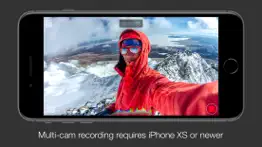
What is doubletake - multicam video app? DoubleTake transforms your iPhone into a multi-cam studio allowing you to capture video from two cameras at the same time on recent devices*
*NOTE: Per iOS 15 capabilities, multi-cam video is restricted to the following devices only: iPhone 13 series devices, iPhone 12 series devices, iPhone 11 Pro Max, 11 Pro, 11, Xs Max, Xs, Xr, SE 2. iPad Pro 2018 and newer. While this app will install and function on all devices supported by iOS 15, all devices outside of this list will be restricted to recording video from on a single camera.
Use DoubleTake to record video in new ways:
- Camera Visualization: Better than a director’s viewfinder! Use DoubleTake’s camera picker view to visualize all available cameras for your device. Use this view to help decide how to frame your shot and which cameras you will select.
- Shot/Reverse shot: To capture all the organic and intimate interaction between two actors or interviewer and interviewee. Traditionally, filmmakers would need to employ two cameras and place these in cumbersome ‘over the shoulder’ locations. With DoubleTake you can place one device in between your actors and place the audience right in the middle of the conversation.
- Multi-cam: Capture two different focal lengths of the same subject at the same time. Use DoubleTake with the Ultra Wide lens (iPhone 11 Pro Max, 11 Pro and 11 only) and the Tele to capture both an establishing shot and a punch-in on your subject simultaneously. Or use any other combination of front and rear lenses for unrivaled multi-cam capture.
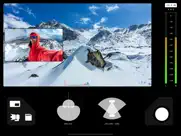
- PiP or Discreet: The DoubleTake interface allows you to see both cameras of your video capture at the same time through the use of a Picture in Picture (PiP) window. You can move this PiP around the screen, tap to zoom in, or swipe it away if it’s distracting (the second video will continue to record). With DoubleTake you can decide if you want to record your videos as separate discrete files or if you want the video recorded as a composite video that includes the PiP window animated as you see it on the screen.
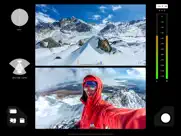
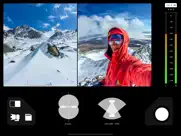
- Split-screen: Doubletake also allows you to use any two cameras to create a 50/50 split-screen effect that is saved as a single video. This is great for capturing engaging interviews, or any scenario where two sides of the story need equal weighting on screen.
- Focus & Exposure Controls: DoubleTake allows you to set and lock your focus and exposure on both cameras during multi-cam capture with our unified reticle. Just tap anywhere to set an area of interest with the reticle, then tap again to lock or unlock. Our easy to use camera switcher lets you effortlessly move between your A and B cams during a recording to adjust the focus and exposure for each independently of one another.
Video Specs:
- Full frame focus and exposure for smooth and easy automated focus and exposure adjustments.
- Selectable broadcast frame rates: 24fps, 25fps, and 30fps depending on your project requirements.
- 1080p video at high bitrate encoding for maximum quality. (note: 1080p video is the maximum resolution supported by the Apple API for multi-cam capture).
- Composited PiP or separate discreet video files recorded as .h264 .mov files are saved to DoubleTake’s internal library which supports batch export to the Camera Roll.
Terms of Use: https://support.bendingspoons.com/tos.html?app=436577167
😍 Do you love DoubleTake - Multicam video app? Please share your friends!



Please wait! DoubleTake - Multicam video app comments loading...
DoubleTake - Multicam video 3.1.2 Tips, Tricks, Cheats and Rules
What do you think of the DoubleTake - Multicam video app? Can you share your complaints, experiences, or thoughts about the application with Bending Spoons Apps ApS and other users?

DoubleTake - Multicam video 3.1.2 Apps Screenshots & Images
DoubleTake - Multicam video iphone, ipad, apple watch and apple tv screenshot images, pictures.
| Language | English |
| Price | Free |
| Adult Rating | 4+ years and older |
| Current Version | 3.1.2 |
| Play Store | com.filmicpro.doubletake |
| Compatibility | iOS 14.1 or later |
DoubleTake - Multicam video (Versiyon 3.1.2) Install & Download
The application DoubleTake - Multicam video was published in the category Photo & Video on 28 January 2020, Tuesday and was developed by Bending Spoons Apps ApS [Developer ID: 1280299077]. This program file size is 64.56 MB. This app has been rated by 504 users and has a rating of 3.4 out of 5. DoubleTake - Multicam video - Photo & Video app posted on 10 March 2025, Monday current version is 3.1.2 and works well on iOS 14.1 and higher versions. Google Play ID: com.filmicpro.doubletake. Languages supported by the app:
EN FR DE IT JA KO PT RU ZH ES ZH Download & Install Now!| App Name | Score | Comments | Price |
| Filmic Firstlight - Photo App Reviews | 4.4 | 903 | Free |
| Filmic Legacy Reviews | 1.4 | 477 | Free |
| Remini - AI Photo Enhancer Reviews | 4.6 | 341,018 | Free |
| Alight Motion Reviews | 4.4 | 64,868 | Free |
Hey there! Please give a warm welcome to our brand new version of DoubleTake!! We’ve decided it was time for a change and to give our users the best user experience with a completely revamped interface! Please enjoy DoubleTake 3.0 and let us know what you think in the reviews!
| App Name | Released |
| Canon Camera Connect | 06 January 2015 |
| CapCut - Video Editor | 14 April 2020 |
| Huji Cam | 28 September 2017 |
| Snapseed | 06 June 2011 |
| Skylight App | 15 October 2018 |
Find on this site the customer service details of DoubleTake - Multicam video. Besides contact details, the page also offers a brief overview of the digital toy company.
| App Name | Released |
| Superimpose X | 15 December 2017 |
| IWebTV PRO | 15 March 2019 |
| White Balance Meter AI - KEV | 30 January 2020 |
| Stop Motion Studio Pro | 05 July 2013 |
| Pixelmator | 23 October 2014 |
Discover how specific cryptocurrencies work — and get a bit of each crypto to try out for yourself. Coinbase is the easiest place to buy and sell cryptocurrency. Sign up and get started today.
| App Name | Released |
| Hive Social | 18 October 2019 |
| Gmail - Email by Google | 02 November 2011 |
| Netflix | 01 April 2010 |
| CapCut - Video Editor | 14 April 2020 |
| Cash App | 16 October 2013 |
Install the Giftmio extension for smart shopping. Get notified about cashback opportunities, activate cashback in one click, and save money on purchases.
| App Name | Released |
| AnkiMobile Flashcards | 26 May 2010 |
| Shadowrocket | 13 April 2015 |
| Shotgun King | 24 February 2026 |
| Incredibox | 27 March 2016 |
| After Inc. | 26 November 2024 |
Each capsule is packed with pure, high-potency nootropic nutrients. No pointless additives. Just 100% natural brainpower. Third-party tested and validated by the Clean Label Project.
Adsterra is the most preferred ad network for those looking for an alternative to AdSense. Adsterra is the ideal choice for new sites with low daily traffic. In order to advertise on the site in Adsterra, like other ad networks, a certain traffic limit, domain age, etc. is required. There are no strict rules.
Keep personal info private, avoid scams, and protect yourself online with AI-powered technology.
DoubleTake - Multicam video Comments & Reviews 2026
Steal your pictures. Have you read the new privacy statement. I did before even trying and I’m currently deleting. Yes, the privacy statement implies that by using their software and uploading your photo, you grant them extensive rights to use your photo (and any other user-generated content) in numerous ways. Specifically, they can: 1. **Publish and Display**: Use your photo publicly in any medium. 2. **Modify**: Alter your photo, including creating derivative works. 3. **Distribute**: Share or broadcast your photo in any format. 4. **Use Your Likeness**: Use your name and likeness in conjunction with the photo. They can do this worldwide, perpetually, and without paying you any compensation. Additionally, you won't have the right to review or approve how they use your photo. Therefore, they essentially have the freedom to use your photo in any way they see fit within the bounds of the applicable law and their privacy policy.
Nice Option. No one could stop talking about this after seeing the demo at Apple’s event in September. Yet, the demo was intended for Filmic Pro, not as a stand-alone app. It’s nice to see, even for those of us who do not have an iPhone Pro. However, as a stand-alone app, more features should be introduced because other apps were already on the market. Until then, I will wait for the Filmic Pro integration because that app is so much more robust.
Filming in landscape. I love the app. The only issue is have is when split screen recording in landscape mode on the phone. One half of the split view is upside down. It would be nice if when saved both screens were right side up. Also when doing PIP mode it would be nice if the video saved as one video instead of two or if we at least get the option to choose how we want it to be saved.
PLEASE FIX THIS ALREADY. Once the app is closed, settings do not save and you have to reapply everything all over again. I have to switch the lens, pick which is A and B, pick the frame rate and resolution then save, EVERY TIME. Let us save our preferred settings already! Also the app crashes a lot, and when it does you’ll loose all the footage. If this app could receive some more care I could be amazing!
Finally! Genius!. I’d love to see a screen record function added if possible. That would be the ultimate addition. To record two cameras and possibly exit the app (while it runs in background) to then record the screen and two peoples commentary about the content being viewed.
Great app. I used this app for the first time tonight to film my comedy hypnosis show. It worked like a charm but I only had one issue. After I stopped filming I noticed I could NOT move the PIP box to another area, causing most of my volunteers to be hidden behind it. As far as I can tell there is no way to edit it to move the box. If there is a way to do so with editing please let me know.
Amazing application. The quality is amazing and the app is easy to use. The one thing i havent figured out is if I’m able to zoom in or out. Other than that the multi cam feature is amazing, and everything else is too. Great app and I’m happy its free, and no in app purchases!
Good features, but unreliable & needs polish. I love the ability to record from multiple cameras on my iPhone 13 at 4K 60. However, the app is quite buggy and lost a few recordings. Sometimes the screen will go black - this is not recoverable. All I can do is force quit and lose the recording. Also, it would be great to remember settings and make the video recording orientation independent of iOS orientation lock. Very easy to accidentally record a mix of resolutions if you’re not paying attention to the settings getting reset. Overall, this app a fun toy in low stakes scenarios. But I can not recommend this app in a production environment. It’s too easy to make mistakes and lose data.
Error Message, then EVERYTHING IS GONE!!. I used this app three times and it worked flawlessly. I was so excited. Started promoting. Then three times in a row I got the error message which then lost all of my recording 40 minutes in. I’m so ANNOYED. Also, it should be noted I used three different iPhones thinking maybe it’s me... nope still crashes and my time and the person that I was recorded withs time was wasted. This is stupid. What is the point!? This is a huge issue a lot of people face using this app and it’s not fixed. I am disappointed, frustrated, and it’s a waste of time. Unless someone can fix this issue, don’t waste your time or your effort. Reached out to support and they gave me no help or answer of why it happens. Don’t waste the energy.
Silent Errors Ruined Half My Shots. Using an iPhone 12 Pro… used the app for six runs at a ski resort, did six runs (12 total videos) capturing the selfie camera and main wide angle camera. Half of our six runs saved at only 3 FPS!!! Of my 12 total videos six of them were ruined with no error message whatsoever. Didn’t even realize it until the end of the day. Three frames per second isn’t even an option! Not sure how the videos were saved that way.
Wow!...buuuuttt.. So this is awesome to see FINALLY out from Filmic. However, this is a feature that was teased over five months ago at the September iPhone event as “coming soon” and was supposed to be part of the Filmic Pro app. So, I’ll save the last two stars for when that happens. I just don’t understand: if they have figured out how to do this, why not bake it into Filmic Pro? Or give us a way to at least launch it from FP like they did with Firstlight?
Used to be good before they got greedy. I purchased this app as a one time purchase long ago, then one going to use it one time without a connection. It did not even start. Now I realize this has become a paid subscription, even though I had paid in at the beginning. Tired of these greedy companies doing this kind of stuff.
Buggy and Crashes. UPDATE May 15,2024: Since updating this app it no longer works at all. It crashes every single time I try to shoot within 30 seconds. What was once a very useful tool is now useless. —-// I have used this app for a long time and have really liked it. After updating the app it constantly crashes. Also after shooting I always do a quick check to make sure it’s ok. Now when I watch a video from the app the controls to close a window are OFF the screen. This means that I have to quit the app after watching a take, re-open and redo the settings I chose because it doesn’t remember them!! Lot of potential with this app if the company would take the time to fix it.
Zero options. Unlike Filmic Pro this app has zero options. I want to use my dual cameras as a bodycam to document my surroundings but the bitrate and framerate are just too high. They offer no options and they don’t allow dual camera recording in Filmic Prob which I do own. It’s almost like developers can’t even fathom that users would have use cases beyond their own imaginations. Everything is high bitrate. High framerate. Huge files.
John. I have used this app for about 8 months and recorded almost 500 videos. Approximately 40 of these videos were unusable because I could not access them. I could see that they were on my iphone 13 pro but I couldn’t play them or share them to another device. My emails to the developer have gone unanswered. How can I use this app when I don’t know whether the video will be useable? Too bad. I love this idea. Hopefully someone else will execute it better.
Great App. Only one request.. I love filmic products and this is another great app. The only thing I would ask for is the ability to digitally zoom inside the pip window. That would be useful for people recording athletic training where the first camera is recording an athlete and you want the second camera to zoom in on the goal / target the athlete is aiming at.
Videos in opposite orientation. Hi. It’s a great app but when I’m using the app to record a video in PiP or discreet mode, the videos are coming in opposite orientations. I tried to change settings, lenses and to uninstall and reinstall but still having the issues of orientation. Is there any way I can fix it? Please let me know how can I fix this issue. Thanks.
Stopped working after 1-2 weeks.. I used this app 2x to record. The first time, after about 20 minutes, I received “operation error” and the app stopped recording and my video was not saved. I had 5gb of space. I freed up to 15gb and tried to record again. It gave me the same error at about 50 minutes. Maybe storage, but again, it stopped recording and deleted my video AND NOW I can’t do anything with the app. Can’t change camera views, record, see past videos, nothing. The app is completely frozen. Power cycled the phone, nothing is working. Will be asking for a refund.
Fantastic!. I just downloaded the bundle from Filmic Pro and couldn’t be happier. I still have a lot to learn. I used DoubleTake at a NFL division playoff game this weekend and it was great to capture what was happening on the field and our reaction at the same time with Picture in Picture. The only thing that would make DoubleTake a little more helpful would be the ability to use a Bluetooth shutter button to stop and start video. It works with the Filmic other products but just changes volume on this app. Hopefully the fix will come in an update soon. It will be a solid five star for me at that time. Keep up the good work!
First App with Multicam. DoubleTake is powerful app for shot video from 2 camera in one time. I think in future it will be redesigned. Right now it has a little bit problems with fast saving video. At first I can’t understand, how can I save my video in Camera Roll.
Novel but NOT PRO. This is great if you were only expecting 2/3 of your lens and 1/4 of your cameras potential. This only shoots in 1080p. Yeah, yeah, because Apple said so. Clearly you two have a working relationship. I hope you can work something out to deliver all 3 cameras in 4K (at least Wide and Tele) in the pro version. Other than that, app works fine. But that’s it. Fine. Cheers.
NO 60 FPS SUPPORT!!!. Ok. 2 things here. One negative and one positive. I am so glad that this app is free but the thing that’s holding it back so much is the lack of 60 FPS support for any lense. Developers if your reading this. Please add 60 FPS support. I’ll take 720p 60 for 2 cameras. It doesn’t matter I just want buttery smooth frames. Other then that. Amazing app. Easy to use and very straightforward.
Lots of bugs that make it frustrating. I recorded two different 15 minute videos today and neither of them are available in the recordings. I know I did everything correctly because I’ve used the app several times. Sometimes it records and sometimes it doesn’t even though it says that it’s recording.
Not what it should be. This was very disappointing to see that there are no controls available, and there’s only two lenses utilized at once. Half the reason I bought this phone (iPhone 11 pro max) was to be able to do what they showed at the keynote and utilize all of my lenses together. I hope this is just the first step and more controls and additional lens capabilities will be added in the future. For now it’s “merh” at best
Frustrating and disappointing. The interface is not only frustrating but the most disappointing aspect of this app is that the videos front and back are not embedded together. The fact that I have to export 2 videos to a video editing software and manually have to embed them is ridiculous which makes this app completely useless to me. Please take notes from instagrams new dual cam feature where you can immediately save the video to your phone and the Picture in Picture mode is built into the recording. I actually know how to use video editing software but people need practical apps that are easy to use!
Nice update!. It would be better than nothing I think is a great too take time record to create some scenarios but please on your next update try and to add the zoom it and out I think is a great tool to record videos for long distances.
Great app, needs updates. This is a really great app that our family enjoys. More frequent updates would be nice as I’ve found a few things that could be implemented smoother. But it’s great.
The only app that does this thing seriously.. And that’s creating dual camera media. Sure it’s lacking some features for but really considering the other apps available, and what it would take to do natively (requiring a second phone), this does the job. If you are doing pro AV or something, there’s no audio input options or viewfinder availability.
Mixed emotions good first attempt. Long review alert! Basically I am upset because Apple should not have showcased this app in the keynote unless it could deliver the product as advertised. 1. This is a two camera view point. Novel at best. What was shown was four cameras during the keynote. I have a Pro Max. Two of them to be exact. So again my question is, does the four camera feature work at the same time? Will this be a paid function? Or was that all photoshop in the keynote? 2. This shoots in 1080p max resolution it seems. Which means downgrades will be super noisy video. 3. I am still so upset about not having four cameras. 4. This does not have settings like filmic pro. This is really a consumer app. Not even prosumer. The good is, it does not crash. And it works. I am just not sure why I was told one thing and then given another. I will pay for the features. Just hurry and delivery what you showed us.
This is the start of something GREAT!. My personal video recordings will be forever changed. This app brings a multi-perspective feel to the videos unlike anything we have had before. The app is basic, but very very intuitive. I don’t think having to confirm videos is needed, because I am using this app for the multi video, making it redundant to have to confirm each change.
Alright. I wish we had better video quality options. Sometimes videos seem poor quality compared to the IPhone 12 Pro Max stock Camera app.
5 stars. I love this, it’s so perfect! I didn’t have any problems with it, and I love the sharpness of the videos it captures. I don’t have a nice camera, and I’m always taking videos of things I do. It’s much easier with this app! Five stars! I’m gonna show this to my friends, and I highly recommend it!
Awesome app one of my favorite. This is is amazing works perfect the only problem im having right now is with my iphone 12 pro max the front facing camera is coming upside down, with my old iphone 11 it was coming perfect but now everytime i finish a record the front facing camera it comes up, upside down... already flip the phone and everything but same problem, need help please
Lacking pro features from filmic pro. Apple advertises this in the keynote. Tells people it will require a $15 app. People buy the app to discover it does not work till an update is released. 5 months later they release this app for free without the pro features. If you want to play around and be limited in settings it’s fine. But this isn’t the pro feature set we were promised and for the folks who bought into filmic pro on release who have been waiting for an update this is disheartening. The pro version should have been released first.
Immediately lives up to Filmic Pro’s standard. Works exactly as advertised immediately after opening the app. I can’t wait to see this full functionality baked into Filmic Pro. For now, I’ll happily be using this as much as possible.
Thank you for free/no in-app purchases (Filmic Pro owner). I was certain when I saw that this had been released that it was going to be paid out in-app purchase having seen other developers do similarly, when waiting patiently for this feature to show up in Filmic Pro, but y’all put it out as proof of concept and to expose people to hoe fantastic Filmic Pro is and the works could use more of that. Thank you!
Awesome App. I don’t really edit movies or even write a review but for DoubleTake, I had to take a moment and write a five star. Love the whole concept of doing a video commentary while watching my kids do something funny. Used iMovie for a quick PiP edit and we are good to go. Great App!
Telephoto setting broken, dev not responsive. I want to use this app for one thing, and that is to capture the telephoto and the normal lens on an iPhone 13 Pro for quick interviews so I have an A and B roll to edit with. Unfortunately, the telephoto mode goes into a 2X crop effect (but looks just fine in Preview mode), which of course throws off the focal lengths of the lenses and makes shooting with it difficult. I filed a report with the dev via their website and even sent them screenshots, demo footage, and a description of the issue, and never received a response. Disappointing, to say the least. The premise of this app is sound, although basic and lacking many features. It seems pretty clear they are putting all their development time into their main app, but this ONE THING I need to use this app for doesn’t exist in that app yet, either. I would love to be able to use this app but as it stands now it’s not possible.
Easier to use, but still missing key feature. I thought with the release of 3.0, we would finally have the option to use three cameras at once, but it’s just UI update. It does make it easier to use the app, but nothing has truly changed.
Simple but powerful. Take full advantage of all the cameras on the iPhone 11 Pro (or whichever iPhone you have), and add more visual pizazz to any video, with easy switching, split-screen and Picture-in-Picture recording.
Looks promising. Hopefully this can be added into Filmic Pro soon and not remain a stand-alone app. The 50/50 mode could be made more flexible if we could move the line to adjust the split | / \ — or even some basic masking. Of course this could be done in post but some basic features combining the video feeds could be useful.
Disappointing Consumer Gimmick.. I had assumed that paying the extra money would allow me to use this feature of recording two cameras at once with Filmic Pro’s great feature set in their regular app. It does not. Filmic Pro should not have released this in its current state - it’s not at all in line with their great app. This is a consumer gimmick that doesn’t give you any camera settings and only records in 1080p. So disappointing and a waste of time and money.
APP SWITCHED TO SUBSCRIPTION. This app was previously unlocked with a one time charge to purchase outright. With a recent update, all functionality was removed, and the app is now subscription based. Imagine being the brainless moron in charge who thought this would be a good idea. What any competent company would have done would be to remove this version from the App Store and grandfather it in for those who already purchased it. Then add a new app with more features that would be subscription based, while informing their user base this change was necessary for their current bozo in charge to feel better when they put their red nose and clown shoes on in the morning. Previous purchases would be downloadable only by those who purchased it before the switch while STILL retaining its full functionality, AND the user base wouldn’t be alienated against the committee of drooling fools who approved this! You would think this would be so easy! So self evident! But no. Not for these slapheads. They decided to throw themselves into the abyss of abandoned apps because they lunged for money instead of pivoted toward it.
Truly Wonderful for Storytelling in Video. I love this app! I use it to tell stories of my video adventures for visiting lighthouses on the west coast of the US. It worked great on my past iPhone 11 Pro and now on my 13 Pro, it’s even better. I wish it would shoot in a higher res, I’d pay for that, but I worry that it will be changing soon. It seems the Filmic app has sold to a horrible company that is making it a super expensive subscription service, pricing out the amateur videographers, like myself. I am hoping that they leave this app alone and not include it, but I am sure that their greed will eventually charge for it. I’ve downloaded all of my files as it said to use it I had to update it, and on 12/1, the new terms of service go into effect, so I don’t want to lose access to what I’ve filmed. PLEASE DON’T CHANGE THIS APP!
Powerful, simple, dope.. This app has very powerful settings in one of the most streamlined interfaces I’ve used. I have an iPhone 11 and am very impressed with the abilities this app has given in its release. Soooooo many excellent features done VERY well. I haven’t found an issue to concern anyone about, so happy shooting! >>> Head’s up, the description mentions you are able to shoot and capture video with two lenses at the same time in the same video. If you’re needing more than two for a project (download and enjoy this anyway) hang tight for the Pro version of this app to release the ability to record more than one stream at a time.
Not reliable. The most important aspect of pro audio is reliability. Without it your product isn’t usable. Two fatal errors after getting 5 minutes and then 10 minutes into discrete videos. Lost everything. Wasted my clients time. I’ll pay whatever price but this needs to be reliable and I need to be able to record 45 minutes. And when there is an error you can’t then lose the whole recording or else your product simply isn’t usable gave professionals. I gave two stars because otherwise this is good, but anything that isn’t reliable isn’t worth more than two stars. I’ll pay a high cost but I need reliability and you can’t lose everything if there is an error.
Buggy so far.. Used it the first day it came out. Had no issues at all. Did the update today before shooting a 30 minute video. Ran a quick test and it seemed to work. Did the actual shoot and it crashes twice. I’m running the latest IOS on a 10XS Max (512) all my other video apps work fine. I did get it to work after the third try. Any suggestions?
Accessibility improvements for VoiceOver users. This is an awesome app, however, I would like to see some accessibility improvements for VoiceOver users. Not all buttons are clearly labeled, all though VoiceOver labels some buttons, not all, and that needs to be fixed for future updates. Not bad on first try.
Love this app however!. The only thing I wish it had was the ability to use your main flash or your screen as a flash for your selfie camera, as a content creator this app is amazing to get multiple recordings at the same time for further editing, we have lights for faces but I think adding the ability for flash on one or both sides would be icing on the cake! Great job on the app devs 🙌
Selfie cam records upside down vs the back cams. Title says it all. For some reason the app records the front and back cams flipped relatively to each other. I tried the pip recording and my face was upside down. When recording two discreet videos the selfie cam was always reverse from the back cam so each video would need to be flipped before editing together.
Did you know that you can earn 25 USD from our site just by registering? Get $25 for free by joining Payoneer!
Excellent addition to FiLMIC pro app system. Thanks Team, this app is another Must have ,so simple to use and quality of videos in the 3 various modes gives a great solution to many inspiration’s a videographer might have... I can thoroughly recommend Doubletake as I have to friend’s which all agree “ This is just Brilliant..
Double Take By Filmic Pro. Awesome
Can’t work it out. Can I not just record the two cameras together? Instead of the the recordings being seperate? If I can and I can’t work it out then cool, if not I guess this isn’t the app I wanted.
Dual cam video. There is some issue with the app Sometimes dual cam video freezing and filmed stuttering
Bending Spoons Strikes Again. This was once a great app. Latest update removed key features and replaces them with a new interface. Seems typical of Bending Spoons. Will find an alternative.
doesn’t take separate videos. I was led to believe there was two separate videos will be saved. it’s just picture in picture which makes it useless when editing a video
So Good. This is one of the best free multi cam app! Keep it up! 👍🏻👍🏻👍🏻
Where is the manual zoom?. I love this app and use it all the time, but the lack of MANUAL ZOOM is very frustrating. It Add that and it would be perfect.
No Bitrate Options, Can’t Use. This is a great app for professional filmmakers, but for those of us without access to professional level storage options the files this app produces are eye-wateringly large. A 7GB 13 minute 1080p double video, for example: it’s just not a feasible option for most people
Wow. Even though I am recording video using only two cameras this is the step in the right direction! I love it, never had this functionality before on an iPhone and I can’t wait to interview people in the future!
Fake App. This app should use all four cameras, however it turns out to be using only three cameras no matter what light condition, the telephoto lens is not activated under any circumstances, This is cheating this is a fake app
Dosnt load. I tried reporting an issue however it says page couldn’t load. The app dosent open half the time when I go to open the app it just loads. Very irritating especially when I want to use it impulsively instead of planning around an app when it decides to work. Very disappointed for a promising what was once an amazing app
EXACTLY LIKE FILMIC PRO. Quite possibly one of the coolest apps for iOS with multiple camera’s, built for the 11 and 11 Pro versions but works just aswell on my XS Max, cheers FiLMiC!
no subscription please. dont make this subscription I paid many times before for full app
Imagine you at your best. All the time. Picture yourself at your sharpest and most productive. Your most alert and focused. Your most lucid, creative and confident. At work. At play. In every area of your life. Add Mind Lab Pro® v4.0 to your daily routine and uncap your true potential. Buy Now!
Very nice but Bluetooth mics please!. I would love to see an option for Bluetooth microphones to be supported in DoubleTake like they are in FiLMiC Pro.
Narrative Designing. I’ve been waiting for a tech like this to come for years. Very happy with the function. Currently testing it on a Xrs. Max 30 FPS and 1080p but gives you 24, and 25. I could easily see a 4 shot interface with it.
Thank you. Absolutely love this companion to Filmic pro, works amazingly well on my iPhone pro and my YouTube channel will greatly benefit from this new feature
DoubleTake App. I have been waiting for this app for a very long time already ever since it was announced and I am very happy that you guys are finally releasing it I was just really hoping it would be in 4K 60 frames a second because I really want to use it to Vlog with on the gimbal
A bit miss-leading for “compatibility”. After looking at more information on this app in the AppStore it said my device was compatible with this app (8+) so I made the assumption the front and rear cameras would work and bought the app. Unfortunately having started up the app, it didn’t allow the feature for both front/rear cameras to take videos at the same time. I’m on the newest iOS (14.7.1). Hopefully when I change to a newer device once this one no longer works, this app will work on the replacement.
Crashes often. I’m really not sure why this isn’t part of filmic pro. It crashes often and isn’t stable. But does what it’s supposed to when it works.
Sub Par. No iPhone X support, another pointless camera app. Wake me up when something for everyone comes along.
Front facing camera footage is broken. I tried using the front facing camera footage on 3 different computers. Didn’t work anywhere. This app really screwed me over. Would not recommend using this app
Works perfectly on 11 Pro Max. The app works perfectly on 11 Pro Max, does exactly what you expect it to. The only downfall is that the max resolution you can film in is 1080p @ 30FPS. I was hoping for 4K @ 60FPS, or at the very least 1080p @ 60FPS. Disappointed with current max resolution availability, fingers crossed future updates can improve on this. That’s the only thing missing to give it a full 5 star review!
Lag and pause. I’ve had it for a while with my iPhone 12 Pro. When I record there is a lag in the video and audio. Happens often. I’ll try to redownload
Crashes. I was so excited to use this app on my upcoming vacation. I upgraded my phone from an iphone 11 to an iphone 13 pro and now the app doesn’t even open. Please fix this! It was such a cool app!
⚠️ They Track You. They track you across apps and the web. Do you really trust a company that does that? See the App Privacy section of their App Store page for details.
Crashes on iPad Pro 12.9’’ 4th Gen. Every time I go to see my other lenses the app crashes and goes to the home screen.
One camera records upside down. Unless I record my videos vertically, one camera is always facing upside down no matter which lens I use. Every time I record horizontally either the selfie camera or the back camera is upside down. It’s a great app regardless but still sucks that I can only record vertically.
Amazing except.... I was tempted to give 4 stars but, just the fact that it works so well and they launched it free without addon costs - and that it works so flawlessly on my iPhone 11 Max, I’ll let it slide. Recording and the recording options are fantastic. My only wish? I spent some time trying to figure out how to export the footage. I pushed the little tick box below- appearing to have selected my two shots. But tapping the bottom buttons did nothing. I tried sliding or long pressing the footage - nothing. It wasn’t until I realized the little selector button had a zero next to it did I realize they wanted me to choose which films to export. Why not give a little text notification when pressing export buttons “tap and select your videos for export first” Woulda saved me a few mins :)
((You got to be kidding)) 😡🤦♂️👎👎👎. I paid for the full version on Filmic Pro just for the double take option, wait it for sooo F$& long, and now you guys are giving it for free!??? How do you think users like myself feel?? It’s sooo upsetting, you guys make me feel dumb to say the least. • You guys where very miss leading in Apple’s keynote. • Didn’t deliver on time. • And now you change you strategy? OMG I’m soooooooooo upset 😡. Will try to make a report and share it with Apple.
Cool but one big bug. Love the concept but when I record the screen shows the cameras properly but when I view the recorded video the back camera ie selfie is upside down and I don’t see any settings to change this
Umm. False advertising.. In the Note section of the app store screen it says dual camera is supported on iPad Pro 2018. Well I have that model of iPad and when I open the app it says dual camera mode is not supported on my device and links me to the website saying my device is not supported. Really sad by this exclusion and incorrect information.
Excellent!. This app is great! It works fine on my iPhone XR. Very handy for the times when you want to record intros to your drone flights or the start of any outing. “We’re here at the zoo.....” I was a little disappointed to find that the videos are limited to 1080p, Mono. Definitely a must have for any video enthusiast.
Another tracking app - NO Thanks!. Why does a camera app need to track its users? Tracking represents very suspicious activity by the developers. The gold standard for apps is “Data Not Collected”. No Thanks to subscriptions!
It’s great. If you have need for multi view video. So far I’m enjoying this. Yes it’s only 1080@30 but I’m ok with that. I was playing taking some video of my embroidery machine. The two lens view was awesome.
Works with gen 3 iPad Pro!. I just tested and this allows simultaneous recording of rear camera and selfie on a 3rd generation iPad Pro. Pretty cool. Seems like a very complete multi-cam recording solution, but all happens on a single device. Could be very useful for vloggers. And thank you Filmic for making this a free app. I’ll have a look at your other apps. The UI so well made that I need to check what else you have.
camera upside down. The app is very good and very user friendly. However I can not take two videos at the same time with my phone vertically placed because the two cameras front camera and back camera are shooting upside down videos. Surprisingly, the videos looks totally normal while shooting and when the videos is processed. It got wrong. And by the way, a 60fps shooting mode would be great
Adsterra is the most preferred ad network for those looking for an alternative to AdSense. Adsterra is the ideal choice for new sites with low daily traffic. In order to advertise on the site in Adsterra, like other ad networks, a certain traffic limit, domain age, etc. is required. There are no strict rules. Sign up!
Was great!. I ordered their bundle a few years ago. I haven’t used it in a while. Trying to access the apps now and now they want a subscription fee. There was no subscription fee when I initially purchased the bundle. What a scam!
Don’t Trust Them!. Don’t update! They lie to their customers and change the apps to an expensive subscription service. They betrayed all of the Filmic Pro customers changing the app to subscription after everyone bought the app.
My bad it is working. Just down loaded new version 3 it work great.
Another bug. If zoom is enabled in accessibility settings the app sometimes crashes when you attempt to set the cameras.
Garbage app. Greedy developer, crap app. Way to go and screw all your customers and supporters in your quest to further exploit your users via a subscription model. App deleted, will NEVER support your crap company again.
Wasted of my money. Paid for this to have one copy of both front and back video recording! I found MixCam app is much better!
App updated a couple days ago and stopped working. App won’t start after update so it’s not actually an app if that happens and is just an icon on my phone now…
Audio permission. Audio permission don’t work with Xs max i try but no opcion for audio in settings app
Doesn’t work many times.. Love the app when it works. However many times it splits the videos so no Picture in Picture even though I check each time and toggle until I have the Picture in Picture selected. SUPER disappointing that it does this so therefore 1 star. I find it really disappointing that developers always release apps with bugs.
Finally!. I was very excited when they showed this feature off as it will bring a whole new level to filmmaking on iPhone. The delays were a little annoying but at least they released this app to allow users to start using it. Empty promises.
Trust the bad reviews only two camera at 1080p. Very poor UI and even less impressive functionality. No 4K? If it’s only 1080p give us all 4 streams, if it’s two streams offer an option for better phones to go 1440p or even 4K
Great for its intended purpose. I only have one question. Why isn’t this able to record all four cameras?
Love. It.. I just wish that it would retain previous camera selections so I didn’t have to re-select every single time I use the app.
Crashes everytime. Seems to crash everytime on new iPhones while working fine on older models. Please fix.
I cant save it in my phone. I bought the 3.99 version. First i saw in a lot of videos that this was free which is not anymore. Then i tested it and took a video but i cannot save it on my phone as i wanted to send video to my kids. So does this mean i need to buy another version?
Cool App. When I save the selfie video combo, it saves it as 2 separate videos instead of one. Will there be an upgrade to fix this! Thanks.
Looking for Photo Mode support. App is great for videos. Can you support photo mode as well?
Selfie not right. After recording it looks like selfie video is being flipped so you end up on the opposite side of the screen when reviewing the recording.
Image quality not good. I’ve noticed that the video quality is half as good as video taken with the iPhones native camera app. How is this possible? The iPhone application must be doing some major editing behind the scenes.
Subscription for this?. Even as a long time user there’s zero reason to have this be subscription based. Just another in a long line of apps that are dead and the developer just wants it to be a money grab at the end. Seriously don’t bother with this app! Plenty of others out there that are 1 time purchase or free.
Lost footage. Not saving footage properly to photos app. Really like it otherwise. There should be a check or confirmation that your footage has saved.
Feature Request. Hello i want to request some features for the double take app Advanced Exposure Control,and Audio.
Single Cam Only on iPhone X. The App Store says it is compatible on my iPhone X but when I launch and try to enable a second camera I receive a message that it doesn’t support multi-cam capture. I’m on the recommenced, latest iOS 13.5.1.
Solid app. HIGHLY RECOMMENDED!. Long overdue feature & thanks to Filmic for producing this app! Dual-cam is so great for story telling and looking forward to future updates & refinements. Thanks -Dave.
How do you merge video from the two cameras. Incredible app. This is what I need. IAm still not sure why the recording is split from each camera? How is the video merged from the two camera angles?
Kinda ok. It would’ve been a great app for me had it used the real “tele” lens on my iPhone Pro instead of just cropping the main “wide” lens since I needed the app to make 3D videos. But why won’t you use the real one ? What’s the deal ?
Needs a update. App is glitches when opening the app closes itself that’s the only thing to fix
Audio interface issue. It won’t record video with an audio interface connected. Just come up with an error.
Filmic Pro Apps. I have both Filmic Pro with the cinematography kit and Double Take. Filmic is just amazing, professional and easy to use!
Frame Rate Issues. I’m running a 12 Pro. I have series frame rate issues all the time to the point where I can’t trust this app. (Yes, I’ve reinstalled a couple of times and I’m running the newest version.) Sometimes I get 24fps. Sometimes I get 4fps. I just used it for a new video and got 4fps for the first minute, then it went up to 24fps for the remainder. Until these frame rate issues are resolved I can recommend this app as it might ruin your video capture.
Lame. Very lame of you guys and apple to hype the feature that got us all excited. Really lame. I guess you’re launching the prosumer version for the next iPhone, right? Lame. Someone decided to lie to millions of people and that person somehow sleeps at night. I don’t know how. I couldn’t. My friends and neighbors couldn’t. Decent people couldn’t. Lame lame. But hey, shout out to the team for putting this together so some guy gets to sleep at night. The team is the champ. The exec can eat a fat d!€K; especially tim alien cookie.
XS Max - UPDATE!. It works! I only wish it had a little bit more in the way of instructions on the app. Finally figured out how to use both cameras!
Love it!. I’ve been waiting on this app since the dawn of the iPhone 11 and it’s finally here. Works like a charm. Let’s get creative!!!
Scam. Do not trust this developer; they’re a bait-and-switch company. I’ve been denied my lifetime access that I bought for filmicpro; they moved it to a very expensive subscription model. This is incredibly dishonest, and makes this app useless.
Good. This app is good for travel, youtuber... if they let us choice video quality to 4k or 8k , it will more powerful
A great start. This app does what it does very well. I would love to see a few of the FiLMiC Pro settings/options integrated into this app. (It would be fantastic if I could use my SmartMike+ with this app like I can with FiLMic Pro).
Great app. I liked the app but be careful what they do with your info.
Bug. On vacation and using pic-in-pic in landscape mode resulted in the inner pic being displayed inverted. I should’ve tested the app more thoroughly before using it but a simple bug like this should have been caught by the project team. Really disappointed that my vacation videos turned out inverted!!
Selfie video upside-down still. Even after the update, the selfie video when using this is still upside down on my iPhone 11 Pro Max. Other people have stated the same problem here but you don’t even acknowledge it. Do you even care. This has to be the worst customer support for an app ever.
What about the IPhone 12. Hi, the iPhone 12 line has been out a few months now. Has there been any updates for this app to be used on the 12, the 12 pro and 12 pro max phones? Thank you.
The app freezes. I took videos but unable to do anything with the videos because the app froze and wouldn’t let me do anything
Filmic has gone downhill so bad lately. I would skip this company and find something better to spend your money on. They want to charge weekly subscriptions now. Weekly not monthly.
Not a big Deal. The app let you record with 2 cameras at the same time but records 2 different files, and it doesn’t let export it directly to the photo app, I bought this app thinking that it would at least give you the file with both cameras
Proof of concept only. Until the videos can be saved to my camera roll or exported, they’re not much use. Thus, this app doesn’t really have any use other than as a proof of concept.
The app is terrible on 12 pro.. If you have 12 pro do not buy this application, when shooting a picture in picture, the front camera records in an inverted video, it's just awful
Another company going the subscription route after people bought it.. I’m tired of there’s greedy company’s it says people that bought it won’t pay anything but we’ll stop getting updated things now too. We’ll be left in the dust.
Needs Some Work. Of the 10+ vids I took yesterday, only 2 actually saved as PNP. Of those 2, 1 of them was recorded at 2 FPS, while the other came out just fine. Disappointing at best. Please update and fix bugs. Thanks.
Review. I thought this app would support the iPhone X as well but it doesn’t even though the iPhone X has really capable hardware and the app just turns into a normal video app so they need to do something about it.
Is what it is. Easy to use and does exactly what it says it does. Top marks for simplicity!
The Great Floppybug. Great potential. I thought the recent update would correct the Great Floppybug but I’m still experiencing on my iPhone 11 Pro Max. When recording with the selfi cam and another rear facing camera, the selfi camera is flipped upside down. Hope this brief description helps with the next update. Thanks.