MacOS Catalina App Reviews
MacOS Catalina App Description & Overview
What is macos catalina app? macOS Catalina gives you more of everything you love about Mac. Experience three all-new media apps: Apple Music, Apple TV, and Apple Podcasts. Locate a missing Mac with the new Find My app. And now coming to Mac, your favorite iPad apps. You can even extend your desktop using iPad as a second display. Now you can take everything you do above and beyond.
Apple Music
• Stream and download over 50 million songs with an Apple Music subscription.
• Access the iTunes Store to purchase songs or albums.
• Find all the music you’ve purchased, downloaded, or imported from CDs organized in the improved library.
Apple TV
• Buy or rent the latest movie releases.
• Subscribe to Apple TV channels to watch popular shows on demand and ad-free, online or off.
• Start watching on one device and pick up where you left off on any of your other devices, including Apple TV, iPhone, iPad, and compatible smart TVs.
Apple Podcasts
• Find podcasts by title, topic, guest, host, and content.
• Subscribe to your favorite podcasts to receive the latest episodes automatically.
• Begin listening to an episode on your Mac, then seamlessly resume on your iPhone, iPad, or Apple Watch when you’re on the go.
Syncing and backup
• Sync content and back up, update, and restore software from the Finder when you connect your iPhone or iPad to your Mac.
App Store with Apple Arcade
• Play 100+ groundbreaking new games with one subscription — no ads or additional purchases.
• Browse the latest games, personalized recommendations, and exclusive editorial content in the all-new Arcade tab on the App Store.
• Enjoy games across iPhone, iPod touch, iPad, Mac, and Apple TV.
Mac Catalyst
• Enjoy a new class of Mac apps built from your favorite iPad titles.
Sidecar
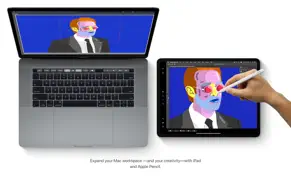
• Expand your Mac workspace by using your iPad as a second display.
• Place one app on each screen, or put your main canvas on your Mac and your tools and palettes on your iPad.
• Use Apple Pencil for tablet input when using your favorite creative pro Mac apps.
Continuity Sketch and Markup
• Create a sketch on your iPad or iPhone and insert it into any document on your Mac.
• Use your iPad or iPhone to sign a PDF or mark up a screenshot on your Mac.
Accessibility
• Control your Mac entirely with your voice using Voice Control.
• Enable Hover Text to display large, high-resolution text in a dedicated window.
• Zoom in closely on one screen when using two displays for improved legibility with Zoom Display.
Security
• Feel secure knowing that the apps you use have been checked by Apple for known malware.
• Authorize access to data when apps request it using new data protections.
Find My
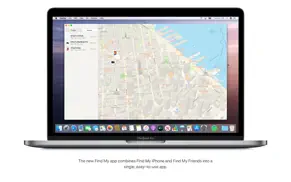
• Keep track of your devices and find friends and family with an easy-to-use new app.
• Help locate devices even if they’re not connected to Wi-Fi or cellular.
• Use Activation Lock to protect Mac models with the Apple T2 Security Chip.
Photos
• Enjoy a new immersive, dynamic experience that showcases your best photos and memories.
• View Memory Movies and edit their duration, mood, and title.
Safari
• Browse using an updated start page that surfaces sites from your history, bookmarks, reading list, iCloud Tabs, and even links sent to you in Messages.
• Help secure your accounts using strong passwords suggested by Safari.
Notes
• View notes as visual thumbnails in gallery view.
• Enjoy a more powerful search that recognizes text in items you’ve scanned and objects within images.
• Share an entire folder of notes using shared folders.
Reminders
• Use new edit buttons to add dates, locations, flags, attachments, and more to reminders.
Mail
• Take control of your inbox by muting a thread, blocking a sender, or unsubscribing from a mailing list.
Screen Time
• Gain insight into time spent using apps and websites and set usage limits.
• Set up Family Sharing to use Screen Time with your family’s devices.
😍 Do you love MacOS Catalina app? Please share your friends!



Please wait! MacOS Catalina app comments loading...
MacOS Catalina 10.15.7 Tips, Tricks, Cheats and Rules
What do you think of the MacOS Catalina app? Can you share your complaints, experiences, or thoughts about the application with Apple and other users?


MacOS Catalina 10.15.7 Apps Screenshots & Images
MacOS Catalina iphone, ipad, apple watch and apple tv screenshot images, pictures.
| Language | English |
| Price | Free |
| Adult Rating | 4+ years and older |
| Current Version | 10.15.7 |
| Play Store | com.apple.InstallAssistant.Catalina |
| Compatibility | iOS 10.9 or later |
MacOS Catalina (Versiyon 10.15.7) Install & Download
The application MacOS Catalina was published in the category Utilities on 04 October 2019, Friday and was developed by Apple [Developer ID: 284417353]. This program file size is 4.56 GB. This app has been rated by 17 users and has a rating of 1 out of 5. MacOS Catalina - Utilities app posted on 24 September 2020, Thursday current version is 10.15.7 and works well on iOS 10.9 and higher versions. Google Play ID: com.apple.InstallAssistant.Catalina. Languages supported by the app:
AR CA HR CS DA NL EN FI FR DE EL HE HI HU ID IT JA KO MS NB PL PT RO RU ZH SK ES SV TH ZH TR UK VI Download & Install Now!| App Name | Score | Comments | Price |
| MacOS Sierra Reviews | 1 | No comment | Free |
| Apple Invites Reviews | 4.6 | 18,466 | Free |
| MacOS Mojave Reviews | 1 | No comment | Free |
| Swift Playground Reviews | 3.7 | 1,856 | Free |
| Apple Music Classical Reviews | 3.9 | 3,807 | Free |
macOS Catalina 10.15.7 provides important security updates and bug fixes for your Mac. • Resolves an issue where macOS would not automatically connect to Wi-Fi networks • Fixes an issue that could prevent files syncing through iCloud Drive • Addresses a graphic issue that may occur on iMac (Retina 5K, 27-inch, 2020) with Radeon Pro 5700 XT
| App Name | Released |
| Universal TV Remote App. | 03 April 2024 |
| UK ETA | 23 October 2023 |
| Google Chrome | 28 June 2012 |
| Amazon Fire TV | 22 December 2014 |
| Xfinity | 18 April 2017 |
Find on this site the customer service details of MacOS Catalina. Besides contact details, the page also offers a brief overview of the digital toy company.
| App Name | Released |
| ITest. | 24 April 2024 |
| Blue Iris | 15 December 2012 |
| Transcend Theory | 16 April 2024 |
| ProPresenter Remote | 16 December 2008 |
| FORScan Lite - for Ford, Mazda | 02 November 2014 |
Discover how specific cryptocurrencies work — and get a bit of each crypto to try out for yourself. Coinbase is the easiest place to buy and sell cryptocurrency. Sign up and get started today.
| App Name | Released |
| WhatsApp Messenger | 03 May 2009 |
| Spotify - Music and Podcasts | 14 July 2011 |
| Netflix | 01 April 2010 |
| 09 October 2009 | |
| CapCut - Video Editor | 14 April 2020 |
Install the Giftmio extension for smart shopping. Get notified about cashback opportunities, activate cashback in one click, and save money on purchases.
| App Name | Released |
| After Inc. | 26 November 2024 |
| Scritchy Scratchy | 18 March 2026 |
| Slay the Spire | 13 June 2020 |
| Shadowrocket | 13 April 2015 |
| Monash FODMAP Diet | 17 December 2012 |
Each capsule is packed with pure, high-potency nootropic nutrients. No pointless additives. Just 100% natural brainpower. Third-party tested and validated by the Clean Label Project.
Adsterra is the most preferred ad network for those looking for an alternative to AdSense. Adsterra is the ideal choice for new sites with low daily traffic. In order to advertise on the site in Adsterra, like other ad networks, a certain traffic limit, domain age, etc. is required. There are no strict rules.
Keep personal info private, avoid scams, and protect yourself online with AI-powered technology.
MacOS Catalina Comments & Reviews 2026
Did you know that you can earn 25 USD from our site just by registering? Get $25 for free by joining Payoneer!