VSD Viewer for Visio Drawings App Reviews
VSD Viewer for Visio Drawings App Description & Overview
What is vsd viewer for visio drawings app? VSD Viewer - Professional Visio Drawings viewer.
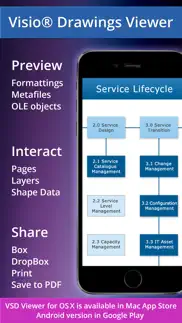
View, Interact, Share, Print, Convert to PDF any MS Visio drawing with VSD Viewer.
VSD Viewer supports specific features required by professionals who needs to preview drawings in details - with Layers and even Shape Data.
VSD Viewer opens and renders Visio Drawings of VSD, VDX, VSDX formats.
VSDX and VSD 2013 drawing formats are supported!
Visio Themes supported now!
BASIC OPTIONS
• Open and preview any MS Visio 2000-2013 VSD drawing
• Preview drawings of VDX/VSDX file format
• Scroll, zoom and navigate multipage documents
• Copy drawings' texts
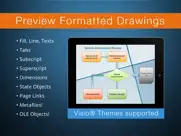
• View complex formatted objects: lines, fill, color, gradients, text formatting, text subscript and superscript, tabulated text*
• Switch documents guides visibility
• View documents with embedded EMF / WMF metafile images and OLE objects**
• View documents with hidden objects
• View objects outside page boundaries
• View original dimension units
FILE MANAGEMENT AND SHARING
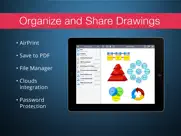
• Organize files and folders using built-in File Manager
• Add documents from iTunes
• Send documents via email
• Open and preview your drawings from cloud storages
• Access your Dropbox cloud storage just from the application
• Print your Visio Drawings via AirPrint
ADVANCED OPTIONS
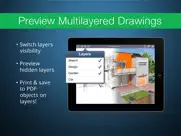
• Switch documents layers visibility, preview hidden layers***
• Preview objects Shape Data
• Convert your drawings to Adobe PDF for annotating and distribution
• Preview your documents of popular doc, docx, xls, xlsx, txt, html, pdf and other formats just with the application
• Setup password protection on application entrance
* Tabulated texts are generally used for technical diagrams as a part of object's and document's frames
** Embedded metafiles and OLE objects are rendered
*** VSD Viewer allows you to preview complex multilayered drawings and switch layers visibility
VSD Viewer is iOS 14 compatible.
Current versions restrictions:
• Processing of huge documents and documents with multiple images may take time.
Your ideas and feedbacks are highly appreciated at [email protected]. Looking forward hearing from you!
All product names, trademarks and registered trademarks are property of their respective owners.
😍 Do you love VSD Viewer for Visio Drawings app? Please share your friends!



Please wait! VSD Viewer for Visio Drawings app comments loading...
VSD Viewer for Visio Drawings 7.16.1 Tips, Tricks, Cheats and Rules
What do you think of the VSD Viewer for Visio Drawings app? Can you share your complaints, experiences, or thoughts about the application with Nektony LLC and other users?


VSD Viewer for Visio Drawings 7.16.1 Apps Screenshots & Images
VSD Viewer for Visio Drawings iphone, ipad, apple watch and apple tv screenshot images, pictures.
| Language | English |
| Price | $9.99 |
| Adult Rating | 4+ years and older |
| Current Version | 7.16.1 |
| Play Store | com.nektony.VSDViewer |
| Compatibility | iOS 11.0 or later |
VSD Viewer for Visio Drawings (Versiyon 7.16.1) Install & Download
The application VSD Viewer for Visio Drawings was published in the category Business on 02 July 2012, Monday and was developed by Nektony LLC [Developer ID: 1439408517]. This program file size is 81.87 MB. This app has been rated by 11 users and has a rating of 3.2 out of 5. VSD Viewer for Visio Drawings - Business app posted on 01 September 2023, Friday current version is 7.16.1 and works well on iOS 11.0 and higher versions. Google Play ID: com.nektony.VSDViewer. Languages supported by the app:
EN Download & Install Now!| App Name | Score | Comments | Price |
| Duplicate File Finder Remover Reviews | 1 | No comment | Free |
| App Update Monitor Reviews | 1 | No comment | Free |
| VSDX Annotator for Visio files Reviews | 1 | No comment | $24.99 |
| Disk Space Analyzer Pro Reviews | 1 | No comment | $19.99 |
| Photos Phone Cleaner Reviews | 4.5 | 901 | Free |
Improved opening drawings from Google Drive Fixed minor UI issues
| App Name | Released |
| QuickBooks Workforce | 17 July 2014 |
| ZipRecruiter Job Search | 28 December 2013 |
| ADP Mobile Solutions | 13 July 2011 |
| Paychex Flex | 11 June 2012 |
| Paycom | 30 May 2017 |
Find on this site the customer service details of VSD Viewer for Visio Drawings. Besides contact details, the page also offers a brief overview of the digital toy company.
| App Name | Released |
| HotSchedules | 30 October 2008 |
| STX | 17 December 2009 |
| VesselFinder Pro | 05 March 2013 |
| ScanBizCards | 28 October 2009 |
| Gamma Calculator Pro | 05 May 2014 |
Discover how specific cryptocurrencies work — and get a bit of each crypto to try out for yourself. Coinbase is the easiest place to buy and sell cryptocurrency. Sign up and get started today.
| App Name | Released |
| TikTok | 02 April 2014 |
| 07 April 2016 | |
| Ralph Lauren | 08 November 2021 |
| CapCut - Video Editor | 14 April 2020 |
| YouTube TV | 05 April 2017 |
Install the Giftmio extension for smart shopping. Get notified about cashback opportunities, activate cashback in one click, and save money on purchases.
| App Name | Released |
| Gambonanza | 01 May 2026 |
| Terraria | 28 August 2013 |
| MilGPS | 01 December 2010 |
| Pou | 26 November 2012 |
| Monash FODMAP Diet | 17 December 2012 |
Each capsule is packed with pure, high-potency nootropic nutrients. No pointless additives. Just 100% natural brainpower. Third-party tested and validated by the Clean Label Project.
Adsterra is the most preferred ad network for those looking for an alternative to AdSense. Adsterra is the ideal choice for new sites with low daily traffic. In order to advertise on the site in Adsterra, like other ad networks, a certain traffic limit, domain age, etc. is required. There are no strict rules.
Keep personal info private, avoid scams, and protect yourself online with AI-powered technology.
VSD Viewer for Visio Drawings Comments & Reviews 2026
Good app.... but.... Great application to view the contents of Visio documents, or at least it was, but the latest update has me scratching my head a little. In previous versions, I was able to view Visio files in full screen in landscape mode. However, this latest update seems to allow the page to be seen in portrait mode, but in landscape mode (iPad turned sideways) the screen view is significantly decreased by the "File Manager". Thank you for the file manager to help me organize my docs, but it really needs an option to hide and retrieve the file manager so that I can maximize the document viewing experience in landscape on my iPad.
Just works. What else do you expect from an app? It just works! I receive an email with a Visio from a customer, open it, voila! There it is. No funny conversion issues so far. Doing mainly network drawings, single and multi layer.
I BOUGHT THIS APP BECAUSE OF ITS REVIEWS BUT. The first VSD file I try to use the app on opens with a bunch of "?" on each and every page, it seems that the app can't deal with images with in a VSD at all. I am really unimpressed with it. All of the VSD files I work with have lots of images in them so VSD viewer is useless for me.
Better than Trying to export you Visios to PDF. When you export you Visios to PDF (the cheap way to get it into your iPad) the formatting is all wrong. This is mostly due to diagrams that are multiple pages Long. This application uses the original Visio file and formats it perfectly on the iPad. I wish it was a little cheaper but it was worth the investment.
Visio viewer is just av viewer. Bought this app by mistake thought I could draw with ipPencil in iPad to draw free diagrams I like in Visio pc macOS App . This is just a viewer
Doesn’t open VSD files. I purchased this app to look at VSD files and the files won’t open. The app should at least do the one thing it’s designed for!
Works perfectly!. I have a bunch of plans for work that are in visio format and need to show them to clients on the go. With this app I can open them on my iPad and everything thinks it's so slick. And the formatting is perfect, all aligned correctly too. Thanks!!
Needs updating for new iPhone 6. Great little app but the resolution seems a little off on a new iPhone 6S. Like the app is being zoomed in. It was great on the iPhone 5. Looking forward to future updates
Very useful. I can preview Visio drawings on my iPhone with this app expediently. And it was cheaper than regular price when I got it.
This viewer really works!. This is a very easy to use and fully functional viewer for all versions of our Visio drawings! Our database is huge with floor plans, wireless deployments, and network configurations. The VSD Viewer running on my iPad allows me to be fully mobile and have our library of drawings on my handy iPad. The drawings display quickly and I can finger stretch them to get more detail if I need to. This app works and works perfectly! Well worth the cost!
works well now. The current version now displays the .vsd file itself instead of depending on other apps, which may or may not display them (eg Good for Enterprise does not). Seems to work fine now. Dan
Visio files on the go!. Great app for viewing video files on your iPad or iPhone. Easy to use, works from Dropbox, Mail and other apps.
Simple and effective.. Very good app.
Okay but there are better Visio apps out there. The offline conversion is nice if you don't have an iPad with 3G/4G on board or a mobile wireless hotspot, but it cannot process measurement/distance annotations properly (all show as 1"), which is critical for me since we use Visio for architectural and space planning. No other apps I have tried can do it offline either, but others offer an online mode which can correctly calculate the measurements. Otherwise an okay app.
Great App!!. Awesome
Useful for me. Finally can preview visio documents without converting to pdf! There are some issues in showing docs, nevertheless it's ok for me. Thanks!
Works great as advertised. Just what I was looking for. Quick office pro handles most Microsoft documents, but I get enough Visios that I really needed a viewer. This does a fine job. I wish the file manager pane was normally closed instead of normally open, but it's not a big deal. Very happy to add one more useful tool tommy iPad.
Great app. Good solution to open and preview your Visio drawing on iPad, strongly recommend
Great App!. No issues encountered. Would like the next app to facilitate editing of files.
Still waiting. I've had difficulty opening Visio 2013 files, seems to take forever when loading from Dropbox. So, sorry I didn't find the app to work well and wished I didn't just pay as much as I did to find it out. Other reviews are favorable so.....
Not impressed either. I'd wished I'd read the reviews instead of jumping to download this app. Once again I'm reminded of the need to fully review the documentation before purchasing. This App will not properly display every Visio document. In fact if you want to view anything more complex than a block diagram then this is not the app for you.
Does not support multiple OneDrive accounts.. I purchased this app because the description said that you can access accounts. Does not support OneDrive for business I store my Visio docs in several accounts
I love it. Visio is such a huge part of my daily work, and I travel a lot. Having this app is such a huge addition for me. Keep up the great work!
Given Microsoft proprietary software this is good as it can be. Hope the MS folks would go native some day or replaced by open standards, Ozzy
Perfect VSD viewer. This is a great vsd viewer that I can use on my iPad to show my clients. Very simple to use, but has the functionality I have been looking for. Nice work!
Absolutely perfect!. I work in IT, and manage a group of engineers. They send Visio's to me constantly and until this app came along I had to beg for PDF exports each time. This app works every time perfectly. There has never been a diagram I cannot see well and in full detail using this app. It also allows me to save as PDF from the app, and then I can mark up the diagrams using goodreader or similar, or mail the diagram to clients. I also LOVE their Mac OS X app VSD viewer which is equally as good (actually even better).
Would be better with edit ability. Has some formatting errors where text is in wrong place
Great Viewer. This is a really great app for viewing VSD Drawings! It works really well and everything looks great and displays properly. It’s definitely worth the money, especially if you use VSD a lot for your work!
No Visio 2010 support. The developers do tell you that in the description, which i missed before buying. For $10 you'd think they would provide a viewer that can read the files in the current (2+ year old) version of the product.
Enhanced File Support. They have updated this app to include Onedrive support, virtually required for an app that is used with an MS product. I've found this app invaluable in communicating with people in the field without having to take a laptop.
Unable to open from Mail. UPDATE: Okay, I received some fine support from Serg regarding this issue. It took a day or so to figure things out but turns out it was the original email I used to open the files was somehow corrupted. Anyway, I've since opened about a dozen other Visio files without any issue. Thanks again Serg! Does what it's supposed to do.
Great viewer if you need to see the Visio docs from your phone. This is a great tool to be able to see VSD documents on your phone. I often get email attachments with Visio documents and had no way to comment or review them until this app. I've never met a VSD file it didn't render great in. Only things missing (but still 5 stars because works really well as a viewer): Export to Mail as a PDF Print with AirPrint (should be roughly the same export to PDF logic) Overall, nice work. This is worth the money if you use Visio documents often.
good visio viewer. works for most vsd's we have, occassionally it can't display an object
Responsive support. If you go to their website and address your issue they respond within a day. I'm still working out this problematic file. Trying to pinpoint the problem and see if its actually the file that's not corrupt.
One Fatal Flaw. The app is great, except for one fatal flaw. It doesn't support the split view functionality, so that I can have VSD Viewer open while taking notes in a different app in a side-by-side view. Adding this split-view functionality would bring my rating to 5 stars.
Great App for Apple Users. This past year I have made a complete migration to Apple products. The one drawback was not being able to view VSD diagrams sent to me. This app allows me to view Visio diagrams on my iPad and iPhone. Support is outstanding! Recently I had a diagram that would cause the app to quit. I sent in a support ticket along with the visio diagram and the support team sent back a version I could read in hours and indicated that a fix would be issued in the next couple weeks. Great service Nektony! Tom
Almost perfect. Works flawlessly with all the Visio files I threw at it. Only wish it has search function as we have some huge org charts and finding a specific person can be frustrating.
Fantastic. This is perfect! Now I can review my visio files on the go with my iPad and not having to boot up my laptop.
works. Works very well. It is the only thing I have found that will open Visio files on an iPad
Superb for viewing MS Visio files while on the way. Now thats another one superb solution for viewing Visio drawings while you are on the way. I have already bought VSD viewer for Mac (and love it), and this app only compliments it. It is easy to check MS Visio drawings while you are traveling and your team needs your input, like in mine case. I just open drawing in my iPhone from email and check it. The best part ir what developer calls “Shape Data” - I can see data of item in the drawing, so I can check specifications and see if really everything is OK. And layers function is also the one I like - in complex drawings it helps to separate data that needs checking. So it is very handy if you need to travel and check team work progress at the same time. As this app is for iPad also, I think that could be used for presentations also, even I have not tried this yet.
Works but!!!!!. Takes more than 60 seconds to load a 756k file? Please fix this and you will get a higher rating. Note: Add a password option and printing you you have my *****.
Bombs on text labels. Might be fine with a flow chart but this failed to render any of my object text labels. Host names and ip addresses next to computers failed to display.
J. Petrox. Finally got the update with themes support. Thnks
Excellent!. Awesome update! Adding layers has enhanced the functionality of the app tremendously! Keep the updates coming.
Excellent Viewer!. I do lots of Visio diagrams. All network related with backgrounds, utilizing vendor stencils, etc. After reading the reviews I wanted to put it through its paces. I opened a 6MB, 29 page Visio file. It loaded quickly and apart from some minor formatting issues it displayed extremely well. Actually better than expected on an iPad. I'll be sending my findings to the developer. It works great now and look forward to future development. Worth the $$.
Fantastic tool!. I love having my .vsd files with me wherever I go. It has made collaboration super quick and simple, so much so that I gifted this app to our entire team! If you're regularly working in Visio, you should definitely give this a try!
Excellent app!. Love it so far.
Great Business tool!. I work at a business where I need to complete projects with a team of people and we are never in the same place at once. This iphone app has really simplified my work. Also I can easily show charts to my co-works with out having to carry my lap top everywhere. This app has really simplified the collaborations with my team!
Perfect. This app saved my day. It is probably the only usable vsd file reader I could find for iPad. It works well and very simple and elegant. This is exactly what I need. Thank you!
Just what I needed!. I had to check on a file on the field... did the trick! awesome.
Did you know that you can earn 25 USD from our site just by registering? Get $25 for free by joining Payoneer!
Patience needed at first use.... I felt ripped off at first attempt. Opened a mail with VSD Clicked on attachment 'Open In ...' appeared Press... Then nothing! and nothing... I was really pi**ed off until about the 4th attempt - when it worked fine after various iterations of kill / reopen mail etc... Final opinion will be withheld until I feel it really does what's expected - reliably. looks good though !
Does what it says. This is well worth the money. It handles large and complicated Visio files with ease. I use the program for viewing only, not for editing, and it's excellent for my needs. One improvement I would like is the ability to send as PDF or PNG directly from the document view. At the moment, I have to save as PDF, open the PDF, then send the file. Streamlining this process would be fantastic.
Works well but not 100% accurate. I have done some testing with various VSD files and they all,render quite well. Unfortunately certain things like line styles (ie dashed line etc) and ends (ie arrowheads on lines) are not reproduced faithfully. Good app though regardless. An extra star if the reproduction of the VSD gets that little bit better.
Marcus. This is not what I expected, poor quality. Most of my router symbols are showing ? Mark. All links are scattered wrongly. Text on the devices are missing. Waste of money.
Imagine you at your best. All the time. Picture yourself at your sharpest and most productive. Your most alert and focused. Your most lucid, creative and confident. At work. At play. In every area of your life. Add Mind Lab Pro® v4.0 to your daily routine and uncap your true potential. Buy Now!
Bravo!. This app has come a long way, but I have to say now its THE app to have if you want to view Visio files on your iPhone. -Renders large complex great -site maps that span multiple pages render great -navigating, zooming input is much better -loads perfect from SkyDrive Well-earned 5 stars.
Can't display layers correctly. MS Visio Viewer (free, but doesn't run on IOS) will show you the layers of a drawing as you last saved it. I had expected VSD Viewer to do the same thing. What VSD Viewer does is show all layers. If the drawing is complex, like a house plan, then it becomes unreadable with things that are over writing each other. So VSD Viewer does what it should for single layer drawings, and it shows multiple pages of a drawing properly. Tthat would make it a great application, if it were free. However, this paid application needs to be able to handle multiple layers long before now. The only work around is to print your Visio drawing to PDF and use the iPhone to read that. Serious Visio users should avoid this product.
Now that was a waste of money. I've open one file (network diagram VSD format) and I had missing connectors, lines are not rounded, shapes missing (e.g. Cloud). Totally useless for me.
Not as advertised. I tried opening several VSD's and none of them looked anything like my drawings. They were clipped, text missing, shapes changed and content missing. Will back bench it until there are some updates.
Stuck. I’ve been using this app for years but now when I try to open a VSD it takes me to a screen that tells how to open a file from mail etc. The only option is to click watch demo. The app never opens the file to view anymore.
Adsterra is the most preferred ad network for those looking for an alternative to AdSense. Adsterra is the ideal choice for new sites with low daily traffic. In order to advertise on the site in Adsterra, like other ad networks, a certain traffic limit, domain age, etc. is required. There are no strict rules. Sign up!
Finally!!. As a professional office manager, this app handles all my needs on the fly. I'm amazed at the array of useful features it has, especially layers and shape data. My iPhone feels like a mini office now, and it works great on iOS 7 too!