Planboard App Reviews
Planboard App Description & Overview
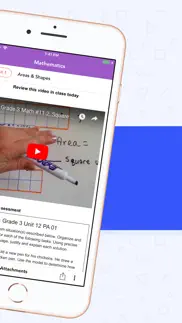
What is planboard app? Plan lessons on the go in an easy-to-use editor with curriculum standards and attachments. Planboard organizes your lessons, subjects, and semesters in a beautiful timetable that is with you everywhere.
Join over 250,000 teachers around the world who are already using Planboard to cut down their classroom prep time and spend more time with students!
——————————————————————————————
FEATURES
• 100% free for teachers!
• Create, edit, and share lesson plans
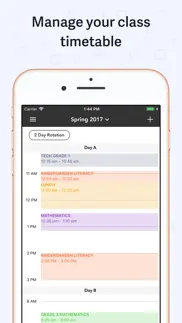
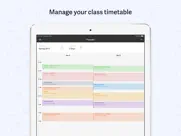
• Organize your timetable, subjects, and semesters
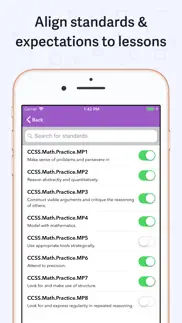
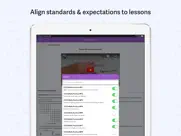
• Manage curriculum standards
• Take photos and add files to lesson plans
• Syncs with Planboard on the web
• Fast and easy to get set up
WHAT TEACHERS ARE SAYING
“A fantastic app that has transformed my lesson planning...I have dumped my old paper planner for good. This is an excellent app.” - benjro
“I love this program! I can create my lessons in a jiffy- dare I say lesson planning is almost *fun* now?! I can even do lesson planning while on the go because the program now syncs with the app- SCORE! I love being able to be out and about and not have to be tied to my computer, but if I think of something for a lesson, I can just plug it right in!...And all of this awesomeness is on the FREE version. I love this software!!!” - Tater and her tots
“I have been looking for a planning and attendance app for so long! This app is absolutely perfect, whether you’re using it on your iPad, iPhone or using the online site on your computer it works flawlessly! Thank you so much!” - Ethie56
“This app is exactly what I was looking for! I have tried many digital planning options and this is by far the best. Being able to change my planner easily on my iPad or computer makes it so easy to change plans and have them there ready to go...Great app!” - J.Lee.17
“So much better than planning in a paper based planner. I like being able to check my lessons or add to them as ideas occur to me using my phone on the go.” - KT28363838
“Will render you pencil & paper daybook obsolete. It is fantastic for your day to day planning and makes printing off a paper copy for a supply teacher super easy” - Mr.Esss
“I have been using it for three years now and love the planning/assessment tools. My principal asked me to inform the rest of the staff about this program. It has helped me make my teaching more organized.” - Stolenfeather
“I feel as though I would not be as organized without Chalk! And the fact that it’s free makes it even more amazing! As we know as teachers we spend a lot of our own money on supplies for our students and having a program this amazing for free means I can spend more on my students so thank you!” - btpuggy
“I wish I had found Planboard years ago! It has changed my entire approach to planning lessons! I cannot recommend this app enough” - BryarsMom
SUPPORT
The Chalk Team can be reached anytime by email at [email protected], or during the day by live chat to assist you with getting the most out of Planboard.
😍 Do you love Planboard app? Please share your friends!



Please wait! Planboard app comments loading...
Planboard 2.30.5 Tips, Tricks, Cheats and Rules
What do you think of the Planboard app? Can you share your complaints, experiences, or thoughts about the application with PowerSchool Group LLC and other users?
Planboard 2.30.5 Apps Screenshots & Images
Planboard iphone, ipad, apple watch and apple tv screenshot images, pictures.
| Language | English |
| Price | Free |
| Adult Rating | 4+ years and older |
| Current Version | 2.30.5 |
| Play Store | com.vetica.Planboard |
| Compatibility | iOS 11.0 or later |
Planboard (Versiyon 2.30.5) Install & Download
The application Planboard was published in the category Education on 26 September 2013, Thursday and was developed by PowerSchool Group LLC [Developer ID: 1057394489]. This program file size is 56.41 MB. This app has been rated by 1,859 users and has a rating of 4.7 out of 5. Planboard - Education app posted on 25 May 2023, Thursday current version is 2.30.5 and works well on iOS 11.0 and higher versions. Google Play ID: com.vetica.Planboard. Languages supported by the app:
EN FR Download & Install Now!| App Name | Score | Comments | Price |
| Unified Talent Mobile Reviews | 4.3 | 433 | Free |
| SM Home Reviews | 1.8 | 9 | Free |
| SchoolMessenger Reviews | 4.4 | 801 | Free |
| Kinvo by Kinvolved Reviews | 2.7 | 40 | Free |
| PowerSchool ERP Employee Reviews | 1 | No comment | Free |
Update web links
| App Name | Released |
| DMV WRITTEN TEST | 03 February 2020 |
| Minecraft Education | 06 September 2018 |
| HelloTalk - Language Learning | 15 December 2012 |
| Seek by iNaturalist | 09 March 2018 |
| Toca Boca Jr | 18 December 2014 |
Find on this site the customer service details of Planboard. Besides contact details, the page also offers a brief overview of the digital toy company.
| App Name | Released |
| ASTB Prep | 15 January 2021 |
| Foundations Memory Work C2 | 01 October 2013 |
| PROmote - Army Study Guide | 07 May 2011 |
| GENKI Vocab for 3rd Ed. | 16 October 2020 |
| Elmo Calls | 09 December 2011 |
Discover how specific cryptocurrencies work — and get a bit of each crypto to try out for yourself. Coinbase is the easiest place to buy and sell cryptocurrency. Sign up and get started today.
| App Name | Released |
| Messenger | 09 August 2011 |
| 12 February 2019 | |
| Gas | 27 August 2022 |
| PayPal - Send, Shop, Manage | 03 February 2019 |
| Google Maps | 12 December 2012 |
Install the Giftmio extension for smart shopping. Get notified about cashback opportunities, activate cashback in one click, and save money on purchases.
| App Name | Released |
| Farming Simulator 26 Mobile | 19 May 2026 |
| Monash FODMAP Diet | 17 December 2012 |
| Slay the Spire | 13 June 2020 |
| Plague Inc. | 25 May 2012 |
| MilGPS | 01 December 2010 |
Each capsule is packed with pure, high-potency nootropic nutrients. No pointless additives. Just 100% natural brainpower. Third-party tested and validated by the Clean Label Project.
Adsterra is the most preferred ad network for those looking for an alternative to AdSense. Adsterra is the ideal choice for new sites with low daily traffic. In order to advertise on the site in Adsterra, like other ad networks, a certain traffic limit, domain age, etc. is required. There are no strict rules.
Keep personal info private, avoid scams, and protect yourself online with AI-powered technology.
Planboard Comments & Reviews 2026
Layout nightmare. In my opinion, the functionality of this app is akin to many tech solutions that school districts are forced to use, and that’s not good. They try to do too much, and make the simplest tasks overwhelming and difficult. Why doesn’t this app start with a calendar first? Semesters?!?! Templates?!?! Timetables!?!?!? Subjects?!?! Why are these separate? I don’t understand. As teachers these items are linked together, and flow together. I don’t get the feeling that teachers designed this app.
No Apple Pencil support???. This app would easily get 5 stars if they added Apple Pencil support and month view. If you could also import a calendar for holidays, PD days, etc, that would make it a 6/5 star app
Bug. I would like it but. There’s a bug in the app, I just installed this an hour ago and it wont let be make a class I’m using an iPhone
A great tool for the classroom. I have used the site and app for the last 3 years and it has greatly helped me simplify my lesson planning. The weekly calendar and the unit options allow me to have different views of the material covered during a lesson, a unit, and through the entire year. It has a learning curve, but it is definitely worth it. I highly recommend it!
Worth the download. I have used this app for a couple of years. It is fantastic at time saving. It keeps me organized and makes planning so much easier. The only problem I have is in chrome it doesn’t connect to me google drive. I have since figured out I can use it in a safari and have full access. Great time saver.
Seems great but can’t get past set-up. I’m using the iOS app and when it takes me to the screen where I need to add my classes it just gets stuck there. There’s a little plus button I’m supposed to press but when I do nothing happens. There are no other buttons I can press from that screen, so I tried closing the app and restarting it. Other options in the menu worked, but when I went to my schedule/plans I couldn’t do anything because I have no classes. I went back to the classes and the screen got stuck there again. Frustrating because the support website wouldn’t let me connect to chat, and when I called the number I was supposed to select what I was calling about. It gave me more than 10 different program options, none of which were Planboard. And I have no way of knowing which is the correct one that is associated with it!
Just wish it had widgets. I absolutely loooove this app! I just wish it had the option to add widgets. I’d like to be able to see my daily schedule in the widgets section.
Works well for my needs. I'm enjoying this app. I can feel organized with my band curriculum. It works great on my iPad, iPhone and PC.
Great but with limitations for scheduling. It’s very helpful being able to share my plans with the specialist who work with my students. I like the timetable but I wish I could make one day only changes for times when I must adjust my schedule due to special events. If there is a way to do this I haven’t found it yet.
Keeps crashing. I have a 2017 iPad and this app keeps crashing. I previously loved it, but now it’s just a pain and unusable. This is especially frustrating since school starts tomorrow!
iPhone app still not great but now syncs. I love Planboard on my laptops web browser and on the iPad app. Used to have syncing issues to my iPhone but that has updated. The iPhone layout is still not great - I wish it would show even a small preview of the plans the way the iPad does in weekly view. I am a band teacher so I don’t usually title my lessons, because our music changes each year, so it is rare that I can recycle plans.
Can’t customize well. There are very few customization options. This might work for a high school but not for elementary school where our schedules change day to day and week to week. App keeps shutting down as well
Can’t sign in. Magic link gets sent to my email, but doesn't log me in. It takes me back to the page where it asks if I want to sign up. There’s no where in the app to indicate you forgot your password. I went to the website and clicked forgot my password and put in my email, but so far it isn't sending me any way to change or recover my password. I don’t remember why I deleted this app years ago, but I’m starting to get an idea.
Excellent resource. Great resource for home schooling. Very effective in keeping lesson plans and grades.
Loved it but incompatibility with iOS update an issue. I was having a great time preparing for the new year but with the latest iOS update, things are playing nice together. Talked with Support and they are working on it but 3 weeks into the year and all work has to be done on my desktop preventing me from using my tablet as a guide during class. It’s a good product if they can work out compatibility. Hoping they can fix it soon before I move back to paper.
Month and Unit view in the app please.. UPDATE: I want to commend the developers for quickly fixing the online site experience for iPad users. It now supports drag and drop which is vital in the Unit View. My initial review of 1-star is up to 4 and the only thing holding me back is the lack of month and unit view on the app. Thanks for hearing our requests. As a teacher of 15 years, I love this resource and look forward to another year with Planboard.
Good. The app is great. I would love to be able to upload lessons from the app not just view the ones already imported. Otherwise awesome!!
Loved this app but it ruined me. I was in love with this app. I put in all my classes and my whole very detailed schedule and did it all on my new iPad. Went to sign in on my phone but it wouldn’t show any of my classes or templates so I signed out on my iPad to try it on there and when I signed back in, everything was gone. That was so much work. And I loved the way the app was working but now I don’t even feel like it’s worth it putting all my information back in if it can just disappear that quickly. Very disappointed.
Not recommended. I was using Planboard for weeks and my class had to change from Tuesdays to Wednesdays. Planboard was NOT ez to edit. Too many clicks to getthe job done. Lost lesson plans, put on the wrong dates, couldn’t view plans from earlier in the year. Planboard is boring layout and not visually appealing like other apps. Sometimes web links disappeared. Don’t waste time here.
The Best Lesson Planning App Available. I have been in the process of trying many different apps in order to move my lesson planning from a physical book to my devices. This app has blown the others out of the water! It takes a bit of time to set up your schedule at first (it took my about an hour to make it perfect). Now, it is absolutely awesome in that it is easy and efficient with an intuitive and minimalistic layout. I especially enjoy the note features for each day. I find I have things I often need to note in my planner that don’t necessarily belong to any specific subject, so it is nice to have that option at the top. Additionally, I love the export feature that is so simple and beautifully lays out my lesson plans for the day. It is easy to print for subs or send my plans to my teammates1 Lastly, I love the option to easily add standards to my lessons. I am wondering if the standards will stay updated though? I know my state is in the process of rewriting science standards this year. I use this app in conjunction with google calendar and google keep — I think I may have found the perfect combination for all of my logistical and planning needs for work, home, and everything else in my life!
LOVE. I really enjoy this app. It makes it a lot easier to just print off for admin if necessary. I am still figuring out how to use it to the full potential ( grading, standards) etc. I love planning lessons now!
Tracking Standards. I love that I can track my standards without any hassles. I also like that I can access my plans from and device. I wish I could move a lesson forward without having to copy each lesson forward a day.
Unusable bug. Something is wrong with the current version of Planboard for the iPhone. I’ve deleted and reinstalled the app, same problem. It immediately launches into setting up a new semester. I already have an account, which I use from my desktop and iPad, so this doesn’t let me log in.
Cannot add new semester. I have liked this app off & on. It can be great, if clunky at times. However, I cannot add a new semester (my school actually runs on a quarter schedule). No matter what I do it won’t record the rotation I choose and I can’t move forward, constantly being told to. House a rotation. Please help!
A great app in theory.... I really enjoy just how customizable this app is to individual teaching schedules. It is a very streamlined, minimalist, and aesthetically pleasing app. Whoever the designer is did a great job. However, and this is a big fat HOWEVER, this app is very glitchy. Every time I try to add a new subject or modify any of my scheduling in any way, the app crashes. I’m not currently able to continue using the app because of this. Please fix this soon!
Sped teacher in TX. Thank you so much!! I teach 3 grade levels of English Resource! This is making planing so easy! My year will go much smoother this year! I love that I can adjust my plan because every teacher knows that the plans will change! Also thanks that it’s free! Another thing all teachers love!!! Thanks again!
Planboard Makes Homeschool easy. I wish I had found Planboard years ago! It has changed my entire approach to planning lessons! I cannot recommend this app enough
Program freeze. The app freezes at step 3 setting up classes. It tells you to press the + button but nothing happens. You are also stuck on this screen and can only exit by closing the app.
Needs support for attachments on iPhone. Have been waiting for years on the iPhone app to support adding attachments of any other kind besides just photos - need to be able to add pdf’s, files from phone, Pages app files to lessons for those of us who solely use this app on our tablet or phone. That is where I create my assignments and so that is from where I need to upload them to my lesson planner. Until then, I can’t really use this app effectively.
Umm bug ?. I was trying to create an account but it didn’t give me the option it was just saying account not found there were no places that I could have clicked to change it
Freezes and Disappears. I use Planboard on my iPad, and while I am typing my classroom planning, all of a sudden the app will stop working and disappear. Then I have to reload it. Also, I will type the title of my lesson and the program won’t save what I have typed. And why H2, H3, H4? Why not just have a regular font size option? I am going to seek another app that has clearer options and doesn’t freeze frequently.
Making life easier. Stumbled onto Planboard. I’m an Itinerant teacher with 30 students at 8 different schools. Entering each student as a “subject” helped me schedule. Then having the ability to link all of my documents and websites into my plan book to click on for quick access is life changing. And when I accidentally close a window or everything on my screen, just one click to Planboard and I can reset myself in moments.
Doesn't work. Old review: This app has quit 3 times before I was even able to "create first class" waste of time New Review: Sent message from developers to try again that issue was fix. Nope don’t waste your time. I swear that the complete contrast in good/bad reviews are good-> people who work fir company. Bad-> real users
Two thumbs up from this homeschooling mom. As I transitioned from cumbersome paper planners, I researched many options for homeschooling. A few of the well-known digital planners were not intuitive or easy to use, and they required monthly or yearly subscriptions, as well as offered features that I, as a homeschool mom with one student, didn’t need. Not only is Planboard fairly easy to learn to use, but I can use it for free since I only have one student and don’t need to subscription-only features. We just finished up our first semester with Planboard, and I have been able to track attendance, grades and attach state standards to my lesson plans. I’m very satisfied with the app and look forward to using it throughout the years.
Love it. It has made planning so much easier!
Great App, New Update Crashes. I’ve been using this program for my classes for quite a while, and was excited to use the iPad app. It was working incredibly well until the newest update, and now the app will crash every time I open it. Hope the next update solves this!
Seems to be a nice app. I think I will like this app but something that would be a great feature would be the ability to see a whole week of assignments at a glance. Teachers submit plans a week at a time and it would be nice to see the whole week to make sure we didn’t miss a day or something didn’t get copied to the wrong slot. Had that happen already on my first time using it. And speaking of copy, it would be helpful if the app highlighted what day you were currently on. Other thank those things I think this app will help lee me organized.
Approved. I really like the prompt response and the professionalism that this organization offers!
Great Support, Improving Rapidly. This app is not perfect, but what apps are? The great thing about this app is the tech team’s flexibility and response. I have filed several bugs already and the team have addressed all but one (which apparently is a difficult nut to crack). I am satisfied with what it does. This app has made my transition from a laptop to an iPad even more smooth and helped me to teach all of my classes from my iPad Pro. Thanks!
Good, but doesn’t work in some iPads. I’m just starting out teaching, but I really enjoy Planboard. It gives me everything I would want in an online, cloud-based lesson planner. My only big complaint is that the app crashes when opening on some iPads. It doesn’t even get to let me log in, it just crashes right away.
The best app for teachers. The best all encompassing app for teachers, hands down.
Organized but doesn’t work with Apple pencil😭. I enjoy the functionality this app has to offer but it would be SO useful if it allowed me to use my Apple Pencil when creating lesson plans or making notes in the moment.
Can’t even log in. I just started using the website and love it. When I tried downloading the mobile app, I couldn’t be more disappointed. Three seconds after it opens, it crashes. Am I doing something wrong? Update: I used my google account even though I had a different password. For some reason, starting with google, even though it was wrong, kept it from crashing.
Best Planning Guide. I can type all the things I want to accomplish during a lesson. I can also add my “to do” list. Adding the state standards is a just a click and it’s on the plan too. I can search by unit or date. Best part? It’s free! I cannot thank you enough for this!
Love it but..... I love this app, but it is missing some key features I need as a teacher. The ability to add events other than classes. For example, morning meetings for committees that meet once every two weeks or etc. I would love if you could sync your Google Calendar with this Planboard. Other than that it is great but I really wish there was an event calendar.
Oops Internal Error. I love the Planboard website. Couldn't wait to put the app on my ipad. Every time I try to log in I get a message "Oops there's been an Internal error" and it won't let me sign in. I have checked my Internet connection at least half a dozen times. This app just doesn't work. *I want to thank the developer for contacting me. I have retired so no longer need the app.
Wonderfully customizable!. AMAZING customer support! I love the new feature of being able to add files from my phone- now I can FULLY plan lessons in the car (not while I am driving). Wonderful features and I am so glad I found this software! I love this program! I can create my lessons in a jiffy- dare I say lesson planning is almost *fun* now?! I can even do lesson planning while on the go because the program now syncs with the app- SCORE! I love being able to be out and about and not have to be tied to my computer, but if I think of something for a lesson, I can just plug it right in! Yes, it is a bit of a hassle to set up during the front end, BUT STICK WITH IT. Create your own template that YOU LIKE. I have my own that I have used for a couple of years so I can just plan away almost mindlessly because I know what goes where. I can organize my PDF and .docx attachments to keep my lessons organized and move them from day to day- EASY TO DO FROM THE UNIT SCREEN in the program. My county uses a modified CC standard and I was able to upload those to Planboard with no issues. Now they are in the system for all to access- and I can track my standards with my lessons. And all of this awesomeness is on the FREE version. I love this software!!!
Great digital planner. Love the layout, the price.... takes a little getting use to and some figuring out/know how to use. Wish it included weekends, and a notes/shopping list that continued until marked off. Using as a homeschool digital planner
Really exceptional. I’m a teacher but I’m not as organized as I would like to be. This planner is supper user friendly, and helps you write your lesson plans in an organized way. It also gives you ideas for class since the standards are there so you can always go there and see which topic you haven’t cover. The best best part is that you can export and print your lesson plan to bring it with you in class (and not your phone...) Also I love the yellow notes on top for side reminders!
This had been a great app in the past, not anymore. In the last update, we lost the ability to do daily plans. No matter what settings I tweak, I can only do a weekly plan. Even the go to date option sends you to the next week! Do better Planboard!
Did you know that you can earn 25 USD from our site just by registering? Get $25 for free by joining Payoneer!
Awesome. Started using it this year and it cuts my planning time down dramatically which is great! I’ve converted most in my staff room and they love it too. I’d LOVE an Apple Watch add on so I can get an alert when my next class is and a quick overview. Also would LOVE to number weeks. In Australia we work on a week 1-10 schedule 4 terms a year. Our units usually cover a single term. Also a widget for ios14 please!
Keeps crashing.. I only got as a far as adding subjects. When I touch t + button as instructed the app closes. Tried 5 times, no luck.
Easy to use. A very handy app for teachers or anyone planning weekly activities. Nice and easy to use once you have setup your timetable. Being able to move lessons over or copy them is very neat!
Perfect - But.... UPDATE: When deleting larger amounts of text from a lesson, if I hold the delete button for too long, suddenly the whole lesson gets deleted! This can be frustrating at times! I have been looking for a planning and attendance app for so long! This app is absolutely perfect, whether you’re using it on your iPad, iPhone or using the online site on your computer it works flawlessly! Thank you so much!
It works. Thanks for that. It works on my iPad Pro quite well.
The app I didn’t know I needed. Super impressed. It’s so easy to use and so so flexible and adaptable. You can put in timetables of multi week cycles or account for days off. You can put in as many different types of lesson plans templates as you need, and push a lesson to the next timetabled spot if things change.
Great app. This is a really easy to use app. I have used many others and I have found so far this is easy to set up and us to record information and to plan. Great work
Great!. So easy! Syncs to website so planning is easier there but quick updates using phone app are great.
Perfect App for Planning. This app is exactly what I was looking for! I have tried many digital planning options and this is by far the best. Being able to change my planner easily on my iPad or computer makes it so easy to change plans and have them there ready to go. I love the little note section above each day also. Great app! 👌🏼👍🏼
Can't sign up. Unable to sign up so can't use....
Great app. This app is great I use it EVERY DAY and it’s a great way to lesson plan wherever I am. Would love to have it Apple Watch campatibile so I can see my upcoming classes at a glance!
New update. After this new update it crashes as soon as I open the app.
Great app but… crashes with Apple Pencil (first gen). I have only just downloaded this app to use for school, and when I am typing lesson notes, I really want to use my Apple Pencil to write instead of typing… however every time I try to write with Pnecil inside the lesson notes box, the app crashes. If this is somehow able to be fixed, that would be a lifesaver! App is great in all other aspects though!
Great app. Easy to use with many great functions.. 👍
Awesome!. I'm loving this app, no more heavy paper day book for me - this works beautifully The app creators are very prompt at answering any questions and they are receptive to feedback.
Buggy and leggy user experience. Needs a rethink. I find the interface quite slow to use as it's basically trying to render a web page each time. Often it's hard to select things I want and it's sometimes impossible to input text till I wait for my slow internet to load the page or whatever is going on. A fix would be for it to be all offline and just doing background syncs
Useless. Won't let me create an account so can't use
Good while it worked. I enjoyed using this app while it worked. However it now won't let me past "Setup Your Planboard Account" despite having used it for months and clearly already having an account. I logged on using the online version and found all my data and planning wiped. This inability to access/loss of my planning is incredibly frustrating to say the least
Great App. Use this everyday for teaching. 1 suggestion, it would be great to have a widget for iPadOS to display today’s classes (or upcoming classes). Also, is there anyway to suggest or add Curriculum information?
Imagine you at your best. All the time. Picture yourself at your sharpest and most productive. Your most alert and focused. Your most lucid, creative and confident. At work. At play. In every area of your life. Add Mind Lab Pro® v4.0 to your daily routine and uncap your true potential. Buy Now!
Add Day Numbers. Instead of letters only to signify the day ( ie Day A) Create an option for numbered days ( ie day 1) Waterloo region public uses numbered system
Amazing!!. I feel as though I would not be as organized without Chalk! And the fact that it’s free makes it even more amazing! As we know as teachers we spend a lot of our own money on supplies for our students and having a program this amazing for free means I can spend more on my students so thank you!
App crashing. I was recommended this app and had such high hopes, but it keeps crashing.
Amazing App for Teachers. This app has been amazing for keeping track of lessons and assessing students. My hat goes off to the developers of this app, all teachers are eternally in your debt! ❤️
Awesome. Best app for teachers
Great tool - app is buggy. I really like the web/computer version of Planboard. It's quite easy to set up and use. The iPad version is quite buggy with the weekly view constantly getting all jumbled and titles running over each other.
2 👍s up. Very easy to use. Great free app
17 years of teaching and this is the best. Hands down the best way to organize my day to day and share PDFs easily with guest teachers. However, Pdf conversion not working great on iPhone.
Awesome app!. Will render you pencil & paper daybook obsolete. It is fantastic for your day to day planning and makes printing off a paper copy for a supply teacher super easy. You may still need a month-view calendar to keep track of upcoming special events like field trips or assemblies but aside from that, this app has been keeping me on the ball for over 2 years now. If you like this, set yourself up with markboard too!
Great Program. I've been using plan board for 2 years now and it's great. Customer support is timely and responsive. The ability to move lessons you don’t teach forward is indispensable. I access it on my iPad and laptop. I lesson plan at home and attach all my documents for printing when I get back to school. Prep times are now planned and well utilized. It’s streamlined the way I teach saving me time and paper.
The app to get if you’re a teacher!. I have been using it for three years now and love the planning/assessment tools. My principal asked me to inform the rest of the staff about this program. It has helped me make my teaching more organized.
Great resource. This makes planning so much easier and organized!
A Savior. I have never been so organized before in my life. Reminders to finish my planning and being able to attach files, videos, and I can even keep track of which standards I have covered. Thank you, thank you!!!
Easy to Use App - Missing curriculum sets. This app is easy to use and has a nice interface. It would get 5 stars but it is missing a lot of the Ontario Curriculum standard sets. Is there some way to add these? Thanks
Very functional. Top end features, ability to choose curriculum strands at a tap, and friendly to use and look at. Only flaw so far is that the first time you go to add a strand to a lesson, the button doesn't work, but as soon as you save and try again it will work until you leave that section and come back. Otherwise, everything is where it should be and it all works. App customer support is also A+.
Incredible!!. I’ve been teaching for over twenty-five years and using Planboard and Markboard for the last five years. I COULD NOT LIVE without this planner and hate the thought of what my planning looked like before I started to use this program. I teach rotary (20 classes per week) and I’d be lost without this amazing organizational tool. I also appreciate how quickly I can count on support if I have a question. Thank you chalk.com!!!
Great app for teachers. I use this app everyday for all of my classes. It is one of the best apps that exist that make teacher's lives easier. It has everything you need to make sure things run smoothly on a day to day basis.
Wow. This app has made my planning so much easier and I can’t wait to reuse my saved units next year without having to retype it all out! I’ve shared it with 3 colleagues who also love it!!
Essential for rotary teachers. This year my package is reading music and PE to grades 1-5. The ability to see my whole week in front of me is so useful when planning ahead, and I love that I can make lesson templates for each class. Copying lessons to other classes is great when I’m teaching the same thing across grades. Having curriculum expectations (core standards, if you’re American) built in is also fantastic as I can quickly add them to each lesson and see what I’ve missed and how we’re doing. I love being able to plan on my work desktop and have it instantly sync to my class iPad. With the iOS 14 update, having my schedule on my home screen is the one thing I’d been waiting for and it’s fantastic. I can glance at my phone when I’m running between classes to double check that I make where I’m going. Solid, solid update to a great app. Have the small widget say “no more classes remaining” when we’re done for the day/week instead of counting down until the next lesson and I’ll be over the moon!
Great tool. Super helpful for teachers that are on the run. I teach core French to grade 1-8 and sometimes forget where/what I’m going/doing next. With the app I can have a quick look at my schedule and be prepared. I can also feel secure in knowing I have access if sent home for Covid issues. Super straightforward planning tool! Highly recommend
Extremely convenient. A colleague recommended Chalk and I'm so happy she did. I love the layout and simplicity of navigating through the site. Took some trial and error, but that's expected with new programs. I love the downloadable phone app to access and update plans on the go. Loving it so far!
Great. Absolutely love this app. I can plan my lessons from wherever I am.
Great tool. Love how I can access and plan from anywhere. Easy to figure out and love how it allows us to correlate to curriculum.
At your fingertips. I love this app. I'm a loyal user of Planboard, and was ecstatic to learn an app was available. Now, I can reference my lesson plans no matter where I am.
Great program. Great program!
Amazing app. This app is incredible, I love the way it allows you to stay organized. It is rich in detail and I can only imagine good things coming in the future. The app didn't work for me the first time as others mentioned, however if you sign up using your work school email on the website first and sign up that way than the App will work as well.
Awesome app. So convenient to be able to check my schedule on computer or my iPad. Easy to use and really helps with semester planning.
Love Planboard!. I recently discovered Planboard and have been using it throughout my internship in my last year of my Degree in Education. It is phenomenal! I like to be a very organized person (a bit OCD even) and love the flexibility of this program and how easy it is to access! It is a wonderful tool and I will definitely continue to use it!
Excellent. Excellent app. I have been using it since 2016. They fix and update based on feedback... MISSING a behaviour log - option for check list, or smile/neutral/sad face... option to write notes attached to the log/ day. PLEASE CREATE AND ADD BEHAVIOUR LOG!
Good app, glad to have it.. Pluses : the shift & copy options, saves changes when you press close. Minuses: the online site has more options and better viewing when trying I attach from Google drive. However, online site has a problem with save feature. I have to time my typing well enough that it works at the save Rhythm as the saving
Life saving!. I love Planboard. I can’t imagine my classroom without it and I am so great full it’s free!!
Very useful tool. I have been lugging my lesson book to and from school for years! A quick google search led me to this program...WOW! I have been experimenting with it this year and think that I may switch over to this format in the second term. I like that I have access to my schedule at all times.
App doesn’t work. Love Planboard on my desktop, but the App does not work. It opens, then almost instantly crashes. Made sure I had latest iPad update, tried reinstalling, all to no avail.
Amazing. So easy to use in my classroom. Love the web App and love this more.
Awesome app for teachers. This is such an awesome app for teachers- it can directly access the curriculum in all subjects. And having access to it on my phone has enabled me to quickly access my day plan.
Lifesaver. This app has proven to be a lifesaver. It takes a minute to input all your info, but then you're good Togo. There are some things I haven't figured out yet but I'll catch on. It also records your marks and tallys them based on certain percentages. Saves me tons of calculating!
Disappointing. Won't let me register sung Gmail account. Ridiculous considering this is how I registered and use the desktop version of the app. Useless . . .
iOS app is very good and will be even better with a few additions. The iOS app is very helpful for quick checks, edits and additions to lesson plans, but it is limited in that it really requires access to the macOS app to take full advantage of all the capabilities. NOTE: the most recent release (April 2018) has significant improvements making it far more useful. Because of this, I’m using the iOS version far more frequently through the day than the macOS version.
Keeps me on track. I have loved using this app since I got it on my phone. Chalk has kept upgrading the features so now it is totally compatible with what I need for planning on the go. I can export the PDF via email if I need to and I can see week at a glance too. So easy to use now. Thank you chalk.com!
Great. With the exception of unit plans (no monthly view for units) it's a great app!
Love it!. I love the way I can easily organise my lessons and move lessons if I need to. Being able to attach the provincial standards to my lessons allows me to keep track of what I have an haven’t covered, as well as proving how thoroughly I have considered the impact of my activities. I love using Planboard and I highly recommend it!
Great. Love the convenience of having the option to add anything to my planner from my phone. The program itself is easy to use and structure to however your semester is set up. Copying and moving lessons is wonderful. Only things I wish it has would be the option to add in meetings or other events into the calendar rather than only lessons from a class. As well as to have multiple options for class times (ie: Health on days 1, 5 at 2:00 and days 2, 6 at 1:00) because I have to create 2 health classes under the semester for it to show up. It’s a pain because I can’t have all my lessons for that class in one place as it is 2 separate classes. Overall a great app and program but a few additions for these options would be appreciated.
The ideal planner. I discovered Planboard last year and I will never return to other methods of organizing for my classes. The convenience of the app, ease of use and personalized templates make this an exceptional product for educators.
Almost perfect. Love the new app. The only functions that I feel are missing are the ability to print, as well as the weekly view. Other than that, it works well!
Plan board is designed for teachers. This app is customizable for our 6 day schedule (unlike google calendar ) and I can add PD days , which I love. The copy lesson feature is great and saves a lot of time too.
Lifesaver. I love all the features. As a beginning teach, it really helps me to stay organized, move things around as needed and look back and be reflective.
Incredible. This app has literally saved my life when it comes to organizing so many things.
Planning on my phone is difficult. I love Planboard! I just wish the editing was a tad easier on my iPhone. Every time I edit a lesson plan on my phone, the “x” button will not allow me to return to the day plans. I always need to close the app in order to return to the day plans screen.
Needs improvement. I wish that plan board calendar was synced with google calendar
Offline Support would get all the stars!. I love the app, but not having a reliable data connection means that it is useless and I have to revert to using Notebook. I love the concept though. Wish I could use it.
Adsterra is the most preferred ad network for those looking for an alternative to AdSense. Adsterra is the ideal choice for new sites with low daily traffic. In order to advertise on the site in Adsterra, like other ad networks, a certain traffic limit, domain age, etc. is required. There are no strict rules. Sign up!
Elementary teacher. Won’t let me add in any classes
App crashing. The app crashes when i attempt to log in with google account Thanks!
Crashes when I try to add a subject. ...Well that lasted all of 3 minutes.
Best electronic planner. I've tinkered with Planboard for several different semesters. The plan this year is to go full throttle. The best feature is making adjustments quickly when administration sends an email about a fire-drill, lockdown, or some other disruption. The weekly setup needs to be labeled Monday- Friday instead of Day 1 or A. The label should also calculate the days left in the semester as well as options for days to next holiday or break. A really nice feature would be for Day 1 of a unit to be labeled; for example, a 14 day unit would show 5 out of 14 on day 5. Printing is annoying. I'd love for a page without all the added footer nonsense. The monthly calendar needs a filter so that I can easily print one subject's calendar for the month. It would save so much time. Integration with Schoology would be jaw-dropping. Imagine all the time saved. Finally, lesson reflections is missing. I need a place to jot down how I want to modify the lesson for next year. In the end, this is the best option for secondary teachers.
Great...when it works. Keeps crashing when I try to add a subject
So much good but one critical missing element. I love so much about Planboard! I found the online app before I found the iPad app. It does so many things I need a planning app to do: 1) easy to add holidays 2) easy to bump lessons (e.g. if you're out sick) 3) easy to learn and use But I need to be able to share my plans by semester. If they would give me a link to a view of all my plans for a particular class, I would be in heaven, but without it, all the other good stuff is useless to me -- like having my dream house with no garage or driveway. So I'll be back on google docs for now, but I'll be watching Planboard, because when they get the sharing right, I'll be their biggest fan.
Love it!. I love Planboard and how easy it is to use!
Easy to Use Powerful Planner. I had given this app a try several years ago and found it to be difficult. Fast-forward to today and the makers of this app have made some incredible improvements. I am using an iPad Pro and Air 2 (along with an iPhone 6s Plus) and have found the app to be much better than the paid app I had been using. Planboard allows for me to add my county's standards and share them with others. I appreciate the fact that I can create and save multiple templates to use for my various classes, and I can further customize my classes with color coding. Adding unit tags and tracking the amount of time spent teaching a particular standard are also useful tools for me. The user interface is especially nice compared to the other planbook app I am using, and I don't get kicked out at odd times. Plans sync immediately so that I can pick up my planning on another device without having to wait. The monthly calendar view is useful when long range planning, and I can take advantage of Planboard's unit planning capability. All-in-all, this app has come a long way and I am excited to use it again as I plan for the second half of my school year. I would like to see the makers of this app create an apps for Markboard. This particular web based app shows a lot of promise for recording attendance and tracking student progress. Thanks again for making this app better than it was a number of years ago and keep up the improvements!
Sadly Disappointed. I love everything that this app offers. Great visuals, uploads of documents and audio attachments. Unfortunately though, I've spent nights uploading plans and utilizing all aspects of this app to not be able to access it the next day. Since updating, the app has been unable to access the server. I've even tried access online at a desktop and it won't work. I really wish the server errors were fixed so that I can continue to use as well as promote this app! Such a great thing wasted!
Love/Hate. The idea behind this app is fantastic! It's easy to set up classes, times, etc....but when it comes to actually inputting the lesson it's a beast! Seriously thought it would take me less time, but ended up going back to my real book. Typing it out and formatting is NOT easy. I wasn't able to highlight specific text or when I tried the keyboard would pop up then disappear quickly. I know it's a newer app, so I will try again after more bug fixes.
Crash. Just downloaded and and keeps crashing instantly
Great Organizational Tool. This is one of the best tools I've come across for lesson planning and documenting where you address content standards in your curriculum. You can attach file and video then access them directly from your lesson plan...genius! I only wish you could work on lesson plans offline and then sync later, but I'm sure that option is in the works.
Couldn’t use it. Couldn’t even use the app. It wouldn’t let me click on the plus sign to add my first class. Deleted app. Looking for another one. May just go old school and write it all down.
A great resource for larger districts with larger PLC teams. This is a great app/desktop product. I can't say enough about the flexibility and versatility of this program/product. I have never seen anything more intuitive for teachers and teams than this. It is simple and the interface is clean and very functional. I needed something more than a paper lesson plan book because I was sick of erasing and not being able to track what I teach. I am more accountable to my administrators, my students, and myself with this product's ability to embed standards and track their coverage. This makes it much easier to combine this data with our assessment data (though we don't use their assessment tool...) and examine what we taught well, what was clear, and what was lacking our exploration of the content. This makes our PLC conversations more rich and more effective. Not to mention it keeps me more organized and able to be flexible at the same time. Kudos and thank you!
Looks promising set-up too difficult. I was really excited about the look and potential I saw in this app UNTIL I got to the schedule set up. On the page where you set your teaching weekly schedule of courses, you are to drag and drop each of your courses you teach (which were created in step prior). Although, I had a lot of trouble clicking and getting the actual course block to drop, fill correct time slot (extend to a 50 min course), and move where I needed them to be placed. After the block is dropped I never could grab it or stretch it into place. Only thing I could do was delete and try again. After 20 min of this nonsense I gave up and sadly said good-bye to the app I really wanted to work out. Fix the schedule interface and I'll be back! :)
Keeps crashing. I have a 2017 iPad and this app keeps crashing. I previously loved it, but now it’s just a pain and unusable. This is especially frustrating since school starts tomorrow!
Won’t even open. I’ve updated everything on the iPad. The app won’t even stay open long enough to log in.
Can’t customize well. There are very few customization options. This might work for a high school but not for elementary school where our schedules change day to day and week to week. App keeps shutting down as well
Feeling organized...finally!!. I love my Planboard. It's taken me a couple of years to think through the best way for me to set it up, but the support team is great. They helped me sort through the options early on. I'm using the copy lesson feature, unit tagging, standards tagging, weekly view export, and hyperlinking from Google. Next year I'll be able to flip it all into a new calendar, such a time saver already! I can find what I need quickly.
No gifted outcomes for Mississippi. I wanted to love this app as much as my coworkers do, but the outcomes for gifted education are not available for the state of Mississippi! 😩 Please let me know if this can be updated.
Doesn't make things easier. Looked promising but you have to go through tech support for silly things like changing dates. Which demonstrates underlying issues. And when I tried to get help from tech support they couldn't find me in their system. More work than my current excel file system of planning when I'm looking for something to simplify the process so I have more time for student and parent contact.
Consultant teacher. I have been using Planboard for 3 years, and I love it! I can access my lesson plans on my iPad and on any computer, seamlessly. I am able to share my plans with colleagues (and vice versa), including attaching links for videos, documents, etc. to my lessons. It is easy to use, and can be set up for any kind of schedule. One of my favorite features is being able to link standards to each lesson, and track which standards I've taught. I wish the copy/move lesson features would work a little more efficiently sometimes, and that I could search previous years' lesson plans by standard or key word, but they are constantly making improvements! I recommend it to all of my teacher-friends!
One of the best lesson planning app. Plan board is cool.
Task list. Can it be added to the app? Thanks!
...... Couldn't log in, couldn't sign up, couldn't load any lesson plans, couldn't contact support- overall the worst app I've ever used.
Couldn’t set up classes. I got to step 3 in the set up phases and then t said to tap the + to add my first class. Tap tap tap. Nothing.
Subjects. It won’t let me add any subjects ... everytime I try it shuts down
Crash, crash, crash. Just installed, the app crashes regardless of what I select (sign up with Google/email/login as existing user). Reset my device, made sure everything on my end was updated. 👎
NO PENCIL SUPPORT. If you want to use your Apple Pencil, then look elsewhere. App crashes when trying to edit/create a lesson.
I actually love this app ... and the web version. This app does everything I've ever wanted a digital planbook to do. Easy to set up a schedule, plan lessons in advance, share them with colleagues or subs, and edit them on the fly. I especially like the different view options - month, week, day... and class view. I can plan a week or look at a year of social studies and work from there. Fantastic app and far better than any of the other planner apps I have tried. Especially useful that it is accessible anywhere with internet, on the web and on mobile devices. Can't wait for their Markboard app to appear.
Great planning tool. This app lets me view and plan my lessons from my iPad, which is great. It’s colorful and attractive, and once you understand how it works, pretty intuitive as well. The information is always current, as I plan my lessons online and it’s always synced to my iPad. Great job.
Ridiculous. A lot of simple steps to create something useless. First clue of it being off mark was the "Timetable" starting at midnight and going to 10am. Unclear on what you are creating, class schedule, semester, sections. Maybe it's a pretty calendar. My class schedule deleted itself after entering in all the data by copying itself as another class. Two of one, and where did all my info go? Does my review sound stupid and confusing? Yes! Because this app is just that, stupid and confusing. Simply so! I had high hopes with how simple is was to set up. But then had to ask what is being created with my info and where did my info go as it was a deleted duplicated jumbled mess. Don't waste your time, this is not the one.
I see potential. I wanted to like Planboard, but it’s not ready yet. Planboard seems to have the best work flow approach of the tools I have tried. However, somethings do not work, some default entries are disruptive/distracting, and the deal breaker for me right now is that I cannot create a combo class combining two subjects in the same period (an unfortunate reality of modern teaching). I’ll likely check on this app at a later date to see how it evolves. For now, I’m sticking with the paper planner… easy to carry/use/modify.
Plus buttons. The plus button on classes doesn’t work and I need a app for lesson plans for my school year.
Great but needs friendlier ability. I really like Plan Board. But I would really LOVE it if I could drag my daily lessons to move them where I want them instead of having to deal with replacing a lesson or copying and pasting. Not being able to do this takes the user-friendliness away. Simple features like this are what keeps me from sharing it with my not-so-text-savvy colleagues.
Keeps Crashing. I never got past serting up. Every time I tried to add a class to my schedule it would say something went wrong. Got tired of trying.
Can’t add classes. I was really hopeful for this app but I cannot add classes so I can’t do anything with it.
Amazing!. Works well even in specialized situations. I am music and dance teacher on a five day rotation, including a quarterly elective cycle. It is able to accommodate all of my complicated schedules and is even flexible enough to account for snow days. It works see lesson with Internet browsers as well, such as Chrome and Safari.
Keeps shutting down. I just downloaded this app and it opens to the Log-in/sign up page and then shuts down immediately. Deleted and reinstalled, updated my iOS, still not working. Help!
Worth the Time. You will need to spend some time organizing your schedule but once you do this it is amazing! I love that it saves while you're typing and syncs between the app and desktop platforms. I teach tech at 3 schools and teach over 20 classes of students so this is great!
Did not work. This app crashed every time I tried to change the time of a class to anything other than 9-10a. Disappointed.
I just wish for one thing. Great app. I can put anything in that I want. I can plan out my whole day with a lesson plan for everything. I love that the standards can be attached and that there is a way to put in a lesson plan template so all you have to do is fill out the stuff that changes from day to day. I also love the easy timetable that is filled in from week to week. One thing I have not seen available is how to change those rare days when there is an assembly or field trip and the schedule isn't on a normal run.
Error messages. Added one class to my schedule and it refused to add any more even on different days. Error messages that told me to submit a ticket. Gave up. Trying Canva.
Good idea, but.... I love the idea of this app. Has a great layout that is very helpful. It is very helpful to view my classes by day, week, and month. It's great to be able to view it on my ipad and my computer. However, on the ipad there are some VERY irritating issues with using the tap and hold features available on the ipad. When I tap and hold to select and copy and paste, it doesn't work! Also, I went to add a link and that feature didn't allow me to add a link. There are several features in this app that I love the idea of, but many of them don't work on the ipad which is frustrating as I do a lot of my planning and teaching from my ipad. It would be great if these kinks could get worked out.
Excellent resource. Great resource for home schooling. Very effective in keeping lesson plans and grades.
Too many issues, difficult to use. Spent over an hour trying to set up my four elementary classes, schedule, standards, etc. When I tried to change the dates for the semester the year changed to 1899! Kept telling me I had invalid dates. Ya think? Then when I accidentally imported the wrong state standards and tried to delete them, I couldn't. I kept getting a prompt asking me if I was sure I wanted to delete because it can't be undone, but then it wouldn't delete. So I tried deleting the entire section and starting over. Nope. Can't do that either. Not enough time left on winter break for me to play around with this and figure it out. I'm just looking for a simple iPad app I can use for lesson planning that has state and Common Core standards from which I can select and drop into my plans for the week. Is that too much to ask?
Good but not as useful as the desktop version. We use PlanBoard at my school, and I've watched the programmers progress on the desktop Web version from something that worked for them to something that works for almost all teachers. The feature that has taken them a long time to get right is the copy classes feature that allows a teacher to copy a class from one day to another class or classes on another day. With the iPad app, they've taken a step backward, and to me it makes the app minimally useful. The copy feature is not available, while their minimally useful shift feature remains. Without the copy feature, I can't maintain a record of what I did on a given day unless I rewrite the lesson from scratch on the next class period. Shifting the class doesn't work for me. I often teach the same lesson at different times during the week for different groups of students. Otherwise, the app is useful for having my lesson plan in hand when I need to read it. It looks good and loads quickly, and for that I gave it a generous 3 stars.
Planboard the best lesson planner for Teachers. I have used a few lesson planners, some that were free and some which cost be a few bucks :(. This is the best FREE lesson planer for teachers that I have ever used. Great videos that shows you step by step and great live support. CCSS comes with this app. You may also go to the web site and set up you plan book and the use your I-Pad to make quick changes. THIS IS THE BEST!
Really like this App. I really like using Planboard! Very helpful and fairly easy to use!
Potential. As a new, young teacher, this app is essential for me as I am allergic to copious amounts of paper. There is some wonderful functionality in the website itself. The app leads some things to be desired. The main drawback is the need for a connection to the Internet. All lessons would take up too much storage, but if a week's worth of lessons were saved, it would be extremely helpful when using my tablet when teaching. I have been slightly derailed a few times waiting for the app to connect and not being able to. There is also a glitch that forces the app to close when trying to take a picture or choose a file to upload and attach to the plan. Personally, I will keep using planboard as the functionality is unrivaled. I'm hoping they make big steps with the app soon as the website recently received a major overhaul.