LockMyDock App Reviews
LockMyDock App Description & Overview
What is lockmydock app? Why Choose LockMyDock?
LockMyDock is lightweight, focused, and built for Mac users with multiple monitors. Keep the Dock on the screen you choose instead of letting it jump around as you move the pointer or switch displays.
Key Features:
- Lock the Dock to a specific screen when using multiple monitors.
- Move the Dock to the current screen whenever you need it.
- Disable Dock roaming on selected screens to match your workflow.
- Control LockMyDock and Dock behavior with keyboard shortcuts.
- Run quietly from the menu bar for quick access at any time.
- Launch at login to keep your Dock setup active automatically.
LockMyDock VIP offers:
- Move Dock to a specific screen
- Disable Dock roaming on selected screens
- Control Dock with keyboard shortcuts
- Unlock all future VIP updates
FREE TRIAL for new users: Each Apple ID gets a 3-day FREE trial :)
After the trial ends, you can decide whether to continue with VIP through an In-App Purchase, including:
# One-time purchase
- Lifetime
# Auto-renewable subscriptions
- Yearly Subscription
## Subscription Description ##
• 3-Day Free Trial: Unlock all VIP features for a limited time, with no charge during or after the trial unless you choose a paid plan.
• Lifetime: One-time purchase to unlock all VIP features for life and enjoy future updates.
• Yearly Subscription (12 months): Unlock all VIP features and enjoy updates during your active subscription period.
• Prices vary by region. Please check your local App Store listing for current pricing.
• Payment: Payment will be charged to your iTunes / Apple ID account once you confirm the purchase.
• Renew: Yearly subscriptions renew automatically within 24 hours before the end of the current subscription period. If renewal succeeds, your subscription continues for the next period.
• Cancel subscription: To cancel auto-renewal, turn it off in your iTunes / Apple ID account settings at least 24 hours before the current subscription period ends.
• The current subscription may not be canceled during the active subscription period. After purchase, you can manage your subscription and/or turn off auto-renewal in your Apple ID Account Settings.
• Terms of Use: https://github.com/HsiangHo/LockMyDock-Feedback/wiki/Terms-of-Use
• Privacy Policy: https://github.com/HsiangHo/LockMyDock-Feedback/wiki/Privacy-Policy
If you need help, please visit the support page:
https://hsiangho.github.io/2018/06/13/SupportPage/
😍 Do you love LockMyDock app? Please share your friends!



Please wait! LockMyDock app comments loading...
LockMyDock 1.4 Tips, Tricks, Cheats and Rules
What do you think of the LockMyDock app? Can you share your complaints, experiences, or thoughts about the application with 翔 何 and other users?
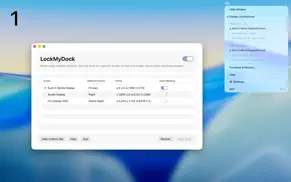
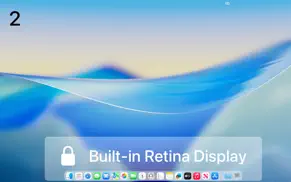
LockMyDock 1.4 Apps Screenshots & Images
LockMyDock iphone, ipad, apple watch and apple tv screenshot images, pictures.
| Language | English |
| Price | Free |
| Adult Rating | 4+ years and older |
| Current Version | 1.4 |
| Play Store | com.HyperartFlow.LockMyDock |
| Compatibility | iOS 11 or later |
LockMyDock (Versiyon 1.4) Install & Download
The application LockMyDock was published in the category Utilities on 04 April 2026, Saturday and was developed by 翔 何 [Developer ID: 1278994432]. This program file size is 3.31 MB. This app has been rated by 17 users and has a rating of 1 out of 5. LockMyDock - Utilities app posted on 11 May 2026, Monday current version is 1.4 and works well on iOS 11 and higher versions. Google Play ID: com.HyperartFlow.LockMyDock. Languages supported by the app:
AR NL EN FR DE IT JA KO PL PT RU ZH SK ES SV ZH TR UK VI Download & Install Now!| App Name | Score | Comments | Price |
| Kaka Reviews | 1 | No comment | Free |
| Wi-Fi Passwords Reviews | 1 | No comment | $0.99 |
| System Snapshots Reviews | 1 | No comment | Free |
| Genemoji Book Reviews | 1 | No comment | Free |
| Calcility - Minimal Calculator Reviews | 5 | 1 | $1.99 |
- Fixed some minor issues.
| App Name | Released |
| Clean Up Storage - Cleaner Kit | 26 January 2017 |
| My Spectrum | 16 December 2014 |
| PrivadoVPN Fast VPN and Proxy | 05 January 2021 |
| Universal TV Remote App. | 03 April 2024 |
| TP-Link Tether | 16 May 2013 |
Find on this site the customer service details of LockMyDock. Besides contact details, the page also offers a brief overview of the digital toy company.
| App Name | Released |
| ITest. | 24 April 2024 |
| Conduit Bender Elite - Calc | 28 November 2012 |
| Watchla for Tesla | 16 February 2021 |
| Blue Iris | 15 December 2012 |
| Necrophonic | 24 July 2018 |
Discover how specific cryptocurrencies work — and get a bit of each crypto to try out for yourself. Coinbase is the easiest place to buy and sell cryptocurrency. Sign up and get started today.
| App Name | Released |
| DoorDash - Food Delivery | 10 October 2013 |
| Cash App | 16 October 2013 |
| Target | 24 November 2008 |
| 12 February 2019 | |
| Snapchat | 13 July 2011 |
Install the Giftmio extension for smart shopping. Get notified about cashback opportunities, activate cashback in one click, and save money on purchases.
| App Name | Released |
| MilGPS | 01 December 2010 |
| CloverPit | 17 December 2025 |
| Subnautica | 08 July 2025 |
| Pou | 26 November 2012 |
| PeakFinder | 12 March 2010 |
Each capsule is packed with pure, high-potency nootropic nutrients. No pointless additives. Just 100% natural brainpower. Third-party tested and validated by the Clean Label Project.
Adsterra is the most preferred ad network for those looking for an alternative to AdSense. Adsterra is the ideal choice for new sites with low daily traffic. In order to advertise on the site in Adsterra, like other ad networks, a certain traffic limit, domain age, etc. is required. There are no strict rules.
Keep personal info private, avoid scams, and protect yourself online with AI-powered technology.
LockMyDock Comments & Reviews 2026
Did you know that you can earn 25 USD from our site just by registering? Get $25 for free by joining Payoneer!