XPSView App Reviews
XPSView App Description & Overview
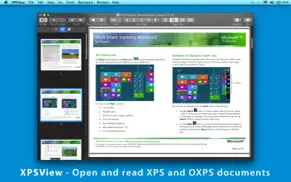
What is xpsview app? ◆ Easy reading page view options. Single page and double page view with optional continuous reading.
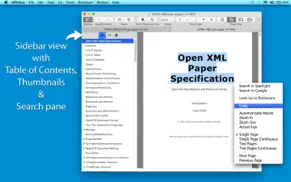
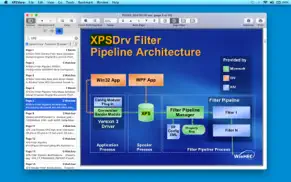
◆ Fully selectable and searchable text contents. Can copy to clipboard.
◆ Bigger and smaller page view using ZoomIn, ZoomOut, Actual Size and Fit to Zoom controls.
◆ Add and manage bookmarks for future reading.
◆ Grouped by files, Group by tags and recent bookmark list for easy and faster access in future.
◆ Maintains reading history. Go to Back and Forward reading page.
◆ Very flexible page navigation controls for easy traverse into open document.
◆ Converts XPS/OXPS files into PDF, JPG, JPEG2000, PNG, TIFF, Multi-Page TIFF, BMP and Plain Text formats.
◆ Extracts raster images from XPS/OXPS files as JPG, JPEG2000, PNG, TIFF, BMP.
◆ XPS/OXPS document inspector to show general information.
◆ Print XPS/OXPS document.
◆ Bookshelf Collections to manage set of recently open and added XPS/OXPS files.
XPS/OXPS to PDF CONVERSION FEATURES:
◆ Converts XPS to fully vector-PDF documents. Preserves text, vector graphics and raster images as editable PDF contents.
◆ Preserves Bookmarks (Outline).
◆ Preserves XPS internal and external topic hyperlinks into PDF. It automatically maintains XPS topic and page navigation links into PDF compatible annotations.
◆ Supports PDF conversion using JPEG, JPEG2000 and Flate image compression methods. Can set compression quality.
◆ Preserves metadata properties.
XPS/OXPS to IMAGE CONVERSION/EXTRACTION FEATURES:
◆ Options to choose from Destination Image Types, JPEG image Quality, Image Resolution and Page Range.
◆ JPEG quality control. Set JPEG quality from lossless to least for JPEG and JPEG2000 image format. It allows you to control output image size and viewing quality.
◆ Option to convert to specified image resolution. Resolution supported for XPS to Image conversion only. Extracted images preserves original resolution of XPS documents.
XPS/OXPS to TEXT CONVERSION FEATURES:
◆ Plain text conversion option to choose from UTF8 and UTF16.
You can refer User Manual from menu "Help -> XPSView Help" for any assistance Or Contact Support.
Privacy Policy: http://rootrisetech.com/xpsview-privacy-policy
Terms of Use(EULA): https://www.apple.com/legal/internet-services/itunes/dev/stdeula/
😍 Do you love XPSView app? Please share your friends!



Please wait! XPSView app comments loading...
XPSView 6.0 Tips, Tricks, Cheats and Rules
What do you think of the XPSView app? Can you share your complaints, experiences, or thoughts about the application with RootRise Technologies Pvt. Ltd. and other users?

XPSView 6.0 Apps Screenshots & Images
XPSView iphone, ipad, apple watch and apple tv screenshot images, pictures.
| Language | English |
| Price | Free |
| Adult Rating | 4+ years and older |
| Current Version | 6.0 |
| Play Store | com.RootRiseTechnologies.XPSView |
| Compatibility | iOS 11.5 or later |
XPSView (Versiyon 6.0) Install & Download
The application XPSView was published in the category Productivity on 23 July 2013, Tuesday and was developed by RootRise Technologies Pvt. Ltd. [Developer ID: 594431033]. This program file size is 5.12 MB. This app has been rated by 17 users and has a rating of 1 out of 5. XPSView - Productivity app posted on 21 January 2026, Wednesday current version is 6.0 and works well on iOS 11.5 and higher versions. Google Play ID: com.RootRiseTechnologies.XPSView. Languages supported by the app:
EN Download & Install Now!| App Name | Score | Comments | Price |
| PUB Converter-for MS Publisher Reviews | 1 | No comment | $39.99 |
| WPS Reader - for MS Works Reviews | 4.5 | 10 | $4.99 |
| Winmail Reader Reviews | 1 | No comment | $1.99 |
| JPG to PDF Reviews | 1 | No comment | Free |
| PDFCutter - Cut PDF pages Reviews | 1 | No comment | $4.99 |
- Bug fixes and UI improvements to streamline with latest iOS. We are thankful to all users for their valuable feedback :)
| App Name | Released |
| Google Slides | 26 August 2014 |
| ChatOn AI - Chat Bot Assistant | 13 January 2023 |
| Widgetsmith | 16 September 2020 |
| Google Drive | 28 June 2012 |
| Ringtones Maker - the ring app | 14 March 2018 |
Find on this site the customer service details of XPSView. Besides contact details, the page also offers a brief overview of the digital toy company.
| App Name | Released |
| Mil Fuel Check | 24 July 2017 |
| BimmerLink for BMW and MINI | 06 April 2016 |
| ItsGrowTime | 06 September 2024 |
| Tampermonkey | 18 November 2024 |
| Master Bender Gold | 08 November 2016 |
Discover how specific cryptocurrencies work — and get a bit of each crypto to try out for yourself. Coinbase is the easiest place to buy and sell cryptocurrency. Sign up and get started today.
| App Name | Released |
| 07 April 2016 | |
| YouTube TV | 05 April 2017 |
| TikTok | 02 April 2014 |
| Amazon Shopping | 03 December 2008 |
| Gmail - Email by Google | 02 November 2011 |
Install the Giftmio extension for smart shopping. Get notified about cashback opportunities, activate cashback in one click, and save money on purchases.
| App Name | Released |
| CloverPit | 17 December 2025 |
| Paprika Recipe Manager 3 | 15 November 2017 |
| PeakFinder | 12 March 2010 |
| MilGPS | 01 December 2010 |
| Procreate Pocket | 17 December 2014 |
Each capsule is packed with pure, high-potency nootropic nutrients. No pointless additives. Just 100% natural brainpower. Third-party tested and validated by the Clean Label Project.
Adsterra is the most preferred ad network for those looking for an alternative to AdSense. Adsterra is the ideal choice for new sites with low daily traffic. In order to advertise on the site in Adsterra, like other ad networks, a certain traffic limit, domain age, etc. is required. There are no strict rules.
Keep personal info private, avoid scams, and protect yourself online with AI-powered technology.
XPSView Comments & Reviews 2026
Did you know that you can earn 25 USD from our site just by registering? Get $25 for free by joining Payoneer!