Ground Station App Reviews
Ground Station App Description & Overview
What is ground station app? The Ground Control Station software is specially designed for BVR flight. With the DJI hardware, you just need an iPad, then you can make the aircraft carry out the flight course preset on the ground control station software. With the click & go flight and joystick control on touch screen functionality you can enjoy the pleasure of using the iPad to control the aircraft. The software now only supports Bluetooth 4.0 iPad devices (such as: the new iPad, the iPad mini and the iPad 4).
Features:
※ Single Waypoint, Multi Waypoints, Joystick Control
※ Custom Joystick Supported
※ Save & Upload Flight Course Supported
※ Chinese and English Supported
※ Voice Reminder
※ Using Bluetooth 4.0 Low Power Consumption Technology
※ WooKong-M Supported
※ Naza-M Supported
※ A2 Supported
※ Phantom 2 Supported
😍 Do you love Ground Station app? Please share your friends!



Please wait! Ground Station app comments loading...
Ground Station 1.4.63 Tips, Tricks, Cheats and Rules
What do you think of the Ground Station app? Can you share your complaints, experiences, or thoughts about the application with DJI and other users?
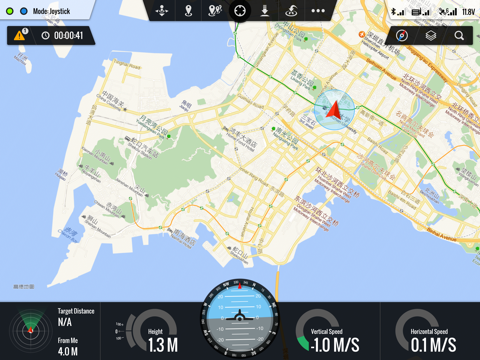
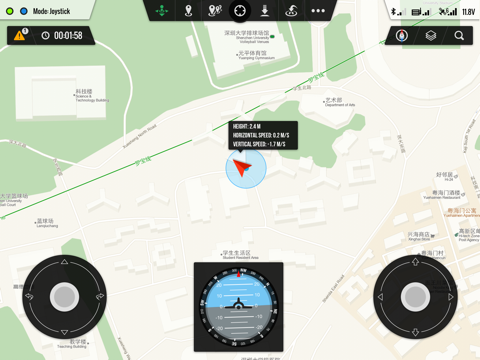
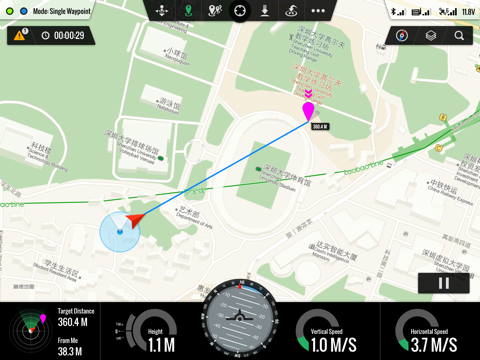

Ground Station 1.4.63 Apps Screenshots & Images
Ground Station iphone, ipad, apple watch and apple tv screenshot images, pictures.
| Language | English |
| Price | Free |
| Adult Rating | 4+ years and older |
| Current Version | 1.4.63 |
| Play Store | com.dji-innovations.gs |
| Compatibility | iOS 6.1 or later |
Ground Station (Versiyon 1.4.63) Install & Download
The application Ground Station was published in the category Utilities on 22 August 2013, Thursday and was developed by DJI [Developer ID: 599957686]. This program file size is 46.28 MB. This app has been rated by 22 users and has a rating of 2.5 out of 5. Ground Station - Utilities app posted on 14 November 2015, Saturday current version is 1.4.63 and works well on iOS 6.1 and higher versions. Google Play ID: com.dji-innovations.gs. Languages supported by the app:
EN ZH Download & Install Now!| App Name | Score | Comments | Price |
| DJI SmartFarm Reviews | 4.5 | 129 | Free |
| DJI GO Reviews | 2.3 | 3,328 | Free |
| SDK Bridge Reviews | 3.6 | 6 | Free |
| NM Assistant Reviews | 3.7 | 13 | Free |
| DJI XT Pro Reviews | 2.1 | 29 | Free |
This update from Apple will improve the functionality of this app. No new features are included. Repaired flash back problem in iOS9
| App Name | Released |
| TP-Link Tether | 16 May 2013 |
| Clean Up Storage - Cleaner Kit | 26 January 2017 |
| Universal Remote TV Controller | 30 August 2021 |
| EarVision | 07 September 2023 |
| Universal TV Remote App. | 03 April 2024 |
Find on this site the customer service details of Ground Station. Besides contact details, the page also offers a brief overview of the digital toy company.
| App Name | Released |
| Piping DataBase - XTREME | 11 March 2010 |
| Export Contacts to Excel | 07 February 2019 |
| Blue Iris | 15 December 2012 |
| AdBlock | 15 March 2014 |
| FORScan Lite - for Ford, Mazda | 02 November 2014 |
Discover how specific cryptocurrencies work — and get a bit of each crypto to try out for yourself. Coinbase is the easiest place to buy and sell cryptocurrency. Sign up and get started today.
| App Name | Released |
| SHEIN - Online Fashion | 19 May 2014 |
| YouTube TV | 05 April 2017 |
| Wizz - Make new friends | 24 February 2019 |
| 09 October 2009 | |
| Gas | 27 August 2022 |
Install the Giftmio extension for smart shopping. Get notified about cashback opportunities, activate cashback in one click, and save money on purchases.
| App Name | Released |
| After Inc. | 26 November 2024 |
| MilGPS | 01 December 2010 |
| Balatro | 26 September 2024 |
| RadarScope | 12 February 2019 |
| Scritchy Scratchy | 18 March 2026 |
Each capsule is packed with pure, high-potency nootropic nutrients. No pointless additives. Just 100% natural brainpower. Third-party tested and validated by the Clean Label Project.
Adsterra is the most preferred ad network for those looking for an alternative to AdSense. Adsterra is the ideal choice for new sites with low daily traffic. In order to advertise on the site in Adsterra, like other ad networks, a certain traffic limit, domain age, etc. is required. There are no strict rules.
Keep personal info private, avoid scams, and protect yourself online with AI-powered technology.
Ground Station Comments & Reviews 2026
Phantom 2 Vision plus. Very disappointed. Downloaded the app and really enjoyed setting up missions while I waited on my Vision plus to ship just to find out it won't work on it. :-( Would have ordered lot less expensive Phantom 2 and used camera and gimbal off of my Phantom 1.1.1 The whole point of ordering the Vision plus was to have the best possible setup for this app.
DJI Phantom 2 Vision. Cool app but...Get on it! Where is the release for this quad! Hurry it up please!
Buggy, Fix them DJI. Had some very spurious results using this app. DJI need to fix the bugs then it would be a great app.
dji. 've noticed with the DJI app Groundstation could no longer works since they updated to 9.1 OSI I found if you disable your Bluetooth on your iPad that works fine but it cannot find aircraft because it is disabled so it's something to do with the Bluetooth enabling part of the app that is malfunctioning maybe DJI could look at this app and fix it if you run the app it will run but then you will have to hit retry and it will do the same thing but if you hit cancel app will open with the Bluetooth disabled lotta people paid a lot of money for this 2.4 autopilot system that does not work maybe we should be asking for our money back if they can't keep up on their software applications get a bunch of people together I see lawsuit
ios9 not compatible. As others have reported, DO NOT UPGRADE to iOS9… Ground Station is not compatible. I use this for work (commercial use of drones with autonomous flight)… before upgrading, and now I’m screwed. The ios9 Beta has been out for quite some time. Why didn’t DJI figure this out??? PLEASE, DJI… fix this!!!!! Fantastic 5 STAR app, but if it doesn’t work, what good is it?
Doesn't work since iOS9...ugh!. It worked great until I upgraded to iOS9, now it just quits immediately after opening....what a miss on DJI's part, disappointed! ...how much longer are we going to have to wait?
Almost there but.... This is a great app for use with the Phantom 2 as long as you have the data link. That being said, it needs these improvements in my opinion to make this a 5 star rating: - altitude is based on where the copter takes off from (not true altitude). There should be an additional display for true altitude and altitude from takeoff - when creating way points, you can only pinch-zoom in to a certain level BUT not close enough to provide the level of detail to make a great flight plan. You need to make it so you can zoom in further! - add the ability to design your flight plan online (where you can zoom in further) and upload it to your Ground Station App. Way point planning takes time. And it would be nice to be able to save your previous work somehow.
measurement. I would like to see feet instead of meters
Do not update if you plan to fly.. Does not work on IOS 9. Tried deleting and reinstalling, but nothing works. Please update ground station to make it compatible with iOS 9
This is tha OLD GroundStation app. For those with newer DJI multirotors, running on the newer iOS devices, the DJI Ground Station Pro app is the one you need!
When Phantom 3 support?. We need Phantom 3 Advance or Pro support
No iOS 9 support. App does not work with ios9 products and the Bluetooth data link. I have tried this with new mini iPad 4 and iPad 2. Dji still hasn't fixed the issue. On iOS 8 it works great however documentation is poor and you are on your own to figure it out.
iOS 9 not supported. iOS 9 not supported. Will not connect. Also, how about the ability to do POI?
Not For Vision or Vision+ or P3, Phantom2 ONLY. Works well for P2 Zenmuse. It is not designed for any other version of Phantom so no P3, Vision or Vision+. This requires you to buy and install the kit/components for the P2 to function. It is not a highly polished app but it gets the job done. That wing said I hope they are working to update it.
ok, not very intuitive.. Lots of room for improvement. iPhone version, point of interest - so the unit autonomously stays pointed at a target...
Great start, needs some cleanup. The graphical interface is nicely polished, sort of surprising after using the PC ground station. Alas, a handful of bugs and UX issues make me nervous to fly with it. In the hour or so I used it, it crashed twice (the app, not my copter .. simulator mode thank geezus) and suffered from a random bluetooth connection forcing me to relaunch the app. Failsafe behavior could be clearer, especially if the app has a habit of crashing. Joystick mode should show the useful flight gauges (altitude, heading, etc). Also, you're unable to zoom/move the map in this mode. Instead, pinching the map will reposition and control the joysticks per your touch. Glad I wasn't in the air to figure that out. Nice looking app with a plenty of promise… please keep at it!
OCT 31 , still does not work!. Looks like they forget about us, HELLO The CUSTOMER HERE! Just bought it , but looks like the problem with the app takes a lot of time to fix. I can still return it , HELLOO!
Looks cool but quits as soon as I open it up. I had high expectations for this app but I was disappointed when the app would just quit as soon as I opened it. I hope this is a problem in between ios9 and the app that can be fixed easily and quickly!
This is not compatible with Phantom 2 vision plus. Like other review said this app do not work with the new Phantom 2 vision plus. I am extreamely dislike it. I count not find the Iphone app for GS too. Fault advertising!
This app doesn’t work on iOS9 sell all you DJI equipment. This app and all DJI hardware related to their iPhone apps stopped working when iOS9 came out, not only has DJI not updated their software they haven’t even bothered to answer any of the thousands of customers affected by this FOR TWO MONTHS.
Why is it not ipad2 friendly:(. I just don't understands why are one and every other drone on the market is compatible with the iPad 2 and dji has not included this in the compatible list. I love my phantom2 and have 100s of hours flight time would love to take it to the next level with GS dji please make GS compatible with either ipad2 or my galaxy tab 8
Need to update. Wow unbelievable how this is still an issue about as unprofessional as it gets ... How long will this go unaddressed ???? DJI hello you there????
Awesome app but not compatible with ipad 2. This app looks awesome but it's just not compatible with the Ipad 2. I would give it 5 stars if it was compatible.
Special thanks. DJI i wanna say a special thanks for the update Your the best Your the first at the world Good luck
Crashes IOS 9 Does not work!!!!!!!!! Crashes. Do not use this app! It crashes with IOS 9 what happened with DJI and quality control? I will not buy another DJI product unless they fix. THESE APPS! Ground Station for iPad. Vision for phantom vision plus v 3 WKM assistant Naza m assistant BASICALLY ALL OF DJI's APPS ARE INOPERATIVE WITH IOS 9.02. And they don't seem to care when you call for help!
Great app....when. Great app when it works. Don't understand why it doesn't use the built in wifi of dji vision. Bluetooth doesn't cut it! Hope the next update solves the stability issues also. Otherwise the concept is great and can't wait to be able to fully take advantage of it.
Phantom 2 vision? WHEN!. I keep reading and hearing that you will release this to ALL your CUSTOMERS that have bought the PHANTOM 2 VISION. Some say that it will be the 1st of the year! The last I looked, the 1st quarter of 2014 is about to be history. Can you please inform all of us that are patiently waiting when you plan to (if at all) give us 'P2V' users access! Thank you
App not working!. Very frustrating, just finished building a complete multirotor package for a University and at the request of the professor they wanted the ability to set waypoints. Well the App is not working with iOS9.1, PLEASE GET THE APP UPDATED!!!!!
Worthless with iOS 9!. App doesn't work at all with iOS 9! Please update immediately!
This is not for the phantom...... I noticed people complaining about this not working on Phantoms, unless you are running an original phantom with a naza v2 installed along with the 2.4 dji link ( which is a separate piece of hardware for older systems) or the A2 flight control system it won't do anything. This app works perfectly for the product it is design d to support. It's functionality is limited as compar d to the dji go app, which is designed for the newer dji products. It's sad that people can't even research the gear they want to put overhead.
Very Disappointed vision 2+ Owner. I purchased dji vision 2 + after researching what apps would be available to utilize with it. I personally believe marketing is false advertising, yes it has ground control function built into dji app, but does not work with this ipad ground station app, or the pc version, which have considerably more functionality than what was delivered for the iPhone. The iPad and pc version, has a larger screen, and is better suited to autonomous flight. Since ground control is already built into the hone apps, this surely couldn't require much work to allow it to function with the new phantom.
Does not work with new Phantom 2 Vision+ 3.0. This app does not work with my brand new Phantom 2 vision+ v3.0 as advertised on the box and on their website (at the time of purchase). NOT happy!
Useless With iOS 9. DJI hasn't bothered to keep up with iOS and now their customers (us) are left high and dry with expensive hardware and useless apps. Thanks for nothing, DJI.
Works as intended..maps way out of date. Application works well. The reason for only two stars is because the maps are EXTREMELY out of date. This is very disappointing as it is hard to plan an autonomous flight with maps that aren't current. Please, please, please update the maps..please listen to your customer!
App will now open on my iPad, but won’t connect. I guess it’s better since it won’t crash now, but I still can’t connect to my phantom. I bought my phantom 2 weeks after updating my iPhone and iPad, so I haven’t been able to use it even once. In months. Very disappointing. Can’t say I’d recommend a DJI product to anyone at this point.
Update your maps. Good app. 3* only because of the outdated maps. Come on and read these reviews and get the maps updated please.
Aerial photographer. What a great app. It does what it says I tested the waypoints and works great Even better than PC ground station. wish It could get even better features but all good I never had any Issues with It and using this on the DJI S1000 Plus and works perfect!. you pilots needs To stop complaining, whining about how it should work and it really does. personally, I love this App so, forget the other ppl who doesn't.
Another Flop for DJI - Doesn't work with Phantom2 Vision+. Another disappointment from the guys at DJI. Nope this does not work with the Phantom 2 Vision + nor will they likely address it anytime soon. So don't hold your breath. Honestly Don't bother.
Issues w ios9. App crashes upon launch of app now that I have installed iOS 9
Causes major problems. After install, kept asking to be authorized for this computer, but once you authorized it says you don’t need to authorize because it is already authorized, then it turns around and asks you to authorize. The merry-go-round never changes. Repeat.
Good App. I got this app because I could not use PC version reliably. It continually would loose connection with the aircraft and I would not have a status as to its whereabouts. This app has worked flawlessly with my Phantom 2 and I never loose the connection. My only complaint is the Apple maps are very outdated. I do the mission planning on the PC version first then go to the IPad and do it there. that way I am aware of any new structures that may be catastrophic to the flight.
Won't Connect. Still won't connect with my P2. Is there another update coming DJI?
Connection weak. Constantly drops Bluetooth connection within 2-5ft of adapter. This makes the app unreliable and unusable. Fix these bugs and I will gladly rate 4-5 stars. Feet option would be nice also...
No longer works with iOS9. The app no longer works with iOS9. DJI just don't care when you call their support, what's new about that! This is a key component of the platform. This is the last DJI product I buy. There customer support is the worst. Wish there was a zero star rating you could give.
great app By DJI. great app so far I use it with phantom 2 H3-2D zenmuse …..
Doesn't work with new Phantom Vision 2+. I just bought the latest Phantom Vision 2+ drone only to find the iPad GS isn't compatible with DJI's latest product. Disappointed
Maps out of date by 5+yrs. This app works pretty well. The only issue I have is that the maps are out of date by 5+ years. This makes is extremely difficult to mission plan in new areas. Please update your maps or use an open source provider.
iOS 9 isn't compatible. This looks like a great app, but it crashes on the splash page every time. I would love the give this a different rating once they update it to be compatible with iOS 9
Not compatible with Phantom 2 Vision+. The app refuses to connect to my brand new Phantom 2 Vision+ 3.0 drone. DJI has known about this problem for months but have still not updated the app. This is their only app designed for iPad and the route flying features in their iPhone only Vision App are not as good as Ground Station. If you need waypoint flying, consider buying a drone from another vendor until DJI updates this app.
Great app but missing one implant feature. I have been flying phantoms for a while and taking lots of photos and videos so when I saw this app it would let me easily fly to locations w/o having to pilot and I could control the camera. What I think is really needed to make this a smash app for dji would be look at points, these points could be added between waypoints for the phantom to target.
Did you know that you can earn 25 USD from our site just by registering? Get $25 for free by joining Payoneer!
IOS9 not compatible. IOS 9 is not compatible with GS Please we need a update to sort this out Andy
Needs update to work on iOS 9. Can the app please be updated to work on iOS 9?
APP CRASHES ON STARTUP. Don't d/l this IT DOESNT WORK!! iOS 9 iPad Air.
Rate this?. Not a good app.. At all It is not compatible with IOS9. Does not start up...
iPad 3 Model MD371X/A Version Softw 9.1. When starting the app it will crash. Have unloaded and reloaded this current app and it does exactly the same, crashes !!!!!!! DJI this is not good, please fix this problem as there are a few hundred DJI customers out there that are not very happy.
Great app!. Impressive to see how easy an app can be for flying an mulitcopter!! But I'm missing the photo mapping tool...
Super. It's super, works perfectly. I would LOVE to have the copter nose in when making circles... So I can make 3d images.... Next release maybe 👍
App crash on ios9 disappointed. Pick up your game ( changer )
Imagine you at your best. All the time. Picture yourself at your sharpest and most productive. Your most alert and focused. Your most lucid, creative and confident. At work. At play. In every area of your life. Add Mind Lab Pro® v4.0 to your daily routine and uncap your true potential. Buy Now!
DJI GS. Very good app working impressively. Outstanding!
Doesn't work with DJI Phantom 2 vision+. Can't connect with my drone
Superb App 5 star but no search function not working in mini Ipad. I love this app far better then Pc GS far more intuitive,user friendly.Could use a few more features but Im sure its just a matter of time from DJI.The only problem Im having and this could be isolated to a small group of us is no working search feature.Its apparent from online reviews others having same problem.So 4 very shiny stars.Yee Haa!DJI!
iOS 9.3.2. Does not work with ios9.3.2, no update since last year. DJI bringing number of new apps now and then but why not support the connection problem with GS which is the basic function. One app cannot dictate people's interest to update the iPad os!
Can’t connect to drone. I can’t find any instructions or support to help troubleshoot this problem.
Adsterra is the most preferred ad network for those looking for an alternative to AdSense. Adsterra is the ideal choice for new sites with low daily traffic. In order to advertise on the site in Adsterra, like other ad networks, a certain traffic limit, domain age, etc. is required. There are no strict rules. Sign up!
iPad APP. 1) They have just released a new firmware upgrade for the Bluetooth Module (in late March 2014) (now version 1.0.1.3, it was version 1.0.1.2). The new Bluetooth firmware upgrade fixed the issues with dropped communications between iPad and Data Link!! I'm very happy about that so please upgrade the BTU Module to the new 1.0.1.3 firmware version to regain proper performance! Remember to keep line of sight between iPad and ground end and line of sight between ground end and air end!! Also stay fairly close to the ground end BTU Module and don't have it behind you. Try to keep the battery a few inches away from the BTU as well (it could cause EMI which will lead to poor BTU performance). 2) With a simple reinstallation of the WKM's 5.26 firmware version, the ground station's "Flight Simulator" will now work on an iPad with iOS 7.1 Note: The same should be true for other controllers like the NAZA V2 for instance. However, I have not tested those controllers yet to be sure. People had a problem using the Flight Simulator with the newer iPads but that has been fixed in the new app. 3) The "Search Location" feature does not work in the new app but it did work in the first app, however, the DJI engineers are now aware of it so it should be taken care of soon. 4) The "Lock Rotation" feature in the iPad's app settings menu is backwards (off is on and on is off). The engineers are now aware of that one as we'll and will soon be fixed. (For those not sure what it's for, it's to keep the screen from rotating when you rotate the iPad 180 degrees). 5) Not often but at times the app will crash and change the "Home Point" will change to the default home point which could be in another country. So, be advised! Disengage the distance limit in the limits feature, it could try to fly to the default home point (and might if it has a large enough battery :-D. ) Just keep the aircraft close enough to be taken over by your standard transmitter in case the home point does change unintentionally. If it does, do not use home lock mode with the IOC function, instead, "USE COURSE LOCK MODE" to get your aircraft back. Home lock mode will make it fly toward the newly changed home point rather than back to YOU if it has accidentally changed. This defeats the purpose do having a Data Link but soon it will work as planned. DJI is putting this one on high priority!!!!! Don't become a member of the fly away club because of this. 6) The waypoint pop up box to enter flight information always pops up in the lower left corner now, allowing you to still see the route and waypoint. The pop up used to pop up right at the waypoint, making it difficult to see your route and the bearing from one waypoint to the next. This is a great improvement over the first version! Note: One thing I see way too often is the control receiver antennas mounted on top of the aircraft or the antennas are barely sticking out of the hub. They are line of sight and carbon fiber blocks the signal (unlike fiberglass, fiberglass is virtually invisible to the signals). Please mount the antennas on the bottom or at least protruding outward from the center hub a good distance even if you have to mount the receiver on a plastic boom to get it there. Don't drill into the hub or the circuit board for power distribution! Use tie straps on the section between the open holes. Do not close up the holes though. They are needed for airflow. Antenna placement could be another cause of your aircraft flying away, especially if the Home Point has accidentally changed on its own. Hang in there, these issues will be addressed and fixed soon!!!! Some of the new features are great, like the option to use feet instead of meters now. Saving mission height, speed, adaptive turn and other info is great too! Being able to make my own templates was a great idea as we'll! No fly zones near major airports is a great safety feature. It's only for major International Airports but you should still be aware of the smaller airports and contact them if you plan to fly anywhere near one! They will gladly work with you if you know what you're doing and you only want to fly close to the perimeter. They probably won't let you fly too close to the airport as full scale aircraft have the right of way to that low altitude airspace for take offs and landings. The iPad is still better than the computer version as far as being more intuitive and operator friendly! The computer is better for things like agricultural grid mapping with servo operated cameras for taking the photos at specific points. Being able to add waypoints along the way with a newly added icon was a nice touch too! I don't have to fly near the TRSA (Terminal Radar Service Area) that often, however, I can still use the Data Link for voltage warnings and overall navigation by looking at the screen. I won't fly that far in a TRSA anyway but it sure is nice to have that extra level of safety by having a stronger signal of nearly 8Mhz wide on the data link vs. 1Mhz wide on a standard transmitter. (3Mhz wide on some of the newer transmitters). I use a Spectrum Analyzer before I fly to make sure there's no interference on my frequency. I "ALWAYS" get permission from ATC first and wait for the NOTOM (Notice to Airmen) like I've been doing (I use a pilot handheld aircraft radio to wait for the NOTOM announcement before I fly). (I'm a licensed full scale pilot too so getting permission from ATC isn't too hard most of the time). I only ask permission to fly at the perimeter. If you are a licensed pilot and have a handheld transmitter, you can advise ATC that you're taking off (after verification of the NOTOM). It is a great app and I know it's hard to get all the bugs worked out until it's been tested by consumers in many different areas of the world. I don't represent DJI. I'm just a pro aerial photographer with experience in the operation of these systems. Before long, this app will be perfect!!! :-)
iOS 7 Broke this?. Can't connect to NAZA -M with iPad 3 running iOS 7. Datalink works fine with PC connection so the hardware is fine. Something broken with iPad connection.
Will not work. This won't work on my brand new iPad mini with ios9.
Will not connect. Using 4th generation IPad, and Wookong. PCground station. And all assistants work just fine. The IPad will not connect. Possibly due to IOS7. No information on their website about the issue. Looks awesome!
Loads on iPad Air 2. Loads on iPad Air 2 but won't run just bombs out
Does not work in iOS 7. Worked great in iOS 6 but after updating to iOS 7 it will not reliably connect to the flight controller.
Does not work with iOS9!!. This app is a key component of the DJI platform. Why did they not ensure it works with iOS9???
Works great with my Flame Wheel 550. I have used this version rather extensively with my DJI FW550 and the DJI 2.4 GH Data Downlink system and I love it! I have written an Excel program which calculates all the altitudes including above ground altitude additions to clear any obstacles I perceive referencing county published contour maps. It has work well for me videoing various altitudes on the side of a hill over timber. I wish my new Phantom 4 Pro+ had an app for it's Android system similar to iPad GS Pro.
FIX IOS9. Dji needs to fix this app on iOS 9. IT CRASHES ON STARTUP
No Phantom 3 compatibility???. Why would this app only support Phantom 2???
DJI Phantom 2 Vision. GS will be available for this Quad around the first of 2014. Yea!!!
Love it - but blue tooth keeps dropping. Big fan of what you guys are doing, and love this app. That said, it continually drops Bluetooth connection (consistently about every 1min while flying). Ak! If cs guys want to contact me Travis @ carbonated . Com I'm using an iPad mini upgraded to ios7 - all naza and Bluetooth firmware is upgraded and current. everything else works beautifully.
Much more Intuitive than their PC version. Once you have all the electronics setup, firmware updated on the hardware this software is really very easy to use. There a still a few bugs to stomp but at least they fixed the iOS7 bug pretty quick.
Will not connect to controller using iOS 7. The software works great in iOS 6 but will not connect to FC running IOS 7. I had to use a different iPad running iOS 6 to get it working again. Please make sure you don't use this with iOS 7 until DJI corrects the compatibility problems.
DJI Ground Station not compatible with iPad 2 Darn!. DJI not compatible with iPad 2. DJI can you please make a Ground Station version for iPad 2.