VO Calendar App Reviews
VO Calendar App Description & Overview
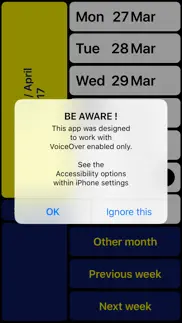
What is vo calendar app? NOTE: Can only be used together with VoiceOver (for blind and partially sighted people).
VO Calendar is a weekly calendar specifically designed to be used with VoiceOver.
The result of this VoiceOver-only design is not only a smoother navigation through the app. It also makes it possible for the VoiceOver speech to give smart summaries depending on the context. This prevents you from having to go through each event
Individually.
Existing events are automatically synchronized. If you prefer not to type, you can record voice memos instead.
You can use VO Calendar with the VoiceOver gestures you are used to.
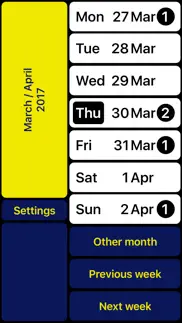
However, there is an even faster way. With the screen being split into two halves you can scan the right half of the screen with your right thumb. A single tap with your left thumb then is enough to activate the concerning function. After getting used to you will find out this helps you to browse through your calendar even quicker.
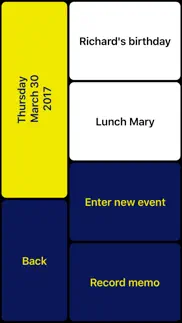
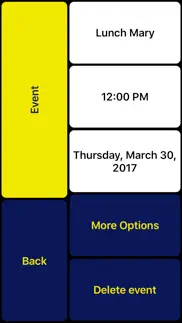
The left bottom always contains the ‘Return’ button so you can still reach it with your right thumb (being an L-shaped layout). At the top left you can always find a summary of the current screen content. In case you are left-handed you can swap left and right.
Note: If you have multiple calendars configured, VO Calendar will show all concerning events. New events will be assigned to your iPhone’s default calendar. Change the default calendar in: Settings > Mail, Contacts, Calendars > Default Calendar.
VO Calendar is developed in cooperation with Royal Dutch Visio, Centre of Expertise for blind and partially sighted people (www.visio.org).
We appreciate your opinion and are always interested in hearing from you. Feel free to leave your feedback in the form of a review or contact us at: [email protected]
In case you have problems recording a memo:
- Hold one finger on 'Record memo' button
- Use other finger to tap on screen
(instead of first focussing on the button and then double tap)
😍 Do you love VO Calendar app? Please share your friends!



Please wait! VO Calendar app comments loading...
VO Calendar 1.2.5 Tips, Tricks, Cheats and Rules
What do you think of the VO Calendar app? Can you share your complaints, experiences, or thoughts about the application with Tom Van Zummeren and other users?
VO Calendar 1.2.5 Apps Screenshots & Images
VO Calendar iphone, ipad, apple watch and apple tv screenshot images, pictures.
| Language | English |
| Price | $3.99 |
| Adult Rating | 4+ years and older |
| Current Version | 1.2.5 |
| Play Store | com.devista.VO-Calendar |
| Compatibility | iOS 15.0 or later |
VO Calendar (Versiyon 1.2.5) Install & Download
The application VO Calendar was published in the category Productivity on 31 January 2013, Thursday and was developed by Tom Van Zummeren [Developer ID: 421359413]. This program file size is 769 KB. This app has been rated by 7 users and has a rating of 4.5 out of 5. VO Calendar - Productivity app posted on 22 November 2023, Wednesday current version is 1.2.5 and works well on iOS 15.0 and higher versions. Google Play ID: com.devista.VO-Calendar. Languages supported by the app:
NL EN Download & Install Now!| App Name | Score | Comments | Price |
| Easy Reminders Reviews | 4.1 | 34 | $1.99 |
| Easy Calendar Reviews | 4.7 | 2,587 | $1.99 |
| Shop Jinni Reviews | 4.6 | 6 | Free |
| VA Calendar Reviews | 1 | No comment | $1.99 |
Updated for iOS 17.
| App Name | Released |
| ChatOn AI - Chat Bot Assistant | 13 January 2023 |
| Microsoft Copilot | 29 December 2023 |
| Claude by Anthropic | 01 May 2024 |
| Ostrich VPN Light - Fast Proxy | 12 December 2022 |
| CamScanner - PDF Scanner App | 27 August 2010 |
Find on this site the customer service details of VO Calendar. Besides contact details, the page also offers a brief overview of the digital toy company.
| App Name | Released |
| Dumbify | 02 April 2024 |
| Pythonista 3 | 13 June 2016 |
| Easy Calendar | 08 March 2011 |
| Lateral Pipe Calculator | 09 July 2012 |
| ICalendar | 05 January 2012 |
Discover how specific cryptocurrencies work — and get a bit of each crypto to try out for yourself. Coinbase is the easiest place to buy and sell cryptocurrency. Sign up and get started today.
| App Name | Released |
| Gmail - Email by Google | 02 November 2011 |
| Cash App | 16 October 2013 |
| Spotify - Music and Podcasts | 14 July 2011 |
| Gas | 27 August 2022 |
| Hive Social | 18 October 2019 |
Install the Giftmio extension for smart shopping. Get notified about cashback opportunities, activate cashback in one click, and save money on purchases.
| App Name | Released |
| Incredibox | 27 March 2016 |
| Shadowrocket | 13 April 2015 |
| CloverPit | 17 December 2025 |
| Ouros | 14 August 2024 |
| RadarScope | 12 February 2019 |
Each capsule is packed with pure, high-potency nootropic nutrients. No pointless additives. Just 100% natural brainpower. Third-party tested and validated by the Clean Label Project.
Adsterra is the most preferred ad network for those looking for an alternative to AdSense. Adsterra is the ideal choice for new sites with low daily traffic. In order to advertise on the site in Adsterra, like other ad networks, a certain traffic limit, domain age, etc. is required. There are no strict rules.
Keep personal info private, avoid scams, and protect yourself online with AI-powered technology.
VO Calendar Comments & Reviews 2026
A VoiceOver friendly calendar!. This application allows you quick navigation through your week's events. You can use traditional voiceover gestures or a simple set of gestures designed by the app developers. Either way, the interface is simple. Long overdue. Thank you!
Halley richmond. I actually took all the other calendars off my phone and I am using voiceover calendar exclusively. I just did this today so don't know if this is the right way to use his calendar or not but it seems to be to me if it's not please let me know. I love the fact that it has a voice memo feature and a note feature. I love it and if there's any way it can be updated I would please ask the developer to update it so I can keep using it without having to have the native calendar apps on my phone which I'm already doing but I want to continue to just use the voice over calendar and none other. Thanks
He sensual for blind VO users!. If you are blind and use voiceover, you know how difficult the Calendar app on the iPhone is. This is the answer to that problem. Although this app needs to be updated, seriously, it is still essential if you are a blind person using an iPhone and you wish to use the calendar function. Note to developers: please, please, please update this app. It is a real benefit to the blind!
A good calendar app to be used with voice over.. This app works very well with the voice over program. However, occasionally it will speak something in Dutch. A small bug that needs to be ironed out, but not that bad. I recommend it!
Recording memos no longer works on IOS17,. Ever since I updated my phone to iOs17, I can no longer record voice memos with this ap. When I browse the list of scheduled events with the swipe gesture, I cannot hear the sound of the content I had recorded.
easy as pie. This app took me pleasantly by surprise. I have used the generic Apple calendar but don't like it. This is as easy as anything I have ever used in my life. It is as easy as a notetaker calendar and a lot simpler by it
VO calendar is great.. This app is such a good app. I like the fact that they developed this with voice over in mind. However, I can't seem to get that settings to change from my default iPhone calendar to this one. How does one go about doing this within settings?
Amazing! Just a few suggestions. This app is amazing! I just have a few suggestions. I would love to see braille support added. When swiping, the text flashes on the display. The only time it is seen on the display is when entering text or editing an entry. Would be great to see it on the main screen. Also would love to see more like a time picker for quicker navigation. Perhaps incorperating that into the settings? So people can choose whether they want the time picker style or the way it is now? Perhaps also some added fields for notes, numbers, things like that. And moving the "More Options" button so that you can access it while adding an event, rather than having to fiddle around a bit before finding it. This also needs a way to replace the native callendar app. And a display date options. The regular callendar will say: "Monday, Januarry 1, 2024" It would be nice to see VO Calendar saying that as well. Love this app. Hope the suggestions help.
Did you know that you can earn 25 USD from our site just by registering? Get $25 for free by joining Payoneer!
Imagine you at your best. All the time. Picture yourself at your sharpest and most productive. Your most alert and focused. Your most lucid, creative and confident. At work. At play. In every area of your life. Add Mind Lab Pro® v4.0 to your daily routine and uncap your true potential. Buy Now!
Makes it a bit easier. A friend purchased this application for me years ago, I’m finally using it. Definitely appreciating the ease of accessibility.
Adsterra is the most preferred ad network for those looking for an alternative to AdSense. Adsterra is the ideal choice for new sites with low daily traffic. In order to advertise on the site in Adsterra, like other ad networks, a certain traffic limit, domain age, etc. is required. There are no strict rules. Sign up!