Rovio Control App Reviews
Rovio Control App Description & Overview
What is rovio control app? This is a remote control application for Wowwee's Rovio. Of course it is only useful if you already have the Rovio hardware.
Keyfeatures:
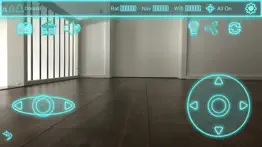
Now also available for your Apple Watch. You can play existing paths forwards, send Rovio to the dock and take photos from your wrist.
Full auto configuration in your network or in ad hoc mode. Don't hassle around with IP addresses.
Supports different setting profiles for local network / public access.
Always know the status of your Rovio: docked, roaming, going home, executing path, recording path.
Take photos with a tap of a button.
Easy to use joystick control movement in 8 directions.
Let Rovio talk: send funny audio files to your Rovio.
Set home location, enable / disable IR Radar, reboot Rovio and more!
Shows strength of navigation signal and wifi.
Allows adjusting camera position quickly.
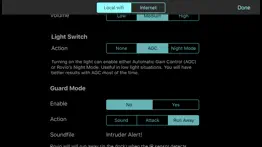
Guard mode.
Turn on / off LED light. AGC and night mode.
Play and record paths.
Shows battery status.
All graphics are optimized for the retina display.
This application is not endorsed by Wowwee and Wowwee is not offering support for the app. If you are experience any problems please use www.digitalsirup.com to get in touch with me.
😍 Do you love Rovio Control app? Please share your friends!



Please wait! Rovio Control app comments loading...
Rovio Control 2.0 Tips, Tricks, Cheats and Rules
What do you think of the Rovio Control app? Can you share your complaints, experiences, or thoughts about the application with Digitalsirup GmbH and other users?
Rovio Control 2.0 Apps Screenshots & Images
Rovio Control iphone, ipad, apple watch and apple tv screenshot images, pictures.
| Language | English |
| Price | $4.99 |
| Adult Rating | 4+ years and older |
| Current Version | 2.0 |
| Play Store | com.digitalsirup.RovioControl |
| Compatibility | iOS 9.3 or later |
Rovio Control (Versiyon 2.0) Install & Download
The application Rovio Control was published in the category Utilities on 23 February 2012, Thursday and was developed by Digitalsirup GmbH [Developer ID: 285538797]. This program file size is 15.31 MB. This app has been rated by 2 users and has a rating of 1.5 out of 5. Rovio Control - Utilities app posted on 01 September 2017, Friday current version is 2.0 and works well on iOS 9.3 and higher versions. Google Play ID: com.digitalsirup.RovioControl. Languages supported by the app:
EN DE Download & Install Now!| App Name | Score | Comments | Price |
| Webcams Pro - watch your Cams Reviews | 3 | 5 | $0.99 |
| SMS Butler - Message Archive Reviews | 3 | 2 | Free |
| Poker Blind Timer HD Lite Reviews | 3 | 4 | Free |
| Magic Xylo Lite - learn to play xylophone Reviews | 4.4 | 15 | Free |
| Life Timer Lite - Age Counter Reviews | 4.3 | 3 | Free |
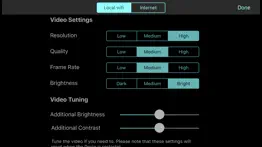
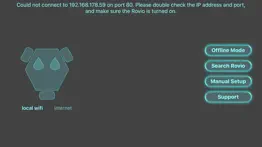
This app has been updated by Apple to display the Apple Watch app icon. The app received a complete overhaul with a simplified design. Please read the most important changes: Introducing the "drag to turn"-button. You can drag this button in 4 directions for quick and precise turns: drag it left for a 90 degrees turn left, drag it right for a 90 degrees turn right, drag it down for a 180 degrees turn right and drag it up for a 180 degrees turn left. Added offline modus - explore the app without being connected to your Rovio. Added full LED control and light animations. In the upper right Menu there is a new button. You can cycle through a bunch of LED presets like: all on, all off, circle animation, runner animation, KITT (do you rembember Knight Rider?) and other animations. Very sweet and works without hardware modifications. Please note that you can not change the LED while charging on the dock, but when charging is done you can for example turn all LED off. (night mode) Bigger joysticks, tweaked controls, optimized UI for all screen sizes. Sound selection menu changed. User names and passwords can now contain characters like ':', '@' or '&'. Added sound preview for guard mode. Requires iOS 9.3 or higher. Smaller improvements and a lot of under the hood optimizations.
| App Name | Released |
| TP-Link Tether | 16 May 2013 |
| Google Chrome | 28 June 2012 |
| Blink Home Monitor | 20 November 2015 |
| UK ETA | 23 October 2023 |
| Mint Mobile | 15 November 2017 |
Find on this site the customer service details of Rovio Control. Besides contact details, the page also offers a brief overview of the digital toy company.
| App Name | Released |
| AdBlock | 15 March 2014 |
| FORScan Lite - for Ford, Mazda | 02 November 2014 |
| EasyMSR | 05 February 2015 |
| EmoGuard - Keyword Blocker | 18 October 2022 |
| Quantumult X | 11 October 2019 |
Discover how specific cryptocurrencies work — and get a bit of each crypto to try out for yourself. Coinbase is the easiest place to buy and sell cryptocurrency. Sign up and get started today.
| App Name | Released |
| Google Maps | 12 December 2012 |
| SHEIN - Online Fashion | 19 May 2014 |
| Amazon Shopping | 03 December 2008 |
| 06 October 2010 | |
| Hive Social | 18 October 2019 |
Install the Giftmio extension for smart shopping. Get notified about cashback opportunities, activate cashback in one click, and save money on purchases.
| App Name | Released |
| Incredibox | 27 March 2016 |
| Paprika Recipe Manager 3 | 15 November 2017 |
| Slay the Spire | 13 June 2020 |
| Geometry Dash | 13 August 2013 |
| Shadowrocket | 13 April 2015 |
Each capsule is packed with pure, high-potency nootropic nutrients. No pointless additives. Just 100% natural brainpower. Third-party tested and validated by the Clean Label Project.
Adsterra is the most preferred ad network for those looking for an alternative to AdSense. Adsterra is the ideal choice for new sites with low daily traffic. In order to advertise on the site in Adsterra, like other ad networks, a certain traffic limit, domain age, etc. is required. There are no strict rules.
Keep personal info private, avoid scams, and protect yourself online with AI-powered technology.
Rovio Control Comments & Reviews 2026
Best there is, but. Very nice app. There is not a better Rovio controller outside of a a teal computer. Just one complaint 1) no way to stop the HOME command once it starts. If I change my mind, or my dog knocks the sensor, Rovio just spins forever trying to find home. The voice commands are cool although sometimes it repeats itself. What would be great would be if Rovio could play a PHRASE THAT I TYPE. that would be wicked cool. Other apps have voice generators, why can't this one.
#1. Best app for the rovio rover. Seriously, I've got the rest...
Good app.. The apps works good need to be able to hear and talk threw it.
So far good ap.. Pro: works well and utilize Internet access to Rovio too. I like the Rovio phrases. Worth buying if you own Rovio. Con: no iPad tilt feature capability to move Rovio and Rovio's easy 360 turn feature is not available. Only turn left and right stick and gliding stick on the right side for control.
iOS 6. This was perfect Until I updated the phone to the iOS 6 now you cannot See any video at all.
Awesome!. I've tried several other Rovio apps, and this by far is the best! Just the ease of control is worth using it, not to mention the other features. Nice work!
App does not work. Purchased for an iPhone 5 and will not open. Keeps asking for wifi connection and my phone has internet. No options to fix.
Best app out there. By far the best with tons of features and very reliable
Marginal. It is no quite what I expected. The video is slow and choppy. There is no capability of raising the camera. However, camera control of exposure is not bad.
(Used to be) Solid - Update. Update: unfortunately the new version almost makes the app unusable. I'm on ios6 and the previous version ran fine, but as soon as I updated the app the video streaming became laggy like a slideshow. The new video brightness feature is a welcome feature. I will be using that a lot if the video lag gets fixed. *****old review**** This app is a must-buy for Rovio owners. The video feed is better than the browser app! However a few gripes: 1.)The sound clip function plays static more often than not. 2.)Needs more precise control options. It can be hard to control with the virtual joystick when it lags. Still a stellar app though!
Did you know that you can earn 25 USD from our site just by registering? Get $25 for free by joining Payoneer!
Imagine you at your best. All the time. Picture yourself at your sharpest and most productive. Your most alert and focused. Your most lucid, creative and confident. At work. At play. In every area of your life. Add Mind Lab Pro® v4.0 to your daily routine and uncap your true potential. Buy Now!
Still the best control for the WowWee Rovio!. The creator of this app has been fantastic at responding to issues when they occur. After iOS6, I was no longer able to use the Rovio as an offsite surveillance device so I contacted him. He replied by email very quickly and said he would work on it. Less than week a new version of the app! Fantastic! I'd say it's much better, not as good as pre-iOS6 and still some choppiness. Thanks for working on it and be wonderful if it could be tweaked further. Btw, check some of the other apps Tommy has created. If you have the AR.Drone like me, he's got apps for that too!
Adsterra is the most preferred ad network for those looking for an alternative to AdSense. Adsterra is the ideal choice for new sites with low daily traffic. In order to advertise on the site in Adsterra, like other ad networks, a certain traffic limit, domain age, etc. is required. There are no strict rules. Sign up!