HVAC Psychrometric Plus App Reviews
HVAC Psychrometric Plus App Description & Overview
What is hvac psychrometric plus app? The "HVAC Psychrometric Plus" app is the #1 selling psychrometric application for the Apple iPhone and iPad. Thousands of happy users have downloaded this useful application for performing quick and simple psychrometric analysis. Just a few reasons why you should buy this application:
1. The Psych Plus is a universal app that it is optimized for the iPhone and iPad.
2. This app was developed by Carmel Software, a company that has been developing software for 25+ years. We are experts in software design and HVAC analysis.
3. It allows you to easily perform single-state and mixed-air HVAC psychrometric calculations.
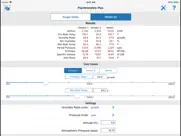
4. Select and update all input parameters and view the calculated results all in the same screen without switching from one screen to another.
5. Select from 23 different combinations of any 2 input parameters such as "Humidity Ratio / Dewpoint Temperature" and much more.
6. Immediately view updated results as you change the input values using the on-screen slider control. You can specify how much to increase or decrease values as you slide the indicator along the slider mechanism.
7. Send an HTML email and a spreadsheet attachment of all of the single-state and mixed-air inputs and results
8. This app now includes the HVAC Equipment Locator. Click here for details: http://bit.ly/1yTq539
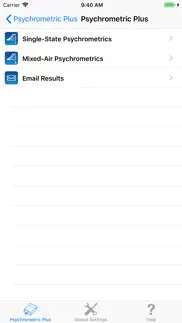
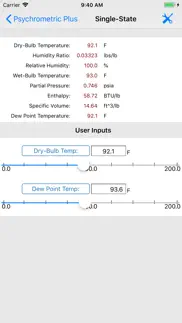
This application contains two separate input modes. The 1st input mode is the "Single-State" mode that allows you to specify 2 psychrometric parameters for a single stream of air and view the remaining 6 calculated values. You can quickly toggle through 23 different combinations of the 2 input parameters and instantly view the calculated results, all on the same screen.
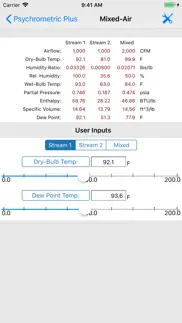
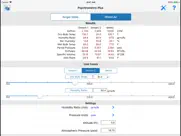
The 2nd input mode is the "Mixed-Air" mode that allows you to specify 2 psychrometric parameters for each of two air streams to calculate the mixed air psychrometric conditions. Once again, you can toggle through 23 combinations of the 2 input parameters and view all results in one screen.
The following input and output value-types are displayed:
1. Dry-bulb temperature
2. Humidity ratio
3. Relative Humidity
4. Wet-bulb temperature
5. Partial pressure
6. Enthalpy
7. Specific volume
8. Dewpoint temperature
9. Total airflow or mass flow (for mixed-air calcs, only)
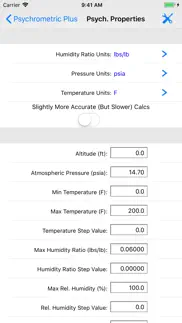
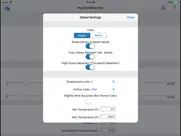
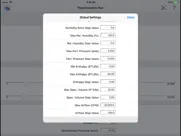
You can specify additional parameters such as the altitude of the air being analyzed, the atmospheric pressure, different types of units such as degrees F or R, and English or Metric units.
The "HVAC Psychrometric Plus" application was designed by Carmel Software Corporation, a leader in HVAC design software since 1995. In fact, Autodesk (the makers of AutoCAD) acquired our analysis software and incorporated it into their leading Autodesk Revit software product. In addition, ASHRAE has hired Carmel Software to develop custom mobile apps to accompany their various standards.
We also offer the following apps for the iPhone/iPad:
1. HVAC Residential Load Calcs
2. HVAC Load Plus
3. HVAC Duct Sizer
4. HVAC Pipe Sizer – Gas Low Pressure
5. HVAC Pipe Sizer - Gas High Pressure
6. HVAC Pipe Sizer – Liquid
7. HVAC Pipe Sizer – Steam
8. Steam Tables
9. HVAC Toolkit
10. Psychrometric LT
11. HVAC Pipe Sizer Plus
12. HVAC Pipe Sizer Gas Plus
13. HVAC Quick Load
14. HVAC ResLoad-J
15. HVAC Equipment Locator
16. HVAC Psych HD
😍 Do you love HVAC Psychrometric Plus app? Please share your friends!



Please wait! HVAC Psychrometric Plus app comments loading...
HVAC Psychrometric Plus 6.1 Tips, Tricks, Cheats and Rules
What do you think of the HVAC Psychrometric Plus app? Can you share your complaints, experiences, or thoughts about the application with Carmel Software Corporation and other users?
HVAC Psychrometric Plus 6.1 Apps Screenshots & Images
HVAC Psychrometric Plus iphone, ipad, apple watch and apple tv screenshot images, pictures.
| Language | English |
| Price | $6.99 |
| Adult Rating | 4+ years and older |
| Current Version | 6.1 |
| Play Store | com.carmelsoft.Psychrometric |
| Compatibility | iOS 15.6 or later |
HVAC Psychrometric Plus (Versiyon 6.1) Install & Download
The application HVAC Psychrometric Plus was published in the category Productivity on 15 January 2010, Friday and was developed by Carmel Software Corporation [Developer ID: 317970398]. This program file size is 16.83 MB. This app has been rated by 2 users and has a rating of 3 out of 5. HVAC Psychrometric Plus - Productivity app posted on 18 December 2025, Thursday current version is 6.1 and works well on iOS 15.6 and higher versions. Google Play ID: com.carmelsoft.Psychrometric. Languages supported by the app:
EN Download & Install Now!| App Name | Score | Comments | Price |
| HVAC Pipe Sizer - Gas High Reviews | 5 | 3 | $4.99 |
| HVAC Quick Load Reviews | 3.3 | 3 | $6.99 |
| HVAC Pipe Sizer - Gas Low Reviews | 5 | 2 | $4.99 |
| HVAC PT Chart Reviews | 4 | 8 | Free |
| Steam Tables Reviews | 3 | 4 | $5.99 |
1. Added a Share button to the iPhone and iPad versions of the app, so you can now text, email, and download reports. 2. Updated help. 3. Optimized for iOS 26.
| App Name | Released |
| Google Docs | 30 April 2014 |
| Ringtones Maker - the ring app | 14 March 2018 |
| Turbo VPN Private Browser | 10 April 2018 |
| Ostrich VPN - Proxy Master | 15 March 2021 |
| Ostrich VPN Light - Fast Proxy | 12 December 2022 |
Find on this site the customer service details of HVAC Psychrometric Plus. Besides contact details, the page also offers a brief overview of the digital toy company.
| App Name | Released |
| Site Audit Pro | 26 April 2011 |
| Oilfield Calendar | 18 April 2014 |
| Dark Reader for Safari | 10 October 2018 |
| Dumbify | 02 April 2024 |
| BimmerLink for BMW and MINI | 06 April 2016 |
Discover how specific cryptocurrencies work — and get a bit of each crypto to try out for yourself. Coinbase is the easiest place to buy and sell cryptocurrency. Sign up and get started today.
| App Name | Released |
| Gas | 27 August 2022 |
| Telegram Messenger | 14 August 2013 |
| Messenger | 09 August 2011 |
| PayPal - Send, Shop, Manage | 03 February 2019 |
| 07 April 2016 |
Install the Giftmio extension for smart shopping. Get notified about cashback opportunities, activate cashback in one click, and save money on purchases.
| App Name | Released |
| Incredibox | 27 March 2016 |
| Geometry Dash | 13 August 2013 |
| Monash FODMAP Diet | 17 December 2012 |
| Slay the Spire | 13 June 2020 |
| Streaks | 31 May 2015 |
Each capsule is packed with pure, high-potency nootropic nutrients. No pointless additives. Just 100% natural brainpower. Third-party tested and validated by the Clean Label Project.
Adsterra is the most preferred ad network for those looking for an alternative to AdSense. Adsterra is the ideal choice for new sites with low daily traffic. In order to advertise on the site in Adsterra, like other ad networks, a certain traffic limit, domain age, etc. is required. There are no strict rules.
Keep personal info private, avoid scams, and protect yourself online with AI-powered technology.
HVAC Psychrometric Plus Comments & Reviews 2026
R&D Use. Four senior R&D execs in our company use it and have never had a problem in F or C. Easy conversion and more flexible than most other apps. There is a small error near 0degF and tiny inconsistencies near saturation but these would only be noticed by a scientist. Great app. Is it available for Excel?
Works great out in the field for HVAC diagnostics. I am doing a lot of diagnostics these days with cooling coils, etc. I really need to do lots psych calcs to determine what the wet-bulb and relative humidity values are. This app is awesome in the field for doing this. Also, I like the mixed-air function for those more complicated jobs. Great work.
Great app for mechanical engineering students. It's a very useful app when doing homework instead of looking for the results in the psych charts and especially when it comes to interpolation. I haven't run into any inaccuracies, yet. Also, I like that I can calculate for different elevations and barometric pressures. I highly recommend this app.
Works great!. Easy to use and accurate. Use it every day.
Great app but.... I've used this app many times in my hvac class and all the values are correct other than enthalpy. So be sure to compare that value to the actual chart because it is way off. I sent a thing to the developers so hopefully the issue can be resolved. The odd thing is that the value for enthalpy when using the mixed stream is correct.
Don't buy. This app will give you false readings I can calculate better and more accurate than this app if you need one then go to Ashrae HVAC Psychrometeric chart apps and download that it will cost you $20.00 but you pay for what you get !!!!!!!!!! This app is crap DONT but this app.😖
Engineer. Does not work. 72/46 is not -7.6 dew point. How to get refund is the ??
Beats using those cardboard psych calculators. I have one of those cardboard Vaisala psych calculators, kind of like a ductulator but for psych. calcs. Anyway, I've been using it for years and it was ok. Now, that I've downloaded this app, I much prefer this: it's quick, let's me specify a large # of input parameters, and instantly displays the results. Good stuff. I also like the fact I can calculate for high elevations since I live in Denver. Great work!!!
Did you know that you can earn 25 USD from our site just by registering? Get $25 for free by joining Payoneer!
Imagine you at your best. All the time. Picture yourself at your sharpest and most productive. Your most alert and focused. Your most lucid, creative and confident. At work. At play. In every area of your life. Add Mind Lab Pro® v4.0 to your daily routine and uncap your true potential. Buy Now!
Now very Good. Answer Not really Good...
Adsterra is the most preferred ad network for those looking for an alternative to AdSense. Adsterra is the ideal choice for new sites with low daily traffic. In order to advertise on the site in Adsterra, like other ad networks, a certain traffic limit, domain age, etc. is required. There are no strict rules. Sign up!