Speak News - RSS news reader App Reviews
Speak News - RSS news reader App Description & Overview
What is speak news - rss news reader app? Speak News reads stories from RSS/Atom news feeds, web pages, Wikipedia pages, or Google News queries to you using text-to-speech. Speak News app is built for iPhone, iPad, and iPod touch. Use Siri to open Speak News and listen to news stories hands-free using the earphones remote control. Just say “Hey Siri, Open Speak News” and the app will start reading your current news stories.
Complete Features
• Use Siri to open the app and listen to stories.
• Use Siri Shortcuts to perform several common activities with voice commands.
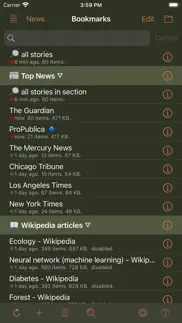
• Bookmarks can be RSS/Atom news feeds, web pages, Wikipedia pages, Google News queries, or Speak News keyword queries. Speak News queries can be created and performed while offline, searching the stories cached on the device.
• iCloud bookmark syncing
• Import bookmarks from a Feedly OPML feed library URL.
• Multitasking allows updating news feeds in the background while reading or listening to news in the foreground.
• Automatically selects appropriate international speech voices based on story language.
• Toolbar functions in a feed view include Play/Pause, Stop, Previous, Next, Update All Feeds, View Mode, Share, Settings.
• Share news headlines and links, or entire news feeds through the standard iOS Share social media activities view, including Message, Mail, Notes, Reminders, Twitter, Google+, Flipboard, Facebook, Evernote, etc.
• Current story info and Play/Pause, Previous, Next functions are available in the media player controls in the device's lock screen and Control Center.
• Speak News automatically rotates through available voices for the current language for each story. This gives more variety and distinction in the sequence of spoken news stories. For instance, in English, this gives U.S. , U.K. Ireland, New Zealand, and Australian voices.
• All stories are saved on your device for later reading and listening while offline.
• Efficient text-only story display makes loading and reading faster, and saves money on your cell phone plan by downloading minimal data.
• Display Styles include White, Light Gray, Sepia, Dark Gray, Dark Red, and Black. The "dark mode" Black and Dark Red styles are ideal for reading in dark environments.
• All text is responsive to the user's preferred text size as set in Settings > Display & Brightness > Text Size, and Settings > General > Accessibility > Larger Text.
• Toolbar functions in the Bookmarks view include New Bookmark, Go To Section, Find, Settings, Library, and Edit.
• Today Widget displays scrolling list of stories from current feed.
• Use the remote control on earphones to speak and pause stories, move to next or previous stories, or select a new RSS feed from your bookmarks.
• Create your own bookmarks and bookmark sections.
• Import bookmarks from Imaja’s Speak News RSS Feeds Library featuring a broad selection of essential and informative news feeds.
• Settings includes many controls for news story display, auto-reload, speech and auto-scrolling behavior, and user-interface sounds.
• Keyboard shortcuts are supported for Speak News functions for use with external Bluetooth keyboards.
• RSS feed details are viewable in the Edit Bookmark view.
• Word Usage action displays statistics on word frequencies in a story or a complete feed.
• Speak News supports a custom URL scheme for adding bookmarks.
Remote Control with Earphones
Tap the center button:
• One time to play or pause the speech.
• Two times to skip to the next story.
• Three times to skip to the previous story.
• Five times to enter Bookmark Selection Mode. In Bookmark Selection Mode, listen for the desired bookmark name and tap one time to open and start speaking the feed.
Settings
Use the Settings view to configure the text display, graphic style and behavior of Speak News.
Visit imaja.com/speaknews for more details and screenshots.
Follow @SpeakNewsApp on Twitter.
😍 Do you love Speak News - RSS news reader app? Please share your friends!



Please wait! Speak News - RSS news reader app comments loading...
Speak News - RSS news reader 2.26.1 Tips, Tricks, Cheats and Rules
What do you think of the Speak News - RSS news reader app? Can you share your complaints, experiences, or thoughts about the application with Imaja and other users?


Speak News - RSS news reader 2.26.1 Apps Screenshots & Images
Speak News - RSS news reader iphone, ipad, apple watch and apple tv screenshot images, pictures.
| Language | English |
| Price | $9.99 |
| Adult Rating | 4+ years and older |
| Current Version | 2.26.1 |
| Play Store | com.imaja.SpeakNews |
| Compatibility | iOS 15.0 or later |
Speak News - RSS news reader (Versiyon 2.26.1) Install & Download
The application Speak News - RSS news reader was published in the category News on 10 September 2016, Saturday and was developed by Imaja [Developer ID: 405583561]. This program file size is 10.58 MB. This app has been rated by 3 users and has a rating of 4.6 out of 5. Speak News - RSS news reader - News app posted on 21 November 2025, Friday current version is 2.26.1 and works well on iOS 15.0 and higher versions. Google Play ID: com.imaja.SpeakNews. Languages supported by the app:
EN Download & Install Now!| App Name | Score | Comments | Price |
| TelepaText - editor, speech Reviews | 5 | 1 | $9.99 |
| Astral Blossom Reviews | 1 | No comment | $6.99 |
| TaskInsight Reviews | 1 | No comment | $19.99 |
| Astral Blossom Reviews | 3.8 | 5 | $6.99 |
| TelepaText - editor, speech Reviews | 1 | No comment | $9.99 |
Speak News gets more user interface modernizations: * Modernized the menus and popovers with the new Liquid Glass design in iOS 26, and added the translucent effect for iOS 15 through iOS 18. * Fixed bug in status bar style for custom display styles. * Speak News is compatible with iOS/iPadOS 26 and the new Liquid Glass design, and iOS/iPadOS 15 through 18.
| App Name | Released |
| Fox Nation | 27 November 2018 |
| BBC World Service | 13 February 2019 |
| RedAlert - Alerts in Israel | 15 November 2014 |
| RadioApp - A Simple Radio App | 12 November 2013 |
| Substack | 08 March 2022 |
Find on this site the customer service details of Speak News - RSS news reader. Besides contact details, the page also offers a brief overview of the digital toy company.
| App Name | Released |
| Hourly News | 20 January 2012 |
| GoodLinks | 10 June 2020 |
| Jubilee25 | 24 December 2024 |
| Earthquake 3D | 14 July 2011 |
| Cosmicast | 16 September 2018 |
Discover how specific cryptocurrencies work — and get a bit of each crypto to try out for yourself. Coinbase is the easiest place to buy and sell cryptocurrency. Sign up and get started today.
| App Name | Released |
| Snapchat | 13 July 2011 |
| 07 April 2016 | |
| Gmail - Email by Google | 02 November 2011 |
| SHEIN - Online Fashion | 19 May 2014 |
| Cash App | 16 October 2013 |
Install the Giftmio extension for smart shopping. Get notified about cashback opportunities, activate cashback in one click, and save money on purchases.
| App Name | Released |
| Gambonanza | 01 May 2026 |
| Balatro | 26 September 2024 |
| RadarScope | 12 February 2019 |
| Bloons TD 5 | 15 November 2012 |
| Subnautica | 08 July 2025 |
Each capsule is packed with pure, high-potency nootropic nutrients. No pointless additives. Just 100% natural brainpower. Third-party tested and validated by the Clean Label Project.
Adsterra is the most preferred ad network for those looking for an alternative to AdSense. Adsterra is the ideal choice for new sites with low daily traffic. In order to advertise on the site in Adsterra, like other ad networks, a certain traffic limit, domain age, etc. is required. There are no strict rules.
Keep personal info private, avoid scams, and protect yourself online with AI-powered technology.
Speak News - RSS news reader Comments & Reviews 2026
Love this app but .... With the latest update it stops audio playback in the background mode and continues through the articles. It’s frustrating. I love this app!!! PLEASE FIX!!!
Beta software. This is the most buggy app I have ever used. How could you ship this?
Did you know that you can earn 25 USD from our site just by registering? Get $25 for free by joining Payoneer!
Imagine you at your best. All the time. Picture yourself at your sharpest and most productive. Your most alert and focused. Your most lucid, creative and confident. At work. At play. In every area of your life. Add Mind Lab Pro® v4.0 to your daily routine and uncap your true potential. Buy Now!
Adsterra is the most preferred ad network for those looking for an alternative to AdSense. Adsterra is the ideal choice for new sites with low daily traffic. In order to advertise on the site in Adsterra, like other ad networks, a certain traffic limit, domain age, etc. is required. There are no strict rules. Sign up!