AVA BLE Remote App Reviews
AVA BLE Remote App Description & Overview
What is ava ble remote app? Any self respecting autonomous robot needs a remote control. If you want to use an iPhone as your controller then Bluetooth is one of the better communication options for directing your robot / drone / whatever.
This app has been designed to work with the Romeo BLE and Bluno boards from DFRobot. The Bluno is a combination of an Arduino and a Bluetooth shield. It uses Bluetooth Low Energy (BLE), which is compatible with iOS 7.0+ devices: iPhone 5+,iPad 3+,iPad Mini,and iPod 5th Gen (note that Bluetooth LE capability is required).
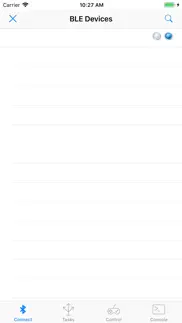
Getting Started: The Connection Screen.
When the app starts, it will open the connection tab and display any compatible BLE devices which are within range. To connect to a device just tap on its name. If the connection is successful, the word connected will be displayed and the communication indicator "LEDs" will turn from flashing blue to green. You can start a manual search for BLE devices by tapping the search (magnifying glass) icon in the top right of the connection screen. You can stop the search by tapping the disconnect device button (a cross) in the top left.
If you are already connected to a BLE device, tapping the disconnect device button will disconnect you. You can only attach to one BLE device at a time.
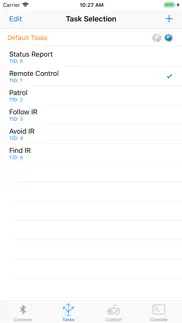
Setting a Task:
The Task tab allows you to send a tasking message to your Bluno. Tapping a task will transmit the tasking ID (e.g. 1) via Bluetooth. Tap the add button (+) to add your own tasks. Tap Edit to delete or rearrange the tasks. Tapping "Default Tasks" will reload the task list that comes with the app.
Controlling your BLE Device:
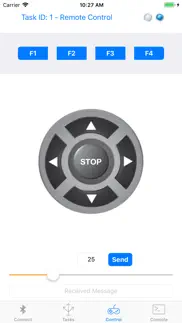
The Control tab acts as a virtual gamepad for your BLE device. The currently selected task is displayed at the top of the screen.
Tapping the function keys (F1 to F4) will send the designated character via Bluetooth to your BLE Device. The function keys will also adjust the speed. F1 = 25%, F2 = 50%, F3 = 75% and F4 = 100%. The speed is sent automatically.
Similarly, tapping the directional dPad or stop button will send the character assigned to those buttons. You can change the characters which are transmitted from the key mapping option in the console tab. The default mappings are:
F1 w
F2 x
F3 y
F4 z
Up Arrow f
Down Arrow b
Left Arrow l
Right Arrow r
Stop s
The speed slider will send the selected speed in the following format:
- start byte: ! // Which indicates that the next byte is speed
- speed byte // encoded as an unsigned char (0-255). We are using 0 - 100.
Messages received from the BLE device are displayed at the bottom of the screen.
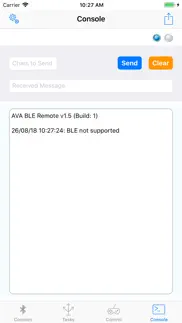
The Console:
The console tab allows you to send any character strings that you wish to the Bluno / Romeo. Just type the message in the text field and tap Send. Any received messages will be displayed below.
The console tab also contains the system log which records various events, such as device discovery, connection, data transmission and disconnection. You can email the system log by tapping the mail button in the top right of the screen.
Tap the settings (gear icon) button if you wish to change the keys mapped to the Control buttons.
Romeo / Bluno Code:
Sample code to allow you to test the app is available from the Reefwing Gist Repository (https://gist.github.com/reefwing/b6b51197ffe1b238fdbfc558a0c26e56).
A full description of how to set up the hardware and software may be found at the Reefwing Robotics Blog (http://reefwingrobotics.blogspot.com.au/).
Notes:
With a Romeo BLE mounted on the DFRobot Devastator Tank mobility platform I noticed that at full speed the Romeo would sometimes reboot due to excessive current draw on the batteries. If you are losing the BLE link you should check whether this is happening to you. It is hard to pick up as the boards reboot so quickly.
Further Information:
You can get further information and support for this app at the Reefwing Robotics Blog (http://reefwingrobotics.blogspot.com.au/).
😍 Do you love AVA BLE Remote app? Please share your friends!



Please wait! AVA BLE Remote app comments loading...
AVA BLE Remote 1.5 Tips, Tricks, Cheats and Rules
What do you think of the AVA BLE Remote app? Can you share your complaints, experiences, or thoughts about the application with Reefwing Software and other users?
AVA BLE Remote 1.5 Apps Screenshots & Images
AVA BLE Remote iphone, ipad, apple watch and apple tv screenshot images, pictures.
| Language | English |
| Price | Free |
| Adult Rating | 4+ years and older |
| Current Version | 1.5 |
| Play Store | au.com.reefwing.AVA |
| Compatibility | iOS 10.0 or later |
AVA BLE Remote (Versiyon 1.5) Install & Download
The application AVA BLE Remote was published in the category Utilities on 20 January 2016, Wednesday and was developed by Reefwing Software [Developer ID: 356051743]. This program file size is 1.48 MB. This app has been rated by 17 users and has a rating of 1 out of 5. AVA BLE Remote - Utilities app posted on 26 August 2018, Sunday current version is 1.5 and works well on iOS 10.0 and higher versions. Google Play ID: au.com.reefwing.AVA. Languages supported by the app:
EN Download & Install Now!| App Name | Score | Comments | Price |
| Response Reviews | 5 | 1 | $0.99 |
| Kiti Reviews | 1 | No comment | $0.99 |
| Bananas Reviews | 1 | No comment | $0.99 |
| Personality Reviews | 1.8 | 5 | Free |
| Ink Blot Profile Reviews | 4 | 1 | $0.99 |
This update from Apple will improve the functionality of this app. No new features are included. - BLE signal strength added (RSSI) - Clear Log button added. - Function keys adjust speed. F1 = 25%, F2 = 50%, F3 = 75% and F4 = 100%. Adjusted speed is sent automatically. - In the Control Tab, the speed slider will send the selected speed (when Send is tapped) in the following format: start byte: ! // Which indicates that the next byte is speed speed byte // encoded as an unsigned char (0-255). We are using 0 - 100. You will need to update the code in your Arduino to make use of these features. Sample code is available at: https://gist.github.com/reefwing/b6b51197ffe1b238fdbfc558a0c26e56
| App Name | Released |
| Genasys Protect | 20 February 2023 |
| Universal Remote TV Controller | 30 August 2021 |
| TV Remote - Universal | 10 February 2023 |
| Blink Home Monitor | 20 November 2015 |
| My Verizon | 03 February 2011 |
Find on this site the customer service details of AVA BLE Remote. Besides contact details, the page also offers a brief overview of the digital toy company.
| App Name | Released |
| Stash - Rule Based Proxy | 10 December 2021 |
| EasyMSR | 05 February 2015 |
| FE File Explorer Pro | 28 February 2012 |
| Export Contacts to Excel | 07 February 2019 |
| Noir - Dark Mode for Safari | 20 September 2021 |
Discover how specific cryptocurrencies work — and get a bit of each crypto to try out for yourself. Coinbase is the easiest place to buy and sell cryptocurrency. Sign up and get started today.
| App Name | Released |
| Google Maps | 12 December 2012 |
| WhatsApp Messenger | 03 May 2009 |
| 07 April 2016 | |
| YouTube TV | 05 April 2017 |
| SHEIN - Online Fashion | 19 May 2014 |
Install the Giftmio extension for smart shopping. Get notified about cashback opportunities, activate cashback in one click, and save money on purchases.
| App Name | Released |
| Procreate Pocket | 17 December 2014 |
| AnkiMobile Flashcards | 26 May 2010 |
| MilGPS | 01 December 2010 |
| Earn to Die 2 | 20 November 2014 |
| Geometry Dash | 13 August 2013 |
Each capsule is packed with pure, high-potency nootropic nutrients. No pointless additives. Just 100% natural brainpower. Third-party tested and validated by the Clean Label Project.
Adsterra is the most preferred ad network for those looking for an alternative to AdSense. Adsterra is the ideal choice for new sites with low daily traffic. In order to advertise on the site in Adsterra, like other ad networks, a certain traffic limit, domain age, etc. is required. There are no strict rules.
Keep personal info private, avoid scams, and protect yourself online with AI-powered technology.
AVA BLE Remote Comments & Reviews 2026
Did you know that you can earn 25 USD from our site just by registering? Get $25 for free by joining Payoneer!