DockThings App Reviews
DockThings App Description & Overview
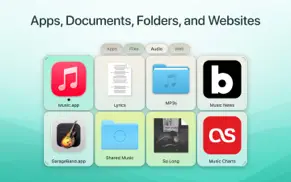
What is dockthings app? You probably have files, documents, folders, or websites you open again and again — or that are buried deep inside your Mac’s folders. With DockThings, you can reach them faster than ever before. Simply drop your most-used items onto a tile in DockThings, and open them instantly with a single click.
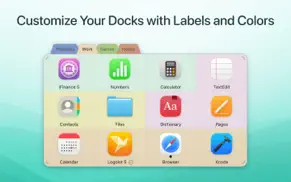
Customize your docks any way you like: assign names, choose colors, or pin tiles permanently. You can even launch websites right from DockThings — no need to open your browser first. DockThings is intentionally simple, designed to do one thing brilliantly: give you instant access to your most important content. Create as many docks as you like — for example, grouped by topic or media type — and keep your most frequently used files perfectly organized.
Using more than one display? Docks can be assigned to specific screens and snapped to any edge you prefer. You have full control over where your docks appear. For extra clarity, highlight tiles with colors, add custom labels, or use Quick Look to glance at file contents without opening them.
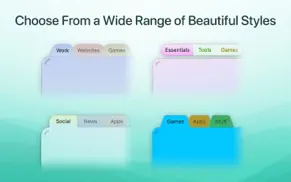
DockThings also offers a wide range of beautifully crafted templates for your docks. Choose from different layouts, styles, and visual themes to find the design that best matches your workflow — whether you prefer something compact and minimal or bold and structured. From a modern glassy look and subtle transparency to high-contrast styles, DockThings offers templates for every preference.
…and already so many improvements since launch!
DockThings 1.1 is bringing so many improvements and new features that it’s hard to list them all in detail. A big thank you to all users who shared their ideas with us – many of those suggestions have already made their way into the app! A few examples: View folder contents right in DockThings, add rows and columns more quickly, enjoy greater freedom in customizing your docks, use faster keyboard navigation or rely on scroll wheel and trackpad gestures.
😍 Do you love DockThings app? Please share your friends!



Please wait! DockThings app comments loading...
DockThings 1.1.1 Tips, Tricks, Cheats and Rules
What do you think of the DockThings app? Can you share your complaints, experiences, or thoughts about the application with Synium Software GmbH and other users?

DockThings 1.1.1 Apps Screenshots & Images
DockThings iphone, ipad, apple watch and apple tv screenshot images, pictures.
| Language | English |
| Price | $9.99 |
| Adult Rating | 17+ years and older |
| Current Version | 1.1.1 |
| Play Store | com.syniumsoftware.dockthings |
| Compatibility | iOS 15.0 or later |
DockThings (Versiyon 1.1.1) Install & Download
The application DockThings was published in the category Utilities on 03 December 2025, Wednesday and was developed by Synium Software GmbH [Developer ID: 284959715]. This program file size is 2.69 MB. This app has been rated by 17 users and has a rating of 1 out of 5. DockThings - Utilities app posted on 12 February 2026, Thursday current version is 1.1.1 and works well on iOS 15.0 and higher versions. Google Play ID: com.syniumsoftware.dockthings. Languages supported by the app:
EN FR DE PT RU ES Download & Install Now!| App Name | Score | Comments | Price |
| Screenium 3 Reviews | 1 | No comment | $59.99 |
| IFinance 5 Reviews | 4.3 | 136 | $19.99 |
| IFinance 4 Reviews | 1 | No comment | $39.99 |
| MacFamilyTree 11 Reviews | 1 | No comment | $69.99 |
| MobileFamilyTree 11 Reviews | 4.7 | 527 | $29.99 |
- Sorting in Folder Menus improved - Issue displaying placeholder icons in Folder Menus fixed - Localization updates
| App Name | Released |
| Govee Home | 26 July 2018 |
| My Verizon | 03 February 2011 |
| Clean Up Storage - Cleaner Kit | 26 January 2017 |
| Facemoji AI Emoji Keyboard | 28 April 2016 |
| Mint Mobile | 15 November 2017 |
Find on this site the customer service details of DockThings. Besides contact details, the page also offers a brief overview of the digital toy company.
| App Name | Released |
| EasyMSR | 05 February 2015 |
| Overseerr | 01 August 2024 |
| Loon | 09 May 2018 |
| AnyFont | 20 February 2014 |
| Noir - Dark Mode for Safari | 20 September 2021 |
Discover how specific cryptocurrencies work — and get a bit of each crypto to try out for yourself. Coinbase is the easiest place to buy and sell cryptocurrency. Sign up and get started today.
| App Name | Released |
| TikTok | 02 April 2014 |
| 09 October 2009 | |
| Spotify - Music and Podcasts | 14 July 2011 |
| Ralph Lauren | 08 November 2021 |
| Cash App | 16 October 2013 |
Install the Giftmio extension for smart shopping. Get notified about cashback opportunities, activate cashback in one click, and save money on purchases.
| App Name | Released |
| Gambonanza | 01 May 2026 |
| Scritchy Scratchy | 18 March 2026 |
| AnkiMobile Flashcards | 26 May 2010 |
| Slime Rancher | 26 May 2026 |
| Plague Inc. | 25 May 2012 |
Each capsule is packed with pure, high-potency nootropic nutrients. No pointless additives. Just 100% natural brainpower. Third-party tested and validated by the Clean Label Project.
Adsterra is the most preferred ad network for those looking for an alternative to AdSense. Adsterra is the ideal choice for new sites with low daily traffic. In order to advertise on the site in Adsterra, like other ad networks, a certain traffic limit, domain age, etc. is required. There are no strict rules.
Keep personal info private, avoid scams, and protect yourself online with AI-powered technology.
DockThings Comments & Reviews 2026
Did you know that you can earn 25 USD from our site just by registering? Get $25 for free by joining Payoneer!