Pastel App Reviews
Pastel App Description & Overview
What is pastel app? Capture and collect color palettes with Pastel!
Pastel is an app for amateur developers & artists (like us!) that lets you build up a library of color palettes to use in your projects.
With drag & drop on iPad, drag colors out into other apps that support dropped colors, like Pages and Keynote, or many third-party apps from your favorite developers, so you can use your Pastel library as your master color collection across apps.
Seamlessly sync your library across devices with iCloud.
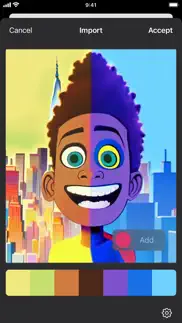
Analyze photos from the photo library or from Files to determine their dominant colors — choosing specific colors manually if you wish — and save their color palettes to Pastel.
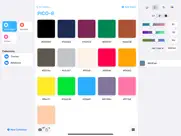
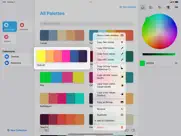
Includes a variety of color pickers, like wheel, RGB sliders, and crayons, or pick named colors from your color library that you curate yourself. On iPad, drag and drop from the sidebar to any palette.
Copy a variety of developer-focused code representations, like RGB, hex, Objective-C, Swift and SwiftUI. Paste hex codes into the sliders color picker.
Copy a pixel bitmap representation of a palette to paste into your favorite pixel editor, share a screen-sized version to set as your wallpaper or Apple Watch face, or export a palette to Procreate®.
Create beautiful, colorful wallpapers in various different 2D & 3D styles using Pastel's wallpaper creator.
In the free version, try out the built-in library, and add your own palettes up to a limit of 8 items total. Upgrade to the unlimited version using in-app purchase.
---
Terms of Use: https://www.apple.com/legal/internet-services/itunes/dev/stdeula/
Privacy policy: https://www.highcaffeinecontent.com/privacy
😍 Do you love Pastel app? Please share your friends!



Please wait! Pastel app comments loading...
Pastel 2.6 Tips, Tricks, Cheats and Rules
What do you think of the Pastel app? Can you share your complaints, experiences, or thoughts about the application with Steven Troughton-Smith and other users?




Pastel 2.6 Apps Screenshots & Images
Pastel iphone, ipad, apple watch and apple tv screenshot images, pictures.
| Language | English |
| Price | Free |
| Adult Rating | 4+ years and older |
| Current Version | 2.6 |
| Play Store | com.highcaffeinecontent.pastel |
| Compatibility | iOS 16.0 or later |
Pastel (Versiyon 2.6) Install & Download
The application Pastel was published in the category Developer Tools on 08 June 2020, Monday and was developed by Steven Troughton-Smith [Developer ID: 286133549]. This program file size is 9.37 MB. This app has been rated by 1,400 users and has a rating of 4.7 out of 5. Pastel - Developer Tools app posted on 20 April 2026, Monday current version is 2.6 and works well on iOS 16.0 and higher versions. Google Play ID: com.highcaffeinecontent.pastel. Languages supported by the app:
EN Download & Install Now!| App Name | Score | Comments | Price |
| Lotto Machine 4 Reviews | 4.5 | 314 | $1.99 |
| Take One Reviews | 4.4 | 7 | Free |
| Broadcasts Reviews | 4.6 | 901 | Free |
| Scarlet Reviews | 4.4 | 293 | $2.99 |
| Grace 4 Reviews | 4.5 | 44 | $39.99 |
• The Quick Add Color panel now has a new look • Color creation flow has been clarified and improved • Fixes an issue at color creation where a palette could end up with duplicated references • Improvements to save and sync
| App Name | Released |
| XTerminal - SSH Terminal Shell | 17 December 2020 |
| Userscripts | 14 May 2019 |
| Dodo - Webview | 24 April 2025 |
| Koder Code Editor | 22 December 2018 |
| Brook.app | 20 March 2017 |
Find on this site the customer service details of Pastel. Besides contact details, the page also offers a brief overview of the digital toy company.
| App Name | Released |
| Ruby 2.0-run code,pro | 16 October 2014 |
| Haptics - Test Haptic Feedback | 19 September 2019 |
| Neural Object Detector | 14 April 2020 |
| Cookie Editor For Safari | 05 April 2023 |
| Code App | 28 May 2020 |
Discover how specific cryptocurrencies work — and get a bit of each crypto to try out for yourself. Coinbase is the easiest place to buy and sell cryptocurrency. Sign up and get started today.
| App Name | Released |
| Messenger | 09 August 2011 |
| Netflix | 01 April 2010 |
| Google Chrome | 28 June 2012 |
| Google Maps | 12 December 2012 |
| Telegram Messenger | 14 August 2013 |
Install the Giftmio extension for smart shopping. Get notified about cashback opportunities, activate cashback in one click, and save money on purchases.
| App Name | Released |
| Balatro | 26 September 2024 |
| Bloons TD 5 | 15 November 2012 |
| HotSchedules | 30 October 2008 |
| Paprika Recipe Manager 3 | 15 November 2017 |
| Bloons TD 6 | 14 June 2018 |
Each capsule is packed with pure, high-potency nootropic nutrients. No pointless additives. Just 100% natural brainpower. Third-party tested and validated by the Clean Label Project.
Adsterra is the most preferred ad network for those looking for an alternative to AdSense. Adsterra is the ideal choice for new sites with low daily traffic. In order to advertise on the site in Adsterra, like other ad networks, a certain traffic limit, domain age, etc. is required. There are no strict rules.
Keep personal info private, avoid scams, and protect yourself online with AI-powered technology.
Pastel Comments & Reviews 2026
Great App. I just gave you 5 stars because I think your app is amazing. I just wonder how to erase a color I added to a certain palette?
Wishing for an eyedrop tool :(. Really wish this had an eyedropper tool
Fantastic color palette!. Was looking for an alternative to something that Adobe offer's across there apps and this is it! Let me tell you, it allows you to save your palettes and sync across your iCloud library for use on other devices. Love every part of it.
really needs eyedropper color picker. it can import and choose colors every way you can imagine except for the way you would likely expect. there isn't a way to simply pick a color that is in other app windows. wel, there is a way. screenshot it, then import the screenshot and it will pick all of the colors for you. that's incredibly cool but most times i want the color of a specific pixel in another window. it will easily be a 5-star app, once it has a simple eyedropper color picker.
Huuuhhh???. I feel like there’s no point of this game like u CANT EVEN MAKE A PICTURE??!! It’s just color pallets you don’t get to use them at all like WHAT?? So people please look at this before you get this app because it not that good. 💖MAGMAG💖
nice app with thoughtful features. this is a nice clean simple app for looking at and collecting collections of colors, and has lots of options for copying and pasting colors in different formats, which is exactly what i was looking for. the one thing i’d like it to also do is implement a widget with a color picker that you can leave on your home screen to choose and copy colors at any time.
Great app but RGB only. I paid for it immediately after download wanting to support the developer and impressed by the UI... never would have assumed that there is no CMYK. I hope this gets added soon. Update: the developer responded to me! Thank you, Steven, for being cool. I hope someday soon I can drag and drop palettes onto Affinity Designer, Vectornator, etc. In the meantime, I will enjoy Pastel and my favorite anachronistic color picker, the crayons. :)
Color accessibility info would be nice!. Love the app! It would be neat if I could get WCAG contrast scores so that I can check my palletes for accessible colors.
Custom palettes costantly disappear, no real product support or documentation. I recently purchased and downloaded this app a few hours ago to my Mac Pro running macOS Monterey. I spend an hour creating several custom palettes I put into a "collection". Suddenly, all of my palettes were gone. The "collection" was still there, but empty. I tried a few tests (making more colors, palettes, collections, open/close the app after creating them), and the palettes would either disappear out of the collection, or the palettes might still be there, but empty of colors. There is no real support for tis product. A webiste/support linke in the Apple App Store goes to webpage, which in turn, has a link back to the App Store. There is a Twitter link, where I suppose that is where we're supposed to learn how to use this app and get support. But I don't care to use Twitter, certainly not for support on a product I spent money on. I see no way to get real support nor a refund. Hopefully others are not having similar loss of time and productivity with this app.
Palettes disappeared after MacOS update. I've been using Pastel for the past several months and have been pleased with it—but recently, I updated my Mac, only to find that all my custom palettes disappeared! I don't know where to find them—was there something involving an API change or plists that got rid of the custom additions? Since I use this app in my work, losing content is unacceptable. Please address this problem as soon as you can.
Nice but..... I guess I just don’t understand the purpose of having just a plain colored widget that provides no information. If it could be used as a background with a clock or something I could understand it.
Love this app. I love this app, it would be perfect if it had a color picker or an easier way to import colors.
Lots of Potential!. I really want to like this app as I have a real need for it, but it is very buggy and does not work as advertised! I cannot drag and drop colors from the color sidebar into a palette, why? There is no way of duplicating a color in a palette as thuis is the easiest way of creating a range of colors. Color names do not survive, when you view a color in a palette the name is erased when you exit. It should also make name editing more accessible and they should be displayed more promimently. Support through Twitter is not what I would call support, so it is basically non-existent, which is a shame. I want to support development of tools like this but it is hard to do if the software does not work correctly and there is no way to report problems except through a review.
Really good app. One suggestion. Really love this app. One thing that would make it even better is the ability to support gradients.
Widget doesn't work :-(. As a graphic designer with 30 different clients who all have different brand colors, this app had me salivating over its potential. UNFORTUNATELYYYY, the widget just says "Loading...." in the week since downloading, and hasn't changed in the week since I installed it. If it started working, I'd give this 5 stars in a second because of all the time it'd save copying color codes every day.
Amazing app but one flaw. This app is great for those who need color palettes and palette ideas, especially for procreate. You can even get a palette by importing a photo! I have one issue though. You can have a palette widget, and it will ask you to put the name of the palette you want to use. It can be a nice decoration, especially if you want to display a certain aesthetic palette or a palette Pride flag. No matter now many times I enter or change the name, the right palette won’t come up! Maybe you can change the way we change the palette in widgets so that we can visibly see which one we are choosing. Just an idea, but great app otherwise!
Amazing color management. I love this app on the iPad and I’m so happy that it made it to the mac!
Greatest Of All Time. Create a palette from a picture.
No way to analyze colors from photos. I see no option to do this in the app and no way to connect with app support via their “website”. Not impressed.
Great app and nice simple design. I have to say I have been looking for an app like this for a while. Found this app after using TheTask app and what I love about that app I like about this one. Simple design. Gets to the point with a user friendly design. Purchased the unlimited version almost instantly to support and hope for continued updates to the app. On feature I would say right now is missing is a CMYK slider. Use this for graphic design and school so that feature would be clutch. Great work devs and looking forward to the updates and Mac app.
Great for managing color palattes. I would've liked more default profiles, but after discovering how easy it is to import profiles (mostly by googling color palettes), this app has been great for keeping track of palettes.
Kind of. I like this app and all the thing is that i dont know how to get into a Page That i can draw in so im going to give this a 3 stars
Great app, but some errors.. This app has great color palettes to create and to choose from, but there is a little problem on choosing the colors on the color wheel. When I go to colors and tapping Cayenne, Eggplant, and Maraschino, is does not show the location of the colors on the color wheel. It shows the colors, but does not go to the right spot. It think is is a bug or a slight error. I hope anyone can fix the issue and keep up the great work.
Can't figure out how to add to menu bar in macOS 13. Any thoughts?
Great App With One Flaw. This is a fantastic app for building up a library of color palettes. It's got first-class organizational capabilities, allowing you to drop palettes into one or more collections, and plenty of ways to export your palettes either to visualize them or use them in software. The one thing it's missing is a URL scheme. If you want to navigate to a particular palette, you have to manually open the application and either browse or search for it. I'd love to be able to generate links to palettes, that I could either record in a notes application or attach via Hookmark, allowing me to jump directly to the linked-to palette.
YES!. I love that the app is across my devices. As a visual artist, it makes it really easy for me to capture a pallet and transfer it between my different apps on iPad and Mac, and when I need to use it on windows I can export the file. Super simple app that I believe is worth the modest price! Thanks for the tool i never realized I needed!
Nice but needs iCloud sync. Overall this is a great app but without exporting / importing or better yet iCloud sync support, it's not a yet pro-level but it has potential.
Used it for years. Stable, simple, useful.. It does exactly what it's supposed to do and saves me time and trouble. The world needs more apps like this.
Much more than a colorpicker (but oddly, not a colorpicker). This is a great palette management tool, and it does what it does really well. If you just need a colorpicker, though, this isn't that: In fact, the only way you DON'T bring colors into this app is the one way I (perhaps foolishly) had assumed I would -- By using a system-wide keyboard shortcut to pull up an eye dropper to select a color (Hint to the developer: This would be a great addition). Regardless, it's a great organizer, and I paid for the full version -- even after realizing I'd also need a colorpicker to go along with it (ie, my only issue with it lies with my expectation rather than with the app itself).
Good could be Better if it had Pantone Palettes as a reference too. I was looking for a means to convert Pantone palettes to an HSB palette, and was hoping Pastel might be one option. It’ still very useful, but not as useful as it could be for my needs.
Is this app a scam?. No introductions or links to same. Unusable in my opinion. Negative reviews are the most recent date,but listed after much older reviews.
Perfect for What I Needed!. This lightweight app is exactly what I was seeking: A quick color picker and keeps track of Palettes, Themes and Collections.
Didn't know I needed this app until now!. Great way to collect color themes. Wish I could name colors though. A bit buggy here and there; seems like color blocks should act like files in finder do with selection, dragging, copying, etc.
Love this app!!. Shooting a documentary and this app has been essential to me developing my lookbook. If you have control over the look of your project then its essential to have help developing the look that will help you tell part of your story. The look and mood that you obtain from your colors in your movie or project are just as important as the words you write down in your script or the picture you draw ... Don't neglect your project and don't get caught off guard having never made the effort to choose a look for your project ... get this app!!!!
Every. Single. Day.. This app is there for me and I use it to keep my company’s color palette close at hand.
Exellent Tool!. Pastel is awesome. It's a must have for all web designers and UI/UX developers.
Fantastic App. Steve always makes very high quality apps, and this is no exception.
Latest great app from the incomparable Steven Troughton-Smith. Stop saving your theme colors as hex values in Notepad. Use the beautiful tool instead.
Keeps me On Brand!. I love having a consistant color pallet through my videos. This helps me easily keep to my brand colors!
Wallpaper generation is rad. As someone who just wants high-res, eye-catching color-swirls on my many screens, the ability to easily set a color palette and generate wallpapers based on them is wonderful. Thanks for the app!
Wallpapers aren’t saving, some distorted. I was really excited following the development of the update that allows more styles of wallpaper generation. However I’m running into a couple of issues on my iPhone 13 Pro. The wallpaper images no longer save to my device. The reference cards still save just fine, but the app will let me “save image” for the wallpaper but nothing happens and the app resumes as normal. The other issue I’m running into is that both the Ball Pit and Pyramid styles don’t produce great images when set to the native phone resolution. The images displayed seem to be really zoomed in, so much so that I can see the artefacting on the image near the edges of the 3D objects, and a really heavy blur filter applied. These distortions aren’t present for landscape or square aspect ratios, but these images still can’t be saved.
Just about perfect, but -. I would really love to have a color picker. I poked around for a bit but couldn't find one. Other than that, this app is perfect for organizing color palettes.
Another great app from a great developer. Love the simplicity. Takes advantage of modern iOS apis. Love it!
None. can you use this program in Photoshop.
All my palettes disappeared. I've been using Pastel for several years to keep track of the color palettes for my software design projects. I went to reference one of my custom palettes today and all my custom palettes were gone even though they were all there last week. Apparently other users have experienced the same. I'll have to spend many hours of going through my projects to recreate my palettes. You can be sure I won't be recreating them in this app. Never again.
Great App. Easy to use. Beautiful UI. Exports in many formats. I have a lot of apps, as most of us do. This is the first time I've felt compelled to write a review.
Soooooo close!. This is such a simple, amazing tool to for solo designers like me to manage client brand colors! The only thing that would take it to the next level is being able to include brand fonts! If this functionality was added, it would be PERFECTION!!!
Incredible for Web Design. Love using Pastel to manage color schemed across various websites I'm building. The sync features is great and the ability to drag a color screenshot right into the app is amazing.
Pallettes disappear and data is lost. This app is pretty much unusable because it will lose palletes that you make. I see other reivews reporting the same issue with responses from the dev to reach out to them. I emailed the developer, but haven't heard back.
Great and simple. Love the simplicity of it. As a feature request, I’d like to propose a shortcut action to pick a colour (probably in-app) from a theme, or by using the colour wheel.
Did you know that you can earn 25 USD from our site just by registering? Get $25 for free by joining Payoneer!
Good but could be great. I love the ability to explore colour and create palettes. I wish I could do two things. I want to export the palette in a format that could be used by Procreate. Second I want to be able to bring in a picture and collect the colours from it. Then IU could adjust the colours using the app. A good that could be brilliant with these two minor tweaks.
The palette app I’ve been searching for. For years, I’ve had a thing for saving colour palettes, whether from apps, websites or ones I’ve generated myself. At first, I kept them in a spreadsheet. I have tried countless other apps but was always disappointed to find they would only generate palettes from images, or limited every palette to a fixed number of colours. But Pastel is basically perfect. A couple of (minor) features I would love: 1) a kind of ‘smart’ collection under Library like Recent containing all custom palettes (eg My Palettes), and 2) option to choose the default way to add new colours, eg. instead of the colour wheel, I would prefer to default to the second view as I always add new colours via hex code. Have just happily purchased the full version for unlimited palettes; thank you for creating the app I always wished existed 🎨❤️ EDIT: Just to acknowledge and thank you for the update including suggestion #2 - so many taps saved! I already rated you 5 stars so ⭐️++
How to load photo?. Analyze photos from the photo library or from Files to determine their dominant colors - choosing specific colors manually if you wish - and save their color palettes to Pastel.
Custom pallets not working. My widget no longer loads after the update but the changes i make to pallets & custom ones ive made won’t show on the widget
This app is the BEST. I have really enjoyed using this app for my video projects and arts and it just works is awesome
Pastel. I saw this app on app of the day, i struggle with making nice colours and these suit my drawings so much! You can import them to procreate. One thing that might be nice is being able to import it to other drawing apps like for eg. Ibis Paint X or Adobe sketch BUT REMEMBER you can still copy the hex codes so u still can import the colours just not as easily . That’s really all, but this app is amazing! I definitely recommend it especially if you have procreate!
Almost perfect. If you could add a way to display colour harmonies in their various facets that would make this the go to app for me. The presets are nice but the tried and tested harmonies and being able to select them easily would send this app to the A list. Thanks
Best app for collecting colour pallettes.. If you do any sort of deisgn, Pastel enables you to collect colour pallettes that are accurate and convenient to access when needed.
best pallette apps ever. the best part is that it exports to procreate easily! and its free, id recommend this app to every artists if i could, thank you so much guys!
Good app. Very good app to get colours right for a drawing. Good for digital or on paper
My goto for colour. A very handy tool when doing web (or any design) highly recommend for designers and developers.
Simple Palette Capture and Library App. Love this app, simple to use, clean UI, available across different devices, can export palette to Procreate, and plus can generate wallpaper!
very nice but.... very nice and lets u easily access all the colours but u have to pay for more stuff other than that absolutely amazing and also it doesn't show the colour you have to kind of guess it because the slider covers it up (4.8/5)
Imagine you at your best. All the time. Picture yourself at your sharpest and most productive. Your most alert and focused. Your most lucid, creative and confident. At work. At play. In every area of your life. Add Mind Lab Pro® v4.0 to your daily routine and uncap your true potential. Buy Now!
Confusing. No instructions. Added wallpaper widget but nothing I tap in it does nothing. No idea how I’m supposed to use the wallpaper feature or what it even does.
Very good!. I was pleasantly surprised with this app. Highly recommend!
Is perfect. Exactly what I needed for my creative workflow.
A Solid Color Palette Manager with a lot of Potential. As a 1.0 release, this app functions well and can be an great addition to any designers toolkit, especially with the recent advancements of iPadOS. That being said, there are a few things I can see being improved. They are as follows: The color picker UI has an indicator at the bottom showing the selected color within the context of the palette. This is great, but it would be much more beneficial to be able to re-arrange the colors so that comparisons can be made between different colors within the relevant palette. When you tap on a color within a palette, there is a delay with the color wheel on iPhone. It jumps from the default position to the selected color. This is minor, but noticeable. On iPadOS, it can confusing being able to have two color wheels open at once (main in middle column, another on the right. Borders could be beneficial for dark colors on dark mode and light colors on light mode. Licorice for instance gets lost on a dark background. A feature to compare color contrast values would be incredibly beneficial for creating accessible palettes. The “Library” heading is missing on iPadOS. There is a bug when trying to open the right-column color picker UI while in iPad portrait.
Handy, but limited. While there’s some excellent and useful features in this app- the photo tool, for instance and the export functions, there’s a few things that make it not so great. You can’t delete a palette, for instance, and the organization tools are pretty limited. A simple slide to delete function and the ability to sort palettes on the main screen by newest and recently viewed would help a lot.
Can’t use my own pallets as widgets. Widgets don’t recognize the names of pallets that I’ve made. When I set a widget to a custom pallet, it just reverts to the “newsstand” look.
Adsterra is the most preferred ad network for those looking for an alternative to AdSense. Adsterra is the ideal choice for new sites with low daily traffic. In order to advertise on the site in Adsterra, like other ad networks, a certain traffic limit, domain age, etc. is required. There are no strict rules. Sign up!
Startlingly bad support. Which is to say no support.
what is this?. can't import an image to pull a pallet from? if it exist no easy way to find it. did adobe patent the user experence?
Don’t trust. It will delete all your palettes
Love It! Too Bad It’s Buggy.. Great app for sorting your colors and palettes right here. Not only can you create collections to store specific types of palettes (For example, I sort my palettes by theme and colors) But you can create entire color systems to reference off of when creating your palettes. This makes the app very useful for pixel artists specifically, or for any artists who like to use limited color palettes. I only have a few issues with the app that keep me from giving it 5 stars: A minor feature I request is the ability to create color systems by deriving from photos and files the same way you can for regular palettes. This would make creating color systems a much, much faster process. All my other problems with the app are how buggy it is. It’s hard to sort palettes in collections because the app keeps thinking I want to take the colors to add to another palette. I keep losing my progress because the way the offline and online storage system is extreme buggy, and I end up having to start all over again with my palettes and color systems when they’re suddenly all gone when I load it up. Palettes with a whole bunch of colors do…NOT display the best. Sometimes parts of the app will literally freeze, causing me to load it back up again. This app just really needs to be cleaned up. It’s a shame; I really like Pastel. I even paid for it to access more storage and features. I can’t use it however if it keeps fizzling on me. I really hope the developers do something about these problems.
Carefully curated palettes can disappear at any moment. This is the second time I have lost every single palette I created in the app. This is 100% unacceptable.
Incredible Potential!. This is a cool app, the iPhone version is really good, the mac version is also great. I wish you add the following features: • Color Picker • Menubar icon for quick access • Image Color Pallet • Integration with Figma/XD/Sketch Thanks for this app.
Beautiful app, ugly icon. I love pastel’s sleek design. But not the icon. Never.
Love. Amazing
GREAT APP. WONDERFULL COLOR SCHEMES AND EASY TO USE INTERFACE. MY GO TO APP FOR COLORS AND THEMES
1000000000000. 1000000000000 stars
xfghjkop@. iop@[ nm,./_]
How. If only there was an explanation on how to use it
Simple, Intuitive, Great Widgets. This app makes managing color pallettes easy. If you could double-click a color to copy the hex code instead of having to right click, I'd give it 5-stars.
It was .....interesting...... I was expecting more of a coloring game but I will except it
Recommended. I’m really enjoying the app. Love the integration with procreate.
Pastel helps me use obscure hex values. My organization has a set color palette and some of them I’ve got memorized (#005596!) and others are tougher 🤦 Pastel helps me quickly access those values when I need them for different projects. It does what it says on the tin and it does it well. What else needs to be said? 5 stars!