Adding Machine 10Key iPhone App Reviews
Adding Machine 10Key iPhone App Description & Overview
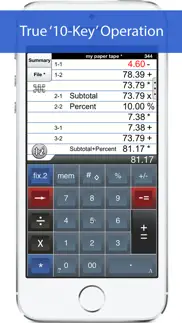
What is adding machine 10key iphone app? 'Adding Machine 10Key for iPhone’ behaves like a true '10 Key' or 'adding machine' like those made by Monroe, Casio, Sharp and others. Press asterisk (*) for a total, operator entry is reversed, and calculate percentages by multiplying and adding to a stream of numbers. SEE THE 1ST FAQ BELOW.
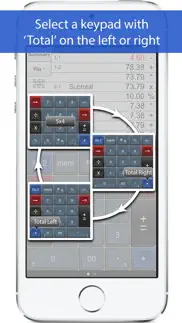
The total (*) key can be on either the left or right side (Sharp or Canon style) and the keypad is expandable to show more or less paper tape history.
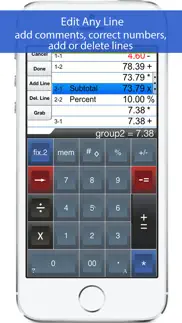
Also. Review & edit numbers, add or delete lines. Save & retrieve paper tape files. Export paper tape files to iBooks©, Dropbox©, or your favorite printing utility (see the FAQs).
==== Recent Press =====
Has been featured in iTunes "What's Hot" in the Finance Category.
Strategic Finance (Tools of the Trade): "If you're looking for a professional desk calculator that can give you full 10-key accounting functions with a tape you can name and save, edit, e-mail, or print, check out Interlocken's 10 Key for iPad."
=================
Specifications:
=================
. Behaves the same as a '10 Key' adding machine.
. Export a PDF file to iBooks©, DropBox©, Email, or your favorite printing utility.
. TypeTone - a major innovation to aid accurate key entry using audio feedback (iPad version only).
. Full size (1:1) keyboard (iPad version only).
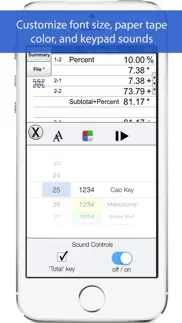
. Select from a menu of keypad sounds.
. 400 lines of paper tape history (full version).
. 3 display formats: fixed, fix+, float
. Save paper tapes to disk for later use.
. Correct numbers, add comments, add/delete lines
. Two keypads offer the 'total' key on the left or right (Sharp or Canon style)
. Comprehensive set of help screens.
================
FAQ's
Q1. What is the difference between 'Adding Machine 10Key Univ', and 'Accountant Calc' in the App. Store.?
A1. Both calculators are single-column adding machines or calculators with full-size (1:1) keypads and are optimized for the iPad User Interface. '10 Key' behaves the same as a 10 Key Adding Machine with reversed operator entry while ‘Accountant Calc’ supports free chaining of +, -, x, /, %, √, 1/x. It is easier to use if you are not familiar with how a '10-key' works.
Q2. Can I touch-type?
A2. Only the iPad version includes ‘TypeTone’, a key will guide your finger back to the center of a key with an audio tone.
Q3. How can I edit an incorrect number or add & delete lines from the paper tape?
A3. Touch any line of the paper tape for edit mode. Touch the side controls: Add Line, Delete Line. You can also edit numbers, split Add/Sub or Mul/Div groups. Press Done to return to Calculator mode.
Q4. Tell me about Email, Printing, and Exporting a Paper Tape.
A4. Email includes a pdf attachment. Print requires an AirPrint capable printer. Open-In will cause a menu of 3rd party Apps to appear. Once exported, print directly to a network reachable printer (even if it is NOT AirPrint capable).
============================
TERMS AND CONDITIONS
Your use of this application is governed by Interlocken Technology's Terms of Use (http://s354819480.onlinehome.us/InterlockenPrivacyPolicy/Interlocken%20Technology%20Privacy%20Policy.pdf) and Privacy Policy (http://s354819480.onlinehome.us/InterlockenPrivacyPolicy/InterlockenTechnologyTermsOfUse.pdf)
😍 Do you love Adding Machine 10Key iPhone app? Please share your friends!



Please wait! Adding Machine 10Key iPhone app comments loading...
Adding Machine 10Key iPhone 7.10k Tips, Tricks, Cheats and Rules
What do you think of the Adding Machine 10Key iPhone app? Can you share your complaints, experiences, or thoughts about the application with Richard Silverman and other users?
Adding Machine 10Key iPhone 7.10k Apps Screenshots & Images
Adding Machine 10Key iPhone iphone, ipad, apple watch and apple tv screenshot images, pictures.
| Language | English |
| Price | $2.99 |
| Adult Rating | 4+ years and older |
| Current Version | 7.10k |
| Play Store | com.papercalc-mobile.papercalc-10Key-suite |
| Compatibility | iOS 12.4 or later |
Adding Machine 10Key iPhone (Versiyon 7.10k) Install & Download
The application Adding Machine 10Key iPhone was published in the category Finance on 23 September 2010, Thursday and was developed by Richard Silverman [Developer ID: 297096643]. This program file size is 10.29 MB. This app has been rated by 129 users and has a rating of 4.5 out of 5. Adding Machine 10Key iPhone - Finance app posted on 27 December 2023, Wednesday current version is 7.10k and works well on iOS 12.4 and higher versions. Google Play ID: com.papercalc-mobile.papercalc-10Key-suite. Languages supported by the app:
EN FR DE IT ES Download & Install Now!| App Name | Score | Comments | Price |
| Adding Machine 10Key for iPad Reviews | 4.7 | 77 | $2.99 |
| Calc Cloud Reviews | 4.1 | 17 | Free |
| Accountant Calc Pro Reviews | 4.4 | 39 | Free |
| Crypto Alert Boss Reviews | 1 | No comment | Free |
| ODO Check Reviews | 1 | No comment | Free |
v7.10 ==== 1. Support for iOS 12.4 and newer.
| App Name | Released |
| Intuit Credit Karma | 18 July 2012 |
| GEICO Mobile - Car Insurance | 07 October 2009 |
| Klover - Instant Cash Advance | 30 July 2019 |
| PayPal - Pay, Send, Save | 03 February 2019 |
| Navy Federal Credit Union | 07 May 2010 |
Find on this site the customer service details of Adding Machine 10Key iPhone. Besides contact details, the page also offers a brief overview of the digital toy company.
| App Name | Released |
| 10BII Calc HD | 20 September 2010 |
| KIS Futures | 14 July 2010 |
| Timeshare Calculators | 12 March 2019 |
| Crude Oil - Live Badge Price | 25 August 2018 |
| Simple Budget Envelopes | 02 February 2018 |
Discover how specific cryptocurrencies work — and get a bit of each crypto to try out for yourself. Coinbase is the easiest place to buy and sell cryptocurrency. Sign up and get started today.
| App Name | Released |
| 12 February 2019 | |
| 06 October 2010 | |
| Gmail - Email by Google | 02 November 2011 |
| BeReal. Your friends for real. | 08 January 2020 |
| TikTok | 02 April 2014 |
Install the Giftmio extension for smart shopping. Get notified about cashback opportunities, activate cashback in one click, and save money on purchases.
| App Name | Released |
| MilGPS | 01 December 2010 |
| Earn to Die 2 | 20 November 2014 |
| Paprika Recipe Manager 3 | 15 November 2017 |
| Monash FODMAP Diet | 17 December 2012 |
| Bloons TD 6 | 14 June 2018 |
Each capsule is packed with pure, high-potency nootropic nutrients. No pointless additives. Just 100% natural brainpower. Third-party tested and validated by the Clean Label Project.
Adsterra is the most preferred ad network for those looking for an alternative to AdSense. Adsterra is the ideal choice for new sites with low daily traffic. In order to advertise on the site in Adsterra, like other ad networks, a certain traffic limit, domain age, etc. is required. There are no strict rules.
Keep personal info private, avoid scams, and protect yourself online with AI-powered technology.
Adding Machine 10Key iPhone Comments & Reviews 2026
Use it daily. Essential!
Good app.. No issues with this app. All works as hoped.
Real deal. Works like the bigger version.
Wonderful, simple. Works wonderfully.
Good in a grocery keeping a list. I needed to keep track of my purchases for a discount of X dollars off in a grocery store. I found this app and gave the free version a try. It worked well with minimal training until I hit the max lines in the free version, so I jotted down the total and started a new list. My one complaint about the free version is turning off the click sound is touchy. One has to be FAST to hit the off switch before the banner appears, but I got it on the 3rd try. I figure @ $3 getting the update is worth the investment. I have yet to really give it a real test to see what all it can do. The only reason for not 5 stars is I do not know it well enough to give it maximum stars, but I doubt if anyone using it will be dissappinted. The look and feel of the app is very well thought out.
Begs for reviews, won’t quit. Every time you open the app, it begs for a review. The begging for reviews is obnoxious enough, but is made worse by the “Don’t Ask Again” option not working. Clearing the tape is always a guessing exercise. There’s an “I” button you use to erase the tape. But sometimes it brings up a menu instead that allows you to erase the tape. Or sometimes it does nothing at all. It’s like I’m a monkey randomly poking at buttons until it does what I want. Would have been a 3 Star review, but the incessant review requests dropped it.
This is a great app. I purchased this app to keep track of expenses at work. I just came back from my sons travel soccer tournament and used the app to keep track of each players expense and cash received
Great app. Has all I need @ the end of the day Get my totals the email them to everyone that needs them. Have one on each of my devices and the files have saved me more than once. Love this app.
Lou Kramer. I have tried many of the apps for adding machines this one is the simplest and the fastest to use. SSP keep my books balanced and the war I stand at all times. Many of the extra features are very handy to have and the ability to store and use a adding machine tape is the best. Yet machine tape makes it very simple to be able to check your calculations just like you would on the desktop adding machine to make sure you didn’t miss or miss figure.
Lots of features. Keeps a running tab, allows you to adjust decimal point, quickly and easily enables me to add up my figures at work. Saves time fumbling for a calculator or going to the office to get an adding machine,
👍. Works well, just like I would expect.
Great app. Great app especially when used on iPad.
Nice needs a little tweaking though. Nice app has a small glitch that prevents you from adjusting the keypad down too the lowest setting though. When you close it out and try Re-opening it again it shows a gap between the minus and plus key.
The best and worth the $2.99. I've been looking for a tape calculator like this, which is especially good for e.g. taxes, and this one is the best.
Getting better. Took a little time to figure out how use I am starting to like the app more and more.
It works!. Works great. Minus one star for nagging me to review ALL the time. Frustrated by constant asking for reviews, so here I am writing a review. Apparently the “Don’t ask me again” button does not work.
Perfect!. I have used adding machine apps on my iPhone for ten years and never liked any of them. This one is perfect! It works like a ten key paper tape machine but it lets me edit a column of numbers to make corrections. Definitely get the upgrade to have 400 lines of numbers. To clear the register double tap the “i” key then tap “clear”. One last time: It’s perfect!
Mr.. Terrific, it's truly better than a real one! The ability to grab a past figure from the tape and use it in the current calc is great, love the memo feature when emailing the tape too!
Good app.. Works as described.
Lost one star because.... It's a good enough app but when you open it up it asks if you want to write a review. One of the options is "don't ask again". I've chosen that option (several times) and it continues to ask me if I want to write a review every time I open the app. Why give you that option if it is going to ignore it when you choose it?
Great App!. Would Highly Recommend!!!!
Great tool for accountants. It does what it should, as good as you need for 10 key
Nice desktop replacement. Works just like my old desktop calculator
Best app for this application I have found. I really recommend it.. See above
Exactly what I was looking for.... ...and it does what it says. This is a keeper. Updated (9-7-11): Point off for continued reminders to rate the product, even though I already had done so. It disregards the "Dismiss" option, treating it the same as "Later." SJR
Great adding machine. I would like to see the feature where I could eliminate the tape and have a bigger “total” screen
10 key adding machine. Love to be able to access everything on my cell phone app. I check prices at stores and of course use at home. I like that everything is shown on tape so I can refer back to my work or in my case, check on numbers I didn't remember. I also save on rolls of adding machine tape.
Love this app.. One of my most used apps. Very handy and user friendly.
Awesome App. Use it all of the time. Nice replacement for an adding machine when you don't need a real paper receipt. You can save your tapes in the app if you need backup.
MUST HAVE app!. Super app! Great appearance & layout, customizable keypad, tape that you can edit as well as save & e-mail, optional sound on key press, fixed/float decimals, negatives in red, ability to add timestamp, handy -> key (to easily correct input errors), double click to quickly clear tape, easy to enlarge keypad. Would like in future update: Ability to make two fixed keys smaller (info/settings buttons), allow more than 350 lines, allow more notations on tape, and ability to custom label groups. Please fix period button (center it on the key) and consider changing icon to resemble 10-key or tape or something more relevant to app. This app will probably replace the default iPod calculator for me (1) because the keypad is easier to use (especially since the keys are larger and the keypad can be customized), (2) because I like running a tape for calculations (no more trying to remember what I last keyed in if I get interrupted!), and (3) because it is handy to be able to edit a line on a tape instead of redoing lengthy calculations. There is nothing comparable to this app in the app store. For accountants - including CPAs & CMAs - and others who use a 10-key, this is a MUST HAVE app!
Great App. This is a great ten key logic app. Does just what I want, and the tape is a great advantage over other calculators. I do wish they would add a square root feature, but I understand that is not usually on a ten key adding machine.
Good design and extra features. I liked the free version so much (see my review there) that I bought the paid version as a thank-you to the developer for doing such a great job of design and support.
Very useful app. I use it daily in my business. Grew up with adding machines. Can’t stand calculators when figuring expenses , job costs etc. allows you to save your work and print it.
Great App. Works just as described.
Good. Needs the correct sound and button to clear tape.
Great app!. I work as a restaurant manager constantly having to count register drawers and balance them maybe three times a day, also safe end of shift counting etc. Our adding machine it’s always in the office way in the back and it’s huge! No way to bring it to the front so many times so this app it’s a life saver for my day and stress levels. I’m not even going to compare it to the phone calculator. It is simply beautiful and everything I need. I very gladly paid for this after trying the free version. You won’t regret it. Thank you so much. The best.
Great App!!. I use this app for business where I used to use a big bulk adding machine. This one fits in my pocket and I don’t have to buy paper tape. I recommend this app!
Handy. Simple and fast.
Excellent App - Subs for my 10 Key. Great design, easy to use and really comes in handy as a sub for my 10 key. Great work.
The best calc app. Simplemente la mejor calculadora. Thanks.
Works just like a 10 key with tape. I work in accounting and use this when my Sharp EL 1197 tape calculator isn't handy. It provides me with all the functions I'm used to using when at my desk.
Stop Asking To Rate It!!!!. The 10 key works fine but every time I open the app it asks me to rate it even though I hit “Don’t Ask Again.” This is very annoying, fix the bugs. Thanks.
Does what it claims. A pleasure to use.. Does what it claims. A pleasure to use.
I like it, but needs more refinements. After using 10 key for a day & 1/2 pretty intensely, I'm growing to like it a lot. I'm not ready to throw out my desktop adding machine out but 10 key delivers when I'm caught away from my office. A couple tweaks are needed: preferences for number format. Key-in defaults to a comma every 3 digits from the decimal point, but the output has no commas, and nowhere to change either formats as a default. The user needs more control over these things.
Great App !! : ). This is a Great App to have when you need a 10 key but have a small desk and no room for your regular 10 key machine. I use this App everyday for quick calculations.
Great Calculator. The calculations are so easy to follow as you work through a list. The ability to produce and store the calculations makes it so much easier. Good app.
Great little calculator. Nice for those who need a visual, virtual running tape for sales or home bookkeeping.
great adding machine. love how this gas line displays and is very in depth. will take some learning to really be good at it! i keep learning new features and it's awesome!
Love It. I use this 10-key app on a regular basis and love it. I have no complaints!
Does the job well.. Very helpful for when I’m away from my adding machine.
Did you know that you can earn 25 USD from our site just by registering? Get $25 for free by joining Payoneer!
The best 10 key calculator!. I am reviewing this calculator based on my experience with the previous and current versions but note that I only use the current version of this app with the iPad. I use the old version because the developers removed the custom keypad feature (ability to move and resize keys) and in my opinion a very important feature due to the size of the iPhone screen. This feature was removed when they introduced the ability to add comments to entries. I personally never had the need to add comments when I use the iPhone app and view this change as being more important for the iPad version. Additionally, I feel cheated that a feature that I paid for and favorably influenced my decision to buy this App has now been removed. I have purchased and tested a very large number of calculators from the App Store and can comfortably state that this developer has the best calculators (standard and 10 keys) for iPhone and iPad on the App Store and I do own and use them all on daily basis. This app is still without a doubt a brilliant 10 key calculator and that is why I comfortably recommend and rate it 5 stars BUT PLEASE BRING BACK THE CUSTOM KEYPAD FEATURE ON THE IPHONE VERSION.
So useful. I love this app for complicated and long money columns. No more losing your place or accidental deleting like a calculator. There are a few buggish things that you can finally work around but I couldn’t have done my book keeping without it.
Imagine you at your best. All the time. Picture yourself at your sharpest and most productive. Your most alert and focused. Your most lucid, creative and confident. At work. At play. In every area of your life. Add Mind Lab Pro® v4.0 to your daily routine and uncap your true potential. Buy Now!
Great app!. Occasionally work from home and this is the best adding Machine app. Can't work without it.
Good calculator.. Really helps with checking accuracy when entering numbers on a flat screen. Works well.
Improvements needed before 5 stars. I bought the premium edition with ability to export PDF files. The program watermarks their own name at the bottom of the page which is selfish promotion on their part. I don't want their name on my work when I've paid for this application. The controls to edit export etc. are all there I just find them haphazardly laid out.
Good App. Works well. No issues.
Adsterra is the most preferred ad network for those looking for an alternative to AdSense. Adsterra is the ideal choice for new sites with low daily traffic. In order to advertise on the site in Adsterra, like other ad networks, a certain traffic limit, domain age, etc. is required. There are no strict rules. Sign up!
Add with tape. Very nice product!
Great. Great