FileViewer USB for iPhone App Reviews
FileViewer USB for iPhone App Description & Overview
What is fileviewer usb for iphone app? OVERVIEW
• FileViewer USB is a file viewing, storage, transfer, printing, and email application for the iPhone. It includes one of the best PDF viewers for the iPhone and can also view many other file types. Files are transferred to FileViewer USB, via iTunes (Finder in Mac OS 10.15 Catalina), using a Wi-Fi or USB connection, or via email, AirDrop, the Files app, or connected devices such as thumb drives.
FILE VIEWING
• Supported file types for direct viewing or listening include portable document format (.pdf), Microsoft Word (.doc & .docx), rich text format (.rtf), plain text files (.txt), Microsoft Excel (.xls & .xlsx), Microsoft PowerPoint (.ppt & .pptx), iWork files (.pages, .key, & .numbers), HTML documents (.html & .htm), web archives (.webarchive), image files (.jpg, .jpeg, .jp2, single & multipage .tif/.tiff, .gif, .bmp, & .png), audio files (.m4a - Apple Lossless & AAC formats, .mp3, .wav, and .aif), video files (.mp4, .m4v, .mov, and .3gp), and other file types (.h, .m, .c, .java, .js, .csv, & .log).
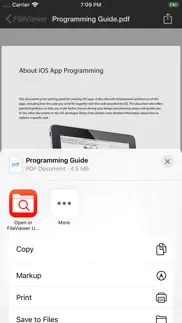
• PDF reader is fast, handles large pdf files, and opens password-protected pdfs. A thumbnail scroll bar feature facilitates viewing of long documents. Pages can be bookmarked. Other features include search, markup functionality, and table of contents view.
• Photos from the Photos app on the iPhone can be transferred to and viewed in FileViewer.
• Images can be copied from this app to the device's camera roll. Images in a given folder can be viewed as a slide show.
• Landscape mode as well as zooming and panning is supported for viewing documents and images.
FILE & FOLDER MANAGEMENT
• Folders can be created to organize files.
• Files and folders can be deleted and renamed as well as moved or copied from one folder to another.
• Multiple files can be deleted or moved to a different folder at the same time.
• FileViewer files can be opened in other apps on the iPhone.
• File and folder lists can be filtered by file type, folders, search phrase, and first letter of name.
• Files and folders can be sorted by date, size, and modification date (ascending & descending).
• Global file search.
• Zip archives can be transferred to and unzipped in FileViewer, providing easy one-step transfer of groups of files and/or folders. Zip archives can be created from files and folders stored in FileViewer USB.
• Capability to save many document types as a PDF.
• Dragging and dropping of files into folders.
AIRDROP
• With AirDrop, users can share files directly between supported iOS devices, as well as between an iOS device and computer.
SOCIAL MEDIA
• Post images and web pages to Facebook and Twitter.
EMAIL
• Files ≤ 20 MB can be emailed as an attachment.
• Email attachments can be transferred from the Mail app to FileViewer USB.
PRINTING
• Documents and images can be printed to AirPrint/ePrint compatible printers.
CLOUD STORAGE
• Connectivity to iCloud Drive, Box, Dropbox, Google Drive, and Microsoft OneDrive.
AIRPLAY & DISPLAYING FILES ON AN EXTERNAL DISPLAY
• Using AirPlay, you can wirelessly stream iPhone screen output, via an Apple TV, to an HDTV.
• Audio can be wirelessly streamed using AirPlay, via an Apple TV, to an audio system.
REQUIREMENTS
• iOS 15 (or higher).
• Files are transferred to FileViewer USB, via iTunes (Finder in Mac OS 10.15 Catalina), using a Wi-Fi or USB connection, or via email, AirDrop, the Files app, or connected devices such as thumb drives.
SECURITY
• Use your fingerprint, Face ID, or a password to protect access to FileViewer USB.
• Individual files are protected using iOS data protection.
HELP
• Help is built into and available from within the FileViewer USB application.
😍 Do you love FileViewer USB for iPhone app? Please share your friends!



Please wait! FileViewer USB for iPhone app comments loading...
FileViewer USB for iPhone 6.8 Tips, Tricks, Cheats and Rules
What do you think of the FileViewer USB for iPhone app? Can you share your complaints, experiences, or thoughts about the application with Mitchell COHEN and other users?


FileViewer USB for iPhone 6.8 Apps Screenshots & Images
FileViewer USB for iPhone iphone, ipad, apple watch and apple tv screenshot images, pictures.
| Language | English |
| Price | $3.99 |
| Adult Rating | 4+ years and older |
| Current Version | 6.8 |
| Play Store | FileViewer-iPhone |
| Compatibility | iOS 15.0 or later |
FileViewer USB for iPhone (Versiyon 6.8) Install & Download
The application FileViewer USB for iPhone was published in the category Business on 29 July 2010, Thursday and was developed by Mitchell COHEN [Developer ID: 301383007]. This program file size is 16.76 MB. This app has been rated by 2 users and has a rating of 4 out of 5. FileViewer USB for iPhone - Business app posted on 03 June 2024, Monday current version is 6.8 and works well on iOS 15.0 and higher versions. Google Play ID: FileViewer-iPhone. Languages supported by the app:
EN ZH ES Download & Install Now!| App Name | Score | Comments | Price |
| FileViewer XL for iPad Reviews | 1 | No comment | $3.99 |
• iOS 17 update • iPhone 15 update • Bug fixes
| App Name | Released |
| FlowPDF | 20 March 2025 |
| Roadie Driver | 18 November 2019 |
| Public Storage | 07 December 2020 |
| UPS | 28 October 2009 |
| Workday | 05 June 2009 |
Find on this site the customer service details of FileViewer USB for iPhone. Besides contact details, the page also offers a brief overview of the digital toy company.
| App Name | Released |
| Superpowers by SYPartners | 11 January 2018 |
| ABBYY Business Card Reader Pro | 23 December 2009 |
| KoolerIce | 02 September 2010 |
| Voice Recorder - Audio Record | 20 November 2014 |
| Awesome Voice Recorder PRO AVR | 05 July 2014 |
Discover how specific cryptocurrencies work — and get a bit of each crypto to try out for yourself. Coinbase is the easiest place to buy and sell cryptocurrency. Sign up and get started today.
| App Name | Released |
| 09 October 2009 | |
| Target | 24 November 2008 |
| SHEIN - Online Fashion | 19 May 2014 |
| Google Chrome | 28 June 2012 |
| Messenger | 09 August 2011 |
Install the Giftmio extension for smart shopping. Get notified about cashback opportunities, activate cashback in one click, and save money on purchases.
| App Name | Released |
| Shadowrocket | 13 April 2015 |
| Streaks | 31 May 2015 |
| AnkiMobile Flashcards | 26 May 2010 |
| HotSchedules | 30 October 2008 |
| MilGPS | 01 December 2010 |
Each capsule is packed with pure, high-potency nootropic nutrients. No pointless additives. Just 100% natural brainpower. Third-party tested and validated by the Clean Label Project.
Adsterra is the most preferred ad network for those looking for an alternative to AdSense. Adsterra is the ideal choice for new sites with low daily traffic. In order to advertise on the site in Adsterra, like other ad networks, a certain traffic limit, domain age, etc. is required. There are no strict rules.
Keep personal info private, avoid scams, and protect yourself online with AI-powered technology.
FileViewer USB for iPhone Comments & Reviews 2026
Update for iOS 7 only.. This update will only run on iOS 7.... what poop. :(
Ok. I would like to be able to send more than one document per email, or even to create a folder and email the whole folder. When I used the free app I could not get it to work right, but after buying the full version they both worked, so that kind of sucked. Good deal for $.99 tho. Way cheaper than AT&T's scandalously priced, sketchy Internet service! 5* would be given if I could email multiple documents at once a's long as they stayed in the 10 MB range or whatever it is
Very useful. Very useful application
Finally!! A simple, fast, "bulletproof" file transfer method!. Perhaps I'm not the most technically savvy but as much as I like and use iDisk and QuickOffice it is frequently a frustrating experience to get everything to connect via wifi and there is no way I've discovered to transfer files between my MacBook Pro and my iPhone without having both devices connected to a server. Why is this important? Because I travel internationally and in a pinch have to e-mail files from my phone or receive them there because I can't get a connection for my laptop. With this app I can now easily and very quickly transfer files between my iPhone and laptop via good old dependable physical connection USB! This is a lifesaver for me as now, in an "emergency" situation I can send transfer any file on my laptop to my iPhone and if I've got a data connection I can e-mail the file. Likewise if I need something in an emergency I can do the reverse. Of course if I could actually tether my iPhone and use it as a wireless modem that would be nice but that is another story. As for the viewer and file features, looks good but too early to comment. I'll come back at this after a couple of weeks and see if it deserves the 5th star!
Worth giving a try. I searched all day for an interface that does this! I've given only four stars because it's brand new and hasn't been reviewed much yet - but if it stands the test of time I'll be one happy girl!!!
Works well for needs. Although it's not a flash drive, since it needs iTunes to transfer data, FileViewer USB works great for my needs. Working with a computer from work, where I don't have administrator rights, all of the WiFi access apps won't interface with my iPhone since they use Bonjour which I can't access through my firewall. FileViewer USB allowed me to not only hookup, but move LARGE files ( multiple +20 Meg) and arrange them in folders as I wanted. The transfer rates were much faster, and more secure, than working through a Box.net solution. I had 200 meg of files, sorted in folders in 15 minutes. 5 stars for meeting my needs in an Apple environment that should mean stability.
Useful. This app saved me in a pinch. Also, very helpful for keeping secure documents on your phone.
Not bad, but not great.... Does not hide files while switching between apps. But otherwise it is ok. If you are worried about hiding stuff, completely close the app from the background. No problems view images or videos.
Yes. No
Crap. Doesn't work as advertised. Yes, it does allow you to open and read a variety of docs, but it wouldn't let me organize in folders, which was why I bought it in the first place.
New Update Doesn't Work. You guys have issued an update that is not compatible with the IPhone 4 with latest firmware installed. Why?
User/Owner. Does everything I need it to do.
Bad interface. The software is hard to use. I can do far more than this software can with the goodreader. I deleted it right after I tried it once.
Like it a lot. That's what I want, USB transfer. Forget the wifi..... Thanks.. It will be the perfect app if we can create simple text document, we won't need to buy another apps.
A must-have app!. Very flexible, easy to use app to organize many common file types. So glad I found it!
????. I just bought this application and i love it, but there seem to be a problem. It crashing!!!! Please do something because is such a great application...
Works great. The only file management program I have used on my iPhone. Works great!
File viewer can't do without. One of the best tools for in the road file viewing and storage
Works alright. This would be great if I could copy the files and attach them to emails...
Great app, no zip?. I have a lot of files I want to put on my touch but because I couldn't put folders directly into the app, I had to put it all in a .zip file. However, the app wouldn't do anything after i pressed unzip. I packed it with 7zip instead of win-zip, since some of my files had too long names, so that could've contributed to it. Also, I wish we could browse the entire directory instead of just the app's folder, but I guess we wouldn't be able to do that anyway with apple's preferences. This is a great app that easily competes with the other manager apps that cost up to $5 more.
Doesn't function as advertised!. I want a refund ASAP. The positive reviews must all be friends. Most of the features did not work at all.
Must-have. This is perfect for file management between the phone/iPad and computer... Well-done and easy to use. Thanks for a great app!
does what it says. very help full app if you travel to places with no internet access for laptop.
I tried make do as advertised. The problem with this app is you have to get the files. In the app to modify them...at least for the iPod four 6.0.1 and with my situation I can't get them in there... I gave two stars because I couldn't edit ipod contents without adding to the app itself...bonus though they have good service for questions I like their services.
Been looking for this. Finally, an app that lets you transfer arbitrary files via USB! NB: the app does not provide USB mass storage support, like a thumb drive (or an iPod); that would earn my 5th star. Otherwise, works great with the latest iTunes.
Not that useful if it doesn't recognize files already on the iphone. There are several PDFs on my phone. I would expect the app to populate with these files. It doesn't. And it doesn't have a method to navigate and/or search to find those files on the phone. Therefore, it's not at all useful to me.
Great App. This is a great app. Lets u view and stores files, movies, photos etc. Well worth the $$. It works great with the new upgrade.
Did you know that you can earn 25 USD from our site just by registering? Get $25 for free by joining Payoneer!
Great app. Don't know of it bad review but it's fine doe's the job and especially the password which I need to enter it
Useless. Do not buy this. You only access the root directory, not any sub folders. There are no controls to copy and/or move (only drag and drop) which makes handling muliple files problematic. Also, the program can not handle large numbers (+100) of files and hungs hangs the iPod when trying to view the files. PS I'm using a iPod Touch 2G with a PC.
Can't manage files!. An almost perfect app for turning the iphone into a handy USB drive. It lacks the ability to manage files & folders. There should be more friendly interface instead of just using iTunes to upload/download files from your iphone. There is just no easy way to move a bunch of files into folders & sub-folders, do I seriously have to copy one file, navigate to the destinatino directory, then paste them one by one? Normally I use Discover, great interface & usability, but only until it stops supporting iOS4...
easy to use. Finally I can detach an email file and save it on the phone? such a basic function you would have expected already built into the phones software anyway this app does it. good app and easy to use.
FAIL APP, waste my money. you cant even put files in it! FAIL
I use this alot. Works well for me. Love being able to put things in folders, etc. The move/paste combo takes a bit of getting used to, and you have to know to scroll to get the email function, but once you get used to it its fine! (Except for the latest problem with the update which isnt for all users...)
Imagine you at your best. All the time. Picture yourself at your sharpest and most productive. Your most alert and focused. Your most lucid, creative and confident. At work. At play. In every area of your life. Add Mind Lab Pro® v4.0 to your daily routine and uncap your true potential. Buy Now!
Don. The program doesn't work. The gentleman doesn't respond to emails. Don't buy it.
Useless. App serves absolutely no purpose.
Filevier USB 2.0. I am happy with this application.
Fileviewer user. This is by far the easiest and most trouble free App that I have on my iPod Touch Gen2. Worth more than the 99 cents. Loading documents via USB is no hassle. I like the ability to place subjects int folders and move the subjects from or into the various folders. I prefer not to use the App that does similar functions via WiFi because Wifi connections give off Electro Magnet Radiation. USB connection is EMR safe. Mitchell Cohen quickly responds to questions or requests for clarification
Adsterra is the most preferred ad network for those looking for an alternative to AdSense. Adsterra is the ideal choice for new sites with low daily traffic. In order to advertise on the site in Adsterra, like other ad networks, a certain traffic limit, domain age, etc. is required. There are no strict rules. Sign up!