Timetracks - Slit-Scan Camera App Reviews
Timetracks - Slit-Scan Camera App Description & Overview
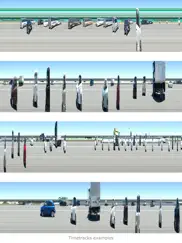
What is timetracks - slit-scan camera app? Timetracks is a camera image-capture application which uses a slit-scan technique. Like an image scanner, it generates a unique effect over a certain defined duration - moving objects and changing scenes will produce interesting photographs.
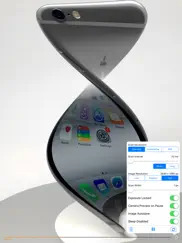
This application includes the following optional settings:
- One-way, Palindrome and Still scan movement
- Scan time interval
- Image resolution
- Scan line width
- Exposure Locked
- Camera Preview on Pause
- Image Autosave
- Disable Sleep
When you activate the “Image Autosave” option, the image will be automatically saved periodically. The activity indicator will be shown while saving.
😍 Do you love Timetracks - Slit-Scan Camera app? Please share your friends!



Please wait! Timetracks - Slit-Scan Camera app comments loading...
Timetracks - Slit-Scan Camera 2.2.0 Tips, Tricks, Cheats and Rules
What do you think of the Timetracks - Slit-Scan Camera app? Can you share your complaints, experiences, or thoughts about the application with Masayuki Akamatsu and other users?
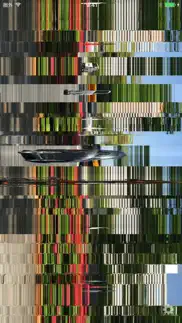
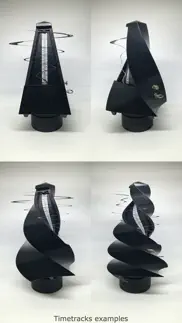
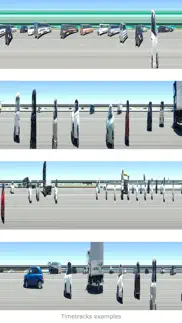
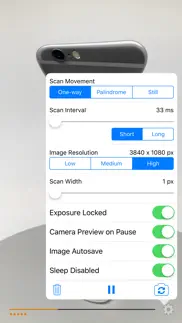


Timetracks - Slit-Scan Camera 2.2.0 Apps Screenshots & Images
Timetracks - Slit-Scan Camera iphone, ipad, apple watch and apple tv screenshot images, pictures.
| Language | English |
| Price | $0.99 |
| Adult Rating | 4+ years and older |
| Current Version | 2.2.0 |
| Play Store | org.akamatsu.Timetracks |
| Compatibility | iOS 9.0 or later |
Timetracks - Slit-Scan Camera (Versiyon 2.2.0) Install & Download
The application Timetracks - Slit-Scan Camera was published in the category Photo & Video on 01 January 2010, Friday and was developed by Masayuki Akamatsu [Developer ID: 284722836]. This program file size is 10.54 MB. This app has been rated by 1 users and has a rating of 1 out of 5. Timetracks - Slit-Scan Camera - Photo & Video app posted on 16 May 2016, Monday current version is 2.2.0 and works well on iOS 9.0 and higher versions. Google Play ID: org.akamatsu.Timetracks. Languages supported by the app:
EN JA KO ZH ZH Download & Install Now!| App Name | Score | Comments | Price |
| Yes-No Reviews | 1 | No comment | Free |
| Banner Free Reviews | 3.2 | 24 | Free |
| T4Two Reviews | 2.4 | 9,399 | Free |
| Gengou Lib Reviews | 2.5 | 2 | Free |
| MINI-COMPOSER by Karl Bartos Reviews | 3.9 | 24 | Free |
This update from Apple will improve the functionality of this app. No new features are included. - Added Camera Preview on Pause support - Added Status indicators such as a progress bar - Added Chinese localizations
| App Name | Released |
| Celebs - Celebrity Look Alike | 06 December 2019 |
| PhotoCircle | 19 April 2012 |
| YouTube Studio | 12 July 2014 |
| Aura Frames | 17 June 2016 |
| Snapseed | 06 June 2011 |
Find on this site the customer service details of Timetracks - Slit-Scan Camera. Besides contact details, the page also offers a brief overview of the digital toy company.
| App Name | Released |
| TV Cast Pro for Sony TV | 30 August 2017 |
| PromptSmart Pro - Teleprompter | 13 August 2014 |
| Tattoo Stencil | 06 April 2018 |
| TV Cast Pro for Chromecast | 29 July 2016 |
| Camera M - Pro Manual Camera | 03 August 2017 |
Discover how specific cryptocurrencies work — and get a bit of each crypto to try out for yourself. Coinbase is the easiest place to buy and sell cryptocurrency. Sign up and get started today.
| App Name | Released |
| 28 April 2011 | |
| TikTok | 02 April 2014 |
| Amazon Shopping | 03 December 2008 |
| Google Maps | 12 December 2012 |
| Gmail - Email by Google | 02 November 2011 |
Install the Giftmio extension for smart shopping. Get notified about cashback opportunities, activate cashback in one click, and save money on purchases.
| App Name | Released |
| MilGPS | 01 December 2010 |
| Monash FODMAP Diet | 17 December 2012 |
| AnkiMobile Flashcards | 26 May 2010 |
| RadarScope | 12 February 2019 |
| Scritchy Scratchy | 18 March 2026 |
Each capsule is packed with pure, high-potency nootropic nutrients. No pointless additives. Just 100% natural brainpower. Third-party tested and validated by the Clean Label Project.
Adsterra is the most preferred ad network for those looking for an alternative to AdSense. Adsterra is the ideal choice for new sites with low daily traffic. In order to advertise on the site in Adsterra, like other ad networks, a certain traffic limit, domain age, etc. is required. There are no strict rules.
Keep personal info private, avoid scams, and protect yourself online with AI-powered technology.
Timetracks - Slit-Scan Camera Comments & Reviews 2026
It's official?. Every obscure photo technique has an app now. I was particularly tickled to find this one, and superbly written too!
Interesting app; I'd like some changes.... Happily, this app no longer crashes immediately on my iPhone 3GS, as of update 1.0.1. That said, I'd still like some changes in this before I'd be likely to use it regularly. Here are some thoughts on 1.0.1: First off, it's a very cool concept. I've been interested in slit-scan photography for a while, and having a way to at least approximate it on the iPhone is a very welcome thing. Next, I find the behavior of this app a little strange in a few ways: it is continually scanning (and, depending on your mode, re-scanning) the range of the sensor (or a single line of it), and (if set to save to camera roll) it saves roughly every 2 and a half full scans (worth), giving you a very tall (or wide, but the UI is always vertical) image, maybe 3:1 aspect ratio (I haven't measured... But the example outputs all appear to be two saved images placed side by side, with that placement done by something other than this app). This is kind of neat to be able to do, but I'd also like to be able to have it do a single scan and then stop, saving the image at that point, and not starting again until I said to. I think that's my biggest request, though. It's definitely interesting, and I expect to play more with it over time. I only wish I had a good way to mount my iPhone on a tripod... Perhaps I'll look for something that will let me do that. Keep up the good work! This app definitely has promise.
Outstanding Photo App. This app can create some really interesting effects if you take the time to learn how to use it. Admittedly, this app could definitely use a bit more polish as far as distinguishing the meaning of the icons but once you learn them it's pretty easy to use this app. I'd love to be able to upload my images directly to Flickr, Twitter or Facebook but that is easily done from within those specific apps. This app really does make for some amazingly interesting images that would otherwise be impossible to achieve. Definitely worth a buck even though I got the app for free during the beginning of twenty-ten promotion!
Unique. Very interesting variation on video capture. Fun to use.
Save needs tweaking. I LOVE this app however, one thing is keeping it from getting a full five stars from me, and that's a big thing. There's no save function. There's an option that says "Save to Camera Roll" but you don't have any control over when exactly it does this. Imagine you start an image, get some good effects, then you're interrupted by something else and need to close down the app. There's no way that I've found of saving your image before closing the app. If you want to keep something specifically, without chance of losing it, you have to either do a screen cap, or wait until you see the activity monitor indicate that it's saved. Without saving control of some kind, it's very heartbreaking to gather some neat effects and images, only to lose them because you must close the app quickly. Nevertheless, it is very fun to play with and I hope that the creators will see fit to add this function. I would still say it's worth the price to play with it.
Great Potential. There are some amazing artistic images that can be created from otherwise ordinary scenes. The screen shots show some typical scenes with the camera (iPhone) held still. Moving the camera around while the 'scan' is taking place renders the most interesting results. Experiment with textures and patterns up close using different types of movement from slow to moderate speeds. The interface could be a little more intuitive. It takes a bit of head scratching to figure out how the thing works. If you just want to take funny pictures of your friends this app is probably not for you. If you want to create never-before-seen images and don't mind a little experimentation this very cool!
Does not work. This is an app that I paid for but does not work. Tried many times to reinstall but without any success. Want my money back.
Menu gets locked out. Once you "start" a capture, the menu disappears and won't return. I need to quit the program and loose any captures. It doesn't appear that any further development/bug fixing is happening if you read the dates on the reviews. These problems have existed for a while. Too bad. Great potential here.
wonderful but no save-when-you-want. Beautiful effects, but it's heartbreaking to see them scroll away without saving. Give me the option to save when I want to and I'll give it six stars.
The app can not be opened. Hello dear developer. Just letting you know that your product does not work but you happily charge for it. Please fix it or return money
Faster please!. I was definitely looking forward to playing with this app, however the fastest scan rate is 0.1s, which is way too slow for most of the things I wanted to look at, like people walking etc. It can't be a hardware thing because the phone can shoot video at 25fps (0.04s). Please allow the fastest speed of pixel grabbing that you can. Also a sideways scan direction would be nice because you get through the whole frame quicker (not so many lines). Could you analyze iphone movies like this so you could shoot action first, then slice later, like Don Whitaker did with Waveslice? Still interesting to play with, but a faster scan rate would be more immediately satisfying.
Don't download. There are better more functional free apps just like it to download. The app is slow and not high quality as far as the image goes
Did you know that you can earn 25 USD from our site just by registering? Get $25 for free by joining Payoneer!
Imagine you at your best. All the time. Picture yourself at your sharpest and most productive. Your most alert and focused. Your most lucid, creative and confident. At work. At play. In every area of your life. Add Mind Lab Pro® v4.0 to your daily routine and uncap your true potential. Buy Now!
Cool idea, bad execution.. This app does not work. I tried to contact the developer with the issues I was having, with no response.
Adsterra is the most preferred ad network for those looking for an alternative to AdSense. Adsterra is the ideal choice for new sites with low daily traffic. In order to advertise on the site in Adsterra, like other ad networks, a certain traffic limit, domain age, etc. is required. There are no strict rules. Sign up!