Ticulator 84 Graphing Calc App Reviews
Ticulator 84 Graphing Calc App Description & Overview
What is ticulator 84 graphing calc app? Intended for use with TI-84 Plus.
TACULATOR 84 GRAPHING CALCULATOR
• Your graphing calculator for high school and college students.
• Includes all the commands and functions for advanced math, list, statistics, distribution, stat plots, etc.
• Use the arrow keys or your fingers to navigate inside the app.
• Covers everything you need: Pre-Algebra, Algebra 1 & 2, Pre-Calculus, Calculus, Statistics...
IT'S EVEN BETTER THAN AN ACTUAL CALCULATOR
• Taculator is 100X faster as it uses the huge calculation power of your iPhone/iPad, while handheld calculators are often slow.
• High-resolution graphing window: Make sharp and beautiful graphs.
• Your new calculator weighs nothing and is always ready on your phone.
• Share your calculations with friends as a text message or email.
◉ Math Functions
• Scientific calculator with all basic arithmetic and advanced functions.
• Ability to scroll through history and copy previous calculations.
• Complex numbers support
• Probability functions like nPr, nCr, factorial, random numbers.
• Enter fractions easily.
• Convert angles and use DMS format.
◉ Graphing Functions
• Graph every function you want and trace for X- and Y-values
• Calculate intersection, zero, minimum, maximum, integral, and derivative.
• Switch between full-screen graphs and normal mode.
• Zoom in and out with your fingers and adjust the window settings.
• Graph statistical plots like histogram, box plot, scatter plot, xy-line plot
• Draw vertical, horizontal, tangent, circle.
◉ Matrix Calculator
• Store matrices and reuse them using shortcuts like [A], [B], [C],...
• Do matrix arithmetic operations: Scalar multiplication, addition & subtraction, multiplication, power of a matrix.
• Calculate transpose, determinant, dimension, inverse matrix, row echelon form, reduced row echelon form, identity matrix, cumulated sum.
◉ List, Statistics, and Distribution
• Use the stat list editor to enter your list values.
• Perform 1- and 2-Variable statistics.
• Use lists to calculate min, max, mean, median, sum, product, standard deviation, variance.
• Find best-fit regressions: LinReg (ax+b), LinReg (a+bx), QuadReg, CubicReg, QuartReg, LnReg, ExpReg, PwrReg, Logistic, SinReg.
• Perform statistical tests: Z-Test, T-Test, 2-SampleZTest, 2-SampleTTest, 1-PropZTest, 2-PropZTest, ZInterval, TInterval, 2-SampleZInterval, 2-SampleTInterval, 1PropZInterval.
• Calculate various distributions: Normalpdf/cdf, invT, Tpdf/cdf, χ2pdf/cdf, Fpdf/cdf, Poissonpdf/cdf, Binompdf/cdf, Geometpdf/cdf.
◉ Command Catalog & Syntax Help
• Get help with all commands with our integrated Catalog & Help section.
• It provides you with syntax help, examples, and possible error messages.
• Enter a command and the app will show you the right syntax next to the cursor.
SUPPORT
Contact us at [email protected]
---
For extended features such as more advanced calculations and functions, get the Taculator Pro membership.
Auto-Renewable Subscription Terms:
You can choose from three subscription options:
• A monthly subscription;
• A yearly subscription;
• A lifetime subscription which is paid for by a one-off upfront payment.
• Payment will be charged to iTunes Account at confirmation of purchase;
• Subscription automatically renews unless auto-renew is turned off at least 24-hours before the end of the current period;
• Account will be charged for renewal within 24-hours prior to the end of the current period, and identify the cost of the renewal;
• Subscriptions may be managed by the user and auto-renewal may be turned off by going to the user's Account Settings after purchase;
Terms of Service:
https://www.taculator.com/terms-of-service.html
Privacy Policy:
https://www.taculator.com/privacy-policy.html
😍 Do you love Ticulator 84 Graphing Calc app? Please share your friends!



Please wait! Ticulator 84 Graphing Calc app comments loading...
Ticulator 84 Graphing Calc 1.4.5 Tips, Tricks, Cheats and Rules
What do you think of the Ticulator 84 Graphing Calc app? Can you share your complaints, experiences, or thoughts about the application with Di Venisco UG (haftungsbeschrankt) and other users?

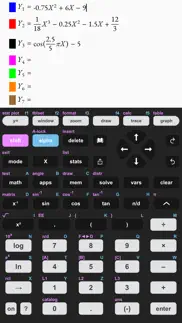
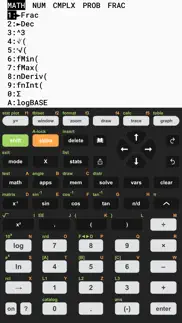


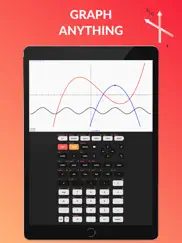


Ticulator 84 Graphing Calc 1.4.5 Apps Screenshots & Images
Ticulator 84 Graphing Calc iphone, ipad, apple watch and apple tv screenshot images, pictures.
| Language | English |
| Price | Free |
| Adult Rating | 4+ years and older |
| Current Version | 1.4.5 |
| Play Store | com.ticulator.calc |
| Compatibility | iOS 13.0 or later |
Ticulator 84 Graphing Calc (Versiyon 1.4.5) Install & Download
The application Ticulator 84 Graphing Calc was published in the category Education on 08 May 2019, Wednesday and was developed by Di Venisco UG (haftungsbeschrankt) [Developer ID: 1449451480]. This program file size is 48.35 MB. This app has been rated by 7,503 users and has a rating of 4.5 out of 5. Ticulator 84 Graphing Calc - Education app posted on 27 April 2026, Monday current version is 1.4.5 and works well on iOS 13.0 and higher versions. Google Play ID: com.ticulator.calc. Languages supported by the app:
EN Download & Install Now!| App Name | Score | Comments | Price |
| Taculator 84 Graphing Calc Reviews | 4.5 | 7,514 | Free |
| TI-84 CE Calculator Manual Reviews | 3.1 | 82 | $4.99 |
| Geometry Solver Pro Reviews | 3.1 | 9 | Free |
| CASIO Graph Calculator Manual Reviews | 2.8 | 6 | $4.99 |
| Calculate84 Plus Reviews | 4.4 | 306 | Free |
Math & Graphing Fixes • sin²(x), cos²(x), tan²(x) now correctly compute the squared value • Graphs like f(x)=x^(2/3)±√(2-x²) (heart curve) now plot fully symmetric instead of just the right half • Right-arrow now reliably exits an exponent Quality of Life • "Rate this app" popup now shows at most once per day • Extreme Window settings now show a clear warning instead of slowing down the app Improved Angle Input • Seconds symbol (") now accessible via ALPHA+[+] key • DMS functions easier to find in Angle menu Plus various stability fixes and minor improvements. Previous Versions: Enhanced GRAPH Sharing • Share your graphs with equations displayed right on the image (from GRAPH menu) • Statistical plots now show your list data alongside the graph Improved Sharing Features (SHARE button) • Instantly share equations with results (e.g., "2+2 = 4") • Included LaTeX math syntax to use equations in other apps
| App Name | Released |
| Seek by iNaturalist | 09 March 2018 |
| PictureThis - Plant Identifier | 20 July 2017 |
| Google Classroom | 13 January 2015 |
| PBS KIDS Games | 27 April 2016 |
| Babbel - Language Learning | 11 June 2014 |
Find on this site the customer service details of Ticulator 84 Graphing Calc. Besides contact details, the page also offers a brief overview of the digital toy company.
| App Name | Released |
| Endless Alphabet | 24 January 2013 |
| Teach Your Monster to Read | 23 July 2014 |
| TLC Practice exam 2.0 | 26 May 2023 |
| ASTB Prep | 15 January 2021 |
| American Mensa Brain Test | 16 September 2010 |
Discover how specific cryptocurrencies work — and get a bit of each crypto to try out for yourself. Coinbase is the easiest place to buy and sell cryptocurrency. Sign up and get started today.
| App Name | Released |
| 07 April 2016 | |
| 28 April 2011 | |
| WhatsApp Messenger | 03 May 2009 |
| Target | 24 November 2008 |
| Google Chrome | 28 June 2012 |
Install the Giftmio extension for smart shopping. Get notified about cashback opportunities, activate cashback in one click, and save money on purchases.
| App Name | Released |
| Gambonanza | 01 May 2026 |
| After Inc. | 26 November 2024 |
| Pou | 26 November 2012 |
| Bloons TD 6 | 14 June 2018 |
| Farming Simulator 26 Mobile | 19 May 2026 |
Each capsule is packed with pure, high-potency nootropic nutrients. No pointless additives. Just 100% natural brainpower. Third-party tested and validated by the Clean Label Project.
Adsterra is the most preferred ad network for those looking for an alternative to AdSense. Adsterra is the ideal choice for new sites with low daily traffic. In order to advertise on the site in Adsterra, like other ad networks, a certain traffic limit, domain age, etc. is required. There are no strict rules.
Keep personal info private, avoid scams, and protect yourself online with AI-powered technology.
Ticulator 84 Graphing Calc Comments & Reviews 2026
Does most of the basics but crashes frequently. I paid $30 for the full version because, as a teacher, I thought this would be perfect to model the students’ calculator entries on a projector. If I try to expand the graphing window past 10 units in either direction or input more than one function to graph, the app crashes. After spending $30 on a product I expect it to work much better and be more powerful than it is. If it can’t get fixed then I’ll look into getting my money back.
Best app and now with 1000 separators. I have never added a review for an app; but I’ve been using this app for over 2 years now. You have no idea how excited I was to find you added 1000 separators. Thank you so much
Ok. So you now that fixed the graphing and crashing and now that I see you have a lifetime purchase for only 30$ compared to 150$+ I’m very happy to say that I like the app better BUT… People are now reporting that it crashes on cellular WiFi and it just crashes when they open it. And with my experience so far with the new version of the app when you hit table it only shows -199 through -185 I’m one for the people so... Could you fix that please?
I downloaded it for a reason. This app has a very clean and professinal look to it, very pleasing to the eye, and the pop up window is a nice size. The color customination at the beginning seens a little unessecary, but its cool too. All of these things are great and it would be the perfect app for me to use on my school work. Execpt.... The graphing function does not work. I'm really disipointed, I hate having to switch between tabs on my browser and the awkwardness of having to click on each of the seperate boxes on online Graphing calculators. If you want just a regular scientific calculator app that looks nice, this is the perfect appfor you. As for me, Ill just use my physical calculator for that. Really, I only downloaded it for the graphing function. I might have given this app three stars in spite of this, but the logo clearly has a misleading graph on it, and there is nothing in the decription saying that you woud need to pay to be able to GRAPH on a GRAPHING calculator. I mean I get it, calculator app developers need to make a living too, but at least inforn your consumers. Anyway main point is: THE GRAPHING DOES NOT WORK BUT ITS STILL AN ATHSETIC REGULAR CALCULATOR
Some troubles. It was working great until last update. Now every time I go into y= it crashes. I can’t type in the equation so I can’t graph it. Any idea how to fix this? I need it to work for my homework, and we already payed for this.
Good but annoying. Does what it should, but you constantly get bombarded with “buy premium” or “rate us” every 5-10 minutes, I honestly can’t really complain though, seeing that this thing is free, and it’s not hard to just X out the pop up. No ads is a huge bonus as well, so again I can’t really complain.
Better than demos. I’m a junior in Highschool, learning throughout the years I’ve used many calculators. Nothing really beats this calculator
Really good calculator. It’s a really good calculator overall and works almost the same as the real ti 84 but it could use the program button which normally would use python
Graphing. Once I updated, the crashing stopped; however, the “graphing” calculator doesn’t allow me to graph. Even before I paid the $30 for the better version, the graphing function worked, so either fix it or I need a refund.
functionality is not stellar. Math Studio or HP Prime Pro are top of the line for accurate algorithms. Solve’s layout makes it easier to use, it’s programmable and the graphs are simpler to create. The current program doesn’t implement the Gamma function correctly. Removed it.
It was great. This was great but now I can’t even use it. I used to use this with no issues I even got the pro version because as a math major I knew this would be a nice in pocket alternative to my actual ti calculator. Now the app won’t even open making it completely unusable
Meh. While the calculator is a great rendition of a physical calculator, users are extremely limited with what calculations they can do. The extent of it is first semester Algebra 2. You can’t use logbase without paying along with most things in the math menu.
Best application. This calculator can very quickly solve everything I threw at it. the design is very beautiful with an easy menu. This is the best calculator it’s the same one that I use in school it’s great bc you can put numbers as exponents and most calculators that I used don’t have that feature, also you can find a numbers square root and this caulator has saved me a lot of work.
Best Calculator App!. I love this app it has helped me with my homework when my graphing calculator is out of battery.....it is also a lot cheaper and easy to use and understand!
Great app, just like Ti-84. This calculator has been able to solve everything I've thrown at it. There's no learning curve if you've already used Ti-84 calculator before. The button placements are very identical.
The Best. This app is life saving. It has everything you need and you can even design the buttons and everything. It works just like a T-i
Great, but.... This app does exactly what it says it does and it does it very well. There are some features hidden behind a pro version, but that’s fine because there are no ads. My only problem is the fact that every time I open it, I am greeted with a full page ad to subscribe to premium and the only way to dismiss it is to hit the x in the corner. It is obtrusive and has no reason to be so persistent. Otherwise, great app.
Nice app but won’t replace traditional calculators. I like this app. It got me through most of my Stats class without paying $100 for a calculator. Unfortunately it lacks a few standard functions needed to solve certain equations in later chapters which was very disappointing.
Clear all list. A great calculator but I can not figure out how to clear all lists every time I attempt it says error. It makes it really hard to enter in data when you can’t put in any other points!
I wish the description listed which functions were for the PRO version. Pretty similar to TI-84 CE, but needs to enumerate clearly what features are PRO exclusive and which ones aren’t. For the price of $0 compared to its 150 dollar counterpart, I’d say it’s pretty good. Sadly, haven’t been able to do much statistics on here (regression, test values). It can graph, but it can’t do calculus or find max. It’s also missing an equation solver (but has a quadratic equation solver). Actually now that I think about it it can pretty much only graph and do the same things the built in calculator can. But still a decent value compared to the 150$. Plus since you already carry your phone around, it’s not bad.
Always tells me to buy premium. I got this app for school for a calculator. It has everything I need but always insist I buy the premium. But everything I need comes free already. It’s a calculator why do I need a premium calculator. What’s it going to do scratch my back while i figure out the equation.
Saved me. This is perfect for any student who doesn’t have a calculator and needs to do their homework after being absent.
Amazing. My homework requires me to use a graphing calculator. This one is perfect. It’s just like the one I use in algebra. I’m not confused about the alpha function button because every part is a different color. It’s also helping me learn about the buttons on a graphing calculator, since it’s very hard in class. It’s also not one of those apps that makes everything pro (in my opinion) very helpful
No trial?. The app's page shows an option for a 7 day free trial. I'm testing out a few graphing calculators in lieu of buying a physical TI-84. The app installed fine but when it opened, I got the error "product not available"; the free trial is apparently no longer available despite being listed on its page. So I'm unable to perform even the most basic graphing functions. I need it for a math-heavy degree but it's useless if I'm unable to test it--other graphing calculators I've tested haven't been consistent (correct) in their calculations, so being able to test before subscribing for a whopping $30 per year is a must!
Does it even graph?. The icon depicts the application creating a graph, so I did expect it to create a graph at least once. I understand it's got in-app purchases, but if it will graph anything for users who are still trying to assess whether this app will serve their needs before buying anything, I was unable to tell how. Entering an equation for a parabola yielded a constant when I tried entering it at the first prompt and when I clicked the "graph" button I wasn't allowed to enter anything before being confronted with an ad. This app might rock the casbah, but it gave no indication what kind of behavior it would provide to those who chose to risk paying money to see.
Great App. This app has been very helpful for both my middle school and high school experience. I don’t pike the fact that the app makes you pay for certain features but after you do it works juts as well as any other calculator.
Pay to complete homework. Really great interface. Loves how smooth it is and works really well. The only reason why I’m reviewing it this way is the simple fact that I have to pay for pro to use some of the functions I need for my school work. I just want a decently made calculator that is ACTUALLY free. None of this Pro crap.
AMAZING APP. This app is the most amazing thing ever. Other than the fact that it puts you through an ad when you open the app, this is easily the best graphing calculator that’s mostly free. You can’t graph certain things but most everything is free. This is such a great app, and I have so much fun creating my own calcular and deciding all the fun colors. It also has other feature that standard graphic calculators DONT have! Overall, it’s an amazing app- I am a student and it’s such a great student calculator!
I got this for my calc class. Everything works but there are two things that are really holding me back in my class. First of all, every time I trace it won’t trace the exact number I type in. Like I’ll type x=0 and it will change it to x=.05. Another thing is graphing derivatives. No matter what I do I can not graph a derivative which makes the current unit I’m in impossible.
Best Calculator App. This calculator has helped me so much not only that it is optional to pay and you can design the calculator how ever you feel😄
Misleading. I wasted 60$ cause I need it for calculus and not only is navigating the calculator a pain it doesn’t work like a normal graphing calculator. I spent hours messing with it trying to understand how it works. I needed to find things like the area of a certain part of the graph using the derivative and the app just won’t do it. Waste of money don’t use.
This thing can't calculate a simple fraction that is square-rooted. Keeps giving me the error message when trying to calculate a fraction with square roots on both sides, horrible and a big waste if time. Pretty infuriating too when it can't do the only thing it claims to do...
Looks promising. This app is a very good implementation of the TI-84 interface, however, with any developing product, there are some downsides. The interface does not always scale properly, which may cause problems with graphing, there are some features that aren't implemented yet, and there are some minor design bugs. These may be weird at first, but I'm excited to see where this app will go!
Missing Functions. I need a graphing calculator for school, and I chose this instead of a more expensive TI-83 or TI-84. However, the main function I need requires pro, which is very irksome. But beyond that, the calculator has no obvious option to turn on the R value. This is more than irksome, as I need this feature as well. Would be four stars, now it's down to two because of this.
Misleading.. You have to do a subscription to get the free trial. It has you “customize” your calculator when you first start up and then you can’t change it. The whole thing is unusable and hard to see because there’s no way to tell what you’re customizing when you first start. No instructions or help or anything. You’re on your own. Cannot know if it actually works or not. Not worth my time or the money. Deleted and canceled.
Not worth the money. At first I thought this app was an amazing calculator and loved that it was customizable, I got a free trial and was unable to cancel when my phone stopped working for a week when I dropped it in water so I got charged. I wasn’t too upset that I accidentally bought it for a year until now. I used to use the graphing features for my math class but now that I’m using it for exponents it often gives me the wrong calculations. For my Chemistry class we need a calculator during class and for tests and my final calculations have been wrong. I’ve shown my teacher what I’m inputting and all my steps are correct and it’s the app that occasionally will give the wrong calculations. This doesn’t happen all the times, but it’s very upsetting to know I paid for a calculator that isn’t guaranteed to give me the proper accurate calculations all the time. I truly believed the calculator app was going to be a great substitute I would recommend, but it’s unreliable and for that reason I would not 100% suggest it to others.
Best calculator EVER. This is the best calculator it’s the same one that I use in school it’s great bc you can put numbers as exponents and most calculators that I used don’t have that feature, also you can find a numbers square root and this caulator has saved me a lot of work.
Great graphing calculator. The only issue I had was that the keyboard on my MacBook didn’t seem to work with the calculator at times (yes I made sure the calculator window was in the forefront).
Hit and miss. needed this for calc homework but the integral and derivative functions only work sometimes usually on less complicated problems. It keeps saying there is a syntax error, there is not I’ve showed my calc teacher and he agrees.
Meh. I paid 29 dollars to have this forever. And compared to playing 100$ for a real one that’s a pretty good deal. bUt, I’ve run into some issues with the calculator. Specifically when solving lengthy equations, it never carries the negative through the problem. For example, if I were to put in -3•4 I would get -12, but then I multiply my answer by 8, (-12•8) and it would give me positive 96, rather than -96. This has caused a few issues on some assignments for me but once I figured out what was happening it was pretty easy to continue. I also have a hard time looking at graphs when I graph them. I’ll put my equations into the Y= and it will graph fine, but I can never see the full graph, and because of that I can’t find the intersections and all that. Other than that it works pretty good, I just try to use it for the more basic stuff that my phone’s calculator can’t do.
Frequently Wrong. From other reviews it looks like this has been an issue for at least three years and they haven’t fixed it. If I input -3 squared, it gives me -9. All squares are positive. Very difficult for summation equations, I have to do twice the work. FIX IT.
results different than two other graphing calculators. i am a student and my algebra class allows us to borrow graphing calculators during class, when i opened the graphing calculator someone had put two functions in and graphed a heart and i started switching out numbers while keeping the function fundamentally the same to see what would change, just typical bored in class type things and since i was still curious about it i wrote down the functions (f(x)=x^2/3-√2-x^2 and g(x)=x^2/3+ √2-x^2) and i downloaded this app to try and recreate my new experiment and this app gave me half the heart, i opened an online graphing calculator and it worked like it did in class, this app is probably somewhat inaccurate
Calculus feature is too primitive. I bought this with the hope that it would do symbolic calculus differentiations and integrals. Nope! Just numerical solutions, and only approximate sometimes. I will be asking for a refund. THIS was the only feature I was looking for, and I’m surprised that a full fledged app is only doing numerical calculus, where my very limited (hardware wise) TI-89 from 20 years ago can do considerably more (symbolic and even diffy-q). Come on developers, be smarter than this.
Not good for statistics. I recently purchased this app to try out and recommend to others within my tutoring businesses. I am really not that impressed with distribution features such as : normal cdf, tcdf, etc…. Not to mention I paid $14++ on the apps and I can not use it. Plus the app has its down moments where it is not functioning properly with minor calculations. I would not recommend this app because it works one day then the next it does not… very inconsistent..
Not happy currently.. So I paid the calculator off for the year but honestly I didn’t mean to. I cancelled subscription like right after and I still had to pay. I would say this is an okay app but you have to pay to use most things so technically it’s not even free. It’s just free download...
Great features, but not very easy to use. It's got all the functions I want in a calculator, but I wish it mapped to my keyboard better. For example, there's a 'shift' key on the calculator, but you have to click on it, instead of just hitting the shift key on your keyboard. Same goes for the 'enter' button when you run into things like a syntax error. You actually have to click the enter button instead of using the enter key on your keyboard. Not a huge deal, but this can be frustrating when you're in the middle of a long calculation. Maybe this is a bug?
Amazing just one tiny problem. I love this app you can customize it And it barely has ads However every time I open this app it say if I want to subscribe I always press the (x) since I don’t want to use money But i would like it if it didn’t always say that I understand once in a while but not always Other than That it’s perfection
I like it, but…. I like this app for the most part. It’s an extremely useful tool to have when you don’t have a tangible graphing calculator, but when typing certain math problems, or even just certain buttons on the calculator, the app will crash. PLEASE fix this!
Apps. Needs to have the apps feature created. Programs are very useful for my classes. Otherwise great calculator app and use it often.
Good Calculator However. I like this calculator a lot. However, they didn't state that the downoad is only for a 7 day free trial. Please update the description of your app with this information to aviod wasting time.
Did you know that you can earn 25 USD from our site just by registering? Get $25 for free by joining Payoneer!
works great. the only thing i would change is the price/subscription is excessive
Cannot Handle Negative Powers. Cant seem to handle 10^(-X) As in no negative powers which is one of the most basic graphics calculator functions. Can you please advise if there is some sort of weird way to enable this. Cheers.
Not working. I was trying to use inverse trigonometry but it didn’t work.
Imagine you at your best. All the time. Picture yourself at your sharpest and most productive. Your most alert and focused. Your most lucid, creative and confident. At work. At play. In every area of your life. Add Mind Lab Pro® v4.0 to your daily routine and uncap your true potential. Buy Now!
Not great. Apps button doesnt work (yet) and thats the only reason I downloaded this....
Hard to enter lists. Although the calculator seems capable of performing al functions, it is not intuitive whatsoever as to how you enter lists, on the list function there is no edit button and there is no help or support to explain anything.
Better previously. Before the latest update this app was great - nearly perfectly replicating a Ti-84. Now it’s useless to me. I used the app so that I maintained familiarity with my calculator such that I’m situations where I needed to use it (midterms, exams) rather than my phone, I knew how to use it because I’d practically been using an emulator. Now that has changed, and I will be switching apps.
Log and ln fonctions. Would that be possible to fix log and ln fonctions. Unable to draw it in y=. Thank you
Wrong calculations. The trigonometry answers were wrong, didn't test anything else but I would not trust any of these other calculations.
Exponents. This app has been very handy up until today. Due to Covid I'm stuck doing online schooling, and I thought buying taculator for about $48 would be far cheaper than a $200 one. My problem is, I can't get exponent 0 on it. I know that anything exponent 0 = 1, but that's only because I TEXTED my teacher (which you aren't supposed to do) so pretty please I'm asking you guys make this like a normal graphing calculator. There are a few other things I very much struggled to find and when trying to Google how to find it, all it brings up is stupid things to download the damn app, WHICH I ALREADY HAVE. I wasted an entire hour messing around with it.
Excellent Calculator with Proper UI/UX. Excellent implementation and great features such as well integrated haptics, a familiar layout based on trusted designs by Casio and Texas Instruments, great job!
Very helpful. This app has been very helpful once I understood how to use it. I would however like if you could finish the developments in the apps button. Thank you
Cancels you out ogg certain features. Bad
Ok. This app isn’t too bad but like it gives you the wrong answer to a calculation, my teacher and I did the same step for a calculation and I didn’t get the same answer as him till I used a diff cal.
change window setting. i had a hard time changing the window setting
Meh. It works good except for the fact I gotta pay to do certain equations which bothers me but all in all it’s not bad
Adsterra is the most preferred ad network for those looking for an alternative to AdSense. Adsterra is the ideal choice for new sites with low daily traffic. In order to advertise on the site in Adsterra, like other ad networks, a certain traffic limit, domain age, etc. is required. There are no strict rules. Sign up!
not working :(. i downloaded this to be able to do my trigonometry homework and it doesn’t graph the equation i put into the y= button. It looks identical to the real calculator but sadly it didn’t work :(
How do I get L1 back. I deleted L1 and I’m not sure how to get it back
Why do I have to pay to use this calculator?. Why do I have to pay to use this calculator? When I want to find the slope and the y-intercept, I have to pay for it. But I don’t want to pay for it.
Amazing. It is amazing. All my friends are paying hundreds of dollars and I download this for free
So far so good!. I really like using this app. The only thing I would suggest is more customization (colors,buttons, etc.)
Wow. Very good! Little to n adds and is one of the best calculators out there!
Please Add this!. Would like to be able to see the sample mean, the sample standard deviation, and the sample size after calculating an interval from stats and data
Good but lacks. I really wish that they had the Test 2nd input (on math button) as well as the angle 2nd input (on apps button) that the Ti-84 has, although it is in the catalog of the app. The rest overall is nice and very practical.
Price. Obliviously no app like this will be free but I just wish a a college student rn it would be or a few version you know.
Nice service. This is rly good for people who don’t have a Texas instrument/ graphing calculator. 5 stars!
Easy to use. Very easy to use
Can only use one function. Can’t graph or use more than one y= function without having to pay. I pay 150 for the calculator already can’t I just use the app for free please? Jeez people.
Scam. They will take without asking. I cannot imagine an app that is made for primary school maths would ever be worth $30 USD PER MONTH! I can draw these graphed renderings for you for half the price each month…
Great. Great school app works good for the time being
Not worth the price. There are too many better options that are free, cost less, and/or do not require a subscription to mention.
Saved me $180 on a real calculator. This calculator is almost exactly the same as the TI-83 graphing calculator I needed for math 1; highly recommended as an alternative to the real one! Thanks!!
This is a subscription only app. Upon downloading it automatically enrolled in an ANNUAL subscription with no obvious way to cancel. I IMMEDIATELY uninstalled it, but still got charged FIFTEEN dollars for an app I will never use. $15 per year for a calculator? Really? After downloading I couldn’t even use it. It is not at all intuitive. Apple showed me how to cancel the subscription with my receipt, but it won’t refund me for a years subscription for an app that was on my phone for less than 10 minutes. Tell me how that makes any sense?
You Guys Are a BLESSING. Broke college student. Needed a TI-84 calculator but didn’t have $150. I do have $0.93 a month though. You guys are amazing. EXACTLY like an actual calculator, and I LOVE the GUI!!!🙏🏼❤️
Annoying. Rather spend money on two graphing calculators than pay for their premium.
Very useable. I don’t take home a calculator for school so I downloaded this and it’s super convenient
Based. Very based
Works fine isn’t actually free. Makes sense but it would have been nice if the app was simply the $30 right away...
Trash wast of money. I bought the lifetime version thinking it would be good but it was just the same as the free version and don’t know how to get my money back
App. For what you can get for free on this app is amazing!!!
I’m very confused. So I like that you can customize the colors but I was typing in a problem and the answer didn’t seem right, so I pulled out my calculator did the exact same basic problem and my actual calculator got a different answer, the right one. So I deleted the app, wish it worked. :(
High quality. This is an very well made app. Props to the developers of this app. This is really great work
Not impressed at all.. I bought the subscription to use for class and I needed degrees minutes and seconds but it doesn’t have seconds and the degrees and minutes calculations were wrong so thanks for the waste of time and money
Love it!!!. This app definitely comes in handy!
What I want. Just like my old TI 83. Now it needs homemade games :)
Great. Great app very useful has key teams that help make math very easy. Must get this is better then a actual graphing calculator
Update. It's good, but the interface needs to be updated. There are keys nd lists that don't foolow the T I 84 location, so it gets confusing sometimes.
Helpful. It’s awesome and helps me a lot with homework
have to pay membership for features. useful and its exactly like a graphing calculator you would buy but you might as well buy a real one if you're trying to access all of the graphing calculator features without a membership.
Almost perfect. Great for graphing if you forgot your calculator, but I think it should have a recursive mode
rlly liked it until. such an amazing up until it started getting more popular, now they charge you money to use certain functions and interior u with ad videos.
It works. But it’s paid after a week :(
Graphing Calculator. I was in need for a TI 84 calculator for school. I found this app and it is exactly like the ti84!! I highly recommend this calculator app 👍
Great Calculator. This is an awesome calculator that is the closest you’ll get to a TI-84. Definitely going to continue using it
Its alright. Its alright but I dont like how it asked if i was a student, and immediately asked me to ask my parents for pro version. Very assuming question to an app that can be simulated online with any other ti calculator
This app is awful. The graph was wrong for everything except parent functions and the table did not have correct values. It looked as if random numbers were just put in there
Thank you!. This is how a calculator should work and the price is fair! Thank you
Cancellation. How do I cancel my subscription?
Subscription?. The fact that you have to pay for this is pretty absurd in my opinion. Also doesn't map to the keyboard or take basic commands which would be a good feature.
Very good. It is the exact same thing as the TI-84 graphing calculator, and I am very glad that this app exists.
Missing Functions. I bought the calculator and it doesn’t allow you to run a Z test as stated in the catalog options. When I press stats, it only gives me the option of EDIT and CALC, no TEST option
Not actually free. Don’t download this if you’re not willing to pay $7 bucks a month. Cool design and easy to use though.
Malware concern. Malware concern with this app. Asks for iTunes username/pass upon opening with no prompt and it is clearly just all around bad because of that. Why in the world would I give my Apple password to these dorks. Switch the lights off for them, Apple. They malicious and phishy.
Best calculator. best on the go calculator! it has everything you need for all math classes.♥️
College algebra. I’m in college algebra, the app is exactly like a TI-84 which is helpful considering that’s what we use but are not able to rent them out. I’m just wondering how to clear all RAM? Cause it’s staring to mess up my graphing
Easy to use and familiar. I finally found an easy way to get my homework done fast 🤟