Add Logo Watermark on Photos App Reviews
Add Logo Watermark on Photos App Description & Overview
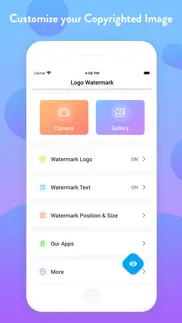
What is add logo watermark on photos app? With this Logo Watermark App, you can Auto Add Logo Copyright on Photos captured using your Phone’s Built-in Camera as well as on your Gallery Photos.
This stamping app facilitates you to imprint your Images in two distinct ways.
~ Single Stamp - Add Logo Watermark on Photos
~ Double Stamp - Add Logo and Text on Photos
Get the setup done at once & your favorite copyright image is ready to roll out!
> How to add watermark to Photos?
1) Just Open this Application
2) Choose if you want to:
- Auto Stamp on Camera Photos or,
- Add stamps on Photos in your Gallery
2)Turn On the Watermark toggle and Upload/Add Logo,
- Adjust its transparency & size
3) Next, you can Copyright with Text (Optional)
- Customize it by choosing the Text Toggle accordingly
- Set the Text Size (S - XXXL), Text Color, Text Style & Text Position
4) Adjust the Watermark Position Accordingly
Bravo!
> Stamp LOGO and TEXT on photos:
The best part is you can customize Signature text separately, i.e., Line 1 and Line 2 at four different positions around your Watermark Logo.
Turn the Toggle On for which you wish to add text; add it with both the line spaces or only with the single one. It is definitely going to make your image look enticing.
Taking your stamped images a level up, you can even customize your digital signature watermark with many options like
- Adjustable Font Size
- Changeable Font Colours
- Varieties of Font Style
- Flexible Font Position
When all the edits and customization is done, if you want to sneak peak about how your watermark photo will look like, you can “Preview” your stamped image before adding it permanently to your pictures.
> Why Pick Us?
- Twice the benefits of protecting both your CAMERA & GALLERY Pics
- Again, Double advantage of adding both LOGO & TEXT to photos
- Well! This is the only App here to facilitate Dual Text Alignment
- Quick and Handy with Super Flexible Settings
- Auto processes after One-Time Setup
- Simple and Elegant User-Interface
Sounds cool right?
NOTE: When you secure images with logo, you can easily identify it. It also answers the ownership of an image for a particular business, person, product or service. You can protect it in many ways such as text & logo copyright on photo, images etc which has distinct shades of lightness and darkness
No matter which profession or field you belong to, imprinting your images is the most convenient way to authorize your pictures. As you can easily protect, secure as well as frame up pics elegantly with just a few taps.
> Why should you Add Logo Watermark on Photos?
We've gathered a tiny catalog of uses making up your work as simple as ABC! Have a look below:
> How to Copyright Image?
There are numerous ways when to represent your identity on any pic. Imprinting a copyright watermark to your image with this stamping app will make your job easy.
> To Enhance your Brand:
Another major benefit of stamping photos is "BRANDING"! Photos are usually Watermark stamped with company name behind also for the purpose of creating their brand awareness among everyone. Isn’t it?
> To Protect Image Theft:
Anything which goes viral online can easily be stolen & used without your permission. To Copyright your photos in this situation, to secure images with logo will be an indirect indication that this photo cannot be used.
> Gain Credits:
Many times photographers just don’t demand financial recognition, but all they need is appreciation and credits for their work. Watermarking their images with their own copyright logo with signature text can grab the credits they wish.
All these features summed up to give you FULL ADVANTAGE in one Install!
So if you are looking to markup your photographs elegantly, there can’t be a better Watermarking Application than this photo stamping app for Camera and Gallery both. Don't believe us? Well! Give it a try then!
Download NOW to add Logo Watermark Stamp on all of your Favorite photographs and make them look Absolutely Gorgeous!
😍 Do you love Add Logo Watermark on Photos app? Please share your friends!



Please wait! Add Logo Watermark on Photos app comments loading...
Add Logo Watermark on Photos 1.1.6 Tips, Tricks, Cheats and Rules
What do you think of the Add Logo Watermark on Photos app? Can you share your complaints, experiences, or thoughts about the application with SUSAMP INFOTECH and other users?







Add Logo Watermark on Photos 1.1.6 Apps Screenshots & Images
Add Logo Watermark on Photos iphone, ipad, apple watch and apple tv screenshot images, pictures.
| Language | English |
| Price | $3.99 |
| Adult Rating | 4+ years and older |
| Current Version | 1.1.6 |
| Play Store | com.autostamper.addlogowatermarkwithtextonphotos |
| Compatibility | iOS 12.0 or later |
Add Logo Watermark on Photos (Versiyon 1.1.6) Install & Download
The application Add Logo Watermark on Photos was published in the category Photo & Video on 01 February 2019, Friday and was developed by SUSAMP INFOTECH [Developer ID: 1535920005]. This program file size is 28.37 MB. This app has been rated by 119 users and has a rating of 3.9 out of 5. Add Logo Watermark on Photos - Photo & Video app posted on 23 August 2024, Friday current version is 1.1.6 and works well on iOS 12.0 and higher versions. Google Play ID: com.autostamper.addlogowatermarkwithtextonphotos. Languages supported by the app:
EN Download & Install Now!| App Name | Score | Comments | Price |
| Onsite Inspection Survey Cam Reviews | 4.5 | 152 | Free |
| My Site Witness Reviews | 1 | 1 | Free |
| Note Camera with Timestamp Reviews | 4.5 | 103 | Free |
| Royal Number Match Game Reviews | 5 | 1 | Free |
| Calculator Plus History Record Reviews | 4.4 | 15 | Free |
- Bug fixes and improve performance
| App Name | Released |
| InShot - Video Editor | 11 June 2015 |
| Kick - Live Streaming | 26 March 2023 |
| Canon PRINT | 22 July 2013 |
| Frameo | 08 December 2016 |
| Picsart AI Photo Editor, Video | 02 January 2013 |
Find on this site the customer service details of Add Logo Watermark on Photos. Besides contact details, the page also offers a brief overview of the digital toy company.
| App Name | Released |
| IWebTV PRO | 15 March 2019 |
| LumaFusion | 22 December 2016 |
| PhotoPills | 21 March 2013 |
| TV Cast Pro for Samsung TV | 05 June 2016 |
| Death Lens | 27 May 2015 |
Discover how specific cryptocurrencies work — and get a bit of each crypto to try out for yourself. Coinbase is the easiest place to buy and sell cryptocurrency. Sign up and get started today.
| App Name | Released |
| PayPal - Send, Shop, Manage | 03 February 2019 |
| WhatsApp Messenger | 03 May 2009 |
| SHEIN - Online Fashion | 19 May 2014 |
| Ralph Lauren | 08 November 2021 |
| TikTok | 02 April 2014 |
Install the Giftmio extension for smart shopping. Get notified about cashback opportunities, activate cashback in one click, and save money on purchases.
| App Name | Released |
| Bloons TD 6 | 14 June 2018 |
| HotSchedules | 30 October 2008 |
| CloverPit | 17 December 2025 |
| MilGPS | 01 December 2010 |
| Plague Inc. | 25 May 2012 |
Each capsule is packed with pure, high-potency nootropic nutrients. No pointless additives. Just 100% natural brainpower. Third-party tested and validated by the Clean Label Project.
Adsterra is the most preferred ad network for those looking for an alternative to AdSense. Adsterra is the ideal choice for new sites with low daily traffic. In order to advertise on the site in Adsterra, like other ad networks, a certain traffic limit, domain age, etc. is required. There are no strict rules.
Keep personal info private, avoid scams, and protect yourself online with AI-powered technology.
Add Logo Watermark on Photos Comments & Reviews 2026
Just purchased.. So far so good.. It looks easy enough to use.
Incredibly convenient photo protection app. You can add logo, add text on camera photos and even both at once. Also text is convenient to change following personal requirements. Choose variants of color, size and style. Putting watermark on the photos I recognize as the ability of saving rights. Generally watermark is protected data. Moreover, it is a simple tool to make professional watermark designating your work as piece of art, for instance, or just to personalization.
Can’t save your message. I like the app however I don’t like that anytime I use it I have to write my name every time
Waste of $2. It’s super inconvenient that you can’t edit where the logo is placed directly on the picture that is uploaded.
Does not work!!!. It keeps saying the stamp was added successfully but nothing shows on the photo. Waste of time. Getting refund.
Awesome and really useful tool!. This application was really helpful for me! Once, I needed to sign the photo I made, and I was looking for the application like this, to stamp a logo and text on photos, which I took. That wasn’t pretty easy to find a good one, because I had a lot of variants, but none of them was good enough to use. So i decided to buy this one, and to be honest, it’s really worth it! This application is really helpful and easy to use! Now I just need few clicks to stamp my logo, and i love it!! Definitely worth it, 5 stars!
Best watermark app!. It allows me to add logo and text on photos with different font styles, size & colors. I can also change the position of stamp logo to prevent my background image from being hampered.
I want to put the watermark where I want. Cant choose watermark location. I need it over the item so my image isn't cropped to remove my watermark.
Great app. Love the app only 3 starts tho becuase I can’t water mark videos. That’s would be perfect
No one can steal my images. I like to take pictures and share them on social media. And due to the recent increase in image theft, I thought I should add logo copyright on photos to protect my images from being copied. It cost me a lot of effort until I came across this app. With it, everything is really simple and fast. In addition, you can add logo watermark on photos, it’s just awesome.
Great program. This is nice and easy to use and does wonders for showing my paintings.
Not What I was Looking For. Wish this app allowed you to place the logo wherever you wanted to on the photo and not a set parameter. And when deciding based on the parameter the background image is the card stock photo not your actual image you are going to place the logo on. 😞
Not flexible. I am not able to move the watermark as I please.
Super!!. Amazing App!
5 stars. This app can flawlessly add text on camera photos. I often feel the need to add logo copyright on photos and now that I've got this one, I am very satisfied with this app.
Simple but lacks. Lacks the ability to move the logo to where you want it on the picture
Not flexible. App does not allow you to move your stamp once it’s placed. You should be able to move/scale/rotate the mark directly on the photo - the available positioning rarely looks good
Works great.. Much cheaper then other apps does the job
Doesn’t work. Paid and app does nothing
Quick. Quick for what i need it for
DO NOT WASTE YOUR $1.99. Purchased this & does not work. The app does not allow you to upload your own watermark and closes on its own & you loose everything. DO NOT PURCHASE!!!
Easy, Quick Watermark. The new version of this Watermark App fixes a problem I sent to them--on my horizontal photos, a text watermark in the bottom right or left might be chopped off. They have included a slider that can move the watermark slightly right/left, up/down, once you have chosen which place to add it. It is nice to be able to add a watermark so easily to photos on my device, when I'm away from my home computer. Note: I have used text only, not a logo of any kind, but I tried several other watermark programs before that just didn't work for me. Happy with this one!
flexible and simple to use. Had to find a good simple app to put logo on pictures and maybe also watermark. Tried this one, you can add logo and also text on photos in this app. It has editor for the logo, like changing it's transparency or adjusting the size, so it would fit better for different images. I like that you can just customize your logo and customize some text, and then stamp logo with or without text on needed pictures. Quite flexible, but simple in use.
Privacy?. Needs access to your entire photo album. Cant just bring in one photo. Waste of money.
Simple. Great app. Easy to use. Lot of variation on placement. Can use my logo
Did you know that you can earn 25 USD from our site just by registering? Get $25 for free by joining Payoneer!
Worst app ever!. I can’t believe I paid for this app. It is horribly set up and very confusing. It’s not user friendly at all. There are no help instructions within the app and it doesn’t function. There is no options to adjust the logos and watermarks at all. It seems to just save it wherever it would like to go. It will randomly add my text or logo to some stock photo I’ve never even seen before let alone selected to use. Don’t waste your money!
Imagine you at your best. All the time. Picture yourself at your sharpest and most productive. Your most alert and focused. Your most lucid, creative and confident. At work. At play. In every area of your life. Add Mind Lab Pro® v4.0 to your daily routine and uncap your true potential. Buy Now!
Good enough!. Thank you to the developers who made this app easy to use and for making it without any clutter. There’s definitely lots of room for improvement, but this is my go to app for watermarking if I don’t have my computer on me.
CAN’T SAVE PHOTO. i can’t save the photo after the stamp is on! doesn’t work! need my money back!
Buggy. Just didn’t work for me.
Adsterra is the most preferred ad network for those looking for an alternative to AdSense. Adsterra is the ideal choice for new sites with low daily traffic. In order to advertise on the site in Adsterra, like other ad networks, a certain traffic limit, domain age, etc. is required. There are no strict rules. Sign up!