C64 Ultimate Toolbox App Reviews
C64 Ultimate Toolbox App Description & Overview
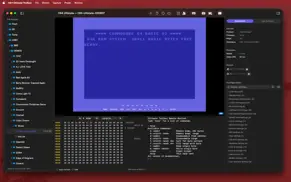
What is c64 ultimate toolbox app? C64 Ultimate Toolbox connects to your Commodore 64 Ultimate device over your local network, giving you a live video and audio stream with hardware-accelerated CRT effects powered by Metal — plus a full-featured file manager, BASIC scratchpad, remote monitor, and device control via the C64U REST API.
-- Two Modes --
Viewer Mode listens for video and audio streams on configurable ports — just hit Listen and go. Toolbox Mode connects to your C64U's REST API for a fully integrated experience: automatic stream setup, file browsing and transfer, device info, file loading, machine control, and keyboard forwarding.
-- File Manager --
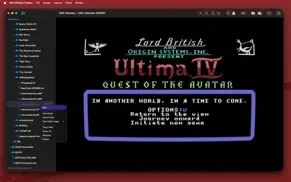
Browse and manage files on your C64U device via FTP. Navigate directories, upload files from your Mac (drag and drop supported), download files, create new disk images (D64, D71, D81, DNP), mount and unmount disk images, and delete or rename files — all from a familiar sidebar interface.
-- BASIC Scratchpad --
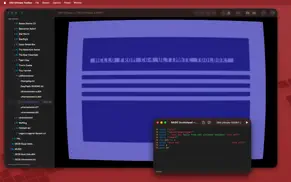
Write and edit Commodore BASIC programs on your Mac with a dedicated scratchpad. Load sample programs, save your work as .bas files, and send programs directly to your C64U for immediate execution. Open multiple scratchpads at once for different projects.
-- CRT Effects --
Choose from 8 built-in presets — from a subtle Home CRT to a classic P1 Green phosphor monitor, an Old TV with heavy scanlines, or a clean Arcade cabinet look. Every effect parameter is fully adjustable: scanlines, bloom, blur, phosphor masks (aperture grille, shadow mask, slot mask), screen curvature, vignette, color tinting, and phosphor afterglow with realistic per-channel decay. The CRT shader renders at your window size — just resize the window to your preferred resolution.
-- Device Control --
In Toolbox Mode, a full toolbar gives you direct access to:
- View device info (product, firmware, hostname)
- Start and stop video/audio streams
- Load and run SID, MOD, PRG, and CRT files directly from your Mac or from the device
- Mount disk images to device drives
- Reset, reboot, or power off the machine
- Access the Ultimate menu
- Pause and resume the machine
- Forward your Mac keyboard to the C64 for remote typing
-- Remote Monitor --
Access an interactive debug monitor for your C64U. Read and write memory, inspect machine state, and issue commands directly from the app.
-- Keyboard Forwarding --
Type on your Mac keyboard and have it appear on the C64 in real time. An on-screen key strip provides C64-specific keys like F1-F8, RUN/STOP, CLR/HOME, and cursor keys. Works with BASIC and programs that read input through the KERNAL.
-- Capture --
Take PNG screenshots or record video with all CRT effects baked in. Recordings are saved as MOV files with H.264 video and synchronized audio.
-- Customizable --
Create and save your own CRT presets with 13 independently adjustable shader parameters. All settings update in real time so you can dial in exactly the look you want.
-- Features --
- Two connection modes: passive Viewer and full-featured Toolbox
- File manager with drag-and-drop upload, download, and disk image creation
- BASIC scratchpad with sample programs and direct-to-device execution
- Remote debug monitor
- Real-time video and audio streaming over your local network
- REST API integration with device info, file runners, and machine control
- Keyboard forwarding with on-screen C64 key strip
- Automatic network scanning to discover devices on your LAN
- 8 built-in CRT effect presets with full customization
- Unlimited custom presets
- Screenshot and video recording with effects applied
- Audio balance control to correct stereo imbalance
- Volume control with mute toggle
- Supports both PAL and NTSC formats
- Password-protected device support with saved credentials
- Live FPS counter
- Pure native macOS app
-- Requirements --
- A Commodore 64 Ultimate device on your local network
- macOS 26 or later
- Toolbox Mode requires FTP File Service and Web Remote Control Service enabled on the device
😍 Do you love C64 Ultimate Toolbox app? Please share your friends!



Please wait! C64 Ultimate Toolbox app comments loading...
C64 Ultimate Toolbox 2.0 Tips, Tricks, Cheats and Rules
What do you think of the C64 Ultimate Toolbox app? Can you share your complaints, experiences, or thoughts about the application with Brad Root and other users?
C64 Ultimate Toolbox 2.0 Apps Screenshots & Images
C64 Ultimate Toolbox iphone, ipad, apple watch and apple tv screenshot images, pictures.
| Language | English |
| Price | $4.99 |
| Adult Rating | 4+ years and older |
| Current Version | 2.0 |
| Play Store | net.amiantos.C64U-Viewer |
| Compatibility | iOS 26.0 or later |
C64 Ultimate Toolbox (Versiyon 2.0) Install & Download
The application C64 Ultimate Toolbox was published in the category Utilities on 23 March 2026, Monday and was developed by Brad Root [Developer ID: 1158641227]. This program file size is 1.34 MB. This app has been rated by 17 users and has a rating of 1 out of 5. C64 Ultimate Toolbox - Utilities app posted on 06 April 2026, Monday current version is 2.0 and works well on iOS 26.0 and higher versions. Google Play ID: net.amiantos.C64U-Viewer. Languages supported by the app:
EN Download & Install Now!| App Name | Score | Comments | Price |
| Gamebook Engine Reviews | 1 | No comment | $4.99 |
| Inneal - AI Character Tavern Reviews | 3.6 | 3 | $4.99 |
| DotBeat Internet Time Reviews | 1 | No comment | $1.99 |
| PiBar for Pi-hole Reviews | 1 | No comment | $4.99 |
| Postalgic - Pocket Blogger Reviews | 5 | 1 | $4.99 |
C64 Ultimate Toolbox 2.0 is a major update with powerful new features: - File Manager: Browse, upload, download, rename, and delete files on your device. Create D64, D71, D81, and DNP disk images. Mount and unmount drives. Drag and drop files from Finder. - BASIC Scratchpad: Write Commodore BASIC programs on your Mac and send them directly to your C64U. Includes sample programs to get started. - Remote Monitor: Interactive debug monitor for reading/writing memory and inspecting machine state. - Auto Device Discovery: Automatically scans your network every 5 seconds to find Ultimate devices. Shows service status and password requirements at a glance. - MOD File Support: Load and play MOD tracker files on your device. - Disk Image Mounting: Mount D64, D71, D81, and DNP images to device drives directly from the file manager. - Improved Connection Flow: Password-protected devices are now discovered and handled gracefully with a password prompt. Saved passwords are tried automatically. - Stream Error Handling: Clear error messages when streams can't start (e.g., device not on Ethernet). - Redesigned Open Device screen with help text and streamlined layout. - Rewritten in pure AppKit for better macOS integration. - Numerous UI improvements and bug fixes.
| App Name | Released |
| Xfinity | 18 April 2017 |
| Tuya Smart | 06 November 2015 |
| UK ETA | 23 October 2023 |
| My Spectrum | 16 December 2014 |
| Genasys Protect | 20 February 2023 |
Find on this site the customer service details of C64 Ultimate Toolbox. Besides contact details, the page also offers a brief overview of the digital toy company.
| App Name | Released |
| NetSpot WiFi Analyzer | 04 May 2020 |
| Piping DataBase - XTREME | 11 March 2010 |
| Export Contacts to Excel | 07 February 2019 |
| My Classic-Retro Console | 14 October 2022 |
| Transcend Theory | 16 April 2024 |
Discover how specific cryptocurrencies work — and get a bit of each crypto to try out for yourself. Coinbase is the easiest place to buy and sell cryptocurrency. Sign up and get started today.
| App Name | Released |
| Ralph Lauren | 08 November 2021 |
| 06 October 2010 | |
| Snapchat | 13 July 2011 |
| CapCut - Video Editor | 14 April 2020 |
| 09 October 2009 |
Install the Giftmio extension for smart shopping. Get notified about cashback opportunities, activate cashback in one click, and save money on purchases.
| App Name | Released |
| Subnautica | 08 July 2025 |
| Paprika Recipe Manager 3 | 15 November 2017 |
| Bloons TD 6 | 14 June 2018 |
| Scritchy Scratchy | 18 March 2026 |
| PeakFinder | 12 March 2010 |
Each capsule is packed with pure, high-potency nootropic nutrients. No pointless additives. Just 100% natural brainpower. Third-party tested and validated by the Clean Label Project.
Adsterra is the most preferred ad network for those looking for an alternative to AdSense. Adsterra is the ideal choice for new sites with low daily traffic. In order to advertise on the site in Adsterra, like other ad networks, a certain traffic limit, domain age, etc. is required. There are no strict rules.
Keep personal info private, avoid scams, and protect yourself online with AI-powered technology.
C64 Ultimate Toolbox Comments & Reviews 2026
Did you know that you can earn 25 USD from our site just by registering? Get $25 for free by joining Payoneer!