Screeny App Reviews
Screeny App Description & Overview
What is screeny app? Screeny makes screen capturing easy and gives you the freedom to capture your videos or images at any size. You can click & drag to resize the capture area or input the exact pixel dimensions to set to the size of the capture area. All the while you will get instant feedback on the capture area's current pixel dimensions.
Screen casting just got a billion times better with Screeny. Now you can capture a specific portion of your screen, rather than having to record your entire desktop. This can drastically reduce video file size and bring focus to a specific portion of your screen. You can even include a video feed from your web-cam inside of your screen cast!
NOTE: Screeny ONLY works in OS X Lion (10.7) and higher.
FILE STORAGE:
- Images are stored in your 'Pictures' folder, in a folder named 'Screeny'.
- Videos are stored in your 'Movies' folder, in a folder named 'Screeny'.
FEATURES:
• Record Video & Snap Images of your screen at any size, and with your built-in or external web-cam!
- Capture any portion of your screen by dragging, expanding and moving the capture canvas to any size.
- Include a video feed from your built-in or external web-cam inside your screen capture.
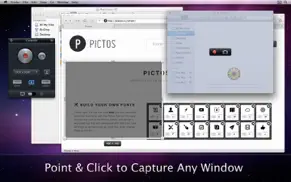
- Click to capture any specific window on your computer.
- Optionally have a mouse highlight animation triggered whenever you click your mouse while recording your screen.
• Cloud App support.
- Optionally have Images & Video automatically uploaded to your Cloud App account!
- Optionally compress videos in the highest quality H.264 before uploading to Cloud App to save on file size.
- View upload & compression progress for Cloud App uploads in the Menu Bar drop down.
• Videos are always saved down at highest possible quality and can be exported for web, etc. using Quicktime.
• Multiple Video Frame Rates.
- Record in 60, 30, 25, 24, 20, or 15 Frames Per Second.
- Lower frame rates improve recording quality for slower machines, or when not much CPU power is available at the time of recording.
• Optionally capture Audio from your computer's microphone when recording video.
• Optionally capture System Audio.
- Requires a 3rd party plugin.
- Instructions on the Screeny Support site.
• Customizable keyboard shortcuts for all recording actions and other preferences.
• Set your recording canvas size by entering a specific pixel dimension or by choosing some handy pre-set dimensions or by clicking, dragging & expanding the recording canvas.
• Screeny is a Menu Bar app and a very simple & powerful tool.
😍 Do you love Screeny app? Please share your friends!



Please wait! Screeny app comments loading...
Screeny 2.2 Tips, Tricks, Cheats and Rules
What do you think of the Screeny app? Can you share your complaints, experiences, or thoughts about the application with Daeo Corp. Software and other users?



Screeny 2.2 Apps Screenshots & Images
Screeny iphone, ipad, apple watch and apple tv screenshot images, pictures.
| Language | English |
| Price | Free |
| Adult Rating | 4+ years and older |
| Current Version | 2.2 |
| Play Store | com.drewwilson.screeny |
| Compatibility | iOS 10.7 or later |
Screeny (Versiyon 2.2) Install & Download
The application Screeny was published in the category Photo & Video on 11 June 2011, Saturday and was developed by Daeo Corp. Software [Developer ID: 440991527]. This program file size is 2.61 MB. This app has been rated by 17 users and has a rating of 1 out of 5. Screeny - Photo & Video app posted on 26 February 2013, Tuesday current version is 2.2 and works well on iOS 10.7 and higher versions. Google Play ID: com.drewwilson.screeny. Languages supported by the app:
EN Download & Install Now!| App Name | Score | Comments | Price |
| OffOf Reviews | 4.6 | 11 | $0.99 |
| Whiteboard - Sketch, Doodle and Share Reviews | 1 | No comment | $1.99 |
| Filtron Reviews | 3.6 | 3 | Free |
| Kloc Reviews | 1 | No comment | Free |
| Filtron Reviews | 1 | No comment | Free |
• Fixed bugs that prevented certain computers from being able to stop recording. • Added support for Droplr file sharing. • Added retina support. • Other small bug fixes.
| App Name | Released |
| Picsart AI Photo Editor, Video | 02 January 2013 |
| CapCut - Video Editor | 14 April 2020 |
| Visify - AI Photo Enhancer | 24 January 2024 |
| Photo Scan App by Photomyne | 09 October 2015 |
| InShot - Video Editor | 11 June 2015 |
Find on this site the customer service details of Screeny. Besides contact details, the page also offers a brief overview of the digital toy company.
| App Name | Released |
| 8mm Vintage Camera | 22 December 2010 |
| TV Cast Pro for Chromecast | 29 July 2016 |
| Print to Size | 21 January 2015 |
| ProCamera. Professional Camera | 18 September 2013 |
| TV Cast Pro for Samsung TV | 05 June 2016 |
Discover how specific cryptocurrencies work — and get a bit of each crypto to try out for yourself. Coinbase is the easiest place to buy and sell cryptocurrency. Sign up and get started today.
| App Name | Released |
| Cash App | 16 October 2013 |
| PayPal - Send, Shop, Manage | 03 February 2019 |
| 09 October 2009 | |
| Netflix | 01 April 2010 |
| BeReal. Your friends for real. | 08 January 2020 |
Install the Giftmio extension for smart shopping. Get notified about cashback opportunities, activate cashback in one click, and save money on purchases.
| App Name | Released |
| Incredibox | 27 March 2016 |
| Slay the Spire | 13 June 2020 |
| Subnautica | 08 July 2025 |
| Farming Simulator 26 Mobile | 19 May 2026 |
| Gambonanza | 01 May 2026 |
Each capsule is packed with pure, high-potency nootropic nutrients. No pointless additives. Just 100% natural brainpower. Third-party tested and validated by the Clean Label Project.
Adsterra is the most preferred ad network for those looking for an alternative to AdSense. Adsterra is the ideal choice for new sites with low daily traffic. In order to advertise on the site in Adsterra, like other ad networks, a certain traffic limit, domain age, etc. is required. There are no strict rules.
Keep personal info private, avoid scams, and protect yourself online with AI-powered technology.
Screeny Comments & Reviews 2026
Did you know that you can earn 25 USD from our site just by registering? Get $25 for free by joining Payoneer!