KORG GEC5 Controller App Reviews
KORG GEC5 Controller App Description & Overview
What is korg gec5 controller app? GEC5 Lab System Controller
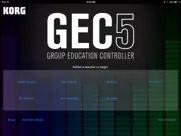
The Korg Group Education Controller (GEC5) represents the most advanced system in group instruction technology. With an intuitive, easy-to-use software user interface, multiple practice and instruction modes, fully-digital stereo sound - the Korg GEC5 Lab System will take any music, language or technology lab to a new level of high efficiency and create a superior classroom experience.
The advanced, yet easy-to-use audio routing in the GEC5 is compatible with any digital audio signal, so get creative and build a room with any combination of electronic instruments including digital pianos, guitars, synthesizers, and even MIDI-controlled software instruments. Want to do even more? Integrate computers with your lab and take learning to a new level of excitement and capability. Unlike other systems, the Korg GEC5 is completely open and allows you to use any curriculum that suits your classroom best. The sky is the limit!
For over 20 years Korg has worked extensively with educators all over the world with overwhelming success in thousands of music, language and technology labs. This expertise in educational technology has led to the development of the Korg GEC5 Lab System - the most user-friendly, flexible and powerful lab control system available.
Software Control Application
MULTIPLE MODES MEAN FLEXIBILITY
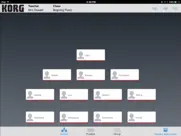
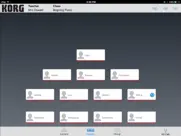
There are three main modes of GEC5 operation. Each of these can be selected within the software interface at the teacher’s station:
Lecture Mode:
Present material and instruction in a lecture format. All students hear the teacher’s microphone and instrument or computer allowing for a captive and quiet audience.
- Tap the Student Instrument/Student Stations button and allow the students to play along.
- Tap and hold to exclude a student from the lecture for independent work.
- Double tap to bring a student into the lecture for comments or questions.
Practice Mode:
Practice mode is used when the students are working independently. Each student hears only his or her own instrument or computer. In Practice Mode, the teacher has the option of “eavesdropping” on the student and initiating 2 way communication with the student for individualized instruction.
- Double-tap to eavesdrop, double-tap again to talk
- Tap All Call to call attention to the group
- Single tap to clear eavesdrop
- Performance Mode allows the teacher to hear all of the students and their instruments at the same time while each student can only hear themselves, their instrument and the teacher’s audio.
Group Mode:
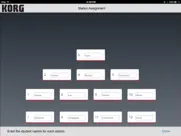
This mode is used when students are working together in groups (two or more student workstations in any conceivable configuration). Each student in a group can hear his or her own instrument as well as the instruments or computer and microphone of the other members of their group.
- Tap and hold to select students to put in a group, then select New Group
- Recall Auto Group Presets
- Make your own custom presets for each class
*This app must be used with the GEC5 hardware system available from an authorized Korg Dealer.
http://www.korg.com/us/products/audio/gec5/index.php
😍 Do you love KORG GEC5 Controller app? Please share your friends!



Please wait! KORG GEC5 Controller app comments loading...
KORG GEC5 Controller 1.7 Tips, Tricks, Cheats and Rules
What do you think of the KORG GEC5 Controller app? Can you share your complaints, experiences, or thoughts about the application with KORG INC. and other users?
KORG GEC5 Controller 1.7 Apps Screenshots & Images
KORG GEC5 Controller iphone, ipad, apple watch and apple tv screenshot images, pictures.
| Language | English |
| Price | Free |
| Adult Rating | 4+ years and older |
| Current Version | 1.7 |
| Play Store | com.korg.gec5 |
| Compatibility | iOS 11.0 or later |
KORG GEC5 Controller (Versiyon 1.7) Install & Download
The application KORG GEC5 Controller was published in the category Education on 18 April 2016, Monday and was developed by KORG INC. [Developer ID: 363714046]. This program file size is 22.22 MB. This app has been rated by 4 users and has a rating of 5 out of 5. KORG GEC5 Controller - Education app posted on 13 July 2023, Thursday current version is 1.7 and works well on iOS 11.0 and higher versions. Google Play ID: com.korg.gec5. Languages supported by the app:
Download & Install Now!| App Name | Score | Comments | Price |
| Bluetooth MIDI Connect Reviews | 1 | No comment | Free |
| IELECTRIBE Gorillaz Edition Reviews | 3.7 | 21 | $19.99 |
| KORG iM1 Reviews | 4.7 | 981 | $29.99 |
| KORG EZ Rec Reviews | 1 | No comment | Free |
| Step Master Reviews | 1 | 4 | Free |
Bug fixes allow users of iOS 12-16.5 to control the KORG GEC5 hardware with this control app.
| App Name | Released |
| Seek by iNaturalist | 09 March 2018 |
| Solvely - AI Study Companion | 14 April 2023 |
| Navigate360 Student | 26 May 2015 |
| Question.AI-Math Calculator | 30 May 2023 |
| Babbel - Language Learning | 11 June 2014 |
Find on this site the customer service details of KORG GEC5 Controller. Besides contact details, the page also offers a brief overview of the digital toy company.
| App Name | Released |
| Universe in a Nutshell | 20 September 2020 |
| TX Real Estate Exam Flashcards | 14 July 2012 |
| Prepware Remote Pilot | 20 July 2016 |
| ACS MyATLS | 12 August 2024 |
| Foundations Memory Work C2 | 01 October 2013 |
Discover how specific cryptocurrencies work — and get a bit of each crypto to try out for yourself. Coinbase is the easiest place to buy and sell cryptocurrency. Sign up and get started today.
| App Name | Released |
| 12 February 2019 | |
| 07 April 2016 | |
| Wizz - Make new friends | 24 February 2019 |
| Messenger | 09 August 2011 |
| Snapchat | 13 July 2011 |
Install the Giftmio extension for smart shopping. Get notified about cashback opportunities, activate cashback in one click, and save money on purchases.
| App Name | Released |
| MilGPS | 01 December 2010 |
| Plague Inc. | 25 May 2012 |
| Monash FODMAP Diet | 17 December 2012 |
| Terraria | 28 August 2013 |
| Bloons TD 6 | 14 June 2018 |
Each capsule is packed with pure, high-potency nootropic nutrients. No pointless additives. Just 100% natural brainpower. Third-party tested and validated by the Clean Label Project.
Adsterra is the most preferred ad network for those looking for an alternative to AdSense. Adsterra is the ideal choice for new sites with low daily traffic. In order to advertise on the site in Adsterra, like other ad networks, a certain traffic limit, domain age, etc. is required. There are no strict rules.
Keep personal info private, avoid scams, and protect yourself online with AI-powered technology.
KORG GEC5 Controller Comments & Reviews 2026
Wow!. Can’t imagine teaching my class without this! It has truly been a lifesaver...especially for someone who isn’t great with technology LOL!
App does not work. Time for update!?
Broken in iPadOS 16.2. No longer works correctly in iPadOS 16…
Doesn’t work on iPad. I’m disappointed in this app. The whole reason we invested in this system was so I could be mobile in my classroom and listen to my students play their keyboard through the headphones. I have emailed the developers multiple times and still get the same answer that they are working on it. Right now the entire system is useless to me.
Did you know that you can earn 25 USD from our site just by registering? Get $25 for free by joining Payoneer!
Imagine you at your best. All the time. Picture yourself at your sharpest and most productive. Your most alert and focused. Your most lucid, creative and confident. At work. At play. In every area of your life. Add Mind Lab Pro® v4.0 to your daily routine and uncap your true potential. Buy Now!
Adsterra is the most preferred ad network for those looking for an alternative to AdSense. Adsterra is the ideal choice for new sites with low daily traffic. In order to advertise on the site in Adsterra, like other ad networks, a certain traffic limit, domain age, etc. is required. There are no strict rules. Sign up!