Clock Widget App Reviews
Clock Widget App Description & Overview
What is clock widget app? Thanks to this application (and the other Widget apps from PacoLabs), you can now customize the Home screen and the Today view of your device, by adding custom widgets for some specific purposes.
From anywhere in your device, you'll have access to your own information and actions.
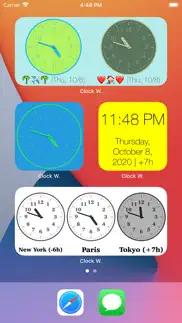
Each Clock widget allows to view 1 to 6 different clocks on the same row.
Each clock can display the current time or the one of a specific timezone.
The time can be displayed as an analog or a digital clock, with or without the seconds.
A text can be associated (to display the town name and time offset).
Various parameters can be changed (like the font name and the day or night colors).
Those Widgets are compatible with the new iOS 14 Home Screen Widgets.
The application is really easy to use and is adapted to the fresh look of your device.
Dark mode of iOS13 is supported.
In Today view:
You can add as many widgets as you want and they will be displayed in up to 3 different lists. Those same lists will be available in the Today view and in the application (although it is possible, if you want, to hide some widgets in the Today view).
To avoid overloading the Today view, when too many widgets are displayed, an intuitive control will allow you to navigate from one widget to another.
Even if the main purpose of the app is to view the widgets in the Today view, it can also be very handy to view them directly in the application (a long press on a widget in the Today view will open it directly in the main application).
😍 Do you love Clock Widget app? Please share your friends!



Please wait! Clock Widget app comments loading...
Clock Widget 6.2 Tips, Tricks, Cheats and Rules
What do you think of the Clock Widget app? Can you share your complaints, experiences, or thoughts about the application with Francis Bonnin and other users?


Clock Widget 6.2 Apps Screenshots & Images
Clock Widget iphone, ipad, apple watch and apple tv screenshot images, pictures.
| Language | English |
| Price | $0.99 |
| Adult Rating | 4+ years and older |
| Current Version | 6.2 |
| Play Store | francis.bonnin.clockwidget |
| Compatibility | iOS 12.0 or later |
Clock Widget (Versiyon 6.2) Install & Download
The application Clock Widget was published in the category Utilities on 22 February 2015, Sunday and was developed by Francis Bonnin [Developer ID: 284043095]. This program file size is 12.58 MB. This app has been rated by 35 users and has a rating of 3.8 out of 5. Clock Widget - Utilities app posted on 02 July 2025, Wednesday current version is 6.2 and works well on iOS 12.0 and higher versions. Google Play ID: francis.bonnin.clockwidget. Languages supported by the app:
EN FR DE IT JA RU ZH ES Download & Install Now!| App Name | Score | Comments | Price |
| Video Compressor - HD Reviews | 4.7 | 22 | $1.99 |
| Subliminal Video - HD Reviews | 4.2 | 10 | $2.99 |
| Count Widget Reviews | 5 | 6 | $0.99 |
| Photo Widget Reviews | 3.9 | 294 | $0.99 |
| Unslice Reviews | 5 | 4 | Free |
* Ability to select the system font in the font picker. * Minor fixes and improvements.
| App Name | Released |
| Tuya Smart | 06 November 2015 |
| Amazon Fire TV | 22 December 2014 |
| Facemoji AI Emoji Keyboard | 28 April 2016 |
| PrivadoVPN Fast VPN and Proxy | 05 January 2021 |
| Phantom - Crypto Wallet | 30 January 2022 |
Find on this site the customer service details of Clock Widget. Besides contact details, the page also offers a brief overview of the digital toy company.
| App Name | Released |
| Hondata Complete | 26 April 2019 |
| AtvTools | 08 January 2023 |
| Export Contacts to Excel | 07 February 2019 |
| Necrometer | 25 May 2023 |
| Overseerr | 01 August 2024 |
Discover how specific cryptocurrencies work — and get a bit of each crypto to try out for yourself. Coinbase is the easiest place to buy and sell cryptocurrency. Sign up and get started today.
| App Name | Released |
| 06 October 2010 | |
| 28 April 2011 | |
| Hive Social | 18 October 2019 |
| Google Chrome | 28 June 2012 |
| 07 April 2016 |
Install the Giftmio extension for smart shopping. Get notified about cashback opportunities, activate cashback in one click, and save money on purchases.
| App Name | Released |
| HotSchedules | 30 October 2008 |
| AnkiMobile Flashcards | 26 May 2010 |
| RadarScope | 12 February 2019 |
| Shadowrocket | 13 April 2015 |
| Slime Rancher | 26 May 2026 |
Each capsule is packed with pure, high-potency nootropic nutrients. No pointless additives. Just 100% natural brainpower. Third-party tested and validated by the Clean Label Project.
Adsterra is the most preferred ad network for those looking for an alternative to AdSense. Adsterra is the ideal choice for new sites with low daily traffic. In order to advertise on the site in Adsterra, like other ad networks, a certain traffic limit, domain age, etc. is required. There are no strict rules.
Keep personal info private, avoid scams, and protect yourself online with AI-powered technology.
Clock Widget Comments & Reviews 2026
Not a widget!. I wanted a clock widget that is large enough to read without magnifier. This is a poorly designed app that must be open to see the click. When open, it looks like it has s in setup mode. There is no icon to finish and make it a widget that shows on the screen all of the time.
Not able to figure out how to set digital view. I am looking for a way to see a large digital view of current time.
Not working with iOS 14 widgets yet :(. Not working with iOS 14 widgets yet :(
Analog not Digital. Weak widget design and for those of us that need to see many time zones at once which seems to be the reason for anyone buying this- it fails to make user interaction simple and fast. Simply switching to a black and white design with city labels this could easily be a wonderful app.
Did not work. Did not show up as available widget. Requested refund.
Can’t select between 12/24 hr time. Total waste of .99$
I'd give it zero stars if I could. If you buy this app, you should expect to have a giant gap of wasted space in your notification center because, for whatever reason, this developer wants more space in the notification center than the app needs in order to space his widget apart from the others... so, your other widgets get pushed down the page. It's silly since every widget already has a title bar that spaces the widgets apart. Wasting space in the notification center is poor design. The settings part of the app is pretty clunky too, but if the widget didn't waste space, that wouldn't matter, since you only need the settings once to set it up. The App Store doesn't have a way to give zero stars, so, this app get one.
Day and Date. The Day and Date line does not show in Widget after this latest update. I hope this can be fixed. Now fixed
Simple. I wanted a simple clock to put on notifications, something with big enough numbers that I wouldn't have to squint at night. Works great
Very nice. Very nice widget. Best app of it's kind.
Did you know that you can earn 25 USD from our site just by registering? Get $25 for free by joining Payoneer!
Imagine you at your best. All the time. Picture yourself at your sharpest and most productive. Your most alert and focused. Your most lucid, creative and confident. At work. At play. In every area of your life. Add Mind Lab Pro® v4.0 to your daily routine and uncap your true potential. Buy Now!
Adsterra is the most preferred ad network for those looking for an alternative to AdSense. Adsterra is the ideal choice for new sites with low daily traffic. In order to advertise on the site in Adsterra, like other ad networks, a certain traffic limit, domain age, etc. is required. There are no strict rules. Sign up!