Blur Photo. App Reviews
Blur Photo. App Description & Overview
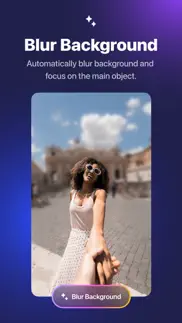
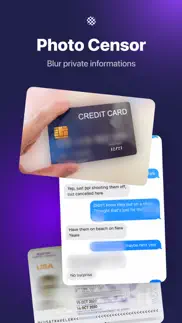
What is blur photo. app? Automatically blur image background, faces or subjects in your photo and add amazing blur effects.
HOW IT WORKS
1. Select a photo you want to blur
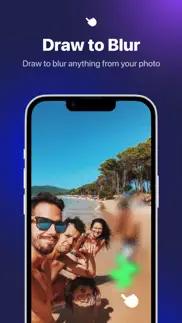
2. Click Blur Background for advanced background blurry effects or using manual mode to finger touch for accurate blurry part
3. Choose from our many amazing blur effects and other filters to enhance your photos
4. Save to camera roll or share your artwork with friends or via social media
*Highlight*
+ Provide multiple unique blur effects to make the photo more prominent.
+ Radial mode to create powerful depth of field editing
+ Blur brush with adjustable strength and soft/hard brushes
+ Custom blur intensity & size
+ Zoom & rotate to work in detail
+ More advanced photo editing tools to make professional photo
Terms of use: https://rockybrain.com/terms/
Privacy policy: https://rockybrain.com/policy/
😍 Do you love Blur Photo. app? Please share your friends!



Please wait! Blur Photo. app comments loading...
Blur Photo. 2.1.5 Tips, Tricks, Cheats and Rules
What do you think of the Blur Photo. app? Can you share your complaints, experiences, or thoughts about the application with Le Giang Nam and other users?



Blur Photo. 2.1.5 Apps Screenshots & Images
Blur Photo. iphone, ipad, apple watch and apple tv screenshot images, pictures.
| Language | English |
| Price | Free |
| Adult Rating | 4+ years and older |
| Current Version | 2.1.5 |
| Play Store | com.rockybrain.blurphotos |
| Compatibility | iOS 15.0 or later |
Blur Photo. (Versiyon 2.1.5) Install & Download
The application Blur Photo. was published in the category Graphics & Design on 16 May 2022, Monday and was developed by Le Giang Nam [Developer ID: 1588693429]. This program file size is 58.73 MB. This app has been rated by 380 users and has a rating of 4.7 out of 5. Blur Photo. - Graphics & Design app posted on 15 March 2026, Sunday current version is 2.1.5 and works well on iOS 15.0 and higher versions. Google Play ID: com.rockybrain.blurphotos. Languages supported by the app:
EN Download & Install Now!| App Name | Score | Comments | Price |
| Push Up Counter. Reviews | 4.5 | 5 | $4.99 |
| AI Lecture Note Taker Reviews | 4.4 | 7 | $7.99 |
| Habit Tracker Widget Reviews | 4.6 | 14 | $2.99 |
| AI Video Eraser Reviews | 5 | 8 | $5.99 |
| Pill Counter Reviews | 4.3 | 50 | $4.99 |
Bug fixes
| App Name | Released |
| Home AI - AI Interior Design | 05 April 2024 |
| AI Remodel - Interior Design | 09 May 2024 |
| Leonardo.Ai - Image Generator | 03 August 2023 |
| Remodel AI - Interior Design | 18 April 2023 |
| DaVinci - AI Image Generator | 06 September 2022 |
Find on this site the customer service details of Blur Photo.. Besides contact details, the page also offers a brief overview of the digital toy company.
| App Name | Released |
| Whiteboard Pro by Qrayon | 23 June 2022 |
| Art Grid Drawing | 09 January 2024 |
| Sketch Club | 23 November 2010 |
| Ibis Paint | 21 June 2011 |
| Image to Pixel Art | 02 February 2022 |
Discover how specific cryptocurrencies work — and get a bit of each crypto to try out for yourself. Coinbase is the easiest place to buy and sell cryptocurrency. Sign up and get started today.
| App Name | Released |
| Wizz - Make new friends | 24 February 2019 |
| CapCut - Video Editor | 14 April 2020 |
| DoorDash - Food Delivery | 10 October 2013 |
| PayPal - Send, Shop, Manage | 03 February 2019 |
| Ralph Lauren | 08 November 2021 |
Install the Giftmio extension for smart shopping. Get notified about cashback opportunities, activate cashback in one click, and save money on purchases.
| App Name | Released |
| Shotgun King | 24 February 2026 |
| Shadowrocket | 13 April 2015 |
| CloverPit | 17 December 2025 |
| Streaks | 31 May 2015 |
| RadarScope | 12 February 2019 |
Each capsule is packed with pure, high-potency nootropic nutrients. No pointless additives. Just 100% natural brainpower. Third-party tested and validated by the Clean Label Project.
Adsterra is the most preferred ad network for those looking for an alternative to AdSense. Adsterra is the ideal choice for new sites with low daily traffic. In order to advertise on the site in Adsterra, like other ad networks, a certain traffic limit, domain age, etc. is required. There are no strict rules.
Keep personal info private, avoid scams, and protect yourself online with AI-powered technology.
Blur Photo. Comments & Reviews 2026
BLUR PHOTO - sad day. This was a five star app, BUT ever since iOS 16 came out I can not get it to function on any of my iPhones - 12 pro max, 13 pro max & my newest 14 pro max - all with max memory. Will change my rating to a five star if the app works again. For now all I get is a black screen with 3 bubbles at the top - 1. Recents, 2. Open File, 3. Three stacked horizontal lines. Nothing happens if you tap or tap and hold any of the blue bubbles. I’ve tried deleting and reloading the app and powering off and resetting the phones all to no avail. The app has blurred itself into non existence.
Works well!!!. Great tools for adding blur effects to my photos. And I love the background blur tool! It’s such a simple way to make my photos look more dramatic haha 😆😆😆
Auto-blur background that actually works. I’ve been trying every “autoblur/autoremove” background app on the App Store. None of the free ones work well at all. But this app does!
Typical. So this app used to work on my old phone with no problems, as a matter fact, it still does on my iPad. Of course, I haven’t updated the app and well over a year. But on my new iPhone, it doesn’t work and go straight to a subscription page that the app on my iPad does not. So, apparently, at some point, this went to a subscription which is typical of the stupid apps. So here’s to taking what was once a great app and ruining it. At least I know not to update it on my iPad and I can still enjoy it that way.
Great App. use it every day
Crap app. This is nothing more than a smudge filter that you have too manipulate with your finger. There are MUCH better free apps out there.
Great app!. This app is amazing!! I have tried other similar apps, and I think this one is the best! One other app worked as well, but it was very basic, and didn’t have any of the extra features that this one has. I’m glad I found this one.
Exactly what I was looking for. This app is easy to use and works great. The photos look natural. I wish that I could add a picture to this review.
10/10 👍. Love the interface, easy to use, easy to understand, it has one job and it does it really really well. And for those who don’t know, it has NO ADS pop-up in the app, and you can save your photo without a watermark, which is what I really like about this app.
Ehsan. Perfect 👍
Huge Capacity with Minor problem !. Please update for ios 16.3 because it freezes so many times . But the app has greate potentiality .
Omega Failure of an App. The app will not ‘readjust’ the particulars of the blurring once you hit the button, ‘blur the background’. There’s no ‘re-editing’ a blur value..? The sliders do nothing after you hit the Blur Background so have no idea why this does this or is even there. You have to completely back out of the photo editing process and attempt to choose an edit/blur parameter that may look nice. While it does blur well, you can’t post adjust it. This is weird and useless… the ‘Unblur’ seems completely useless just as much. Can’t determine what purpose that is since the app has a ‘revert’ button/arrow too?? App need serious refinement for recommendation.
Image saving blank after editing. I tried many times and it’s blank after I Blure some portion of background and save it. Please fix this otherwise there is no use of this App.
nice. Nice but a weekly charge
Wonderful. I’m a professional concert photographer and I use this application to play name that performer pictures where I blur out their faces. We have a really fun time with it. Thank you so much for the easy yet powerful program. It’s a must have!!
Blur App 👍🏼. This has got to be the best blur app available. I’ve tried over 15 and this is easy to use and exactly what I need. Great job 👏
All the beautiful effects I need. The only app that gives me the Bokeh blur effect I need. Beautiful and correctly blurred result. Worth every penny spent
🙄. Funny to buy every week 😂 There is no monthly or lifetime requirement The app has some nice things But the payment method is bad It is preferable to purchase one time Because the application is for editing photos and is not for daily use, and is not used as a montage for daily use
Amazing. Really great app for blur the background of image easily, well done.
Great start. It would be great to insert a user photo background in place of the blur.
Proud mama. Easy to use way better then other apps would highly recommend!!
Did you know that you can earn 25 USD from our site just by registering? Get $25 for free by joining Payoneer!
Developer Disappoints Early Users with In-App Purchases. The developer has set prices for the full versions of many of their software applications, or offers them for free with a time limit. After some time, they quietly add in-app purchases, making it impossible to use the software without these purchases. For early buyers of the software, this feels like a form of deception.
Imagine you at your best. All the time. Picture yourself at your sharpest and most productive. Your most alert and focused. Your most lucid, creative and confident. At work. At play. In every area of your life. Add Mind Lab Pro® v4.0 to your daily routine and uncap your true potential. Buy Now!
Adsterra is the most preferred ad network for those looking for an alternative to AdSense. Adsterra is the ideal choice for new sites with low daily traffic. In order to advertise on the site in Adsterra, like other ad networks, a certain traffic limit, domain age, etc. is required. There are no strict rules. Sign up!