Core Data Lab App Reviews
Core Data Lab App Description & Overview
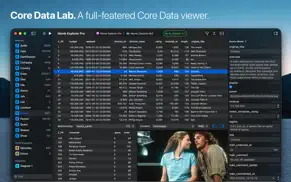
What is core data lab app? Core Data Lab lets you easily view, edit, and analyse data of SQLite-based Core Data and SwiftData apps. View, track, and explore what’s inside your Core Data database, including all Core Data-specific details like relationships, entity descriptions, fetch request templates, composite attributes, and more.
Quick start
• Set up a new project in a few easy steps using the project assistant.
• Select an app or model file and let Core Data Lab search for a matching database.
• Or select a database file and let Core Data Lab search for matching apps.
• Or use the simulator browser to select a database and app combination in one go.
Data change tracker
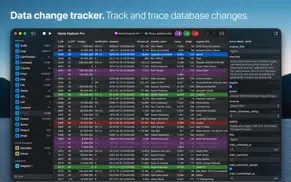
• Hit the Play button on the toolbar to start tracking database changes.
• New, deleted, and changed data rows are displayed with distinct colors.
• Each previous row version is displayed individually, including all value changes.
• No need to change your project or implement special libraries.
• Works with macOS apps and apps running in an iOS, iPadOS, watchOS, tvOS or visionOS simulator.
Data filter
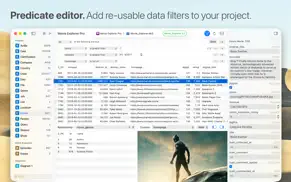
• Use the built-in easy-to-use predicate editor to filter and query your data.
• Save predicates as part of a Core Data Lab project for easy access.
• Duplicate predicates to make quick variants of the same filter.
Data editor
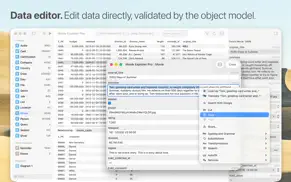
• Edit and create data directly in the inspector panel or detail window.
• Delete rows directly in the data grid.
• Change, replace, or nullify data with batch updates.
• All data mutations are validated by the active Core Data Object model.
Relationships viewer
• View instantly all relationships and related data of a selected row.
• Easily switch to another relationship.
• Selecting a row in the relationship panel will show the data in the inspector panel.
Simulator browser
• Browse local iOS, iPadOS, watchOS, tvOS or visionOS simulators for Core Data apps and databases.
• Add app and database combinations with one click to your project.
Object model diagrams
• Visualize your Core Data model in one or more diagrams, showing all entities, attributes, fetched properties, and relationships.
• Inspired by the ‘graph style’ editor of the data model designer tool in Xcode 13 and older.
• Exportable to PDF and clipboard.
Content viewer
• Automatic detection and display of web links, image data, HTML content, PLIST objects, binary content, and more.
• Switch to Text view to inspect the HTML, XML, or JSON text content of web links.
• Built-in HTML debugger.
Entity description viewer
• View all details of all attributes of a selected Core Data entity.
• Inspect all other details like relationships, indexes, and constraints.
Raw data viewer
• Open and view SQLite databases without a Core Data object model.
• Support for opening SQLite files in the Finder.
Data import
• Import data using CSV or JSON files.
• JSON import supports relationship data and composite attributes.
• All data import happens under validation of the active Core Data Object model.
Data export
• Export a selected row or table to CSV or JSON.
• Export data tracking data to CSV or JSON including history data.
• JSON export supports relationship data and composite attributes.
• CSV data can be viewed and further processed in Excel or Numbers.
Project-based
• Your database, app, and model references are stored in a Core Data Lab project.
• Data filters, selections, sorting settings, and diagrams are also part of the same project.
• This makes it easy to stop and continue working with your data, without recreating anything.
• Projects are saved as standard NSDocument files, including tabbed windows, auto-save, and more.
Support
If you encounter problems with this app, then please take a look at the Core Data Lab help page at https://betamagic.nl/support/coredatalab/help.html. If this doesn’t provide the solution you are looking for, or you miss some essential features, just contact us at [email protected].
😍 Do you love Core Data Lab app? Please share your friends!



Please wait! Core Data Lab app comments loading...
Core Data Lab 3.0 Tips, Tricks, Cheats and Rules
What do you think of the Core Data Lab app? Can you share your complaints, experiences, or thoughts about the application with Ron Elemans and other users?
Core Data Lab 3.0 Apps Screenshots & Images
Core Data Lab iphone, ipad, apple watch and apple tv screenshot images, pictures.
| Language | English |
| Price | $19.99 |
| Adult Rating | 4+ years and older |
| Current Version | 3.0 |
| Play Store | betamagic.Core-Data-Lab |
| Compatibility | iOS 15.6 or later |
Core Data Lab (Versiyon 3.0) Install & Download
The application Core Data Lab was published in the category Developer Tools on 19 December 2019, Thursday and was developed by Ron Elemans [Developer ID: 802165890]. This program file size is 5.43 MB. This app has been rated by 17 users and has a rating of 1 out of 5. Core Data Lab - Developer Tools app posted on 11 May 2026, Monday current version is 3.0 and works well on iOS 15.6 and higher versions. Google Play ID: betamagic.Core-Data-Lab. Languages supported by the app:
EN Download & Install Now!| App Name | Score | Comments | Price |
| Movie Explorer Reviews | 1 | No comment | Free |
| Movie Explorer Pro Reviews | 1 | No comment | $22.99 |
| Download Buddy Reviews | 1 | No comment | $2.99 |
| News Explorer Reviews | 4.6 | 639 | $4.99 |
| News Explorer Reviews | 1 | No comment | $9.99 |
• Full Liquid Glass support, including a new app icon with support for icon styles in macOS 26. • Favorite Attributes let you put attributes in front or on top of other attributes in tables and forms, making it easier to identify and work with your data. • Favorite Content controls which attributes should be displayed first in the content viewer panel. • New Relationships panel in the Object editor window, which allows you to view the relationship data of multiple objects side-by-side. • Visualize your data model with diagrams, heavily inspired by the ‘graph style’ editor of the data model designer tool in Xcode 13 and older. Other improvements: • Search within webpages in the content viewer. • More supported image formats in the content viewer. • Native document title display and editing features. • Improved large text performance. • Startup options in the app settings. • Improved handling of canceling editing of data.
| App Name | Released |
| XTerminal - SSH Terminal Shell | 17 December 2020 |
| Userscripts | 14 May 2019 |
| Working Copy - Git client | 08 November 2014 |
| Koder Code Editor | 22 December 2018 |
| SSH VPN - Port Forwarding | 02 November 2023 |
Find on this site the customer service details of Core Data Lab. Besides contact details, the page also offers a brief overview of the digital toy company.
| App Name | Released |
| Buffer Editor - Code Editor | 01 March 2012 |
| PPHub For GitHub - Developer | 20 November 2017 |
| Inspect Browser | 09 February 2017 |
| Store Redirect Switch | 03 April 2023 |
| Mevolit | 16 May 2025 |
Discover how specific cryptocurrencies work — and get a bit of each crypto to try out for yourself. Coinbase is the easiest place to buy and sell cryptocurrency. Sign up and get started today.
| App Name | Released |
| PayPal - Send, Shop, Manage | 03 February 2019 |
| 09 October 2009 | |
| TikTok | 02 April 2014 |
| Snapchat | 13 July 2011 |
| Telegram Messenger | 14 August 2013 |
Install the Giftmio extension for smart shopping. Get notified about cashback opportunities, activate cashback in one click, and save money on purchases.
| App Name | Released |
| Gambonanza | 01 May 2026 |
| MilGPS | 01 December 2010 |
| PeakFinder | 12 March 2010 |
| Shotgun King | 24 February 2026 |
| Pou | 26 November 2012 |
Each capsule is packed with pure, high-potency nootropic nutrients. No pointless additives. Just 100% natural brainpower. Third-party tested and validated by the Clean Label Project.
Adsterra is the most preferred ad network for those looking for an alternative to AdSense. Adsterra is the ideal choice for new sites with low daily traffic. In order to advertise on the site in Adsterra, like other ad networks, a certain traffic limit, domain age, etc. is required. There are no strict rules.
Keep personal info private, avoid scams, and protect yourself online with AI-powered technology.
Core Data Lab Comments & Reviews 2026
Did you know that you can earn 25 USD from our site just by registering? Get $25 for free by joining Payoneer!