Celestial Navigation App Reviews
Celestial Navigation App Description & Overview
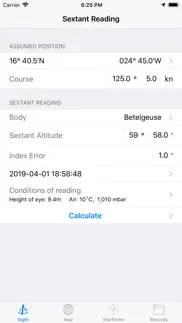
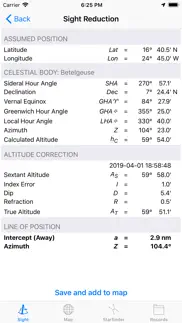
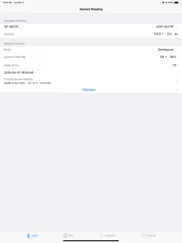
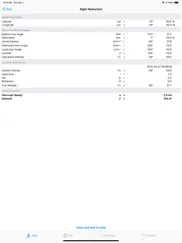
What is celestial navigation app? This app does all the calculations to reduce a sextant reading to a line of position on the map. All intermediate numbers are shown to check your manual calculations.
• Perpetual nautical almanac
• Calculation of the line of position (azimuth and distance)
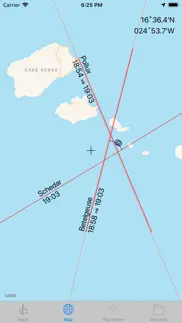
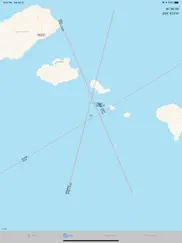
• Draws the line of position on the map.
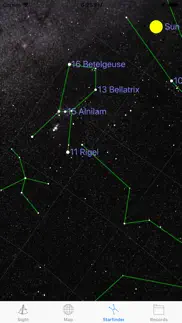
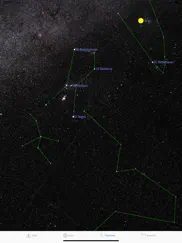
• Star Finder: just point your device to the sky to identify the navigational stars.
• Save your readings, choose what to show on the map.
A sextant is required to make full use of this app.
😍 Do you love Celestial Navigation app? Please share your friends!



Please wait! Celestial Navigation app comments loading...
Celestial Navigation 1.4 Tips, Tricks, Cheats and Rules
What do you think of the Celestial Navigation app? Can you share your complaints, experiences, or thoughts about the application with Dr. Harald Merkel and other users?
Celestial Navigation 1.4 Apps Screenshots & Images
Celestial Navigation iphone, ipad, apple watch and apple tv screenshot images, pictures.
| Language | English |
| Price | $1.99 |
| Adult Rating | 4+ years and older |
| Current Version | 1.4 |
| Play Store | de.merkel.Celestial-Navigation |
| Compatibility | iOS 11.0 or later |
Celestial Navigation (Versiyon 1.4) Install & Download
The application Celestial Navigation was published in the category Navigation on 03 April 2019, Wednesday and was developed by Dr. Harald Merkel [Developer ID: 404381431]. This program file size is 51.15 MB. This app has been rated by 14 users and has a rating of 4.4 out of 5. Celestial Navigation - Navigation app posted on 20 August 2020, Thursday current version is 1.4 and works well on iOS 11.0 and higher versions. Google Play ID: de.merkel.Celestial-Navigation. Languages supported by the app:
EN DE Download & Install Now!| App Name | Score | Comments | Price |
| Trace Tuner Reviews | 5 | 4 | $0.99 |
• Supports now dark modus. • Alphabetical star list as option. • Bug fixes, e.g. fixed missing possibility to enter negative index error on some devices.
| App Name | Released |
| KakaoMap - Korea No.1 Map | 27 February 2009 |
| DC Metro and Bus | 19 November 2012 |
| Premium Parking | 22 October 2013 |
| Bluebikes | 11 July 2017 |
| Electrify America | 03 June 2019 |
Find on this site the customer service details of Celestial Navigation. Besides contact details, the page also offers a brief overview of the digital toy company.
| App Name | Released |
| LeadNav GPS | 30 September 2013 |
| Find93 | 04 March 2025 |
| Ship Finder | 01 April 2010 |
| Theodolite | 30 November 2009 |
| Jacksonville Zoo - ZooMap | 25 October 2021 |
Discover how specific cryptocurrencies work — and get a bit of each crypto to try out for yourself. Coinbase is the easiest place to buy and sell cryptocurrency. Sign up and get started today.
| App Name | Released |
| Cash App | 16 October 2013 |
| YouTube TV | 05 April 2017 |
| Google Chrome | 28 June 2012 |
| 06 October 2010 | |
| CapCut - Video Editor | 14 April 2020 |
Install the Giftmio extension for smart shopping. Get notified about cashback opportunities, activate cashback in one click, and save money on purchases.
| App Name | Released |
| AnkiMobile Flashcards | 26 May 2010 |
| Stardew Valley | 24 October 2018 |
| Slay the Spire | 13 June 2020 |
| Geometry Dash | 13 August 2013 |
| Farming Simulator 26 Mobile | 19 May 2026 |
Each capsule is packed with pure, high-potency nootropic nutrients. No pointless additives. Just 100% natural brainpower. Third-party tested and validated by the Clean Label Project.
Adsterra is the most preferred ad network for those looking for an alternative to AdSense. Adsterra is the ideal choice for new sites with low daily traffic. In order to advertise on the site in Adsterra, like other ad networks, a certain traffic limit, domain age, etc. is required. There are no strict rules.
Keep personal info private, avoid scams, and protect yourself online with AI-powered technology.
Celestial Navigation Comments & Reviews 2026
Exceptionally Accurate and easy. This is a terrific app for reducing celestial navigation sights. Easy to use and is exceptionally accurate. You can change the settings to suit your preferences. It will store your sights and allow you to select which ones to plot. I’ve tested it many times against hand calculations and every time and it comes right on the money. I highly recommend this app.
Perfect.. You put your sextant reading and it will give you a line of position. No need for nautical almanacs. But it does show all the variable values so you can double check your own calcs.
Exactly what is needed…no less, no more. This app has everything that one needs to resolve several sights into a fix. Nothing is missing. There is no clutter of unnecessary “features”. The best app that I’ve seen for celestial navigation. The inputs are: * assumed position entered by user or taken from device's GPS chip * date and time entered by user or taken from device's GPS chip * celestial body selected by user from a list of sun, moon, planets and stars * altitude of the celestial body read from sextant entered by user (Hs) * index error, if any, entered by user The outputs are: * actual altitude of the celestial body (Ho) * calculated altitude of the celestial body body (Hc) * intercept distance and direction (towards/away) * azimuth (Zn) details of the calculation from sextant altitude to observed altitude are shown. details of calculation from assumed position longitude to LHA of body are shown. The calculated line of position can be saved to the "Records" and placed on the provided map via a single click. All calculated lines of position stored in the "Records" tab can be displayed or hidden from the map. This allows each set of sights to be viewed separately without having to delete the previous set of sights. A "Starfinder" uses the device's GPS and orientation to show each celestial body. NOTES: 1. By default, the stars are sorted by number...use "Options" -> "Settings" -> "Sort stars alphabetically" to sort by name rather than number. 2. By default, the time is set to local time rather than GMT/UTC.
Some UI issues. There is evidently a lot of thought and effort that has gone into the math and the mechanics of this app. It definitely has potential to be great. Unfortunately user interface problems detract from its usefulness. One example. Depending the size of your screen, you might or might not be able to enter latitudes and longitudes. On my iPhone 7, the digits are obscured due to lack of space.
Superb software. I’m running this on an iPad 4 Mini and having a blast relearning what I once learned with a calculator and reams of graph paper. Seamless integration of sights, reduction, and plots. I especially appreciate the sight entry, storage, edit, and selection features — well thought out and very handy. Simple and capable, I will be using this for fun and to teach and demonstrate the craft. Thank you for the superb app!
Wow. This app is terrific! It is good to learn the “long way” of plotting your position but once you learn, then this app makes it so much easier and faster. All you need is your sextant and your watch and let the fun begin.
Capable but crashes on iPad. A free app that is fully capable of calculating a line of position directly from a sight. Unfortunately after the first couple of sights the app won’t open anymore and just crashes immediately on startup.
Did you know that you can earn 25 USD from our site just by registering? Get $25 for free by joining Payoneer!
Imagine you at your best. All the time. Picture yourself at your sharpest and most productive. Your most alert and focused. Your most lucid, creative and confident. At work. At play. In every area of your life. Add Mind Lab Pro® v4.0 to your daily routine and uncap your true potential. Buy Now!
Adsterra is the most preferred ad network for those looking for an alternative to AdSense. Adsterra is the ideal choice for new sites with low daily traffic. In order to advertise on the site in Adsterra, like other ad networks, a certain traffic limit, domain age, etc. is required. There are no strict rules. Sign up!