Fi light App Reviews
Fi light App Description & Overview
What is fi light app? fi light is an smart Bluetooth LED control software.
1) Support RGB /WWCW lighting control
2) Adjust RGB color, WWCW color temperature and brightness
3) Change colors to the rhythm of the music
4) Built in a variety of modes, the speed of the mode can be adjusted
5) Change colors according to the rhythm of the sound
6) Support timing switch
😍 Do you love Fi light app? Please share your friends!



Please wait! Fi light app comments loading...
Fi light 2.2.6 Tips, Tricks, Cheats and Rules
What do you think of the Fi light app? Can you share your complaints, experiences, or thoughts about the application with 兴魁 胡 and other users?
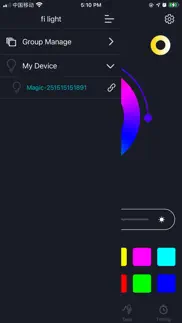
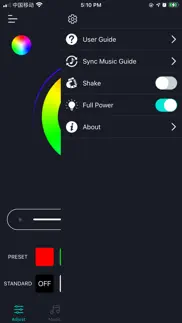
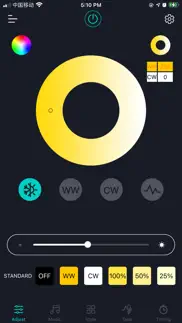
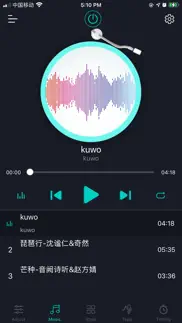
Fi light 2.2.6 Apps Screenshots & Images
Fi light iphone, ipad, apple watch and apple tv screenshot images, pictures.
| Language | English |
| Price | Free |
| Adult Rating | 4+ years and older |
| Current Version | 2.2.6 |
| Play Store | com.filight.qh |
| Compatibility | iOS 9.0 or later |
Fi light (Versiyon 2.2.6) Install & Download
The application Fi light was published in the category Lifestyle on 08 July 2017, Saturday and was developed by 兴魁 胡 [Developer ID: 1050544418]. This program file size is 24.83 MB. This app has been rated by 100 users and has a rating of 2.8 out of 5. Fi light - Lifestyle app posted on 16 February 2023, Thursday current version is 2.2.6 and works well on iOS 9.0 and higher versions. Google Play ID: com.filight.qh. Languages supported by the app:
EN FR DE JA ZH Download & Install Now!| App Name | Score | Comments | Price |
| Trim Light Reviews | 5 | 1 | Free |
| Triones Reviews | 2.3 | 47 | Free |
| HappyMesh Reviews | 1.6 | 6 | Free |
| ISmart CCT Reviews | 1 | No comment | Free |
| Elite Ble Reviews | 4.2 | 5 | Free |
Fix some known bugs.
| App Name | Released |
| Phone Tracker - Family Locator | 31 May 2023 |
| Eufy | 29 October 2018 |
| Tesla | 10 December 2012 |
| Starla - Call the Universe | 21 March 2025 |
| Wyze - Make Your Home Smarter | 13 October 2017 |
Find on this site the customer service details of Fi light. Besides contact details, the page also offers a brief overview of the digital toy company.
| App Name | Released |
| The Secret To Money | 08 September 2016 |
| LeafSpy Pro | 19 March 2015 |
| INKHUNTER PRO Tattoos try on | 29 March 2018 |
| Sincey - remember when | 03 June 2025 |
| WiFi Blocker | 30 May 2017 |
Discover how specific cryptocurrencies work — and get a bit of each crypto to try out for yourself. Coinbase is the easiest place to buy and sell cryptocurrency. Sign up and get started today.
| App Name | Released |
| Google Maps | 12 December 2012 |
| Ralph Lauren | 08 November 2021 |
| Wizz - Make new friends | 24 February 2019 |
| Cash App | 16 October 2013 |
| 28 April 2011 |
Install the Giftmio extension for smart shopping. Get notified about cashback opportunities, activate cashback in one click, and save money on purchases.
| App Name | Released |
| Ouros | 14 August 2024 |
| AnkiMobile Flashcards | 26 May 2010 |
| RadarScope | 12 February 2019 |
| Farming Simulator 26 Mobile | 19 May 2026 |
| Terraria | 28 August 2013 |
Each capsule is packed with pure, high-potency nootropic nutrients. No pointless additives. Just 100% natural brainpower. Third-party tested and validated by the Clean Label Project.
Adsterra is the most preferred ad network for those looking for an alternative to AdSense. Adsterra is the ideal choice for new sites with low daily traffic. In order to advertise on the site in Adsterra, like other ad networks, a certain traffic limit, domain age, etc. is required. There are no strict rules.
Keep personal info private, avoid scams, and protect yourself online with AI-powered technology.
Fi light Comments & Reviews 2026
consistency. Needs work. Fails to maintain settings. Not a paid for review by Vine or anything else. This is an honest review. Warts and all Nice color lights but no different thsn any other led light like this whether they are square or in a bar. The setting keeps reverting to half of the full intensity no matter how many times I set it and make it a settimg preset. These lights do not have a consistent timing option. The app should have the ability to turn off and on at a certain times but it does not work that way. There is very little instruction as to how to do this if it is even possible What instructions there are, are not intuitive or appropriately American translated aka Ok if you don't speak English but translation to English is confusing or missing full directions. This is a fault of Amazon for not insisting or providing a better translator Amazon should deal with this issue for as much as they charge the sellers. at least have staff who's user-friendly and will be tasked with trying the instructions and then correct them Basically tje Instructions are lacking altogether. The app designers failed to take into account the different iPhone sizes so the on off button actually hides underneath the top of the menu bar so one cannot access it again software quality control stupidity to not have made this more user-friendly. In addition one cannot access the additional settings because they're also under the top menu bar and there's no way to tap on them without just initiating Apple settings Basically you have to set both the lights to one color and that is it. It is not like Melpro Square wall washers where i can have a variety of options from the amount of time it stays on to the variety of cycles i can create. I don't want a wall washer that is super complex I just want it to be able to be let's say purple and orange for Halloween. The lights are set to the same light and that is it - there is no option to alter them to be contrasting. I was provided with one remote for two units I don't want to get into DJ professional DMX style wall washers. Just had hoped to get something that was a little more user-friendly and would provide me some contrast or variables that have to be a software engineer in order to operate With that said these are fine lights if you just want to set them to one color and leave it and turn them on yourself or get a reliable timer So far I just turned them on at duskand turned them off in the morning because every time I set a time for let's say for 5 hours it never works So the price is not bad and if you don't mind having to turn the lights off manually or on the color is good, the price is right.
Has issues with linking devices. Has problems with linking multiple lights.
Lights won’t connect. Light use to connect to app now it doesn’t
Disappointed. App controls on paper manual show external music mode, but on the app there isn’t. That’s the main reason I bought the LED’s.
Always connects. I have several different types of LED color lights with different apps. This one always connects instantly without giving me any problems. Love it.
Easy to connect and use. Works well with the OPPSK wash light. The app is simple to use and connected to the light without any issues.
Connects to device but doesn’t change color. Not sure what the issue is. I’ve restarted my phone and unplugged the lights just in case but it still will not change the color. The app shows me that it is connected to my lights and the light itself shows Bluetooth is connected But the colors will not change Help!
Unable to add light. I’m only able to add 1 of the 2 lights. Do not recommend.
Love. I love my LED lights. I bought my first set of two and then I quickly bought a second set. I love them inside of my house and outside of my house. It’s hard for me to decide so I have two outside and two inside.I’m thinking about getting a couple of more.
Good. Good
Request. Please make the pulsating light adjust fir brightness
Look elsewhere. I am working on bypassing this for my outdoor lighting. The sensors require that I am close by to function and disconnect when I leave. Instructions are marginal at best.
Lights don’t even show in app. Cannot connect lights to app…what a waste
Won’t connect to Bluetooth. Worked when I first opened the box but after one use they won’t connect to Bluetooth. I’ve tried turning off then on, turning BT off and on, disabling the app then re downloading and nothing works. They’re stuck on white light setting and are brand new.
App screen sized wrong for iPhone 15. The setting and menu buttons literally sit in clock and battery icons at top. And the power button sits under the camera at top. If this is the only app that controls the light bar I will have to return it.
Starts out good. Wish I had seen these reviews before purchasing. Worked good for one day.
Bluetooth operations. The Bluetooth no longer works on any of the lights. There seems to be an app issue. The light worked great once you figure out the loop hole to use all the lights at one time. The app only handles 10 to 12 lights at one time. Sometimes I have to set lights then unplug some to set the rest. Now all the light quit responding at the same time. I even had a couple at home from the same purchase time that also no longer responding. It put me in a bind because we use the At our venue and didn’t work anymore and we had to rent. Now we will get new ones with different vender. The ones we have now are useless with out Bluetooth operation. I would be surprised if this is read and is an easy fix. If there is a fix then I will fix the review.
Love this light bar. Like absolutely suprised. Only thing I wish it has was interface with Alexa or an intel MacBook
No instructions on how to add devices, even in how-to.. Bare bones and unable to sync lights properly. App isn’t all that great.
Not working. I’ve had them for a few months , used for one gig now stuck in same two color pattern with no way to change and do not response to the app
Redesign. Please please please move the power button to the bottom of the screen! The power button in the application is right in the middle of the notch on the top of the screen for newer iPhones
No help and it doesn’t work. I followed all the instructions, all the troubleshooting steps and they say “reach out to support” but don’t tell you how. Right out of the box it’s useless.
Light went out. Bought two.. one just stopped working out of nowhere.
Have 4 of them. They adjust to color I want but won’t stay bright? I pick up my phone after 3 mins and brightness adjusted to mid level? Why does it change??
Instructions are useless. Most difficult simple device I ever bought
The 2nd light will not connect. Is there any fix for the 2 nd light not connecting to the app?
Can’t use app (needs update for new iPhone). Cannot touch icons on the top of the screen bc of the Dynamic Island on the new phones. UI needs to be adjusted to fit the new screen. Unfortunately I can’t even turn the thing on bc of it. Useless.
Doesn’t connect. The Fi Light seems to not be able to connect to the app
Tony. The
Great Light needing Better Control. Love these lights but have not found and wish there was a way to save adjusted setting from the app to easily get lights back to where they were at when used last.
Last update killed app. Lights wont adjust brightness. App is garbage please make it work.
1 light connects. Only one of the ambient lights are connecting. Anyway to fix this? I will change to 5 star review if so
Let There Be Lights. The app doesn’t consistently connect to the lights, which means you must turn the lights on by physically touching the power button on each light. I was unaware of this detail. The lights were to be placed at different heights some unreachable without a ladder. This doesn’t work at all for the purpose the lights were purchased.
Don’t buy. I bought 2 of these to put in my room however only one will connect to the app my other 40 dollar light is non-useable I’m upset
APP NO LONGER WORKS. The bluetooth is not connnecting. Phone says it is, but the app is not controlling the light. The settings buttons are not lined properly on the newer model iPhones so it’s not usable.
App Used To Be Great - Limited Functionality iPhone 15 Pro Max. Using iPhone 15 Pro Max you can no longer use the device management drop down to control multiple lights. The menu sits right under the clock and you aren’t able to access it.
last update makes it so you can’t adjust brightness. please help and fix!!!!
Non-stop flickering. These lights just blink off and back on, then start randomly cycling through every color. Would not recommend
Wont work. Ive been trying to use this light but it would nit work i connected to Bluetooth and it dosent work still i dont know whats going on but if you could dix it that would be great,Thanks!.
Bad. It doesn’t work at all the bluetooth doesnt connect nor does it change any colors
Not always reliable and not great app set up. If you bought these lights to set up a party or for your house, you will have no problem. However, I’ve been trying to use the slides for on stage, and they aren’t reliable. Sometimes when I turn the off button the lights don’t turn off. Also, the fact that you have to scroll through settings instead of pushing them, make it hard to switch from one to the other without accidentally turning on other settings. I also miss the setting that lets me time a show. Also, only pre set colors can flash/pulsate. Not for professional use.
Lights not working!. My lights have stop working, and I am not sure the reason why! 🤯
Needs Update for iPhone 15. The app works well enough but on my new iPhone 15 Pro, the buttons at the top of the screen (menu, power, settings) are too far up on the screen so they're almost impossible to push (like they've bled off the screen). They need to be located lower on the screen.
Needs updating. App isn’t working the same for newer iPhones with Dynamic Island. Please help us the app is great otherwise
Works well after 2 yrs. Five stars
Needs update for iPhone 15 Dynamic Island. Overall it works great on my older iPhones. But it very much needs an updated version to work around the Dynamic Island and screen shape of the iPhone 15, because some important buttons are not clickable on the latest iPhone. Please release an update to make it usable again.
Doesn’t work anymore. It used to work and it was pretty consistent, but now does not connect and just flashes through rainbow
Terrible app and product. This app is terrible. They sell these like you can have them on a timer but they don’t tell you that you have to physically push a button to turn them on every time. And then the every time the light goes off, it deletes all of your timer settings. What a waste of money. And a terrible Apple.
Doesn’t interact well. The view doesn’t align to the iPhone 15. The latest version is installed but I can’t tap any of the top buttons because it is stretched too far up.
IT WONT LET ME CONNECT. I HAVE BEEN TRYING FOR HOURS AND HOURS AND IT WILL NOT CONNECT I HAVE BEEN FOLLOWING THE INSTRUCTIONS AND IT DOSE NKT WORK
Did you know that you can earn 25 USD from our site just by registering? Get $25 for free by joining Payoneer!
Timer?. Hi there. I just installed two light today and am trying to set auto timers to go on and off at certain times. I am confused about how to do this. In the timer area you can choose the light, then put in a time and then select “operate” or “enable” and I’ve tried every combination of these in order for the lights to switch off but nothing seems to work. I can’t test the turning on until tomorrow. Can someone please help?
Timer. Also have issue with timer. With no instructions, the detective work is tiresome
Color not changing. The device is not working properly. Even if we turn off on the mobile app the light stays in one solid color. Then have to turn off on the wall.
Imagine you at your best. All the time. Picture yourself at your sharpest and most productive. Your most alert and focused. Your most lucid, creative and confident. At work. At play. In every area of your life. Add Mind Lab Pro® v4.0 to your daily routine and uncap your true potential. Buy Now!
Very easy intuitive interface. Automatically connected to my lights. App very easy to use.
Rarely even finds the device.. Not worth the money. It doesn’t even recognize the device when I am standing directly below the light. Not impressed
Adsterra is the most preferred ad network for those looking for an alternative to AdSense. Adsterra is the ideal choice for new sites with low daily traffic. In order to advertise on the site in Adsterra, like other ad networks, a certain traffic limit, domain age, etc. is required. There are no strict rules. Sign up!