Webex App Reviews
Webex App Description & Overview
What is webex app? Cisco Webex is an app for continuous teamwork. Move work forward in secure work spaces where everyone can contribute anytime with messaging, file sharing, white boarding, video meetings, calling, and more. It works on virtually any device, with these top benefits for mobile app users:
• Streamline Teamwork: One place for all the tools that help you do your job better and faster. Create spaces for you and another person or for a group working on a project.
• Make Better Decisions: Start and join meetings instantly. See everyone with an amazing HD video experience. Share your screen. Keep teamwork going in the connected work space.
• Stay Informed About All Your Work: Select from our growing catalog of integrations and bots to keep up to date with what's happening in other apps such as Box and Salesforce
• Find Anything Fast: Search for people, messages, and files across all your spaces - no need to switch accounts or views
• Bring The Experience Into Meeting Rooms: Pair your app to a Webex device, such as the Webex Board, to do things like wirelessly control meetings and save whiteboard drawings
• Work Securely: Built for business collaboration with end-to-end encryption
Want to do more with Webex? Visit webex.com.
IMPORTANT NOTICES AND DISCLAIMERS - PLEASE READ
Cisco Webex is a collaboration application that provides messaging, voice, and video calling capabilities.
By downloading Cisco Webex, you agree to comply with the terms and conditions of the Cisco EULA. You also consent to the installation of all future updates of the Cisco Webex software. Use of this software is governed by the current Cisco END USER LICENSE AGREEMENT found at the following link: http://www.cisco.com/go/eula
By using the Cisco Webex software, you consent to Cisco Systems Inc. collection of data from your usage of the Webex software. All Data is collected in conformity with the Cisco Privacy Policy which is located at http://www.cisco.com/web/siteassets/legal/privacy.html
WARNING: This program is protected by copyright law and international treaties.
Cisco Systems Inc.
170 West Tasman Drive, San Jose, CA 95134 USA
😍 Do you love Webex app? Please share your friends!



Please wait! Webex app comments loading...
Webex 46.5.0 Tips, Tricks, Cheats and Rules
What do you think of the Webex app? Can you share your complaints, experiences, or thoughts about the application with Cisco and other users?
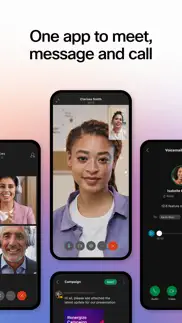




Webex 46.5.0 Apps Screenshots & Images
Webex iphone, ipad, apple watch and apple tv screenshot images, pictures.
| Language | English |
| Price | Free |
| Adult Rating | 4+ years and older |
| Current Version | 46.5.0 |
| Play Store | com.cisco.squared |
| Compatibility | iOS 17.0 or later |
Webex (Versiyon 46.5.0) Install & Download
The application Webex was published in the category Business on 13 September 2014, Saturday and was developed by Cisco [Developer ID: 298844389]. This program file size is 569.28 MB. This app has been rated by 9,378 users and has a rating of 4.5 out of 5. Webex - Business app posted on 14 May 2026, Thursday current version is 46.5.0 and works well on iOS 17.0 and higher versions. Google Play ID: com.cisco.squared. Languages supported by the app:
AR BG CA HR CS DA NL EN FR DE HE HU ID IT JA KO NB PL PT RO RU SR ZH SL ES SV ZH TR UK CY Download & Install Now!| App Name | Score | Comments | Price |
| WebexOne Events Reviews | 4.8 | 98 | Free |
| Cisco Product Verifier Reviews | 3.6 | 3 | Free |
| Intelligent Node Reviews | 3.5 | 2 | Free |
| Cisco Jabber for BlackBerry Reviews | 5 | 2 | Free |
| Cisco Meeting Reviews | 1.8 | 26 | Free |
• New default virtual backgrounds • Turn call notifications on or off on your device • Streamlined raised hand notifications • Use custom GIF reactions in meetings • Enhancements to the Join a meeting screen • Enhancements to the Meetings screen • New leave meeting option • Enhancements to the Personal Meeting Room screen • Easily connect to nearby devices
| App Name | Released |
| Roadie Driver | 18 November 2019 |
| ZipRecruiter Job Search | 28 December 2013 |
| Lyft Driver | 08 May 2017 |
| Slack | 20 March 2013 |
| FedEx Mobile | 10 November 2015 |
Find on this site the customer service details of Webex. Besides contact details, the page also offers a brief overview of the digital toy company.
| App Name | Released |
| VesselFinder Pro | 05 March 2013 |
| EML Viewer Pro | 22 September 2017 |
| Countertops Draw | 21 April 2022 |
| Remote Desktop - RDP | 12 February 2019 |
| Voice Recorder - Audio Record | 20 November 2014 |
Discover how specific cryptocurrencies work — and get a bit of each crypto to try out for yourself. Coinbase is the easiest place to buy and sell cryptocurrency. Sign up and get started today.
| App Name | Released |
| 09 October 2009 | |
| WhatsApp Messenger | 03 May 2009 |
| DoorDash - Food Delivery | 10 October 2013 |
| 12 February 2019 | |
| Messenger | 09 August 2011 |
Install the Giftmio extension for smart shopping. Get notified about cashback opportunities, activate cashback in one click, and save money on purchases.
| App Name | Released |
| Scritchy Scratchy | 18 March 2026 |
| CloverPit | 17 December 2025 |
| Earn to Die 2 | 20 November 2014 |
| Pou | 26 November 2012 |
| Geometry Dash | 13 August 2013 |
Each capsule is packed with pure, high-potency nootropic nutrients. No pointless additives. Just 100% natural brainpower. Third-party tested and validated by the Clean Label Project.
Adsterra is the most preferred ad network for those looking for an alternative to AdSense. Adsterra is the ideal choice for new sites with low daily traffic. In order to advertise on the site in Adsterra, like other ad networks, a certain traffic limit, domain age, etc. is required. There are no strict rules.
Keep personal info private, avoid scams, and protect yourself online with AI-powered technology.
Webex Comments & Reviews 2026
Restore automatic dismissal of notifications. Since the last update, I now receive notifications of my own messages. This seems completely unnecessary as I know these messages are sent. Please restore the earlier functionality where notifications would automatically disappear from my phone when I read the messages on my computer. The notifications are clogging up my screen, and I struggle to filter actual new messages from old notifications.
Great but…. Why don’t my direct messages close out on my phone app when I close them out on my laptop? Everything else sync’s up fine, so I don’t understand why this happens. It’s really annoying to have a giant list of old direct message conversations I have to leave (and then confirm leaving) one by one. Please consider changing this? Thanks.
Good app, few feature should be added. I use this app for school, and I have to say: It’s extremely convenient. Especially during coronavirus. However, there are a few things that need to be changed (in my opinion!) First, I think that the developers should work on fixing the fact that every time you get out the app to research anything, the next time you get into it, it just sits there and lags. Second, I think that you should fix the fact that you can’t raise your hand when you join from WebEx Teams into meetings. I may be wrong and there is a way to do this one, but if that is the case, PLEASE reply and correct me! :) Finally, I think that you should add a feature where you can look at what people’s deleted messages said. There have been many times where my friends tricked me and deleted their message and I have no idea what they’re talking about. I just think these features would be really useful, but other than that I think that this is a great app and I’d recommend it to many people. Have a good day!
Excellent, But Needs More Table Stakes Features. My organization (ADP Innovation Lab) has been using WebEx Teams since 2020, and moving away from our previous messaging and video providers, this has been a godsend. However, I believe there are still some very basic features that should be supported natively. These can be seen here: 1. Bulk Support for leaving spaces, as opposed to one by one. (For both mobile and web) 2. Native polling support for users, with customizable question and answers. 3. Ability to add custom emojis for reactions (or just more emojis for reactions), AND the ability to react more than twice on a messages. 4. A setting that “Tagged Messages” or “Unread Messages” automatically goes to the top of all messages, even when you have “Favorites” be its own section. Maybe make it’s own section. This comes from having to scroll down to find the notification / person. 5. Having a separate section for unread messages makes me click on the filter and then click on the unread messages, can we make this generally a better UX with one click somehow? 6. If some of the features above aren’t going to be done, maybe link to a store in WebEx to see where you can get bots that have been written to accomplish these things.
WebEx is a good app!. WebEx is a good app! I like it’s chat features and the fact that it lets you download anything posted to it. It makes screen, camera, microphone, and file sharing easy. It’s encryption from the ground up, not as an add-on. Things are only decrypted at the endpoint.
Just doesn’t work as needed. We moved to this service and simply cannot reliably take calls. On WiFi we will answer a call, get shown you picked up the call, other lines stop ringing, unable to speak with the caller and a few moments later all lines ring with the same incoming call. On cell network it’s basically the same. The only way we can get the call to be answered is by killing the app and starting it back up. This works for around 4-5 hours then the call feature is just broken again. If we move from WiFi to cell it breaks the call feature and we have to kill then open the app again in order to make or take calls. We can use handsets but that doesn’t help when folks are mobile or working remotely.
No transfer call option. I'm a system administrator for a corporation, and we use Fusion/Megapath for VoIP, so therefore we are forced to use WebEx. End Users are reporting that the transfer call option has been removed from the mobile application. We were able to use this function in the app previous to the most recent update. This can not continue to be an issue, as the company I work for needs the ability to transfer calls withtin the company. I have submitted a ticket on Fusion's customer portal, and await a response from either team. Would not recommend for business use!!!
Terrible. Crashes frequently, voicemails and recent calls dont update or just disappear, and whoever designed it needs to find another line of work — for example I just got a call and needed to conference someone else in (from my contacts saved in the app), and yet when I clicked on conference I got a random list of people in my organization but could not choose a contact I had already saved in the app AND could not type in their phone number. And there’s a feedback tab but you have to sign into an account that doesnt exist to use it. Zero intelligence behind this app.
R&D Listen up!. I’m so confused as to why all Webex features are not available in one app? Why must i download three different Webex apps? We are past those days! Lets create a better UI This definitely needs to be consolidated into one app....also would be a game changer if you could do file sharing in a way that the parties included can make personal changes or notes that would store on their end view...... effectually a shared document that can be individually annotated on ones own end. 1) Also try to integrate a social space... Call it the “Break Room 2) Make task lists available for projects.... with status bar, and status updates.... so that team members can know when projects are completed. 3) make a way to attach a title to the user example: CEO, secretary, Manager, supervisor...etc Reach out to me for clarification on any ideas and we can also discuss compensation for any ideas implemented.
High quality join meeting experience!. I’ve been using WebEx for over a month, it give me a very impressive join meeting experience, the audio and video quality is excellent, there are plenty of interesting features ongoing during the meeting.
Notifications are terrible. Within the last couple of updates the app icon I longer shows the red circle with count of unread messages and notifications stay in my Notification Center forever even after I’ve read them on my computer. Also, every time I move to another app and reopen Webex it kicks me back to the main page instead of putting me back in the chat I was just in.
Near Junk. Just got this from my employer. The dial pad is delayed when typing a number in and the call quality sounds like it’s 2006 again and was calling on 3G. It’s 2021. We should have HD calling. Why is it my CISCO VoIP phone at the office is crystal clean but this sounds like garbage? Internally it’s fine. I don’t talk with internal because it’s only 3 of us and all of our calls our external clients with cellphone numbers. Get it together. Why all of the sudden dark mode has turned itself off by itself!!!
Cannot Answer Calls. The application worked well for a couple of weeks, but since December, I can no longer answer calls. I’ve uninstalled and reinstalled multiple times, but calls just ring once and automatically go to missed call. If it wasn’t mandatory for my organization, I wouldn’t be using this app. We moved from UCX to Webex and it has a lot of crashing issues. It seems to work well on the laptop. But that defeats the purpose of mobile communication necessities.
Call quality mediocre, No voicemail. Call quality has been pretty meh. Voicemails got lost somewhere in recent versions. They show up on phone and desktop, but nowhere to be seen on iPhone version. I get notifications but they do not show up in the app unless I tap on the notification. If I just go directly to the app, they don’t appear. Wait for next call, person leaves message, and tap notification, and voilà suddenly there are messages.
Love the app but would fix a few small things. First, I use this app all day long almost every day and for the most part it works incredibly well. I have tie-ins with things like Sharepoint and OneDrive so it aids collaboration on files. Messaging is quick and I like the hierarchy of Teams and Spaces. They could get a little more creative with permissions but it may add complexity we don’t need. What we do need is less caching time on the app. If you need real-time changes, like when doing administrative work on Spaces and Teams, it’s much better to use the web interface. Sometimes it will take the app forever to catch up to any changes made either on the web or even in the app itself. It also wouldn’t hurt to have one more level of hierarchy above arenas when things get really busy. Finally, an option to auto-populate team members into a new space (other than just (General) would be a nice option when creating a Space under a Team. Still, the best messaging app I’ve used since ICQ. 😉
Cool bed no. So Webex is a great app but if you are in LISD student your messages will always be deleted by LISD Moderator. He deletes messages and he might even remove you from a team you made sometimes he removes the people you added to your team but if you add them again he will remove them and send you a message over 3 times. If you are not in LISD staff member then he will message you operation checked requires LISD staff member in it. Even in a private chat your message will be deleted. So we rated this 2 stars. 1 is for a good app which sends messages but the other is for Messages getting deleted if you are you in LISD.
Please allow iPhone WebEx app to access Focus.. I use Outlook at work to mark myself out of office. The airplane icon on my iPhone WebEx app indicates that this app knows that I’m out of office. I continue to get Webex calls. I put myself in Do Not Disturb on the iPhone WebEx app in addition to being out of office. I continue to get calls. It appears that the only way to stop the calls when The I’m not working is thru iPhone > Focus > Do Not Disturb. But, I would still like others to be able to contact me on my day off. But there is no way to allow the WebEx app to access focus, therefore no way to customize it so I hear from everyone EXCEPT WebEx when I’m am not working. I uninstall the app and reinstall it when I’m on vacation. Just nuts.
Easy to use and powerful. Such an easy tool to use and powerful communication tool that our entire team uses. I love the ability to send files/attachments to messages, as well as add links to text so that teams can quickly access pages or information at those links.
Constantly Bugging me for 911 Address. I use Webex to receive office calls on my cell phone. The app continuously alerts me to update my 911 address for emergency calls. Not only when I’ve changed location, but even when I’m sitting in one location do I get this message repeatedly. There appears to be no way to opt out of the 911 feature. This is the most annoying thing about the app to me, but in general this is a lousy, clunky, poorly constructed app that I would NOT recommend.
Has come a long way…. Have been using this now for two years or more, functionality and features have increased drastically during that time. I am impressed with the continual regular updates, thank you for putting time and energy into this platform.
Lacking IPv6 Support. I thought there was a strict requirement by Apple that all apps in the App Store needed to support IPv6. My mobile carrier only provides v6 on LTE and my network at home is also v6 only with NAT64/DNS64 and my iPhone does 646XLAT for connection to legacy IPv4 services but whenever I’m at home or on the road I get the notification that someone sent me a message but trying to open the chat to see what they said shows no new messages. Attempting to log out and log back in now shows the message “unable to connect to the server”. Even attempting to send the logs to support says it cannot send them. It’s really not acceptable in 2023 to not have IPv6 support.
Buggy.. Use this app daily for work, but the notifications in the latest release are buggy. It alerts me for messages that I’ve already read on my laptop, so I constantly have to open the app to clear them out. And now it’s sitting at 1 notification, but for no obvious reason (cannot find any new message, no highlight on a channel/space/etc). Maddening.
Wish the webex chat app worked half as well as webex meetings. I’m accustomed to apps integrating smoothly with the iOS ecosystem. The webex chat app does not integrate well. Between only getting generic notifications on the Home Screen and Apple Watch, general app instability, slow refresh / update speeds and a clunky user interface (why does it take so many clicks to start a new chat with someone?), using this app is far from state of the art. If you want to make it even worse, try to integrate a Cisco phone system with the app….that has been a long, painful and disappointing process.
Big brother!!!!!!. Creating a psycho effect on business users by showing when everyone was last “seen”! Who cares???? ???? ???? Only management does. Cisco enforces surveillance, not productivity. My friends at another job keep moving the mouse to show them Active!! Stop showing that Active status!!! Others will get back to us when they see the message!!! We don’t need to see if they are active, only to see if they do a presentation so we don’t disturb them. Response to Developer’s comment: NO! This functionality, to show you inactive after 5 minutes, should not be there! It creates 1. a desire to management to be big brother (and expect that you have it on when others do) 2. stress for subordinates. I am in management. You can tell me all excuses but you still create a non-productive frame. Please remove it instead of finding excuses. There are other silent employee activity monitoring tools. You should not make this app the same.
Need something extra.... Ok... it’s is a great app but i need a little somethin-somethin... So i use this app for online school so i am on a ipad but when i go on computer u can change ur font in messenges and on ipad u cant do that and i really love the font changer this but most of the time i am on ipad and it does not have it so please somehow make this happen...cand that’s kinda all that i have to say... other that that this app is great but one more this is that u might wanna make it available offline somhow because when i have a question for school and my dads fixing the internet i try to text my teacher but it says “unable to send” or something like that so please make that happen too.... and if we are in a group call can u make it so we can see our self????????? And sometimes when i try to call somebody it does not work so please fix that and bye! Have a nice day stay safe and of course.... have fun! ✌️
New issues with push notifications. Since the last update, I’m now getting push notifications on my phone for messages that I have already read on my laptop, and I am not getting push notifications at all for some brand new messages that did trigger on-screen notifications on my laptop. I will say that the search feature seems to have improved recently. It’s not as slow as it used to be, and I can now search for groups by name whereas I didn’t used to get any results back at all when searching for group names.
It works but super frustrating at times. I use this app for work. It’s frustrating when you only have 3 rings to pick up a call because of company policy, but the phone app misses one and a half rings vs the pc app. I’ll hear the pc ringing well before my phone. So if I want to use my air pods with my phone I constantly can’t connect to the call in time even if I hit answer on the 2nd ring when the notification finally shows up, the call just drops. It’s frustrating, but I deal with it. I just constantly have to call people back and bring up my recent missed calls takes forever too.
Audio issues. I have this app to connect to my office phone when I work remotely and need to make protected calls. Too bad the people I’m attempting to call can’t hear me when they answer the phone! So many calls where I cannot be heard and this is wasting my time. And no, this is not user error.. it’s not my phone, nothing is muted, not connected to any other devices.. just have issues when I use this app. How am I supposed to get my work done?
Current Version Prevents Google from Loading. The current version is pinging every second, sometimes less. With the “Team” app and Meeting app installed together, it’s checking so frequently that Google is “detecting suspicious activity,” and preventing searches. 41.4.8 is Trash: Instead of notifications of messages I get notifications of errors to display a message. That’s worse than before when they added the stupid notifications to meetings that I can’t turn off and use WebEx Meetings for. Ridiculous!
Can’t Turn Off Meeting Notifications. With the recent update push notifications are now showing for upcoming meetings. I do not want these notifications, and the app doesn’t provide a way to turn them off. If you want to get notifications when someone sends you a message on teams you are stuck. Please fix!
No background app refresh so no ability to answer calls. I use Webex to work from home, we recently switched from Jabber to Webex. I am unable to use the app because calls do not go through if my phone is locked or if the screen is not directly on the Webex app. I’m not sure why this is, I have reached out to my organizational support, Apple support, etc so it has to be the app settings. This is not a good app if you have to answer phone calls because unless your phone is ALWAYS on and never locks, draining all of the battery, or you never switch/toggle between apps, you cannot get phone calls through to your phone. I have tried everything I can to get this to work and done research for months but I still cannot get it to work. If it is possible for developers to allow notifications from the background when apps are not open and the phone is locked, this would be great. Until then, I am unable to even do the basics of my job while working from home.
Works well for when on the move. The app works really well with calls in allowing you to remain available when away from the office. However, there’s some nagging issues around the call log I would like to see addressed. Calls that are answered on the desk phone, and not answered using the Webex app show up as missed calls in the local iPhone call history. This clutters the iPhone call history with fake missed calls. There’s also no way to turn off the Webex call log from being integrated into the iPhone call log. Would like to be able to disable that integration completely when ready.
Great App. Great app, really does what we need it to do. The only complaint I have is that there is no way to keep images that I take and send within the app to stop going to my personal photos. We have to take and send images all the time for my job and and the end of the day I have to go to my personal photos and delete all of them. A button toggle to turn of the auto download feature would be great!
Notifications not working correctly. App has been great but with recent update there’s no toggle to turn on the feature to actually display the notification message that comes in. I would like it to display as I receive iMessages with preview on. Just displaying a notification is okay but rather get a preview of the content of the message
911 message is excessive. Let me decide if I want to use this app for emergencies. If I don’t that’s on me. If I do then bug me to death with the excessive prompts to enter an address. (By the way that’s pointless if your driving) Even after you enter an address as prompted it continues to ask for it! Even during calls! Annoying. If you try and allow your location it sends you to settings where you can’t do anything to allow your location.
The new experience. I use webex teams on a daily basis and the transformation on the experience is remarkable . The application have introduced several new features recently and has some pretty powerful integrations with other apps and bots. The productivity improvement is remarkable with the meetings , whiteboard, calls and chat on the same pane...
Several problems. Doesn't retain themes preferences. No matter what you chose it comes back to dark theme each time you launch the app and log in. Still no way to set du not disturb time ranges It's essential to be able to set a do not disturb status between, say, 6pm and 7am as well as weekends or afternoons if you work part time etc. Now you have to logout each time and log back in when you come back which is a pain.
Most recent update ruined the text log. This last update has made it in usable with having an active conversation with text chats. Every time I type and send something it never updates when exiting a conversation I re-enter and it’s blank completely have to force quit the app to reload a current version of the text log of a chat and then if you type anything new it will be out a date again and you’ll have to force quit the app and reload the whole log.
Great App… BUT….. My employer uses CISCO WEBEX for meetings, chat, collaborations, etc. It works great. For the work I do, we are required to have a coworker control our screen, check strings of a patch job, then put in their credentials to start the job. This noble app allows us to view someone’s screen, but does not have the control option. The App NEEDS the control option…
Teams. Aww man! I love the new update! There are so many new features! And it is more compact, easier to read, new themes, and it makes it really easy to communicate with my teachers during virtual learning! However....the new update forced me to log out and back in..as well as other students and teachers across the district. From then on we were not able to find our teams.... but it is a very seamless app!😁
Can’t login on iPhone 13 mini. When I try to login, the apps browser takes a very long time for me to be able to authenticate using my token. I can’t sign in at all. Update: Increasing rating to 5 as I am able to log in now and also this application supports voice text messages.
MAJOR FLAW. Ok, so after the update, there has been a major glitch that needs to be fixed instantly. While we have to do important school work and send photons and attend meetings, the app keeps asking to get permission to use photos and the microphone to send photos and hear meetings. The problem is that for iOS, there is nothing to let Webex access the camera and the microphone in settings. It’s gone! Reduced to atoms! It doesn’t exist. Please somehow integrate in into the Webex app, or just automatically do it. Thank you for reading my ted talk.
Stellar App, Mobile has one flaw that RUINS it. I work at a recruiting firm and we use Webex for all of our communications. On PC, I have no complaints. When you go to hang up/disconnect on mobile, the button is extremely unresponsive and has a slight delay so if you double click it to hang up (like you have to do 50% of the time because it's not responsive) you end up re-calling someone you recently called because the window finally closes and you accidentally click on the number, calling them. This is infuriating when dealing with clients, people who's space we are trained to respect. Double calling in the same day is looked as like harassment according to our company standards, and this app makes it very easy to do so by accident. Really well built and convenient app, completely ruined by this one flaw that is truly fatal when working in a professional industry.
Invaluable for global teams. I started using WebEx as part of an international Continuing Education program for dentists in early 2021 and have used it almost daily since then. It took a bit to get used to, and with the number of Spaces early on, it was moderately cumbersome to keep track of everything. As additional organizational features have been added, that problem has largely been resolved. It’s a remarkably flexible app, too.
Please Add Apple Watch Support. WebEx (Teams) has a great iOS app. It integrates very nicely with my desktop client running simultaneously and is great for calls and team messaging. It has been my full replacement for Jabber for 3 months now and I am loving it. The only feature it is lacking is an Apple Watch App. I miss being able to change my status from my watch like I could do in Jabber. I also miss the ability to check conversation history and check for new messages on my watch. While I still get the notifications on my watch, I don’t always see those or remember if I responded or not. By having an Apple Watch App, I could see the real-time conversation history, order and read status. Thank you!
Great UI love the security. This is so much easier to navigate than slack or Teams. Running work and fantasy teams from the same place and video calls with my mom. Works great. Favorite feature is remarking messages as unread and filtering on just my mentions
No notifications schedule?. How can an app like this exist where you cannot disable notifications based on schedules like after hours, from an application level? If you’re on vacation you need to sign out of the app or reconfigure the call queue to simply stop getting calls. How in this day and age there isn’t a function to silence notifications within this application based on hours someone would work during is enraging. This app is garbage compared to Teams
Issue with notifications. App works great for me except that the badge will show notifications but there aren’t any unread messages or missed calls and I can’t clear them. I open the app and hop into spaces and go to call history and still I see the red number on the badge on my Home Screen. Not the end of the world but pretty annoying.
“CarPlay support” doesn’t support calls. If it weren’t for Webex calling simply not working over CarPlay (receiving or placing calls), this would get 5 stars. But showing an incoming call, allowing me to answer it, and then it dropping every time is unacceptable. There is no setting or combination of steps that makes it work. Not even a workaround like using Webex via Teams. It just cannot be used to make or receive Webex calling while plugged into CarPlay, whether accepted or initiated via the phone itself or the CarPlay display. Why there is no option to disable CallKit, or manually select how calls are handled on the device, I don’t know. But it’s outrageous. Do better.
Great APP .. just add support for Google Cast also. WebEx is a great app for quick meetings and calls and easy sharing and it’s very secure . Only thing I feel would be great if the content is allowed to share on Google cast also it would be awesome to view the meeting content on tv screens too.
Did you know that you can earn 25 USD from our site just by registering? Get $25 for free by joining Payoneer!
Blank page. Not able to open chat app in iphone 15 pro max!
Best Collaboration tool. Easy to use and works like a charm. Makes me highly productive whilst being secure. Great audio and video quality.
Must Have App. This is one App I just can't live without. Enabling simple and easy collaboration betweren myself and many different partners, suppliers, firends and family. And the options it opens up when used with other Spark capable devices (Spark Registered Video Endpoints, CIsco Spark Board, etc) makes everyhting amazingly simple.
Great start. A great start to a IM chat app! A bit buggy and needs more features to compete with Slack/yammer/what's app, but noticing lots of development going on so the future looks bright for Spark!
Lost all messages. Has there been a recent update? Am now unable to access any of my messages or send messages and all of my contacts have disappeared! Very frustrating!
Not one app for meet & call, 2 apps. A year ago, someone submitted a review asking why wasn’t Webex & Webex Meet one program. Well, why isn’t it? It’s a year later & still two separate apps ❌👎🏽
keep downloading. when I delete this it keeps downloading
Does not work properly. When I got this app it was so useful but then one day it just stopped working and I can barely use it. It takes me over 1 month to get it working again but it can’t even survive 1 day.
Unstable. Does not work as intended. Occasionally when opening the app for the first time in a day, it will automatically dial someone in my contact list. Also cannot access voicemails from the mobile app? Or if we can it is hidden somewhere secret.
Lost all chats and chat options. After the recent upgrade, not able to view chat options.
Crashes. Crashes and unable to open after latest update.
Cannot share files from Webex to other apps. Cant share files with the current update. Cant share files to an email, cant share it anywhere😡 how annoying and no flexibility whatsoever... Webex cant even upload videos or photos fast. Always comes up with an error or crashes. Even if you try to upload 8-10 photos in one go.
Impossible to use. Never had problem with the app but last couple versions have been impossible to use. Crashes at exact 3sec of opening it.
Sends notifications regardless of settings. I have this app set to not allow any notifications at all. Somehow, regardless of this, calls come through and interrupt me on my iPad even when I do not have the app open. Separately from that (and this is a broader problem with the webex service, not just the iPad app), when you are in Webex, you will get notifications that a Space has started a call regardless of your global notification settings or the settings for that Space.
When is iWatch app coming??. The phone and PC apps are great and I use both the messaging and meeting functions all day. There’s an iWatch app for meetings but not for messages - seems backwards - when will the messaging app be available for iWatch, please?
Transfer calls. It seems the feature to transfer calls has been removed. Can we have this added again. We rely on this feature heavily
Amazing!. This app is incredibly easy to use and very very useful! Messages transfer straight away from iPad to laptop, and the video system is quite simple to get the hang of
Advanced call settings no longer works. Since the last update I can no longer turn on the Do Not Disturb from the app. The screen is blank and just says “cannot contact server” And why is it hidden away and so inaccessible? The automatic message bank doesn’t work so we get random calls diverted to my phone at all hours of the night and nothing works and I can’t turn them off. Also quiet hours needs an automated DND setting for out of hours and a no contact for weekends
Good but there is room for improvement. Works great and makes communication so much easier. It would be even better if it was an independent app, at the moment it relies on webex meet app to be able to join meetings from your IOS device. (Scheduled and PR meetings) When is the fully independent app going to be released?
Fantastic for secure team collaboration. Love using this app for team messaging, meetings and calls for my business and with our clients. The end-to-end encryption and compliance features are a must for the clients we work with.
Crashing after recent updates. Don’t know what it is but it keeps crashing after first start up.
Excellent collaboration app. Allows me to work with colleagues, other businesses and customers easily. Couldn’t live without it!
Needs work. Doesn’t gives notifications to Apple Watch while ringing, randomly mutes so no one can hear you, randomly doesn’t give notifications to your mobile while someone is ringing you
Quality. I have used all the platforms and Webex is just class. The quality is incredible and the room device integration is leaps ahead of anything out there.
Crashes. App doesn’t open after the last update
Crashes. Latest update causes it to crash. Have to uninstall and reinstall every few hours.
The best in everything!. This is the best app on the market for high-quality collaboration. Makes all other technologies look like toys.
Diverting Calls. For some reason I can’t divert the calls anymore with the new update. Can you fix this?
Buggy. Very buggy. The active meeting window disappears randomly and I lose access to the meeting control like unmute, exit meeting, turn on video etc. I have to close the application and join the call again. Sometimes the device options only shows “my phone”. Clicking it a few times and eventually the other options appear e.g call me and call in. If I join before the host, it puts me in a state of “waiting for other people”. When the host joins, it doesn’t put me in the meeting. Everyone that joins after the host joined can hear the audio fine. Anyone that joins before the host is stuck in there own sandbox “waiting for others to join”.
Recent update has crippled the app. Some recent update has caused the app to become extremely CPU-intensive after opening a chat with a large number of messages. It becomes unusable, so i shut it down.
Could be better. There are a couple of things that could really do some work. 1. Even when the phone is set to DND, Webex calls still come through! You have to switch to DND In the app or log out 2. When in a call, there are too many steps(and clicks) to transfer a call to another user. Making it a clunky transition instead of a smooth one.
poorly programmed. How does this bloated app use nearly 600MB?
So bad. Doesn’t even work, bad old interface
Handy tool for any device.. Been using Webex now for meetings and messaging for a while and got to say love the stability and features. Couldn’t live without it. The persistent messages are really important as I move from device to device during my work day. Even got my mum using it and she hates technology. 😀
Sub Average. Design and layout is so convoluted. Hard to use, I’d recommend using Zoom or even Teams instead.
Notifications. Hi there, All is great, love using it. However the notification badge gets stuck even after reading all messages. Very annoying.
Poor. I find WebEx is way behind MS Teams and zoom. Having been a WebEx/Spark user for almost 2years the switch to MS Teams was night and day. WebEx video quality is poor, audio is disjointed. If your an office365 customer is a no brainer to use Teams. Best thing i have ever done is ditch WebEx.
Solid.. I use this for work and I have found it really very useful. It’s stable. It’s flexible. It connects well with the other software we use.
Won’t load since ios14. Since iOS 14 the app won’t even load. Deleting and redownloading does nothing. Literally cannot use it at all now.
Great product improving always. This app has gone down hill so has the desktop version, sound quality, video are just not as good since latest release I also wish after reading a message I could mark as unread and highlight or something so I remember to come back to it
Powerful collaboration tool. Full featured app that allows teams to work together - discussions, video calling, file sharing
Definitely not a one-stop service. I was prompted to download webex meetings, a separate app when I tried to join a call with the Webex app. That means taking up more phone memory space and adding time to joining a meeting. Improve your app and streamline your services.
Great product. Fantastic app
App Stuck on Hang On Screen. Being using the service for a few years, although as of recent the Webex app has been unreliable - the Hang On screen is constantly looping upon launch as of recent even after I’ve updated my phone to the latest version. I cannot access any app features.
Audio issues. Not sure if this can be adjusted, but the sound is barely audible via the built in speaker on max volume and the microphone doesn’t seem to work at all on an iPad Pro
My most used business app. I live in this app... makes collaborating and joining meetings super easy.
Love the webex app!. One stop shop for all my business needs. Quick call to a colleague or customer, easy messaging and loving the new insights into work life balance to keep me on track!
Does not open on ipod touch. I downloaded this app to do school and chat with friends and on my ipod touch is wont even open!
Worst IM application ever. Hands down the worst IM application over the past 25+ years. The phone shows a message but when opening the application it takes ages to open. When it does open it takes a long time to update to show the message. Sever poor performance. One of the biggest UC companies in the world and they can’t get the simple things right
Freezing. Updated to v42.5.0 on iPhone 13 mini. This version is unstable and freezes all time. Annoying to wait 10 seconds each window.
Imagine you at your best. All the time. Picture yourself at your sharpest and most productive. Your most alert and focused. Your most lucid, creative and confident. At work. At play. In every area of your life. Add Mind Lab Pro® v4.0 to your daily routine and uncap your true potential. Buy Now!
Amelioration sur l’app cell versus la version ordi. Étant donné que j’ai essayé autant avec l’ordinateur que mon cellulaire et même mon pad, je suis déçue que sur mon cellulaire je puisse avoir que deux appels en même temps. Il serait bien de faire l’ajout d’avoir la possibilité d’en avoir plus à partir de l’app cellulaire comme sur l’ordinateur.
Very useful app. Five stars
Collaboration starts with Cisco Spark. Working within a national team, on many projects, Cisco Spark has given all of us the opportunity to work within a space no matter where my team is located. Meet, chat, collaborate. Amazing App
Love the App. Great for collaboration and replaces email!
A very nice application. Even though there could be some lag when video sharing compare to other solution. But definitely improving.
My iphone become very hot when I'm using Webex app. Everytime I use the app,my iphone become very hot,old versions don't have this problem.
Great App. Great app for collaboration with end to end security. Very flexible to be able to use connect to on-prem and cloud based solutions.
Latest upgrade. After I upgraded its not working this is not ok , it was working fine before !!
Can we get Apple Watch support?. Would be nice to have Apple Watch support so that i know when someone is calling me. Phone is always on silent mode and i won’t get the notification, nor can i force it to ring due to silent mode. So i only see the notification of missed call. Thank you
40.11 now crashes on iOS 14.2. Looks like not enough testing was done. Please fix ASAP.
Awful at syncing. This app struggles to display new messages. Sometimes I’ll even get the notification with the new message, but when I go to the app and view the message thread, it won’t be there. I will have to close and reopen the entire app to get my latest messages.
Full of glitches. Issues with video freezing, and dropped sound. Worse than Skype, had to delete.
Great but who’s developing this?. This is a great application! Also an awesome collaboration tool. However. I cannot for the life of me figure out why you have to download WebEx Meetings to be in a video call? What’s the point of having two apps when all the other competitors have one? MS TEAMS you can do everything in a single app. Is there a plan to merge WebEx Meetings into the WebEx app?
Works well, but battery hog!. Title says it.
Great collaboration app. Accessible from laptop, mobile. Available to interact with people even outside the company. Reduces use of email.
Great App!. Thanks
Worst meeting app ever. When I use it in my phone. It keep going black screen because it’s thought I am put close to my ear. But who will join a meeting and put phone close to ear. It’s 2023, people using headset or something else. I don’t know what developer thinking.
moved from push to pull messaging?. i updated to version 4.12(755) recently. ever since the update, i am not getting new messages unless i open the app. has there be change in the way the app receives messages - changing from push to pull?
App constantly wanting me to register the app. Can’t it just remember my info instead of having me 2 factor authenticate?
Works great. Easy to use, great collaboration tool.
This is the right tool for the job. I am deploying this for my team, and it is the perfect tool for us. Mixed with the meeting capabilities, this has really empowered my company to work the way they want to. It is amazing to see the different ways people come up with on their own once the have this tool.
Almost as good as Zoom! (Not really). This is a great product. I like the added challenges it provides when trying to use it. So much more then the others. It makes the other tele-conference apps seem boring as they are just too easy to use. Who doesn’t want a challenge! From a usability point of view though, this is almost as good as Zoom. Which makes this a very solid app if you like collecting apps! You may never actually want to use this, but that’s beside the point! Oh what a tangled mess we weave when we first try to use WebEx!!
Don't need permission to access photoes of phone?!. It's really strange or scary that this app don't need permission to access all of my photoes of my phone?!(This app can access photoes in phone automatically without any permission)I don't lnow why this app has this superpower,but I know this could be really horrorible,please fix this....thank you.
Doesn’t update quick enough. At times this app works great but then, it doesn’t sync in real time when alternating between app and desktop. Also, when messages are read or replied to, the badge app icon still shows that items are to be read which is annoying and misleading. Please fix
Excellent Communication App. WebEx works so well in keeping me and my colleagues connected.
App won’t open. App won’t open and update not fixing it.
Great app. We use this app at work because it syncs to our phone company provider. This is a great app. I am able to use my earbuds with my phone to answer customer calls. Sometimes it lags to our phone system though which can be frustrating but otherwise it’s great. The only thing is I wish they would make this app compatible with iwatch so I don’t have to carry my phone to transfer a call or answer more quickly. I find answer with my earbuds is were the delay is on when it answers.
Update broke screen sharing. Great app but I think the latest update broke screen sharing. I no longer see teams in my broadcast selection.
Why two apps?. It’s really weird and confusing that I need two apps: WebEx, and “WebEx Meet” and they hand things off from one to the other all the time—one app opens the other and vice versa. It’s very annoying!
Perfect for Business. Integration with WebEx Room Kit makes collaboration easy Works seamlessly with all my Microsoft apps and documents Very reliable product
Good app but.... Stop taking control of audio when connected to Apple CarPlay. It's pretty clear that there are no telepresence devices for the phone to pair to when CarPlay is connected. Quite annoying. Thanks!
App does not launch. App opens then closes immediately
Best Team Collaboration App. Love the new Interface of webex teams. I use the teams space to collaborate with my teams, share content, whiteboard, make adhoc calls and shedule my meetings. Everything in one place. Simple and reliable Thanks
Webex = Best Meetings, Collaboration & Calling. I have been using Webex for years now and can not say enough positive things about the service compared to Microsoft Teams and Zoom. Webex is without a doubt the best in class meetings, collaboration & calling experience with superior call and video quality. Security is baked into the Webex platform from the ground up not an afterthought like Zooms is considering some of Zoom’s certificates issued out of China.
It is awful to navigate and is way less user friendly then zoom and google meet. Never get this app
Terrible. Compared to other web conferencing apps WebEx is the worst. Zoom and teams are much easier to use. With way less glitchy. The browser app doesn’t allow you to see certain thing like a video shown in class. Compared to Zoom it’s way to complicated has to connect by phone because it wouldn’t allow me to select use computer audio. I was able to change after which is stupid. Horable app!!!!!
The first rule of squared is.... You don't talk about squared.
Notifications need the app to be open. I have every notification setting turned on in Settings for the app. But if someone messages me and the app happened to be closed, I don’t get the message. This happens for all of my staff as well. Too bad.
Simple. This app makes it simple to securely connect with coworkers and external users on projects. Very easy!
Best UC App in the market!!. I have been using Microsoft messaging from Lynx, Skype and even MS Teams, I have to say when I first tried Webex Teams I was skeptic but after using for it for a week I never looked back. It super easy to use on your desktop or mobile, it’s super fast when loading my messages and I can make and receive calls. The best part is I can join my meeting or schedule my meetings all in one app. Keep it going Cisco!!
Works great. Awesome way to connect with my colleagues around the world
No longer runs on 6s. No longer opens (stuck on initial splash screen forever) after recent updates. Now cut off when mobile from my business circle.
Horrible. Absolutely horrible. Drops calls if someone else calls. Unable to pick up calls as it says fails or when someone calls it just keeps beeping
Privacy. I deeply dislike that the calls I make through the Webex app show up in the recent call history of my phone. I would appreciate an update where the activities within the app remain there, so my personal phone call history is just my own. This feels like a breach of privacy for the people I call for work, as I would never call them or retain their numbers within my personal phone.
“Please wait for Background Refresh”???. Please update this app so that the background refresh is done automatically without having to open the app up.
Adsterra is the most preferred ad network for those looking for an alternative to AdSense. Adsterra is the ideal choice for new sites with low daily traffic. In order to advertise on the site in Adsterra, like other ad networks, a certain traffic limit, domain age, etc. is required. There are no strict rules. Sign up!
App Is not working. I have no idea what the latest update was on this app. I am not able to have incoming calls, can’t log out of the app. When it does ring I get two or three rings and I have this background noise and you can’t hear anybody in the phone call drops. Please fix this ASAP, I use this app to answer the company phone. I called him for support numerous times with no resolution.
Notification pop up’s won’t go away. I’ve had the app for a few weeks now, and I’m starting to lose patience with it because the notification pop up on the top right corner of it won’t go away. Everything is read,But the notification pop up again won’t go away.
No notifications schedule?. How can an app like this exist where you cannot disable notifications based on schedules like after hours, from an application level? If you’re on vacation you need to sign out of the app or reconfigure the call queue to simply stop getting calls. How in this day and age there isn’t a function to silence notifications within this application based on hours someone would work during is enraging. This app is garbage compared to Teams
It is okay. So it made a update where u can send voicemails and it made me restart which I was angry about but I remembered they have an website I could use anyways it made restart I logged back in it diddnt open app so I deleted app the redownloaded it it worked awsome and I love it new update it great! 😊
Perfect app. I use Webex Teams with everything on a PC and mobile, with Cisco video end points. Every month it is getting better and better. Cisco has the best collaboration portfolio, and I love how it integrates with Microsoft Office and file sharing solutions. Way better than Microsoft Teams.
Bad update fixed. Update fixed the issue. Back to living this app. Thanks for the response Just updated this with the latest update and it crashes when I open it. Help. I love this app and use it every day for work.
INCREDIBLY BAD PRIVACY ISSUE. Baffled by privacy lapses in the design on Webex. When prompted to share screen, it says select “Window” implying 1 single selected window using singular noun. It ended up sharing all my chrome windows exposing personal information. HOW DO THEY THINK THIS DESIGN IS OK? I’ve ruined my presentation and accidentally shared personal information and screen without knowing. This is incredibly horrible. Worst part is that there isn’t a proper channel to provide feedback. I hope they get sued quite honestly.
So close ... but a definite miss.. Not sure what the developers are going for with this app. They have the app with good features and them “fix” the app and remove features. The app fails to update in real time consistently if at all. It worked better in the beginning. Seems that someone is more concerned about themes than the actual function of the app. Please start back at the beginning.
Constantly Bugging me for 911 Address. I use Webex to receive office calls on my cell phone. The app continuously alerts me to update my 911 address for emergency calls. Not only when I’ve changed location, but even when I’m sitting in one location do I get this message repeatedly. There appears to be no way to opt out of the 911 feature. This is the most annoying thing about the app to me, but in general this is a lousy, clunky, poorly constructed app that I would NOT recommend.
It was better. Whatever happened in the last update (42.5.1), the app barely works now. It takes 30 sec- 1 min to open, opening conversations is slow and typing is laggy. (iPhone 8) please fix.
Stuck in a perpetual boot loop.. I heavily rely on this app for my current role and need it to facilitate phone calls. More of than I would like, and frankly more often than it should be the app crashes and repeats this loop of going to the app web page and having me open the app. It loops me into this over and over. Sometimes i get lucky and can make a conference call or delete a voicemail. I’m always sure to update to new versions.
Still needs work.. The WEBEX concept is amazing and allows me to communicate remotely while appearing to be stationary. However, when I’m in cellular “5G UW”, especially driving, I cannot make or receive calls. Very disappointing for a CISCO product. I suggest the Engineers iron this flaw out, rollout an update, or advise on the “fix” to users sooner rather than later.
Notifications are broken. I used to get preview text included in the notification, now it just says "new notification" and I have to open the app to actually read the message. Also, the notification menu in the app is missing. Update: show previews is set to always, but it still doesn't show me the message text.
Awesome App. Use the app daily for work and even some person use! The service is great, the app has plenty of customization while staying end user friendly. Love this app and service!
Notifications are broken. Please fix the notifications! They’ve been broken for months but the latest update (where the release notes only mention changing the logo?? Hello???) made it even worse. Message previews don’t work at all. It’s the least helpful thing in the world to wake up to 35 notifications that just say “you have new messages.” Maybe let’s stop focusing on new features and fix the existing ones
Useless. This app is trash. It’s full of bugs. It’s slow and doesn’t respond when you press buttons. My company switched to it and none of us are able to receive incoming calls. The app rings, but stalls when you try to answer the call. We have all had to use our personal mobile numbers instead. It is as if you don’t have a business number, with this app.
The new experience. I use webex teams on a daily basis and the transformation on the experience is remarkable . The application have introduced several new features recently and has some pretty powerful integrations with other apps and bots. The productivity improvement is remarkable with the meetings , whiteboard, calls and chat on the same pane...
Completely disappointed. Webex is unusable for me for past 2 months. I heavily relay on this app as I’m constantly on the go. The app has a bug for past couple of months that won’t allow it to stay open. As soon as I open the app, it crashes. I reached out to technical support and they provided a work around that didn’t help. They have been aware of this issue for a while and have not come up with root cause or solution.
Love the app yet a few things stop working like they use to. I was use to the app having PIP mode when I would be in a meeting I could leave the app and see my face and the meeting now I can’t seem to get that to work anymore
911 message is excessive. Let me decide if I want to use this app for emergencies. If I don’t that’s on me. If I do then bug me to death with the excessive prompts to enter an address. (By the way that’s pointless if your driving) Even after you enter an address as prompted it continues to ask for it! Even during calls! Annoying. If you try and allow your location it sends you to settings where you can’t do anything to allow your location.
Can’t Turn Off Meeting Notifications. With the recent update push notifications are now showing for upcoming meetings. I do not want these notifications, and the app doesn’t provide a way to turn them off. If you want to get notifications when someone sends you a message on teams you are stuck. Please fix!
Great APP .. just add support for Google Cast also. WebEx is a great app for quick meetings and calls and easy sharing and it’s very secure . Only thing I feel would be great if the content is allowed to share on Google cast also it would be awesome to view the meeting content on tv screens too.
Good app, bug in new version.. The table view when you click your profile icon in the upper left corner is missing the second table row for me, which is where I set the timer for me to be away for 24hrs after working. Set A Status is there, but the row below it is empty and shorter.
Unusable. We use this for remote work and we’ve had problems for about a month with dropped calls, calls with no ringing, calls not going through. We’ve resorted to a workaround for now but it is an unreliable app and service. I’ve also been frustrated that connectivity to bluetooth headsets has been unreliable as well and the app is slow to respond resulting in unintended touches and dials out.
Doesn’t support older iOS. Been using Webex for a few years now, usually no issues. But recently all our clients need to update their app to join the meeting. Well, if you don’t have a new device you can’t download the new version! This is REALLY UNACCEPTABLE! So now we have several clients that are unable to join! One client has iOS 15.8.1, that really isn’t that old, but because the client has an older device she can’t update the iOS. WebEx, FIX THIS PLEASE!
Poor design on iOS. The app functions great on the iOS when using it. However, when not in use it is poor at best. The sound notification is not audible, able to changed and does not repeat. The badge notifications do not reset on the phone until you open the app even if Background Refresh is enabled. The sad part is, both of these issues are well known by Cisco for many years with no changes.
Love the app...but... Something happened with this last update. When I click to open it flashes open and the closes out completely. I have to delete the app and redone load it and put back in my credentials and it works. Then once I close it and try to get back on it. It does the same thing.
Text Message from Private cell phones. The capability to receive text messages from private cell numbers would benefit those who have speech impairments.
Not good for calling. I’ve used Teams, Viber, Skype, WhatsApp, and of course the iOS calling app. Webex is the worst. They try to push their team communications regardless of whether you want to use it or not. The screen always starts with messaging. Picking up the call is glitchy. Getting to voicemail is hard. The UI isn’t intuitive. I wish they spent some effort improving the voice experience.
Notification Badge Won’t Go Away. The app works well but since the last update the notification badge on iOS is stuck at “1”. I’ve deleted and reinstalled the app. I logged out and back in again. I disable and re-enabled notifications. And I’ve rebooted my phone several times. The badge will not update.
Would have been impressive in 1995. WebEx is so behind, outdated and clunky, it can do a lot but does little well, not at all intuitive and the mobile app has been getting less and less reliable. This latest update is causing constant pop up screens and notifications are gone on Lock Screen. I only use this because my company uses it. Much better communication apps out there
I ❤️ WebEx Teams. I think that WebEx teams is great. I am able to contact my friends that don’t have phones. Also, I love the ability to delete a message. Also, if you were added into a group and want to leave it, it is so easy.
Worst User Experience for schools.. Our school is in Taiwan and after looking WebX, Zoom, and Google Meet, we opted to go with WebX. It was a disaster. The system has a lot of bugs and we experienced teachers sharing their screens without hitting the share screen button and students and teachers getting muted out of nowhere. We hung onto this system for a month but in the end to no avail….we now have migrated to Google Meet.
Transferring Calls. I use this on my IPhone when I am working from home and at first it was fine. But now I can’t transfer calls. Before I would tap on the three dots and the transfer button would pop up but now it’s not there.
Great Collaboration App. Best collaboration and video conferencing app out there. Having used all the video conferencing apps extensively, Webex is the best among them. Superior user experience, video quality and messaging features, while being very secure.
Crashes constantly. I use the WebEx app at work daily, and it was incredibly convenient to be able to use my PC and phone interchangeably to communicate with colleagues. Unfortunately over the last few weeks the app has become completely unusable. Every time I start typing a message the app crashes and I lose what I was typing, making me waste time and leaving me unable to do my work if I’m not at my desk. Please fix this.
Missing some critical functions/features still. Rating due to current lack of features compared to competitors. 1. No snooze functionality of alerts (only during working hours, etc) 2. Clicking notifications from phone screen doesn't not take you directly to current message
What all-in-one?. I’m so confused here. You schedule a meeting through webex app and they still make you download webex meetings? This wasn’t like that before the update … as webex app worked just fine with joining scheduled meetings. I’m not sure why this is a “all-in-one” app if you’re still downloading at least 2. ???
Please add Apple Watch support!. Watch support is the only thing missing from Webex features, the lack of which substantially complicates my life. I must carry my phone around our workspace instead of being able to answer calls on my Watch from this one service - all other services are available on my Watch. Thanks.
VOICE DOESN’T WORK ON IPOD TOUCH. The voice calling feature (formerly Teams) has stopped functioning on all our iPod Touches. This calling Webex feature was working a few days ago but when we updated to the most current software version we were no longer able to make calls. I contacted Cisco and was given the answer “iPod Touch is not a supported device.” even though the App store lists iPod Touches as supported devices.
New App Is Awful as a Phone in an Enterprise Environment. The latest version of the WebEx app broke 15 phones we use in an inpatient facility. Cisco support has been no help. Basically, think twice before using Cisco’s enterprise call systems and the WebEx app. Cisco TAC has been unhelpful and we, the customer, are left not able to answer phone calls in a Clinical setting. Cisco is screwing up another product w/ bloat ware. Find another soft phone provider you can trust to run AGILE development.
Needs Ability to change ringtone. Definitely working well for us in our work environment, but users on cellphones all want the ability to change the ringtone like they can in the desktop app. Strangely that’s missing.
Notifications not working correctly. App has been great but with recent update there’s no toggle to turn on the feature to actually display the notification message that comes in. I would like it to display as I receive iMessages with preview on. Just displaying a notification is okay but rather get a preview of the content of the message
Love app but it just stopped working on my Apple Watch. Using this app on my phone along with my Apple Watch used to make my workday so easy! All of a sudden it just stopped working on Apple Watch and now after uninstalling and reinstalling it, I can’t even get it to show up on my Apple Watch. Looking for a solution please. It’s a great app. But I can’t use it anymore.
Great UI love the security. This is so much easier to navigate than slack or Teams. Running work and fantasy teams from the same place and video calls with my mom. Works great. Favorite feature is remarking messages as unread and filtering on just my mentions
Can’t turn off inbound calls. I needed this app to join meetings remotely (after the Webex Meet app stopped working). But this app makes my (personal) mobile phone ring whenever my office phone rings. Even after hours or when I’m on vacation. I tried turning off all notifications and disabled running in the background but it still rings. My IT group said there’s nothing that can be done except uninstall the app. So that’s what I did. But now I can’t join meetings remotely.
Several problems. Doesn't retain themes preferences. No matter what you chose it comes back to dark theme each time you launch the app and log in. Still no way to set du not disturb time ranges It's essential to be able to set a do not disturb status between, say, 6pm and 7am as well as weekends or afternoons if you work part time etc. Now you have to logout each time and log back in when you come back which is a pain.
WebEx is a good app!. WebEx is a good app! I like it’s chat features and the fact that it lets you download anything posted to it. It makes screen, camera, microphone, and file sharing easy. It’s encryption from the ground up, not as an add-on. Things are only decrypted at the endpoint.
Great but…. Why don’t my direct messages close out on my phone app when I close them out on my laptop? Everything else sync’s up fine, so I don’t understand why this happens. It’s really annoying to have a giant list of old direct message conversations I have to leave (and then confirm leaving) one by one. Please consider changing this? Thanks.
High quality join meeting experience!. I’ve been using WebEx for over a month, it give me a very impressive join meeting experience, the audio and video quality is excellent, there are plenty of interesting features ongoing during the meeting.