Processing & p5.js iCompiler App Reviews
Processing & p5.js iCompiler App Description & Overview
What is processing & p5.js icompiler app? Compose and compile your Processing & p5.js projects right on your phone or iPad, wherever your are!
Export your Processing projects as App on your home screen:
1. Select an App icon for your Processing project.
2. Add it to your home screen.
You can now use the app offline, just like any other app!
This app is already being used in high schools and universities to teach and learn Processing & p5.js.
Your code is highlighted and formatted for excellent reading-comfort.
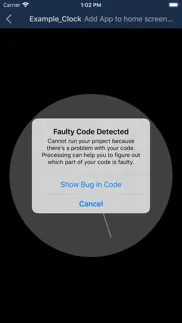
Processing Pro allows you to see which parts of your code are causing problems.
3D sketches and games are supported.
This is not an official app by processing.org or p5.js
Available subscription: Processing Pro, offers additional functionalities, such as exporting your sketches as apps.
Trailer Music: Circle of Alchemists
Privacy and Terms: http://processing-app.org/terms/
😍 Do you love Processing & p5.js iCompiler app? Please share your friends!



Please wait! Processing & p5.js iCompiler app comments loading...
Processing & p5.js iCompiler 2.7 Tips, Tricks, Cheats and Rules
What do you think of the Processing & p5.js iCompiler app? Can you share your complaints, experiences, or thoughts about the application with Riedel.wtf Apps S.L. and other users?



Processing & p5.js iCompiler 2.7 Apps Screenshots & Images
Processing & p5.js iCompiler iphone, ipad, apple watch and apple tv screenshot images, pictures.
| Language | English |
| Price | Free |
| Adult Rating | 4+ years and older |
| Current Version | 2.7 |
| Play Store | com.polarapps.processing |
| Compatibility | iOS 11.0 or later |
Processing & p5.js iCompiler (Versiyon 2.7) Install & Download
The application Processing & p5.js iCompiler was published in the category Developer Tools on 20 May 2013, Monday and was developed by Riedel.wtf Apps S.L. [Developer ID: 517545753]. This program file size is 32.65 MB. This app has been rated by 80 users and has a rating of 3.5 out of 5. Processing & p5.js iCompiler - Developer Tools app posted on 14 November 2021, Sunday current version is 2.7 and works well on iOS 11.0 and higher versions. Google Play ID: com.polarapps.processing. Languages supported by the app:
EN FR DE JA ES Download & Install Now!| App Name | Score | Comments | Price |
| QuickScreen Reviews | 1 | No comment | $5.99 |
| ICE Buddy for your Menu Bar Reviews | 1 | No comment | Free |
| Tap for BPM Reviews | 1 | No comment | Free |
| IRedstone Reviews | 4.6 | 450 | $1.99 |
| Shortcut Remote Control Reviews | 2.5 | 7 | $0.99 |
Finished support for Webcam / Camera API for p5.js projects. You can now access the phone‘s camera via p5.js‘ createCapture() API!
| App Name | Released |
| Termux | 09 December 2024 |
| Stream - Network Debug Tool | 04 January 2018 |
| Proxyman - Network Debug Tool | 10 March 2021 |
| BluetoothAssistant | 26 October 2020 |
| Resolutioner | 11 May 2021 |
Find on this site the customer service details of Processing & p5.js iCompiler. Besides contact details, the page also offers a brief overview of the digital toy company.
| App Name | Released |
| OpenTerm | 15 December 2019 |
| IDepth NDI | 20 July 2024 |
| N8n Toolbox | 05 June 2025 |
| Inspect Browser | 09 February 2017 |
| CodingKB | 19 January 2025 |
Discover how specific cryptocurrencies work — and get a bit of each crypto to try out for yourself. Coinbase is the easiest place to buy and sell cryptocurrency. Sign up and get started today.
| App Name | Released |
| Target | 24 November 2008 |
| Wizz - Make new friends | 24 February 2019 |
| 05 February 2019 | |
| DoorDash - Food Delivery | 10 October 2013 |
| PayPal - Send, Shop, Manage | 03 February 2019 |
Install the Giftmio extension for smart shopping. Get notified about cashback opportunities, activate cashback in one click, and save money on purchases.
| App Name | Released |
| RadarScope | 12 February 2019 |
| Paprika Recipe Manager 3 | 15 November 2017 |
| Bloons TD 6 | 14 June 2018 |
| Procreate Pocket | 17 December 2014 |
| Scritchy Scratchy | 18 March 2026 |
Each capsule is packed with pure, high-potency nootropic nutrients. No pointless additives. Just 100% natural brainpower. Third-party tested and validated by the Clean Label Project.
Adsterra is the most preferred ad network for those looking for an alternative to AdSense. Adsterra is the ideal choice for new sites with low daily traffic. In order to advertise on the site in Adsterra, like other ad networks, a certain traffic limit, domain age, etc. is required. There are no strict rules.
Keep personal info private, avoid scams, and protect yourself online with AI-powered technology.
Processing & p5.js iCompiler Comments & Reviews 2026
Compiler error messages, when do we want it?. NOW!
Good editor, but with a fatal problem. I love the fact that I can use this editor to work on sketches when I don’t have internet available, but several times I’ve had a situation where I’ve done substantial work on a file and found out later that none of my changes were saved and the file has reverted to an earlier version.
Buggy, Compiler feedback behind a paywall. I thought that with this app I could pun processing sketches created on the desktop version on my phone. I spent 4ish hours writing it only to find out that I cannot use this app. For one, you can’t import an entire folder at once. You can’t even import multiple .pde files at once! I had to import each one individually and copy paste them back together. Additionally, you have to pay to receive ANY feedback from the compiler. I completely understand the necessity for a paid version but you should at least be able to verify that your code works before paying. Without compiler feedback this is literally useless to program in. You cannot fix your code if the only error you are given is “Faulty code detected. Pay us to see where” I have no issue with the paid version and I would happily pay for it after I can make my code work but I can’t even do that Thirdly, the code color highlighting is terrible. It highlights inside comments, and only highlighted “bool” out of a boolean declaration. Notepad++, free open source software does this just fine, as does every other text editor. Any IDE should be at least that good. Lastly, the compiler seems overall buggy. Code written on Processing windows unchanged, does not run on this app. This program was nothing fancy. It only had 4 classes and did very little, but somewhere there is an error that I am completely unable to fix because I can’t see compiler feedback. I was really excited when I found this app and hope that I can use it how I intended. That is unfortunately impossible right now.
Well implemented processing IDE, fluid coding experience, could use debugging output. Processing IDE is very well implemented. Development is surprisingly fluid and quick for mobile. My one issue is with debugging. It’s hard to trace the source of coding errors, as you’re left with a black output screen and nothing else. Easy fix would be to display the error output from the processing interpreter/compiler.
Awesome. You have got to be one of the best coders. You have made the two most helpful things that I can use. Good luck on your career!😉
Awesome. I downloaded this app a week ago for processing and today I had the thought, “I wonder if there’s an app for p5js”... and it turns out that feature was literally integrated two days ago. Amazing app, I’ve been using it extensively, going back and forth between the github app, copying some processing sketches to get ideas for my own creative projects. Amazing app!!!
Won’t run .pde files. If you try to upload pde files and run them, they won’t work. You have to pay $25 to “unlock” compiler output to see what’s wrong. I’d rather make my own app than pay tax to see a compiler output.
вдлвовльвлвьвллвтвлвтвлвшсоаоалв. первый Российский комментарий
This could be awesome. The basic implementation for Processing is done well. Seems like a few functions are missing, but a great start. To make this a 5 star app and worldwide adoption, consider the following suggestions. If time is the issue, I bet many users would be willing to pay $1 or more to complete this. 1) implement Processing version 3 functions so sketches are fully portable 2) add multi-file support 3) add library capability with some type of library manager to import or delete libs 4) add capability to import and export sketches to a host computer. Maybe use Dropbox or or other existing file sharing tool I look forward to future enhancements.
Great app but wont support PVector class. great app really really love it you should really get it! thare are three main problems for me tho... 1) PVectors wont work for some reason. 2) no else statmnt. 3) this is beary important it doesn’t have arror messages. but i really love this app so im gona go ahead and give is the five stars is deserves enyway.
Great for coding in Processing. Huge improvements in the most recent version!
Please Let us know the limitations. Love this for playing around on my phone. I understand wanting payment for advanced features like debug messages. But please put a list of the major limitations of the compiler somewhere. Through reading reviews it seems that vectors and maybe functions with parameters are not supported. But a list from the Dev would be much appreciated.
It’s okay, but importing doesn’t work. I get it’s open source and free to use (I’d pay for it if a: there were a list of features I’d get for that, and b: I could find the in-app purchase page), but the import project folder feature doesn’t work. If this is something that’s a benefit for paying users, it should either be disabled or lead to the subscription page. A coder-friendly keyboard would be a plus, but I can manage. For doing quick Processing sketches on the fly, it’s good enough but don’t expect to be able to do more complex projects.
Critical flaws. The app is great, easy to use and overall deserves a 5 Star review, except that it deletes your code. Frequently. For anyone who hasn't used the app there is one thing you should know, there is no save button. While it seems to save when you exit the project, or logically it should save when you run the program, under certain circumstances, it will revert to the first time you ever exited the program. It seems like just implementing a save or backup button would make the program perfect. But if it can't even function as a notepad, then it's only a mediocre compiler.
Clunky and Faulty. I have enjoyed writing Processing programs on my computer for about 3 years now. They are a great way for me to keep my skills polished and make things I can easily show others. Imagine my joy at finding out there is a way to do this on mobile! I immediately downloaded the app and even paid for the lifetime Pro features. I am now regretting this purchase. My biggest gripe with the app is just how limited it is. I should have taken it as a sign that ALL of the example projects are only one file long. I have tried to make multi-file projects work, but clearly that feature is just for show. Typing is also HORRENDOUS! Not only does it not auto-indent for you, but typing towards the middle of the file jumps the viewport to the bottom so you can’t even see what you’re typing. Overall, I can see that the projects I want to make will not work in this IDE. After reading reviews that are years old, I can see that the developers have abandoned this hot pile of garbage, and the pro content is not worth a single cent.
Nice implementation of Processing. Frogg GmbH´s implementation of a Processing IDE for iOS is straightforward and easy to use both for the beginner and for the experienced Processing developer. It s nice to be able to test out simple to moderately complex sketches on the go. I do have a few suggestions: 1) a simple help system for beginners focusing on iOS-specific interactions with the hardware would be nice (camera, accelerometer, gyroscope, GPS? but, perhaps, some of these have not been or will not be implemented), 2) integration with other software tools (for instance, GitHub clients such as Working Copy), 3) a means to create and interact with a “data” directory and to import and export resources, and 4) a means to interact over Serial with external devices (ultimately, Arduinos, etc) would be nice. Thanks for taking the time to create a fine app.
Doesn’t recognize some data types.. I ‘m using this for a college CSC course. It automatically highlights some words as data types and it’s quite annoying. I ‘m using the interface function and the app things I’ve created an int named “erface”. Booleans also come out as just “bool” and the bool’s name is “ean”. Extremely annoying. Don’t waste your time with it. Just get the program on your laptop.
Glitched?. I started a canvas, and drew in it, it I can’t see the finished product, like I can’t see what I coded, I can only see the code, even when I click the play button
No compiler messages LOL. Building this nice app and then not showing compiler errors is kind of hilarious. I feel like I’ve been trolled.
Best one out there! 👍👍. Definitely the best compiler I have come across in a while. Works like a charm! It is in German though, I would have given five stars if there was an option for language. Must have for any processing lover!
Pay to play - on processing?. Simple commands won’t run. Dev want $$ to “debug” it. In another review he literally told someone who complained to fix it themself. Nice attitude. Typical German.
Functions with parameters break. Maybe I’m just crazy, but if i have a custom function with any parameters, the whole screen renders black. No parameters? Fine, works fine, but I need parameters to work :(
Great app. This app worked great for compiling until the update screwed up the if() command
meh!. I’m new to coding and while it’s nice to have an app where I can write and edit code, this app certainly doesn’t make it easy on me. It doesn’t display error messages, only the output, so when code doesn’t run it’s very difficult to find the source of the error. It doesn’t auto-indent and it doesn’t detect missing or extra brackets, so formatting is really difficult. sorry!
Great App, Worth your time. This app downloads very quickly, because it takes up so little storage space. It is a very well made app, and I would recommend it to anyone who is interested in a free processing compiler.
Screenshots. This app has no bugs that I'm aware of and is the best processing compiler on the app store. I have a request to make, however. Because I use this program to make art, like a lot of people, I would love it if there were a fullscreen mode that would allow me to take screenshots of my program while it is running without anything else in the background (time, battery life, signal, blue bar of processing). If there is already a way to do this please let me know. Otherwise this app is basically perfect except for one thing: it doesn't show errors in your code. For me this isn't much of a problem but for people starting off this can be frustrating. Thank you for making such a great app!
Perfect. AMAZING
Glitch. The about button and the new project button is impossible to see if dark mode isn’t turned on. At first, you can see it, but then if you scroll up, it disappears and I can’t get it to come back
Okay app. The app is okay because it allows you to create programs and run them, but is lacking in a few places. For one, there are no error messages. This makes correcting your code unnecessarily difficult for even fixing a simple mistake like a missing semicolon. Secondly, the formatting is a bit off. Else statements will throw the formatting of the whole code off and you have to type very specifically for some of the coloring to work (An example being you must have parenthesis directly after an "if" for it to be colored). While the coloring isn't necessary, it would be nice for it to work. Another somewhat minor issue is that you can swipe from the left hand of the screen to go back to your code. This means if a user of your code actually has to perform this action in some hypothetical program, it will just end it and go straight back to the code, inevitably frustrating them and the programmer. I ran into this problem when drawing with a piece of code I made. And lastly, the output strictly only shows 2 lines. There is no clear option to make the output larger or to perhaps split the output with the drawing screen. Overall I would have given this app 3 stars but I couldn't because it lacks error messages, which are pretty essential to programming.
Problem found. Again an update released has caused bugs in input. With a program that worked prior to the update, using void mouseClicked() it is running the code once then twice per click then 3 times per click and etc
Good but could be better. So overall it’s a good programming app but it’s missing some very important features.You don’t know what’s making the program crash you have to find it no debug log or anything,It also doesn’t have a designated save button.This has screwed me over and made me have to redo my projects several times.Personally I think you should not have to pay for compiling it.Other than that it is a really good program and is really useful for development.
No dev support. The app is a buggy, and don’t expect support. I’ve emailed the devs, and never got a reply. Project naming is broken, so you can’t name files with underscores or numbers, which is common for processing sketches. More complex effects such as blendMode(); don’t work. Simple sketches are possible, but if you want to make something more complex you’ll have to resort to video editing apps, or using a real IDE on a desktop.
Way better than the official app. You can copy and paste
Quite Wonderfull. This app is nice and simple. I am usually weary of ide's on ios, but this app is very nice.
Good App. This is a good app for beginner programmers. For some reason I cannot use "else" or "for" commands. It could be improved with some documentation on app. However the app is great otherwise, and I look forward to updates.
Allow basic debugging for free. At least allow free users to have basic debugging and make more complex error debugging for pro users.
Good for begginers. This app made me love coding and it made me want to learn the basics after I did something simple like draw a square but now you have a way to code wherever you’d like for FREE. I do wish it had tools to help beginners and syntax error messages so that I knew where to fix my mistakes but for an app this simple and free it deserves five stars it’s just such a great app!!!!!!!
i feel ripped off.. simple things fail silently - just a blank screen. errors that are trapped lead to an in-app purchase screen without even a hint of where the problem is. After you buy the upgrade, it might show where the error is and suggests you comment out the offending line. Useless. This product is scandalously bad and reflects poorly on the real processing software.
updates. is this app updated with the most recent pro repo? im trying to run a simple shape tutorial just to start, because i have things to do, but the app just runs a black screen, and it doesnt tell me anything. how am i supposed to know which features it can run if the support just takes me to the processing site? please fix, and ill increase your rating.
A Very powerful coding app. Processing Icomplier is a very powerful app. However i have not used it to it’s full extent but it’s very good for coding. Me and my father are doing coding every week and this is the app we use. 101/100 stars
Awsome. I love this app, I’m a big fan of massing around in Processing but often do not have my laptop on me, so now I always can code. Just one thing, by default on my iPad I like widescreen, and the code by default is width, height. Swapping them fixes it, just a small nagging. But that barely detracts from such an awsome app. Thank you for continuing to develop this app for free!
DISAPPOINTMENT. Imagine the least you could do for a Processing app, and you have this app. A huge disappointment. - No local reference (I can open the web reference by myself; it’s NOT THAT MUCH WORK) - No code complete/insight - the console is UNUSABLE for anything more than a single line - Not up to the standard of the current desktop app This is JUNK. PLEASE DO BETTER.
Does what it's supposed to. Neat little app that is simple and works. Allows you to create, edit, run, and save sketches. Copy/paste works which is crucial!
What?. So you have to pay to see any errors or feedback at all? I get it but I have 5 like lines of code just like any of the examples and it says it can’t run..And it’s a subscription? They really aren’t trying to hide the greed.
Some issues. Note: This review contains 4 edits. I absolutely love the app! It works perfectly and exactly as it should - however, the last update has two problems. One, the sketches are no longer ordered by last created. Not sure if this was just overlooked or if it was done purposely, but it would be nice if it was changed back (or there was some filter selector). Secondly, the example projects’ code disappeared... again, not sure if this was accidental or not. Otherwise, great job! Keep doing what you do! — Edit 1 — Okay, I had to lower the rating because I just found out (since the update) you can no longer use numbers in the title... Also, still waiting for those two things stated above to be fixed... — Edit 2 — Lowered it again for three reasons: 1. I’ve gotten no response and it’s been more than a few days since the last update. 2. I’ve been working on a fairly large project, (am roughly halfway done with it) and noticed the insane amount of lag when trying to edit a sketch. Moving the cursor around using 3D Touch seems to be fine, among other operations (such as scrolling, tapping, copying, pasting, etc.), but trying to type characters is VERY slow. I copied and pasted the whole thing into Pages. I can type with nearly no lag there, and it’s the same code. My current sketch is about 700 lines or so and is getting longer by the day... and slower, too. It is most definitely NOT my phone, either, as I’m running the app on my iPhone X - correct me if I’m wrong, but that shouldn’t be happening. 3. Some operations are annoying and can be a pain to fix. For example, sometimes when typing right after pasting things, the screen goes all wonky and moves your cursor somewhere totally different. Also, when you hit a key after closing a sketch, a similar effect happens. With a super large amount of lines, it gets really difficult to find where you were. Compare it to trying to finding a needle in a haystack. It’s possible, but only with a lot of effort. Might lower it again if those issues aren’t resolved (or at the very least, looked into). — Edit 3 — I understand this is fairly hard to read, so I’ll summarize it to the best of my ability. First, I have some new things that could be added: - Find and replace Currently, trying to change something in multiple places is best done by copy - paste, although this is rather slow. Find and replace would speed this up greatly. - A console Currently, the only way to debug is through text. It would make it much easier with this. Text on the canvas also cannot be copied, but text from the console can, which would allow for many new operations. - A settings menu This would allow for different options for formatting, sorting (for the sketch menu), the ability to edit the default code for your sketches, and other things. Those three are ordered by how much I’d like to see them added (find & replace being first). Now, the issues with the app: They are stated as follows: - Issue First explained: details of issue Here they are: - Sketches not ordered / sorted properly From original: Should be sorted by last edited - Example project code is missing From original: It disappeared after the last update. It was fine before that, so it was likely just overlooked. - Some characters cannot be used in naming sketches From Edit 1: Things such as numbers, spaces, and underscores no longer work when naming a sketch. - Insane lag when typing From Edit 2: This is only seen when the sketch has a large amount of lines. Has happened twice with larger projects. - Cursor / screen moves / scrolls when typing From Edit 2: I’ve only had this happen on one sketch, so I have no way to reproduce it. - Try / Catch doesn’t work New: It’d be nice if there was an error output when a sketch cannot run. - Pixel density not optimized for Retina screens New: Some things such as arcs appear grainy due to them only having pixels at whole numbered places, but not decimal ones (Not sure how to explain that well, but I hope you understand it). Those are ordered by when I said them, but also (coincidentally) ordered by their importance. Please fix them! Thanks. — Edit 4 — Looks like the app was updated! Just from opening the app, it looks good. The ability to search projects actually fixes quite a few issues - props for adding that! Project code is still missing, but I assume a reinstall would fix that. You can use numbers and underscores again (yay)! Not only does the lag when typing seem to be much less prevalent, but the ability to put functions in other files through classes should allow for most programs to be nearly lag-free. From the tests that I’ve gone through, the jumpy cursor seems to be resolved as well! Unfortunately, arcs still appear grainy for whatever reason, but overall the update is incredible! The ability to add files within folders is great, and I’ll definitely try it out. Keep doin’ what you’re doin’!
If you don't want heartache, DO NOT DOWNLOAD THIS APP. It seemingly randomly reverts progress and there is no save option other than to export the script as a file. I will not pay for an app that deletes entire functions and classes that I spent days working with. This seems to happen more often when using multiple .pde tabs, and when switching tabs it often undoes all work done in the previous tab after the new tab was created. Horrible file management and the data loss is not worth it.
File management error. I absolutely love this app. I greatly appreciate coding apps that work without WiFi, and this is the only one I’ve found for Processing. A bug I’ve found, however: I’ll be working on a project, then my phone will fall asleep, I’ll wake it back up, and the changes will be reverted back and I’ll lose up to a few files of work. I’m not sure how or why this happens but I think it’s worth looking into. Secondly, and this is not a bug, just a design thing, the syntax highlighter highlights “bool” in orange - but the keyword is “boolean”. So a line of code will like this: “boolean flag = false;” And “bool” will be orange, while “ean” will be white.
Great app, couple of suggestions. This app was what got me started with Processing. Here are my suggestions to make it even better. - Add a preferences panel for multiple options, including one to use the beta version of Processing (3) - Sync over iCloud or Google Drive, to allow work on sketches on desktop and continue working on them on iOS
Near worthless without being able to import libs.. Needs the ability to import libraries. Also almost no debugging even if you pay. It’s a good start but that’s all it is.
Awesome!. This app is awesome. Works perfectly and is really fun to play around with!
Did you know that you can earn 25 USD from our site just by registering? Get $25 for free by joining Payoneer!
Landscape please!. It is unlikely that I will use this for writing processing on the ipad unless I can type in landscape mode. Same for the other one I tried (and will review much the same)
bad. poor quality app, no good way to import an existing project, waste of time
Absolutely terrific. This is a great app for quick cool processing and p5 sketches, i have a bunch of sketches on my phone, probably more than i have anywhere else, super great app i recommend it wholeheartedly!
Excellent. I’ve used this for a few Processing sketches with p5js on my iPad Pro (with keyboard folio) and it works really well. My 3yo daughter loves watching and playing with some of the examples and code I’ve written too. Exporting of projects just got added too, so I can shuffle off my code to my desktop for finishing off.
Great version for ios. The version is a bit old but it's practically identical to the PC version. Would recommend it
Thanks for the update!. Thank you so much for this update! I’ve been waiting for something like this for ages! With this new update, programming with Processing on my iPad became such a better experience! Thanks for the great app!
Imagine you at your best. All the time. Picture yourself at your sharpest and most productive. Your most alert and focused. Your most lucid, creative and confident. At work. At play. In every area of your life. Add Mind Lab Pro® v4.0 to your daily routine and uncap your true potential. Buy Now!
Does not work. Some functions work. I could draw an ellipse. But others don’t . I could not draw a square. I paid $9.99 for the subscription to see if that would help, and it did not. Total rip off. They took my money and I still don’t have something that works.
Great Application. Been using this for several years now. Perfect way to learn the basics and much fun creating games for myself and my grandkids. Not a full replacement for a native SDK but I’ve had no problem on my old iPad Air 2 running 3D graphics at 60 FPS. Considering purchasing the Pro version for added error detection and iOS app creation which is missing from the basic version.
It’s good but 1 thing. Is there anyway that you could make this app convert Processing code to the New P5.js I think so many are having so much difficulties with trying to make code for the new P5 it would be really nice if you could maybe add something like that or something a little bit similar even to help people out with this 🙏🏻🥺
Works well except when you want to export files. I downloaded this just for a project in my university multi media course. The functionality in app works very well in my opinion for coding but can get overloaded easily. The one major, I repeat major problem that I face with this is that I cannot export it anywhere to submit it to my course’s online dropbox. I feel that this would be a major problem for several other people as well if they only have access to an IPad like me.
I hope that.... I don't want people to say that they want this to not be in the app store like valen22 and I can keep my things I made!
The Library. It is a very good application. But please can you add the possibility of adding a library, it would be very nice.
Programming issue and feedback. The app takes longer to depict the results/images/graphics after you type in the code, compared to the typing the same thing on PC, however gives enough space for a person using the app to practice different codes
One of a Kind Experience. This is the worst experience I’ve seen in my life, excuse my profanity. -4th Year Comp Sci Student
It works :D. I was able to copy paste the little game I made using my school computers Processing onto my iPad. Now I can show my family the progress I’ve made!
A poor effort. Deleted within two minutes - it's using an old version of Processing, has no error output at all (code just fails silently on error), no console to speak of, and the standard keyboard. Look elsewhere, this should just be taken off the store.
good but is missing features. processing on the ipad is… meh. i think being able to open the folder of code on the files app would be very helpful and is a necessary feature that is missing from the ipad app.
It doesn’t save you code. Wrote roughly 200 line of code and it just disappeared
Way better than competition. Copy and paste works! Formatting is a little wonky, and there is no undo button. Otherwise works great!
Great app 👍🏼. gg, really good app, but you should add a folder our a classer option, also pixelDensity() and displayDensity() ,continue the great job ;)
Adsterra is the most preferred ad network for those looking for an alternative to AdSense. Adsterra is the ideal choice for new sites with low daily traffic. In order to advertise on the site in Adsterra, like other ad networks, a certain traffic limit, domain age, etc. is required. There are no strict rules. Sign up!
great, but.... overall a very good compiler for processing! However, there are some easy improvements which are preventing me from giving a higher rating. 1. Please! make a landscape version. I would like to use this with my keyboard to input code faster, and can't if the only option is portrait. 2. Please use monospace type, because it's really hard to head some of the code, due to the narrow spacing otherwise nice job
Screenshots. This app has no bugs that I'm aware of and is the best processing compiler on the app store. I have a request to make, however. Because I use this program to make art, like a lot of people, I would love it if there were a fullscreen mode that would allow me to take screenshots of my program while it is running without anything else in the background (time, battery life, signal, blue bar of processing). If there is already a way to do this please let me know. Otherwise this app is basically perfect except for one thing: it doesn't show errors in your code. For me this isn't much of a problem but for people starting off this can be frustrating. Thank you for making such a great app!
Needs an ability to change the font size of the code.. Looking forward the next updates.
Goodie goodie. Jajajajajajakkakak