VOSC Visual Particle Synth App Reviews
VOSC Visual Particle Synth App Description & Overview
What is vosc visual particle synth app? VOSC is best understood as a visual analogue of a traditional sound synthesizer. The medium of synthesis, rather than sound waves, is a vast quantity of on screen particles. By manipulating the size, shape, and frequency of the oscillators, an endless variety of moving patterns and textures can be created.
A primary mechanism at work in VOSC is the phenomenon of visual harmony as explored by the computer graphics pioneer and visual artist John Whitney in the mid 20th century. The oscillators of VOSC operate in accordance with Whitney's principle of differential motion, giving rise to harmonic resonances as their frequencies move across whole ratios.
😍 Do you love VOSC Visual Particle Synth app? Please share your friends!



Please wait! VOSC Visual Particle Synth app comments loading...
VOSC Visual Particle Synth 2.0.1 Tips, Tricks, Cheats and Rules
What do you think of the VOSC Visual Particle Synth app? Can you share your complaints, experiences, or thoughts about the application with Duncan Holby and other users?
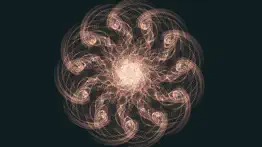
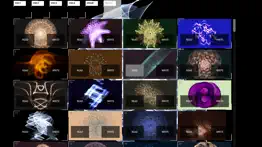
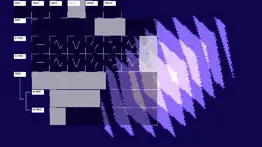
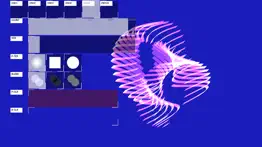


VOSC Visual Particle Synth 2.0.1 Apps Screenshots & Images
VOSC Visual Particle Synth iphone, ipad, apple watch and apple tv screenshot images, pictures.
| Language | English |
| Price | $4.99 |
| Adult Rating | 4+ years and older |
| Current Version | 2.0.1 |
| Play Store | com.glyf.vosc |
| Compatibility | iOS 12.0 or later |
VOSC Visual Particle Synth (Versiyon 2.0.1) Install & Download
The application VOSC Visual Particle Synth was published in the category Graphics & Design on 24 January 2013, Thursday and was developed by Duncan Holby [Developer ID: 592599281]. This program file size is 122.7 MB. This app has been rated by 26 users and has a rating of 4.5 out of 5. VOSC Visual Particle Synth - Graphics & Design app posted on 16 February 2025, Sunday current version is 2.0.1 and works well on iOS 12.0 and higher versions. Google Play ID: com.glyf.vosc. Languages supported by the app:
EN Download & Install Now!| App Name | Score | Comments | Price |
2.0.1 - Fixes for some older devices Version 2.0 is a complete app rewrite using a new graphics engine, enabling greater performance and functionality. New features include: - New additive and multiplicative blend modes - New oscillator waveform - Variable particle size and shape - Granular color and resolution controls - Patch thumbnail image previews - 40 new factory patches Please note that due to the extent of changes in this major release, patches saved using Version 1 are not compatible with Version 2 and will not be available after updating.
| App Name | Released |
| Cricut Design Space | 04 June 2014 |
| Dreamona -AI Video Art Creator | 23 July 2024 |
| Pixelcut AI Photo Editor | 03 November 2020 |
| DaVinci - AI Image Generator | 06 September 2022 |
| KLINGAI | 06 January 2025 |
Find on this site the customer service details of VOSC Visual Particle Synth. Besides contact details, the page also offers a brief overview of the digital toy company.
| App Name | Released |
| Image to Pixel Art | 02 February 2022 |
| ChromaMagic | 15 March 2024 |
| Ms Paint | 21 July 2022 |
| KiCAD PCB Viewer | 29 June 2023 |
| Clear Widget - Blank Spaces | 13 March 2023 |
Discover how specific cryptocurrencies work — and get a bit of each crypto to try out for yourself. Coinbase is the easiest place to buy and sell cryptocurrency. Sign up and get started today.
| App Name | Released |
| Hive Social | 18 October 2019 |
| 06 October 2010 | |
| Wizz - Make new friends | 24 February 2019 |
| WhatsApp Messenger | 03 May 2009 |
| Telegram Messenger | 14 August 2013 |
Install the Giftmio extension for smart shopping. Get notified about cashback opportunities, activate cashback in one click, and save money on purchases.
| App Name | Released |
| Ouros | 14 August 2024 |
| Earn to Die 2 | 20 November 2014 |
| Incredibox | 27 March 2016 |
| Bloons TD 5 | 15 November 2012 |
| Streaks | 31 May 2015 |
Each capsule is packed with pure, high-potency nootropic nutrients. No pointless additives. Just 100% natural brainpower. Third-party tested and validated by the Clean Label Project.
Adsterra is the most preferred ad network for those looking for an alternative to AdSense. Adsterra is the ideal choice for new sites with low daily traffic. In order to advertise on the site in Adsterra, like other ad networks, a certain traffic limit, domain age, etc. is required. There are no strict rules.
Keep personal info private, avoid scams, and protect yourself online with AI-powered technology.
VOSC Visual Particle Synth Comments & Reviews 2026
Definitely recommended!. Solid simulator, lots of fun to play with.
Visual Only!. I found this program in a search for synthesizers. I was looking for apps that make sound. This doesn't. But it is really, really cool. And very interesting from the "history of computer graphics" standpoint. I give it less than five stars only for not mentioning anywhere in the documentation that THERE IS NO SOUND! Actually, I expect the developer could make it audible since all the parameters appear to be in the audio range. How about it? Or at least mention its muted nature in the description.
Looks incredible. Really impressed by what I can do with this but I can’t figure out how to use the capture feature. It’s truly disappointing if someone wants to tell me how to do it successfully I’m all ears.
I’d happily pay more for AUv3 audio reactivity. I don’t know if its possible but id happily buy a visual synth like that with some midi and audio reactivity through auv3
Cosmic wonderment. Playing with this is like being able to direct some crazy goings on in outer space. And you can pick your own color scheme and save the different setting and designs that you create.
Stunning. I love this app because aside from the Vasulkas, Whitney is a hero of mine, and this just makes waveforms that much more of an exciting moving medium for art. That said, eagerly awaiting desktop and wonder if you are building in a midi control capability to live create, and adding the effects and other features like an xyz axis flexibility? ..an amazing original app with amazing recent improvements. Thanks!!!!
The new update is gorgeous.. Completely surprised by the new update. Not a completely new experience but it feels so much richer now. The visuals are cleaner and easier to see with customizable particle colors and background colors. Thank you so much for changing how the presets worked xD. Now we can see previews of the presets and clearly select ‘Read’ or ‘Write’. The interface flows better now and feels even easier to dive in and create mesmerizing visuals. Thanks again for this awesome update.
Amazing but why didn’t the share screen/capture button do anything?. Would love to use this as supplements to my art but screen recording from the iPhone looks bad quality, and when I click the button nothing happens
Inexpensive, but also kinda underwhelming… Plus it forces screen orientation in a weird way…. Not bad… Needs waaay more options. Like the ability for the particles to fade color based on stuff like age, distance etc so it’s not so monochromatic. Also seems to be a bug in that it forces the screen to be held one way. I.e. it doesn’t rotate. For the price it’s not bad, but I’d pay more for more…
still losing hours of my life to this app. Of all the particle generating apps I have on my iPad, this one is one that stays when others have to be taken off to open disk space. Even though you can only use two colors at a time and there is not much in the way of direct touch interaction with the fields once set up, I consistently lost many hours over the last three years to tweaking the oscillator parameters that determine everything about this app. The combinations are practically infinite, and it is surprising how quickly one parameter change will make a sinuous figure coalesce out of absolute noise! And each oscillator can be modulated, so you can set it up and then stare at the screen for hours. Better than weed. Very very nerdy weed.
Dude, some people want to use the app today.. I remembered this app as a cool thing to heal the brain.
Cool. A lot more subtle than most of the other visuals apps I've seen. Takes a while to get a feel for what the different sliders do, and then it takes some tweaking to find something that looks cool, but its worth it - I could stare at it forever. One thing is that the patches are kind of confusing - I accidentally overwrote some of the presets at first - make sure you drag left to load and not right.
Smarter than your average particle generator!. I'm an artist, both visual and musically. The iPad and the App Store have provided a great playground of electronic music synthesizers and a curious particle generators. Although VOSC produces no sound, it seems to be a combination of both, a visual synthesizer. it is a joy to play with.
beautiful, but ... Of ALL the apps i own of this variety (EVERY ONE REALLY) this one stands out above the rest. its beautiful, organic, leaves a lot of room for personal tweaking, so on and so forth. i spend an significant time with it, and i deem it time well spent. My only issue is that it only runs on my phone, my pads will show the opening screen then blank out into nothing. yes my pads r recent enough and up to date. i was really hoping to contact the developer directly and skip this route altogether, but i don’t see a way, despite him having a nice enough website theres no method of contact. Can u pls look into this, i want the magic Large, not contained just on my phone screen. THX THX THX 🙏
Nothing on startup. App doesn’t appear to launch. I see the VOSC banner then nothing. Running up to date I pad pro.
Amazing, want more!. This is great! I’d love it if it were modular, you could make one thing affect another.
Lots of potential. Similar to Uzu and Gravilocity without the realtime multitouch performance capability. But I love how this one uses oscillators, frequency, etc. seems more "musical" in a way. Would love to see multitouch implemented so that you could perform with this. I love some of the intricate and emotive designs you can get. Website says that a laptop version is in the works but that was back in 2013.
Did you know that you can earn 25 USD from our site just by registering? Get $25 for free by joining Payoneer!
Retro interface and can’t save to Camera Roll. This app looked good and in haste I bought it. However the interface is archaic, it took me several minutes to figure out how to get an image. Also, you can’t save to the Camera Roll. It forces you to upload to their website and then you have to visit the site and download the image. So no good if you are not on the Internet at the moment of your creativity.
Imagine you at your best. All the time. Picture yourself at your sharpest and most productive. Your most alert and focused. Your most lucid, creative and confident. At work. At play. In every area of your life. Add Mind Lab Pro® v4.0 to your daily routine and uncap your true potential. Buy Now!
Adsterra is the most preferred ad network for those looking for an alternative to AdSense. Adsterra is the ideal choice for new sites with low daily traffic. In order to advertise on the site in Adsterra, like other ad networks, a certain traffic limit, domain age, etc. is required. There are no strict rules. Sign up!