AARP Now App Reviews
AARP Now App Description & Overview
What is aarp now app? Introducing the new and improved AARP Now. It’s the app that makes your AARP Membership truly mobile.
AARP Now connects AARP Members to personalized news, alerts, events and savings that matter to you—whenever you want them. Download AARP Now and your membership is wherever you are.
MY AARP
The all-new My AARP includes top stories hand curated by our editorial team, uniquely personalized news, events, benefits, and new ways for you to customize your experience with AARP Now. Plus, videos and the latest digital editions of AARP The Magazine and AARP Bulletin. Easily access your digital membership card, Inbox and My account with one tap from My AARP.
MORE PERSONALIZED THAN EVER
The new AARP Now personalizes recommendations based on your previous activity. Get more of the content you love on My AARP, News, Benefits and Events.
ACCESS DIGITAL EDITIONS OF AMERICA’S TWO LARGEST PUBLICATIONS: AARP THE MAGAZINE AND AARP BULLETIN
AARP Publications help people 50 and older live their best and most fulfilling lives. Read current and back issues in AARP Now. You’ll find these in the new AARP Publications tile. Don’t have time to read now? Save any magazine article for quick access later. And you can even listen to articles through our new audio feature.
NEWS
The new AARP Now includes more opportunities to catch up on the latest news in just a few minutes; read the latest Top Stories on the My AARP tab, or dig deeper on the all-new News tab, bringing you even more curated news, plus news uniquely personalized just for you. Save News stories for reading later. And join the conversation by sharing with friends and adding comments!
MORE AARP
The new More AARP tab lets you tailor your app experience. If you find something you’ll want to access often, use the Customize Your Navigation feature to add it to your navigation bar.
SAVE FOR LATER
We have expanded the save feature in AARP Now beyond just benefits and events. You can now save news stories and videos, and features in AARP Publications, as well as benefits and events. Access items Saved for Later by tapping the Saved for Later icon on News, Benefits or Events, or tap Saved for Later in My Account or My AARP.
DIGITAL CARD/MEMBERSHIP
Instantly access your digital membership card and add it to Apple Wallet alongside your other affinity and payment cards. Join AARP or renew your AARP Membership in seconds. Plus, manage your account on the go.
EVENTS
Explore hundreds of local community events and online virtual events – from farmers markets, movies, documentaries, workshops, fitness classes and more, to kid-friendly activities – and quickly register for them right from the app.
MEMBER DISCOUNTS
Easily find benefits and discounts in your neighborhood, now with new Nearby view, showing nearby benefits on a map. Offers are added monthly.
GAMES
Access AARP Games, wherever you are! From Word & Trivia Games to Arcade Games to Solitaire & Mahjongg, there's something for everyone. And if you want even easier access to Games, add Games to your navigation bar with the new Customize Your Navigation feature.
NOTIFICATIONS
Receive news alerts, reminders for upcoming events or when benefits you have saved are nearby. You can easily manage your notifications in My Account > Notifications.
AARP REWARDS
Get more from AARP Now with the AARP Rewards program! Earn Rewards points for downloading the app and visiting the app each day, plus synchronize your favorite fitness tracker or the Health app to get even more points for steps, swimming, and cycling.
*AARP Membership is not required to use AARP Now, but AARP Members Edition™ exclusive content may require membership.
Terms of Service: https://www.aarp.org/about-aarp/terms-of-service/
Privacy Policy: https://www.aarp.org/about-aarp/privacy-policy/
😍 Do you love AARP Now app? Please share your friends!



Please wait! AARP Now app comments loading...
AARP Now 4.3.0 Tips, Tricks, Cheats and Rules
What do you think of the AARP Now app? Can you share your complaints, experiences, or thoughts about the application with AARP and other users?


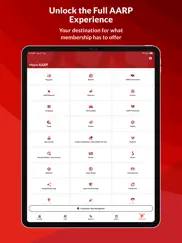

AARP Now 4.3.0 Apps Screenshots & Images
AARP Now iphone, ipad, apple watch and apple tv screenshot images, pictures.
| Language | English |
| Price | Free |
| Adult Rating | 17+ years and older |
| Current Version | 4.3.0 |
| Play Store | org.aarp.AARPNewsApp |
| Compatibility | iOS 18.0 or later |
AARP Now (Versiyon 4.3.0) Install & Download
The application AARP Now was published in the category Lifestyle on 29 September 2010, Wednesday and was developed by AARP [Developer ID: 394286732]. This program file size is 181.44 MB. This app has been rated by 181,913 users and has a rating of 4.7 out of 5. AARP Now - Lifestyle app posted on 02 June 2026, Tuesday current version is 4.3.0 and works well on iOS 18.0 and higher versions. Google Play ID: org.aarp.AARPNewsApp. Languages supported by the app:
EN Download & Install Now!| App Name | Score | Comments | Price |
| AARP Innovation Lab First Look Reviews | 4.5 | 8 | Free |
| AARP Staying Sharp Reviews | 4.7 | 3,096 | Free |
| AARP Streams Reviews | 2.3 | 28 | Free |
| AARP Alumni Network Reviews | 5 | 2 | Free |
| AARP Perks Reviews | 1 | No comment | Free |
Improved Events experience : We’ve made updates to the Events experience to make sure you see all the AARP events available to you. Discover something new today! Improved Digital Membership Card: We’ve updated the membership card to clearly show your membership status and allow you easily to renew if your membership expires. Benefits Experience Updates: Find relevant benefits near you more easily with improved provider location accuracy. Performance & Reliability Improvements: Enhanced ads quality monitoring, improved login stability, strengthened data privacy and improved navigation across key app sections.
| App Name | Released |
| Smart Life - Smart Living | 25 May 2016 |
| Toyota | 07 August 2019 |
| Starla - Call the Universe | 21 March 2025 |
| Tea Dating Advice | 12 January 2023 |
| MyChevrolet | 27 October 2010 |
Find on this site the customer service details of AARP Now. Besides contact details, the page also offers a brief overview of the digital toy company.
| App Name | Released |
| 12 Steps Companion AA Big Book | 13 November 2008 |
| AA 4th Step | 22 January 2015 |
| HOGSCAN | 06 April 2017 |
| HRV4Biofeedback | 02 June 2020 |
| MyURemote - Universal Remote | 27 March 2012 |
Discover how specific cryptocurrencies work — and get a bit of each crypto to try out for yourself. Coinbase is the easiest place to buy and sell cryptocurrency. Sign up and get started today.
| App Name | Released |
| Spotify - Music and Podcasts | 14 July 2011 |
| Google Chrome | 28 June 2012 |
| Google Maps | 12 December 2012 |
| Wizz - Make new friends | 24 February 2019 |
| Ralph Lauren | 08 November 2021 |
Install the Giftmio extension for smart shopping. Get notified about cashback opportunities, activate cashback in one click, and save money on purchases.
| App Name | Released |
| MilGPS | 01 December 2010 |
| Pou | 26 November 2012 |
| Geometry Dash | 13 August 2013 |
| Scritchy Scratchy | 18 March 2026 |
| Procreate Pocket | 17 December 2014 |
Each capsule is packed with pure, high-potency nootropic nutrients. No pointless additives. Just 100% natural brainpower. Third-party tested and validated by the Clean Label Project.
Adsterra is the most preferred ad network for those looking for an alternative to AdSense. Adsterra is the ideal choice for new sites with low daily traffic. In order to advertise on the site in Adsterra, like other ad networks, a certain traffic limit, domain age, etc. is required. There are no strict rules.
Keep personal info private, avoid scams, and protect yourself online with AI-powered technology.
AARP Now Comments & Reviews 2026
Much of the app doesn’t work. (This is the experience on an iPhone 15, a currently sold iPhone. I have had it and been logged-in for *months* but kept expecting them to fix such an obviously broken app, so I never bothered to write a review… until now.) ——— There are 5 section of the app, represented by icons at the bottom of the screen. MY AARP, NEWS, BENEFITS, EVENTS, MORE AARP. ———Three of those sections have been absolutely useless for the 6+ months I’ve had this app. You click on “News” or “Benefits” or Events” and all you get is “Something went wrong. Please tap refresh to try reloading. If the problem persists, please contact support.” ——— Hysterically, the “Refresh” button is 98% covered up by those 5 icons on the bottom, SO YOU CAN’T EVEB CLICK IT. And the “contact support” link DOES NOT EVEN WORK. At all. ——— I have to believe this was some beta app, not a full finished version. But how was it even uploaded??? AND HOW HAS NO ONE WHO MADE IT NOTICED HOW FULLY SCREWED UP IT IS????!?? People should literally be fired over this. ——— (To give credit, the other two icons actually do work.)
App errors. Current link to ask a question about the app triggers an automated response email indicating it’s an incorrect link. My question was related to deletion of messages from the app Inbox as the number of messages notification does not change after reading messages, thus users are not aware if new messages have been sent. Also, can’t find a way to delete messages after reading them. Fair warning - As I use the app for limited purposes, given these issues, there could be additional issues other app users may experience.
Easy Fixes. TL;DR: Not optimized for iPad’s bigger screen real estate; Keychain functionality missing. I really blame Apple for this. I’ve seen a lot of this; Apple allows a developer to say their app works on the iPad. Technically, this is true. But what that means to you and me and millions of other users is that we expect the darn thing to not be the iPhone app running on the iPad. We expect orientation modes to work, and the full screen to be utilized. Not a tiny window that renders your big, beautiful iPad into just a mirror of your iPhone screen. But Apple lets developers claim it works on the iPad when really it doesn’t. Next is Keychain, the super helpful iOS built-in password manager. This isn’t Apple’s fault, but the developers. A big, rich organization like AARP ought to support the automated filling in of login credentials on their app. I mean, AARP is constantly warning seniors about the dangers of weak passwords and phishing scams etc., yet they don’t even optimize their app to support using Keychain, which is a great way to create a really strong password without having to memorize (or write down!) a random string of characters! Do better Apple and AARP. We know you have the resources to manage that.
CHECK OUT AARP and see what I found out.. Have always liked AARP ever since I joined this great organization. Also love the way this organization has a supplemental medical plan after retirement. I checked into so many plans till I found AARP Plan. I’ve been so happy with this plan I signed up for 7 years ago. They’ve been very go to me and sure they will when my wife retires in December 2022. Check out AARP and there retirement medical plan compared to all those other companies out there. You’ll find out what I found out how they charge for there medical retirement plan. I owe them so much. THANKS
If you have trouble connecting to your membership. I had missed the deadline to renew, so as soon as I restarted my membership, I installed this app. When I tried to set up the app, it asked me to enter my membership number to “connect my membership with my AARP account.” That is confusing, as what would be the difference between my membership account and my membership? The app showed my membership as having expired, despite my logging in with the same credentials as on the web (where my membership was good and expiration was years in the future). SOLUTION: I followed the activation link in the renewal-success email ON my iPhone. (I had already followed that link on desktop, but that didn’t activate my account on the app.) That link in the email on my iPhone brought the app up directly (no side trip to Mobile Safari!) and instantly activated my account on the app. That’s actually very cool, as many developers don’t connect straight to their apps. Hopefully this helps others.
Wrong info, locations change and keeps resetting. Difficult to use this app as it keeps resetting back to home screen every time you leave it to check out something without closing it. You have to go through steps finding what you were looking at all over again ... if you can remember. Provided with a wrong non-existent address for Denny's!!! I have been a member for almost a year and haven't used a single benefit so far. Live events are all offered during working hours. Some of us still work! Location of services with discounts (e.g, oil change) keep changing. Why not make them available in all locations all the time, so people didn't have to check and recheck every time and drive farther than the closest location to them? How is that helping elderly people?
Very Disappointed. This app seems like it would have a lot of good content but it is so glitchy and slow!!! I’ve tried it on several different occasions months apart and it’s still the same. My phone is updated and I’m not iPhone illiterate. I know how to work it quite well. It constantly makes you sign in. It also takes you to the AARP website if you choose certain content. I wrote a comment and it would not even publish it. And it would not tell me why. I thought it was very bland and short. Nothing bad at all. lol! Don’t waste your time with this app. You might want to just try the website instead if that even works. You would think after paying for membership that they would get the app right!! Disappointed!!
Just plain good information. Reading the information I received from AARP not that I didn’t know this before AARP just brought it home in a good nutshell. I Holy Spirit get me up at 5 AM and I begin to read about health issues good brain health and medication and other things that don’t quite cut it and those that make things better. I found out that I am in conflict with my meds and my healthy eating goes against the meds. but with this information now my doctor and I will work this out thank you AARP.
To the point!. I like that your articles are short into the point.I just read the article about five items that will be scarce at the grocery stores this year. I like that I could read it and not have to go around the history of the world before you got to the point. Sometimes I don’t have time to read a long article or I have some health problems and I can’t read for a long time .thank you
AARP’s website is cumbersome and antiquated. I went on to book a trip for the first time on the AARP website and spent over 20 minutes just trying to get a hotel which I already knew which one I wanted and a flight. It took forever because you couldn’t find things and a lot of places after entering the information there was no done or enter button so you had to figure it out yourself. It also was about $600 more than the other sites I went to. My first and last time using it. I hope the rest the website is not as bad and if it is, I’m just going to get on the phone instead.
Life saver. AARP is a life-saving tool, especially, when it comes to scamming. I am the caretaker of my 86 year old Mother who has dementia. Before being diagnosed with this disease she was a brilliant thinker. She loved working with computers and on them. However, after my Dad died, she would sit on the computer a lot actually conversing with someone that we found out later was a scammer. Fortunately, the gentleman she spoke to was not able to get any money from her. I am an avid reader of AARP and fortunately I read an article on how these scammers work to make you think they are from Microsoft. My mom and I became one of your stories on the saddest occasion of our lives it was after the death of my brother. My mom purchased a computer and while I was working to create an obituary, someone claiming to be from BestBuy called demanding additional money from my mother in order for me to download the needed software to write the obituary. Fortunately, I had read about this technique and hung up on the guy and called BestBuy that had me speak to someone in their Fraud department. They helped me clear up the situation and I was able to relay what happened to my mom which taught her a very valuable lesson. Thank you for these articles they help.
Daily deals are almost worthless. If the daily deal seems like it’s a good opportunity it disappears within less than a minute. It appears they probably only have about 10 of these when they are decent and they disappear immediately. The ones daily deals that are basically have no real value. they are the ones that will hang around for the whole two hours or perhaps they have thousands of them.I no longer waste my time trying to catch a daily deal.
Good Information, Difficult To Use. I use an Apple Smart Folio with my iPad Pro. This configuration is best supported by the iPad’s landscape mode. Unfortunately, the AARP Now app for iPad only allows for the portrait mode. This is could be considered a “win” for some users that prefer this mode. For others such as myself, this becomes a bit of a nuisance. I would find it useful to have the option of determining which display mode works best for me, as opposed to having the developer decide. If that is not possible, I would suggest that mobile users consider a web version instead of this app.
Games not working, terrible support. As of the latest “bug fix,” none of the games work. Any link in games can’t be selected, nothing happens. I emailed AARP support but got no response. I logged on to the chat and received a message to clear cookies and was then kicked off chat. I had already taken all of these steps, including deleting and reinstalling the app, without success. It seems no one from AARP Now recognizes or can fix this problem. Terrible customer support, will probably delete the app. Eventually received a response that a new bug causes games to not work if the default navigation settings are changed, and suggested changing them back. That worked, but jeez, what a bug! Totally not obvious why that would be the problem, and I hope they beta-test new releases better in the future.
What happened?. I’ve always liked this app and the information I’m able to get from it. However, about three weeks ago, I discovered I can log into my app, but I have to go through all kinds of hoops. It says it doesn’t recognize my password. I’ve changed the password three times. I can no longer read the items for members only even though I am a member and when I go onto the website, it says hi (my first name). When it asked me to type the letters to prove that I am not a robot or whatever, there are no letters that show up for me to type. What happened to cause the sun change? I’ve never had this problem before. I’ve deleted the app and reinstalled it, but it still doesn’t work.
problem. hi I was wondering why I have to always put in my password? But then when I put an end it doesn't recognize it! I hate when you have to put in the moving letters or whatever. I'm beginning to hate this a lot. Matter fact I've been hating it ever cents. I have my password changed but it's not working like it should I shouldn't have to do the the login part where you have to do the moving letters or whatever all the time. This tells me that this app is not really working correctly so until you have this fixed I don't think I'm gonna use it from that email because I'm having a problem with my email when it says login from the email and I'm doing it the right way but it keeps on telling me to do the moving letters I am visually impaired and even when I do the voice part that's not working at all so until then I'm just gonna go to the app itself and when it's in my email I'm gonna keep on erasing it because it's not working through my email only from the app I hate when it says do the moving letters or type the letters you see you whatever I am visually impaired and the audio does not work sorry for this long part that I had to put in but I am just frustrated when it says login from the email it doesn't work only from the app it works fine but from the email it's horrible so any time I get this in my email with the aARP I am going to discard it with the app it works fine so I'll tell you get that fixed I'm just gonna keep on logging in with the Apple stead of the email from Jeanne PS my password should work and I should not have a problem with it
This app needs work!. I’ve actually never reviewed an app before, but this one, the AARP app, is so glitchy, it’s just awful to use. Where it offers something for print, it displays the product but no print button. Login password info isn’t saved so you have to go into your password settings to fill it in. Not easy to unsubscribe from the 29 (!!) newsletters that you’re automatically signed up for. App developer, not all “old” people are tech illiterates. Some of us are advanced tech users and expect better. Please fix the glitches.
Excellent content; glitchy interface. First, the Good: Informative articles, TED talks, body and mind workouts, and community connections. Honestly, much more than I expected—and still plenty to explore! I might sound like a fake review (there’s an article for that,) but wait— The Bad: The application needs a lot of work. Bugs and glitches, AI text all over the place on quizzes, white text over gray backgrounds, video errors, spinning wheel of doom, and it is impossible to scroll on many articles. Also a little frustrated to be bounced around to the browser and back (or lost in limbo) for many things. The Ugly: Trying to find articles and links that I want to access again between the browser and app ping pong. All of the good stuff gets close to five stars for content, while the interface rates closer to three. Work in progress, I know—but I hope you can address some of the text, browser. and scrolling issues sooner than later.
Please fix the games. The variety and number of games is great! However, most of the games don’t have a way to exit. So you have to swipe out of the entire app to go pick a new game. If the game gets stuck, there’s no exit so you have to swipe out of the entire app to start a new game. And since it’s an app, you can’t even use the back button. Sometimes you can’t even choose a different icon. When you come back to the games icon, you’re stuck in the same place.
App update terrible. I opened the AARP app like I do every morning to find a new updated app and look. It asked me to sign in but when I did, it didn’t recognize my sign in and required me to create a new password. So I created a new password. I hit the sign in button and all it does is spin. I can’t get into my account on the app anymore. It is very frustrating. So I figured I would delete the app and then put it back on my phone which I did. When I went to sign in, it didn’t recognize my information again and it also asked me to create a new password, which I did, and all it does is spin when I hit the button to sign in. I am on the app every morning and this is just ridiculous. I would’ve gave the reading a one, but I can read the stories that are on there and that’s about it. Nothing else.
Enjoy the games but lots of bugs. I love the assortment of games the app offers and enjoy playing many of them. But the bugs are bothersome. Occasionally it logs me out, and when I log back in, the Games tab is gone from the navigation bar. And then I get the instructions pop-up for each game, like I’ve never played before. Secondly, there are certain games - Codeword and Two minute Crossword - that I play every day but my score is never indicated in the calendar that appears each day. Someone in the FAQ section suggested that you need to be logged in. And I was logged in to the app, but apparently not into GAMES. When I logged into games, my score did indeed show up on the calendar for that day, but then I was logged out of the app, and had to do that all over. Lastly, I don’t mind the 15 or 30 second ads that come up before certain games, but the 3 minute purple Humpty Dumpty ad is too much! When that one comes up, I close the app and find something else to do.
Marginally functional bad app. App does not even display properly while I use on my iPhone screen, and I am using the latest version of iOS and the latest version of the app Absolutely necessary portions of the app, such as buttons to click runoff the bottom of the screen similar issues exist Help does not display at all. It’s just blank either in the app or in the browser Big UI overhaul needed —— I probably have a content blocker or some sort installed I will not remove the content blocker under any circumstances help should not be blocked by a content blocker what’s wrong with your programming standards. The app should always work properly and if the phone is in lockdown mode The app should still work properly The app is insanely slow There are minor issues that involve AARP ethic For instance, a person may sign up for newsletters because Points are available However, the app failed to tell the member That they need to not sign up for too many points related things at once because you can only get some limited number of points per day This is AARP taking advantage of the members. And that’s terrible ethics When you consider that probably all the day to AARP is busy making money off of it I know AARP is probably a nonprofit, but that never stopped From making money so that’s not relevant The way the app operates and the way the website operate on my phone Leave me, wondering about the ethics of the organization as a whole
You pay for membership and APP still full of Ads. Hate this app. Would not recommend. Take the option to get the paper copy of the magazine in the mail. Opting for digital is too aggravating. I hate all the advertisements in the app. If you pay for membership the app shouldn’t bombard you with advertisements! Ads are behind every article you read and at the bottom of the page. They also have paid advertisements that look like regular articles but if you tap on them they launch to a website outside of the app. Also, the top of the app will constantly have an ad to try to force you to sign up for automatic renewal. It won’t go away even if you’ve already signed up for 5 years! I could be dead in 5 years, why would I sign up for automatic renewal 5 years from now?
Nearly unusable. And I’m an IT professional. The information architecture for this app is stunningly terrible. You can’t find anything intuitively. So you go to “Search.” In this case, it was to find out how to download my AARP membership card. Returned over 1660 results of articles that mentioned “download” and “membership” and “card,” but nowhere said “How to download your AARP membership card in the AARP Now app,” let alone that result being the first in the list. This app is really nothing more than a push to have users sign up for notifications and newsletters, and a repository for their past articles, which are written to such an elementary reading level as to insult common intelligence. Just trash.
Fails on iPad. I tried to write a comment to a story on the iPad app and it was simply too difficult to complete. The text of the comment simply scrolled off the single line input to the left, so you couldn’t read or edit what you’ve written. You could see one or two of the previous words you entered, but that’s all. I tried dragging the cursor back on the text, but had no success. Additionally, the virtual keyboard on Apple products has three words above it that you can choose as your input. The app has three words, but only displays the final three characters of the words, so there’s no way to know what the choices actually are. If you want to interact with AARP using an iPad, don’t bother with this app!
Surprises me each time. I am finding this app worth my time and attention. It stimulates my curiosity each time with something new, and the variety and depth of info seems huge. Sometimes a game or mini quiz or video is just the mental break I need or a good distraction while waiting for an appointment to start. The meditation and stretching videos were very good too and that was a surprising ‘find’, as I am an advanced meditation teacher. AARP App, Keep up the great work! 🙌🌅😎
Why AARP matters. There are far and few noble organizations which provide the trust, utility, and value that AARP provides to citizens of the world. AARP stands for truth, they are a shield devoted to the protection of our vulnerable and refreshingly the advice they give is never self serving; they truly put the interests of common people first. The content and advice they provide is holistic; they care about our physical and mental health, they care about our financial well being, they care about helping us protect and enjoy the most of what we have, and for those of us less fortunate they provide sage advice for overcoming our respective hurdles and improving our quality of life. I can’t think of any organization I’ve belonged to being more worth the cost of membership than my AARP membership. Thank you!
I feel like the ads are designed to rip off seniors. The articles are good, layout confusing, ads are basically click bait. I tried one of the advertisments which offered $100 gift certificate from target. To get there, you had to give them a bunch of information via a survey, sign up to have various people call you and bug you, and then you are REQUIRED to buy multiple specific products like a Costco membership before you could get the supposed hundred dollar gift certificate. I would’ve thought AARP would do better.
Horrible App & Company. The App doesn’t allow you to cancel your account! Oh it has the feature to do so but when you click cancel the app pops up a “are you sure?” pop up that prevents you from canceling your account. Then to add insult to injury they show that their call center is open until 11pm EST, nope, closed before 8:15pm EST when I tried to call them. Since they want to continue scamming me then I’m calling my bank in the morning to have any future charges denied! Guess that is the only way to stop them from scamming me further. Why would anyone belong to AARP? I get better discounts from anyone else! As an example; Valvoline Oil Change, with AARP discount $146, even the dealership only charges $78! Spend a little time researching this company and whatever you do don’t believe these glowing reviews, they must be by fake bought and paid for shill’s. Go ahead and keep my $16 you scammers, it’s a cheap education as I now know how you’re just another for profit company taking advantage of the elderly and not about helping protect the elderly.
Great APP…BUT…. I really like the AARP app however it is very frustrating to use. In this day and age it’s ridiculous that this app seems to be stuck in the past. Older people are way more tech savvy now. Please catch up to us. In no particular order here are the things I have found so far that have created this frustration. For reference purposes, I have the iPhone 15 pro max. So it’s a new phone using an outdated app. 1. If you turn the phone to landscape mode, either whatever you were reading freezes or it returns to the app home screen. 2. Same with playing a game. If you turn the phone you have to restart whatever game you were playing. 3. If the phone goes in sleep mode, you have to restart the whole process of going to that game again. 4. Some games just don’t work at all. They open but you can’t play them. 5. Even when reading an article, if your phone goes into sleep mode while reading, when you wake the phone, the app goes back to the home screen and you have to find the article again. 5. Why can’t we save an article to read later? I literally have to send an article to myself via email so that I can read it another time. 6. When anything is open, the word “Done” appears at the top left of my phone. Please get rid of this and just put a back arrow so we can choose to just stay on this page and go back to the Home Screen ourselves. 7. I have not used this app yet on my iPad, but from what I’ve read in other reviews that is also a nightmare experience. I use my phone for the most part. But if this is the case, please, please have your app designer fix these flaws. This app shouldn’t be so frustrating to use. Let’s see if they actually respond and do something about this or just send a canned response and do nothing. This is what appears to happen when reading older reviews complaining of these very same issues I have just written about. Reviews that are 3 and 4 years old stating the same issues. Please fix these issues. You would have a great app if you do.
Is this 2020 or 2010?. ‘Cuz this app — the NEW app, replacing two no-longer-supported apps (AARP & AARP Member Benefits), looks like it was designed for iOS 3. First of all, a non-Universal app that doesn’t even support landscape and must be viewed at 2X on an iPad is, IMO, pathetic. Who’s advising you on this stuff, some Windows programmer? And Universal is the minimum. No iPad version is just poor policy, especially for an app that wants to be as much as this one seems to. But here is what really bugs me: If you are working in the app, filling out a form or registering for something, and need to switch to another app for some reason (e.g., to look something up), when you switch back to AARP Now, it opens back to the home page, all entries one had made being lost in the process. That is completely unacceptable. This happened to me just the other day, as I tried to sign up for the driver safety course thru the app (my fundamental error, should have used a browser). I was almost all the way thru, then needed to check something in another app. When I switched back to AARP Now, I was backat the home page as described above. Meanwhile, my credit card was charged, but I cannot find any access to the course, and have not received a purchase confirmation. Because the app reset to home before the process was complete. Fix these please…🤔😉😊
App Changed Now Clunky. Unfortunately, the app has changed which I’m all for improvement. I’m not one of these folks that doesn’t like change. I actually embrace it and always looking at bigger and better ways to do things. This one is too clunky. Trying to figure out where the rewards are and how to use them which by the way, I go in every day, I get my 15 points, and you get nothing for those rewards you put in for stuff but nothing ever pans out. The reward system is not very good and if you want to motivate people to use it, there should be some reinforcements like actually having it work and reward you with something.
Great app but….. This is an excellent app for keeping track of my membership, reading the articles, but I took notice recently that a lot of the features are unresponsive when tapped, for example I tap account details the load thing came up and spun quickly then it disappeared and didn’t take my to the account section, it just stayed on the screen I was on, is it a bug maybe?
App doesn’t show spouse as secondary member. I can’t rate it because I just downloaded the app today. But there are a few differences from the website you might fix. The app profile doesn’t show my spouse as secondary member even though the .org website does. The app also doesn’t show auto renewal but the website does. I don’t see a way to give feedback about the app except in this review. You might add app feedback in the contacts section.
Membership. If you want to work with AARP, make sure you have 💰💰💰otherwise it seems to hat you’re a nobody as was demonstrated by their team in my state. The job opportunities were hokey too because when contacted some had no clue about any employment. Volunteers were the same most if any when contacted had no clues what you were talking about. If they shaped up, it might be worthwhile what you invest in them and not just get a cheap piece of luggage or such to keep one interested or that they actually make it seem like they are genuinely interested in what you bring to the table and not just a membership fee. 🥲🥲🥲
Is AARP trying to make members feel old?. The functionality of the collection of iOS apps with AARP in the name is not apparent to the naked observer. What do each of them do, except demand different orientations which are mostly at odds with different devices? I’m sure there is actual good intent behind the various offerings, but I’ll admit to my mystification. Perhaps a one page roadmap or just a chart: Name of app : intended information for the member : target device : which way to hold the device? Or a list of all official AARP apps with an estimated time to grasp the functionality and links to explanations of why they exist? I gave this app a middling rating because I can’t figure out what it’s supposed to do, or if it wants me to do something, but it does have an entertaining collection of endlessly spinning beach balls. I don’t know. I don’t usually think of myself as tech challenged. I could be wrong about that. Please tell us where the clues are hidden.
The perfect app, and as far as perfect is possible. I find this to be a very useful app, as it ties together AARP‘s features, in one place, including coupons, points, travel, reviews, and senior discounts. I may eventually go completely paperless, partially thanks to this app. The level of detail and functionality demonstrates AARP’s commitment to its members. This is one of the finest apps I have ever used so kudos to the programmers as well as AARP.
Stepping backwards. I used the old app to read the magazine and newsletter. I downloaded the new app and see that it’s only available in portrait mode and is really a phone app, not an iPad app. I read reviews that are well over a year old and saw the same complaints I’m writing here. Developer responses said (back then) that they are always looking for ways to improve their app. Clearly no one on the developer’s team is actually listening because nothing has changed. AARP, as your members become more tech savvy and have greater expectations of tech products, why do you continue to ignore us? Don’t bother responding to this review with the same old “thank you for your opinion, we are always looking to improve our product.” No, you’re not. By the time you read this I’ll have already deleted your app. I’ll check back yearly from this date to see if you finally truly have listened to us and have improved your app.
Can't access AARPBulletins or AARP Magazines. I cannot view either copies of the current or past AARPBulletins or AARP Magazines. Previously, there was a AARP Publications app that gave access to these issues, are you going to give that access to these publications? This app is a step backwards for those of us that have difficulty reading the small pint in the hard copy publications I receive. I believe many people would prefer to read theses publications online and cancel the hard copy issues. You could save a lot by providing digital versions rather than sending print versions that many probably discard without reading.
Redesign ruined the app. No longer a useful tool.. I used to come to the app several times a day to watch podcasts, read articles and play games. I used to have to sign in only once a day. Now I have to sign in every time I try to read an article, play a game or try to watch a video. As soon as i open the app I have to sign in. Tap on a story to read…. There’s the sign in screen again. Read the story, close the story and tap on the next one, sign in again. The same for videos and games. Constant sign in for everything I try to do. Articles, podcasts and games loaded almost instantly before the update. Now navigation through the site takes forever. The usual wait now is one to two full minutes for a video or game to fully load and then I’m lucky to get half way through before it either freezes or has to buffer to continue. The app has become more of a waste of my time than a useful tool. Will probably uninstall if it doesn’t improve soon.
I’m Really Tired of Tilting My Head!. When I searched for the App and saw one for an iPad, I happily downloaded it. I figured, like many of the Apps, it would just ‘accommodate’ to whichever position in which the iPad was being used. I, like many, have a keyboard attached to my iPad. It’s very inconvenient, as well as uncomfortable to attempt to position my iPad for viewing in the portrait position while everything is in the landscape position! Please! These reviews read as if many others have the same issue that I do! Please upgrade your App to be able to be used either in portrait OR landscape modes! If you do, I’d give you a 5.0, just for the relief of my neck and shoulder pain from trying to work with this App in portrait mode!
Mixed emotions. I signed up and never got my gift , then I was asked to sign up again for renewal and still didn’t get my gift the only thing I’ve been receiving is annoying emails asking me to renew over and over again and I already signed up for two years already , like wait until my time is up and stop harassing people to renew just to keep people money flowing into your company just to give people cents off of things & stop promising free gifts to lure people when you not giving them .i was told it’s on its way for a yr now
Keeping the public informed. Keeping 55 and older up to date in the world. I enjoyed reading your article and it not about being Democrat or Republican. We are all humans and feel we can read your article at ease. Thanks for the updates. Note: I have found more and more corp doesn’t take calls…they want you to go to there website and feel out information (20 minutes) . Only 2-5 minute question. I think there should be a contact person and separate number ( answer the call) for people that do not have phones, tablets and can’t afford internet.
Awful. This is one of the worst apps I’ve ever tried to use. It runs me in circles on the login page, almost never actually letting me log in. None of the features actually work once I’m in the app. The games are static with no way to open them. The multitude of video ads just bog everything down, and seriously, why all the ads? I just subscribed! The website works almost as badly, even though I have cleared cache and changed browsers, and all the other suggestions I have found. Ultimately, you should not waste device space on this app. If you must access anything in your account, I recommend using the web version via Duck Duck Go which blocks the ads and allows the site to run a bit better. Just plain awful, and so is the AARP site.
Needs so much work. Tired of having to shut down the phone because this app causes it to lock up each time I use it. Incredibly slow to load. Games show in app as a popup which makes them impossible to play. Moving cards in solitaire is a great example. Difficult to find something if it started as front page news but then moved off the front page to an unknown location. Things don’t seem to be organized in a way that matches my schema! BTW they sent me a survey. It forced you to answer every question even if there wasn’t a response that worked for me. So I quit.
Good but still needs work.. Overall the app is useful but after using it for a couple of years now I still am unable to save some stories. I have seen other people mention this in their reviews but it is still not fixed. It is also sometimes hard to find an article that you were unable to save - not sure why. Sometimes it works perfectly and other times it finds nothing or articles not really related to your search.
Not Very Social. With all their great articles, some are important for seniors, there is no way to share an article with a spouse or friend. Not even if they also have the app. Sometimes we miss things and a friendly reminder from a friend is all we need to stay aware and safe. Sometimes while reading an article on my phone I get interrupted and sit my phone down, when I return wake up the app, the article is gone and there is no way to pick up where you left off, and sometimes you can’t even find the article. Very frustrating!
BEWARE OF AARP POOR CUSTOMER SERVICE. Since becoming members of AARP, my family and I have genuinely sought to embrace and utilize the benefits the organization offers. Unfortunately, a deeply distressing experience in December 2024 has left us feeling profoundly disappointed and betrayed, particularly by AARP’s travel services and customer support. We encountered a major crisis during a trip booked through AARP Travel in our flight and rental car. The airline denied us boarding for our return flight to the United States, citing the absence of a visa for Charles de Gaulle (CDG) Airport in Paris—even though we were only transiting and never intended to enter France. We were shocked to learn that, according to the airline, AARP should not have sold us the travel package under these circumstances. We were not warned of any such requirement during the booking process. This ordeal left us stranded at the airport for over 28 hours. Most heartbreakingly, my husband—who is physically disabled and has very limited mobility—was forced to spend the night on an airport couch because we were unable to secure any nearby accommodations. Throughout this entire ordeal, we reached out to AARP for support, only to be redirected to the airline, which offered no resolution. The AARP mobile app repeatedly crashed, making it nearly impossible to communicate or get help when we needed it most. Despite our repeated attempts to get answers, AARP customer service insisted they had investigated the issue and offered nothing more than a general apology. We felt abandoned in one of our most vulnerable moments. With heavy hearts, we strongly advise others—especially those with health or mobility concerns—to think carefully before using AARP’s travel services. It is crucial to understand that AARP is not the actual travel provider; Expedia handles the bookings. Unfortunately, this vital detail was not made clear until it was far too late.
Please fix. The latest update is useless, wonder if you all do beta testing before you roll out updates. There are so many issues, too many to count. The pages don’t fit on my iPad, syllacrostic is so small I need my glasses to play. Constantly being prompted to log in and asked to complete my profile-it should all be there since I’ve been a member going on 15 years. And opening multiple Safari windows every time I open something is horrendous. Really enjoyed playing the Games but now it’s too much of a hassle wondering if it’s going to work or not. Take it back to the old version until you’ve tested this on all the platforms and make sure things work. Very sad you’ve taken the enjoyment out of what was a good thing.
Doesn’t recognize password. I can log onto my account on my computer with my computer. When I try to open the app it doesn’t recognize my account. I even tried changing passwords. I got a message stating that my password had been changed, but when I tried to log in with the “new password” I received a message saying that it didn’t recognize the account. I checked on my computer and it let me use my old saved password, but not the “new” one created. It’s as though the App isn’t connected at all to the account that I use online. That’s just flat out bizarre. Fix the App.
Did you know that you can earn 25 USD from our site just by registering? Get $25 for free by joining Payoneer!
Imagine you at your best. All the time. Picture yourself at your sharpest and most productive. Your most alert and focused. Your most lucid, creative and confident. At work. At play. In every area of your life. Add Mind Lab Pro® v4.0 to your daily routine and uncap your true potential. Buy Now!
Ads. Annoying ads.
Adsterra is the most preferred ad network for those looking for an alternative to AdSense. Adsterra is the ideal choice for new sites with low daily traffic. In order to advertise on the site in Adsterra, like other ad networks, a certain traffic limit, domain age, etc. is required. There are no strict rules. Sign up!
Do better please. On the plus side - I can login. On the con side, app is not universal so it shows up in miniature form on iPad. Plus it doesn’t work with keychain or password managers so I have to hand type my password each and every time. And it’s kludgy and slow. Please update app. And while you are at it please add the publications to this app because maybe then I could read them. The old app you had 10 years ago was much better ☹️
Multiple Sign Ins to view some articles. I really liked the previous version but the new release of the app is very annoying. Although I have initiated facial recognition in order to access the app, numerous articles require additional individual sign ins by typing in my user name and password. This really shouldn’t be necessary and is very annoying. Hope you can fix this.
Review. I received email to advocate for fair drug prices by calling my congressional representative. I dont phone my government reps. I have sent emails. You have no provision for sending emails (audubon provides letters/emails to send as is or you can add your comments). Plus, when I looked for an email address for AARP, there wasn’t any. I would rather send comments than talk. Don’t you receive emails? Also, i had a problem when trying your link for more RV info.
Great information but.... Frequently, when I bring up an article of interest in the AARP app, I am distracted with another task and need to come back to finish reading. However, upon returning to the app, I'm taken to the home screen and then have to find the article again. VERY ANNOYING! Otherwise, great information that is timely and relavent.
AARP. I enjoy reading all the information they have on the app. It’s convenient and easy to use. I wish they had a save or bookmark so I can finish where I leave off reading, otherwise I have to search for the place I left off and the article I was reading.
Reviewing benefits. Still going through all the information available. I am not ready to response yet, so far I like the open terms regarding information available.
Log in problems. Although the app stores the information from my AARP card, my name and membership number, whenever I come across “members only” content, I need to log in to view it. Why this is problematic is that the login link does not work. On the other hand, the “create an account” link works really well. I don’t understand why if the app stores my card and membership information, I still need to log in to view certain content with a login link that does not work.
Earning points from the card. Even though my wife and I share the same account I used my card for savings at a local restaurant. They honored it, but we didn’t see if it was applied to our account or how many points we earned from the transaction. How do we know if it was or not?
Missing some key features. * Search for articles * Ability to bookmark articles * Return to where you were if you switch out of the app and come back to it. Frustrating it doesn’t have these basic features. Would give it five stars if it had these features.
Terrible app. I use this app on my iPhone and iPad. It doesn’t allow copy and paste the password. It doesn’t recognize my fingerprint to sign in. It forces you to sign in multiple times if you want to use points or check your account or just because (I’ve used the app every day and still doesn’t recognize me at times) even though you are already signed in. Many times the games don’t load properly. It is by far the worst app of the many that I use.
Upgrade Worked 2nd Time. I was able to get to the login and signed on successfully after processing the update. Since the upgrade I have not been able to login using iPad. After login info input. It churns on a screen with a man holding a phone and an envelope flashing. what’s the deal?
Lot’s of Information. At times I have difficulty with the site but overall I enjoy the articles and the games to earn points very much!! I get a lot of information from AARP!
New Opinion. Before using this website, I didn’t have much to do with AARP. Now I’m reading the informational articles, playing games, learning new ways to make aging easy and enjoyable. There is a lot to see, learn, save, etc. on this site. Hope you enjoy it, too.
AARP. I hope you always do these articles All so interesting -my hope is that I can always get to read them even after a month or so sometimes in that day I haven’t alwsys the time like to go back Thankyou
Thank you for all your updates, always!. If it wasn’t for AARP I’d never know of the “news” that’s solely available for Seniors. I’m a former journalist and informative news for Seniors is essential. It can be a life time to the “time” left and how to make the most of it. I’m not trying to be dramatic just a realist. Thank you…
Money Saving Tips. Great reminders on how we lose money in places we pay little attention to. My husband has to buy every little gadget. He’ll proclaim “it” only cost X amount…and he got a great deal! But… I’m sorry…those “great deals” add up!!!!
App does not work properly for games. This app was working fine on my iPad and iPhone until about 3 weeks ago. Now every time I try to sign into games I receive a “No response -serialization error. Data not in correct format”. I’ve changed my password and it will work maybe once and then it will go back to error message. I’ve had to go back to signing into website which defeats the purpose of having any app.
Member card in Apple Wallet. I downloaded the app simply to get my AARP card loaded to my Apple Wallet. It appears the app has that functionality, however it would not work for me. I pushed the button to load the card to wallet, but it didn’t work. I tried to load the AARP card to my Apple Wallet again the next day and it worked. I am happy now!
AARP. The updates that have been made to the website are great and make finding items easier than ever before. If you are member you need to visit this website for important information that can impact your life and retirement plans
AARP Has Great Information. Why do I enjoy my membership with AARP? 1. Excellent and timely information that keeps me informed of any potential issues or problems ahead of time. 2. Low Rates on yearly membership dues are reasonable. 3. Rewards, Rewards, and more Rewards! Love! 4. Benefits for us! Lower prices on excellent companies in many areas, travel insurance, help with trip planning, car insurance, excellent travel accommodations, flight reservations etc… love! 5. We can celebrate our age and vitality without breaking the bank when it comes to travel expenses. Thank you AARP
Wrong times for events listed under events. I just downloaded the app and all the events are basically listed in the middle of the night. Just thought you might want to fix that. Also when I clicked on “get tickets,” nothing happens. Hope to see this stuff fixed, so that the app becomes more useable. Thank you!
Portrait versus landscape mode. It is really upsetting the way this app works. When I am reading an article it can be viewed in landscape mode. When I finish an article and want to look for another article it pops back into portrait mode. I have the choice of reading the list of arrivals side ways or turning my iPad to view them in portrait mode. Please fix this.
Doesn’t work well. Every time I try and use the app, for example, to look at an article, it does the spinning wheel thing and eventually asks me to login. If I go onto a second article, it does the same thing. This morning, I tried to get into their game section and I just kept getting an error message that said “something went wrong.” AARP may be a good organization, but their app really just doesn’t work.
Can’t even create an account t. I'd love to rate this app but it won't let me create my account. I complete all steps successfully and when I click to agree to conditions a screen comes up that says sorry something went wrong on our end. Have retried too many times. Tried deleting the app and redownloading. The phone number for support on the app is not in operation. Called the main aarp number and the gentleman said he resubmitted my email and try again- doesn't work. I just deleted the app permanently.
Staying close to family and friends. Stay close so if you need help they will be there for you to help you in your time of need .They can spot trouble before it get worce. That’s what friends any family are for depend on them They will love to help.
Can’t ask app not to track. This app starts off with a pop-up that asks you to allow it to track your activity across other apps. I don’t want to allow that, but if you don’t agree, you can’t close the pop-up and use the app. It says you can change it in the settings later, but I don’t want to do that, I want to refuse it from the beginning like I’ve done with every other app I have. So now I just can’t use it at all.
No Search Feature. Should you leave the app for any reason or your phone just locks from time away, you can’t get back to the article you were reading. If the article is not currently on their front page you cannot search for it to return. Should you swipe oddly left or right the same thing occurs and you can’t get back to the article. Frustrating!
Solid app—does what I’d like!. The only hiccup I have right now is a bug with iOS 15 where I can’t renew my membership using Apple Pay. The screen just pops up and then the background of the app turns red and the Apple Pay popup disappears then. That’s the only thing keeping me from having a 100% awesome experience.
Useful app to access AARP benefits. So far I’m enjoying the app. It seems easy to use and stable, etc. Only feedback would be to developers to add a Share button in the News section. Good content, worth sharing.
App functions. Scrolling is not user friendly. I’m glad I don’t have worse arthritis in my fingers-it would be extremely frustrating to try to take the quizzes or even move to the earn more points line!
AARP ❤️. Every senior should be sure they get AARP . They offer us so much in the ways we need to be involved and informed on all issues pertaining to our age group! They advocate for us. They bring us much needed discounts for so many services! I am thankful for you ! I give you a trillion stars !
Holidays. Enjoy the words of encouragement that I get here. And the reminders to enjoy the life that I do have. Getting older is privilege and it’s nice on this app to be able to view so many different opportunities and ways to even enjoy life more.
Logging me out. I love this app, but it’s so frustrating when it logs me out for no reason almost Daily. Have to then re-sync my apple health. Unnecessarily cumbersome but otherwise great. Ability to stay logged in would be great
Cmon people. First of all a good number of people who use your app wear glasses to read, yet there’s a ton of stuff written so small and against a background we can’t see. I love the games in the app but I’m sick of you guys messing around that section so we can’t find the game at all or it takes 10 minutes to locate. Do better!
Saved time & money today!. When I turned 65 I never gave AARP much thought. But at my 92 yr old mom’s prodding I joined, saved on her taxes and took the safe drivers test for yet another discount! Ok, I’m an AARP believer! I have to admit, I have always enjoyed reading the AARP magazine, when I visit.
My view. AARP app is very good for me and my wife. This application keeps us on top of the latest news and medical information that we need for a better quality of life. We both thank you so much for having us as members of the AARP.
The news you need when you need it. I have been very impressed with the articles that AARP has sent me as compared to other news alerts. I read the majority of AARP and few of the others.
Worthless since update. Freezes on personal information, no local events listed at all. Old version worked perfectly, new version is worthless.
Helpful information you need. Events of the day, health and exercise updates and life lessons are all things you will find on the AARP website. The app makes it easier to find.
LANDSCAPE. This app is useless, because it’s difficult to see in portrait. Older people, who you represent can see better if the screen can rotate. (Or perhaps it’s the advertisers) Please do not respond with your usual “landscape is not available at this time.” JUST FIX IT. If you can’t then get a more qualified IT team.
Social Security. After 44 years of being on disability I find myself questioning whether I’d continue receiving my check with Biden/Harris destroying America! AARP keeps me updated on what’s happening. Now I’m also a widow wondering if I’m going to survive. It’s complicated but AARP keeps me informed! Thanks AARP!
Great information. For people 65 and over we need as much information as possible. For we are in need of guidance. Money - exercise - keeping us up to date on the government level. State and Federal. Thanks for your help.
AARP Customer Care Center. I in joy the service I had it only fo 3 day now I aready save 20% off my cellphone bill every month I am glad I signed up and it as a lot of useful these on there and get award points as will and can get gift cards to I glade have this I had to what info I was in my 50 “ into I got it i wash I could had this sooner thanks.
Not really ready to provide comments since I have not used many of the services. As i begin using these services and am no longer primary care taker of my deceased husband I will or plan to provide reviews as I begin using the features of this aarp app.
Review of app. They should place a share button on the articles offered on the app. As it stands now, I have to login to the website just to share an article of interest. Other than that the app has worked great.
News notifications. When are you going to fix the issue with not being able to share, add to reading list and bookmark articles? I don’t have the time usually to read them right away and like to save them. This was working perfectly fine a month ago, but ever since a pop up box comes up now, I can’t do anything. This is extremely frustrating!
Do I enjoy the AARP app?. The information is relevant to our age group and quite useful. But signing in is a pain. I wish we could just touch the app and get in without the lengthy process of signing in. I avoid reading the useful information just because of the upsetting sign in process.
App issues. I have a strong Wi-Fi signal, so these issues are the app itself. Constant issues with various things. The app will glitch and ask for sign in again when already signed in, and it repeats. Game playing will reverse to previous screen while in the process of playing a game, resulting in having lost the process and having to start over. When choosing a category, the screen will freeze (spinning circle), having to delete the app and reinstall it.
Something got BROKEN. Why are you forcing me to tailor the app. When I go ahead with this option is goes to a screen with a square smiley face ….which acts like a blue screen of death. Deleted and reinstalled. Same thing.
Learning what’s available for AARP members. I’ve retired the beginning of pandemic. Since I care for my mother I thought I look how to keep active mind wise. Looking at what is available for myself and my mother. I want to keep her active and myself.