Thunderstorm for Nanoleaf App Reviews
Thunderstorm for Nanoleaf App Description & Overview
What is thunderstorm for nanoleaf app? Summon a thunderstorm light show using your Nanoleaf devices. Watch your devices pulse and flash to the sounds of a storm.
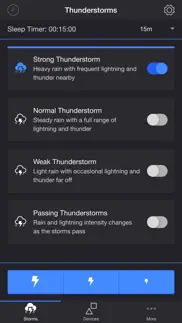
THUNDERSTORMS
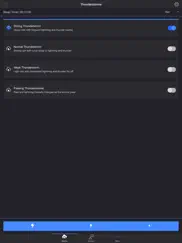
• Strong Thunderstorm — Heavy rain with frequent lightning and thunder nearby
Devices pulse quickly to the sound of heavy rain. Booming sounds of thunder accompany bright flashes of light.
• Normal Thunderstorm — Steady rain with a full range of lightning and thunder
Devices pulse to the sound of rain. The sound of thunder can be heard from various distances. The closer the lightning, the louder the sound, and the brighter the flashes of light!
• Weak Thunderstorm — Light rain with occasional lightning and thunder far off
Devices pulse slowly to the sound of light rain. Dim flashes of light are followed by soft sounds of thunder.
• Passing Thunderstorms — Rain and lightning intensity changes as the storms pass
Devices pulse and flash at different rates to correspond with the current strength of the storm.
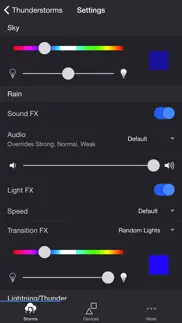
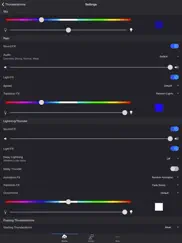
SETTINGS
Sky
• Change the base color and brightness of your lights
Rain
• Toggle rain sound effects
• Change rain audio: Default, Heavy, Steady, Light, On Tin Roof
• Change rain volume
• Toggle rain light effects
• Change rain speed: Default, Slow, Medium, Fast
• Change rain transition effects: Explode, Flow, Random Lights
• Change color and brightness of rain light effects
Lightning/Thunder
• Toggle thunder sound effects
• Change thunder volume
• Change delay lightning (Wireless audio delay offset)
• Toggle delay thunder
• Toggle lightning light effects
• Change lightning animation effects: Random Animation, Explode, Flow, Random Lights
• Change lightning transition effects: Random Transition, Flicker, Pulse, Fade Quickly, Fade Slowly
• Change lightning/thunder occurrence: Default, Never, Occasional, Normal, Frequent, Unreal
• Change color and max brightness of lightning light effects
Passing Thunderstorms
• Change starting storm for Passing Thunderstorms: Weak, Normal, Strong
• Change cycle time for Passing Thunderstorms: 15m, 30m, 60m
Background Sounds
• Toggle background sounds: Birds, Cicadas, Crickets, Frogs
• Change background sounds volume
General
• Change default end state: On, Off
• Select mode to automatically start when app opens
• Choose time to automatically stop selected mode
• Choose time to automatically restart selected mode when sleep timer ends, enabling recurring cycle
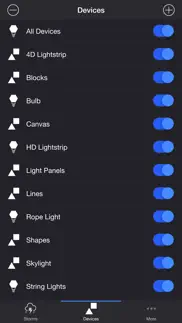
DEVICES
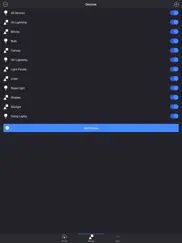
Add one or more of your Nanoleaf devices on the Devices tab. Toggle on the devices you want to use for your thunderstorm light show. To edit a device in the list, swipe the item to the left and tap the pencil icon.
ADDITIONAL FEATURES
• Lightning on Demand — Start a storm and utilize the lightning buttons at the bottom of the screen for manual control.
• Sleep Timer — Set a timer complemented with an audio fade-out feature.
• Bluetooth and AirPlay Support — Connect to Bluetooth speakers directly, or connect to speakers with AirPlay using the Control Center. Adjust the Delay Light FX setting to offset any wireless audio delay.
I'd love to hear your thoughts and appreciate you taking the time to rate the app. By leaving a review, I can continue to improve Thunderstorm for Nanoleaf and create a great experience for you and future users. Thank you! —Scott
😍 Do you love Thunderstorm for Nanoleaf app? Please share your friends!



Please wait! Thunderstorm for Nanoleaf app comments loading...
Thunderstorm for Nanoleaf 4.0.2 Tips, Tricks, Cheats and Rules
What do you think of the Thunderstorm for Nanoleaf app? Can you share your complaints, experiences, or thoughts about the application with Scott Dodson and other users?
Thunderstorm for Nanoleaf 4.0.2 Apps Screenshots & Images
Thunderstorm for Nanoleaf iphone, ipad, apple watch and apple tv screenshot images, pictures.
| Language | English |
| Price | $2.99 |
| Adult Rating | 12+ years and older |
| Current Version | 4.0.2 |
| Play Store | io.scottdodson.thunderstorm.aurora |
| Compatibility | iOS 13.0.0 or later |
Thunderstorm for Nanoleaf (Versiyon 4.0.2) Install & Download
The application Thunderstorm for Nanoleaf was published in the category Entertainment on 13 June 2017, Tuesday and was developed by Scott Dodson [Developer ID: 1033778296]. This program file size is 73.53 MB. This app has been rated by 17 users and has a rating of 1 out of 5. Thunderstorm for Nanoleaf - Entertainment app posted on 11 February 2026, Wednesday current version is 4.0.2 and works well on iOS 13.0.0 and higher versions. Google Play ID: io.scottdodson.thunderstorm.aurora. Languages supported by the app:
EN Download & Install Now!| App Name | Score | Comments | Price |
| Thunderstorm for Hue Reviews | 1 | No comment | $2.99 |
| Fire Simulator Reviews | 1 | No comment | $1.99 |
| Firestorm for Hue Reviews | 1 | No comment | $2.99 |
| Soundstorm for Hue Reviews | 5 | 2 | $2.99 |
| Thunderstorm Simulator Reviews | 4.5 | 2 | $1.99 |
Need help? Email [email protected] - fixed compatibility issue
| App Name | Released |
| Netflix | 01 April 2010 |
| Steam Mobile | 26 January 2012 |
| Gametime - Last Minute Tickets | 03 May 2013 |
| Prank All-Hilarious prank app | 10 March 2023 |
| Amazon Prime Video | 31 July 2012 |
Find on this site the customer service details of Thunderstorm for Nanoleaf. Besides contact details, the page also offers a brief overview of the digital toy company.
| App Name | Released |
| Scourby YouBible | 16 May 2012 |
| Coloring Watch | 20 July 2019 |
| Ghost Science M3 | 28 March 2018 |
| GSE SMART IPTV PRO | 14 November 2022 |
| KennysGifs | 10 January 2025 |
Discover how specific cryptocurrencies work — and get a bit of each crypto to try out for yourself. Coinbase is the easiest place to buy and sell cryptocurrency. Sign up and get started today.
| App Name | Released |
| Spotify - Music and Podcasts | 14 July 2011 |
| DoorDash - Food Delivery | 10 October 2013 |
| PayPal - Send, Shop, Manage | 03 February 2019 |
| Snapchat | 13 July 2011 |
| Gas | 27 August 2022 |
Install the Giftmio extension for smart shopping. Get notified about cashback opportunities, activate cashback in one click, and save money on purchases.
| App Name | Released |
| Subnautica | 08 July 2025 |
| Farming Simulator 26 Mobile | 19 May 2026 |
| Geometry Dash | 13 August 2013 |
| Bloons TD 6 | 14 June 2018 |
| Gambonanza | 01 May 2026 |
Each capsule is packed with pure, high-potency nootropic nutrients. No pointless additives. Just 100% natural brainpower. Third-party tested and validated by the Clean Label Project.
Adsterra is the most preferred ad network for those looking for an alternative to AdSense. Adsterra is the ideal choice for new sites with low daily traffic. In order to advertise on the site in Adsterra, like other ad networks, a certain traffic limit, domain age, etc. is required. There are no strict rules.
Keep personal info private, avoid scams, and protect yourself online with AI-powered technology.
Thunderstorm for Nanoleaf Comments & Reviews 2026
Did you know that you can earn 25 USD from our site just by registering? Get $25 for free by joining Payoneer!