MacDive App Reviews
MacDive App Description & Overview
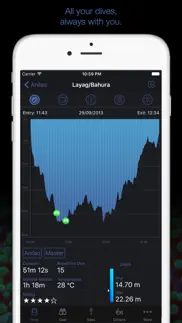
What is macdive app? View and log your dives on the go. Detailed profiles, images, Smart Bluetooth downloads and more.
We've brought the best features of MacDive for macOS to your pocket. MacDive for iPhone can be used as a fully featured standalone dive log, and it also works great in conjunction with MacDive for macOS.
• Browse and manage your dive logs on the go.
• Use iCloud or Dropbox to keep your data in sync between your iPhone and MacDive for macOS.
• Automatic dive site tracking via GPS. Put your iPhone in your dry bag and worry about the details when you're back on land!
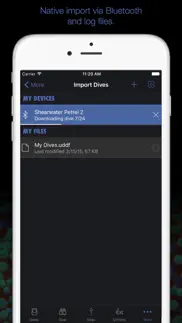
• Native downloads from supported Smart Bluetooth devices.
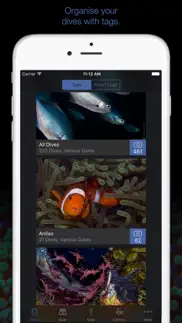
• Catalogue and identify the critters you've seen, or the ones you want to find.
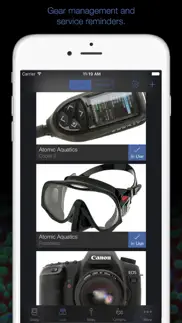
• Manage your gear and let MacDive remind you when a service is due.
MacDive supports downloading dives directly from various Smart Bluetooth devices, like the Shearwater Perdix AI and Teric, Suunto D5 and EON Steel, Scubapro G2, Mares Genius and Bluelink, Heinrichs Weikamp OSTC and the Dive Nav DC Buddy (sold separately). See our website for a full list of devices.
Please note that continued use of Location Tracking/GPS running in the background can dramatically decrease battery life.
😍 Do you love MacDive app? Please share your friends!



Please wait! MacDive app comments loading...
MacDive 1.4.13 Tips, Tricks, Cheats and Rules
What do you think of the MacDive app? Can you share your complaints, experiences, or thoughts about the application with Mint Software Ltd and other users?


MacDive 1.4.13 Apps Screenshots & Images
MacDive iphone, ipad, apple watch and apple tv screenshot images, pictures.
| Language | English |
| Price | $9.99 |
| Adult Rating | 4+ years and older |
| Current Version | 1.4.13 |
| Play Store | com.mintsoftware.MacDive |
| Compatibility | iOS 9.0 or later |
MacDive (Versiyon 1.4.13) Install & Download
The application MacDive was published in the category Sports on 08 December 2015, Tuesday and was developed by Mint Software Ltd [Developer ID: 1062494204]. This program file size is 51.33 MB. This app has been rated by 59 users and has a rating of 4.7 out of 5. MacDive - Sports app posted on 02 October 2024, Wednesday current version is 1.4.13 and works well on iOS 9.0 and higher versions. Google Play ID: com.mintsoftware.MacDive. Languages supported by the app:
EN Download & Install Now!| App Name | Score | Comments | Price |
Updates for iOS 18
| App Name | Released |
| Fishbox - Fishing Forecast App | 13 January 2015 |
| Sleeper - Fantasy Sports | 01 May 2015 |
| PrizePicks - Fantasy Sports | 15 October 2018 |
| USGA | 13 April 2022 |
| Fliff - Social Sports Picks | 18 December 2019 |
Find on this site the customer service details of MacDive. Besides contact details, the page also offers a brief overview of the digital toy company.
| App Name | Released |
| Volleyball Rotations | 27 October 2018 |
| PinPal | 25 July 2009 |
| Purple Belt Requirements 2.0 | 08 June 2023 |
| Like My Drill | 09 May 2012 |
| Jetting Yamaha YZ 2T Moto | 03 May 2019 |
Discover how specific cryptocurrencies work — and get a bit of each crypto to try out for yourself. Coinbase is the easiest place to buy and sell cryptocurrency. Sign up and get started today.
| App Name | Released |
| BeReal. Your friends for real. | 08 January 2020 |
| Messenger | 09 August 2011 |
| Netflix | 01 April 2010 |
| 28 April 2011 | |
| Google Maps | 12 December 2012 |
Install the Giftmio extension for smart shopping. Get notified about cashback opportunities, activate cashback in one click, and save money on purchases.
| App Name | Released |
| Slime Rancher | 26 May 2026 |
| Subnautica | 08 July 2025 |
| Gambonanza | 01 May 2026 |
| Monash FODMAP Diet | 17 December 2012 |
| Scritchy Scratchy | 18 March 2026 |
Each capsule is packed with pure, high-potency nootropic nutrients. No pointless additives. Just 100% natural brainpower. Third-party tested and validated by the Clean Label Project.
Adsterra is the most preferred ad network for those looking for an alternative to AdSense. Adsterra is the ideal choice for new sites with low daily traffic. In order to advertise on the site in Adsterra, like other ad networks, a certain traffic limit, domain age, etc. is required. There are no strict rules.
Keep personal info private, avoid scams, and protect yourself online with AI-powered technology.
MacDive Comments & Reviews 2026
Great initial release. This app has amazing functionality for an initial release. I’ve synced 90 dives full of images to the cloud from Mac Dive (OS X) app and synced them into this app. Everything is working great. This initial release has obsoleted the Dive Log app that I was using. It is nice to have full image synchronization into the app which Dive Log did not. It’s minor, but I would like to see the images rotated when the device is rotated so they better fit on the screen.
Doesn’t work. I have attempted to get this to sync for days now and actually for weeks at multiple points. I have attempted getting support from both the forum on their website as well as directly from MacDive. All to no avail. I’ve tried reinstalling it after deleting it, and it simply doesn’t even ask for my Dropbox information and tries to sync anyway. While this is a great desktop version on my iMac or MacBook, it simply does not work on the iPhone.…
The best dive log app!!!. Love this app and the versatility that it has. Syncs well with all of my dive computers via Bluetooth and backs up to cloud and my computer easily. I can keep as much or as little info as I want and can track my wife and kids logs easily too! Seriously my favorite!!!
iPad Support at Last. Wow! Gorgeous upgrade for the iPad.
Amazing on iPhone.... But DESPERATELY needs an iPad version! For those of us using tablets in the field (lots), running the iPhone version in the iPad’s “compatibility mode” is... acceptable, but looks really silly. That being said. This is by far the best solution on the market *IF* you exist solely in the Apple ecosystem.
Will not sync with macdive for osx. I purchased only for the purpose of syncing with macdive for osx hoping that the iOS version would sync with my peregrine dive computer. The osx version claims it syncs but they fail to talk to each other as well. Very disappointed with both versions.
Sweet Compliment to Mac-Dive. I have been a Mac-Dive customer for a number of years. I've logged over 1,000 dives and was very excited when Nick came out with a mobile compliment to Mac-Dive. The interface is beautifully designed and provides a substantial amount of detail for a mobile app. My favorite feature is a critter tracker. I've been photographing underwater for a number of years and now I'm having fun uploading and cataloging my critter photos. If Mac-Dive is any indicator, we can expect Nick to continue updating this app in the future. A solid five stars!
Great dive app. We’ve (wife and I) have been using this app for a few years now. On a recent dive trip a buddy recommended the Dive Log app so I tried it. Although it seems okay I’m much happier with the features in MacDive. Keep up the good work. We really like the cloud syncing so we can readily upload and review data to our iOS devices as well.
Best in class. Awesome app. Moved nearly all dives from google drive over. Much better interface and it syncs across devices. Highly recommended. Only thing left in drive is my tables and tide charts. Just need a place for them now.
Great App - Responsive Developers. This app is a fantastic way to carry logs with you and view them. I import dive computer data via the companion MacApp since my dive watch does not support BlueTooth. Dropbox syncing keeps the apps on the same page. Also has a brilliant GPS tracking feature that you can activate at the beginning of a dive trip and then just throw your phone in a dry bag the whole time. When you input dives from the DC, it automatically tags your locations and makes a beautiful map of all the sites where you have dives. Finally, developers are top notch. New DC or firmware updates can effect how they sync. And MacDive supports A LOT of different DC brands. Any little bugs I find, I shoot an email and they’re super responsive in finding and fixing those bugs.
Great App. This is a great app that works with most computers. I like the map feature showing all the places I have dove on the world map. I also like that it syncs with the app on my Mac book as well.
Don't work with Oceanic pro plus 4. Don't waste money and time with this dive log software, don't work with oceanic pro plus 4 and the support don't have knowledge enough to fix, is more than year alredy talking with support and never fixed
Developer does not support updates.. I have been using the app for 5+ years love the app and it features layouts. But the developer has gone quiet and has not been updating support. I wish the developer world sell it to someone that would continue support on a regular basis. I know someone would buy it.
Beautiful and VERY useful representation of dive data. This is a gorgeous UI and the representation and use of data actually make the desktop app seem all the more out of date. Please use iCloud for data sync, your desktop and iPhone app are all within the Apple ecosystem so there's really no reason not to. Please also add all of the DC Buddy supported computers, I have a Sherwood wisdom 2 and 3 I cannot use with this. GREAT first go at bringing a long standing Mac app to iPhone, thank you!
Been using this for 10 years. Great app. I have upgrades dive computers a few time but always sync them to Mac dive. Has been great I only wish they would update more often and native support the garmin.
Great App. Well designed, really like this app. Love the iPad app!
Bluetooth sync works great!. Worked well with my Oceanic VT3, but the Bluetooth sync with my Perdix AI is fantastic! I can get everything in the system while I wait at the airport, if not before. Well done Nick!
Very promising - but currently too buggy. Initially it looked really good; nice interface, good layout and design, promising feature set. Uncertain about how thoroughly it was tested though. Imported all my data ok and appeared to be working nicely; but then selected the smart logs option to view dives and it crashed straight away. Subsequent attempts to open the app result in it crashing immediately, so it’s unusable. Could do with some minor interface tweaks. Bold, large size font on some headings is jarring and text color needs better contrast with the background to improve the readability and ease of use. Sync should be changed to use iCloud, since it’s easier, more convenient and it’s only syncing between iOS and OS X. Fix the crashes as well and it’s a 4 or 5 star app.
Excellent dive logging software. I have been using MacDive for a couple of years, and it does everything I need - great logging of dives with all the info I want, compatible with my Perdix dive computers, syncs with iCloud so that I can simply log with my iPhone after diving, and add more info on my iPad or my Mac afterwards. A real pleasure to use.
Love it. Perfect iOS companion to the desktop MacDive. What more can I say, I was very pleased with my first experiences of this app. I have been using the desktop version of MacDive for a couple of years. It's his crate application that allows you to track everything you would want to track in your scuba dive log book. Furthermore, you can bring in pictures seamlessly from photos or iPhoto. Multiple photos can be linked into a single dive. It appears that everything in that desktop version of MacDive gets synchronized directly into the iOS version. Although the process took quite a bit of time, I think that is because I had over 250 photographs that were linked in to different dives. That said, the iOS app is very easy to use, all of the information that you need is there, and the really great thing is now you can add new dive sites right in your iOS app, using the GPS location of the phone itself while you are on the dive boat to mark the location. Previously I had to take my Garman on the dive boat, Mark the site and at a later time after I got home I would manually put it into Mac dive. You also have the ability on the fly to add a photograph taken with the iOS devices on camera directly to a dive. The app even allows you to link to your iOS contacts app to add buddies. Overall, I have played around with the app for a couple of hours, had no crashes, I see no discrepancies no hangs. I cannot say that I've tested all of the features, my dive computer does not have Bluetooth built in, so I don't have a means to test the direct import of the dive profile. My current dive computer is a Liquivision Lynx, so I need to import through the Liquivision app, then drag the file onto MacDive to import the profiles. That works very well. Great Job Nick!
Great all, but missing a vital component for iOS. I have been using this app for the past six months. I love how it tracks and sorts my dives, and tracks my equipment and servicing for each item. It is missing one vital component for iOS that prevents me as an instructor from recommending this to my students: the ability to print your dive logs from iOS. I utilize an iPad Pro exclusively for my work, and being able to record and retain my student dive logs as well as mine requires me to transfer the data to another app to print, and then I cannot sort specific dives. Spending another $1200+ on a Mac is not a solution. While I love the app and have everything loaded, I am looking for a replacement that also allows me to print.
Fantastic Dive Log. I have been using first the Mac version and now the iOS version of MacDive for about 10 years. The interface is intuitive and easy to use. The iCloud support is smooth and seamless between iOS devices and my Mac. I love the Bluetooth import, it makes downloading logs quick and painless. Thank you for creating and maintaining such a great product.
Best log for Mac ever.. I have been a MacDive desktop user since 07 and bought the app the same week it came out. Support was great. I have not had any issue with the app and enjoy being able to download via Bluetooth to the phone while on trips.
Great app works flawlessly. Works great with my Perdix AI dive computer over Bluetooth.
Amazing App. I bought this so many years ago… I can’t even remember. I have over 200 dives logged and still use it to this day. What is most impressive is that the developer continues to update this app even after 10 years. It links with my EOS dive computer to automatically input dive info. The dive location is automatically added as well. It has an option to track your movement on the surface, ideal for tracking the path the boat took to get to the dive site. I would buy this app again and have recommended to friends and family to buy it for themselves. Everyone I have recommended it to has thanked me because it is awesome!
Great diving app. It took me a little while to get this fully working, especially the part about importing the dive data from my Suunto computer. But this app does a great job of combining computer data with photos and other attributes of dives that I want to log. I love the ability to pinpoint on map, and tag by dive types, sites, etc... Overall does everything it needs to do, can’t really think of anything I’d want this app to do that it doesn’t
Amazing Support. Technically I’m writing about my experience with her companion desktop app, but it is all one family. Support for these apps is phenomenal! I just purchased the app after having received the necessary hardware to connect my dive computer to my MacBook. But it didn’t work. I contacted support last night and have been working throughout the day with them to get it working. Fast response; clear instructions on what to try and what information they needed; and in the end the problem was fixed. Turns out the dive computer vendor changed their cable which required some tweaks. Definitely worth paying for when you get friendly and effective support.
This is great for tracking dives. I use a shearwater Teric. Recently shearwater for some reason has decided to replace their app. But they left off a bunch of things they had added to the old app. I find the new shearwater app to be unwieldy and awkward and not intuitive to enter data. So I hunted and tried different dive log apps until I found this one. It’s great! I can add locations easily, add dive tripes, use multiple tags on dives, set up gear profiles so I don’t have to re enter my usual setups. And the exports and stats are great. Live this app! Good job!
Wow. Very Nice Interface. Must-have app for dive logging, even more so if you use MacDive on a Mac. Photo integration works great, as does critter tagging, smart logs, and all the other features. Always a pleasure to use. Very pretty screens. Every app should be this well planned and executed. Outstanding!
Doesn’t work for Suunto eon core. iPhone 16 pro iOS 25 Eon core running 4.0. Will not sync with eon core and will not import dives. $9 lost
Wonderful. This app is a perfect dive log solution. It’s intuitive, easy on the eyes, and has everything I was looking for in a dive log app. Not just the obvious, like inputting GPS coordinates and info for every dive site, but also the little things like calculating RMV based on SAC rate and fully customizable tank size. I was able to get accurate air consumption data with an AL80, HP120, and double 12L with no issues. Finally having all my dives, sites, photos, certs, and gear—not to mention other useful stuff like medical info and DAN#—together in one place is incredibly satisfying. For less than the cost of a nitrox fill, it’s a no brainer.
Excellent App. Still my primary app that I use. Thank you for a great app
Best designed iOS Scuba App. I’ve been a fan/user of the MacDive desktop app for years and have long been waiting for an iPhone app. Worth the wait! This is the best designed iPhone app (I’ve used others). Very clean user interface, great visualizations for gas usage and depth charts. Geo placements and photo integrations are elegant. And after a quick setup with Dropbox (need a DB account) you can sync between the two devices. Great job MacDive team and thanks for bringing this to us divers.
Great App. I’ve been using the app for a number of years. I love having my logs at my fingertips. I sync my computer right at the dive site so I can capture the site location via GPS.
Did you know that you can earn 25 USD from our site just by registering? Get $25 for free by joining Payoneer!
Nothing else is as good as MacDive. Superb app. I’ve tried every dive log software there is and they are all terribly written and feel like they were made 20 years ago by amateurs. MacDive is modern, professional, powerful, easy to use, comprehensive, and very well supported. Seriously, nothing else comes close.
Sleek and Sexy, attention to detail. I am loving this app. I love the desktop version too, but this app has such a nice feel to it - it totally destroys my previously used iOS logging app. Navigation is so intuitive and it crams in so much. Gps mapping, photos, smart logs, gas and gear management. Hats off to the development team - it looks great, has so many cool features. Definite 5 star app
iPad Pro version??. I also use the Dive Log app to sycrononize with MacDive OS X. Unlike MacDive, Dive Log makes an iPad version. So whilst this app works well with the desktop version it scales poorly on an iPadPro
Fantastic App and even better Support. I have used the macOS version of Mac Dive for many years now and found it to be by far the best dive logging application. It is user friendly, intuitive and has a great design. Having just downloaded the iOS version has mobilised my fantastic experience! I have also dealt with their support team, and received second to none support, putting larger software developers to shame!
Needs iPad screen size support. Great app, syncs well with desktop MacDive app. Please add support for iPad screen sizes.
Imagine you at your best. All the time. Picture yourself at your sharpest and most productive. Your most alert and focused. Your most lucid, creative and confident. At work. At play. In every area of your life. Add Mind Lab Pro® v4.0 to your daily routine and uncap your true potential. Buy Now!
Works well and great support for all these years. I bought the app when it was for desktop only, gradually the developer added iOS version and support iCloud sync. The list of compatible new dive computers keeps growing, glad to have a developer who really supports the dive community.
Best Diving app on Mac or iDevices. This app is fantastic! Our family has been using it for numerous years now and it keeps getting better and better. Using Bluetooth with three of our dive computers we can load dives onto any of our devices (iPhone, iPad mini, or MacBook) easily and quickly; then share the information between the devices. Or load the data to the Mac using a data transfer cord and then share to other devices. The gear, critter, and location management is very easy. I love having the ability to see photos marked at the location in the dive profile where they were taken.
Adsterra is the most preferred ad network for those looking for an alternative to AdSense. Adsterra is the ideal choice for new sites with low daily traffic. In order to advertise on the site in Adsterra, like other ad networks, a certain traffic limit, domain age, etc. is required. There are no strict rules. Sign up!