Guideline App Reviews
Guideline App Description & Overview
What is guideline app? Guideline has joined Gusto.
Gain peace of mind on your road to retirement. Our award-winning app¹ makes it refreshingly easy to set up your 401(k) account and track your progress anytime, anywhere.
SET UP IN MINUTES
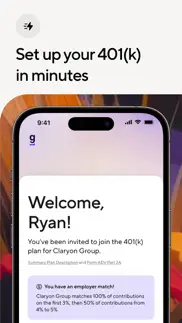
Set up your 401(k) in minutes right from your phone, no computer required.
ACCESS ANYTIME
Update your contribution amounts or make changes to your investment portfolios with just a few taps.
INVEST WITH CONFIDENCE
Take our questionnaire to see which of our portfolios is right for you. Plus, we’ll automatically rebalance your portfolio to help you stay on track.
CHECK YOUR PROGRESS
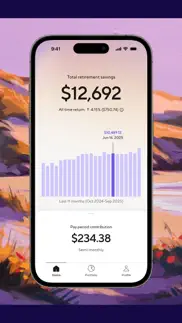
See your portfolio, performance, and total retirement savings to date.
CONSOLIDATE SAVINGS
You can roll over other accounts right from the app so all of your savings can be in one place. Plus, you’ll be able to take advantage of our portfolio management and low fees, which could help you make the most of every dollar saved.²
ENABLE MOBILE-FIRST SECURITY
Protect your account with security features like two-factor authentication (2FA) and biometric recognition.
AWARD-WINNING CUSTOMER SUPPORT³
Access live support in English or Spanish, plus numerous resources, how-to guides, and FAQs via our Help Center.
Disclosures:
The images above are illustrative and for educational purposes only. They are not representative of any client account.
This information is general in nature and is for informational purposes only. It should not be used as a substitute for specific tax, legal, and/or financial advice. Investing involves risk and investments may lose value. You are advised to consult a qualified financial adviser or tax professional before relying on the information provided herein.
See our https://my.guideline.com/agreements/fees for additional information regarding our fees and services.
1.
2024 Fast Company Innovation by Design Award Winner for Guideline's mobile application in the Mid-Size business category in June 2024. Fee paid for application. See https://www.fastcompany.com/91126780/methodology-innovation-by-design-2024 for more information.
2.
This information is for illustrative purposes only, and is not intended to be construed as investment or tax advice or as an assurance or guarantee of future performance. Investing involves risk, and investments may lose value. Investment advisory services for Guideline’s 401(k) product (when 3(38) fiduciary services are appointed) are offered by Gusto Investment Services, LLC, an SEC-registered investment adviser. Expense ratios for custom portfolios will vary. For more information regarding these fees, see the ADV 2A Brochure and Form CRS.These expense ratios are subject to change by and paid to the fund(s). View full fund lineup.
3.
2025 The American Business Awards® Bronze Stevie Winner in the Customer Service Team of the Year - Financial Services & Insurance category. Fee paid for application. See http://www.stevieawards.com/aba for more information.
To learn more, go to guideline.com
😍 Do you love Guideline app? Please share your friends!



Please wait! Guideline app comments loading...
Guideline 1.1.21 Tips, Tricks, Cheats and Rules
What do you think of the Guideline app? Can you share your complaints, experiences, or thoughts about the application with Gusto, Inc. and other users?


Guideline 1.1.21 Apps Screenshots & Images
Guideline iphone, ipad, apple watch and apple tv screenshot images, pictures.
| Language | English |
| Price | Free |
| Adult Rating | 4+ years and older |
| Current Version | 1.1.21 |
| Play Store | com.guideline.mobile |
| Compatibility | iOS 15.1 or later |
Guideline (Versiyon 1.1.21) Install & Download
The application Guideline was published in the category Finance on 26 June 2023, Monday and was developed by Gusto, Inc. [Developer ID: 1478804270]. This program file size is 46.35 MB. This app has been rated by 1,823 users and has a rating of 4.8 out of 5. Guideline - Finance app posted on 09 June 2026, Tuesday current version is 1.1.21 and works well on iOS 15.1 and higher versions. Google Play ID: com.guideline.mobile. Languages supported by the app:
EN Download & Install Now!| App Name | Score | Comments | Price |
| Gusto Mobile Reviews | 4.8 | 42,168 | Free |
Bug fixes and other improvements.
| App Name | Released |
| Barclays US | 29 March 2011 |
| Western Union Send Money Now | 09 May 2011 |
| NetBenefits | 08 May 2013 |
| Crypto.com - Buy BTC, CRO, XRP | 31 August 2017 |
| Klover - Instant Cash Advance | 30 July 2019 |
Find on this site the customer service details of Guideline. Besides contact details, the page also offers a brief overview of the digital toy company.
| App Name | Released |
| Debt Free - Pay Off your Debt | 14 December 2010 |
| Crude Oil - Live Badge Price | 25 August 2018 |
| Cash Log Basic | 30 April 2015 |
| WifiMan from DataMan | 08 November 2015 |
| Write checks | 11 October 2012 |
Discover how specific cryptocurrencies work — and get a bit of each crypto to try out for yourself. Coinbase is the easiest place to buy and sell cryptocurrency. Sign up and get started today.
| App Name | Released |
| BeReal. Your friends for real. | 08 January 2020 |
| Google Chrome | 28 June 2012 |
| 28 April 2011 | |
| PayPal - Send, Shop, Manage | 03 February 2019 |
| Netflix | 01 April 2010 |
Install the Giftmio extension for smart shopping. Get notified about cashback opportunities, activate cashback in one click, and save money on purchases.
| App Name | Released |
| Subnautica | 08 July 2025 |
| Monash FODMAP Diet | 17 December 2012 |
| Streaks | 31 May 2015 |
| After Inc. | 26 November 2024 |
| Paprika Recipe Manager 3 | 15 November 2017 |
Each capsule is packed with pure, high-potency nootropic nutrients. No pointless additives. Just 100% natural brainpower. Third-party tested and validated by the Clean Label Project.
Adsterra is the most preferred ad network for those looking for an alternative to AdSense. Adsterra is the ideal choice for new sites with low daily traffic. In order to advertise on the site in Adsterra, like other ad networks, a certain traffic limit, domain age, etc. is required. There are no strict rules.
Keep personal info private, avoid scams, and protect yourself online with AI-powered technology.
Guideline Comments & Reviews 2026
Really needs some user testing. Forces users into MFA but does it in a way that makes it obvious no user testing was done. Doesn’t support codes from major password managers and won’t even let you paste in your code. Tell your PM to do better Guideline.
Great App. Very slick UI! I am able to do what I need via the app and see how my 401K is doing. Highly recommend.
Beautiful app. And I rarely say that about any app. Looking forward to when Roth IRA is factored in 😎
Finally. Been waiting years for this. Nice 👍
Bad dark mode. They finally implemented “dark mode” and it’s garbage. Looks like a child just drew awful purple colors all over it and has no concept of proper design. So let’s start by firing your app designers and paying for better ones. I don’t know if anyone told you morons this, but your “dark mode” does not have to match your company logo colors. And while you’re fixing this trash, add a proper iOS dark icon. Get rid of this obsession with purple.
2FA doesn't work. I'm using DUO to generate codes for 2FA, and I'm taking the numbers from the correct entry for Guideline. Every time I try to login on the app, it tells me the code isn't valid. What's the point of an unusable app?
Login screen is broken. No way to login because the login screen refreshes each time I try copy paste an OTP. Also the password field does not accept an autofill from a password manager. Ridiculous
solid start, poor implementation. It’s great that they finally got an app. Congrats. UI and UX is still pretty clunky. Authentication is buggy; can’t even paste code from a other factors.
Easy to use!. Really liked how easy this app is to use. Thanks guideline!
What happened???. Gusto acquired Guideline and now one of my accounts is with Accrue which doesn’t have any app and the other is with Guideline which Gusto manages? This is a terrible update and makes me want to leave guideline completely now.
Can’t access. I have a different phone and I can’t log in, always says to text the old number to verify. And the app won’t download for me either
Tracking in China right now, can’t login. Why can’t I log into my account via this app while I m traveling in China?
App. Excellent app and user experience.
Easy to Use. Very simple can change contributions very easily
Simple and easy to use. Much slicker interface compared to the website. Easy to check my 401k balance and portfolio.
…. I wish my current company used Guideline.
Face ID does not work. Every time I want to use the app, I have to manually enter my password, even though I have biometrics enabled and have verified my identity on this device many times before. There’s no benefit to using the app when it’s easier to log in through the website.
Account fee increase?. So Guideline just increased the account fees. No doubt it’s in response to everyone’s accounts being down because of foolish fiscal policies beyond their control. Will they lower it when the market goes back up? Pffft. No! I expect dark mode soon. At least give us that. Update: thanks for the reply to review, but… it’s not a good look to ask customers to contact someone. This isn’t troubleshooting a bug. In 2025, it’s not unreasonable to expect support for dark mode. It’s been 6 years since dark mode support was announced. One would hope product is checking in on the reviews. They should know that multiple folks are calling this out as something that should be supported.
Fees are too high. This company is consistently raising their 401k account fees. Like doubling them. With nothing to show for it. Lame.
Unable to login. I’m unable to login into the app. I enter my credentials and it prompts me for two factor then sends be me back to login screen.
Solid, simple UI. The app makes it easy to see your balance, performance and pertinent account docs. It’s also got really high uptime that I’ve noticed. All in all, a simple effective app.
Can’t sign in. My native iOS keyboard works on all other apps. I have deleted and reinstalled guideline on my iPhone12 twice; restarted the phone…twice. I cannot type anything in the text boxes. That means I cannot enter my username or password to login. All screens load fine, native iOS keyboard pops up, but no keys/input register
Good. Good!
It’s about time. But happy the mobile app is finally here
Freezes upon opening. Worked for a while. Now it freezes every time I open it and can’t even log in. Deleted and redownloaded the app and that did not help. Running the latest iOS too.
Hassle of a company. Cannot close or opt out without going through a maze of online opt outs and circle of accounts. Doesn’t do anything over the phone . Do NOT LIKE THIS COMPANY AT ALL.
Great app. Very easy to use and great design. Retirement on your fingertips!
Latest Update Can’t Login. App uses 2FA, but when you navigate away from the app to use an Authenticator, the app goes back to the username/password screen when you come back. So if you use a password manager and 2FA there’s no way to get into the app. Also the password will no longer fill from my password manager (using Keeper)
Terrible app. Doesn’t let me log in ever!!!’. Awful app had to remove and re download several times and still does not work
Great app - easy to view. Unlike the website, the app is very streamlined and has all vital information in a well presented format. Good stuff - I enjoy the bar graph how you can hover over each investment period and see the total value and marginal growth/reduction
clean app. no clutter, clean app, you can see everything just like on the website
401k. I like how it’s outlined..
App Doesn’t Work. Can’t sign in.
Gusto just kicked most of us off of the app. If you used Guideline for 401k, but didn't use Gusto for payroll, you just got kicked off the app today, and told to go use a quickly thrown together website called Accrue. That's where they put us until they can find a buyer for us unwanted customers.
No support for IRA accounts. Looks nice and is long overdue, but I still have to use the website to view my IRA account.
App is completely useless now. Man they wasted no time booting people who didn’t use Gusto huh. As if I personally run payroll at my company. Good job!
Biometrics/FaceID Retention. Cannot retain my Face ID for login for more than one use. Incredibly frustrating, why have the feature if it doesn’t work?
Super easy. Easy to use, great reporting, I can do everything I need in the app. I wish all the companies I have worked for used Guideline. Highly recommend.
Great app!. Super simple and easy to use UI
Constant login issues. Undefined errors require you to login on website. Face ID does not work. Useless app.
Very clean. Easy to understand and use and fantastic first version out of the gate. Visual design light and airy and beautiful.
Nice and clean UI. I agree with other reviewers. It really is a nice app. I’ve been waiting for this. When I received an email invited to be part of early release I immediately downloaded the app. Nice clean UI.
Did you know that you can earn 25 USD from our site just by registering? Get $25 for free by joining Payoneer!
Imagine you at your best. All the time. Picture yourself at your sharpest and most productive. Your most alert and focused. Your most lucid, creative and confident. At work. At play. In every area of your life. Add Mind Lab Pro® v4.0 to your daily routine and uncap your true potential. Buy Now!
Adsterra is the most preferred ad network for those looking for an alternative to AdSense. Adsterra is the ideal choice for new sites with low daily traffic. In order to advertise on the site in Adsterra, like other ad networks, a certain traffic limit, domain age, etc. is required. There are no strict rules. Sign up!