GridMaker App Reviews
GridMaker App Description & Overview
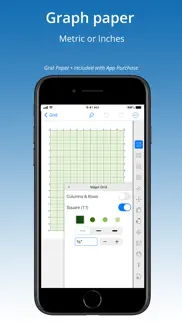
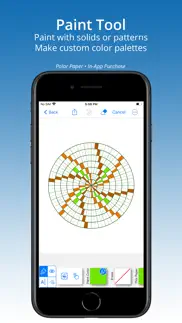
What is gridmaker app? Create accurate grids in inches or metric to print or share as PNG, PDF or SVG. Includes Paint Tool with built-in color palettes or add colors to create unlimited custom pallets from images, live camera, color wheel, RGB or HSB codes. Place image behind any grid for analysis or artist grid method.
No ads or tracking.
Purchase includes 3 papers GRID, DIAGONAL, DOT:
— GRID —
• Set to square or rectangle grid.
• Adjust grid line weight.
Set grids to an exact size — perfect for knitters and crafters!
Up to four line colors on a grid, special feature adds custom line colors.
• Label rows & columns with numbers [1,2,3] or letters [A,B,C] and set starting corner, values, and stepping.
• Label grid axes.
• Place axis and label.
• Add diagonal lines to split grid into half- or quarter- triangles.
• Place a center-dot with adjustable placement.
— DOT (ISOMETRIC) —
• 5 dot styles.
• Set to isometric or rectangular dot pattern.
• Specify exact dot spacing, then connect dots with horizontal, vertical, and diagonal lines.
• Place a center-dot anywhere on the page.
• Label rows & columns with numbers [1,2,3] or letters [A,B,C]. Set starting corner.
— DIAGONAL —
• Adjust grid line weight.
• Divide & sub-divide blocks.
Add spacing between blocks, grid, and center-point.
— InApp PURCHASES —
Add 8 hard-to-find specialty papers. Buy any five papers (or
purchase the ’All Papers Forever’ BUNDLE) to unlock all papers forever. Credit is given for every purchase so that on purchase of any fifth paper the bundle is instantly added:
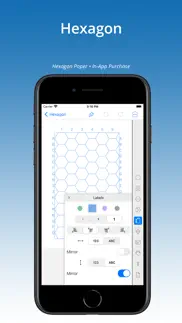
Hexagon
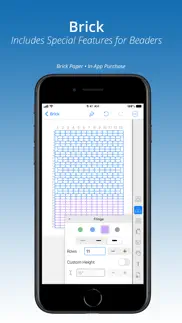
Brick
Log-Log & Semi-Log
Polar
Spider
Ancestry
Music
Triangle (Ternary)
— FEATURES OF ALL PAPERS —
√ Paint Tool. Color grid. Make custom color palettes. Add annotations.
√ Place an image under any grid, then adjust size and placement.
√ Metric (cm or mm) and Inch settings for grid and page size.
√ Choice of Print Settings for standard papers (such as 8.5x11 or A4) with adjustable margins, or set page at a custom size.
√ Print or share grids as a PDF, PNG or SVG to other apps for further editing — even as templates to laser or pattern cutting machines.
√ Share painted grids as a PNG or PDF.
√ Work up close using pinch-n-zoom.
√ Show multiple grids on a page with tiling.
√ Up to four grid line colors, special feature adds custom line colors.
√ Title grid with choice of font, size, bold/italic, and color.
√ Place a center-point on several papers.
√ Library of templates (Quick Picks) offer inspiration and a short cut to creating grids.
√ Purchases work on all devices — iPhone, iPad, and iPod.
Don’t see the paper or feature you need? Send an email and we’ll see what we can do!
😍 Do you love GridMaker app? Please share your friends!



Please wait! GridMaker app comments loading...
GridMaker 1.29.5 Tips, Tricks, Cheats and Rules
What do you think of the GridMaker app? Can you share your complaints, experiences, or thoughts about the application with NNN Software and other users?


GridMaker 1.29.5 Apps Screenshots & Images
GridMaker iphone, ipad, apple watch and apple tv screenshot images, pictures.
| Language | English |
| Price | $0.99 |
| Adult Rating | 4+ years and older |
| Current Version | 1.29.5 |
| Play Store | com.nnnsoftware.GridMaker |
| Compatibility | iOS 12.0 or later |
GridMaker (Versiyon 1.29.5) Install & Download
The application GridMaker was published in the category Education on 22 December 2016, Thursday and was developed by NNN Software [Developer ID: 906118789]. This program file size is 130.27 MB. This app has been rated by 40 users and has a rating of 3.3 out of 5. GridMaker - Education app posted on 03 December 2024, Tuesday current version is 1.29.5 and works well on iOS 12.0 and higher versions. Google Play ID: com.nnnsoftware.GridMaker. Languages supported by the app:
EN Download & Install Now!| App Name | Score | Comments | Price |
| MySkyPics Reviews | 1 | No comment | Free |
| Pic Colors Reviews | 1 | No comment | $0.99 |
| QuiltPaper Reviews | 3.2 | 28 | $0.99 |
| SnapDragon Fortune Tellers Reviews | 1 | No comment | $0.99 |
| QuiltSize Reviews | 1 | 3 | $0.99 |
A bead designer requested help to make designing larger patterns easier. This update increases the row and column limits for Grid papers. Custom Resolution allows making larger designs for painting. This is available for all papers.
| App Name | Released |
| HelloTalk - Language Learning | 15 December 2012 |
| Beanstack Tracker | 07 May 2018 |
| DMV Practice Test 2025 myDMV | 17 June 2022 |
| Lingokids - Play and Learn | 10 September 2015 |
| Seek by iNaturalist | 09 March 2018 |
Find on this site the customer service details of GridMaker. Besides contact details, the page also offers a brief overview of the digital toy company.
| App Name | Released |
| Prepware Private Pilot | 13 October 2009 |
| Driving Theory Test 4 in 1 Kit | 18 August 2014 |
| TLC Practice exam 2.0 | 26 May 2023 |
| EPA 608 Practice | 13 August 2018 |
| PROmote - Army Study Guide | 07 May 2011 |
Discover how specific cryptocurrencies work — and get a bit of each crypto to try out for yourself. Coinbase is the easiest place to buy and sell cryptocurrency. Sign up and get started today.
| App Name | Released |
| Gmail - Email by Google | 02 November 2011 |
| 12 February 2019 | |
| PayPal - Send, Shop, Manage | 03 February 2019 |
| Hive Social | 18 October 2019 |
| Ralph Lauren | 08 November 2021 |
Install the Giftmio extension for smart shopping. Get notified about cashback opportunities, activate cashback in one click, and save money on purchases.
| App Name | Released |
| CloverPit | 17 December 2025 |
| Incredibox | 27 March 2016 |
| Geometry Dash | 13 August 2013 |
| Shotgun King | 24 February 2026 |
| Paprika Recipe Manager 3 | 15 November 2017 |
Each capsule is packed with pure, high-potency nootropic nutrients. No pointless additives. Just 100% natural brainpower. Third-party tested and validated by the Clean Label Project.
Adsterra is the most preferred ad network for those looking for an alternative to AdSense. Adsterra is the ideal choice for new sites with low daily traffic. In order to advertise on the site in Adsterra, like other ad networks, a certain traffic limit, domain age, etc. is required. There are no strict rules.
Keep personal info private, avoid scams, and protect yourself online with AI-powered technology.
GridMaker Comments & Reviews 2026
Perfect w/ a suggestion. This app was just what I wanted. Perfect, with a caveat. I wanted an app to help me in designing, or editing, a Bargello quilt design. This app was a perfect solution. It allowed me to choose the size of grid I wanted (68x108) and to copy or import a picture file onto the grid. The picture underlying the grid let me see that my calculated grid size was off by a few rows AND I was able to adjust the grid to fit the actual “size I need. The only suggestions I would make would be to allow the modification of individual rows (horizontally and vertically), and to allow substitution of color to the imported picture; ie from original purple to blue. This app would be a great addition for quilters.
Just go buy a pad of graph paper. One cannot draw anything on the graph paper. There is no edit / draw functionality at all. -[update new version] still pretty useless! Developer(s): please explain a workflow where this tool would be of any use.
Just what I needed. In less than 5 minutes I had the size graph paper I needed on the screen, had figured out how to draw on it and had mapped my project. The fact that I could use a two fingered pinch to increase the size of the view to save my tired old eyes after I had drawn what I needed was the icing on the cake. I look forward to exploring the program more. I create bead weaving patterns. This is awesome!
Works, but very non-intuitive to use. After purchasing this app, my initial review was a firm one star! After playing with the app, I found that it is actually quite useful as an engineering tool. Usage is highly non-intuitive however. You have to do a lot of icon touching to find and open windows that allow you to adjust line spacing etc. again, non-intuitive. But hey, buy it for a buck and try it. With patience, you will likely find that it does what you want.
Perfect Picture Positioning. We needed a way to project grids on the walls of our new home to assist with placement of family pictures and artwork. GridMaker was the perfect solution. Saving grids with transparent backgrounds allowed us to project grids on our 11 ft walls for precise spacing. We created a simple grid on an iPad, connected to an inexpensive micro projector and lit our walls with bright white grids.
I Import Into Photoshop. These grids fulfill all my needs through Photoshop. Even with light-weight lines, they also print clearly on my ink jet printer. Note that with transparency, the grids can overlap and overlay.
Can’t erase lines. I wanted to use the app to make line drawing, but you can actually erase any lines, just full blocks. Total waste of money.
Does Exactly What It Says It Does. This app provides exactly what it says it will - the tools to MAKE a custom GRID image to be PRINTED on PAPER for the purpose of expedient sketches. In simple terms: MAKE a GRID, PRINT it on PAPER, so that you can HAND SKETCH your ideas. It's unfortunate that this app has as many 1-star ratings as it does - clearly those reviewers didn't read the app's description. I would also venture to guess these same folks haven't hand sketched ideas onto paper enough to understand the benefit of custom graph paper. If they had, the value of this app would have been blatantly obvious. While the app's look is a little clunky, it provides a good array of customization options and workflow. I find the in-app purchases very sensible and fairly priced. The only real complaints that I have: - would like the ability to more easily center the grid on the paper - would like support for thinner line printing
Hard to use and requires in store purchases to just use simple features. Complete waste of money. Incredibly hard to use, and you have to pay to unlock even the most simple things, like removing their annoying logo. Waste of time and money, stay away!
GridMaker. I finally found the graph apps I was searching for. I am a lacemaker and doing design work by hand. Designs I am working on require special dot sizes, inches or mm. I found the sizes were preset on dot graphs. I wrote to a developer and suggested to be more flexible with sizes. In one week later, he made it happen. Now I can create any sizes on dot graphs. I never expected to hear from the developer. How wonderful! I tried this app and found to be very user friendly, nothing really complicated. The developer appreciates suggestions to improve.
NO CENTERING when text is selected?????!!!!. OMG! I’m TRYING to design a project & the OCD is making me crazy because I can’t get the letters centered in their boxes or on the grid itself! It seems obvious that is what should happen when text is selected. Needless to say the app is worthless to me without that, I can’t use it if the letters are off by SO much. Would rate zero stars if I could.
Perfect. For free, I’m able to print all the basic graph paper I want for only the cost of printer paper and ink. For just $1, get the hexagon pack, and then you can make isometric too. Plenty of options to make exactly the way you want. I think it’s another $1 to remove the logo, which is worth it, but if you’re stingy, it’s non intrusive. Absolutely the best couple dollars I’ve spent on an app for a long time.
For a paid app it’s underwhelming!. The fact that you are charging for this app is wrong in my opinion. This app should be a free app. It’s missing a lot of features that I feel should be in here if you are going to charge for the app. For example when you go to edit in colors and text their is no way to undo what you just did. If I go to draw a line in color there is no way to erase it or undo it. It’s super annoying. The text feature is also very bad. I feel the app is decent for what it is but you shouldn’t be charging a dollar for it. Please update this with these simple features.
Works and could be easier to use. Update~ Latest version improved interface and help system so 5 stars now. I’m planning to install some free form stones to make some curved paths and boarders in my garden. Breaking out of perfect symmetry for landscaping applications might be an interesting horizon... — After playing with it a bit I got the grid I wanted and for that I’m most appreciative! It’s a good utility as is, with a better interface and a better built-in help system it’d be 5 stars. Lots of room for more and different forms to be included like a kaleidoscope function, random generator, and free form constructions the user makes and the app generates from.
Can’t draw on grid lines. I use grid paper for sketching plans for woodworking, but was disappointed that this only allows you to shade in each square, and not draw lines along the grid lines. You can’t even draw a line across but you have to tap each square individually. For me, it’s a total waste.
Good item. Hopefully you guys keep working to make it better.. Good item. Hopefully you guys keep working to make it better. I am having hard time adding left margin, right margin, top margin, and and extra customizable margins. I don’t see these features. And you guys need to optimize these applications to for iPad Pro 12.9 3rd generation. I am currently using this device. Please add these stuffs. If you add these all features that I mentioned above I am definitely going to purchase other paper types. Thank you. And truly sorry for the previous “rude review.”
NOP. I just wasted my money. The green grid will stay on any project you make. There are so little thickness and color line options, you can’t customize the grid size but what the app has preset. This app is more to color grids inside the squares. If you want to make your own kind of custom lines (like me) this app is not for you.
Useless. Terrible app - cant draw on it
Perfect for me. This is just what I was looking for - a way to make custom graph paper, some that's not available off the shelf. If you're wanting more than that, yes, you'll be disappointed.
Do not like. Cannot use pencil with this app! Found no settings
Good App! HAS Erase Feature. ******UPDATE I FOUND IT 😅 The app is excellent for making graphs, very well priced, my only issue is needing to restart whenever i draw a line i didnt intend to. There are many options to erase, but none of them seem to work. Id give it a 3.5/5 if i could, once this bug is fixed itll be a 5 star! Thanks for making this app
Great app. I like that app a lot I use it to print papers for my kids for their school homework and games
Cannot delete lines in Paint mode. Making the graph paper the size you want is great. If all you want to do is that, this will work great for you. I like to draw out basic designs for cabinets, pantries, etc. for figuring out how to organize a space. There’s no way to erase or undo a line, which unfortunately makes this product useless to me.
Ehhh. It’s ok for general graph paper and I have designed some simple things with it BUT not being able to easily make and then color half square triangles is a real NEGATIVE for me. Improve this one feature and it would be 4 stars
Great for technical nerds like me. I’ve been using the online version of this app for quite a while now & was very glad to find an actual app for iOS. I like to build grids that subdivide 11”x17” paper into 1”=1’-0” with each foot having 12 squares in order to create scaled drawings without using an architects/engineers scale in the field. But you can build whatever graph you’d like or need for whatever scale you’re working with.
Stinks! Don't Buy! Save Your Money!. Paper Grid only for looks! Can't customize and put labels. Colors are offered in three light pastels and one grey tone. Placing lines for your grid poor process. Wasted my money just to look at a pre-made graph.
Very Useful App & And Superb Service!. I downloaded this app to help me in creating knitting designs. With it, I can precisely graph my personal gauge with the particular yarn I plan to use. The standard graph papers I can find in stores only have squares in 1:1 ratios. I do not knit in 1:1. Initially, I had a problem setting up subdivisions to view my charts in 1" x 1" blocks with 3 rows across and 4 rows down. So I contacted NNN's support. That was yesterday. Looked for the reply today, only to find it had been answered - yesterday! The reply included instructions to make the graph paper I needed. With step-by-step illustrations! However, one step was omitted, choosing a color to unlock divisions controls. I managed to get that on my own. Nevertheless, the quality and timeliness of the support was some of the best I have ever experienced. (And I need a lot of help. Lol) If one needs to make custom graph paper, I highly recommend this app!
Garbage, don’t buy.. All you get is to print graph paper. You have to keep paying for every step. Filling squares - pay again. Biggest ripoff, doesn’t even deserve 1 star.
Cant undo basic writing. Horrible app. R. You can only undo from one tool. Garbage app.
Great for simple graphs and grids. I just need to make basic graph and grid paper with different options such as color, line width, spacing, etc. This app does exactly that! I can save them as high res PDFs, or images with transparency, bring them into Notability, or print them. The cons: Besides creating simple graphs, this app is not intuitive at all. There are some editing functions - drawing lines, freehand drawing, adding notes- that are clunky, and I couldn’t quite get them to work. There is a Help section with some videos, but no written instructions anywhere and the videos didn’t explain the drawing and editing features very well. The developer website also has no additional information. Overall the app does the basics very very well, and that’s why I give it five stars. It’s worth the .99 to not have to open up Adobe Illustrator to make custom graph paper. I would love to see updates with more robust drawing and editing features and a more modern feel and interface. *** I really hate seeing negative reviews because people didn’t take the time to read the app description! This is not meant to be a note taking, drafting, or drawing app!
Odd numbers. Great app but I wish you could divide the grid with odd numbers. I want to make knitting patterns with 5 stitches across and 7 rows up but it only lets me divide with even numbers
Horrible. Not easy to use. I wanted to be able to plot coordinates for 2D arrays and all I can figure out is how to tap a box
How do I even make the graph?. Layout of graph editing is very confusing and doesn't offer proper labeling. I can even seem to number or GRAPH data on this GRAPH MAKING app. Not worth it. My 99 cents is wasted
All you can do is make graph paper. I suppose if you have a good imagination you can imagine using it for drawing something, but otherwise this is the most pointless app that I've ever paid for
Fantastic. I love this app for all kinds of grid types. I use it for weaving pattern grids, who’s is like pixel art. Being able to add row and column numbers is nice. So many choices! I recommend this app to anyone that needs regular spaced lines and shapes for their projects
Don’t Waste Your Time or $. The image uploaded makes the image such awful quality. Wanted to use it for grid reference but there’s no way I’d use this app as it is for this. Also the 0.99 is for part of the app not the whole app.
Did you know that you can earn 25 USD from our site just by registering? Get $25 for free by joining Payoneer!
Imagine you at your best. All the time. Picture yourself at your sharpest and most productive. Your most alert and focused. Your most lucid, creative and confident. At work. At play. In every area of your life. Add Mind Lab Pro® v4.0 to your daily routine and uncap your true potential. Buy Now!
Restore a recently deleted. I accidentally deleted a grid, and I was wondering if there is a way to restore? It was many an hours of work.
Adsterra is the most preferred ad network for those looking for an alternative to AdSense. Adsterra is the ideal choice for new sites with low daily traffic. In order to advertise on the site in Adsterra, like other ad networks, a certain traffic limit, domain age, etc. is required. There are no strict rules. Sign up!