SketchUp - 3D Modeling App Reviews
SketchUp - 3D Modeling App Description & Overview
What is sketchup - 3d modeling app? Experience the world's leading 3D design platform with a free 7-day Go trial! Without a subscription, you can still view 3D projects for free.
Go offers essential 3D design tools, including SketchUp for iPad and SketchUp for Web. Created for design enthusiasts, architects, interior designers, contractors, home remodelers, construction professionals, and set designers, our intuitive tools streamline the creative process, allowing you to effortlessly craft 3D models and visualize concepts. Whether you're planning a home renovation, designing interiors, or creating a detailed architectural model, SketchUp helps bring your visions to life through 3D design.
Go Features:
- Work seamlessly across devices: Create 3D models on your iPad and computer using SketchUp.com.
- Generative AI Designs: Harness the power of AI to create stunning visuals for architectural and home designs. Generate images that inspire your creative process and support your design narrative.
- Room Planner & Space Design: Experiment with different layouts and design options to find the perfect fit for your space. Model your space with designer fixtures and furniture.
- Real-time, realistic visuals: Create stunning photorealistic visuals by integrating environments and customizable real-world materials.
- Scan-to-Design: Use our 3D scanning feature to capture real-world spaces, which AI intelligently transforms and organizes into editable 3D models.
- Augmented Reality (AR): Visualize your designs in the real world with our AR capabilities.
- DWG Compatibility: Import and export DWG files seamlessly, ensuring compatibility with other CAD software.
- Import real-world information: Import images to textures, satellite imagery, 3D terrain, 3D buildings, and location information to power your designs with real-world context.
Why Go?
- Architects & Contractors: Transform your architectural visions into reality with intuitive 3D modeling tools. Quickly visualize and iterate design concepts and present ideas to clients and stakeholders.
- Interior Designers & Home Remodelers: Visualize your ideas in 3D and AR, ensuring your designs meet expectations. Use AI image generation to inspire additional finishes and layouts.
- Landscape Designer: Plan and visualize outdoor spaces, from planters to parks, with our 3D landscape tools, like real-time shadow studies, geo-locating satellite imagery, and 3D terrain.
- DIYer: Whether you're planning a small remodel or a complete home renovation, SketchUp provides the tools you need to design and execute your projects with confidence.
Without a subscription:
- Switch between perspective and orthographic camera views.
- Control the visibility of parts of your model.
- Adjust the look and feel of your model by controlling Edge and Face styles, Shadows, Hidden Geometry, Section Planes, and Section Cuts.
- Take measurements and get information about edge lengths, the area of faces, the volume of solids, and component and group definitions.
- View models in augmented reality.
IMPORT/EXPORT
-Import: SKP, SKE, SKM, HDR, EXR, PNG, JPG, PDF, DWG, DXF, STL
-Export: Images (PNG), Animations (MP4), SKP, USDz, PDF, DWG, DXF, OBJ, STL, MP4
REQUIREMENTS
Requires iOS 17 or higher with a minimum of 1024Mb of RAM. For additional info, please visit help.sketchup.com. The AR model viewing feature uses ARKit and is compatible with iPhone 6s and newer, iPad Pro, or any 2017 iPad or newer.
SUBSCRIPTION DETAILS
Create 3D designs with a free 7-day Go trial. Payment will be charged to your Apple Account on confirmation of purchase. Your subscription will automatically renew unless auto-renew is turned off at least 24 hours before your subscription expiration date. Your account will be charged for renewal within 24 hours before your subscription expiration date. After completing your initial purchase, you can manage your subscription and/or turn off auto-renew by visiting your Apple Account Settings.
😍 Do you love SketchUp - 3D Modeling app? Please share your friends!



Please wait! SketchUp - 3D Modeling app comments loading...
SketchUp - 3D Modeling 8.2.1 Tips, Tricks, Cheats and Rules
What do you think of the SketchUp - 3D Modeling app? Can you share your complaints, experiences, or thoughts about the application with Trimble Inc. and other users?


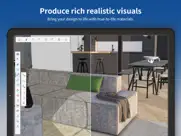

SketchUp - 3D Modeling 8.2.1 Apps Screenshots & Images
SketchUp - 3D Modeling iphone, ipad, apple watch and apple tv screenshot images, pictures.
| Language | English |
| Price | Free |
| Adult Rating | 4+ years and older |
| Current Version | 8.2.1 |
| Play Store | com.trimble.buildings.SketchUp |
| Compatibility | iOS 18.6 or later |
SketchUp - 3D Modeling (Versiyon 8.2.1) Install & Download
The application SketchUp - 3D Modeling was published in the category Graphics & Design on 14 April 2014, Monday and was developed by Trimble Inc. [Developer ID: 322561665]. This program file size is 700.23 MB. This app has been rated by 17,365 users and has a rating of 4.4 out of 5. SketchUp - 3D Modeling - Graphics & Design app posted on 01 June 2026, Monday current version is 8.2.1 and works well on iOS 18.6 and higher versions. Google Play ID: com.trimble.buildings.SketchUp. Languages supported by the app:
CS NL EN FR DE IT JA KO PL PT RU ZH ES SV ZH Download & Install Now!| App Name | Score | Comments | Price |
| Visibility Drive Reviews | 2.5 | 14 | Free |
| Cityworks 10 Reviews | 2.4 | 19 | Free |
| AgileAssets Work Manager Reviews | 1 | No comment | Free |
| FarmENGAGE Reviews | 2.4 | 21 | Free |
| Connected Farm Fleet Reviews | 5 | 1 | Free |
Here’s what's new in SketchUp for iPad v8.2.1 We’ve resolved user reported issues with the newly redesigned measurements box, and fixed several bugs around app stability. Bug Fixes • Removed Apple Pencil scribble inputs in the measurements box after it caused issues selecting and editing values. This returns measurement editing to its previous behavior with the Apple Pencil • Resolved a bug that prevented semicolons from being recognized properly in the measurements box for regions using semicolon numerical separators • Resolved a bug that prevented commas from being recognized properly in the measurements box for regions using commas as decimal separators • Fixed a crash affecting models with unused materials that occurred after saving. While saves were successful, subsequent crashes could happen at any time. We hope these fixes help to stabilize and improve your modeling experience! Your feedback is invaluable, so please keep sharing your thoughts and suggestions on our community forum. http://forums.sketchup.com/c/SketchUp-for-iPad/
| App Name | Released |
| Handy - Live Widget Wallpaper | 16 January 2022 |
| AI Remodel - Interior Design | 09 May 2024 |
| KLINGAI | 06 January 2025 |
| Leonardo.Ai - Image Generator | 03 August 2023 |
| Rooms | 17 November 2023 |
Find on this site the customer service details of SketchUp - 3D Modeling. Besides contact details, the page also offers a brief overview of the digital toy company.
| App Name | Released |
| Focus Line | 12 April 2023 |
| RoughAnimator - animation app | 20 January 2015 |
| Procreate Pocket | 17 December 2014 |
| Color Harmony by Powsty | 27 October 2021 |
| Sketch Club | 23 November 2010 |
Discover how specific cryptocurrencies work — and get a bit of each crypto to try out for yourself. Coinbase is the easiest place to buy and sell cryptocurrency. Sign up and get started today.
| App Name | Released |
| 06 October 2010 | |
| CapCut - Video Editor | 14 April 2020 |
| BeReal. Your friends for real. | 08 January 2020 |
| Gas | 27 August 2022 |
| Google Chrome | 28 June 2012 |
Install the Giftmio extension for smart shopping. Get notified about cashback opportunities, activate cashback in one click, and save money on purchases.
| App Name | Released |
| HotSchedules | 30 October 2008 |
| CloverPit | 17 December 2025 |
| Scritchy Scratchy | 18 March 2026 |
| Gambonanza | 01 May 2026 |
| After Inc. | 26 November 2024 |
Each capsule is packed with pure, high-potency nootropic nutrients. No pointless additives. Just 100% natural brainpower. Third-party tested and validated by the Clean Label Project.
Adsterra is the most preferred ad network for those looking for an alternative to AdSense. Adsterra is the ideal choice for new sites with low daily traffic. In order to advertise on the site in Adsterra, like other ad networks, a certain traffic limit, domain age, etc. is required. There are no strict rules.
Keep personal info private, avoid scams, and protect yourself online with AI-powered technology.
SketchUp - 3D Modeling Comments & Reviews 2026
Critically buggy. If you edit and update your SketchUp model this app will not retrieve the up-to-date model. Even after deleting the model from viewer, clearing it from recent apps on iPad, renaming the model online, then downloading the model with the new name, the old version of the model persists. I had to completely DELETE THE APP from my iPad and re download to retrieve a new version of the model for viewing. After searching the SketchUp forums I discovered this has been an issue since 2018. The latest response from the dev team, which is a year old as of Jun 2021 does not offer a working solution and says they’re working on it. I can’t understand how something that is the most basic of functionality can take this long to fix. Clearly they don’t spend much time working on this app.
Forces you to make an account. All I wanted to do was simply send a 3D sketch up file to a friend. When I realized that they would have to make an account just to open I file whether I text it to them or Dropbox it. The makers of Sketch Up need to realize that the users of this app are not the same as the users who make 3D models in the desktop app. All they want to do is view a model and spin it around. That’s it! No making usernames or passwords or any of that. Way to make a very simple task into a pain. Now it guess I’ll have to do a screen capture video to show them the design. 🙄😡 Thanks for nothing.
Useless unless you have the latest IPad Pro. Nothing is more impressive then trying to show a clientele a rendering and have it crash constantly. Worse safe the long conversations online on people frustrated with crashing and no answered except “You need the latest iPad to work, then its doesn’t whorl all the times anyways”. It’s a useless program to rely on. If you have a tiny model you need to look at, it will work sometimes.
Workspace improvements. The app has improved a lot in the past few years, my only complaint would be that it should make more efficient use of the workspace, since it is on such a small screen. All of the buttons and tools should disappear until activated, since nobody is using this app to do major edits to a model
Fantastic app. Exception: As of updating my iPad to version 12.1.4, the app continually crashes. Developer needs to address this. I'm new to SketchUp and this app makes it possible for me to take and use my models wherever I go with my iPad. It works incredibly well and is kept up to date with the most recent version of SketchUp. Couldn't be without it.
Why this is one star. I want to be able to make my own creations at the store at least two so that you can try it out but no you just have to give them some thing that they can’t build their own thing on so that they can try it out and do it on the road I’m giving this one star I wish I could give it a zero or half a star I want to be able to create my own build then see if I want to do more as a test to figure out if I want this app or not so if you want me to buy this app you better give it that one maybe to try out of your own free build so you can figure out the controls!!!!!!!!!!!!!!!!!!!!!!!!!!!!!!!!!!!!!!!!!!!!!!!!!!!!!🤬🤬🤬🤬🤬🤬🤬🤬🤬🤬🤬🤬🤬🤬🤬😡😡😡😡😡😡😡😡😡😡😡😡😡😡😡😡😤😤😤😤😤😤😤😤😤😤😤😤😤😤🤬😡🤬😡🤬😡🤬😤😡😤😡😤😡😤😡😤🤬😤🤬😤🤬😤🤬😤🤬😤😡😤🤬😡🤬🤬😡🤬🤬🤬🤬🤬😡🤬🤬🤬
Great app!. I’ve been waiting for this app a long time. It’s an excellent way to communicate ideas quickly in the field. My rating reflects that this app meets my expectations, which is strictly to show clients and colleagues ideas. I didn’t expect it to be able to do much else, but it has a few features that are a huge bonus. Powerful tool!
Not quick or intuitive. I have a SketchUp Pro subscription and only tried out the app for the hope that it would let me do basics without opening my laptop. But from the get-go this app wants you to download any models uploaded to the 3d warehouse in order to open them. Why would I want to download a giant model onto my phone? Streaming the model should be a basic. Just like all models on 3D warehouse can be previewed without download. Also why would I upload my client’s confidential models to the warehouse? My projects are saved on Dropbox and there is no way to connect Dropbox to this viewer (not there in the cloud options). Please update app to do these basic things and while you are at it, make sure I can measure some distances on the model as well. Sort of like DWG Trueview!
Wish there were other pricing plans. I am a woodworking hobbyist. With my day job, I only build one on two small projects a year. I can't use software that charges me $119 a year when I might only use the tool five or ten hours a year for my simple table on cabinet designs. Perhaps you could charge a fixed fee for each drawing, or allow one free drawing. As it is, much of my time would be spent just learning the tool. My recollection is that Google allowed some free drawings. Too bad that's gone away.
Way beyond expectations!!. When I heard SketchUp was coming out with an iPad app I remember thinking “that’s never going to work right.” Not having a mouse and click option makes 3D anything nearly impossible. But wow has it so exceeded my expectations! You move with your finger. You draw with your pencil. It’s that simple. The double finger to undo is also an ingenious feature and I love that it’s synonymous with other drawing apps like ProCreate. Not only can you do so much with SketchUp in general, but now you also have a hand sketch option too. Which tends to give a more personable feel. All wrapped up in something I can throw in my purse and get on the train. All in all, I’m sure there have got to be bugs within the app but I have yet to find them. If you’re skeptical about an iPad CAD app I would encourage you to give it a try.
Projects missing. I logged into this app and the one project I created is nowhere to be seen. Instead I see a couple sample projects. I used the free web version of Sketchup to create the project. If this app does not show projects for non-upgraded (free) accounts, that should be readily apparent after logging into the app. It should present a listing of your projects, with some copy stating that you'll need to upgrade to view them in the app. There is no mention of it if this is indeed a limitation. If it is NOT a limitation, the app is just broken from a usability perspective. It makes no sense that you can create & save projects while logged in on web, then log in here and see nothing you created. If if IS a limitation, though, that is pretty ridiculous, because I can view my project with mobile Safari. There's a fine line between "extra features" (in the context of deciding whether to pay for software) and "reversing bad decisions" aka "making things less evil". I usually get angry about the latter things and don't end up paying for the software. I don't know why. Sketchup is obviously very useful. And I usually pay for useful software that I want to use. There must be some psychology behind it & some way for developers / product managers to optimize better for conversion. 1 star because this is basically useless as-is.
Excellent. I am new to 3d modeling in general. So far I love Sketchup for iPad and will be getting pro for pc very soon. It is relatively easy to learn the basics and the support staff is always quick to respond with any questions or problems I have. I cannot compare to other modeling platforms because I don’t have the knowledge or experience to do but I have tried a couple others and Sketchup has been the least frustrating to learn and one of the only ones I have been able to get a response from in a timely manner. Definitely recommend trying if you are looking to get into 3d modeling.
EagwrUser. It is difficult to reach tech support. You have to go thru a long non-sence list of questions in order to reach them! The help search gives you all kind of non-related topics related to your search topic! The modeling app seems like is doing pretty much what was designed for.
Waste of time. After two painful days, I have 2 rooms of a house done and spend most of my time screwing up my model trying to do basic things and hitting the undo button. It shouldn’t feel like a hard earned victory to get a rectangle the correct shape and size. I spend far too long trying to manually type sizes since there is nearly zero snap to grid functionality that works as expected. The camera is absolutely ridiculous and unusable for working inside of a room. I think Minecraft would be 1000 times better for architectural renderings.
I download this app and it’s just a viewer???. I wanted to try this app. After I downloaded it, I found that there were two premade files. I did not have the ability to create a file of my own or to try the app. Every time hit the create button , it wanted me to fork over $119 for a subscription. This is ludicrous because I don’t even know if I like it. I wanted to “try” the free version firstBefore I had to actually pay for anything. IWouldn’t even have downloaded a stupid viewer. Also, while I’m on topic why don’t you guys have some sort of a basic tutorial either?
Game Changer for me. I've been an artist starting with iPad drawings and finalizing with separate Sketchup computer CAD drawings for years. After 15min playing with this new iPad version, I am thrilled with what I see. Most of it is very good and usable, and I am able to make simple models with no additional learning/researching required. I am sure this will continue to improve. And this will obsolete my need for the iPad drawings. Great first effort Sketchup team! Thank you
Good for Designers, Engineers, and Contractors. This tool is easy to learn, and easy to use to communicate design ideas between designers, engineers, and contractors/fabricators. It’s models can be extracted to create Autodesk level precision in Autodesk with their software suite. It’s models can be easily created by designers to share ideas with engineers and contractors. And it can be used by contractor/fabricators to create models that help the contractor communicate more clearly with both engineers and clients. It is so power and yet intuitive to learn while indicating enough precision to effectively used by anyone along or at either end of the product design and production process. I highly recommend this product. It will easily pay for itself in a short span of time.
Same issue as many others. I love Sketchup online but this important app for people like me who use an iPad to view models is pretty much useless. Does not refresh with latest version of my models, which I update frequently. The only way to get the latest version is to uninstall and reinstall. They’ve apparently been ‘working on it’ for years now, but it still isn’t resolved. They do still want you to pay for the upgraded version, however, which it is difficult to justify when the non-upgraded version does not work as it should.
Can only wish for a better product from SketchUp.. I have been a SketchUp Pro user for many years. I’ve taught myself how to efficiently use the desktop version over the past 15 years. In the recent years with everything going mobile and to tablets, I have considered switching to Shaper3D. My only hang up was having to learn a new process of creating efficient design for my customers. Right when I was ready to switch up and give Shaper3D a year of my time and money. SketchUp announced they where working on an app for the tablet. This kept me in their corner, at least until it was released about 8months later. Each day I would log on to see if it had been released, waiting patiently and eagerly for the familiarity of what I was already using. After the long anticipated wait, it was finally released. I logged in and quickly realized this was a baby version of what I had already become so familiar with. The process has been revamped and only a small percentage of the tool I use on a daily basis where available at my finger tips. I could only image creating a very simple and limited product with this newly released product. Unfortunately, when my SketchUp Subscription expires, I want be renewing it. Instead I will be trying my hand at a program that was designed around mobility and tablet use, or at least feels that way. I hope SketchUp makes this app a front runner in tablet use, at least one day!
Happy with SketchUp App for iPad. We just started using the SketchUp App for our site assessments. the SketchUp App allows us to easily create basemaps as we collect site measurements. Using an iPad instead of a laptop is much easier. I’m still learning all the gestures and tools as they are a bit different without a mouse, but overall it was an easy transition from the desktop to the iPad and we are overall happy with SketchUp for the iPad.
Unusable. I’m not sure what the issue is, but the app is functionally unusable. It takes 2–5 attempts with an apple pencil before the action will register; trying to draw a simple rectangle becomes a 2 minutes exercise in frustration and misshapen rectangles, as the tool will decide to suddenly place the edge of the rectangle halfway through my stroke. I have generation of the iPad Pro prior to the M1, so I can’t see how the iPad is the issue, and my pencil functions flawlessly in every other app. I hope the bugs get worked out, because it would be worth upgrading from free to paid to be able to sketch with my pencil.
Needs major improvement. I wanted to like it since there is finally a competitor on the iPad against Shapr3D, unfortunately it is lacking way to much. 1. Limited file types, I would at least like 3mf added. 2. It is not very intuitive and does not display axis well making it difficult to sketch on desired planes. 3. If you are going to offer double/triple tap settings, they should have more than the “selection” tool offered. 4. When drawing lines it does not give an option to easily display lengths, to set parallel/perpendicular etc that I could find. The only feature it has that I love that Shapr3D doesn’t is the free draw option. Beyond this the app is severely lacking and in need of ui and capability updates, but I’m glad they have something to start, and hopefully by the end of the year they have a product I’m willing to pay for.
Must relearn Sketchup. Unsure I want to relearn the entire sketch up app from new. i’ve spent years slowly learning the desktop and web version. Do I learn a whole new version of SketchUp or learn a different app and different tools. At 120 a year, I’m going to pause, evaluate, and demo other offerings. Pencil support is a bit strange. I’ve been learning the Pencil for a few days and find it’s great for just drawing shapes, but if you want precision, hence the point of Sketchup, it’s not the right tool to use.
This company is a joke. The browser version of Sketchup hasn’t been working for weeks. I thought I was going crazy but I found comments from other people complaining on Twitter as well. The web page where you’re supposed to log in literally just doesn’t work. It never loads the actual login part, so when you try to use sketch up you just get sent to a blank web page and can’t actually use the product. If this is how bad it functions why would I ever upgrade to the paid version lol? It’s been weeks with no fix. I’m surprised more people aren’t complaining. The one other person I saw mention it on Twitter pointed to a bunch of JS errors but never got a reply. Unbelievable
Viewer great, now terrible. The SketchUp viewer was great. Now the app is super hard to use. I’m an artist and I build 3D environments to use as backgrounds for a graphic novel. I draw on my iPad so I used to be able to create my scene on my computer and then open it in the viewer, rotate and move around to the view I want, and then save a screencap. Now the move/rotate tools are barely functional. A slight movement zooms me way out or to a totally different area of the map - it’s incredibly difficult and time consuming to use. Worst of all, the camera depth option is gone. That was one of the most important features. I searched the help topics, which provided no useful options. I sent a message to support asking for help and never heard back.
Hi. My dad works for this company he said I should download this app but I think you can have some improvement like say I want to design a house there could be a pice that I could just tap and it would make the front of the house and also can you add stuffed animals to design I know you probably don’t read every single one of these but please read the one that I made and I don’t get it I have to search it up to get to it
Deletes your files. I had two very detailed plans deleted from my Trimble connect account. I cannot find any previous versions either. Now I am in the middle of the project and need to create them again from scratch. The app works fine and making plans is straight forward, but none of that matters if the plans disappear from the cloud storage. An option to save a copy locally and on the cloud would be appreciated. For now, I’ve canceled my subscription and will use another program in the future.
Great. The improvements made to this version of SketchUp Viewer are great! With much improved stability, I can review my projects from my phone with great clarity and with the same options as if I were working from my PC, including measuring. The developers truly deserve to be congratulated on putting out a product worthy of the Trimble brand!
Just what I was looking for 👏🏻. I more or less stumbled on the app after a Google search for “SketchUp iPad.” I got it from the App Store and I was able to use it with no trouble. I had previously put my drawings in PDF files so I could look at them without my MacBook. Needless to say, that didn’t work too well! Now I can access my models in several ways. I don’t need to edit files on my iPad, so this app does everything I need. Draw me happy 😊
Very Imressive. Having SketchUp on an iPad has definitely been an idea in the minds of a lot of SketchUp users for quite some time now. I have struggled with the various ways that people navigate SketchUp, from the trackpad, yuck, to the cintiq pen on Wacom, super clunky and not efficient. Once I heard that SketchUp was released on the iPad I immediately thought what have they done to overcome the clunky way that a pencil is used and finger gestures. To my immediate surprise after diving into SketchUp on the iPad, I found myself feeling like I had rediscovered SketchUp for the first time back in 2001, AMAZING!!! SketchUp on the iPad happens to be a legit additional way to work, offering such power in the most sleek portable device. No more lugging the heavy laptop around to do on-site tasks, smaller meetings, and family show & tells 😁
Incomprehensible. 1) the navigation tools you show on the download page of the App Store simply don’t exist in the app. I can only rotate around the center of the model and pan. No way to “stand somewhere and look around”. The navigation button that you show on the download page simply doesn’t exist on the actual app 2) same with the AR function. It’s there on your screenshot of the app on your App Store page. Just not on the actual app. I have a sketchup pro account. So let’s say maybe this is me being stupid and these things exist but I simply haven’t found them. Ok. Fine. But that’s then a problem of a confounding and incomprehensible user interface which is completely different from what you present in the App Store. I’m deeply unimpressed by sketchup viewer and will probably simply migrate back to Home Design 3D which is less powerful but has functional and comprehensible navigation tools.
Update removed critical functionality. It almost feels like the purpose of this update was to ruin the app. 1. No more search function within the app? Why would you remove this unless you were purposefully trying to make the app useless. It’s a model viewer that doesn’t let you search models. 2. I can no longer set focal length? Am I missing something? I’m a professional storyboard artist and use the app to build reference images for my drawings. Without the ability to change the focal length of the camera, the app becomes practically useless. I genuinely can’t imagine why they would do this unless they don’t want people using this product anymore. They say full SketchUp is coming to ipad soon - maybe they’re trying to cripple SketchUp viewer, so they can force everyone into a paid subscription on the full app?
Huge SketchUp fan, this one not so much. I am a longtime user of SketchUp, since around 2007, but over the years I have tried to find alternatives. The main reasons are that they switched to a web-based app (not a fan), I really detest subscriptions, and the implementation of the iPad version leaves a lot to be desired. For any 3D printing projects, I use Shapr3D on the iPad because SketchUp on the iPad is just not fun. I would like to be able to use the same shortcuts I use on my Mac. Things are just different. I wish Trimble would look at the implementation of navigation and drawing on Shapr3D for tips on how to make SketchUp better.
Misleading and predatory. This app makes you with up for an account so they can sell your data and then says their product is not free or doesn’t have a free version all while never being upfront about it on AppStore. The only thing you can do without paying $12 a month is view files. You can get the free trial but it will auto charge you after 7 days. I am not against having to pay just be upfront about the cost and don’t make me sign up for an account just to figure this out. Now time to try to find out how to delete my account so it isn’t leaked in the next data breach.
Does not work on Google Drive in iOS. Mobile skp is a wonderful asset but needs work to validate Trimble claims as follows: 'When installed, the SketchUp Mobile Viewer app will register itself with your device’s operating system as an app that is intended to be used to open files with the *.skp file extension." * NOT TRUE: Google Drive does not show up. 'So anytime..." * NOT TRUE: see complaints logged since oct'16 on Trimble web site "...you’re browsing apps on your device and come across a SketchUp model, whether it’s attached to an email," * NOT TRUE: does not open in 3 top email apps. "...or whether it’s in a folder of files in your Google Drive app," * NOT TRUE: does not open in GDrive. '...you can tap the *.skp SketchUp file, then press the Open icon, and choose the SketchUp Mobile Viewer app from the list." * NOT TRUE: does not appear on any list.
Product misrepresentation. Feel this product is represented under false advertising. Just wanted to design simple closet layout, but wasn’t able to design anything at all without upgrading to a paid account. I instinctively distrust a company when they mis represent. Don’t bother, also wasn’t able to delete account once created! Again stay away! I recevied a reply from this company offering a free trial, not something I'd do considering I don't trust them now. Perhaps a proper solution would be to change the marketing strategy and allow all people a limited try of their product out the gate, if it's worth anything people would subscribe after having tried it and determining its value to them. Their response is just empty words!
Great app but needs work. SketchUp is a great product but this should at least have some of the basic design functions especially on an iPad. Should be able to make minor design tweaks from the app rather than have to open up a laptop. Would be especially useful when presenting a project to customer on site. To be able to tweak a design in the field with customer.
Why?. I downloaded this in hopes of finally being able to do home design. Compared to the other apps/games, this one looked promising. I download it, make an account and I immediately get told that in order to truly use the app I have to pay $120 a year. Excuse me?! I would hope that for that much money the program is perfect. If it isn’t, I am sorry to those who have purchased this. I will never be able to find out though. ;-;
Good, but endlessly frustrating. I really want to love this app. And it does many things very well. The potential of designing in 3d on an iPad with pencil is all that. But in practice, every time I use this app, I’m deeply frustrated. Tools seem to randomly switch to bizarre modes. I’ll select an object , choose the move tool and constrain to an axis, then start to move it, only to find that it’s decided I’m trying to rotate my object. Or I pan back a bit too far, and suddenly, I’m stuck “in” a wall and can’t pan or zoom back out. Things like this happen all over the place. So I give this an honest 3 stars. At the end of the day, it’s better than the alternatives I’ve tried, and it gets the job done. But man, it’s just never easy or fun to use.
Good but…. I really just need a viewer app for SketchUp files to get some background scenes for making a webtoon. However, the files I wanna use are often city scapes over 500mb, and this app won’t open them without crashing since they’re so big. I’d love if this app can open those giant files on my iPad, honestly I’d pay for an upgrade even if it means I can view them on my iPad easily! This is literally the only thing I need before I’d consider this app to be perfect at what it does, so I’ll rate the app 5 stars when I can do so (and of course I’ll buy the upgrade immediately).
Good app. So I have to say that to show you this sketchUp is not what it says it is need to pay to play anything you could walk around and one of the places they mean you can’t interact with it a good game that’s 3-D like this one but is real is 3D modeling app so I will try that instead of it because I did a different review to and because I put one star on it it doesn’t show it to anybody so I take my advice and use the 3D Modeling App so you can actually do something instead of having to pay money. Thank you have a good day bye. This is what it looks like I suggest downloading this.
Not the old desktop app. It could be a feeling of nostalgia, but this is definitely not how I remember sketch up 5-10 years ago. Even though intuitive, it’s not nearly as efficient as trying to use AutoCAD or MicroStation for basic 3-D models, and at times I found it frustrating compared to a mouse and keyboard to the point where I would rather have a laptop and mouse, or track ball with a copy of autoCAD or microstation. Unless I was being required to use it I cannot justify the price, this just isn’t for how are use 3-D modeling CAD. It is great that they have a one week free trial, but I wish it was longer so I could play around with it more.
As it Should Be!. I have been using Sketchup since the very earliest incarnation (pre-Google). Where once it was amazingly innovative and accessible, it has felt kludgy and long in the tooth on a computer. Now on my iPad Pro, it feels again like a natural, powerful, transparent design tool. As it was originally. As it should be. What a wonderful surprise! And the best thing is that all the skills, techniques, etc translate over to the new interface. LayOut next please!
Almost a great app.. The app works great for the most part, my only pet peeves are that you can only use the app in landscape on iPhone (even in the file picker) and that the UI for managing files is difficult to understand. For example, if I open a file from Trimble connect, do I need to delete and download again if I make changes to it? I would prefer to have the files as either a list/table view with swipe to delete/info/redownload or a collection view with a edit button in the top right that allows models to be deleted.
Monthly Subcription. I gave this app a 4 out of 5 only because there is not an option to do a monthly sub. I believe the company would make more money if this was a possibility. Customer don’t want to drop $120 dollars knowing they wont use it all the time. But if you gave customers the option there would be benefits to you and the customer.
Awesome Experience. I’ve been a long time user of SketchUp since it was owned by Google. I’ve never been a pro version user but have been a prosumer type user over the years, designing furniture, interiors, and small construction projects. This new version of SketchUp on the iPad, incorporating the Apple Pencil is a game changer. It is a whole new experience but has all the familiarity of the regular desktop version. It mentally changes the whole feel of everything. It’s like it has opened up a low friction pathway for imagining ideas and just drawing them on the screen. It’s early days for the app, and I’ve encountered a few bugs a missing functionality, but it’s quite awesome. I’m sure Trimble will fix all the issues in upcoming app updates.
Unusable. Installed app and went through the registering process to then find out I need to pay a subscription fee to use the app unless I wanted to use the viewer. I would not have consented to handing my data over if I had known that I would be unable to use the app at all without paying for it. If I need to hand over data then the app should come with a free option. OR the opportunity to try the app out without having to hand over the data rights. It could be a great app, but one more subscription where I pay $8 a month when is not in the cards. I wouldn’t mind just paying when I need it, but instead it is a monthly fee. DO NOT INSTALL THIS APP.
It’s not the best. I’ve used SketchUp for years and I find the solutions they came up with for the mobile version are unintuitive in relation to the original computer version. Separate tools need to be selected for nearly every modification or addition, planes will move unexpectedly while selecting them, it’s not easy to select and delete segments…basically, the feeling is that I have to work extra hard to use this on my convenient tablet. Maybe I need to integrate a keyboard into the process, but then why wouldn’t I just just the full version? After waiting for a long time for this to arrive…I am now on;y going to use this as a viewer, and will continue to hope for a better alternative or some REALLY intuitive updates to this one. Until then, it’s just not a good companion to the full SketchUp App
Unable to display tool names next to the tiny icons.. The icons are so small they are hard to discern on my iPad Pro 10.5” display. When I paid for a year long subscription a month and a half ago, I figured it would be easy (or at least possible) to turn on labels for them, but since then, the only reference I was able to find said that option is accessible from a menu (under the VIEW sub-heading) that is not visible on my screen. Nor have I found any help reference for how to enable it. I have used multiple CAD software package for years as a chip designer and professional engineer. This one is not working for me at all.
Impossible to use. It’s great that SketchUp came to iPad but it is impossible to use with pencil, very unintuitive and finicky, and even if you learn the new way to use the tools it’s a pain to draw anything but the most basic things. Some tools are tap, some tools are hold, half the time you don’t know what the next step is for the tool you’re using, half the time the tool workflow ends by touching with a finger or the pencil hovering near the wrong thing, it’s insane. Then the tooltip menu to enter dimensions follows the pencil on hover, meaning you can’t use it because it keeps shifting and shaking. It’s ridiculous, I don’t think anybody in this company has actually tried to use this app. Am I using it incorrectly? Probably! Are the help videos or documentation useful? Not at all! They describe trivial steps and don’t clarify anything that helps make this usable. Forget it if you’re a power user looking for precision, your best bet is to get a mouse and keyboard for the iPad, which means just keep using it on your laptop…
Did you know that you can earn 25 USD from our site just by registering? Get $25 for free by joining Payoneer!
Can not work without internet.. Great app but, Be aware that SketchUp on pc and iPad are useless while offline. If you are travelling somewhere has no internet or slow internet speed. You’d better to have a working plan B. Otherwise, you will be cooked.
Basic. You can’t make cutting list. The program is so limited. I DO NOT RECOMMEND. don’t waste your time
Won’t even let me sign in. I need to urgently review house plans and I can’t even sign in on the app. The pop up for cookies pops up and won’t go away so the app won’t let me do anything at all. Useless
Idea seems great, force closes. Cool idea and was excited to use… Downloaded it twice but it just force closes before I can even open it :(
Long learning curve use alternatives. Very frustrating app. Has potential but learning curve too long and too hard to use on iPad. Use other options like smart draw. Don’t waste your money
Great useful app. I draw my various models using web base SketchUp. This app is great to view and review my 3d drawings anywhere anytime.
This new version crashes every time. Now won't display models.. On both iOS 12 and 10, it crashes on startup. This applies to V5.0 . Update: The patch Version 5.0.1 fixes the V5.0 crash issue , but it won't display any of my models on iPad with iOS10. The model flashes up quickly and then disappears after which an emoty white screen is displayed. I have signed into my Trimble account. NB The models were created by someone using another account.
Money. Can only work if paid for app, unable to create anything
It’s not free. I just want to create a design for a project and of course the app wants me to pay over 100 dollars to do so. Installation is free but all i can do is look at some dance place. What’s even the point. Don’t download unless you have that kind of money to waste on the app.
The AR option is confusing. I quite like the basic app, however the AR option is confusing
IPad Version. THe iPad version is very fickle and somewhat difficult to master. The pencil integration needs a fair bit of work with the functionality differences between using a Pencil on the iPad and a mouse on the PC to be as such it is really annoying. Has potential but a long way to go.
No way in. Took a few goes to get past creating an account and I have no idea how I managed it in the end. Then it went to a website that had no way out. Deleted it.
Incredible ability. The capability of this app is incredible and well worth the effort to learn and use. The number of uTube clips and tutorials is also very useful and greatly appreciated.
Like it !😀. Very quick and easy dream to use
Update for current iPads!. Almost a year since they’ve been out and I have huge black bars on the iPad app...
VERY Convenient. You need to remember you are using a phone. Not a Mac or PC. This is very convenient when you would like to explain or show someone your ideas. 4 Stars.
$174. Why bother, waste of time, waste of money. Avoid it.
Go back to old SketchUp.. I’ve been using SketchUp for years, though the new layout and removal of features (in an effort to pay for them?) has rendered this app almost unusable. Let us browse the warehouse, and simplify the UI back to how it was. Thanks.
Not great. Very hard to open and locate skp files on my phone. Counter-intuitive app. Couldn’t give a ff about trying AR. Just want to open a file!
What is this?. Straight up - no drawing tools. Uninstall, try again. No drawing tools. View tools only. Hopeless.
very broken. can't get past the first screen, loads a blank safari window in a panel, closing it just auto opens it again no way to create a login, create a document, no idea how this got past the review team at apple
Waste of time. After came highly rated in a Reno group I’m in but I have no idea what is actually being used as this version doesn’t even allow you to try out a few features before expecting you to pay $175. Immediately deleted. Deserves no stars for making me create an account for zero usability.
lol not free at all. F off can’t do a thing till u pay for it good luck losers
Intuitive and Effective. This is a well designed app that allows me to easily take my models into the field. It is extremely intuitive to use and very effective.
A big nope.. I am so very sick and tired of apps that present nothing but a login screen with nary a mention of same in the App Store listing. Have a single star.
Long time SU professional - The final piece has arrived.. After a decade of model making and use for su to convey my models into reality this app has blown this potential sales tool out of the cosmos. I want a whitebox of this to add my models into it and sell it on to hundreds of companies. Please?
Crash. Frequent crashes on iPad
Expensive, and the free part of the app is useless. Expensive, and the free part of the app is useless. I have tried a few design software tools and as far as I can tell this app doesn’t seem to be any better. If the developers want to improve this then I would suggest providing a free version that gives you at least some usability.
I Love this program. Truely even though i am using it for my work. i am having such a great time with it. It has helped i so many ways. actually being able to build something in real scale in real time accurate measurements do it in 3-D and make sure it works before I even make it. It’s a godsend. Thanks so much. Do you guys?
Great app. It does what it says. It’s a SketchUp model viewer so those complaining about not being able to model, the low rating you gave the app should have given to your inability to read. 🙄
Its not what it seems. Despite the free price tag in the store, that is not the case. You will have to create an account with SketchUp first, only for the app to then point out you only have access to view sketches, not create any.
How can my client see my sketch up model on his iPhone?. How can my client see my sketch up model on his iPhone?
Doesn’t work with Apple Pencil.. I do not recommend this app. At least until all the bugs are fixed. Just recently downloaded this app so am new to it. I was hoping this app was going to be excellent. However I could not even do the Get Started Tutorial as the app doesn’t register with my pencil… Pencil works fine with everything else outside this buggy app. It worked briefly once when I drew on the screen but was short lived. It has potential, but these bugs need to be fixed.
Where did the AR go?. I paid for this app for the AR but it seems to be missing from the new update. Apparently it’s there and has a better interface? Ummmm can’t even find it.
Sketchup Viewer. As a sketchup user, it's great to be able to take my projects with me, on my iPhone.
Fantastic. This viewer is fantastic. I can take my designs anywhere to work on them. Easy to get the sketch up files mobile. Great customer support.
You download it thinking it’s free but it’s not. Stick with the free version is a joke, all you can do it look at the Home Screen, can’t even make a new project
Bad. Shocking bad I’m sorry I have to use it for school and I can’t becuase it can’t build
Login Screen failure. Downloaded the app onto my iPad Mini, and I am unable to login as the login screen is incomplete (IOS 15.6). Renders it completely unusable.
Waste of time and money. Should be free option like pc…otherwise what’s the point. I can use rhino, refit or others which are better for model but costs same. Poor economics . The free version is useless as said by others . APP looks decent enough but cost to play is to high
Not free. Need to open accounts etc.. straight to the bin
Clint. Awesome to have access to sketch up on my iPad, seems smooth and glitch free. Can't wait till this evolves to an editing app also!
SketchUp. Top app
Just collects info and doesn’t work. Just collects your name and email etc then fails to load EULA. Unusable
Great. Great app for on site dimensions check and design modifications
iPad mini 6. It crashes & I would like to have a rendering app
Loving it.. Sketch up has always been the most user friendly and by far the best application for quick 3D modelling. Now the mobile app is free. It’s the best things a SketchUp enthusiast can ask for. Thanks a lot Trimble! Arshad Khan
iPad version doesn’t work & you cannot login. Don’t bother.. What a pointless exercise. Downloaded the latest version onto the latest up-to-date M1 iPad pro. Signed up, logged in and set everything up. Even created my first design. Now however, when I try to log back in, there’s a login dialog that opens, and that’s where you’re stuck. There’s no way to get past that point, no way to enter your credentials and no way to open previously saved work. Glad I didn’t pay the $174 - it would’ve been wasted. Amazes me that people go to all the effort to write potentially decent software and then they force away customers, who like me would probably have paid their $174 price tag. Another customer forced back to their opposition…
THE WORST. When I signed up, I had to pay money just to add things the worst app never ever get it, unless you want to pay a lot of money for Absolutely nothing.😡😡😡😠😤
Can’t even try without paying. Straight to the junk box
Imagine you at your best. All the time. Picture yourself at your sharpest and most productive. Your most alert and focused. Your most lucid, creative and confident. At work. At play. In every area of your life. Add Mind Lab Pro® v4.0 to your daily routine and uncap your true potential. Buy Now!
Not good. Imagine
Doesn’t work. I can not open app it just closes right after you open it
Very glitchy. Difficult to work with. Screen keeps jumping around. The iPad isn’t made for SketchUp. SketchUp needs to get better with its products for iOS.
Can’t even access the app. Downloaded the app, and all I get is an empty browser page with no ability to create an account. Turned off ad blockers and pop up blockers. Nada.
Good app. Needs more coloring and 3D models also only good if using Apple Pencil
Paying twice for the app??. My regular sketchup account doesn't work for the ipad app. Paying twice, no thanks. The free version even doesn’t allow to try it. I couldn't do anything to assess the app properly.
Cannot sign in. There is an error with signing in, it tells valid emails they don’t exist. I could not even sign in to this app because it wouldn’t except any email. It looked cool and like a good app but it was impossible to sign in.
Can’t create a new project. I don’t understand, where is the button to create a new project? There are four tabs on the bottom none of them them. Let me create a new project lol what the heck?
Sort of hard to figure out. I love sketchup for the computer! Its an easy to use, fun and simple project creator I was able to successfully log on using my school email (however non of my projects were there which is okay with me, i just wanted to mess around with it on mobile} The first thing i noticed is that you start off with 2 projects. For me they were the sketchup logo and “dance center”, but i couldnt find a button to create a new document. I tried to log into the dance center to see if i could delete it and make a model on that page instead, but i couldnt figure out how to remove the component, how to make lines- im sure this app could be quite useful to some but i dont think its meant to be a mobile resource, i feel like this is just to show your projects off
Can not open app!. Ever time I try it just crashes…
ThIs Is So DePrEsSiNg. BrO It CoStS mOnEy To CrEaTe
Cannot Sign In. Glitch has not been fixed that prevents users from signing in when they first open the app.
Waste of time. I bought the game and was excited to play it then right when I got into it, well, I don’t have Apple Pencil, it wouldn’t let me draw with my finger even though with the tutorial video it showed that you can draw with your finger then I tried to cancel it but now I’m just paying more money >:((
Meh. It kinda sucks for me. I’m trying this app for free but there’s no tutorial or anything and I can’t do anything
Like many others: IAP price is far too high.. I used to be a casual Sketchup user, but the constant attempts to extract money from my pocket turned me off Sketchup. I am willing to pay a fair and reasonable price for software, at a tiered pricing level (N dollars for X components, P dollars for Y components, etc.). but the IAP price for this, and the lack of coordination between the app pricing and the other means to use sketchup means that Trimble’s trying to double and triple dip in my wallet. For the majority of what I need, i’ve switched to Moblo, which has enough of what I need for a basic modelling.
Great application needs one thing though. I really like using Sketchup with the Apple Pencil it is an amazing way to create models in Sketchup. You need to make a left handed mode though it is really clumsy always having to go backwards to select a tool. I also find that it takes input when I rest my hand on the screen.
Can’t login. The login screen does not work at all on an iPad. None of the button works.
Login broken. App is unusable. When launched, you are presented with a blank white square that is supposed to be a login window, but none of the fields appear.
Не скачиваете. Тупо лагающее приложения И только за подписку Почему нельзя сразу сделать платным Тупые
Far too much money.. It’s $20 a month.
Can’t sign in. When I first opened the app i couldn’t even sign in please fix this the trailer looks so cool and I want to be able to do the same on the app
Can’t use it without payment. Can’t use it without payment
Need a subscription $$ to use. You have to create a Trimble account as well as pay a monthly/ yearly subscription to use.
Not helpful & charged me & not refunding. So I tried the app for the trial period, I also tried few other apps too at the same time. Sketch up was the least user friendly to my experience. So I didn't want to buy the subscription. However, my cancellation didn't go through due to some reason and I got charged. I've been trying to get it refunded within a week or two when I got changed but no luck. As Apple doesn't give option to get it refunded as I didn't want to get the subs. So hopefully this will help getting in touch with the developer
Terrible app. I tried multiple accounts and still couldn’t create a new model as the button wouldn’t show up, absolute scam
Really great app. User friendly. Very helpful too, I draw on my laptop at home and then I’m able to view it from my mobile anytime, especially useful when working on projects.
Not free. Waste of time
Unusable on iPad. Has anyone from Trimble actually used this app on an iPad? Tutorial is pretty much useless. Info is covered by tool tabs that I don’t know how to move because they cover up most of the “tutorial”. On the plus side, at least deleting the app is easy.
Very cool. Very cool app. Easy to use.
Terrible App Design. Can’t even get through the account creation page due to the fact that it won’t allow you to past your created password from a password manager .
For me is better on iPad than on the computer. I bought an iPad 9, it’s not even the pro, and sketchup runs pretty fine just like a computer! For me it’s even better cause it’s faster, you can use two hands and move the model with your hands is nice too!
Sketchup seems sketchy. Down loaded the ap, get a message from something called Trimble that insist you sign up, start that process says allow sign in to a device not in my area.. Nope, who or what is Trimble? Why an account just to see if it might do what I want..
Doesn’t work iPad. Started great downloaded a free trial went to the learn section and boots me off of the app every time doesn’t work
Not user friendly. Hard to cancel.. User interface is really dense. If you’re looking for something to make quick and easy floorplans with, this isn’t it. Also it is incredibly hard to cancel ! You have to sign up for a ‘free trial’ to try it, but the cancellation process takes longer than the trial does. You WILL get charged the one month fee. Total scam. Do not download. Major company; shame they engage in such shady practices.
SketchUp. I have just started with SketchUp and I am enjoying it immensely. 👍
Not free. This app needs an account and paid monthly subscription.
“Updates” remove standard features. I have a complete scale model of my condo, down to the inch. Now the app removed the tape measuring tool. It used to be an amazing tool to take with me to ikea or homedepot. Now my model is completely useless.
So Pc is free but iPad is not?. I need this app for my class but I can’t even model anything because I don’t have a subscription but the rest of my class on Pc’s aren’t having any problems i even tried on my chrome book like some of my classmates are doing with no problems but I’m the only one having problems.
Don’t bother. Site won’t allow you to try it at all without signing up for a trial use. Always redirects you to purchase screen
Worst app ever!. Absolute worst app I’ve ever downloaded in my entire life. They took something that was so simple with sketch up and made it impossible to even use. I wish I could give it -1000 stars. I’m going back to pen and paper
Meh. It’s just meh. SketchUp used to be wayyy better back when it was owned by Google.
Difficile. Très difficile a utiliser sans formation
Amazing seeing my art on the iPad. Truly awesome
It's a trap- 150 a year to use. It is not free - it only lets you use anything after you agree to a 150 per year subscribe fee- what a scam! The app may be good but this is not a business practice of a serious company. Be upfront about yourprice and I will think again
Can’t create without buying. Why can’t I buy it the game is literally to create
p2w. this drawing app sucks >:(
Version très limitée. Cette version est très limitée. Il est impossible de sauvegarder sur un disque local ou réseau. Et j’ai des doutes sur la confidentialité. Aussi il y a beaucoup de limitation sur la réédition des objets « texte » une fois placés. Je NE RECOMMANDE PAS pour ceux qui ont des projets d'envergure tels des plants d’ébénisterie ou de maison.
Expensive!!!. $25/month. Get outta here lol
Crash a lot. This is not a cheap App. I was used to the desktop version and happy to able to work on my iPad. Some features from the desktop are not available on the this version. It’s a good tool but crashes a lot and this is a big problem. There isn’t updates, so can’t blame on that.
Looks cool but won’t let me sign in. Sketchup looks like an amazing app, and I was looking for an app that does the same thing as sketchup. But it won’t let me sign in! In seems kind of sketchy , because I checked my passwords and they were correct but sketchup said they weren’t.
Adsterra is the most preferred ad network for those looking for an alternative to AdSense. Adsterra is the ideal choice for new sites with low daily traffic. In order to advertise on the site in Adsterra, like other ad networks, a certain traffic limit, domain age, etc. is required. There are no strict rules. Sign up!
IM NOT SIGNING INTO NOTHIN. OK I understand like this looks good but my parents put controls on my iPad so I can't access the Internet the web Safari is blocked and you say it's rated 4+. But let's be honest would you not put controls on A 4 year olds iPad? My point is I don't wanna have to sign into anything and I don't wanna wait until these controllers get removed from my iPad. So make it accessible without the web
Unusable expensive software. It crashed on after 4 hours+ work. Crashed and corrupted the file. I had to start from scratch a second time and after many hours of work constantly saving the file it did it a second time. I have been a Sketchup user for a long time and this is the worst. I would run for the hills if you are considering. I am going to ask for money back.
It looks cool…. I mean it seems like it could be a really cool app, but I can‘t sign in cos my ipad has restrictions on certain websites. I know it sounds like I‘m complaining about something you can‘t control, but I just want to be able to sign in without having to go on a website… It won‘t let me do anything without signing in so its kind of pointless for me to even keep it in my app library.
Shop portable. I often sketch parts on my desktop and then fabricate them in my shop. I don’t want to carry a computer in my shop for reference due to dust, etc. This is perfect. Sketch it up on the computer then carry the iPad into the shop for referencing dimensions and shapes and perspectives. Perfect. I love SketchUp.
Works well but missing basic features. The app is great to use, but not being able to do something as basic as renaming groups in Outliner seems like such an easy thing to update. Having dozens of groups all just named “Group” is SO FRUSTRATING when working on a model. Also my keyboard randomly stops working for keyboard shortcuts - no issues with keyboard in other apps.
Poor connection to server. Using the quick draw door (window, etc.) insert is a very nice feature. However, modifying the dynamic model requires server connection and that keeps spinning, not connecting, in more than one session over a period of days, the server connection is very spotty. I have Wi-Fi over fiber and the connection on my end is robust. Otherwise, the app is good and responsive to the Apple Pencil.
I really like this program. I like SketchUp in all of its’ forms. I look forward to getting my Apple Pencil involved. It is a pleasure to work with this software. That is why I gave SketchUp a five-star rating. I think it is still that good. It is good to be up and running with a few lessons.
Easy to use!. I am really enjoying this, they’ve made a lot of progress! It does randomly quit a lot which can be frustrating, but overall I’m not having any issues. The tutorials are super helpful
Autosave Doesn’t Work. I’ve been using Sketchup for a couple months and love it, but I opened my files today and found that a week of work is just gone! All my files are versions saved over a week ago, not their most recent versions. I’ve been told by the incredibly unhelpful customer service support team that there’s no way to recover the files to their most updated versions. It’s a pricey program that I don’t mind paying for but it needs to work!
Pay to use?. Well I will be removing this app. They need to tell people in the app description that you only get a 30 day free trial before anyone downloads the App. I was just going to use for my own personal use for remodeling my house because of a water leak coming up from the slab. Not sure how to remove the cookies other then drag the app to delete and/or move to trash bin.
It doesn’t work. I have tried multiple times to get this app to work but I can’t seem to get it working. I will not blame the app but there are some quirks that are needing to be fixed. For example when I try to look up an tutorial on YT, I can’t follow them because my screen will not allow me to sketch on SketchUp also the apps doesn’t provide a great experience quality wise and I did delete the app immediately after trying again and again and again. Don’t like the app.
I think I might just be stupid lol. Uh I counldnt get it to work. Ya. That’s basically it. I was just stuck with another project I didn’t do and I couldn’t make my own so I was just stuck 😃👍 I’d try the game again if I knew how to get my own. I think I’m just stupid, but I’d still appreciate help 🙃
doesn’t even work. I tried pressing things and it didn’t work I also saw a tutorial didn’t work. You also have to pay to get a new project you don’t even get a fresh plate to work on so it’s basically impossible and if you try to delete the other day ones like I said the buttons aren’t quite working before you say you have to press it more I did so many times I also held it so I don’t understand this app.
great app. Almost everything works great. One thing I would like to see improved is anchoring in AR mode. The problem is, often I cannot find the model after anchoring, it's position seems to jump somewhere random depending on the scale.
Works great! Some challenges going from Sketchup pro on laptop. Using it on a 12” iPad which is not bad at all. Not sure how easy it would be to use on a 10”. Finding functions I am used to on the laptop version is not too hard, but does take time.
Awesome. Works great. Would be even better if you could view the Outliner list in the app. Also, when you select a component, it would be nice if you could read the whole ‘Definition’ section. When I create a model, I often name the components the dimensions, so when I’m in the shop, it would be great to be able to click on the component and see the whole line.
Great app. Viewing my models on this app is flawless as far as performance goes. It’s actually smoother than on the laptop I use to put these models together. My only complaint is when models are imported from pc to mobile, lighting and shadow effects are removed. I’m sure it’s because of performance but if there is a toggle setting to add or remove these effects that would be perfect.
Finally with support for ARKit. I’ve been hoping since the release of iOS 11 that SketchUp would update their iOS app to support ARKit so models could be inserted into the real world. So far this feature seems to work well, but only supports horizontal surfaces for placing objects. ARKit in iOS 11 now supports vertical surfaces so I’m hoping they quickly add that as an option in SketchUp for iOS!
NO Full Price otion. This app is one of those App that are nice to have but you wont use that often. Which begs to question the motive of making a Year subscription instead of having a full price option available. Developer just believe everything needs to be a subscription for some reason even if their product doesn’t warrant for one. These developers are sorely mistaken and it comes off as greedy practices.
Impressive capabilities, needs some work to be perfect. A great new tool for designers and architects. Has some stability issues with 150mb+ files on iPad Pro M1. I really hope developers continue their great work and develop the full potential of this app on iOS devices.
Not a fan of subscription model. Loved sketchup on PC, if this functions the same I’m sure i’d love it on iPad too. I just don’t like the subscription business model. I’m sure for professionals its worth it but as a casual user I’d rather pay up front for the app and buy assets, pre made models, or functions as needed. Maybe charge a subscription for cloud storage. Hopefully there’ll be a compromise for us casual lovers and users of sketchup.
I can’t even sign in. I have loaded and reloaded the app but can’t sign in and can’t access the software. I have an active subscription and can still log in on my Mac. Please fix this issue.
Okay so i thought it was going to be good. So I was like u know I love art and design so 8m going to look for a 3D design app thing. So I saw this , and I was like “oooooooo! Sounds cool!” Oh I was wrong 💀 when I got in the app I wanted to make my own design…….IT COSTnFREAKING MONEY!!!😡 like Ik u want to make money BUT COME ON! No one wants to pay money to do what the app was lit for like bro 💀💀💀 This is dum and I feel like it’s not fair! Look it would have been a fun game but I’m just a kid and I’m definitely not a spoiled one! My mom wants me to live m6 dream for art but NOT LIKE FREAKING FRAKEN MONEY TO MAKE A LITTLE PEICE OF IT!
Terrible app, terrible pricing. Extremely lame that you have to download the app and go through a silly authentication routine to find out they expect roughly half as much to use this app as they do for their “pro” subscription. The problem is this app is less than half the quality, value, and functionality. Why not just list the pricing up front and tell me this is a weaker version of the product so I can see immediately that it’s not for me instead of wasting my time?
Can no longer open any models. Long time SketchUp user. A couple of weeks ago, it stopped updating files modified on computer. More recently, I now can’t open any model. As a viewer, this was a 5-star product until recently.
Don’t list it as free. Ya’ll, if your app isn’t actually free. Don’t list it as one. A trial does not count as free. I used SketchUp all the time in college (we had a whole class on it) and thought the app would be like that. My fault for not reading but I assumed the paid portion was like the desktop where it just got you premium content. This app is absolutely useless unless you pay so please just don’t mark it as free. Its misleading. No one cares about a viewer.
Glitchy the first time i opened it. the first time ive downloaded this game or app its not been letting me open it, its kicked me out multiple times. Today is day two and its still now working.
Please fix. I was looking forward to editing and making rooms/3d models on my iPad, but I can’t do anything unless I pay. Which I felt kinda disappointed about it. So I can’t make anything due to I am a free user. I can only use the free version online if I log in . It doesn’t work on iPad as a free user sadly when I log in here on this app. I’m sorry but it’s no good, I was a bit annoyed I can’t make anything when I am a FREE USER!!! I got this app. I hope this will get fixed in the future.
Not Powerful, Extreme Limitations and UI/UX Flaws. Shapr 3d is better, more powerful, and has less limitations than Sketchup. Sketchup is also about 1/3 the price. If you want Sketchup, use it for hand drawn boxes and lines, it’s better than drawing by hand but still opaque in how to do things and doesn’t function correctly when following Sketchup instructions on how to do the thing, namely boolean operations (intersections) and transformations like scaling. Do better.
Something is terribly wrong. I’m logged in and my designs are gone and when I go to create a new design it tells me to upgrade to the full version and I’ve already paid for the full year and it even tells me that I already have the full version and won’t let me continue. I’ve deleted the app, I’ve updated both my iPad and the app and still nothing. I want my money back or fix this immediately!!!
Get ready for a challenge. Sketch up is not intuitive so be ready for some frustration. Just getting matriculated is perplexing. The orientation materials were created by people who already know the program. This leaves new comers starting from point zero. There are competing online courses that are helpful but the two major ones talk so fast you have to repeat them several times just to get what they are talking about.
Dimension manual entry bug. I am experiencing a bug that makes SketchUp unusable. If you create an object, enter the manual dimension UI, and delete the value, you will not be able to enter a different value. The text entry mode will get “stuck” in the delete-key press state and any new values entered will immediately get deleted. If you force-quit the app, it will fix itself until you try to delete a value again, then the bug shows up again.
Many issues. 1.Auto save and save. The app is constantly saying that I have to save designs which are saved. It is annoying. 2. My app looks nothing like the tutorial videos. The dimension input box is at the to and almost not aligned with my screen so it is hard to use rendering about half of the model inaccurate. 3. The app only works like it should about 10 percent of the time. 4. I love Sketchup, however security and functionality are still in infant stages.
Poor after new overhaul. They claim they did a new overhaul, and that is correct. Because the app does not work as well as it used to. I cannot load models in from my google drive and cannot seem to get the most recent to actually show the most recent. I used to love this app and use it all the time for my viewing of projects on my phone. This update was a huge step backwards and not as interested anymore. They need to do a lot of reverting because this new version is horrible.
Tricking Customers. I actually paid $10 for this app and you refused to give me my money back even though you made it free to the public a few weeks after I bought it. I installed the update yesterday unknowingly that the app would now require that I give you my personal information and create an account so that you can collect info on me and others. That’s not our agreement upon purchase. You do not have the right the change the terms of our original agreement without a meeting of the minds. Unethical business practices.
The Best. Of all the programs I’ve been exposed SketchUp is by far the easiest and most intuitive drawing program ever. I wish they had a version for senior citizens that didn’t cost as much , but for most of my needs the Free online version is totally adequte.
“Update” V5 renders app useless. The app worked just fine this morning. Auto-update unfortunately kicked in, and now the app is trash. Opening the app offers two possibilities: the splash screen loads, then forces you to either sign in or create account. Either way you go, the app just crashes and closes. The other possibility is the splash screen doesn’t even load all the way before it crashes. The app does nothing but crash. You can’t even click the help button to alert the developer.
I love it but. Since the recent update- the program crashed every time I try to bring in CAD. But otherwise I love the availability to work on my projects on my ipad. This is incredible- and thank you for bringing this in from desktop to ipad. But please fix this bug- please
Super Responsive and Easy. I’ve been on Sketchup for a long time and have been waiting for some thing that I could use anywhere at anytime and that would be strong enough to just work. This was worth the wait.
Not for hobbyists any more. If you want to use Sketchup for your own personal use, making models and animations just for fun, don’t bother. This app will lock you out of the 3d tools after 7 days, unless you pay a $120 yearly subscription. Trimble will tell you to use their free web-based version, which is inferior in every way that matters, and they *still* will want you to sign up for an account, even then. I guess we’ll have to keep on waiting for a hobbyist-friendly 3d modeler on this platform.
Well it’s cool but…………. It’s really cool and I was excited to play it but when I went in it said I needed a prescription and it was like 115$ for a year! and I thought that I could do it with out but it only let me go in the dance room! so yeah it seems great but unless you want to pay a bunch of money I would not get it! Thank you for reading! Good bye!
Impressive. Have been a huge fan of SketchUp since a kid. Very impressed with the soon-to-be ability of ease of use on the iPad and the viewer aspect on iPhone is amazing. Exactly what I need to up my architecture firm and our company loves it!
Not at all intuitive. This is just another overly complicated app. All I want to do is sketch out a simple two-story garage concept that I can manipulate to determine where I want the doors and windows. I have been trying to figure out how to do that for an hour and cannot do it. This is not intuitive and if there are directions, I cannot easily find them. I just want a blank page that I can draw on to make a simple a box and a few other lines. FRUSTRATING!!! I will get out my board, T-square and triangle and do it old school.
Great Viewer. Does exactly what it’s supposed to do and operates smoothly even with large files, although this tends to burn up your phone battery pretty quickly if you’re not plugged in. I realize you can look into models using the section planes, but it would be nice to be able to hide/show selected components within the app.
Love the mobile app!!!. I can do my planning work on a laptop where it’s easier and add dimensions to my drawings, and when I’m in the shop I can just bust out the mobile app to have my plans handy. Great app!
This not a free app. This app is misleading. You can download the app for free but you can’t actually use the app unless you pay a monthly or yearly subscription. There is a 7 day free trial so maybe that’s where they feel they can get around the semantics of “free” with in app purchases. I don’t have a problem with paying but the company should be upfront about this. If you stand by your product, then there is no reason to trick people into downloading your app.
Love it. just wish there was more prompts for how to incorporate and change downloadable features / more plug and play features for novices. Almost need a version for professionals, and a ‘build-a-bear’ version for people wanting to conceptualize their home renovations from the couch
Soul to soil landscaping. We are overall happy with Sketchup, the only thing we’re having trouble with is inputtting plant models that slow down the whole model. Some react well with the program but maybe some are too large for my ram to generate?
Charged twice. I love this app very very much but I just bought a prescription yearly for 119 a couple months ago and yall just charged me 128 again a few days ago. How do I fix this?? Will give 5 stars when this is fixed. Thank you
$120 are you insane?. Apparently my son wanted to try this app & it’s definitely my fault for not realizing a subscription was renewing today but $120? For what? What exactly does a $120 I just spent buy me? The app must not have been all that exciting since it had already been deleted by my son. But if I’m going to be spending $120 on this app, he better dam well be using it & for that price I should own this app forever I’m not too happy about this if you couldn’t already tell. SMH