MermaidEditor App Reviews
MermaidEditor App Description & Overview
What is mermaideditor app? MermaidEditor is a diagram and chart editor, powered by mermaid-js. And MermaidEditor supports iPhone, iPad and Mac, with one app you can edit diagram everywhere on any device.
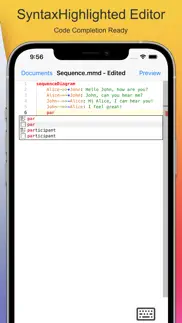
MermaidEditor supports mermaid-js syntax highlighting and code completion, so it can help writing diagram and chart clearly, easily and quickly.
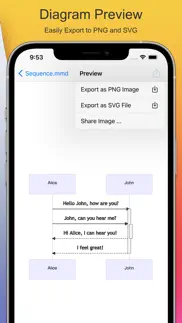
You can also easily export charts as PNG images or SVG files from the editor, or share image to other people with system actions.
√ All Platforms
- Both Mobile and Desktop platforms supported, you can edit diagram documents on iPhone, iPad or Mac
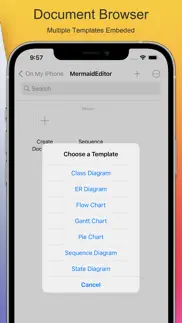
- Document browser based app, easily edit files on device and sync document between devices
- Multiple windows ready, it makes the editor more powerful on iPadOS
- Keyboard shortcuts ready on iPadOS with keyboard connected
√ Powerful Editor
- Syntax Highlighting for mermaid-js grammar
- Auto Completion in editor helps typing keywords quickly
- Code Snippets likes parallel block in sequence diagram makes life easier
- Instant Parsing Error indicator for locating syntax error
√ Instant Preview
- Auto Generated Preview when typing in editor
- Zoom and Pan to move preview for checking diagram's detail
- With Scroll wheel it can be easily zoom diagram on macOS
√ Integrated Extensions
- Thumbnail support, every .mmd file will has its own thumbnail when saving file
- QuickLook Preview extension helps you preview mermaid document in Files app on iPhone or iPad and Finder on macOS
√ Sharing
- Save diagram document as its source with .mmd extension
- Export diagram to PNG image or SVG file with one click
For mermaid-js grammar, please visit https://mermaid-js.github.io/mermaid/ for documentation.
😍 Do you love MermaidEditor app? Please share your friends!



Please wait! MermaidEditor app comments loading...
MermaidEditor 1.8.2 Tips, Tricks, Cheats and Rules
What do you think of the MermaidEditor app? Can you share your complaints, experiences, or thoughts about the application with 基伟 徐 and other users?


MermaidEditor 1.8.2 Apps Screenshots & Images
MermaidEditor iphone, ipad, apple watch and apple tv screenshot images, pictures.
| Language | English |
| Price | $3.99 |
| Adult Rating | 4+ years and older |
| Current Version | 1.8.2 |
| Play Store | com.tickplant.MermaidEditor |
| Compatibility | iOS 14.0 or later |
MermaidEditor (Versiyon 1.8.2) Install & Download
The application MermaidEditor was published in the category Developer Tools on 15 August 2021, Sunday and was developed by 基伟 徐 [Developer ID: 391905315]. This program file size is 124.66 MB. This app has been rated by 10 users and has a rating of 2.2 out of 5. MermaidEditor - Developer Tools app posted on 10 August 2025, Sunday current version is 1.8.2 and works well on iOS 14.0 and higher versions. Google Play ID: com.tickplant.MermaidEditor. Languages supported by the app:
EN Download & Install Now!| App Name | Score | Comments | Price |
| GitStatX Reviews | 1 | No comment | Free |
| Power JSON Editor Mobile Reviews | 3.2 | 10 | Free |
| Power TOML Editor Reviews | 1 | No comment | $3.99 |
| FastLinkMapAnalyzer Reviews | 1 | No comment | Free |
| Power Plist Editor Reviews | 1 | No comment | $3.99 |
- Updated mermaidjs to 1.8.2
| App Name | Released |
| Storm Sniffer - Packet Capture | 09 April 2022 |
| Proxyman - Network Debug Tool | 10 March 2021 |
| Store Redirect | 12 January 2022 |
| Runestone Text Editor | 05 May 2022 |
| Termius - Modern SSH Client | 07 August 2012 |
Find on this site the customer service details of MermaidEditor. Besides contact details, the page also offers a brief overview of the digital toy company.
| App Name | Released |
| SSL Checker | 20 February 2018 |
| Smart NFC | 19 September 2019 |
| IPulse - Monitor Your Device | 12 March 2024 |
| Arduino Bluetooth Pro | 30 October 2022 |
| PasteMe - Pastebin Client | 12 January 2017 |
Discover how specific cryptocurrencies work — and get a bit of each crypto to try out for yourself. Coinbase is the easiest place to buy and sell cryptocurrency. Sign up and get started today.
| App Name | Released |
| PayPal - Send, Shop, Manage | 03 February 2019 |
| Amazon Shopping | 03 December 2008 |
| 28 April 2011 | |
| 06 October 2010 | |
| Snapchat | 13 July 2011 |
Install the Giftmio extension for smart shopping. Get notified about cashback opportunities, activate cashback in one click, and save money on purchases.
| App Name | Released |
| MilGPS | 01 December 2010 |
| Streaks | 31 May 2015 |
| Scritchy Scratchy | 18 March 2026 |
| Shotgun King | 24 February 2026 |
| Stardew Valley | 24 October 2018 |
Each capsule is packed with pure, high-potency nootropic nutrients. No pointless additives. Just 100% natural brainpower. Third-party tested and validated by the Clean Label Project.
Adsterra is the most preferred ad network for those looking for an alternative to AdSense. Adsterra is the ideal choice for new sites with low daily traffic. In order to advertise on the site in Adsterra, like other ad networks, a certain traffic limit, domain age, etc. is required. There are no strict rules.
Keep personal info private, avoid scams, and protect yourself online with AI-powered technology.
MermaidEditor Comments & Reviews 2026
Black on dark gray. Basically, uselesss, text is black on a dark gray background making it almost impossible to see.
Basic and useful. This is a basic app that utilizes the Mermaid JS descriptor language. (You can Google "mermaid-js" online for a complete syntax guide; that's what I did.) By "basic", I mean you can input line-by-line Mermaid JS syntax and it will render the diagram. You can also paste into the syntax editor area. (I tested this, because a one-star reviewer claimed otherwise. I copied-and-pasted a complete diagram into a new document, and it rendered fine. I am on an "M1" iPad Pro. Perhaps that matters?) Why am I giving it five stars while another gave it one? Because it is literally exactly what I needed. It is a very simple mermaid-js editor and renderer. There are no bells. There are no whistles. I did not need to copypasta from elsewhere, in fact. I only needed to type in my diagram to see it graphically. This app can generate an SVG from the diagram, but I would have been happy if I could have only screen-captured it. So, I'm happy with the app. I have been working on a difficult problem at work. Visually tying together existing components diagrammatically made life easier because I could determine which existing components to use, and which pieces of code I still needed to write. This app was helpful for me.
Solid Mermaid Editor. I’m building a second brain out of plain text files, and this app expands what I am able to do. I’m excited to plan my projects with GANTT charts, make a timeline of my mom’s career, and create a family tree.
Doesn't Support mmd Files. Despite the first screenshot, the app doesn't actually support opening .mmd files, which really limits its utility.
Decent, but could use some improvements. Basically functions well. Pros: - Live editing. - Double-clicking an .mmd file does open the app, despite the other review. - pan and zoom of the diagram supported, though panning requires a click-and-hold, which is unatural for typical trackpad behavior on a Mac app (compare to the Maps app). - Generates diagrams from standard templates. - Link to the MermaidJS docs. Cons: - The cursor is almost invisible in the editor. I'm constantly losing track of it. - Needs better support for light/dark themes (this may help the cursor issue). - Large state diagram didn't render, and no errors were displayed. - Code completion only works for Mermaid key words, not user-defined symbols (compare to the official Live Editor)
Doesn’t open Mermaid files.. The irony of this app being called Mermaid Editor but not actually being able to gracefully open files with the .mermaid extension is laughable.
Useless without a select/copy/paste feature.. No way to get any useful interactions in or out of this without a clipboard.
Don‘t waste your time and money. PSA: Don‘t waste your time and money. The editor does not have clipboard functionality, so unless you are into typing mermaid files from scratch this app is useless.
Opens .mmd files, and can export PNG or SVG easily. I picked this tool up after getting frustrated with the bad export functionality of the Mermaid live editor. I often need to export my mermaid charts to PNG or SVG. This tool handles that case very well, and the edior panel is clean and has nice code highlighting. I do with the editor pane had a light/dark mode though, as the white background is brutal on the eyes at night.
Useless. Cannot paste diagrams, basic function
Did you know that you can earn 25 USD from our site just by registering? Get $25 for free by joining Payoneer!
Needs work. Think I'll just stick with the web version for now. - files / Document view shows recents and recently deleted. Mermaid recents shows a bunch of iCloud files totally unrelated to Mermaid. One would expect that the director my would start fresh and have its own folder not Ben f shared across all your event files. Making it hard to locate or try and open a file you may want to sync. - UX is amateurish, the keyboard icon to edit is annoying, for an editor that is 99% keyboard driving this isn't logical. You should be focussed in the editor most of the time. The button to toggle is not a good experience at all. - rendering looks terrible, I currently see triangles and no connecting lines in a flowchart. - Navigating between documents view and editor view is lost in the interface. Deleting the app now, wasted a few $$ here
Can’t paste text. I can’t imagine a good reason why this ability would not have been added.
Imagine you at your best. All the time. Picture yourself at your sharpest and most productive. Your most alert and focused. Your most lucid, creative and confident. At work. At play. In every area of your life. Add Mind Lab Pro® v4.0 to your daily routine and uncap your true potential. Buy Now!
Usually fails. In general, not designed to be very usable. Will produce a diagram under the right circumstances, but more typically fails with “Importing module script failed.”
No documentation or supporting website. I wanted something to do quick and simple flowcharts and saw that this app would also do sequence diagrams, so I bought it. Unfortunately I can’t find any help, documentation, or even a support website to help me navigate this app. For that I’ll rate it 2 stars for now and, depending on how I make out with the app, will return to adjust my rating accordingly
Adsterra is the most preferred ad network for those looking for an alternative to AdSense. Adsterra is the ideal choice for new sites with low daily traffic. In order to advertise on the site in Adsterra, like other ad networks, a certain traffic limit, domain age, etc. is required. There are no strict rules. Sign up!