Py Editor for Python App Reviews
Py Editor for Python App Description & Overview
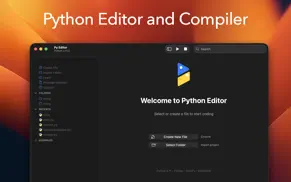
What is py editor for python app? Python Editor is a native macOS application that lets you write and run Python code instantly, with no installation or configuration required. Python 3.11 is embedded directly in the app, along with essential data science packages.
INSTANT PYTHON DEVELOPMENT
Start coding immediately with Python 3.11 built right into the app. No need to install Python, manage virtual environments, or configure paths. Everything works out of the box.
PRE-INSTALLED PACKAGES
We've included the most popular Python packages so you can start building real projects immediately:
- NumPy 2.3.5 for numerical computing and arrays
- Pandas 2.3.3 for data analysis and DataFrames
- Matplotlib 3.10.7 for data visualization
- Requests 2.32.5 for HTTP and API calls
- BeautifulSoup 4.14.2 for web scraping
- Pillow 12.0.0 for image processing
All packages are properly configured and code-signed for macOS.
PROFESSIONAL CODE EDITOR
Built on the industry-standard Ace editor with support for 150+ programming languages. Features include:
- Syntax highlighting for Python, JavaScript, HTML, CSS, Java, Swift, and 145+ more
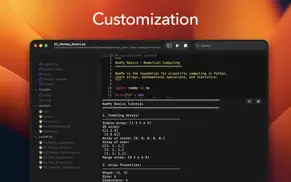
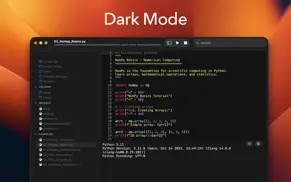
- Multiple color themes with automatic dark mode support
- Customizable fonts and sizes
- Line numbers and code folding
- Auto-completion and smart indentation
- Find and replace functionality
- Soft wrap and invisible character display
INTEGRATED PACKAGE MANAGER
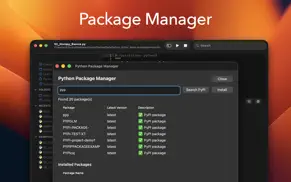
Install additional pure-Python packages directly from PyPI using the built-in Package Manager. Search thousands of packages and install them with a single click. No terminal required.
LEARN WITH BUILT-IN TUTORIALS
Six comprehensive tutorial files included with 800+ lines of example code:
1. Getting Started - Python fundamentals, variables, loops, and functions
2. NumPy Basics - Arrays, mathematical operations, and statistics
3. Pandas DataFrames - Data manipulation, filtering, and CSV operations
4. Web Requests - HTTP calls, JSON APIs, and error handling
5. Web Scraping - BeautifulSoup fundamentals and HTML parsing
6. Installing Packages - Using pip and the Package Manager
THREE-PANEL LAYOUT
Left panel shows your files organized into sections: Actions for creating and importing files, Folders for your projects, Recents for quick access, and Examples for tutorials.
Center panel features the code editor on top and a Python console below for viewing output and errors.
Right panel provides live preview for Markdown, HTML, and SVG files.
SMART FILE MANAGEMENT
- Security-scoped bookmarks for reliable file access
- Import external folders into your workspace
- Recent files for quick access
- Auto-save option when switching documents
- QuickLook preview for images and PDFs
- Support for 150+ file formats
NATIVE macOS EXPERIENCE
Built with Swift and AppKit for optimal performance on both Apple Silicon and Intel Macs. Follows macOS design guidelines with proper sandbox compliance and Gatekeeper signing.
WHAT YOU CAN BUILD
Data Analysis - Work with CSV files, perform calculations, create visualizations
Web Development - Make API calls, parse HTML, build web scrapers
Automation - Write scripts to process files and automate tasks
Learning - Perfect for students and beginners with built-in tutorials
Prototyping - Quick scripts without heavy IDE overhead
RECENT IMPROVEMENTS
- Fixed critical file access issues on macOS Sequoia
- Improved dark mode text visibility
- Enhanced Package Manager with double-click installation
- Better keyboard shortcuts (ESC and Cmd+W to close windows)
- Improved security-scoped file bookmarks
- Auto-save preferences
After a 3-day free trial, a subscription unlocks the complete experience:
- Editor customization
- Beautiful themes
- Complete Python guidebook
- Python learning resources
Privacy Policy: https://www.iubenda.com/privacy-policy/85758827
Terms of Service: https://www.apple.com/legal/internet-services/itunes/dev/stdeula
😍 Do you love Py Editor for Python app? Please share your friends!



Please wait! Py Editor for Python app comments loading...
Py Editor for Python 26.0.1 Tips, Tricks, Cheats and Rules
What do you think of the Py Editor for Python app? Can you share your complaints, experiences, or thoughts about the application with Andromeda Corp LTD and other users?
Py Editor for Python 26.0.1 Apps Screenshots & Images
Py Editor for Python iphone, ipad, apple watch and apple tv screenshot images, pictures.
| Language | English |
| Price | Free |
| Adult Rating | 4+ years and older |
| Current Version | 26.0.1 |
| Play Store | com.python.editor.macOS |
| Compatibility | iOS 13.0 or later |
Py Editor for Python (Versiyon 26.0.1) Install & Download
The application Py Editor for Python was published in the category Developer Tools on 13 October 2023, Friday and was developed by Andromeda Corp LTD [Developer ID: 1745089768]. This program file size is 37.67 MB. This app has been rated by 17 users and has a rating of 1 out of 5. Py Editor for Python - Developer Tools app posted on 03 February 2026, Tuesday current version is 26.0.1 and works well on iOS 13.0 and higher versions. Google Play ID: com.python.editor.macOS. Languages supported by the app:
AR DA NL EN FI FR DE EL HE HI IT JA KO NB PT ZH ES SV ZH Download & Install Now!| App Name | Score | Comments | Price |
| Python Editor App Reviews | 4.1 | 6,434 | Free |
- Bugfix
| App Name | Released |
| Jayson | 01 February 2019 |
| Proxyman - Network Debug Tool | 10 March 2021 |
| Spectre VPN | 16 November 2020 |
| Replit | 18 October 2022 |
| Termius - Modern SSH Client | 07 August 2012 |
Find on this site the customer service details of Py Editor for Python. Besides contact details, the page also offers a brief overview of the digital toy company.
| App Name | Released |
| Device Information Tool | 07 October 2024 |
| IDepth NDI | 20 July 2024 |
| PPHub For GitHub - Developer | 20 November 2017 |
| OpenTerm | 15 December 2019 |
| SSL Checker | 20 February 2018 |
Discover how specific cryptocurrencies work — and get a bit of each crypto to try out for yourself. Coinbase is the easiest place to buy and sell cryptocurrency. Sign up and get started today.
| App Name | Released |
| YouTube TV | 05 April 2017 |
| WhatsApp Messenger | 03 May 2009 |
| Ralph Lauren | 08 November 2021 |
| Gas | 27 August 2022 |
| TikTok | 02 April 2014 |
Install the Giftmio extension for smart shopping. Get notified about cashback opportunities, activate cashback in one click, and save money on purchases.
| App Name | Released |
| HotSchedules | 30 October 2008 |
| Incredibox | 27 March 2016 |
| Scritchy Scratchy | 18 March 2026 |
| PeakFinder | 12 March 2010 |
| Balatro | 26 September 2024 |
Each capsule is packed with pure, high-potency nootropic nutrients. No pointless additives. Just 100% natural brainpower. Third-party tested and validated by the Clean Label Project.
Adsterra is the most preferred ad network for those looking for an alternative to AdSense. Adsterra is the ideal choice for new sites with low daily traffic. In order to advertise on the site in Adsterra, like other ad networks, a certain traffic limit, domain age, etc. is required. There are no strict rules.
Keep personal info private, avoid scams, and protect yourself online with AI-powered technology.
Py Editor for Python Comments & Reviews 2026
Did you know that you can earn 25 USD from our site just by registering? Get $25 for free by joining Payoneer!