ISH Shell App Reviews
ISH Shell App Description & Overview
What is ish shell app? A Linux-like shell on iOS. You can edit files with sed and cat, move them around, and more!
https://github.com/ish-app/ish/
😍 Do you love ISH Shell app? Please share your friends!



Please wait! ISH Shell app comments loading...
ISH Shell 1.3.2 Tips, Tricks, Cheats and Rules
What do you think of the ISH Shell app? Can you share your complaints, experiences, or thoughts about the application with Theodore Dubois and other users?
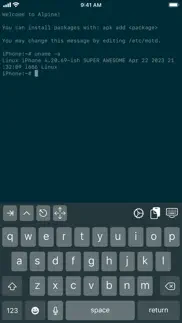
ISH Shell 1.3.2 Apps Screenshots & Images
ISH Shell iphone, ipad, apple watch and apple tv screenshot images, pictures.
| Language | English |
| Price | Free |
| Adult Rating | 17+ years and older |
| Current Version | 1.3.2 |
| Play Store | app.ish.iSH |
| Compatibility | iOS 11.0 or later |
ISH Shell (Versiyon 1.3.2) Install & Download
The application ISH Shell was published in the category Developer Tools on 22 October 2020, Thursday and was developed by Theodore Dubois [Developer ID: 1432356577]. This program file size is 5.79 MB. This app has been rated by 1,215 users and has a rating of 4.7 out of 5. ISH Shell - Developer Tools app posted on 21 May 2023, Sunday current version is 1.3.2 and works well on iOS 11.0 and higher versions. Google Play ID: app.ish.iSH. Languages supported by the app:
EN Download & Install Now!| App Name | Score | Comments | Price |
| Modulus Calculator Reviews | 4.7 | 8 | Free |
| Nasin sitelen Wakalito Reviews | 3.6 | 25 | Free |
Fixed bugs: - Make better diagnostics work in the file provider too, to diagnose Files app issues
| App Name | Released |
| Storm Sniffer - Packet Capture | 09 April 2022 |
| Bugjaeger - Mobile ADB | 30 August 2023 |
| Jayson | 01 February 2019 |
| XTerminal - SSH Terminal Shell | 17 December 2020 |
| Runestone Text Editor | 05 May 2022 |
Find on this site the customer service details of ISH Shell. Besides contact details, the page also offers a brief overview of the digital toy company.
| App Name | Released |
| UDevice - Dev Assistant | 02 February 2022 |
| ComfyUInator | 14 November 2024 |
| The Developer | 24 February 2022 |
| Code App | 28 May 2020 |
| PasteMe - Pastebin Client | 12 January 2017 |
Discover how specific cryptocurrencies work — and get a bit of each crypto to try out for yourself. Coinbase is the easiest place to buy and sell cryptocurrency. Sign up and get started today.
| App Name | Released |
| Google Maps | 12 December 2012 |
| Netflix | 01 April 2010 |
| Google Chrome | 28 June 2012 |
| Gas | 27 August 2022 |
| Messenger | 09 August 2011 |
Install the Giftmio extension for smart shopping. Get notified about cashback opportunities, activate cashback in one click, and save money on purchases.
| App Name | Released |
| Plague Inc. | 25 May 2012 |
| Incredibox | 27 March 2016 |
| Scritchy Scratchy | 18 March 2026 |
| Earn to Die 2 | 20 November 2014 |
| After Inc. | 26 November 2024 |
Each capsule is packed with pure, high-potency nootropic nutrients. No pointless additives. Just 100% natural brainpower. Third-party tested and validated by the Clean Label Project.
Adsterra is the most preferred ad network for those looking for an alternative to AdSense. Adsterra is the ideal choice for new sites with low daily traffic. In order to advertise on the site in Adsterra, like other ad networks, a certain traffic limit, domain age, etc. is required. There are no strict rules.
Keep personal info private, avoid scams, and protect yourself online with AI-powered technology.
ISH Shell Comments & Reviews 2026
It’s about time. It’s about time Apple allows useful command line access. Developers and power users sometimes need to do things for which a nice polished app is not yet an option. Sometimes all you need is a shell or python script to get work done.
Great App but needs 64bit support. This is a great app, but it’s mind boggling to me that the developers chose (and continue to choose) to emulate a 32 bit environment instead of a 64 bit environment. This makes the the app essentially useless for me (and I’m sure for many others as well). I’m giving 3 stars instead of 1 because it’s otherwise a great app and if the developers release a 64 bit version, I’d come right back.
I can’t figure out how to install the tools needed to install tools. So I’m order to install tools you need certain programs that aren’t in stalled or maybe I’m wron I was gonna ask for help so far this app being as it is is an 4 pretty good but an little stressful if the developers see this pls contact me
iSH Shell. I was on the TestFlight program before with the apk package manager and it was a really useful app, bringing actual productivity to my iPad in the form of Alpine Linux, albeit the hardware and software limitations. Now it’s finally released on the App Store without a package manager and I am really happy for the developer! Things can of course still be installed through the Files app, file systems can by imported, and more! And the initial price was pretty nice〜
Greatest thing ever for iPad. I have this thing, which many of you will understand. It’s not a /real/ computer until I have command line. Sure, it’s sandboxed...but hey, I can run vi, python and compile helloworld.c on my iPad! It really changed how I use my iPad and I spent time seeing how much of my day I could handle on it and I was surprised to find out that I could do most of it. Do not underestimate what a command line means to some of us.
five stars for the creator. The system is not as compatible as you might think (problems with pip and stuff) but the fact it’s a x86 is pretty impressive already. Great contribution towards a more usable IOS coding solution. Thanks to the author.
Best new AppStore release in years. This is the best app for developers and any Linux geeks around. The author is an incredible dev and person and this app is the first app I reach for. Having actual vim and tools available to on my local device is priceless, though worth every penny on Patreon!
A native capability that should have been available from apple. I was finally able to use ipad for remote linux shell access and makes it one step closer fir mac book replacement. It feels little sluggish when adding public keys, but is working. Can not change time zone yet. However it is usable and with apk support makes it very useful. Hopefully other distros will add support as this adds portability. Using this in ipad pro 12.9 second generation.
Great Linux app so far. This is a great app, and it has great potential. I've done some research on the web, and apparently there was supposed to be in APK package manager for this app under Alpine Linux. When I try to install APK packages, it says, "Ash, APK, not found". I was trying to compile Emacs from the source, but it requires the GNU make package which this app doesn't come with preinstalled. Other than that though, this is a great step forward to having Linux in your pocket. Though it's limited and sandboxed, and can't necessarily run directly on iOS hardware, this is something awesome too see. One thing I particularly like is the voiceover accessibility support. I was able to connect an external keyboard and start working with Linux on my iOS device. The only thing that could be improved is that it's a little slow when you're typing commands, but this is still an awesome app. I am looking forward to future development.
Linux at your fingertips. Being able to access a proper shell in the walled garden on my phone nonetheless is a freeing feeling. This one terminal gives enough power to delete other apps and it is free of ads to boot!
Fairly extensive linux userland emulation. A linux userland built from the ground up. Comes with an alpine rootfs, but you can swap that out. You can run normal x86 linux programs, and you can transfer files easily. You can even run an HTTP server! (for a few minutes, after which iOS kills the app)
Fantastic tool. I have been using this app through the beta process. It has allowed me to turn my iPad into a mobile Linux command line. I have compiled software pulled from GitHub, ssh into servers to fix files and play with different ideas with standard Linux tools.
Solid app, with a price that cant be beat. I was amazed when I found this app. It is wonderful to get an Alpine Linux based tool right on my iPad. Even with iPadOS limitations it is super useful, especially with the ability to import from the “filesystem”. The only thing I could ask for is the ability to change shells, though that may be baked in already.
Turns the iPad into a device which is useful for quick hacks!. I was amazed: Looks like Linux, acts like Linux, tastes like Linux. After installing OpenSSH and git and emacs, this doubled the value of my iPad. OK, so it’s not the fastest machine on earth, but once a week some fire erupts and the choice is going to the office or solving it with your iPad and suddenly the iPad has a much improved standing in my world.
Outstanding and crucially important to the usefulness of iOS. This app is an absolute game-changer. There was nothing like it at the time of release, and that may still be true. The fact that Apple allows it shows that they might actually be committed to making iPads a computer replacement after all.
I really want to like this app. This is almost everything I want (barring theming) in a terminal app. If it would only work. I can maybe type one or two commands before the app freezes and does not recognize any text input, and I have to close it and re-open it, rendering it almost completely unusable. It's not a one-time thing, either, it happens just about every time I open the app. I recommended this to a friend and he installed it on his iPad Pro and it also happened to him, though more intermittently than me. I just wish this bug could be fixed, because everything else about the app is almost perfect.
62f. Am I the first to rate? The AppStore automatically set a 3-star rating, so I decided to write a 3-star review. i686 support isn’t complete yet, app is still in beta testing even though it was just yesterday iSH listed at 69,99$. Download listed as 3.8Mb although actual (re)install has reduced that to ~2Mb. Alpine’s various ‘i386’ repositories have hordes of independent and interdependently-functioning prebuilt binaries archived into individually-downloadable apk packages, but some of these are riddled with multithreading and complex 32-bit SSE2 instructions: while an unknown number are still on their way to being supported, iSH-emulated multithreading doesn’t (yet) function for at least one of the 2020 iDevice chipsets. Caveat emptor!
CLI Busybox x86 emulator & Alpine Linux repos. Cons: no man, no distinct cursor keys for command line movement, no graphical user interface. Suggest tap i button at top-right of screen keyboard and choose upgrade repository format. Wait until upgrade completes, then go to command line interface (CLI) and type. Observe tab key, control key, escape key at top-left of screen keyboard. Seemingly useless cursor mode key as a single four-arrows button (I don't know what other keys are for cursor - Vim hjkl). apk apk info apk update apk upgrade apk list Pro: Lets you copy your personal files from iOS v12 such as your notes PDF into a Linux subdirectory and then ftp copy it to your personal computer.
Very useful. I Been using this app for developing with vim and even though it’s slow it still can do what I want and the terminal feels right at home. I just hope apple don’t decide to remove it and if it get popular maybe they can aim to increase its speed and optimize it the best they can.
Able to SSH with it. This thing is impressive but needs some setup (install openssh with apk) before you can use it like an SSH client. I will go from 3 stars to 5 if you can somehow get key repeat to work. beware that iPadOS has a tendency to show an annoying accented key popup when holding down keys, depending on how the text entry is implemented.
Makes my iPad so much more usable. I have been using iSH on TestFlight for ever and have seen it mature. It’s so nice to be able to write ruby and python using vim :). Having a proper command line makes my iPad and iPhone so much more usable. Having said that iSH still has a long way to go and being officially added will definitely help it reach a wider audience and mature faster!
This is the best SSH client for iOS. I don't want to mention the name of other similar tools, none of them is comparable with this amazing app! I just sold my MacBook and tried to use iPad with external display as the main device. I have a lot remote linux hosts. In other apps, I need to manually edit host one by one. With this, I only need to import the .ssh directory from macbook backup.. Thank you!!!
yay. I sudo rm -rf /‘d the system. Does this have a display? (besides terminal) (old) (new) I just installed Fedora Linux on my Chromebook. Perfect. Absolutely divine. If you want a distro, it’s Fedora. User friendly, better than mint, smaller than mint (i see why people call ubuntu bloatware, i had 15 GB/29.6 GB just from install), just use Fedora. Screw ubuntu, Screw debian, Screw Mint, Fedora is THE ONE. Looks good, works good, and this is coming from someone who: Hasn’t used Fedora before Hasn’t used it for more than 15 minutes Is a child Only installed 1 program (supertuxkart) It’s PERFECT. This app is also good, found a way to sudo rm -rf / the app. Both: 10/10
Excellent Port of Alpine Linux. I’ve been around since the project started and have followed the beta til now. The work involved in the creation of this app and the community standing behind it amazing and deserves credit for porting this over to iOS. Many man hours were put in by Theodore himself and others such as the creator UTM and other contributors that have given valuable insight to the community and have pushed the limitations of iSH in order to present a full features Alpine Linux experience right here on your iOS device which is no small feat. This application allows much freedom over file s creation, editing, and even movement of files and folders laterally to other application folders. It’s worth the download even if you just want to place games in the terminal or ssh into your devices. Enjoy! Project Zer0
My suggestions. I think it should have more oses and stuff like debian or kde. But thats the only thing mainly its amazing and hope to see more from it soon. 5 stars!
Amazing App. This is an amazing app, please can you guys keep updating it? it should take more resources and i dont mind paying for it. Possibly make an ubuntu version. Please i love this app and i have been using it to do so much even installed pip, python3 and more on it and it has been amazing. I cannot over emphasize how useful this tool has been and i dont want it to die. Best devops, sys admin, programming and learning tool i have seen for the ipad. Please update and release newer versions and more distros. this is even better than using emulators.
Excellent utility, if slow. Before I get into what I like, I'll mention my main dislikes. The most noticeable is speed: because it's JIT-like, you can tell that the performance is slower than native (for example, taking a few seconds to open an ssh key). Additionally, while many apps that I use (gcc, python, node, to name a few) work, not everything will work out of the box (for example, ip addr doesn't behave). Despite these limitations, I would still give this app 5 stars: it just significantly improves the utility of my device. I mainly use it as an ssh/mosh box, but I can also do some basic programming locally. For fun, I even got a VNC server to run! Even as a basic tool for SSH, I can easily just use my own keys and I don't see noticeable delay once the connection is established. There's probably more interesting things I could do with it given the support of APK.
Command Line on iPhone at last!. ISH is an amazing and potentially one of the most valuable applications I have seen for iPhone. It installs an Alpine Linux package that can be readily customized by adding other packages. The possibilities are limitless. Here is one of my immediate work flows: Take a movie with iPhone. Edit the movie with iMovie, exporting the finished product in a folder ISM exposes on iPhone. Run exiftool and emacs and touch as needed under ISH to add metadata to the movie such as GPS, time stamps, captions, keywords &c. Upload the movie to my Adobe account. Voila. The movie is archived for me and I am sharing the movie on my site complete with proper metadata. Other uses include administering several remote servers through SSH. Unlike other applications, ISH provides both local and remote (through SSH) command line access to whatever I use. Needless to say, I use command line for a huge number of tasks. The possibilities of this excellent application cannot be overstated. Keep up the good work! I look forward to working on my databases and numerous other applicaations.
Beautiful. What a fantastic app! My use cases are: 1) true plain text editing for iOS (i can mount my iCloud drive and use vim to edit text files...finally I can edit plaintext without using some other GUI-based 3rd-party app and I can sidestep Apple's Notes app which is fine but littered with too much style formatting assumptions...it's not pure plain text)❤️, 2) running python terminal apps (super lightweight and no fluff...a beautiful, purist way to run text parsing and data/file manipulation tools)❤️, 3) generating .wav or .aiff files with sox which can be saved to my mounted iCloud folder and then played on the iPhone❤️
I love this app I also have a question. Hey everyone just wanted to say this app is amazing I’ve been using it since like 2019 when it was on testflight, it has amazing capabilities and it’s nice to be able to have linux terminal on an iphone. My question to the creators is does ish support docker yet??
Does it have GUI capability?. I’m a beginner when it comes to Linux, but I absolutely love what I’ve seen/been able to do with it. I’ve got no experience with alpine, but wish to gain more. However, idk the limitations of this. Specifically, can it run a GUI, and if not, to what extent can you makeshift one using characters? Sry for being a bother, just wondering😅 Anyways, love the idea, didn’t think this could even be done on iOS software
A bit slow, but this could be a beautiful future. I really hope development continues in earnest. mosh, for example, is slow. And sometimes it hangs on installs.
Pip is unusably slow. This is a fantastic project, but I do a lot with python, and pip is so slow that when I try to install some libraries like matplotlib, it just doesn’t’ finish. I’ve let it sit for an hour or more to no avail. I’m not sure why it would get stuck, the package is only 40MB. It downloads ok, but just won’t finish installing.
Most useful app ever. With a well-configured iSH, I stopped to use any SSH apps because I found nothing better than native ssh with tmux in iSH. I can just sync the dot config files from my Git repo just as using a real PC.
Basically a VM on your phone. This is an incredibly useful app that allows you to do everything you can on alpine Linux on your phone. This allows you to ssh into servers, download packages, write scripts, etc. (basically anything that you can do with an alpine Linux vm).
Great little app. I rarely write reviews but this app caught my attention and deserved a review First it’s like a bare bones raspberry pi in CLI mode. Nothing of the bloat is installed but available apk list | grep -i ssh This revealed a lot of options but ultimately what I was looking for I was able to ssh into my raspberry pi and do some basic things that I usually load up my laptop for. I’m sure I’ll use this app for more but that task alone was greatly worth a free download
Great app but isn’t modernized, lacks “app intents”. Best terminal/SSH app for iOS! Almost state of the art in every way except “app intents” to run from shortcutsz A-shell is really behind this app but A-shell offers shortcut integration. I honestly don’t know how this is free with No Ads..!! But It’s great. Please great developer of this amazing app, give up shortcuts and Siri integration
Perfect, except ONE thing…. Outstanding implementation of alpine. Super on all levels save one: the multi-directional arrow button. TODO: Add an option for alternate button layout: ⬅️⬆️⬇️➡️ instead of the clunky multi-arrow button. Why: because in actual phone use the multi-button provides no end of frustration because: (1) it’s a super tiny controller for big fat fingers, (2) it’s a button with an overloaded state—all 4 directions in one button!? (3) when it transitions states is unpredictable to the user, (4) you can’t see the thing transition to a new state under your fat fingers—making it even more unpredictable! There’s plenty of room on the row for all 4 buttons. Please just make 4 directional buttons an option. Other than that I can’t think how to improve this mostly wonderful app.
Alpine in your pocket. You’ve won the heart of this tinkerer!!! Excellent app that gives you a full Linux distribution in a sandbox, while keeping the rest of your iOS device private and secure!! :)
Great work, but still needs polishing.. Fast for non-JIT emulation, but since I installed python and some packages and closed the app, it would never launch again. Every time I tap it, it just immediately crash. iPhone 8 with iOS 16.5 .
A true Linux system on iOS. This is the best way of running Alpine Linux on iOS without using emulation. The only thing I can think off right now that the app is missing is VNC, which could be ported in the app so you wouldn’t have to background, but right now the app is perfect the way it is.
A million thank yous!. I am a linux desktop user and I hate laptops.... this shell keeps me productive the 5 minutes a month where I remotely need to access a terminal on the mothership but also could use a local session to string some commands together. May the spaghetti monster bless you for making this, and thank you Apple for finally approving of such a project.
Make my iPad Pro pro. With iSH and some other dev tools, I can do 90% of my day job as a software developer on my iPad Pro, which means that it’s finally a legitimate professional-grade tool for me. This nicely fills an absolutely critical gap, and without it there’s no Pro in my iPad.
Not able to edit files. Hello, when I installed ish on my iPad mini 5th gen, I had been able to see and edit the files of ish on my files app provided by Apple, but now after I reinstalled on the same iPad, I’m not able to see or edit those files, devolepers pls help
Holy Cow It’s Real!. I have a few headless Raspberry Pi’s that I use in my home and one day I decide I want to SSH into them on my phone from the couch. Turns out none of the SSH apps that come up on App Store can connect. They are all flashy bloated apps that aren’t suited for me. Then I found this app and how to install OpenSSH apk. So happy this app exists for everyone that is comfortable with CLI and doesn’t require me to learn something new.
Great for Python and web development!. Grab Python for HTTP server, eventually serving files, write some HTML files and serve, open and see what you have made in Safari! You can write codes in Python for Python stuff too. My go-to text editor is based on HTML with contenteditable attribute and some bit of JavaScript + Shortcut for a fully functional text editor. iSH is the missing jigsaw puzzle I need to serve the HTML I "need". I need iSH more than Notes app because the text editor I made is better than Notes app. There's inline calculator, there's text replacement, open and save UTF-8 document, color theme etc. What can Notes app do, is far limited.
Wow. One of the biggest things I missed about a particular competing mobile operating system was Termux. This app brings some of that sanity and utility to iOS and I'm happy to have found it. It may not be perfect, but it still adds so much utility to my device. No more paying $9/yr or whatever for apps that could just be a shell script.
Excellent emulator. This app really helps my iPhone be way more useful by including alpine Linux with all the things it needs and without anything it doesn’t. If you need a simple Linux terminal to do things like run IPMItool or mess around with docker, this is the app for you. Although it is an emulator/virtualization app, it doesn’t feel like anything’s being emulated- it feels like im talking to the native shell of my iPhone. Its simplicity is key-there is no desktop or emulated screen, but that’s actually a positive because the shell is so useable and iPhone friendly. I use this app more than I use my actual computer now whenever I need to use a Linux terminal for system administration! It’s one of the best apps on the iPhone ever! Also I love the no ads!
Awesome tool. I love that I have a Linux terminal on my phone. Nearly everything that I could want seems to just work from gcc and make to apt-get. While not a perfect app, I haven’t found any other utility or programming mobile app that comes close to having the functionality that this does.
Awesome, even if slow. tl;dr: I was able to compile a LaTeX Beamer presentation with pictures etc. as is, by installing the full texlive distro via apk. To me this is the most important use case—-edit a presentation in a pinch with no computer nearby, and no net access. My main fear is that Apple will eventually pull the plug. I do hope they relent and explicitly allow for this kind of fully sandboxed VMs, and hopefully even allow JIT compilation. But, who knows if they will?
Did you know that you can earn 25 USD from our site just by registering? Get $25 for free by joining Payoneer!
Unusable. Hangs all the time
Was Once Great but now Abandoned Development. The iSH app really does create a “Linux” environment on an iOS device but it’s not seen an update in years now. Pretty significant bugs have started to creep in after every iOS update that comes along
Fantastic work. For those us that are command line natives this is like having a missing limb re-attached. Works surpringly well and makes so many things easy where I would otherwise have to ssh into a Linux box or my laptop to do. I've been using the beta for ages and I'm impressed and extremely pleased you've gotten it into the app store.
Amazing !. Sad that Apple is going to take this down soon
Alphine. This is a alphine terminal
Incredibly useful app. I’ve been using the iSH beta for a while now and it’s been the most incredibly useful app. Heaps of useful Unix command-line utilities working on my iPad, including git, ssh, python, vi, emacs and many others. I’m even using python libs as a command-line for a kubernetes server (kubectl didn’t work last time I tried). Great too see it fully fledged in the store, and kudos to Theo and his helpers getting it there.
The best shell for iOS, albeit buggy at times. I’ve tried a-shell and I have to say compared to a-shell iSh have much more customisation available, and functionality more complete. Though my workflow doesn’t seem to work well with it, it’s a very handy and capable and perfect for emergency situations.
Amazing app should be top 10. I spent ages looking for a terminal app to use to log into my various servers on the iPad. All were either lacking function or most of them were ridiculously expensive or utilised a subscription model. Enter iSH. What an amazing idea. Can even install common nix apps like open-ssh to generate keys, ipmi-tool to access server bmc and nano to edit files etc. 5/5 All day long.
Excellent. This app is perfect for those who just want to use Linux commands and setup an environment to SSH into IoT devices. Helps me manage the PiHole and more from the iPad.
Serious bug; have to delete and reinstall. I had this for a week. Worked great. Then root iSH directory started saying "Content Unavailable" in the Files app and any app that tries to access this directory. The font on the console became very fuzzy too. And then random freezing of the console screen, and npm got corrupted. Rebooting, resetting options, deleting files, swiping apps out of memory, none of this worked. I had to use an unorthodox method to transfer my work out of the drive. Which was lucky because then my home directory got emptied. And the backup reflected this. I don't trust the backup to restore without corruption. So if I do try again I'm going to have to reinstall and reconfigure everything. I'm not the only one who has encountered this bug but I thought it had been fixed. Thanks anyway though.
Great app. Thanks for all your effort writing this app.
AMAZING!. I cannot believe this app is free. Run python, Git etc it really is a complete Linux shell running locally. Heaps of great documentation on github as well. The developer Theodore Dubois really is out here doing god’s work.
Nice.. very nice. shame it’s only emulations so stuff like docker doesn’t run. i just mostly use it as a flexible ssh client into my a raspberry pi. and sometimes to debug network issues. i wish net-tools came as a -reinstalled package so i didn’t have to waste time finding out “apk add” was a thing.
Incredible. Now we’re talking! Bless you Theodore! kj
So happy to see this approved on the App Store. I hope Apple takes notice at its 5 star and number one developer tool rating. The iPad needs more pro apps like this to take advantage of its power. It’s a god send in my line of work.
Emacs in your pocket. You need to use ‘emacs-nox’ rather than ‘emacs’ package. And if you find the beta of ish you’ll it’s a later version of Emacs you can use. This is a great writing station / elisp console deck. So happy to have a little non-commercial corner on this increasingly monetised pocket computer.
Is ish temporarily down or somthing?. When i try something it says try again later
Liquid Glass. can you put liquid glass in the app? thanks!
Yep!. This definitely looks promising. Thank you!
The missing link. This finally makes an iPad work as a device for learning compiled programming languages!
Amazing. Works great, happy to see this on the app store!
Based. Haii, I really like the uname -a output, whoever made this is incredible, I hope you do well in life also extremely useful app, maybe not practical but hey, i like it :3
Imagine you at your best. All the time. Picture yourself at your sharpest and most productive. Your most alert and focused. Your most lucid, creative and confident. At work. At play. In every area of your life. Add Mind Lab Pro® v4.0 to your daily routine and uncap your true potential. Buy Now!
I love this. iSH shell is great, I use it for remote access via ssh and running scripts. It’s basically linux in your pocket with no bloat and no ads!
Great. Can even connect to my Raspberry Pi
Best app on the store. Super convenient for ssh
5 Stars. Super good app can run many good linux apps recommend to get
Sucks, unusable. I have used different flavours of linux. I have returned to this app after months.. it has never worked for me. I just plain dont like it. It wont let me install anything simple from the package manager. I h8t it.
Great but kind of faulty.. I love this app and use it quite frequently! But there are some issues I have with it, those being: Localhost usage — whenever I try to do something with localhost that isn’t pinging (like say nmap or implementing TCP) I get the following error: route_dst_netlink: cannot create AF_NETLINK socket: Invalid argument Internet usage: some software run into some issues using the internet for downloading, those being: NPM (with certain modules like child-process), And git (git cloning results in making a directory and sitting there doing nothing). Lastly: using FISH as a shell does not work, within seconds it will crash the app.
Absolutely Incredible. Amazing work guys!
Great app. This is great, even better with the fact that this is completely open source and free with absolutely NO ADS.
Great app but could be better. This is the closest thing to a working Linux terminal that I’ve found for IOS. It’s taught me a lot about the simple commands and file system. One thing I think you should add is a dedicated escape button. I found myself getting trapped in different programs such as the vi text editor without being able to exit due to not having an escape button. vi uses esc button to allow the :wq command but without the escape button, I was unable to get myself out of the insert mode for vi. Also found this to be the case with some other applications and thought it was worth a quick mention. Great app though! You’ve built something fantastic and I haven’t seen any app like this. Keep up the great work!
Nice Nice Nice OmG Yay !!!. I love you so much all ! Nice work .
Amazing. This app is amazing if you wanna use Linux on your apple devices. Much respect to the creator.
Coolest coolest coolest app on the entire App Store. Literally the best app on the entire App Store @apple notice this , you ca. run nmap and other Linux cli apps from your iPhone directly 🥹🥹🥹🥹🥹🥹🥹🥹🥹🥹🥹🥹🥹🥹🥹🥹!!!!!!! 🥹🥹🥹🥹🥹🥹🥹🥹🥹🥹🥹🥹🥹🥹🥹🥹!!!!!!! 🥹🥹🥹🥹🥹🥹🥹🥹🥹🥹🥹🥹🥹🥹🥹🥹!!!!!!! 🥹🥹🥹🥹🥹🥹🥹🥹🥹🥹🥹🥹🥹🥹🥹🥹!!!!!!!
Git clone. Im trying to be a script kiddy and i cant get git clone to work
Great terminal app!. So far so good, I can install vim and ssh, and connect to the server. So far everything that I want.
Incredibly well done, better than paid alternatives. Thanks dev(s)
Scam inside. After installing this app I got hacked some different things was installed on my files that indicates some codes I realized when my phone slowed down so much I did check files and saw that stuff.
Couldn’t be happier. Thank you Theodore Good job
Thank you. Thank you, just thank you 🥹
Best Shell and Real Linux on my iPad. I am speechless once I opened this tools. If you are a hard core Linux / Unix user, get this app ASAP!
Pour pratiquer à partir d’un réseau local captif! C’est faire avec une pierre 2 coups!. Null to unknown , I love you!
Phenomenal little app!. It’s surprising and truly remarkable that it was possible for the developer to create and get this working in iOS at all, let alone how well it functions. For doing basic network tasks and testing, along with remote access to administer other servers (through ssh and the likes), nothing beats it! And it’s completely free with no ads or other waste and tracking bloat! The single reviewer that gave this app a 1 star obviously doesn’t understand the entire premise behind what this is for and can be used to do...
Super light. Was searching for an app to ssh with my phone. I was surprised by this app’s low size and high rank. So I gave it a shot. It is really cool. Don’t hesitate.
Very Impressive. This VM is extremely impressive. It’s definitely not for people who haven’t used command-line Linux distros before. It’s a VERY barebones alpine Linux install; it doesn’t even have the sudo packages by default. It’s crazy how the developer was able to make a (mostly) functional Linux VM that works on iOS. Plus there are no ads or subscriptions :)
the best iphone app for script kids, linux shell users. If you learn the basics of busybox and alpine linux this app will balloon the capabilities of your iphone. I’m sure there are many limitations (for two, it opens blurry sometimes and i have to close it and reopen, and using custom fonts seems to not work great) but it feels like nearly everything I normally do in a TTY simply works. The ability to ssh into my main pc or link together commands and scripts to do advanced sorting and archiving on files or write code with TMUX and neovim while im out and about feels like a new horizon for nerds who feel stuck with IOS.
Wow. I can’t believe this is real, let alone free. Really well thought out user interface too. Minimal but very fluid. Great job.
Run real Linux executables. This is the real deal, it works by reimplementing a Linux kernel in native iOS code, and uses a assembly language “JIT” to emulate 32-bit x86 instructions. Worth noting some things don’t work, since this isn’t a Linux kernel in a VM (instead it captures syscalls, kind of like WSL 1).
This app is excellent!. Such a pleasure to be able to run an alpine Linux shell on my iPad. I was able to get golang, git, oh-my-zsh installed, check out my blog repo and commit updates on the go! Smooth, reliable - a great experience. Thanks for working on this!
Cute, but …. … what is the point? There’s no ssh client, you can’t install anything, can’t even do “ip addr”.
Amazing, but…. It’s amazing, but I wish it was up to date with the latest version of Alpine Linux.
It is literally Linux, no adds, no extra, amazing.. The app took seconds to load, and no, to can install packages. It's Alpine Linux. Also, the keyboard is amazing!! There's a little directional arrow thing that you drag like a joystick to emulate arrow keys, and the app feels so smooth to use.
One of the most useful app!. This is a brilliant! Having real Linux on iOS is not a dream anymore. Wonder if it will be possible to have fully blown desktop Linux one day! (One can dream).
Legit Linux. This is real Linux actually running in an app! It is so cool to be able to run real Linux executables on an iPad! Great work to the iSH team! I’ve been using this app for a couple years now and it has only gotten better since I started using it!
What’s wrong with Apple?. Why do they need to kill everything that is a bit more interesting than dumb games with IAPs?
Alpine on iPad!. By far the best Terminal/SSH experience from an iPad!
Amazing Work. I really, really want to give this five stars, but practically speaking, it is not. This replaces a lot of what I use my cloud VM for, but it just doesn't have a late enough version of Alpine to get recent enough versions of most dev tools (nodejs, python).
Useful. Sadly its not maintained anymore
Adsterra is the most preferred ad network for those looking for an alternative to AdSense. Adsterra is the ideal choice for new sites with low daily traffic. In order to advertise on the site in Adsterra, like other ad networks, a certain traffic limit, domain age, etc. is required. There are no strict rules. Sign up!
ios is tailored to deprive consumers. The only reason i still own a iPhone.
good start. Trying to use this for development on the road with just smartphones, but so far, required tools aren't working: `strace` fails immediately, and python3 `tkinter` breaks somewhere in libfontconfig. `gdb` works, though.
Awesome native shell experience. With vim and other tooling available via `app add`, really awesome experience on iPad.
How to call this program jailbreaking or what?. Well i recently downloaded the app and went by instructions how to use python and etc. But i am wondering if my phone jailbroken now or not?
Prevent mounting of root directory to a directory on iPhone. It’s just a bug I found. Trying to mount the root directory onto a folder in On My iPhone/iPad causes the whole thing to break.
Great app.. This is a great app. I love how you can have access to linux. I think that it would be really cool if you could port MS DOS to iOS.
Good app. Thank you for writing such a good app. I think we can donate some money in -app purchases
Too limited, little value. Besides the ability to side load Linux apps it’s just too limited. I guess it’s nice if you’re too lazy to get a developer account so you can load what you want on your iPhone. From a reliability and speed stand point you are much better off just using a remote client to a real computer.
Genius!. This app bridges the mobile - pc divide more than any apple feature has
Can’t run Kali. Google Bard says I can swipe left to view the Distributions tab. The thing is, I can’t swipe left. Is this not available?
Updates - few and far between. When will the next update be released? Thank you
Works, but is slow. Fully functional Alpine Linux shell, but is too slow for my purposes.
Alpine Linux on my phone?. Heck yeah. I haven’t used it for anything crazy but I am really liking it and enjoying alpine!
I hardly ever write a review, but this App is awesome. I’ve been wanting a good terminal for iPad, and this not only works but works well. You should really add a tip function on your app!
iSH Shell. I followed this app since it’s inception. After a very long TestFlight phase it is now a mature app I use every day. It is the most flexible among this class of shell apps like blink shell, a-shell and others. Many thanks for this gem.
Ever wanted a alpine Linux running on your iOS device?. This is exactly what you get , run applications or just ssh , curl ...
Great app. This app has helped me learn about Linux. It’s amazing having a Linux machine right in my pocket. One small bug is that the cursor doesn’t line up with the text. This happens on both my iPhone 8 and first gen se. both are on iOS 15.
Awesome.. It’s Alpine Linux with a functioning package manager etc. This is the best thing to EVER happen to the iPhone, and also, the only App store review I have ever written.
Needs to be finalized. iSH is not designed to run in the background, which causes difficulties when working with networks
Good but don’t have packages.. Everything is good but the (apk add) doesn’t add (pip3). I need this package but it isn’t adding it. I don’t know if it’s don’t work on iOS
Unstable. Constantly have to close app because typing doesn’t work. When trying to select text the status bars will open and close frantically moving around the text. Needs some quality of life improvements
Convenience 100. Absolutely love this app. Been using it for a while now and it has served me greatly for a multitude of things.
Fantastic App. Extremely happy to have linux OS available on the iPad! Can use my iPad like a laptop now 😁
This app is great!. I’ve been trying to figure out how to run Linux on my phone for awhile! One suggestion, you should try to add shortcut integration. Like maybe a shortcut action that accepts text as a command to run then returns the output as text!
5 star. Gets the job done
No updates…. Many versions and fixes on the GitHub but not a single new release for iOS in over a year. I’m tired of the app crashing and not working when the fixes have already been created.
I like this app but. I have no idea how to remove the default filesystem. I created my own file system and I wanted to test it but it’s not working.
Best way to ssh. Last ssh client you will ever need, and so much more! I am using this daily to shell into my work machines remotely, and that’s just the tip of the iceberg
Incredible. This is the only app I have found that truly emulates Linux in an unrestricted way. Extremely helpful.
Funny thing. If you type poweroff the app will freeze then crash and then quit this may need to fix
Bug with Vim. Love this app, it allows me to do small assignments with Linux natively on my iPad Pro. Only issue is, Vim is bugged in certain instances. It will often display the wrong line in a place where, in actuality, the line is something else.
Dear developer. This app is awesome. When I use vim editor,I can’t see the lowest line because the hot key shadow it,and if the hot key can modify like termux,it will be more humanize. Wish you see my words!
Nice!. Just the ticket for creating CSRs for updating my apple developer certificates! Functionality is great albeit slightly slow. Great Job!
This app is the best app released for developers on iOS in a long time. This app makes development a breeze. It can replace almost all the other development tools
I could install neofetch. I could install neofetch to show off to friends and family
AMAZING!. This app is single handedly the greatest thing since sliced bread, with a fully functional Linux distro now baked into your iPad/device!! It’s really amazing!! I’d pay $30 for this, but it’s free!
What’s been missing on iOS / iPadOS. This is an amazing app that makes real development work possible on the platform.
Excellent. Exactly what I needed to do basic command line work. If you are looking to use SSH, you need to install by running: apk update > apk add openssh-client
So good. Allowed me to ssh into my cloudflare tunnel using the cloudflared package and ProxyCommand. This app runs so well and fast. It’s crazy
Incredible!. To be able to telnet, SSH etc from my iPhone is amazing.
The app which makes i-devices more or less useful. If Apple removes this from the store, I will remove Apple from my life.
Excellent software. What a powerful shell on ios it is with only 5.7mb.
Most useful app ever. With a well-configured iSH, I stopped to use any SSH apps because I found nothing better than native ssh with tmux in iSH. I can just sync the dot config files from my Git repo just as using a real PC.
Not Perfect, But Perfectly Fine. There is still some stuff that doesn’t work, but what does is exceptionally useful. iSH has made my iPad so much more useful than it used to be.
Great app!. Feels like I have an actually useful computer in my pocket
Amazing!!!. Have been beta testing this app for a very long time, it is amazing. Provides close to everything you need in the terminal/shell domain. The provided description is a slight understatement (for this mismatch I should take away one star, buahaha!!!1!)
Amazing functionality!. Does exactly what I hoped it would do - thank you to the developer for putting in the time to make this!!
Adorable!!!!. Hi Teodore I’m here just for saying you are perfectly fantastic creative developer Your work is very very veryyyyyyy amazing, congratulations buddy You and other contributors are really talented and your work result is definitely the best. I’m usinh iSH since first test version, I am a Golang developer, abd ish has turned my iPad to a super fast and high performance Linux machine. Thank you and good luck
Finally I am able to use command line programs on iOS. I’m honestly surprised Apple allowed this app on the AppStore.
Love it. The concept behind this is so awesome. I love being able to tinker around in the environment on the phone. Quick question. Any editor we can add that will allow us to save or exit? Being nano, vi, vim, etc all require ctrl or esc keys, I can’t seem to figure out how what to do for creating a txt file. I could rebind keys in nano conf for instance “if” I could get into it to change the binds and save… any ideas? Thanks!