PLIST Editor App Reviews
PLIST Editor App Description & Overview
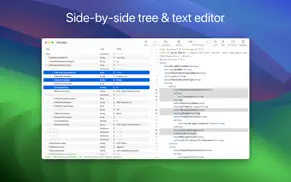
What is plist editor app? PLIST Editor is a side-by-side tree & text editor for property list (plist) data. In a clean and easy to use interface, it allows you to quickly create, inspect, modify and save your .plist documents.
PLIST Editor is one of the few source control "friendly" property list editors that you can find on the market. For all plist formats (XML, Binary and OpenStep/ASCII), it maintains the order of dictionary elements and the editing capabilities are on parity with Xcode, so you don't see a difference between a file edited in PLIST Editor and one edited in Xcode.
PLIST Editor can be used as a lightweight Xcode alternative, having more features, using less disk space, less memory and starting up faster.
Core Features
• Open & save property list files in XML, Binary and OpenStep/ASCII format, including those created using NSKeyedArchiver
• Side-by-side tree & text editor. Any changes made in one of the editors are automatically reflected in the other.
• "Source control" friendly - the order of dictionary elements is preserved, showing them in the same order as defined in the file. Similarly, when the plist is written to disk, the order of items from a dictionary written to disk is the same as the one seen on screen. This is especially useful when you keep the files in a repository, because only the relevant changes will be shown when diff-ing the edited files.
Tree Editor
• Presents the plist data in a "tree" like interface, making easier for you to understand how the data is structured
• Makes the process of editing plist data error-free and way more easier than dealing with raw text
• Its selection is automatically reflected in the text editor
Tree Editor - Features
• Multiple selection of sibling elements
• Cut, copy, paste, duplicate, delete and reorder elements, even when multiple elements are selected
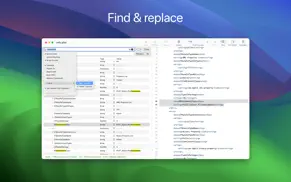
• Find & replace text in the plist elements. Support for "Regular Expression" is included, too
• Choose where the Find (or Replace) will take place: in "Key" or "Value" column or both
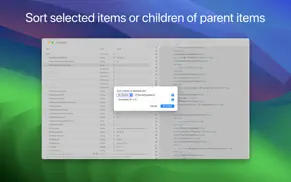
• Sort elements, either by clicking one of the column headers or using the dedicated panel
• Set label for child dictionaries to help you understand what each dictionary represents
• Edit the elements, even when multiple are selected (via "Edit -> Edit Value...")
• Paste plist data, either from raw XML or from Xcode
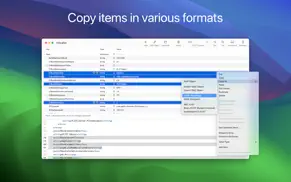
• Copy elements as Swift or Obj-C objects or JSON data or PLIST data
• Embed elements in array or dictionary
• Shift elements left or right
• Move elements up or down
• Row height which accommodates multi-line text
• Undo & redo
Text Editor
• Visualize and edit plist's textual content
• Any changes made in the text editor will automatically be synchronized with the tree editor
• For any errors during editing (i.e. you mistyped something and the plist XML becomes invalid) you'll be informed about this
Text Editor - Features
• Syntax coloring
• Customize the font and its size
• Change editor's location (right or bottom)
• Toggle the visibility of the the text editor
• Show (or hide) invisible characters, like tab or new lines
• Undo & redo
Folder Browser
• Browse folders' content by dragging them on the app's Dock icon or by using "File → Open" panel
• Choose .plist files to make quick edits or to view their content
Snippets
• Save plist items for later reuse
• Access the Snippets by clicking the corresponding toolbar button
Quick Look Preview Extension
• Preview the .plist files in Finder using the Quick Look extension provided by the app
CMS Support
• Import plist data contained in files which are encoded using Cryptographic Message Syntax (CMS), like .mobileconfig or .mobileprovision files
• View information about the signers and the additional certificates which might be included in the message
Other Features
• Dark mode, including a beautiful "black" mode
• Auto Save & Versions support, including the possibility to disable them
• Detect when the file is changed by another application
• Toolbar to access common operations
😍 Do you love PLIST Editor app? Please share your friends!



Please wait! PLIST Editor app comments loading...
PLIST Editor 1.63 Tips, Tricks, Cheats and Rules
What do you think of the PLIST Editor app? Can you share your complaints, experiences, or thoughts about the application with VDT LABS S.R.L. and other users?
PLIST Editor 1.63 Apps Screenshots & Images
PLIST Editor iphone, ipad, apple watch and apple tv screenshot images, pictures.
| Language | English |
| Price | $7.99 |
| Adult Rating | 4+ years and older |
| Current Version | 1.63 |
| Play Store | com.vladbadea.plisteditor |
| Compatibility | iOS 11.0 or later |
PLIST Editor (Versiyon 1.63) Install & Download
The application PLIST Editor was published in the category Developer Tools on 27 September 2016, Tuesday and was developed by VDT LABS S.R.L. [Developer ID: 567740333]. This program file size is 4.8 MB. This app has been rated by 17 users and has a rating of 1 out of 5. PLIST Editor - Developer Tools app posted on 30 January 2026, Friday current version is 1.63 and works well on iOS 11.0 and higher versions. Google Play ID: com.vladbadea.plisteditor. Languages supported by the app:
EN Download & Install Now!| App Name | Score | Comments | Price |
| Easy CSV Editor Reviews | 1 | No comment | $9.99 |
| JSON Editor Reviews | 1 | No comment | $7.99 |
| PLIST Editor Mobile Reviews | 5 | 4 | Free |
| Easy CSV Editor Mobile Reviews | 4.1 | 34 | Free |
| JSON Editor Mobile Reviews | 3.9 | 11 | Free |
Improvements • The PLIST items of type "date" are now displayed, in the Tree editor, using ISO-8601 format. This is similar how the latest version of Xcode displays the dates. However, if you want to revert to the previous format, you can do this by choosing "Settings/Preferences → View & Edit → Show Dates in → Medium format, using System timezone". ――― If you enjoy PLIST Editor and find it useful, please also consider PLIST Editor Mobile, the sibling app specifically made for iPhones and iPads. We constantly want to improve the quality of our apps. For any feedback, questions and ideas please contact us at [email protected]
| App Name | Released |
| Jayson | 01 February 2019 |
| Replit | 18 October 2022 |
| O-KAM Pro | 06 January 2022 |
| Dodo - Webview | 24 April 2025 |
| Store Redirect | 12 January 2022 |
Find on this site the customer service details of PLIST Editor. Besides contact details, the page also offers a brief overview of the digital toy company.
| App Name | Released |
| DNS Propagation | 03 October 2024 |
| DraftCode for PHP IDE | 12 February 2013 |
| ICardVerify - Card Validator | 09 May 2024 |
| Neural Object Detector | 14 April 2020 |
| ESP32 BLE Terminal | 01 June 2021 |
Discover how specific cryptocurrencies work — and get a bit of each crypto to try out for yourself. Coinbase is the easiest place to buy and sell cryptocurrency. Sign up and get started today.
| App Name | Released |
| YouTube TV | 05 April 2017 |
| Google Maps | 12 December 2012 |
| 09 October 2009 | |
| SHEIN - Online Fashion | 19 May 2014 |
| TikTok | 02 April 2014 |
Install the Giftmio extension for smart shopping. Get notified about cashback opportunities, activate cashback in one click, and save money on purchases.
| App Name | Released |
| Monash FODMAP Diet | 17 December 2012 |
| MilGPS | 01 December 2010 |
| Terraria | 28 August 2013 |
| RadarScope | 12 February 2019 |
| Gambonanza | 01 May 2026 |
Each capsule is packed with pure, high-potency nootropic nutrients. No pointless additives. Just 100% natural brainpower. Third-party tested and validated by the Clean Label Project.
Adsterra is the most preferred ad network for those looking for an alternative to AdSense. Adsterra is the ideal choice for new sites with low daily traffic. In order to advertise on the site in Adsterra, like other ad networks, a certain traffic limit, domain age, etc. is required. There are no strict rules.
Keep personal info private, avoid scams, and protect yourself online with AI-powered technology.
PLIST Editor Comments & Reviews 2026
Did you know that you can earn 25 USD from our site just by registering? Get $25 for free by joining Payoneer!